

Gestionarea programului asistentelor medicale într-un cabinet medical aglomerat poate fi copleșitoare. Trebuie să coordonați turele, să echilibrați volumul de muncă și să asigurați respectarea cerințelor legale. Software-ul pentru programarea asistentelor medicale vă poate ajuta să reduceți aceste dificultăți, economisind timp și diminuând numărul de erori.
Din experiența mea, găsirea software-ului potrivit presupune înțelegerea nevoilor unice ale echipei dumneavoastră. Am testat și analizat independent diverse opțiuni pentru a vă oferi o listă imparțială și bine documentată a celor mai bune alegeri.
Veți găsi informații despre funcțiile, avantajele și dezavantajele fiecărui instrument, care vă vor ajuta să luați o decizie în cunoștință de cauză. Indiferent dacă vă doriți ceva ușor de utilizat sau cu numeroase funcții, acest ghid își propune să vă sprijine în gestionarea programului.
Why Trust Our Software Recommendations
6,700+
Reviews
20
Industry experts
16+
Evaluation factors
14
Years
Our team has been testing and reviewing software since 2012. As medical practice leaders ourselves, we know how difficult—and important—it is to choose the right software.
For this guide, we evaluated tools using hands-on testing and independent research, scoring tools using our selection criteria.
Our reviews reflect our human editorial judgment, not a sales pitch.
Tabel comparativ al software-ului pentru programarea asistentelor medicale
Acest tabel comparativ sintetizează detaliile privind prețurile pentru selecția mea de software-uri de top pentru programarea asistentelor medicale:
Sorted by: Default
| Tool | Starting Price | Website | |
|---|---|---|---|
Best for efficient scheduling and shift management | 4.6 out of 5 | Pricing upon request Free plan + 14-day free trial available | Website |
Best for mobile-first schedule access in Canada | 4.8 out of 5 | $3.50/user/month 21-day free trial + free demo available | Website |
Best for automated nurse scheduling | 4.5 out of 5 | $50/month 30-day free trial | Website |
Best for unified internal and agency nurse staffing | Not rated | Pricing upon request Free demo available | Website |
Best for enhancing team communication through a unified platform | 4.6 out of 5 | $5/user/month Up to 31-day free trial + free demo available | Website |
Best for facilitating mobile workforce management | 4.2 out of 5 | Pricing upon request Free demo available | Website |
Best for remote access to schedules across multiple devices | 4.5 out of 5 | $25/month | Website |
Best for managing large, complex workforce schedules | Not rated | Pricing upon request Free demo available | Website |
Best for addressing staffing challenges and reducing labor costs | Not rated | Pricing upon request Free demo available | Website |
Best for simplified shift planning and time tracking | Not rated | $1.70/user/month Free trial + free plan available | Website |


Recenzii despre cel mai bun software pentru programarea asistentelor medicale
Mai jos sunt prezentate rezumatele mele detaliate ale celor mai bune software-uri pentru programarea asistentelor medicale care au ajuns pe lista scurtă. Recenziile mele oferă o privire detaliată asupra funcțiilor esențiale, avantajelor și dezavantajelor, integrărilor și cazurilor de utilizare ideale pentru fiecare instrument, pentru a vă ajuta să îl găsiți pe cel mai potrivit pentru dumneavoastră.
 Best for efficient scheduling and shift management
- Free plan + 14-day free trial available
- Pricing upon request
Visit WebsiteCustomer Rating:4.6/5
Connecteam helps employees stay in the loop with updated schedules via notifications. Connecteam is an all-in-one employee management app designed to manage deskless teams efficiently. It features tools for time tracking, scheduling, task management, and real-time communication.
Why I Picked Connecteam:
Connecteam significantly improves the scheduling process for healthcare facilities through its comprehensive and user-friendly features. Its intuitive interface allows for efficient shift management, enabling nurses to view, manage, and swap shifts with ease. Additionally, the software's automated scheduling tools reduce administrative burdens and minimize conflicts, ensuring efficient operations.
Along with these features, Connecteam also offers real-time notifications to help keep staff informed about schedule changes, promoting better communication and coordination among team members. Added functionalities like GPS tracking, task management, and customizable HR solutions further enhance operations and boost productivity.
Standout Features & Integrations:
Key features of Connecteam include operations management, streamlined communication, automated time tracking, employee availability management, and mobile access.
Integrations include Gusto, Xero, Zapier, Paychex, and QuickBooks.
Pros and Cons
Pros:
- Mobile access
- Strong communication tools
- Customizable templates
Cons:
- Limited offline capabilities
- Limited advanced features
Learn more about Connecteam: Best for mobile-first schedule access in Canada
- 21-day free trial + free demo available
- From $3.50/user/month
Visit WebsiteCustomer Rating:4.8/5
Agendrix displays a color-coded weekly schedule with shift details, open slots, and time-off visibility, helping managers assign roles and avoid conflicts. Agendrix is a Canadian scheduling solution designed for shift-based teams. Its mobile-first design and healthcare-friendly features make it a reliable option for clinics, long-term care facilities, and small hospitals looking to streamline nursing schedules.
Why I Picked Agendrix:
I chose Agendrix for its mobile-first design, which is a big win for healthcare teams constantly on the move. Nurses can view schedules, clock in, and receive shift updates all from their phones—making it easier to stay connected without returning to a central desk. Managers can fill open shifts, approve time off, and send real-time updates to the team using built-in communication tools. It also handles attendance, availability, and multi-location scheduling, which is especially helpful for busy clinical settings.
Standout Features & Integrations
Features include mobile scheduling, GPS-enabled time tracking, automatic timesheets, employee availability management, and built-in messaging. The platform also supports clock-ins via kiosk, mobile, landline, or biometric options.
Integrations include EmployerD, Nethris, Sage 50, Acomba, QuickBooks, Ceridian Powerpay, ADP Workforce Now, Payworks, Lightspeed, Azur, Easypay, BeLocum, Hopem, and Folks HR.
Pros and Cons
Pros:
- Built-in chat and shift notifications help teams stay informed
- Time tracking and clock-in options support different workplace setups
- Nurses can view and manage schedules from their phones
Cons:
- Reports could offer more customization options
- Setup may take time if switching from manual tools
Learn more about Agendrix: Best for automated nurse scheduling
- 30-day free trial
- From $50/month (billed annually)
Visit WebsiteCustomer Rating:4.5/5
TimeTrex provides a centralized dashboard where managers can review schedules, time punches, exceptions, and authorizations in one place. TimeTrex gives healthcare facilities, staffing agencies, and nursing teams a practical way to centralize scheduling, time-tracking, and payroll — all tied together in one platform. If you’re managing complex nurse rosters, rotating shifts, or multiple facility sites, TimeTrex can help you replace spreadsheets and manual punch-clocks with a system that lets you manage schedules, track attendance, and automate payroll — potentially freeing you to focus more on patient care and less on administration.
Why I Picked TimeTrex
I picked TimeTrex because it offers scheduling tools that account for staff availability, skills, and demand — an essential match for nursing environments where shifts, certifications, and coverage needs vary. The automated scheduling and shift-management capabilities help ensure proper coverage and reduce conflicts, which means less nurse overwork and fewer gaps in care. Combined with integrated time-tracking and payroll, TimeTrex makes it easier for you to manage complex shift patterns and ensure accurate pay based on real hours worked.
TimeTrex Key Features
In addition to its scheduling engine, you get a broader set of features that support full workforce management:
- Biometric & Attendance Solutions: Provides advanced attendance tracking with facial recognition and GPS, enhancing accuracy and reducing fraud.
- Employee Self-Service Portal: staff can clock in/out, view their schedules, request time off or shift swaps, and review pay stubs — all from a browser or mobile device.
- Human Resources Management: Includes consolidated HR tools for managing employee profiles, benefits, compliance, and document management.
- Analytics & Reporting: Delivers insights into workforce performance and trends for data-driven decision-making.
TimeTrex Integrations
TimeTrex provides custom API integration for enhanced functionality, allowing seamless connectivity with existing systems.
Pros and Cons
Pros:
- Time and attendance plus payroll in one package
- Supports mobile and biometric clock-in, handy for distributed workforces
- Allows employee self-service for time off, schedules, timesheets
Cons:
- Free plan lacks customer support and mobile app access
- Limited number of native integrations compared with leading HR platforms
Learn more about TimeTrex: Best for unified internal and agency nurse staffing
- Free demo available
- Pricing upon request
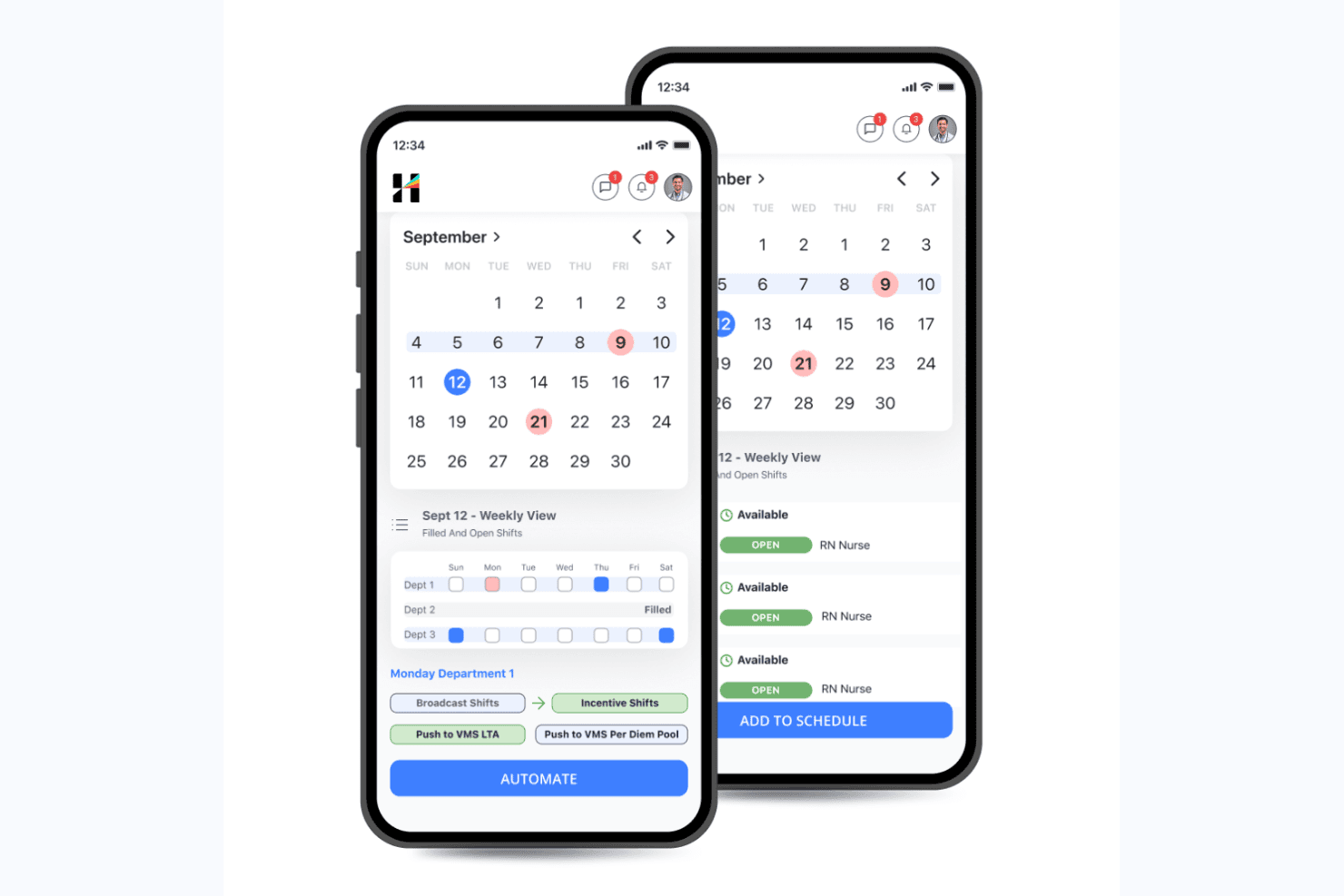
Hallmark Health Care Solutions lets managers schedule and automate open nursing shifts. Hallmark Health Care Solutions is an enterprise nurse scheduling and workforce management platform that combines AI-driven shift scheduling, internal float pool management, vendor management for external agencies, credential tracking, and predictive demand forecasting.
Who Is Hallmark Health Care Solutions Best For?
Hallmark is a strong fit for large hospitals and multi-hospital health systems that need to manage employed nurses, float pool staff, and external agency workers from a single platform.
Why I Picked Hallmark Health Care Solutions
Hallmark earns its spot on my shortlist because it's the only nurse scheduling platform I've found that manages employed nurses, internal float pools, and 750+ external staffing agencies from a single system. I particularly like the AI-Enabled Resourcing module, which compares internal versus agency labor in real time using acuity, HPPD, and census data, so your team isn't guessing which option is faster or cheaper to fill a shift. The Vendor Management System handles competitive bidding and fulfillment tracking across agencies without requiring separate tools.
Hallmark Health Care Solutions Key Features
- Demand forecasting: An AI model uses census data, callout patterns, seasonal trends, and length-of-stay metrics to project staffing needs at the unit and service line level weeks or months out.
- Talent intelligence: Captures individual nurse preferences for shift, location, and assignment type, then factors those preferences into AI-driven scheduling decisions alongside availability and skills.
- Credential expiration monitoring: Automatically tracks credential and licensure deadlines for current, active, and past workers, with proactive alerts and exception management built in.
- Executive workforce analytics: Dashboards consolidate overtime spend, agency utilization, compensation alignment, and patient outcomes into a single view designed for senior nursing and finance leadership.
Hallmark Health Care Solutions Integrations
Hallmark lists integrations with Epic, Cerner, Workday, UKG, QGenda, Okta, ADP, Paycom, Oracle, and SAP Concur. It supports API, Webhooks, EDI, HL7, FHIR, and SFTP connections for custom data exchanges.
Pros and Cons
Pros:
- Executive dashboards consolidate labor and patient data
- Unified internal float pool and agency management
- AI-driven staffing meets HPPD and acuity rules
Cons:
- Very few published peer user reviews
- No public pricing or free trial offered
Learn more about Hallmark Health Care Solutions: Best for enhancing team communication through a unified platform
- Up to 31-day free trial + free demo available
- From $5/user/month (billed annually)
Visit WebsiteCustomer Rating:4.6/5
Deputy's scheduling feature screenshot. Deputy, as a comprehensive nurse scheduling software, is designed to simplify workforce management and enhance team communication. It facilitates communication within a unified platform, making it the go-to solution for healthcare settings that prioritize smooth and effective interaction among staff.
Why I Picked Deputy:
Deputy caught my eye as an impressive scheduling tool that goes beyond just slotting shifts. Its commitment to fostering communication in healthcare teams through its platform made it stand out. Given the often frantic and high-stakes environment in healthcare, facilitating seamless communication between team members can significantly boost efficiency and morale.
This is precisely why I chose Deputy - it recognizes and addresses this often overlooked aspect of nurse scheduling.
Standout Features and Integrations:
With Deputy, not only can you create and share schedules easily, but you can also manage leave requests, track time and attendance, and even share instant updates with your team. The real-time communication feature makes it an ideal tool for nursing teams that need to stay connected and informed.
Key integrations include payroll systems like ADP and Gusto, HR platforms like BambooHR, and point-of-sale systems like Square and Vend.
Pros and Cons
Pros:
- Broad range of integrations with popular payroll and HR systems
- Easy-to-use interface that simplifies scheduling tasks
- Robust communication tools to ensure effective team coordination
Cons:
- Customer support can sometimes be slow to respond
- Limited customizability in comparison to some other tools on this list
- Advanced features are only available at a higher price tier
Learn more about Deputy: Best for facilitating mobile workforce management
- Free demo available
- Pricing upon request
Visit WebsiteCustomer Rating:4.2/5
Skedulo analytics dashboard Skedulo is a scheduling software designed to streamline mobile workforce management. It provides businesses with comprehensive tools to schedule, track, and manage their on-the-go employees, making it well-suited for industries reliant on field operations.
Why I Picked Skedulo:
In reviewing various scheduling tools, I picked Skedulo for its robust focus on mobile workforce management. Compared to other options, it provides specific features that cater to field operations, such as location-based scheduling and mobile job tracking.
I determined Skedulo to be best for facilitating mobile workforce management due to its comprehensive approach to mobile work coordination.
Standout Features and Integrations:
Key features of Skedulo include location-based scheduling, real-time visibility into job status, and robust analytics for performance assessment. These features are vital for businesses with significant field operations.
Skedulo integrates well with various CRM, HRM, and payroll systems. This includes prominent platforms such as Salesforce, providing businesses with the flexibility to incorporate Skedulo into their existing workflows.
Pros and Cons
Pros:
- Provides real-time visibility into job status for better management
- Integrates with popular CRM, HRM, and payroll systems, allowing for smooth workflow management
- Robust focus on mobile workforce management, ideal for businesses with significant field operations
Cons:
- Features may be overkill for businesses without a significant mobile workforce
- The platform may have a learning curve for those unfamiliar with such systems
- The starting price might be steep for small businesses or startups
Learn more about Skedulo: Best for remote access to schedules across multiple devices
- From $25/month (billed annually)
Visit WebsiteCustomer Rating:4.5/5
A screenshot in ScheduleAnywhere where employees' schedule can be seen. ScheduleAnywhere is a scheduling solution that provides accessible and easy-to-use features for scheduling staff across various industries. Its capacity to offer remote access to schedules across multiple devices underpins its capability to cater to modern, agile workplaces where mobility and flexibility are vital.
Why I Picked ScheduleAnywhere:
I picked ScheduleAnywhere for its robust mobile compatibility. This tool stands out because it allows employees and managers to access schedules on the go, which I found extremely important in today's dynamic work environments. In my judgment, ScheduleAnywhere is the best for enabling remote access to schedules across multiple devices.
Standout Features and Integrations:
ScheduleAnywhere offers vital features such as shift rotations, schedule copying, and multi-view options for different locations and departments. Additionally, mobile compatibility is an essential feature that facilitates remote access to schedules.
The tool provides essential integrations with payroll systems, which greatly simplifies the process of accounting for employee hours and overtime.
Pros and Cons
Pros:
- Features like schedule copying and shift rotations add convenience
- Integration with payroll systems aids in accounting for employee hours
- Mobile compatibility enables access to schedules on the go
Cons:
- The user interface might seem outdated compared to other modern scheduling tools
- Lack of a free version could deter potential users
- Higher price point may not be ideal for smaller organizations
Learn more about ScheduleAnywhere: Best for managing large, complex workforce schedules
- Free demo available
- Pricing upon request

Here's an overview of Shiftboard's all-device screenshot showing the published schedule dashboard. Shiftboard is a robust nurse scheduling software designed to handle the complexities of large workforce schedules. It expertly accommodates intricate rotations, variable shifts, and diverse skill sets, making it an optimal choice for larger healthcare institutions or settings with complex staffing needs.
Why I Picked Shiftboard:
When selecting this tool, I appreciated Shiftboard's exceptional handling of large, intricate workforce schedules. Compared to other options, it effectively stands out for its ability to seamlessly manage and navigate complexity.
I firmly believe that Shiftboard is "Best for managing large, complex workforce schedules" due to its comprehensive scheduling capabilities, robust features, and adaptability to diverse staffing requirements.
Standout Features and Integrations:
Shiftboard shines with its dynamic scheduling capabilities, including its ability to auto-generate schedules, manage overtime, and facilitate quick shift trades. Its demand-based scheduling is a major boon for large teams with variable staffing needs.
As for integrations, Shiftboard offers excellent compatibility with a wide range of systems. Key integrations include HR and payroll systems like ADP and Quickbooks, enhancing the end-to-end management of your workforce.
Pros and Cons
Pros:
- Advanced scheduling features enhance efficiency
- Integrates smoothly with HR and payroll systems
- Exceptional at managing complex staffing needs
Cons:
- The user interface may require some learning for optimal utilization
- Some features may be excessive for smaller healthcare settings
- Higher starting price compared to some alternatives
Learn more about Shiftboard: Best for addressing staffing challenges and reducing labor costs
- Free demo available
- Pricing upon request

OnShift's scheduling dashboard view OnShift is a human capital management software designed specifically for the healthcare industry, offering an array of features that address common staffing challenges and help reduce labor costs. It caters to organizations that deal with high employee turnover rates and those looking to maintain staffing levels while managing expenses.
Why I Picked OnShift:
I chose OnShift for its industry-specific approach to staffing challenges. It stands out for its attention to factors that particularly impact the healthcare industry, such as high turnover and fluctuating demand. Based on my analysis and comparisons, I determined that OnShift is best for addressing staffing challenges and reducing labor costs, thanks to its predictive and proactive management features.
Standout Features and Integrations:
OnShift provides notable features like predictive scheduling, employee engagement tools, and a recruitment platform to ensure staffing needs are met efficiently. It also offers proactive overtime control to manage labor costs effectively.
OnShift integrates with a range of payroll and HR systems, making it a versatile solution that can adapt to various administrative structures.
Pros and Cons
Pros:
- Offers integrations with multiple payroll and HR systems
- Employee engagement tools for improved morale and reduced turnover
- Predictive scheduling and proactive overtime control for cost-effectiveness
Cons:
- The user interface might require a learning curve for those unfamiliar with such systems
- The industry-specific approach might limit its applicability to non-healthcare industries
- Lack of transparent pricing information may deter potential users
Learn more about OnShift: 10Best for simplified shift planning and time tracking
Sling
- Free trial + free plan available
- From $1.70/user/month (billed annually)

Take a look at Sling's scheduling feature. Sling is a workforce management software that centralizes scheduling, time tracking, and employee coordination. Designed with ease of use in mind, it simplifies shift planning and time tracking, making it an excellent tool for businesses wanting to manage these tasks efficiently.
Why I Picked Sling:
Sling captured my attention with its focus on simplicity and ease of use in shift planning and time tracking. Its clean, intuitive interface sets it apart from other scheduling tools that can often seem overwhelming. I selected Sling as the best tool for simplified shift planning and time tracking due to its user-friendly design and focus on these core features.
Standout Features and Integrations:
Sling offers a robust set of features, including a built-in time clock, employee availability settings, and an efficient shift planning module. The time tracking component is particularly useful, allowing managers to monitor work hours and overtime accurately.
When it comes to integrations, Sling can be paired with multiple payroll software platforms to ensure a smooth transition from scheduling and time tracking to payroll processing.
Pros and Cons
Pros:
- Effective integration with payroll software
- Built-in time clock with overtime monitoring
- User-friendly interface makes shift planning and time tracking simple
Cons:
- The free plan is fairly limited, necessitating an upgrade for more comprehensive needs
- Lacks some of the advanced customization options found in competitors
- The annual billing cycle may not be preferable for all businesses
Learn more about Sling:
Alte software-uri pentru programarea asistentelor medicale
Iată câteva opțiuni suplimentare de software pentru programarea asistentelor medicale care nu au ajuns pe lista mea scurtă, dar care merită totuși analizate:
- 11TCP SoftwareBest for integrating with existing HR systems seamlessly
- 12Schedule360Best for advanced configurability and scalability options
- 13NurseGridBest for fostering nurse engagement and work-life balance
- 14ShiftWizardBest for reducing overtime with efficient labor management
- 15eScheduleBest for streamlining operations with custom automation features
- 16Deel HRBest for creating schedule policies
- 17RotageekBest for optimizing staffing with AI-powered scheduling
- 18Buddy PunchBest for drag-and-drop shift scheduling
- 19StaffScheduleCareGood for extensive staff scheduling in care environments
How I Evaluate Nurse Scheduling Software
I split my evaluation into two layers: the baseline capabilities a tool must have—like shift rotation and credential tracking—and the differentiators that set the best options apart.
Core Functionality (Table Stakes For This List)
When I'm selecting tools for my list, I rank each one on a scale from 0 (does not offer the functionality) to 5 (excels in this area) for each core functionality listed below. Then, I calculate the tool's total score into a percentage. Each tool needs to achieve a minimum total score of 65% to be considered for inclusion.
- Shift Scheduling & Rotations: I look for tools that handle complex rotating patterns, night shifts, and multi-unit coverage without requiring managers to rebuild schedules each period.
- Self-Service Shift Management: Staff should be able to request PTO, pick up open shifts, and initiate swaps from a mobile app rather than calling the charge nurse.
- Credential & Compliance Tracking: Each tool should store nursing licenses and certifications with expiration tracking so unqualified staff aren't accidentally scheduled.
- Staffing Ratio & Coverage Rules: I check whether the platform enforces nurse-to-patient ratios and skill-mix rules per unit rather than leaving coverage gaps to manual oversight.
- Time, Attendance & Payroll Integration: The tool should capture clock-in/out data and connect to payroll systems to reconcile overtime, shift differentials, and worked hours.
- Automated Notifications & Alerts: I evaluate how the platform pushes open-shift alerts, schedule changes, and coverage gap warnings through SMS, email, or push notifications.
Once I have a list of tools that meet this criteria, I consider what sets each platform apart.
Differentiating Factors (What Sets Vendors Apart)
Here's how I compare and contrast different vendors:
Standout Features
Acuity-based staffing is a big differentiator—I look for tools that adjust assignments based on real-time patient severity, not just headcount. Fatigue management matters too, especially for units running 12-hour shifts; the best platforms flag unsafe consecutive stretches before they happen. I also evaluate predictive demand forecasting. Tools that use historical census data to project staffing needs weeks ahead help managers avoid last-minute scrambles.
Beyond Features
Healthcare ecosystem integrations are one of the first things I check. A scheduling tool that connects to your EHR for real-time census data and syncs with payroll platforms like UKG or ADP saves hours of manual reconciliation each pay period. Compliance also carries real weight—I evaluate whether a platform meets HIPAA standards and supports role-based access for PHI. Finally, deployment fit matters. A five-location clinic network and a solo practice have very different needs, so I look at how pricing and scalability flex across practice sizes.
Cum să alegeți software-ul pentru programarea asistentelor medicale
Este ușor să vă pierdeți în liste lungi de funcții și structuri complexe de prețuri. Pentru a vă ajuta să rămâneți concentrați în timp ce parcurgeți procesul unic de selecție a software-ului, iată o listă de verificare a factorilor de care trebuie să țineți cont:
| Factor | Aspecte de luat în considerare |
|---|---|
| FactorScalabilitate | Aspecte de luat în considerarePoate software-ul gestiona creșterea numărului de angajați? Verificați dacă acceptă mai multe locații sau departamente și dacă prețul se ajustează pe măsură ce echipa se extinde. |
| FactorIntegrări | Aspecte de luat în considerareSe integrează cu sistemele existente, precum software-ul de salarizare și cel de resurse umane? Asigurați-vă că acceptă instrumentele pe care le utilizați deja, pentru a evita introducerea manuală a datelor. |
| FactorPosibilități de personalizare | Aspecte de luat în considerarePuteți adapta software-ul pentru a respecta regulile și politicile dumneavoastră de programare? Căutați opțiuni pentru ajustarea șabloanelor sau crearea unor fluxuri de lucru personalizate. |
| FactorUșurință în utilizare | Aspecte de luat în considerareInterfața este intuitivă pentru toți utilizatorii? Luați în considerare dacă personalul va avea nevoie de instruire extinsă sau dacă poate învăța rapid să utilizeze software-ul, cu îndrumare minimă. |
| FactorImplementare și integrare inițială | Aspecte de luat în considerareCât timp este necesar pentru a începe utilizarea? Verificați dacă există resurse precum videoclipuri de instruire sau tururi ghidate, care să vă ajute echipa să înceapă fără probleme. |
| FactorCost | Aspecte de luat în considerareCare este costul total de deținere? Nu vă limitați la prețul afișat. Luați în considerare taxele ascunse pentru funcții sau asistență suplimentare și comparați planurile anuale cu cele lunare. |
| FactorMăsuri de securitate | Aspecte de luat în considerareRespectă software-ul reglementările privind protecția datelor? Asigurați-vă că dispune de criptare, controale de acces și actualizări regulate de securitate pentru a proteja datele sensibile ale personalului. |
Ce este software-ul pentru programarea asistentelor medicale?
Software-ul pentru programarea asistentelor medicale este un instrument conceput pentru gestionarea și organizarea turelor și programelor asistentelor medicale. Administratorii din domeniul sănătății și managerii de asistente medicale utilizează frecvent aceste instrumente pentru a aloca eficient personalul și a asigura respectarea legislației muncii. Programarea automatizată, schimburile de ture și notificările în timp real contribuie la reducerea volumului de muncă administrativă și la îmbunătățirea acoperirii turelor. În general, aceste instrumente sporesc eficiența operațională și asigură îngrijiri mai bune pentru pacienți prin gestionarea optimă a personalului.
Funcții
Atunci când alegeți software pentru programarea asistentelor medicale, urmăriți următoarele funcții esențiale:
- Programare automată: Generați automat programe pentru ture pe baza disponibilității și preferințelor personalului, reducând erorile manuale și economisind timp.
- Schimbarea turelor: Permiteți asistentelor medicale să schimbe turele cu ușurință, asigurând acoperirea necesară și ținând cont de nevoile personale.
- Notificări în timp real: Trimiteți alerte instantanee personalului cu privire la modificările programului sau la turele următoare, pentru ca toată lumea să fie informată.
- Monitorizarea conformității: Monitorizați respectarea legislației muncii și a politicilor interne pentru a evita problemele juridice și pentru a asigura programarea echitabilă.
- Acces mobil: Permiteți personalului să își vizualizeze și să își gestioneze programele din mers, prin intermediul dispozitivelor mobile, pentru o flexibilitate sporită.
- Gestionarea disponibilității: Țineți evidența perioadelor în care personalul este disponibil pentru muncă, facilitând ocuparea turelor și gestionarea solicitărilor de concediu.
- Șabloane personalizabile: Utilizați șabloane pentru a crea rapid programe adaptate nevoilor specifice ale departamentului sau anumitor tipare de ture.
- Capacități de integrare: Conectați-vă la sisteme existente, precum cele de salarizare și software-ul de resurse umane, pentru a fluidiza fluxul de date și a reduce sarcinile administrative.
- Instrumente de raportare: Generați rapoarte privind indicatorii programării pentru a analiza eficiența încadrării cu personal și a lua decizii informate.
- Permisiuni pentru utilizatori: Controlați accesul la datele și instrumentele de programare în funcție de rolurile personalului, pentru a menține securitatea și integritatea datelor.
Beneficii
Implementarea unui software pentru programarea asistentelor medicale oferă mai multe beneficii pentru echipa și afacerea dumneavoastră. Iată câteva dintre acestea:
- Eficiență îmbunătățită: Programarea automată reduce timpul alocat sarcinilor manuale, permițând personalului să se concentreze asupra îngrijirii pacienților.
- Comunicare îmbunătățită: Notificările în timp real mențin pe toată lumea la curent cu modificările programului, reducând neînțelegerile.
- Conformitate mai bună: Instrumentele de monitorizare asigură respectarea legislației muncii și a politicilor interne în cadrul programelor, minimizând riscurile juridice.
- Flexibilitate sporită: Schimbarea turelor și accesul mobil permit personalului să își gestioneze programele cu ușurință, îmbunătățind echilibrul dintre viața profesională și cea personală.
- Decizii bazate pe date: Instrumentele de raportare oferă informații despre tiparele de încadrare cu personal, ajutându-vă să faceți ajustări informate pentru îmbunătățirea operațiunilor.
- Economii de costuri: Programarea eficientă și integrarea cu sistemele de salarizare ajută la controlul costurilor cu forța de muncă și la reducerea cheltuielilor administrative.
Costuri și prețuri
Alegerea unui software pentru programarea asistentelor medicale necesită înțelegerea diferitelor modele și planuri de preț disponibile. Costurile variază în funcție de caracteristici, dimensiunea echipei, extensii și alți factori. Tabelul de mai jos rezumă planurile comune, prețurile lor medii și caracteristicile incluse de obicei în soluțiile software pentru programarea asistentelor medicale:
Tabel comparativ al planurilor pentru software-ul de programare a asistentelor medicale
| Tipul planului | Preț mediu | Caracteristici comune |
|---|---|---|
| Tipul planuluiPlan gratuit | Preț mediu$0 | Caracteristici comuneProgramare de bază, acces limitat pentru utilizatori și raportare de bază. |
| Tipul planuluiPlan personal | Preț mediu$5-$25/utilizator/lună | Caracteristici comuneProgramare automată, schimbarea turelor și acces mobil. |
| Tipul planuluiPlan pentru companii | Preț mediu$30-$60/utilizator/lună | Caracteristici comuneNotificări în timp real, monitorizarea conformității și șabloane personalizabile. |
| Tipul planuluiPlan pentru întreprinderi | Preț mediu$70-$100/utilizator/lună | Caracteristici comuneRaportare avansată, capacități de integrare și asistență dedicată. |
Întrebări frecvente despre software-ul de planificare a turelor asistentelor medicale
Iată câteva răspunsuri la întrebările frecvente despre software-ul de planificare a turelor asistentelor medicale:
Poate software-ul de planificare a turelor asistentelor medicale să gestioneze modele de ture rotative?
Da, majoritatea programelor software pentru planificarea turelor asistentelor medicale pot gestiona ture rotative, precum ciclurile zi-seară-noapte. Puteți configura modele care se repetă pe parcursul mai multor zile sau săptămâni. De obicei, sistemul vă permite să alocați personalul acestor modele sau să le ajustați manual, dacă este necesar. Astfel, puteți urmări mai ușor acoperirea turelor fără să porniți de la zero în fiecare săptămână.
Cum afectează actualizările regulilor de conformitate programul?
Dacă regulile se modifică, va trebui să actualizați setările din sistemul de planificare. Software-ul va utiliza apoi regulile actualizate pentru a semnala conflictele sau pentru a împiedica alocările nevalide. De exemplu, dacă se modifică perioadele de pauză sau intervalele de odihnă, sistemul ar trebui să reflecte aceste schimbări în programele viitoare. Este recomandat să verificați setările ori de câte ori se modifică o politică.
Puteți limita numărul de ture de noapte alocate unei asistente medicale?
Da, de obicei puteți stabili limite pentru numărul de ture de noapte alocate fiecărei persoane într-o anumită perioadă. Software-ul verifică aceste reguli atunci când generează programul sau când alocă manual turele. Astfel, nimeni nu ajunge să aibă prea multe ture nedorite la rând. De asemenea, acest lucru vă ajută să respectați regulile sindicatelor sau ale contractelor colective de muncă.
Este necesară instruirea pentru utilizarea software-ului de planificare a turelor asistentelor medicale?
Majoritatea programelor software pentru planificarea turelor asistentelor medicale sunt concepute pentru a fi ușor de utilizat, însă o instruire poate fi utilă, mai ales pentru echipele care nu au mai folosit planificarea digitală. Mulți furnizori oferă resurse de instruire precum videoclipuri, seminare online și tururi de prezentare a produsului. Utilizarea acestor resurse poate scurta perioada de învățare și vă poate asigura că echipa folosește software-ul în mod eficient.
Cum poate software-ul de planificare a turelor asistentelor medicale să îmbunătățească respectarea regulilor?
Software-ul de planificare a turelor asistentelor medicale poate contribui la îmbunătățirea conformității prin automatizarea monitorizării programelor și prin furnizarea de alerte privind posibile încălcări ale legislației muncii sau ale politicilor organizației. Acesta poate genera rapoarte care vă ajută să monitorizați conformitatea și să faceți rapid ajustările necesare. Această funcție este deosebit de utilă pentru organizațiile mari, cu nevoi complexe de planificare.