

Software-ul EMR pentru gastroenterologie oferă suport pentru raportarea endoscopiilor și șabloane specifice gastroenterologiei, permițând echipei să se concentreze pe îmbunătățirea fluxului de proceduri. Documentarea endoscopiilor și integrarea analizelor de laborator pot fi dificile, dar suportul potrivit poate îmbunătăți acuratețea și reduce timpul alocat sarcinilor administrative.
În acest articol, compar și analizez cele mai bune instrumente software EMR pentru gastroenterologie, pentru a vă sprijini decizia de achiziție.
Why Trust Our Software Recommendations
6,700+
Reviews
20
Industry experts
16+
Evaluation factors
14
Years
Our team has been testing and reviewing software since 2012. As medical practice leaders ourselves, we know how difficult—and important—it is to choose the right software.
For this guide, we evaluated tools using hands-on testing and independent research, scoring tools using our selection criteria.
Our reviews reflect our human editorial judgment, not a sales pitch.
Tabel comparativ: software EMR pentru gastroenterologie
Acest tabel comparativ sintetizează detaliile privind prețurile pentru selecțiile mele de top de software EMR pentru gastroenterologie.
Score legend (out of 5)
- Excellent4.5–5
- Good4–4.4
- Average3–3.9
- Below average2–2.9
- Poor1–1.9
Sorted by: Default
| Tool | Starting Price | Website | |||||||
|---|---|---|---|---|---|---|---|---|---|
Best for its robust mobile support | 4.3 out of 5 | 5 | 4 | 4 | 4 | 4 | 5 | Pricing upon request Free demo available | Website |
Best for comprehensive workflow management | 3.7 out of 5 | 3 | 4 | 3 | 4 | 4 | 4 | Pricing upon request Free demo available | Website |
Best for large-scale health systems | 3.8 out of 5 | 4 | 3 | 3 | 5 | 4 | 4 | Pricing upon request Not available | Website |
Best for its data analytics capabilities | 3.3 out of 5 | 3 | 3 | 3 | 4 | 4 | 3 | $499/user/month Free demo available | Website |
Best for GI billing and surveillance automation | 3.5 out of 5 | 2 | 4 | 4 | 4 | 4 | 3 | $229/user/month Free demo available | Website |
Best for multi-specialty practices | 3.5 out of 5 | 3 | 4 | 2 | 4 | 4 | 4 | Pricing upon request Free demo available | Website |
Best for AI-driven endoscopy documentation | 3.3 out of 5 | 4 | 2 | 3 | 4 | 3 | 4 | Pricing upon request Free demo available | Website |
Best for AI-aided endoscopy procedure notes | 3.3 out of 5 | 5 | 3 | 4 | 2 | 2 | 4 | Pricing upon request Free demo available | Website |
Best for GI coding and pathology-linked recalls | 3.8 out of 5 | 4 | 4 | 4 | 4 | 3 | 4 | $200/prescriber/month Free demo available | Website |
Best for flexible and scalable solutions | 3.3 out of 5 | 2 | 3 | 3 | 4 | 4 | 4 | Pricing upon request Free demo available | Website |


Recenzii ale celor mai bune software-uri EMR pentru gastroenterologie
Mai jos sunt rezumatele mele detaliate ale celor mai bune software-uri EMR pentru gastroenterologie care au intrat pe lista mea scurtă. Recenziile mele oferă o privire detaliată asupra caracteristicilor principale, avantajelor & dezavantajelor, integrărilor și cazurilor de utilizare ideale pentru fiecare instrument, pentru a vă ajuta să îl găsiți pe cel mai potrivit pentru dumneavoastră.
 Best for its robust mobile support
- Free demo available
- Pricing upon request
Visit WebsiteCustomer Rating:4.5/5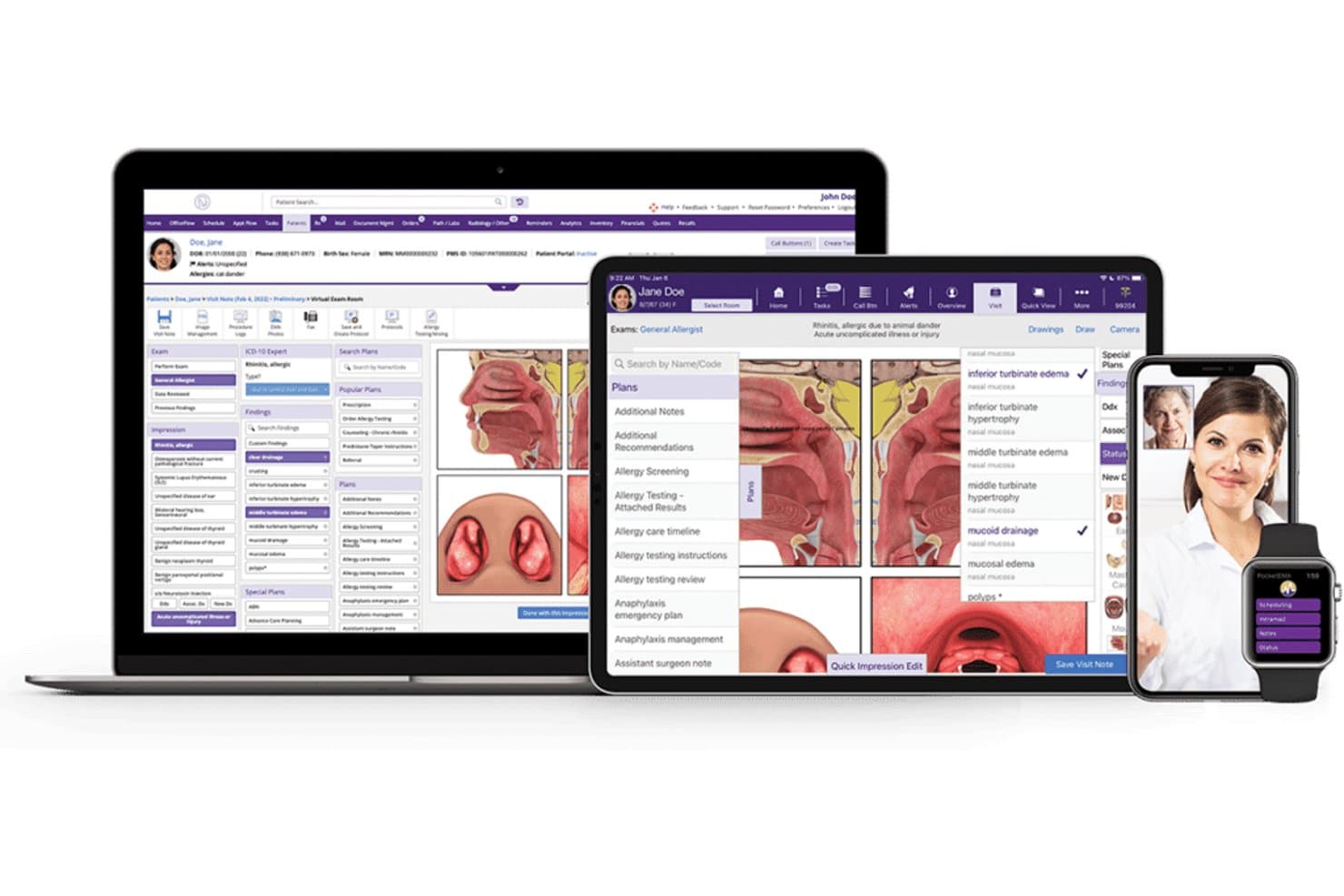
Here's the EMR software interface of ModMed in desktop and mobile view. ModMed, also known as Modernizing Medicine, is an integrated healthcare platform that combines specialty-specific EHR, practice management, telehealth, patient engagement, and mobile tools.
Who Is ModMed Best For?
ModMed works well for specialty medical practices that need mobile access to clinical and administrative workflows from smartphones and tablets.
Why I Picked ModMed
I picked ModMed because its mobile capabilities help providers access patient information, review schedules, document encounters, and manage clinical tasks while away from a desktop computer. Its specialty-focused workflows also connect mobile charting with practice management, telehealth, and patient engagement tools. This makes ModMed a strong option for practices that want an integrated healthcare platform with reliable mobile functionality.
ModMed Key Features
- Mobile EHR access: Review patient charts, document visits, manage schedules, and complete clinical tasks from supported mobile devices.
- Specialty-specific workflows: Use templates and clinical tools designed around the needs of different medical specialties.
- Practice management: Manage appointment scheduling, billing, patient information, and administrative tasks from one platform.
- Integrated telehealth: Conduct virtual visits while keeping documentation and patient information connected to the EHR.
ModMed Integrations
ModMed connects its EHR with practice management, telehealth, revenue cycle management, analytics, and patient engagement tools. It also supports connections with laboratories, pharmacies, clearinghouses, and other healthcare services to streamline clinical and administrative data exchange.
Pros and Cons
Pros:
- Intuitive and user-friendly interface
- Integrates with a variety of medical tools and services
- Excellent mobile support for on-the-go access
Cons:
- Limited customization options
- Higher pricing tier compared to some competitors
Learn more about ModMed: Best for comprehensive workflow management
- Free demo available
- Pricing upon request
Visit WebsiteCustomer Rating:4.3/5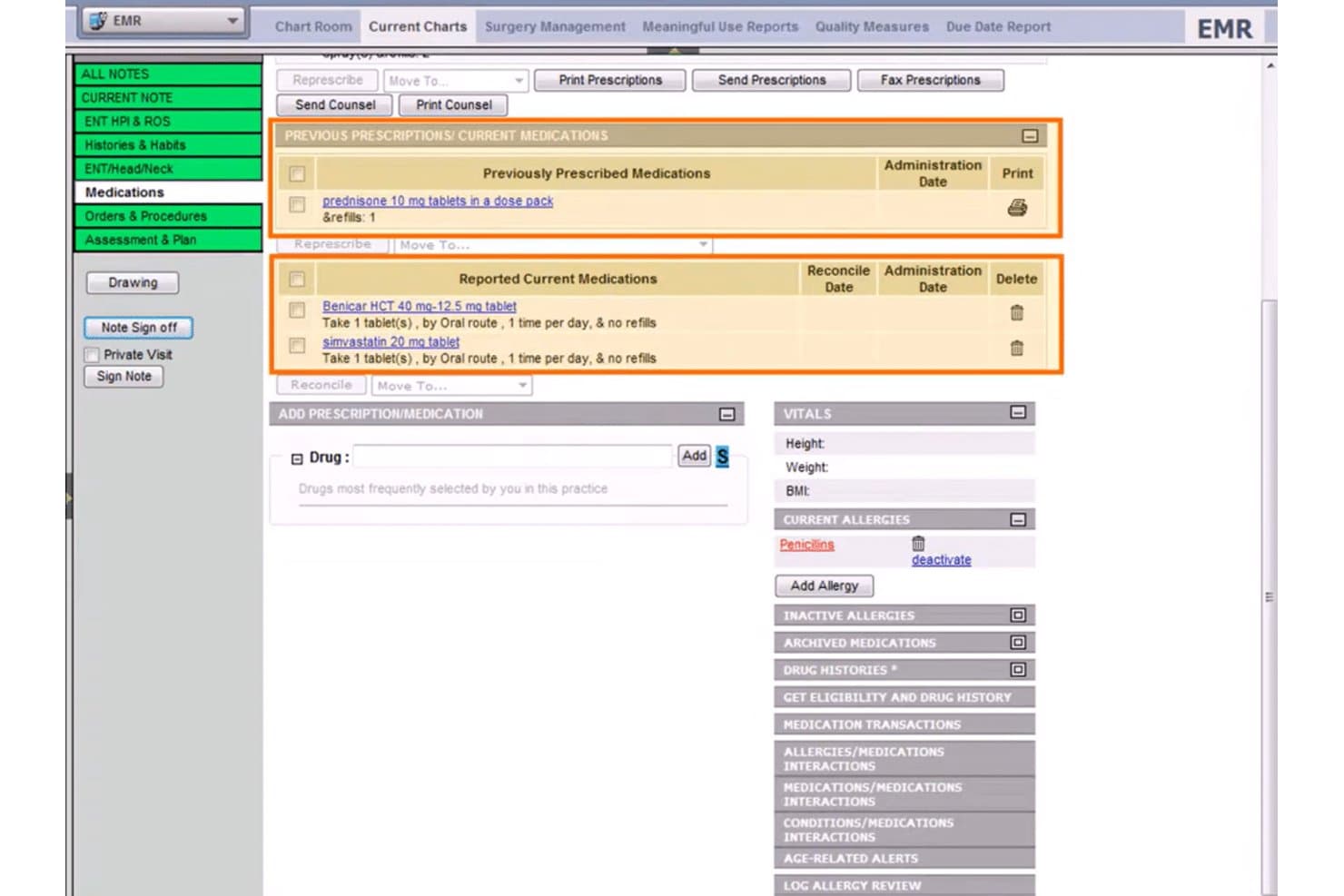
Welcome to the patient medications tab inside WRS Health. WRS Health is a cloud-based gastroenterology EMR and practice management platform that combines GI-specific clinical documentation, procedure reporting, scheduling, and integrated billing.
Who Is WRS Health Best For?
WRS Health fits GI practices that want clinical documentation, scheduling, and billing managed within a single platform—from solo physicians to multi-location groups.
Why I Picked WRS Health
WRS Health earns its spot on my shortlist because it ties clinical documentation, scheduling, and billing into one connected workflow built specifically for GI. I like how the GI superbill auto-populates charges as procedures are charted, which cuts the lag between documentation and claim submission. The built-in procedure queue walks teams through colonoscopy and endoscopy from pre-op to post-op, with consent forms and global-period tracking handled along the way.
WRS Health Key Features
- AI scribe: Captures GI patient histories—including abdominal pain, GERD, and colonoscopy follow-ups—and pre-fills templates automatically.
- MIPS quality reporting: Tracks GI-specific measures like colorectal cancer screening, IBD monitoring, and hepatitis C management for compliance reporting.
- Digital consent management: Stores e-signed consent forms for colonoscopy, endoscopy, and liver biopsy directly in the patient chart.
- Online patient intake forms: GI-specific questionnaires—including colonoscopy pre-screening and IBS/IBD symptom trackers—flow directly into the patient record.
WRS Health Integrations
WRS Health supports integrations with Surescripts, Medicity, OptumInsight, EMR Direct phiMail, and MDToolBox, plus two-way lab interfaces. It also offers FHIR and EDI connectivity for custom data exchange.
Pros and Cons
Pros:
- Inbound fax routing reduces result-handling work
- Prebuilt GI templates shorten procedure charting
- GI procedure queues connect notes to charges
Cons:
- Patient registration can create duplicate accounts
- ASC and anesthesia workflows remain undocumented
Learn more about WRS Health: 3Best for large-scale health systems
Epic
- Not available
- Pricing upon request
Visit WebsiteCustomer Rating:3.9/5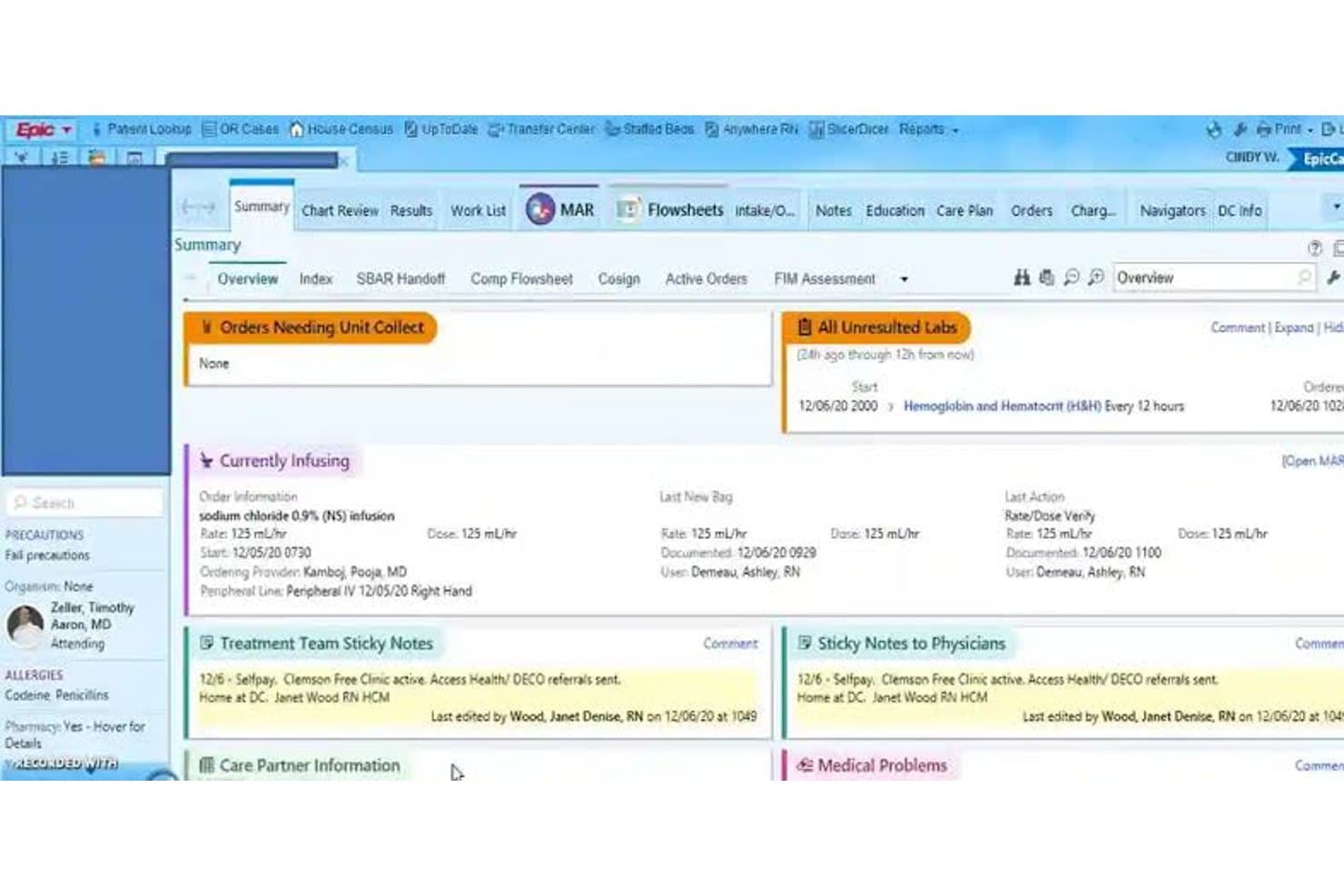
Epic patient care summary dashboard Epic is a comprehensive healthcare software platform that combines electronic health records, patient engagement, telehealth, revenue cycle tools, and enterprise-wide clinical workflows.
Who Is Epic Best For?
Epic works well for large hospitals, academic medical centers, and multi-site health systems that need a scalable platform for managing complex clinical, operational, and patient care workflows.
Why I Picked Epic
I picked Epic because it is built to support large, highly complex healthcare organizations. Its broad feature set connects clinical documentation, scheduling, billing, patient communication, analytics, and care coordination across departments and facilities. Epic’s scalability and interoperability also make it a strong option for health systems that need a unified platform capable of supporting extensive provider networks and large patient populations.
Epic Key Features
- Enterprise EHR: Manage clinical documentation, orders, medications, patient histories, and care plans across multiple departments.
- Patient engagement: Give patients access to appointments, test results, messages, bills, and telehealth services through digital tools.
- Practice and revenue cycle management: Support scheduling, claims, billing, payments, and administrative workflows across the organization.
- Telehealth capabilities: Enable virtual visits and remote care while keeping documentation connected to the patient record.
Epic Integrations
Epic supports interoperability with laboratories, pharmacies, imaging systems, health information exchanges, medical devices, and third-party healthcare applications. Its integration tools help large health systems exchange clinical and administrative data across internal departments and external care networks.
Pros and Cons
Pros:
- Strong interoperability and integrations
- Extensive suite of features
- Highly scalable for large health systems
Cons:
- Implementing the system across a large organization may be challenging
- Pricing and contract terms can be complex due to customization
Learn more about Epic: Best for its data analytics capabilities
- Free demo available
- From $499/user/month
Visit WebsiteCustomer Rating:3.4/5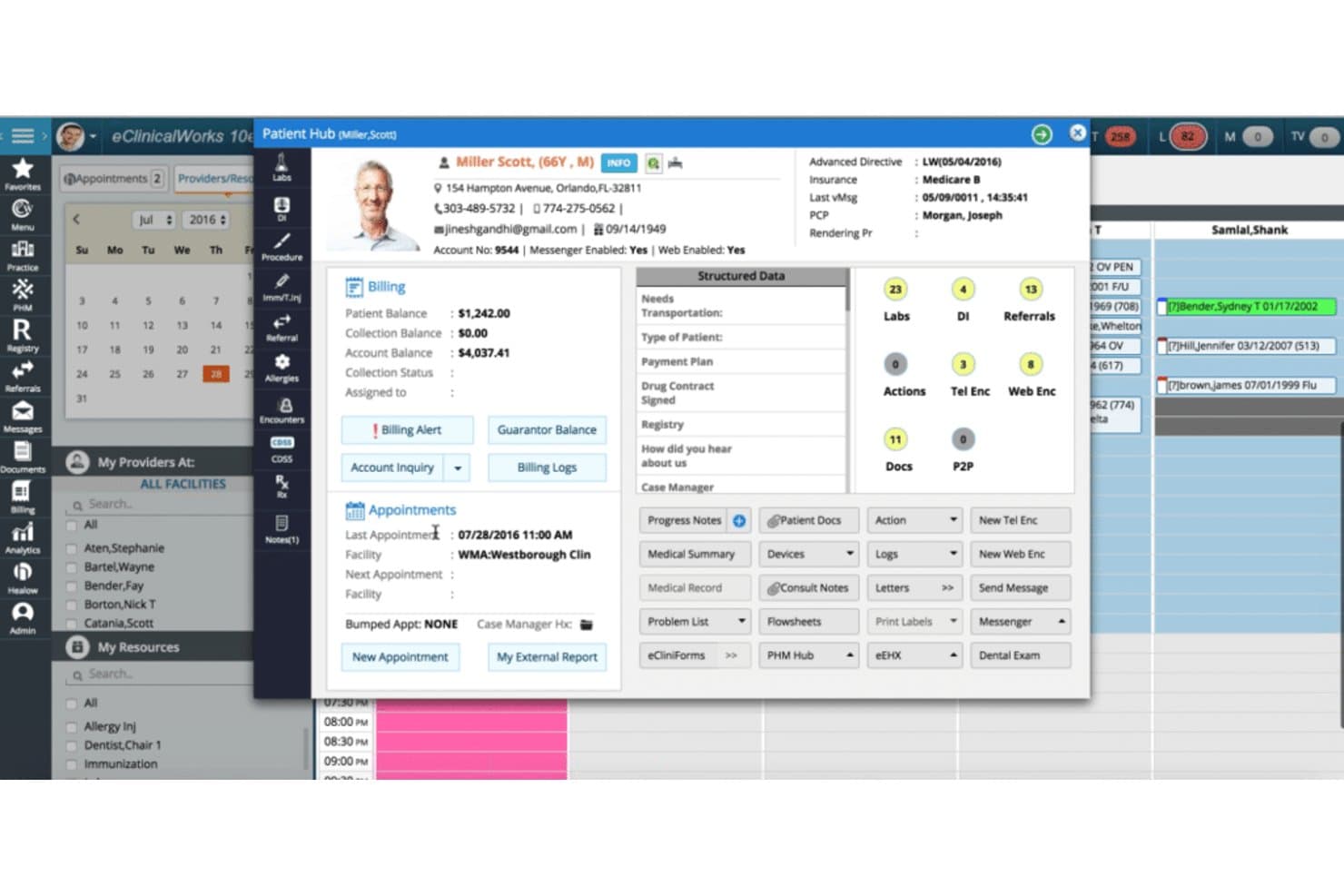
The patient hub of eClinicalWorks provides all the information necessary to provide excellent patient care. eClinicalWorks is a healthcare IT platform that combines electronic health records, practice management, medical billing, patient engagement, and data analytics tools.
Who Is eClinicalWorks Best For?
eClinicalWorks works well for healthcare organizations that want to use clinical, operational, and financial data to improve practice performance and patient care.
Why I Picked eClinicalWorks
I picked eClinicalWorks because its analytics capabilities help practices monitor performance across clinical and administrative workflows. Healthcare organizations can use dashboards and reporting tools to evaluate patient outcomes, identify operational bottlenecks, track revenue cycle performance, and support more informed decisions. Its combination of analytics, interoperability, EHR, and billing tools makes it a strong option for practices that want a data-driven healthcare platform.
eClinicalWorks Key Features
- Data analytics dashboards: Monitor clinical, financial, and operational performance through centralized reports and visual dashboards.
- Electronic health records: Manage patient histories, clinical documentation, orders, prescriptions, and care plans.
- Practice management: Handle scheduling, billing, claims, patient registration, and other administrative processes.
- Interoperability tools: Exchange patient information with connected healthcare organizations and external systems.
eClinicalWorks Integrations
eClinicalWorks supports connections with laboratories, pharmacies, billing systems, imaging services, clearinghouses, and other healthcare IT platforms. These integrations help practices exchange clinical and financial data while maintaining more complete patient records.
Pros and Cons
Pros:
- Comprehensive suite of healthcare IT tools
- Strong interoperability with other systems
- Advanced data analytics capabilities
Cons:
- Some users report that customer service can be improved
- Steep learning curve for new users
Learn more about eClinicalWorks: Best for GI billing and surveillance automation
- Free demo available
- From $229/user/month
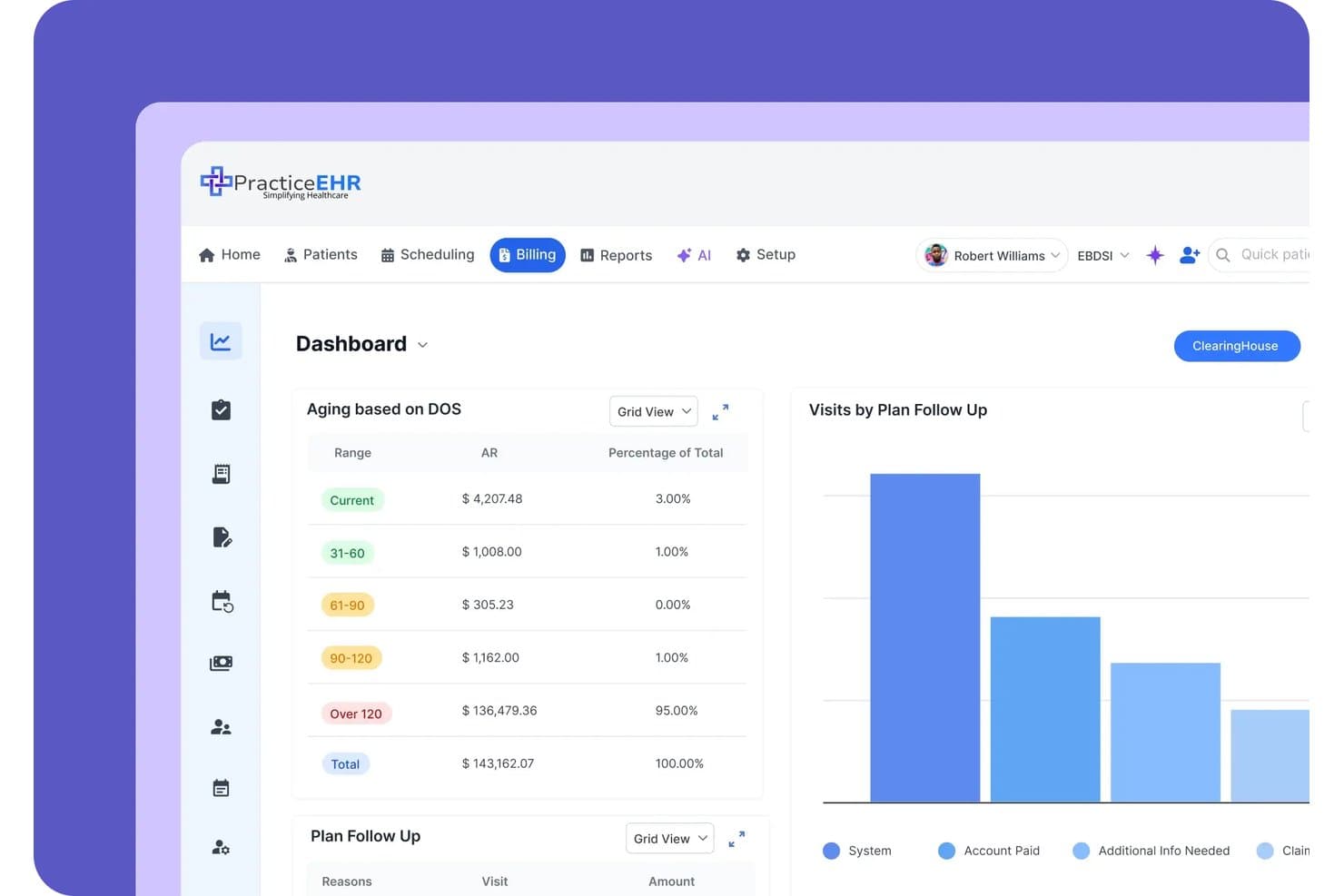
Practice EHR tracks aging AR and plan follow-up data on one billing dashboard. Practice EHR is a cloud-based EHR, practice management, and revenue cycle management platform built for independent practices, with GI-specific workflows spanning clinical documentation, pathology-linked surveillance recalls, ASC billing, and AI-assisted coding and claim editing.
Who Is Practice EHR Best For?
Practice EHR fits independent GI practices that want billing automation and surveillance recall workflows without managing separate RCM or PM systems.
Why I Picked Practice EHR
Practice EHR earns its spot on my shortlist because its billing automation is genuinely built around GI workflows, not retrofitted from a generic template. I like that the AI Claim Editor checks claims line by line and flags denial risk before submission, which matters when you're billing complex ASC cases with both facility and professional components. Pathology results link directly to scope cases and automatically trigger 3-, 5-, or 10-year surveillance recalls, cutting the manual follow-up work that bogs down independent GI practices.
Practice EHR Key Features
- AI Scribe: Transcribes patient visits in 20+ languages and auto-drafts SOAP notes with suggested ICD/CPT codes for provider review.
- GIQuIC registry reporting: Automatically submits quality data, including adenoma detection rate, to the GI quality registry for MIPS compliance.
- Biologic prior authorization tracking: Monitors prior auth status and visit limits for IBD biologics like Humira, Stelara, and Entyvio.
- AI no-show prediction: Scores each appointment for cancellation risk so your front desk can prioritize outreach before a scope slot goes to waste.
Practice EHR Integrations
Practice EHR integrates with LabCorp, Quest, Kno2, Carequality, TEFCA, Surescripts, and unnamed endoscopy report writers. It offers a FHIR R4 API for custom integrations and supports HL7 connections with imaging centers.
Pros and Cons
Pros:
- AI claim editing flags denial risks
- Supports dual ASC and professional billing
- Automates pathology-driven surveillance recalls
Cons:
- Template setup requires detailed staff input
- Structured procedure documentation remains underdeveloped
Learn more about Practice EHR: Best for multi-specialty practices
- Free demo available
- Pricing upon request
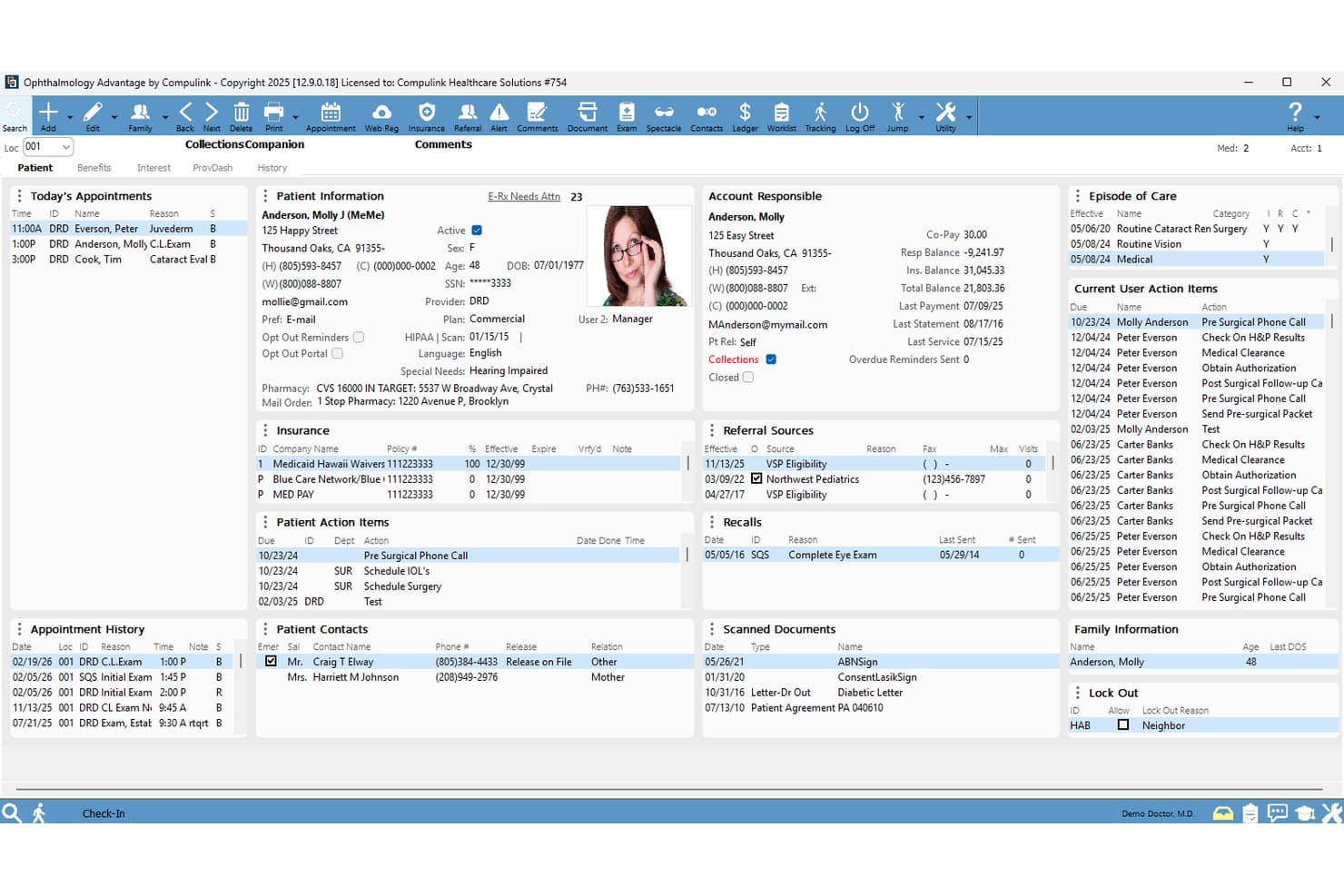
Here's a screenshot of the patient portal inside Compulink Healthcare Solutions. Patient records such as diagnosis and medical history is securely stored here to provide not just gastroenterology care solutions. Compulink Healthcare Solutions is a specialty-focused EMR platform that combines GI-specific clinical documentation, procedure reporting, scheduling, and integrated revenue cycle management tools in a single database.
Who Is Compulink Healthcare Solutions Best For?
Compulink is a strong fit for GI practices that also run an ambulatory surgery center and need one system to manage clinic scheduling, procedure documentation, and billing across both settings.
Why I Picked Compulink Healthcare Solutions
I picked Compulink Healthcare Solutions because it's one of the few GI EMR platforms that genuinely handles both a clinic and an ambulatory surgery center from a single database. I especially like how its combined clinic/ASC scheduling coordinates procedure rooms, anesthesia availability, and recovery capacity in one view, so nothing falls through the cracks on a busy scope day. The Standard of Care Engine also flags undercoding tied directly to documented findings, which I find valuable for GI practices where CPT and modifier selection can make or break reimbursement.
Compulink Healthcare Solutions Key Features
- AI ambient scribe: Quantum AI listens to patient visits and maps documentation into 350+ discrete EHR fields across 18 languages in real time.
- Standard of Care Engine: Flags undercoding and unbilled services by linking care rules to appointment reasons and documented findings before and after the visit.
- AdvantageRCM outsourced billing: An optional service pairing your practice with a dedicated US-based billing manager who handles denials, appeals, and on-demand reporting.
- ONC-certified MIPS/MACRA reporting: Built-in GI-specific quality measure tracking covers ADR, colorectal cancer screening follow-up, and ASC reporting workflows.
Compulink Healthcare Solutions Integrations
Documented integrations include Surescripts for e-prescribing and Quantum AI for ambient scribing. Compulink also offers a FHIR API using US Core 6.1.0 and clearinghouse connectivity for billing workflows.
Pros and Cons
Pros:
- Finding-linked coding and charge capture
- Customizable single-screen charting layouts
- Combined clinic and ASC scheduling
Cons:
- Updates can disrupt scheduler workflows
- GI-specific user feedback remains scarce
Learn more about Compulink Healthcare Solutions: Best for AI-driven endoscopy documentation
- Free demo available
- Pricing upon request
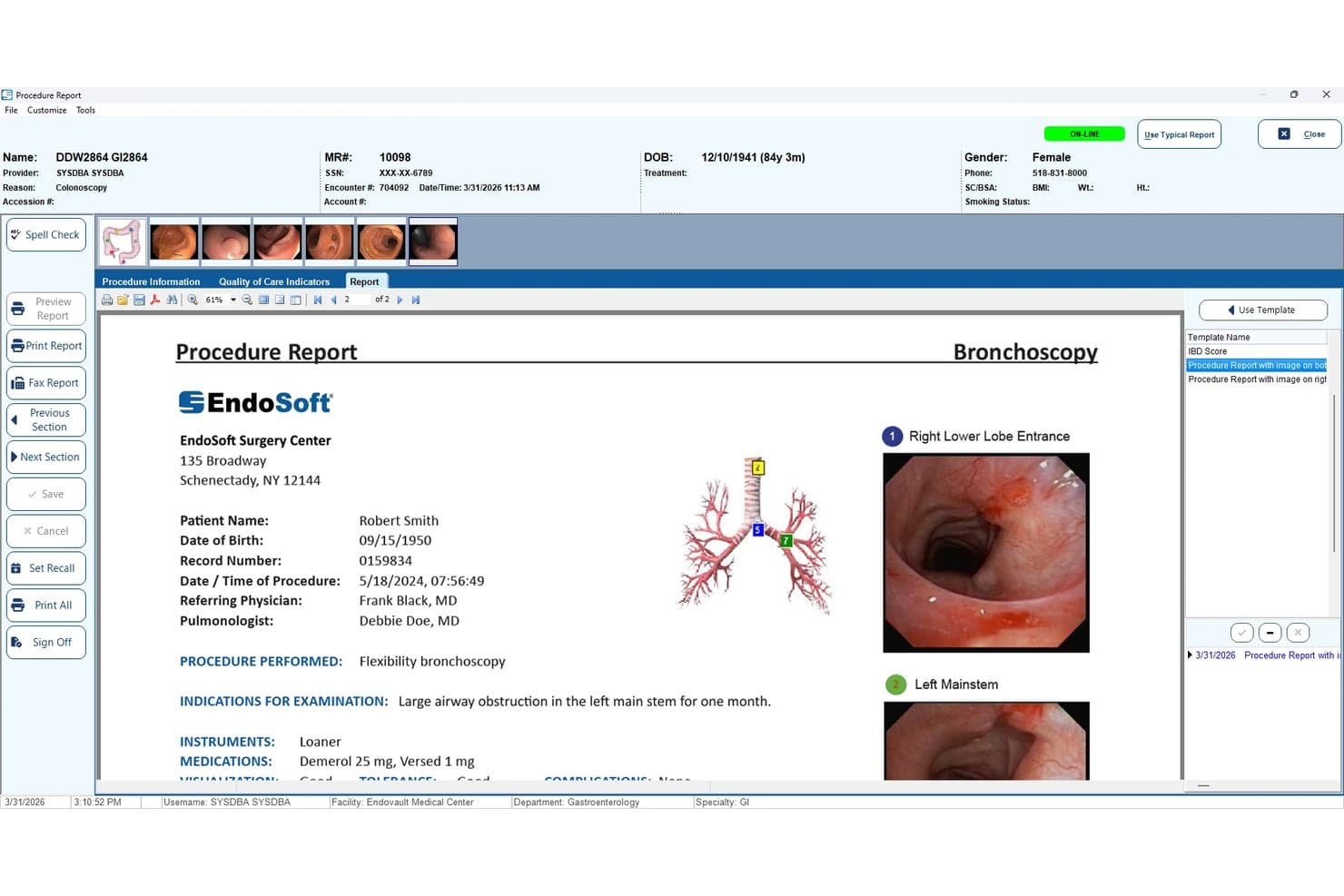
EndoSoft generates bronchoscopy procedure reports with embedded images. EndoVault® by EndoSoft is a GI-native EHR that combines AI-assisted voice documentation, structured endoscopy procedure reporting, image and video capture, and quality registry reporting for gastroenterology practices and ASCs.
Who Is EndoSoft Best For?
EndoSoft suits GI physicians and practice administrators in endoscopy-focused practices or ASCs who need AI-assisted procedure documentation and quality registry reporting built into their EHR.
Why I Picked EndoSoft
I've included EndoSoft in my top picks because its Argus AI voice documentation is genuinely built for the endoscopy suite, not bolted on as an afterthought. During a colonoscopy, Argus NLP captures what the physician says and sorts it directly into the right report fields, auto-filling quality metrics like ADR, withdrawal time, and bowel prep scores without manual entry. I also like that specimen jar labels print in real time via voice command, cutting a step that typically slows post-procedure charting.
EndoSoft Key Features
- GIQuIC-certified quality registry reporting: Automatically extracts procedure data for GIQuIC, MIPS/MACRA, and CDC submissions without manual data entry.
- Multi-source HD image and video capture: Records up to four simultaneous video sources during complex procedures, with built-in PACS and a DICOM viewer for image management.
- HL7 pathology interface with automated ADR calculation: Pulls pathology results directly into EndoVault and calculates adenoma detection rates and sessile serrated adenoma rates automatically.
- Legacy system data migration: Moves patient records, images, reports, quality metrics, and billing data from EndoWorks, EndoPRO, and Endobase with no data loss.
EndoSoft Integrations
EndoSoft integrates with Epic, Oracle Cerner, VA CPRS, and VistA, plus Olympus, Pentax, and Fuji scopes. It supports HL7, FHIR, DICOM, IHE, and an API for custom connections.
Pros and Cons
Pros:
- Scope-neutral imaging links directly to reports
- Automated quality metrics support GI reporting
- AI voice capture structures procedure reports
Cons:
- Users report errors and outdated interfaces
- Setup can challenge smaller organizations
Learn more about EndoSoft: Best for AI-aided endoscopy procedure notes
- Free demo available
- Pricing upon request
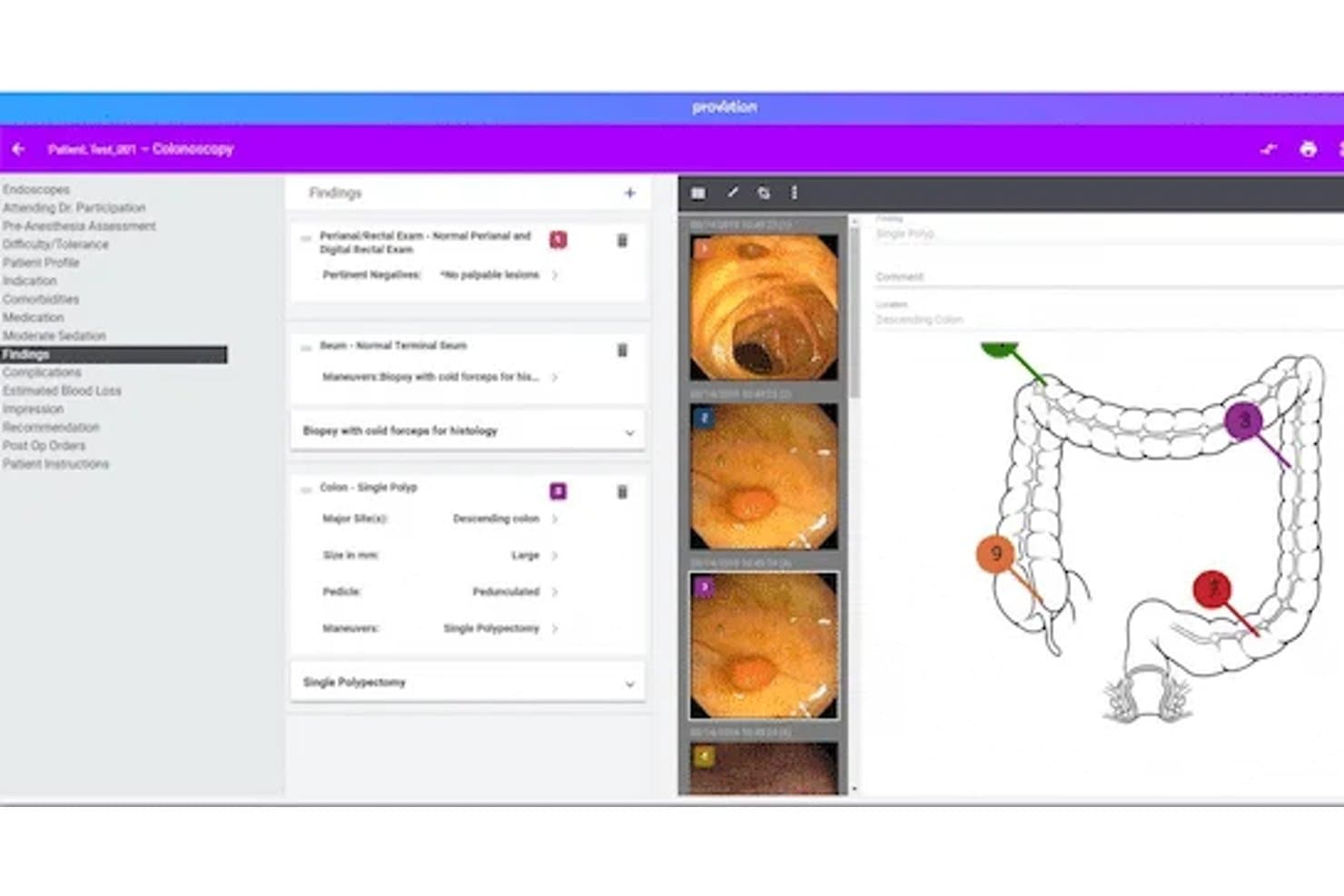
Provation Apex streamlines colonoscopy documentation with findings and imaging. Provation Apex is a cloud-based GI procedure documentation and endoscopy reporting platform that covers physician notes, nursing charting, anesthesia records, pathology integration, and patient tracking across the full procedural episode—from pre-op to post-op.
Who Is Provation Apex Best For?
Provation Apex is a strong fit for GI-focused hospitals and ambulatory surgery centers that need deep, procedure-level documentation but already have a separate EHR handling outpatient records and scheduling.
Why I Picked Provation Apex
I picked Provation Apex as one of the best because its AI voice documentation tool, Mira, turns spoken commentary during a colonoscopy or upper GI endoscopy into a structured procedure note in real time—no dictation cleanup required afterward. It also generates CPT and ICD-10 codes automatically from the note selections, covering 150+ CPT/HCPCS codes tied to the procedure. What seals it for me is the native scope-to-note image capture, which pulls images directly from the endoscope into the report without a manual import step.
Provation Apex Key Features
- GIQuIC quality registry submission: Structured procedure data feeds directly into GIQuIC for benchmarking and quality reporting, available in Standard and Premium packages.
- Electronic specimen collection and label printing: Specimen data is logged digitally during the procedure and auto-populates into the physician's note.
- Real-time patient tracking board: An electronic board replaces paper and whiteboards, showing live patient and room status across the care team.
- Pathology lab interface: Results from approved partner labs like LabCorp and Quest Diagnostics automatically populate into procedure notes through a built-in interface.
Provation Apex Integrations
Provation Apex integrates with Epic, Oracle Health/Cerner, MEDITECH, LabCorp, Quest Diagnostics, Sonic Healthcare USA, and other approved pathology labs. Its Secure Communication Connector supports HL7, pathology PDFs, vitals, and DICOM data.
Pros and Cons
Pros:
- GI templates cover advanced procedures and pediatrics
- Native scope image capture supports procedure reporting
- AI converts endoscopy speech into structured notes
Cons:
- Reported support availability varies by user experience
- No longitudinal outpatient record or native scheduling
Learn more about Provation Apex: Best for GI coding and pathology-linked recalls
- Free demo available
- From $200/prescriber/month
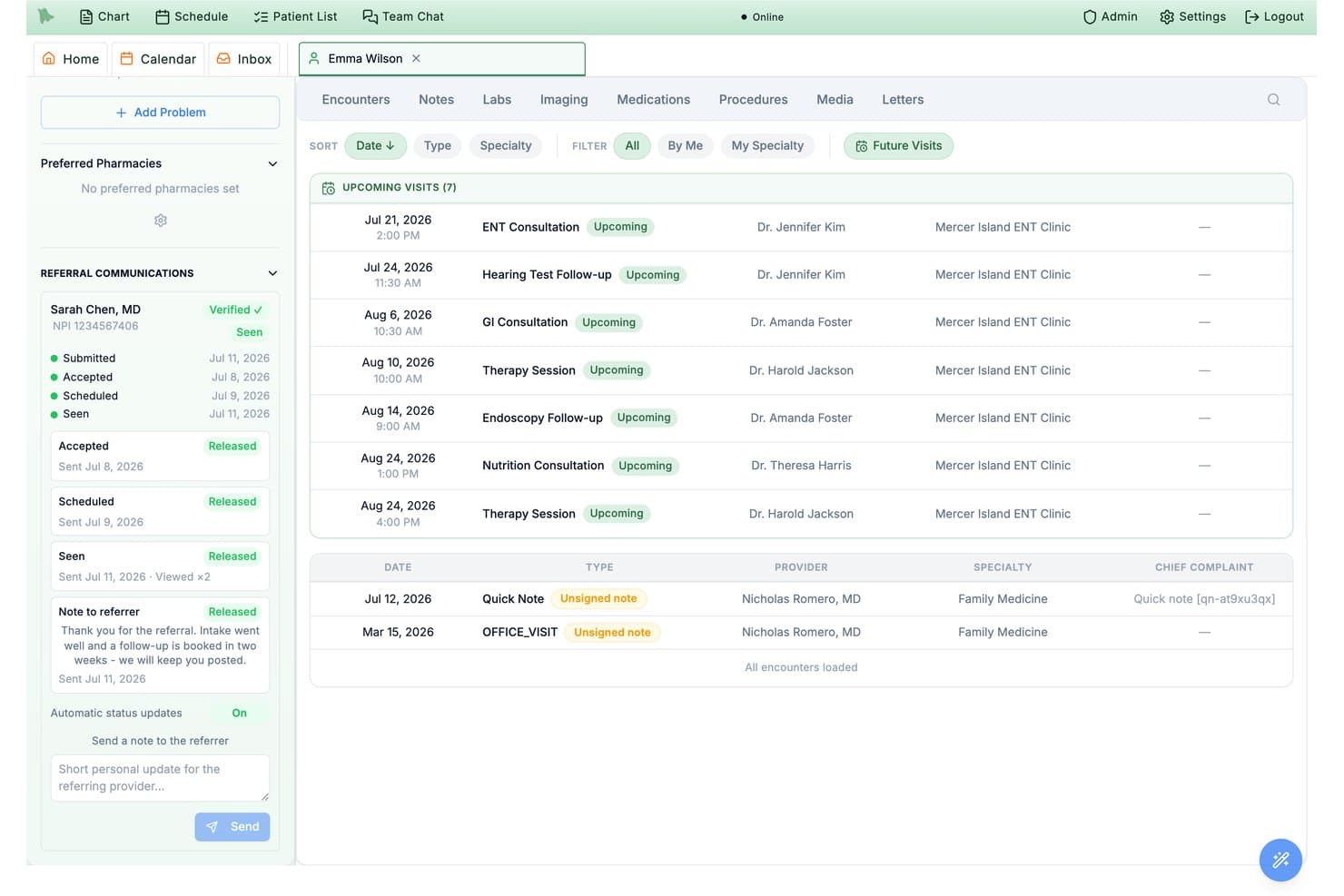
Hero EMR tracks referral communication status and upcoming specialist visits. Hero EMR is a gastroenterology-focused EMR platform that combines GI-specific clinical documentation, structured endoscopy reporting, pathology-linked surveillance recalls, and specialty coding support.
Who Is Hero EMR Best For?
Hero EMR is a strong fit for independent GI practices where billing staff need accurate coding support and clinicians want pathology-linked surveillance built directly into their workflow.
Why I Picked Hero EMR
I've included Hero EMR in my top picks because its GI coding logic goes deeper than most platforms I've seen. Smart Coding Intelligence automatically switches a screening colonoscopy to a therapeutic code when the procedure converts, then applies the correct PT or 33 modifier without manual lookup. I also like that pathology results are matched directly to colonoscopy findings, with surveillance intervals calculated under US Multi-Society Task Force guidelines and recall alerts pushed practice-wide.
Hero EMR Key Features
- AI scribe with disease scoring: Drafts structured GI office visit notes and automatically calculates disease activity scores like Mayo and Harvey-Bradshaw for IBD and hepatology follow-ups.
- Live quality dashboard: Tracks ADR, serrated lesion detection rate, withdrawal time, and prep adequacy against GIQuIC registry benchmarks and ASGE-ACG targets.
- GI dotphrases: Typed shortcuts like
.colonoscopy,.ibdscoremayo, and.liverpanelinsert structured templates and calculators directly into the note editor. - Specimen jar tracking: Assigns each polyp to a specimen jar and tracks it from the procedure through to the matched pathology report.
Hero EMR Integrations
Hero EMR documents integrations with Quest, Epic FHIR, Rayus, Surescripts, Zoom, Office Ally, Availity, Stedi, Optum, and UHC.
Pros and Cons
Pros:
- Structured reports capture polyp-level details
- Pathology findings trigger surveillance recalls
- GI coding handles screening-to-therapeutic conversion
Cons:
- Scope capture and ASC billing undocumented
- GI capabilities lack independent user validation
Learn more about Hero EMR: 10Best for flexible and scalable solutions
NextGEN
- Free demo available
- Pricing upon request
Visit WebsiteCustomer Rating:5/5
The main page of NextGen gives easy access to important links, as well as profile information and the latest news. NextGen is a comprehensive healthcare technology platform that offers solutions including electronic health records (EHR), practice management, and telehealth services. Its flexibility and scalability make it an ideal option for growing practices that need a system that can evolve with their changing needs.
Why I Picked NextGen: I chose NextGen for its exceptional adaptability and scalability. In a field where change is the only constant, having a flexible tool that scales with the growth of your practice is essential. NextGen distinguishes itself with its capacity to adapt to various sizes and types of medical practices, making it the best option for practices seeking a flexible and scalable solution.
Standout features & integrations:
Among the many features of NextGen, its robust EHR, comprehensive practice management, and flexible telehealth services stand out. The platform integrates well with many other medical systems and tools, simplifying workflows and improving patient care.
Pros and Cons
Pros:
- Good integration with other systems and tools
- Comprehensive feature set, including EHR, practice management, and telehealth
- Highly flexible and scalable, adjusting to the size of the practice
Cons:
- User interface could be more intuitive
- Initial setup can be complex
- Some users report a steep learning curve
Learn more about NextGEN:
How I Evaluate Gastroenterology EMR Software
I split my evaluation into three parts, with the most weight on core functionality: documenting GI visits, capturing endoscopy findings, and linking results to patient records. Next, I look for distinctions such as pathology result matching. Finally, I consider support beyond features, including GI-specific migration, endoscopy staff training, and clear pricing.
Core Functionality (Table Stakes For This List)
When I'm selecting tools for my list, I score each one on a scale from 0 (does not offer the functionality) to 5 (excels in this area) for each core functionality listed below. I then convert the total into a percentage to help assess each tool's overall fit, with extra weight on any functionalities I’ve deemed essential.
- GI Documentation (Essential): I look for structured GI templates that capture symptoms, history, and visit-specific details without forcing routine consults into generic notes.
- Endoscopy Reporting (Essential): For colonoscopy and other procedures, I assess structured findings, image links, and outcome documentation tied to the patient record.
- Patient Records: I check whether clinicians can review longitudinal charts with history, medications, allergies, and records from prior visits.
- GI Coding and Billing: I assess whether GI procedure and diagnosis coding workflows support claim preparation and give staff ways to review codes before submission.
- Lab and Pathology: I consider how results are received, matched to the right patient and procedure, and surfaced for follow-up after biopsy.
- Scheduling and Coordination: I look for appointment and procedure calendars connected to patient charts and follow-up workflows across clinical and administrative teams.
Once I have a list of tools that meet the criteria, I consider what sets each platform apart.
Differentiating Factors (What Sets Vendors Apart)
Here's how I compare and contrast different vendors:
Standout Features
Pathology result matching is a big one. I check whether biopsy specimens auto-link back to the originating procedure note so clinicians aren't manually chasing results across systems. Scope integration also matters—I look for direct image capture from endoscopy towers into the report, which saves documentation time and keeps visual findings tied to the patient record. I also evaluate ASC billing workflows, since GI groups running separate procedure sites need clean separation of professional and facility fees.
Beyond Features
I check whether a vendor can handle data migration from legacy GI-specific systems—not just generic EMRs—since losing structured procedure history during a switch is a real risk. Referral connectivity matters too: I look for automated routing of procedure reports and pathology results back to referring providers, especially for post-colonoscopy coordination with primary care or oncology teams. I also evaluate total cost transparency, particularly whether endoscopy reporting or ASC billing modules carry separate fees that aren't obvious in base pricing.
Cum să alegeți software-ul EMR pentru gastroenterologie
Este ușor să vă pierdeți în liste lungi de funcționalități și structuri complexe de prețuri. Pentru a vă ajuta să rămâneți concentrat în timp ce parcurgeți procesul unic de selecție a software-ului, iată o listă de verificare a factorilor de care trebuie să țineți cont:
| Factor | Aspecte de luat în considerare |
|---|---|
| FactorScalabilitate | Aspecte de luat în considerareVa crește acest software odată cu cabinetul dumneavoastră? Luați în considerare volumul viitor de pacienți și dacă instrumentul poate face față unei creșteri fără probleme de performanță. |
| FactorIntegrări | Aspecte de luat în considerareSe conectează la sistemele existente? Verificați compatibilitatea cu sistemele de laborator, software-ul de facturare și alte instrumente pe care le utilizați zilnic. |
| FactorPosibilități de personalizare | Aspecte de luat în considerareÎl puteți adapta la fluxurile dumneavoastră de lucru? Căutați opțiuni pentru personalizarea șabloanelor și interfețelor utilizatorilor, astfel încât să corespundă nevoilor cabinetului dumneavoastră. |
| FactorUșurință în utilizare | Aspecte de luat în considerareEste interfața intuitivă pentru echipa dumneavoastră? Asigurați-vă că reduce timpul de instruire și permite personalului să îndeplinească sarcinile eficient, fără frustrări. |
| FactorImplementare și integrare inițială | Aspecte de luat în considerareCât de fluentă este tranziția? Evaluați suportul oferit în timpul configurării, inclusiv materialele de instruire și asistența pentru migrare. |
| FactorCost | Aspecte de luat în considerareSe încadrează în bugetul dumneavoastră? Comparați nivelurile de preț și luați în considerare atât costurile inițiale, cât și cheltuielile pe termen lung, precum întreținerea și actualizările. |
| FactorMăsuri de protecție a securității | Aspecte de luat în considerareSunt protejate datele pacienților? Verificați conformitatea cu HIPAA și cu alte reglementări și asigurați-vă că sunt implementate criptarea și controalele de acces. |
| FactorCerințe de conformitate | Aspecte de luat în considerareRespectă standardele din domeniu? Verificați respectarea reglementărilor relevante din domeniul sănătății pentru a evita problemele juridice și a asigura siguranța pacienților. |
Ce este software-ul EMR pentru gastroenterologie?
Software-ul EMR pentru gastroenterologie este conceput pentru specialiștii în afecțiuni gastrointestinale. Acesta include șabloane pentru endoscopie, rapoarte de colonoscopie și monitorizarea sănătății digestive. Instrumentul simplifică raportarea și îmbunătățește documentarea bazată pe proceduri.
Caracteristici
Atunci când selectați un software EMR pentru gastroenterologie, urmăriți următoarele caracteristici principale:
- Gestionarea dosarelor pacienților: Organizează și stochează în siguranță informațiile despre pacienți, făcându-le ușor accesibile furnizorilor de servicii medicale.
- Programarea consultațiilor: Simplifică procesul de programare, contribuind la reducerea absențelor și la gestionarea eficientă a fluxului de pacienți.
- Gestionarea conformității: Asigură respectarea reglementărilor din domeniul sănătății, protejând datele pacienților și evitând problemele juridice.
- Șabloane personalizabile: Permite cabinetelor să adapteze documentația la nevoile lor specifice, îmbunătățind acuratețea și fluxul de lucru.
- Analiza datelor: Oferă informații despre performanța cabinetului și rezultatele pacienților, sprijinind luarea deciziilor și elaborarea strategiilor.
- Funcționalități de telemedicină: Facilitează consultațiile la distanță, sporind accesul la îngrijire și confortul pacienților.
- Acces la portalul pacientului: Le permite pacienților să își consulte dosarele medicale și să comunice cu furnizorii de servicii medicale, sporind implicarea acestora.
- Integrarea cu sistemele de laborator: Se conectează la serviciile de laborator pentru un schimb uniform de date, îmbunătățind acuratețea diagnosticării.
- Criptarea securizată a datelor: Protejează informațiile sensibile împotriva accesului neautorizat, asigurând confidențialitatea pacienților.
- Instrumente interactive de instruire: Oferă resurse precum videoclipuri și tutoriale pentru a facilita procesul de integrare a noilor utilizatori.
Beneficii
Implementarea unui software EMR pentru gastroenterologie oferă mai multe beneficii pentru echipa și afacerea dumneavoastră. Iată câteva dintre acestea:
- Îngrijire îmbunătățită a pacienților: Accesul la dosare și istorice organizate ale pacienților permite stabilirea unor diagnostice și planuri de tratament mai precise.
- Eficiență operațională: Funcții precum programarea consultațiilor și analiza datelor contribuie la simplificarea fluxurilor de lucru și la gestionarea eficientă a resurselor.
- Conformitate cu reglementările: Instrumentele de gestionare a conformității asigură respectarea reglementărilor din domeniul sănătății, reducând riscul sancțiunilor.
- Implicare sporită a pacienților: Portalurile pentru pacienți permit o comunicare mai bună și accesul la informațiile medicale, încurajând relații mai strânse între pacienți și furnizorii de servicii medicale.
- Accesibilitate sporită: Funcționalitățile de telemedicină permit consultații la distanță, extinzând opțiunile de îngrijire pentru pacienți.
- Securitatea datelor: Criptarea securizată a datelor protejează informațiile pacienților, asigurând confidențialitatea și încrederea.
- Economii de costuri: Gestionarea eficientă a operațiunilor cabinetului și reducerea documentelor pe suport de hârtie contribuie la diminuarea costurilor totale.
Costuri & prețuri
Selectarea unui software EMR pentru gastroenterologie necesită înțelegerea diferitelor modele de preț și planuri disponibile. Costurile variază în funcție de funcționalități, dimensiunea echipei, suplimente și alți factori. Tabelul de mai jos prezintă pe scurt planurile comune, prețurile medii ale acestora și funcționalitățile incluse de obicei în soluțiile software EMR pentru gastroenterologie:
Tabel comparativ al planurilor pentru software EMR de gastroenterologie
| Tipul planului | Preț mediu | Funcționalități comune |
|---|---|---|
| Tipul planuluiPlan gratuit | Preț mediu$0 | Funcționalități comuneGestionarea de bază a dosarelor pacienților, programarea consultațiilor și asistență limitată. |
| Tipul planuluiPlan personal | Preț mediu$20-$50/utilizator/lună | Funcționalități comuneGestionarea dosarelor pacienților, programarea consultațiilor și gestionarea conformității. |
| Tipul planuluiPlan pentru afaceri | Preț mediu$50-$100/utilizator/lună | Funcționalități comuneȘabloane personalizabile, analiză a datelor și acces la portalul pacientului. |
| Tipul planuluiPlan pentru întreprinderi | Preț mediu$100+/utilizator/lună | Funcționalități comuneSecuritate avansată a datelor, funcționalități de telemedicină și integrare cu sistemele de laborator. |
Întrebări frecvente despre software-ul EMR pentru gastroenterologie
Iată câteva răspunsuri la întrebările frecvente despre software-ul EMR pentru gastroenterologie:
Cum îmbunătățește software-ul EMR pentru gastroenterologie îngrijirea pacienților?
Software-ul EMR pentru gastroenterologie îmbunătățește îngrijirea pacienților asigurând accesul corect și rapid la dosarele pacienților și la rezultatele testelor. Acesta permite echipei dumneavoastră să consulte rapid istoricul pacienților, să gestioneze medicamentele și să monitorizeze rezultatele tratamentului. Acest lucru conduce la luarea unor decizii mai bine informate și îmbunătățește calitatea generală a îngrijirilor oferite.
Cum ajută sistemele EMR la facturare și programări?
Sistemele EMR simplifică facturarea și programările prin automatizarea acestor procese și reducerea erorilor manuale. Acestea se integrează cu software-ul de facturare pentru a asigura transmiterea corectă a cererilor de decontare și oferă instrumente pentru programarea eficientă a consultațiilor. Astfel, cabinetul dumneavoastră economisește timp și își îmbunătățește gestionarea fluxului de numerar.
Se poate integra software-ul EMR cu alte sisteme medicale?
Da, multe soluții EMR pentru gastroenterologie oferă funcții de interoperabilitate care permit integrarea cu alte sisteme medicale. Acestea includ sisteme de laborator, centre de imagistică și alte platforme EHR. Integrarea asigură schimbul neîntrerupt de date, îmbunătățind coordonarea și comunicarea între diferiți furnizori de servicii medicale.
Care sunt măsurile de securitate ale software-ului EMR pentru gastroenterologie?
Software-ul EMR pentru gastroenterologie include de obicei măsuri de securitate precum criptarea datelor, controale de acces și audituri periodice pentru a proteja informațiile pacienților. Asigurați-vă că software-ul respectă reglementări medicale precum HIPAA pentru a proteja datele sensibile și a menține confidențialitatea pacienților.
Cum evaluez costul software-ului EMR?
Pentru a evalua costul software-ului EMR, luați în considerare factori precum modelul de tarifare, taxele de abonament și orice costuri suplimentare pentru funcții sau asistență. Comparați aceste costuri cu beneficiile oferite de software pentru a determina valoarea acestuia pentru cabinetul dumneavoastră. Căutați structuri de tarifare transparente pentru a evita taxele ascunse.