

Software-ul de gestionare a cheltuielilor pentru domeniul medical ajută organizația să urmărească, să controleze și să raporteze cheltuielile companiei pentru activități clinice, administrative și operaționale. Dacă sunteți în căutarea unor modalități de a reduce procesele manuale, de a îmbunătăți conformitatea și de a obține vizibilitate în timp real asupra cheltuielilor, platforma potrivită poate face o diferență măsurabilă.
Având în vedere reglementările stricte, lanțurile complexe de aprobare și necesitatea de a aloca exact costurile, echipele din domeniul medical au nevoie de soluții software ușor de utilizat, care reduc sarcina administrativă și sunt concepute pentru mediul lor unic. Această listă vă va ajuta să comparați instrumente de top pentru gestionarea cheltuielilor, astfel încât să puteți alege software-ul care se potrivește fluxurilor de lucru, vă susține nevoile de conformitate și vă permite să vă concentrați asupra îngrijirii pacienților.
Why Trust Our Software Recommendations
6,700+
Reviews
20
Industry experts
16+
Evaluation factors
14
Years
Our team has been testing and reviewing software since 2012. As medical practice leaders ourselves, we know how difficult—and important—it is to choose the right software.
For this guide, we evaluated tools using hands-on testing and independent research, scoring tools using our selection criteria.
Our reviews reflect our human editorial judgment, not a sales pitch.
Software de gestionare a cheltuielilor pentru domeniul medical – Tabel comparativ
Tabelul de mai jos compară detaliile privind prețurile pentru selecțiile mele principale de software de gestionare a cheltuielilor pentru domeniul medical.
Sorted by: Default
| Tool | Starting Price | Website | |
|---|---|---|---|
Best for multi-site provider spend controls | 4.8 out of 5 | Pricing upon request Free demo available | Website |
Best for corporate card expense feeds | 4.6 out of 5 | $11.99/user/month Free demo available | Website |
Best for travel and expense management in clinics | 4.7 out of 5 | $15/user/month Free plan + Free demo available | Website |
Best for global supplier payment automation | 4.5 out of 5 | $99/month Free demo available | Website |
Best for compliance tracking in clinical environments | Not rated | $7/report Free demo available | Website |
Best for mobile receipt capture by healthcare staff | Not rated | Pricing upon request Free demo available | Website |
Best for grant and fund expense allocation | Not rated | $400/month Free demo available | Website |
Best for AP automation in medical group practices | Not rated | $49/user/month Free plan + free demo available | Website |
Best for real-time policy enforcement on claims | Not rated | $11.99/user/month Free demo available | Website |
Best for multi-location healthcare purchasing control | 4.8 out of 5 | $499/month Free demo available | Website |


Software de gestionare a cheltuielilor pentru domeniul medical – Recenzii
Mai jos sunt rezumatele mele detaliate ale software-urilor de gestionare a cheltuielilor pentru domeniul medical care au ajuns în selecția mea. Recenziile mele oferă o analiză detaliată a funcțiilor, celor mai potrivite cazuri de utilizare și integrărilor fiecărei platforme, pentru a vă ajuta să o găsiți pe cea mai potrivită pentru dumneavoastră.
 Best for multi-site provider spend controls
- Free demo available
- Pricing upon request
Visit WebsiteCustomer Rating:4.8/5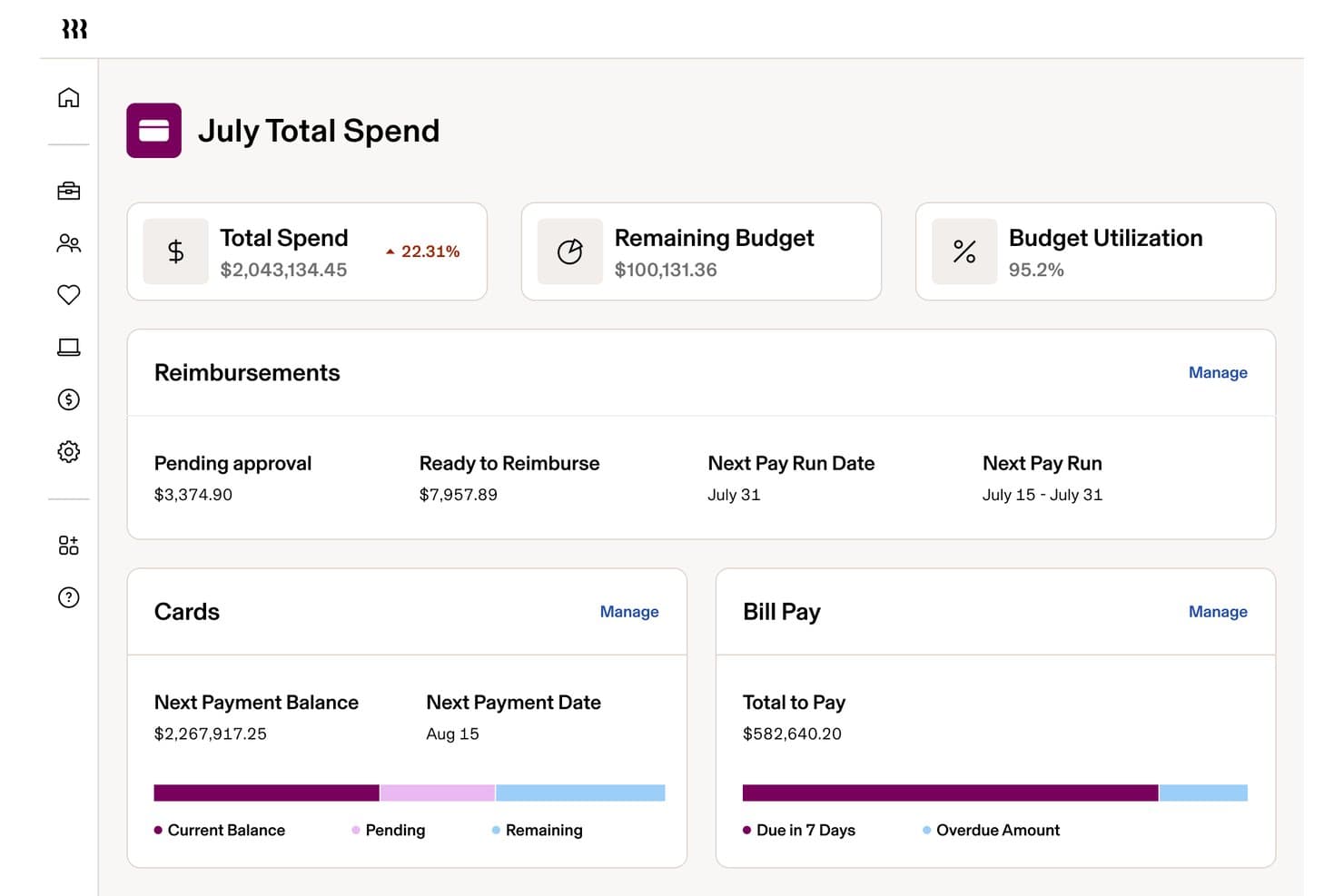
Rippling Spend tracks total spend, reimbursements, and bill pay in one dashboard. Rippling Spend is an expense management platform that unifies corporate cards, reimbursements, bill pay, and travel booking under a single policy engine driven by employee HR data across departments, roles, and locations.
Who Is Rippling Spend Best For?
Rippling Spend is a strong fit for multi-site medical groups and healthcare networks that need granular, HR-driven spend controls across providers, departments, and locations.
Why I Picked Rippling Spend
Rippling Spend earns its spot on my shortlist because of how its HR-driven policy engine handles spend controls across multiple provider locations. I love that you can auto-issue corporate cards with custom limits scoped to a provider's role, site, and department, then have those policies update automatically when staff change positions. For a medical group running several clinics, that kind of granular, location-level control is genuinely hard to replicate with a standalone expense tool.
Rippling Spend Key Features
- Global reimbursement processing: Rippling pays employees and contractors in 185+ countries and 100+ currencies directly through its payroll system, making it practical for organizations with traveling clinicians or locum tenens staff.
- AI-powered receipt capture: The mobile app uses OCR to extract line-item data from receipts, auto-convert currencies, and flag duplicate submissions before they're finalized.
- Role-based spend dashboards: Finance controllers and department heads each see spend data scoped to their level, with pivot tables, custom fields, and ERP-synced exports for month-end reporting.
- Integrated corporate travel booking: Rippling Travel connects flight, hotel, and car rental booking directly to the expense system, with dynamic price caps and 24/7 live travel agent support.
Rippling Spend Integrations
Rippling Spend offers native integrations with QuickBooks Online, Xero, NetSuite, and Sage Intacct, plus 70+ HRIS partner integrations, including Workday, BambooHR, and ADP. No native integrations are listed for Epic, Cerner, or major practice management platforms.
Pros and Cons
Pros:
- AI-powered receipt capture and duplicate detection
- Global reimbursement for traveling clinicians supported
- Granular spend controls for multi-site providers
Cons:
- No pre-built healthcare expense categories
- No HIPAA BAA for expense management data
Learn more about Rippling Spend: Best for corporate card expense feeds
- Free demo available
- From $11.99/user/month (billed annually)
Visit WebsiteCustomer Rating:4.6/5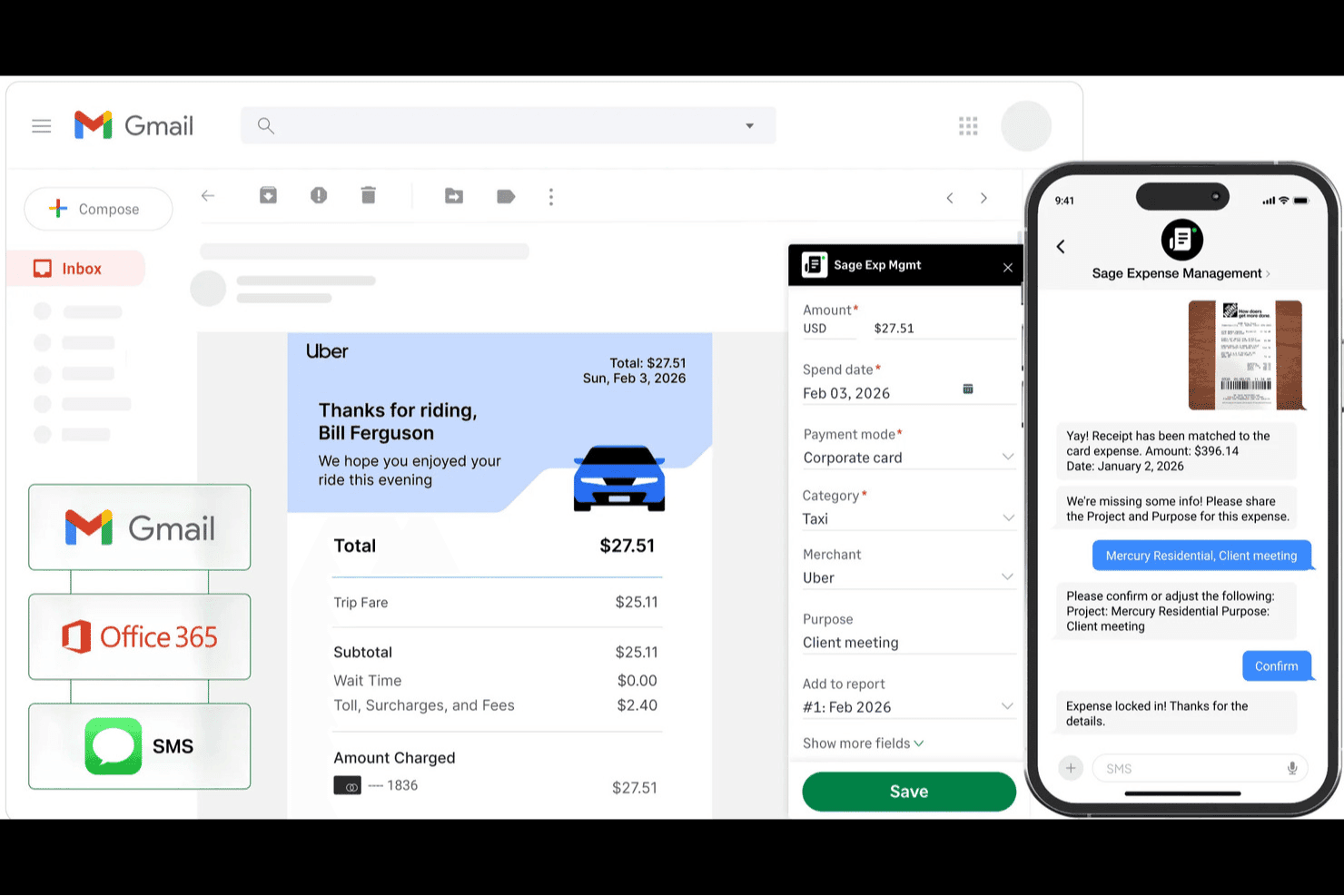
Sage Expense Management auto-captures receipts from Gmail and SMS into expense reports. Sage Expense Management is an SMB-focused expense management platform that automates receipt capture, corporate card reconciliation, approval workflows, and accounting sync across tools like QuickBooks, Xero, and Sage Intacct.
Who Is Sage Expense Management Best For?
Sage Expense Management is a strong fit for finance and accounts payable teams at small and mid-sized healthcare organizations that need to automate corporate card reconciliation and expense reimbursement without switching card providers.
Why I Picked Sage Expense Management
Sage Expense Management earns its spot on my shortlist because of how it handles corporate card expense feeds in real time. When a staff member uses a card, they get an instant text alert and can reply with a receipt photo, which the system then reads and matches to the transaction automatically. I particularly like this for healthcare teams, where card reconciliation across departments or facilities is a constant burden. The Bluegrass Health Partners case is a good example: a 13-group nursing home operator used custom cost-center fields to hit 99% expense tagging accuracy and cut month-end close from 15 days down to 5.
Sage Expense Management Key Features
- Multi-level approval routing: Rules-based approval workflows let you configure routing by amount, category, department, or project, with scheduling reminders for pending approvals.
- Real-time spend policy checks: The policy engine flags missing receipts, duplicate submissions, and budget overruns before an expense report reaches an approver.
- Custom cost center and field tagging: You can create custom dropdowns and fields—like a "Facility" selector—to tag every expense to a specific department, location, or entity.
- Offline mobile expense capture: The mobile app saves expenses, mileage, and reports locally and syncs them automatically once a connection is restored.
Sage Expense Management Integrations
Sage Expense Management offers native integrations with QuickBooks Online, Xero, Sage Intacct, Sage 50 (beta), and Sage 300 CRE. Business plans also include API integrations for custom connections with HR and payroll systems.
Pros and Cons
Pros:
- Offline capture helps traveling clinical staff
- Facility tags support multi-site expense coding
- Real-time card alerts prompt receipt capture
Cons:
- Receipt matching errors can require corrections
- No stated HIPAA or BAA assurance
Learn more about Sage Expense Management (formerly Fyle): Best for travel and expense management in clinics
- Free plan + Free demo available
- From $15/user/month
Visit WebsiteCustomer Rating:4.7/5
Navan streamlines travel booking and expense management for healthcare teams. Navan offers an integrated platform for managing travel bookings and expenses, designed with healthcare clinics and organizations in mind. It appeals to administrators and finance teams who need to control travel costs and simplify reimbursement processes. The tool helps address challenges like policy compliance, real-time expense tracking, and centralized travel management for busy clinical environments.
Who Is Navan Best For?
Navan is a good fit for healthcare clinics and organizations that need to manage staff travel and related expenses in a centralized platform.
Why I Picked Navan
I picked Navan because it brings together travel booking and expense management in one platform, which is especially useful for clinics with staff who travel between locations or attend offsite training. Navan lets you set travel policies, automate approvals, and capture expenses directly from bookings, reducing manual entry and errors. I also appreciate that it provides real-time insights and visibility into travel spend, so finance teams can monitor budgets and ensure compliance. These features make Navan a practical choice for healthcare organizations that need to manage both travel logistics and related expenses efficiently.
Navan Key Features
In addition to its travel and expense management focus for clinics, I also found several other features worth noting:
- Real-time spend tracking: The platform provides up-to-date visibility into all travel and expense transactions as they occur.
- Integrated virtual cards: Navan issues virtual cards for specific purchases, helping control spending and reduce fraud risk.
- Mobile app for on-the-go management: Users can book travel, submit expenses, and approve requests directly from their mobile devices.
- Automated policy enforcement: The system flags out-of-policy bookings and expenses, supporting compliance with clinic guidelines.
Navan Integrations
Integrations include NetSuite, QuickBooks Online, Xero, Sage Intacct, and Workday.
Pros and Cons
Pros:
- Direct sync with major HRIS and ERP tools
- Automated IRS and tax audit compliance
- AI-powered OCR scans healthcare receipts
Cons:
- High cost compared to basic competitors
- Significant GPS battery drain on mobile
Learn more about Navan: Best for global supplier payment automation
- Free demo available
- From $99/month
Visit WebsiteCustomer Rating:4.5/5
Tipalti automates healthcare payments, supplier onboarding, and global compliance. Tipalti is a payment automation platform designed for healthcare organizations that manage complex supplier networks and international payments. It appeals to finance and procurement teams looking to reduce manual payment processing and improve compliance with global regulations. The platform helps address challenges like cross-border payments, supplier onboarding, and payment reconciliation in healthcare environments.
Who Is Tipalti Best For?
Tipalti is a strong choice for healthcare organizations with global supplier networks that need to automate and manage cross-border payments.
Why I Picked Tipalti
I picked Tipalti because it addresses the unique challenges healthcare organizations face when paying suppliers across multiple countries and currencies. The platform automates global payments, manages tax compliance, and supports a wide range of payment methods, which is essential for healthcare finance teams working with international vendors and contractors. I also like that Tipalti includes built-in supplier onboarding and validation tools, reducing the risk of payment errors and fraud. These features make it a practical solution for healthcare organizations that need to optimize and secure their global supplier payment processes.
Tipalti Key Features
Some other features that make Tipalti a strong choice for healthcare organizations include:
- Tax compliance management: The platform collects and validates tax forms, helping organizations meet IRS and global tax requirements.
- Supplier self-service portal: Suppliers can onboard themselves, update payment details, and track payment status without manual intervention from your team.
- Automated invoice processing: Tipalti uses OCR and AI to capture invoice data and match it to purchase orders, reducing manual entry.
- Payment reconciliation: The system automatically reconciles payments with bank records, simplifying month-end close and audit preparation.
Tipalti Integrations
Integrations include Oracle NetSuite, Sage Intacct, Microsoft Dynamics 365, Intuit QuickBooks, Everflow, and LinkTrust.
Pros and Cons
Pros:
- AI-driven 3-way PO matching for clinics
- Automates mass global healthcare payouts
- SOC 1 & 2 plus HIPAA data protection
Cons:
- Sync errors with some legacy EMR systems
- Mobile app lacks deep admin controls
Learn more about Tipalti: Best for compliance tracking in clinical environments
- Free demo available
- From $7/report

SAP Concur automates healthcare expense reporting with compliance and visibility tools. SAP Concur is a cloud-based expense management platform designed for healthcare organizations that need to manage complex spending and regulatory requirements. It appeals to clinical administrators and finance teams who want to automate expense reporting and gain visibility into spending patterns. The tool helps address challenges like policy enforcement, audit readiness, and integrating expense data with other healthcare systems.
Who Is SAP Concur Best For?
SAP Concur suits healthcare organizations and clinical administrators who need to closely track expenses and maintain regulatory compliance across multiple departments.
Why I Picked SAP Concur
What makes SAP Concur a strong choice for healthcare expense management is its focus on compliance tracking in clinical environments. I picked it because it offers automated policy enforcement, audit trails, and real-time alerts for out-of-policy expenses, which are essential for organizations facing strict regulatory scrutiny. The platform also supports detailed documentation and digital receipt capture, making it easier for healthcare teams to maintain accurate records for audits. These features help healthcare administrators reduce compliance risks and ensure spending aligns with both internal policies and external regulations.
SAP Concur Key Features
Some other features that make SAP Concur valuable for healthcare expense management include:
- Mobile expense capture: Users can submit receipts and expenses directly from their mobile devices for faster processing.
- Automated reimbursement workflows: The platform routes expense reports through customizable approval chains to match healthcare organization structures.
- Integration with travel booking tools: Connects business travel bookings with expense reporting to ensure all costs are tracked and categorized.
- Multi-currency and multi-language support: Supports global healthcare organizations with staff and operations in multiple countries.
SAP Concur Integrations
Integrations include SAP, ADP, NetSuite, QuickBooks, Xero, and Microsoft Dynamics 365.
Pros and Cons
Pros:
- Integrates with major ERP and HR systems
- Offers automated policy enforcement for expenses
- Supports digital receipt capture for mobile users
Cons:
- Setup complexity for multi-entity healthcare groups
- Occasional delays in expense reimbursement processing
Learn more about SAP Concur: Best for mobile receipt capture by healthcare staff
- Free demo available
- Pricing upon request

Emburse streamlines healthcare expense capture, approval, and reimbursement compliance. Emburse offers expense management solutions designed for healthcare organizations with distributed teams and mobile staff. It appeals to administrators and finance professionals who need to capture, approve, and reimburse expenses quickly while maintaining compliance. The platform helps address challenges like lost receipts, manual data entry, and policy enforcement in busy clinical environments.
Who Is Emburse Best For?
Emburse is a good fit for healthcare organizations with mobile staff who need to capture and manage expenses on the go.
Why I Picked Emburse
I chose Emburse because it offers mobile receipt capture that fits the fast-paced, on-the-go nature of healthcare work. Staff can snap photos of receipts from their phones and upload them instantly, which helps reduce lost paperwork and speeds up reimbursement. I also like that Emburse uses OCR technology to extract data from receipts, minimizing manual entry and errors. These features make it much easier for healthcare teams to manage expenses while moving between clinics, patient sites, or administrative offices.
Emburse Key Features
Some other features that make Emburse a strong fit for healthcare organizations include:
- Automated expense report creation: The platform generates expense reports automatically from uploaded receipts and card transactions.
- Custom approval workflows: Administrators can set up multi-level approval processes tailored to organizational policies.
- Integration with accounting systems: Emburse connects with popular accounting and ERP platforms to sync expense data.
- Mileage tracking: Users can log and calculate mileage expenses directly within the platform for reimbursement.
Emburse Integrations
Integrations include NetSuite, QuickBooks Online, Xero, Sage Intacct, and Amazon Business.
Pros and Cons
Pros:
- AI helps flag medical policy violations
- Automates audit trails for healthcare
- Integrates with CMS and NPI databases
Cons:
- High implementation fees for small labs
- Customer support can be slow to respond
Learn more about Emburse: Best for grant and fund expense allocation
- Free demo available
- From $400/month

DATABASICS is a cloud expense platform for healthcare finance and compliance tracking. DATABASICS is a cloud-based expense management platform designed for healthcare organizations with complex funding and reporting needs. It’s well-suited for finance teams and administrators who need to track expenses across multiple grants, funds, or cost centers. The platform helps address challenges like compliance, transparency, and detailed allocation of healthcare spending.
Who Is DATABASICS Best For?
DATABASICS is a strong fit for healthcare finance teams that need to allocate and track expenses across multiple grants, funds, or cost centers.
Why I Picked DATABASICS
I chose DATABASICS because it offers detailed tools for allocating expenses to specific grants and funds, which is a common challenge in healthcare finance. The platform lets you tag and split expenses across multiple funding sources, making it easier to stay compliant with grant requirements and internal policies. I also appreciate that DATABASICS provides built-in reporting for fund tracking and audit support, so finance teams can quickly generate documentation for oversight or reimbursement. These features make it a practical choice for healthcare organizations managing complex funding streams.
DATABASICS Key Features
In addition to its focus on grant and fund expense allocation, I also found several other features that support healthcare organizations:
- Mobile receipt capture: Users can upload receipts directly from their mobile devices, making it easier to document expenses on the go.
- Automated policy enforcement: The system flags out-of-policy expenses automatically, helping teams maintain compliance with internal and external regulations.
- Multi-currency support: DATABASICS allows users to submit and process expenses in multiple currencies, which is useful for organizations with international operations or funding.
- Custom approval workflows: Administrators can configure multi-level approval processes to match their organization’s specific expense review requirements.
DATABASICS Integrations
Integrations include Sage Intacct, NetSuite, Microsoft Dynamics 365, Paylocity, and Oracle Financial.
Pros and Cons
Pros:
- Combines time and expense in one app
- Highly responsive 24/7 customer support
- Automated work hour and audit rules
Cons:
- Custom report builder is not intuitive
- Higher entry cost for smaller clinics
Learn more about DATABASICS: 8Best for AP automation in medical group practices
BILL
- Free plan + free demo available
- From $49/user/month

BILL automates accounts payable for healthcare teams, streamlining payments and approvals. BILL offers accounts payable automation designed for medical group practices and healthcare organizations. It appeals to finance teams and administrators who need to manage vendor payments, approvals, and documentation in one place. The platform helps reduce manual data entry and supports compliance with healthcare financial processes.
Who Is BILL Best For?
BILL is a good fit for finance teams in mid-sized and large medical group practices for accounts payable automated workflows.
Why I Picked BILL
I picked BILL because it automates accounts payable tasks that are often time-consuming for medical group practices. The platform lets you digitize invoice capture, set up multi-level approval workflows, and schedule payments to vendors directly from the system. I also appreciate that BILL provides audit trails and document storage, which helps healthcare organizations stay organized and compliant. These features make it easier for finance teams to manage high volumes of invoices and payments without manual paperwork.
BILL Key Features
In addition to its AP automation capabilities for medical group practices, I also found several other features that support healthcare finance teams:
- Digital document storage: The platform stores invoices, receipts, and supporting documents in a secure, searchable digital archive.
- Custom payment approval workflows: Administrators can configure multi-step approval processes to match internal controls and compliance needs.
- Vendor management tools: BILL allows you to onboard, manage, and communicate with vendors directly within the platform.
- Automatic payment scheduling: Users can set up recurring or one-time payments to vendors, reducing manual intervention.
BILL Integrations
Integrations include NetSuite, QuickBooks Online, Xero, Sage Intacct, Tallie, and Intacct.
Pros and Cons
Pros:
- Real-time visibility into medical spend
- Direct sync with top healthcare ERPs
- Roles-based access protects patient data
Cons:
- Occasional sync lags with accounting
- Requires specific setup for HIPAA use
Learn more about BILL: Best for real-time policy enforcement on claims
- Free demo available
- From $11.99/user/month (billed annually)

Sage Expense Management automates healthcare expense claims while ensuring compliance and control. Sage Expense Management offers healthcare organizations a way to automate and control expense claims across departments. It’s designed for finance teams and administrators who need to manage spending while maintaining compliance with healthcare regulations. The platform helps address challenges like policy adherence, real-time visibility, and reducing manual errors in expense processing.
Who Is Sage Expense Management Best For?
Sage Expense Management is a strong choice for healthcare finance teams that need strict, automated policy controls on expense claims.
Why I Picked Sage Expense Management
I picked Sage Expense Management because it enforces expense policies in real time, which is especially important for healthcare organizations with strict compliance requirements. The platform automatically checks every claim against custom rules as expenses are submitted, flagging violations before they reach the approval stage. I also like that it provides instant feedback to users, helping prevent errors and reducing back-and-forth between staff and finance teams. This level of automation supports healthcare administrators who need to maintain tight control over spending and regulatory adherence and maintain operational efficiency.
Sage Expense Management Key Features
Some other features that make Sage Expense Management useful for healthcare expense workflows include:
- Automated receipt scanning: Users can upload receipts, and the system extracts and matches data to expense claims.
- Multi-level approval workflows: Administrators can set up custom approval chains to match organizational hierarchies.
- Real-time spend analytics: Finance teams can access dashboards that break down spending by department, category, or user.
- Mileage and per diem tracking: The platform supports healthcare staff who need to log travel expenses according to organization policies.
Sage Expense Management Integrations
Integrations include Sage Intacct, Sage 300 CRE, Sage 50, QuickBooks Online, and American Express.
Pros and Cons
Pros:
- Real-time visibility into clinic spend
- Built-in audit trails for compliance
- HIPAA-compliant data security
Cons:
- Mobile app lacks full web functionality
- Complex initial configuration required
Learn more about Sage Expense Management: 10Best for multi-location healthcare purchasing control
Precoro
- Free demo available
- From $499/month (billed annually)
Visit WebsiteCustomer Rating:4.8/5
Precoro helps healthcare teams manage purchasing, approvals, and budgets across locations. Precoro gives healthcare organizations a way to manage purchasing and business expenses across multiple locations from a single platform. It’s a strong fit for finance teams and administrators who need to coordinate procurement, approvals, and budget tracking in complex healthcare environments. The tool helps reduce manual paperwork and supports clear oversight of company and employee spending across departments or facilities.
Who Is Precoro Best For?
Precoro fits healthcare organizations with multiple locations that need centralized control over purchasing and expense approvals.
Why I Picked Precoro
What stands out about Precoro is how it addresses the challenges of managing purchasing and expenses across multiple healthcare locations. I picked it because it lets you set up location-specific approval workflows and budget controls, so each facility can follow its own rules while still reporting into a central system. The platform also tracks orders, deliveries, and invoices by site, which helps healthcare finance teams monitor spending and compliance at both the local and organizational level. This level of control is especially important for healthcare groups that need to balance autonomy with oversight.
Precoro Key Features
In addition to its multi-location purchasing controls, Precoro offers several other features relevant to healthcare expense management:
- Catalog management: Maintain a centralized catalog of approved suppliers and products for consistent purchasing across all locations.
- Three-way matching: Automatically match purchase orders, invoices, and delivery receipts to reduce errors and prevent duplicate payments.
- Custom reporting: Generate detailed reports on spending, supplier performance, and order history tailored to healthcare needs.
- Role-based access controls: Assign permissions based on job function to protect sensitive financial and procurement data.
Precoro Integrations
Integrations include NetSuite, QuickBooks Online, Xero, and Sage Intacct.
Pros and Cons
Pros:
- Customizable approval workflows for healthcare compliance
- Centralizes supplier and contract management
- Offers three-way matching for invoices
Cons:
- Catalog setup can be time-consuming for large systems
- Reporting customization can require technical support
Learn more about Precoro:
Alte software-uri de gestionare a cheltuielilor pentru domeniul medical
Iată câteva opțiuni suplimentare de software de gestionare a cheltuielilor pentru domeniul medical care nu au ajuns în selecția mea, dar merită totuși analizate:
How I Evaluate Expense Management Software for Healthcare
I evaluate these tools in two layers—baseline must-haves like HIPAA compliance and receipt automation, then the differentiators that matter most to practice administrators managing multi-site spend.
Core Functionality (Table Stakes For This List)
When I'm selecting tools for my list, I rank each one on a scale from 0 (does not offer the functionality) to 5 (excels in this area) for each core functionality listed below. Then, I calculate the tool's total score into a percentage. Each tool needs to achieve a minimum total score of 55% to be considered for inclusion.
- Healthcare Expense Categorization: I check whether a tool offers medical-specific categories like CME, malpractice insurance, and clinical supplies rather than forcing you to build them from scratch.
- HIPAA-Compliant Data Handling: Receipts and invoices tied to patient care can contain PHI, so I look for signed BAAs, role-based access controls, and audit logging.
- Automated Receipt & Reimbursement: I evaluate the full workflow from mobile receipt capture through OCR extraction to approval routing, especially for physician and traveling clinician reimbursements.
- Corporate Card & Spend Controls: Practice administrators need to set spend limits by department or provider, so I look at card issuance options and how granular the policy controls are.
- Multi-Location & Provider Tracking: Group practices and MSOs need expense allocation across clinics, departments, and individual providers. I evaluate how each tool handles cost center mapping and consolidated reporting.
- Healthcare Accounting Integrations: Connecting to platforms like QuickBooks, Sage Intacct, or NetSuite matters, but I also check for compatibility with practice management systems like Athenahealth or NextGen.
Once I have a list of tools that meet this criteria, I consider what sets each platform apart.
Differentiating Factors (What Sets Vendors Apart)
Here's how I compare and contrast different vendors:
Standout Features
Dedicated CME and credentialing tracking is a big differentiator. I look for tools that let you tag licensing fees and education spend by provider with renewal reminders built in. AI-powered policy enforcement also matters, especially for flagging duplicate submissions or out-of-policy charges before they reach an approver. For practices tied to research grants or value-based care contracts, I evaluate whether a tool can tag expenses to specific payers or funding sources for clean reconciliation at audit time.
Beyond Features
I consider how well a platform fits your practice size. A solo dermatology office has very different needs than a multi-specialty group adding locations through acquisition. Implementation support also carries weight—I look for vendors that offer pre-built chart of accounts templates and onboarding resources designed for clinical staff who aren't finance professionals. Security posture rounds things out; beyond HIPAA compliance, certifications like SOC 2 Type II and HITRUST signal that a vendor takes healthcare data governance seriously.
Cum să alegeți software-ul de gestionare a cheltuielilor pentru domeniul medical
Este ușor să vă pierdeți în liste lungi de funcții și structuri complexe de prețuri. Pentru a vă ajuta să rămâneți concentrați în timp ce parcurgeți procesul unic de selecție a software-ului, iată o listă de verificare a factorilor de care trebuie să țineți cont:
| Factor | Aspecte de luat în considerare |
| Scalabilitate | Va putea software-ul să gestioneze volumele actuale și estimate de facturi și plăți pe măsură ce cabinetul dumneavoastră se dezvoltă? |
| Integrări | Se conectează instrumentul nativ la sistemele dumneavoastră EHR, de contabilitate și de salarizare pentru a evita introducerea manuală a datelor? |
| Posibilități de personalizare | Puteți adapta fluxurile de aprobare, rolurile utilizatorilor și rapoartele pentru a corespunde structurii și politicilor organizației dumneavoastră? |
| Ușurință în utilizare | Vor putea personalul clinic și cel administrativ să utilizeze sistemul cu o instruire sau o întrerupere minimă? |
| Implementare și configurare inițială | Cât timp va dura să începeți utilizarea și ce resurse sau sprijin oferă furnizorul în timpul configurării? |
| Cost | Sunt toate costurile transparente, inclusiv taxele de configurare, asistență și integrare? Se potrivește prețul bugetului și tiparelor dumneavoastră de utilizare? |
| Măsuri de securitate | Oferă software-ul gestionarea datelor conformă cu HIPAA, piste de audit și controale ale accesului utilizatorilor pentru a proteja informațiile sensibile? |
| Cerințe de conformitate | Poate sistemul să susțină nevoile dumneavoastră de documentare, păstrare a datelor și audit pentru reglementările din domeniul medical și cerințele plătitorilor? |
Ce este software-ul de gestionare a cheltuielilor pentru domeniul medical?
Software-ul de gestionare a cheltuielilor pentru domeniul medical este un instrument digital care ajută organizațiile medicale să urmărească, să aprobe și să documenteze cheltuielile legate de operațiuni, consumabile și servicii. Aceste sisteme automatizează procesarea facturilor, gestionează plățile către furnizori și mențin conformitatea cu reglementările din domeniul medical. Prin centralizarea datelor și fluxurilor de lucru privind cheltuielile, acestea susțin raportarea exactă, reduc erorile manuale și ajută echipele medicale să mențină controlul financiar în toate departamentele și unitățile.
Funcțiile software-ului de gestionare a cheltuielilor pentru domeniul medical
Când selectați software-ul de gestionare a cheltuielilor pentru domeniul medical, urmăriți următoarele funcții esențiale:
- Capturarea facturilor: Digitalizează și importă facturi din e-mailuri, scanări sau încărcări, reducând introducerea manuală a datelor și ajutând echipele să proceseze rapid volume mari de facturi ale furnizorilor.
- Fluxuri de aprobare: Direcționează cheltuielile prin lanțuri de aprobare personalizabile, pe mai multe niveluri, pentru a asigura conformitatea cu politicile interne și cerințele de reglementare.
- Gestionarea furnizorilor: Centralizează datele de contact ale furnizorilor, condițiile de plată și istoricul tranzacțiilor, facilitând urmărirea relațiilor și soluționarea problemelor de plată.
- Programarea plăților: Permite utilizatorilor să stabilească datele de plată, să automatizeze plățile recurente și să gestioneze fluxul de numerar prin alinierea plăților cu ciclurile bugetare.
- Stocarea documentelor: Stochează în siguranță chitanțe, contracte și documente justificative, oferind acces facil pentru audituri și verificări de conformitate.
- Rapoarte de cheltuieli: Generează rapoarte detaliate privind cheltuielile pe departament, furnizor sau categorie, sprijinind analiza bugetară și planificarea financiară.
- Jurnale de audit: Urmărește fiecare acțiune efectuată asupra unei cheltuieli sau facturi, creând o evidență transparentă pentru conformitate și verificare internă.
- Capacități de integrare: Se conectează la software de contabilitate, sisteme de salarizare și sisteme EHR pentru a sincroniza datele și a reduce introducerea duplicată pe diferite platforme.
- Permisiuni pentru utilizatori: Permite administratorilor să controleze accesul la date financiare sensibile prin atribuirea de roluri și permisiuni în funcție de responsabilitățile postului.
- Acces mobil: Permite personalului să verifice, să aprobe sau să trimită cheltuieli de pe smartphone-uri sau tablete, sprijinind fluxurile de lucru la distanță și în deplasare.
Funcții AI comune ale software-ului de gestionare a cheltuielilor pentru domeniul medical
Pe lângă funcțiile standard ale software-ului de gestionare a cheltuielilor pentru domeniul medical prezentate mai sus, multe dintre aceste soluții integrează AI cu funcții precum:
- Extragerea automată a datelor: Utilizează AI pentru a citi și extrage detalii esențiale din facturi, chitanțe și alte documente, reducând introducerea manuală și minimizând erorile.
- Detectarea anomaliilor: Analizează continuu tiparele de cheltuieli pentru a semnala tranzacțiile neobișnuite sau potențialele fraude, ajutând organizațiile medicale să mențină conformitatea și integritatea financiară.
- Direcționarea inteligentă a aprobărilor: Învață din deciziile istorice de aprobare pentru a sugera sau automatiza direcționarea cheltuielilor către persoanele potrivite pentru aprobare, accelerând timpul de procesare.
- Analiza predictivă a fluxului de numerar: Aplică modele AI pentru a prognoza cheltuielile viitoare și necesarul de numerar pe baza datelor istorice, sprijinind planificarea financiară proactivă.
- Detectarea duplicatelor: Identifică facturile sau cererile de rambursare potențial duplicate prin compararea detaliilor documentelor, reducând riscul plăților duble.
Beneficiile software-ului de gestionare a cheltuielilor pentru domeniul medical
Implementarea software-ului de gestionare a cheltuielilor pentru domeniul medical oferă mai multe beneficii echipei și companiei dumneavoastră. Iată câteva dintre avantajele pe care le puteți aștepta:
- Conformitate îmbunătățită: Fluxurile automate de aprobare și jurnalele de audit ajută organizația să respecte reglementările din domeniul medical și cerințele politicilor interne.
- Procesarea mai rapidă a facturilor: Capturarea digitală și extragerea datelor bazată pe AI reduc introducerea manuală, accelerând întregul ciclu de la factură la plată.
- Vizibilitate financiară mai bună: Rapoartele și analizele în timp real oferă echipelor financiare o imagine clară asupra cheltuielilor din toate departamentele și de la toți furnizorii.
- Reducerea riscului de erori: Detectarea automată a duplicatelor și alertele privind anomaliile minimizează posibilitatea plăților duble sau a tranzacțiilor frauduloase.
- Gestionarea simplificată a documentelor: Stocarea centralizată a facturilor, chitanțelor și contractelor facilitează recuperarea documentelor pentru audituri sau verificări.
- Integrare îmbunătățită: Conexiunile fără întreruperi cu sistemele de contabilitate, salarizare și EHR elimină silozurile de date și reduc volumul de muncă pentru reconcilierea manuală.
- Fluxuri de lucru scalabile: Lanțurile de aprobare și permisiunile pentru utilizatori personalizabile susțin dezvoltarea și se adaptează structurilor organizaționale în schimbare.
Costurile și prețurile software-ului de gestionare a cheltuielilor pentru domeniul medical
Selectarea software-ului de gestionare a cheltuielilor pentru domeniul medical necesită înțelegerea diferitelor modele și planuri de tarifare disponibile. Costurile variază în funcție de funcții, dimensiunea echipei, suplimente și alți factori. Tabelul de mai jos sintetizează planurile comune, prețurile medii ale acestora și funcțiile incluse de obicei în soluțiile software de gestionare a cheltuielilor pentru domeniul medical:
Tabel comparativ al planurilor pentru software-ul de gestionare a cheltuielilor pentru domeniul medical
| Tipul planului | Preț mediu | Funcții comune |
| Plan gratuit | $0 | Capturarea de bază a facturilor, stocarea limitată a documentelor, acces pentru un singur utilizator și raportare simplă. |
| Plan personal | $15-$49/utilizator/lună | Asistență pentru mai mulți utilizatori, fluxuri de aprobare de bază, raportare standard și integrări limitate. |
| Plan pentru companii | $100-$999/lună | Lanțuri de aprobare avansate, gestionarea furnizorilor, integrarea cu sistemele de contabilitate și jurnale de audit. |
| Plan pentru întreprinderi | Personalizat | Fluxuri de lucru personalizate, securitate îmbunătățită, instrumente de conformitate, asistență dedicată și analize avansate. |
Software de gestionare a cheltuielilor pentru întrebări frecvente din domeniul sănătății
Iată câteva răspunsuri la întrebările frecvente despre software-ul de gestionare a cheltuielilor pentru domeniul sănătății:
Cum ajută software-ul de gestionare a cheltuielilor la respectarea cerințelor de conformitate din domeniul sănătății?
Software-ul de gestionare a cheltuielilor contribuie la respectarea cerințelor de conformitate prin impunerea fluxurilor de aprobare, stocarea pistelor de audit și asigurarea gestionării documentelor conforme cu HIPAA. Aceste funcții facilitează îndeplinirea cerințelor de reglementare și pregătirea pentru audituri.
Se poate integra software-ul de gestionare a cheltuielilor cu sistemele electronice de evidență a sănătății (EHR)?
Da, multe soluții de gestionare a cheltuielilor oferă integrări cu sistemele EHR. Acest lucru permite partajarea fără întreruperi a datelor între sistemele financiare și cele clinice, reducând introducerea manuală a datelor și sprijinind urmărirea exactă a costurilor.
Ce aspecte de securitate ar trebui să urmărească organizațiile din domeniul sănătății la software-ul de gestionare a cheltuielilor?
Urmăriți funcții precum gestionarea datelor conformă cu HIPAA, controale privind accesul utilizatorilor, criptare și jurnale de audit detaliate. Aceste măsuri de protecție securizează informațiile financiare sensibile și informațiile referitoare la pacienți împotriva accesului neautorizat sau a breșelor de securitate.
Este important accesul mobil pentru gestionarea cheltuielilor din domeniul sănătății?
Da, accesul mobil le permite cadrelor medicale și personalului să trimită, să verifice sau să aprobe cheltuieli din mers. Această flexibilitate este deosebit de utilă pentru echipele care lucrează în mai multe locații sau în medii clinice cu ritm intens.
Cât durează implementarea software-ului de gestionare a cheltuielilor într-un cadru medical?
Durata implementării variază, însă majoritatea soluțiilor bazate pe cloud pot fi configurate în câteva săptămâni. Factori precum migrarea datelor, necesitățile de integrare și instruirea personalului pot influența durata totală, așa că planificați o implementare etapizată, dacă este necesar.