

Ao navegar pelo complexo panorama dos recursos humanos nos cuidados de saúde, percebi que um software fiável e eficiente pode fazer toda a diferença. O software adequado pode fazer maravilhas pela sua prática — na gestão de colaboradores, na conformidade e nos fluxos de trabalho.
Estas soluções de software simplificam o recrutamento, melhoram a conformidade, agilizam a integração, automatizam tarefas rotineiras e criam um ambiente onde os cuidados prestados aos doentes e a eficiência dos membros da equipa coexistem harmoniosamente. Se se tem sentido assoberbado pelos desafios dos recursos humanos, como acompanhar as alterações constantes na conformidade, gerir turnos variados ou manter uma equipa satisfeita, estas soluções de software são a resposta.
Why Trust Our Software Recommendations
6,700+
Reviews
20
Industry experts
16+
Evaluation factors
14
Years
Our team has been testing and reviewing software since 2012. As medical practice leaders ourselves, we know how difficult—and important—it is to choose the right software.
For this guide, we evaluated tools using hands-on testing and independent research, scoring tools using our selection criteria.
Our reviews reflect our human editorial judgment, not a sales pitch.
Tabela de comparação de software de RH para cuidados de saúde
A tabela abaixo compara os detalhes de preços das minhas principais seleções de software de RH para cuidados de saúde.
| Tool | Best For | Trial Info | Price | ||
|---|---|---|---|---|---|
| 1 | Best for managing complex scheduling | Free demo available | Pricing upon request | Website | |
| 2 | Best for integrated time tracking with payroll sync | Free demo available | From $8/user/month | Website | |
| 3 | Best for multi-state healthcare payroll | Free demo available | From $35/user/month + $89/month platform fee | Website | |
| 4 | Best for HR compliance in regulated industries | Free demo available | From $5/user/month | Website | |
| 5 | Best for advanced analytics in benefits management | No free trial available | Pricing upon request | Website | |
| 6 | Best for communication with secure messaging | Free plan available | From $29/month (billed annually) | Website | |
| 7 | Best for continuous feedback in healthcare | Free demo available | From $5/user/month (billed annually) | Website | |
| 8 | Best for employee data management | 15-day free trial + free demo available | From $299/month (billed annually) | Website | |
| 9 | Best for ensuring compliance with training and certifications | Free demo available | Pricing upon request | Website | |
| 10 | Best for healthcare recruitment companies | Free demo available | Pricing upon request | Website |


Avaliações do melhor software de RH para cuidados de saúde
Apresentamos abaixo os meus resumos detalhados do melhor software de RH para cuidados de saúde que entrou na minha lista restrita. As minhas avaliações oferecem uma análise detalhada das principais funcionalidades, vantagens & desvantagens, integrações e casos de utilização ideais de cada ferramenta, para o ajudar a encontrar a melhor opção para si.
 Best for managing complex scheduling
- Free demo available
- Pricing upon request
Visit WebsiteCustomer Rating:4.3/5
Paylocity's dashboard offers employee self-service features and comprehensive payroll and expense management. Paylocity is a cloud-based human resources and payroll software solution designed to meet the unique needs of a wide range of businesses, including healthcare organizations. It offers a comprehensive suite of tools to help you manage staffing challenges and complex scheduling, ensuring your team can focus on delivering quality patient care.
Why I Picked Paylocity: Its user-friendly interface helps manage complex HR and payroll tasks, including employee scheduling, benefits administration, and compliance tracking, which are essential in the healthcare industry. The software ensures accurate payroll management and provides efficient scheduling tools for staff to manage shifts. Paylocity also focuses on employee engagement with features like customizable training programs, social collaboration hubs, and recognition tools, fostering a positive work environment and reducing turnover.
Standout features & integrations:
Other features include employee self-service, which gives your staff secure, 24/7 access to payroll and HR data via desktop or the Paylocity mobile app. The platform also offers a compliance dashboard, providing quick access to work authorizations, EEO and FLSA compliance data, industry news, and certifications. Integrations include Salesforce, Slack, Marketo, NetSuite, ServiceNow, Workday, Sage Intacct, Xero, Oracle NetSuite, Microsoft Teams, BambooHR, and Greenhouse.
Pros and Cons
Pros:
- Mobile app accessibility
- On-demand payment options
- Comprehensive tax filing
Cons:
- Tax services limited to US jurisdictions
- No free trial option available
Learn more about Paylocity: Best for integrated time tracking with payroll sync
- Free demo available
- From $8/user/month
Visit WebsiteCustomer Rating:4.6/5
Combined payroll, benefits, PTO requests, company directory, and employee self-service features displayed across desktop and mobile app interfaces. Justworks is a healthcare HR software platform that combines payroll, benefits administration, compliance management, time tracking, and HR support in one system.
Who Is Justworks Best For?
Justworks is a good fit for healthcare organizations and clinics that need a unified HR, payroll, and compliance solution for managing employees across multiple locations.
Why I Picked Justworks
I’ve included Justworks in my top picks because its integrated time tracking syncs directly with payroll, which is essential for healthcare teams with hourly staff. My team uses the built-in time tracking to capture hours and overtime, and I can review and approve timesheets before payroll runs. I also rely on its audit trails to verify shift records and ensure compliance with labor laws.
Justworks Key Services
- Benefits administration: Manage medical, dental, vision, and other employee benefits in one place.
- HR support center: Access live HR experts for compliance and policy questions.
- Automated onboarding: Digitally onboard new hires with customizable workflows and document collection.
- PTO tracking: Set up and monitor paid time off policies and approvals for your team.
Justworks Integrations
Native integrations are not clearly documented. Justworks offers an API for custom integrations.
Pros and Cons
Pros:
- Centralized benefits administration for healthcare teams
- Automated payroll with tax filing included
- IRS-certified and ESAC-accredited PEO services
Cons:
- Benefits options may not fit all regions
- Custom reporting options are somewhat restricted
Learn more about Justworks: 3Best for multi-state healthcare payroll
Warp
- Free demo available
- From $35/user/month + $89/month platform fee
Visit WebsiteCustomer Rating:4.1/5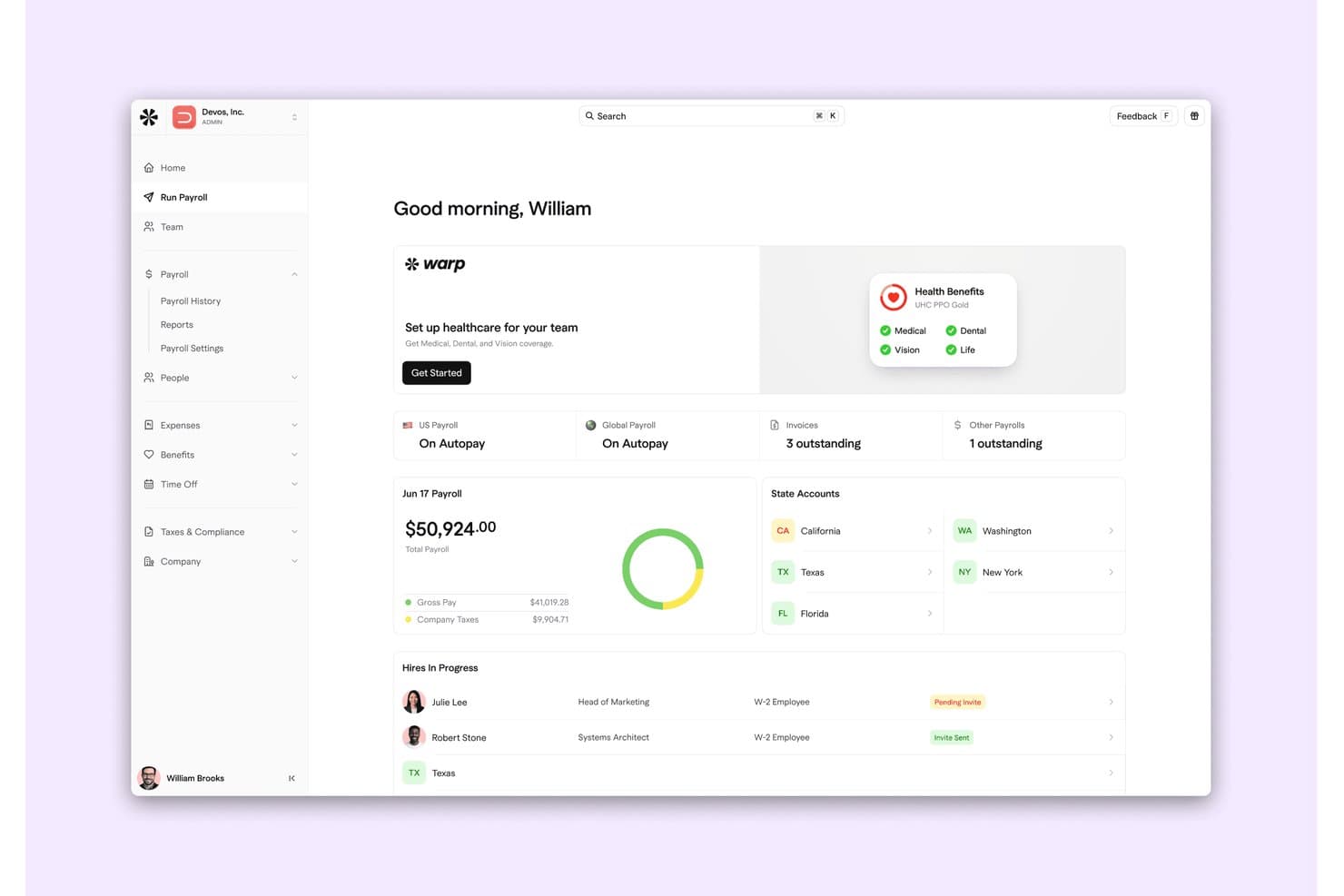
Here's where you can see the payroll summary, health benefits setup, and hiring progress in Warp. Warp is an employee management platform that combines payroll processing, HRIS, benefits administration, tax compliance automation, and time tracking for healthcare and life sciences organizations operating across multiple states.
Who Is Warp Best For?
Warp suits healthcare and life sciences companies—telehealth providers, dental groups, and biotech teams—that run payroll across multiple states and need tax compliance handled automatically.
Why I Picked Warp
I've included Warp in my top picks because it handles multi-state payroll compliance better than most platforms I've seen at this price point. For telehealth providers or dental groups operating across several states, Warp automatically registers with the right state tax agencies and monitors filings across 10,000+ jurisdictions, so your payroll team isn't manually tracking down registration requirements every time you expand. I also like that its AI agents can triage and resolve tax notices without someone on your team having to dig through the paperwork.
Warp Key Features
- Benefits administration: Manages employee enrollment, renewals, qualifying life events, carrier data feeds, premium reconciliation, and COBRA workflows across medical, dental, vision, and life insurance plans from 30+ carriers.
- Employee self-service onboarding: Guides new hires through tax forms, direct-deposit setup, I-9 verification, document signing, and benefits enrollment through a self-service portal.
- Shift-based time tracking: Captures clock-ins and clock-outs, breaks, and geofenced timesheets, with configurable overtime and double-time rules that feed directly into payroll.
- AI-powered tax notice resolution: Triages incoming tax notices, researches the cause using payroll data and agency guidance, and auto-resolves routine cases without manual intervention.
Warp Integrations
Warp documents integrations with QuickBooks, Xero, NetSuite, Ashby, Lever, Checkr, Human Interest, Accrue 401k, Vestwell, and Thatch. It also offers REST API, CLI, MCP, and Enterprise webhooks, though no EHR, EMR, or practice-management connector is documented.
Pros and Cons
Pros:
- Approved time converts into payroll earnings
- Onboarding covers tax forms, I-9, and benefits
- Reviewers praise automated state tax filings
Cons:
- Clinical shift swaps and pay rules undocumented
- No documented credential or license tracking
Learn more about Warp: Best for HR compliance in regulated industries
- Free demo available
- From $5/user/month
Visit WebsiteCustomer Rating:4.8/5
Deel facilitates easy payments to employees and workers in over 150 countries, along with local benefits and compliance management. Deel is a comprehensive global HR platform designed to streamline the hiring, payroll, HR, and compliance processes for organizations operating in over 150 countries. It enables companies to efficiently hire employees and contractors, automate payroll, and ensure adherence to local regulations.
Why I Picked Deel: Deel's platform offers comprehensive payroll management, supporting payments to workers in over 150 countries while ensuring institutions maintain workforce compliance. This is particularly advantageous for healthcare organizations with a diverse, global workforce. Furthermore, Deel offers a learning management system and performance management tools for ongoing skills development in the healthcare space.
Standout features & integrations:
Features include automated payroll processing, in-house visa support, expense management, contract generation, benefits administration, time-off tracking, AI-driven career progression frameworks, and multi-language support. Deel integrates with QuickBooks, Xero, Gusto, Rippling, BambooHR, Workday, ADP, SAP SuccessFactors, NetSuite, and Slack.
Pros and Cons
Pros:
- Integrates with Deel Engage
- In-house visa support
- Automated payroll processing
Cons:
- Could have more customization options
- Learning curve for new users
Learn more about Deel HR: Best for advanced analytics in benefits management
- No free trial available
- Pricing upon request

WEX portal displaying healthcare savings goals and a virtual benefits card. WEX Benefits is a comprehensive benefits administration platform that simplifies how employers offer and manage health-related financial accounts. It is designed for HR teams looking to streamline employee benefits packages, including HSAs, FSAs, and HRAs. The platform solves the administrative burden of managing complex healthcare savings accounts, reducing paperwork and improving employee financial wellness.
Who Is WEX Benefits Best For?
It is best for mid-sized to enterprise healthcare organizations seeking a robust system to manage complex employee health and wealth benefits.
Why I Picked WEX Benefits
I selected WEX Benefits because it provides HR leaders with unparalleled visibility into how their benefits programs are actually being utilized. It stands out as the best for advanced analytics in benefits management, allowing administrators to dive deep into spending trends and participation rates. This data-driven approach empowers organizations to adjust their offerings proactively, ensuring they provide the most relevant tax-advantaged accounts while optimizing overall program costs.
WEX Benefits Key Features
Benefits debit card: Provides employees with a single, multi-purse payment card to easily access their HSA, FSA, or HRA funds.
Employee portal: A centralized dashboard where staff can view account balances, track healthcare savings goals, and manage claims.
Compliance management: Automates regulatory compliance tasks, including COBRA administration and IRS reporting requirements.
Custom reporting: Generates detailed, actionable insights on employee enrollment, fund utilization, and overall program engagement.
WEX Benefits Integrations
Integrations include Workday, ADP, UKG, and Paylocity.
Pros and Cons
Pros:
- Deep HRIS integrations
- Automates COBRA compliance
- Unified benefits debit card
Cons:
- Custom reports require training
- No transparent pricing or free trial available
Learn more about WEX Benefits: Best for communication with secure messaging
- Free plan available
- From $29/month (billed annually)
Visit WebsiteCustomer Rating:4.6/5
Connecteam helps HR teams manage onboarding and training processes. Connecteam is a versatile employee management tool designed for various industries, including construction, retail, food and beverage, and healthcare. It is particularly beneficial for small to medium-sized businesses and roles in operations, human resources, IT, and internal communications.
Why I Picked Connecteam: Connecteam is recognized as an effective healthcare HR software due to its comprehensive and user-friendly features that streamline various HR processes. Along with unique smart time tracking and efficient staff management capabilities, Connecteam also offers strong communication and engagement tools, such as secure messaging and a centralized knowledge base. This is complemented by mobile training and onboarding modules that ensure all staff, including remote and non-desk employees, have access to necessary training materials and updates.
Standout features & integrations:
Features include automated time tracking, forms and checklists, document management, training and onboarding, accessible directories, company newsfeed, and lifecycle tracking. Connecteam integrates with Gusto, Zapier, Xero, Paychex, and QuickBooks.
Pros and Cons
Pros:
- Advanced employee management
- Mobile accessibility
- Customizable templates
Cons:
- Limited advanced features
- Occasional performance issues
Learn more about Connecteam: Best for continuous feedback in healthcare
- Free demo available
- From $5/user/month (billed annually)
Visit WebsiteCustomer Rating:4.8/5
PerformYard provides healthcare teams with insights into employee performance and overall data metrics for improved decision-making. PerformYard is a performance management software designed for HR professionals, team leaders, and executives. It facilitates processes such as employee reviews, goal setting, and feedback across various industries.
Why I Picked PerformYard: PerformYard offers features that are particularly beneficial for healthcare HR needs, focusing on enhancing performance management. One useful feature is continuous feedback, which allows for ongoing communication between employees and management. This is especially handy in healthcare settings where frequent updates and evaluations are necessary due to the dynamic nature of the work. Another valuable feature is its advanced reporting and analytics. This functionality allows you to track performance trends over time, which is vital for healthcare organizations that need to ensure consistent quality and compliance with industry standards.
Standout features & integrations:
Other useful features include formal reviews and check-ins, goal management, employee engagement tracking, various review types, customizable performance management, integration with existing HR tools, and dedicated customer support. Integrations include ADP, BambooHR, Gusto, Rippling, UKG, Workday, Paylocity, Slack, Microsoft Teams, G Suite (Google Workspace), and Okta.
Pros and Cons
Pros:
- Smooth implementation and training process
- Continuous feedback
- Goal tracking
Cons:
- Limited customization in some areas
- Complex reporting
Learn more about PerformYard: Best for employee data management
- 15-day free trial + free demo available
- From $299/month (billed annually)
Visit WebsiteCustomer Rating:4.5/5
Workable HR offers a self-service portal for employees to request time off. Workable HR is a comprehensive platform designed to enhance your hiring and employee management processes. It offers tools for sourcing candidates, tracking applicants, and managing employee data, all within a single system.
Why I Picked Workable HR: In the healthcare sector, managing employee data securely is crucial. Workable HR provides a centralized database where you can store and manage all employee information, ensuring easy access and compliance with data protection regulations. This feature is particularly beneficial for healthcare organizations that handle sensitive employee information. Additionally, Workable HR offers time-off management tools that allow your team to request and approve leave, helping maintain adequate staffing levels.
Standout features & integrations:
Features include document storage for keeping all employee-related documents organized and easily accessible, customizable employee profiles that let you tailor information fields to suit your organization's specific needs, and an employee self-service portal. Integrations include Indeed, BambooHR, HiBob, Checkr, Certn, ADP, Deel, Thomas Assess, Verified First, LinkedIn, Google Workspace, and Microsoft 365.
Pros and Cons
Pros:
- Range of HRIS features
- Workflow automation features
- Efficient candidate management features
Cons:
- Many premium tools are paid add-ons
- Payroll integrations are only available with the Premier plan
Learn more about Workable HR: Best for ensuring compliance with training and certifications
- Free demo available
- Pricing upon request
Visit WebsiteCustomer Rating:4.3/5
Mitratech Trackstar offers healthcare HR teams robust analytics and insights into various aspects of the organization, like hiring trends and performance. Mitratech Perform is an HR software solution designed to help organizations manage employee performance, learning, and recruitment all in one platform. For healthcare teams, where staffing can be complex and high-pressure, Perform offers a way to keep track of employee development, ensure compliance, and make sure the right talent is in place to meet your patients' needs.
Why I Picked Mitratech Perform: I picked Mitratech Perform because it allows you to create and track individualized training programs, ensuring that your staff stays up to date with certifications and compliance requirements. Perform's performance reviews are customizable, letting you build 360-degree reviews that take into account the nuances of healthcare roles. With the ability to schedule regular feedback sessions and create development plans, you can foster growth among your team members, which is essential in a high-stakes environment like healthcare.
Standout features & integrations:
In addition to its core features, Mitratech Perform offers workforce analytics and engagement surveys, giving you deeper insights into staff satisfaction and areas for improvement. These tools are especially useful in healthcare, where burnout and retention are ongoing concerns. Perform also integrates with various HR and payroll platforms, including ADP, BambooHR, UKG Pro, and Paylocity.
Pros and Cons
Pros:
- Customizable performance management
- Facilitates staff feedback and reviews
- Robust reporting and analytics
Cons:
- Customization can be time-consuming
- Extensive features may be overwhelming for smaller organizations
Learn more about Mitratech Perform: 10Best for healthcare recruitment companies
Jobma
- Free demo available
- Pricing upon request
Visit WebsiteCustomer Rating:4.7/5
Jobma provides an intuitive dashboard for managing interviews, including candidate tracking, net promoter scores, and upcoming interview schedules. Jobma is a virtual interviewing platform designed to help teams hire more efficiently across various industries, including healthcare recruiting. It offers tools like one-way and live video interviews, assessments, and AI features to support smarter hiring decisions.
Why I Picked Jobma: Jobma offers features that are particularly useful for healthcare HR teams dealing with high volumes of applicants. Its asynchronous one-way video interviews allow candidates to record responses at their convenience, which can be reviewed by hiring teams as their schedules permit. This flexibility is beneficial for healthcare organizations that need to assess numerous candidates without the constraints of scheduling live interviews. Additionally, Jobma's AI-powered assessments, including automated scoring and proctoring, help reduce unconscious bias in hiring decisions.
Standout features & integrations:
Jobma also offers automated transcriptions of video and audio responses, facilitating easier review and documentation of candidate interviews. Additionally, the platform's proctoring capabilities detect multiple faces, screen sharing, and unusual behaviors during interviews, helping to ensure the integrity of the assessment process. Some integrations include Workable, BambooHR, Workday, Zoho Recruit, JazzHR, Greenhouse, CEIPAL, Freshteam, SmartRecruiters, Glow In The Cloud, Lever, and Recruitee.
Pros and Cons
Pros:
- Ensures data security with SOC 2 Type II, GDPR, and CCPA compliance
- Facilitates asynchronous video interviews
- Offers AI-powered assessments
Cons:
- Not ideal for organizations that require in-person interviewing
- Email invitations may sometimes end up in candidates' spam folders
Learn more about Jobma:
Outro software de RH para cuidados de saúde
Eis algumas opções adicionais de software de RH para cuidados de saúde que não entraram na minha lista restrita, mas que ainda vale a pena conhecer:
- 11CheckrBest for AI-powered background screenings
- 12Zoho PeopleBest for easy HR automation and workflows in healthcare
- 13WorkdayBest for delivering a comprehensive suite of financial, HR, and planning applications
- 14iCIMSBest for leveraging data to improve healthcare staffing and retention
- 15SyncHRBest for dynamic and adaptive workforce planning in healthcare
- 16PeopleSoftBest for extensive customization and flexibility in healthcare HR processes
- 17HireologyBest for optimizing recruitment and hiring in the healthcare industry
- 18LeagueBest for offering health-focused benefits and insurance plans
- 19MatchrBest for comprehensive HR solution addressing all facets of healthcare HR
- 20PaytientBest for offering flexible payment options to healthcare employees
- 21RipplingBest for seamless integration of HR and IT in the healthcare sector
How I Evaluate Healthcare HR Software
I split my evaluation into baseline criteria—like credential tracking and HIPAA compliance tooling—and differentiating factors that separate a good fit from the right one for your practice.
Core Functionality (Table Stakes For This List)
When I'm selecting tools for my list, I rank each one on a scale from 0 (does not offer the functionality) to 5 (excels in this area) for each core functionality listed below. Then, I calculate the tool's total score into a percentage. Each tool needs to achieve a minimum total score of 65% to be considered for inclusion.
- Credential & License Tracking: I check whether a platform can monitor nursing licenses, DEA registrations, and CE credits with automated expiration alerts rather than manual spreadsheet tracking.
- Healthcare Compliance Management: Each tool should support HIPAA and OSHA policy documentation, required training logs, and audit-ready reporting that a compliance officer can pull before an inspection.
- Clinical Staff Scheduling: Scheduling needs to handle shift rotations, on-call assignments, PRN coverage, and multi-location staffing—not just basic calendar views built for 9-to-5 office teams.
- Healthcare Payroll Processing: I evaluate how each platform handles pay for salaried providers, hourly clinical staff, shift differentials, and per-diem or 1099 contractor classifications.
- Onboarding & Training Management: New hire workflows should cover clinical and administrative roles, from background checks and skills checklists to role-based compliance training assignments.
- HR Records & Benefits Administration: A centralized employee database with benefits enrollment is the baseline, but I look for carrier connections and support for ACA reporting across the workforce.
Once I have a list of tools that meet this criteria, I consider what sets each platform apart.
Differentiating Factors (What Sets Vendors Apart)
Here's how I compare and contrast different vendors:
Standout Features
Full provider credentialing workflows make a real difference—I look for platforms that go beyond tracking to support payer enrollment and primary source verification. A built-in healthcare LMS with pre-loaded CE courses for HIPAA and infection control saves your compliance team from cobbling together third-party training tools. I also evaluate EHR integrations, since syncing provider data with systems like Epic or athenahealth cuts down on duplicate entry across HR and clinical operations.
Beyond Features
I check whether vendors hold SOC 2 Type II attestation and offer signed BAAs, since any platform handling PHI needs to meet healthcare-grade security standards. Practice size fit matters too—a solo dermatology office and a 200-provider multi-specialty group have very different configuration needs. I also evaluate pricing transparency, especially whether credentialing or scheduling modules come bundled or carry add-on fees that shift total cost as your headcount grows.
Como escolher software de RH para cuidados de saúde
É fácil ficar submerso em listas extensas de funcionalidades e estruturas de preços complexas. Para o ajudar a manter o foco enquanto percorre o seu processo único de seleção de software, apresentamos uma lista de verificação dos fatores a ter em conta:
| Fator | O que deve considerar |
|---|---|
| FatorEscalabilidade | O que deve considerarConsidere se o software pode crescer com a sua prática. Conseguirá gerir mais colaboradores à medida que expande? Verifique se existem limites quanto ao número de utilizadores ou às funcionalidades. |
| FatorIntegrações | O que deve considerarAnalise a facilidade com que o software se liga às ferramentas que já utiliza. É compatível com plataformas essenciais, como as de processamento salarial e gestão de horários? A integração pode poupar tempo. |
| FatorPersonalização | O que deve considerarPondere até que ponto pode adaptar o software às suas necessidades. Pode ajustar os fluxos de trabalho e as definições para corresponderem às operações da sua prática? |
| FatorFacilidade de utilização | O que deve considerarAvalie se a sua equipa consegue utilizar o software facilmente. Uma curva de aprendizagem acentuada pode implicar mais formação e uma adoção mais lenta. |
| FatorImplementação e integração | O que deve considerarAnalise a rapidez com que pode começar a utilizar o software. Existem recursos, como tutoriais e suporte, para ajudar a sua equipa a começar sem dificuldades? |
| FatorCusto | O que deve considerarAvalie o preço em relação ao seu orçamento. Existem taxas ou custos ocultos que possam aumentar o valor final? Compare com outras opções para garantir uma boa relação qualidade-preço. |
| FatorMedidas de segurança | O que deve considerarCertifique-se de que o software protege os dados sensíveis dos colaboradores. Procure funcionalidades como encriptação e atualizações regulares de segurança para evitar violações de dados. |
O que é o software de RH para cuidados de saúde?
O software de RH para cuidados de saúde é uma ferramenta concebida para gerir tarefas de recursos humanos em estabelecimentos médicos. Estas ferramentas são geralmente utilizadas por profissionais de RH, gestores de estabelecimentos e administradores para simplificar a gestão do pessoal e o acompanhamento da conformidade. Funcionalidades como a gestão dos registos dos colaboradores, o controlo do tempo e o processamento de salários ajudam a garantir operações eficientes e conformidade regulamentar. No geral, estas ferramentas proporcionam valor ao poupar tempo e reduzir a carga administrativa das equipas de cuidados de saúde.
Funcionalidades
Ao selecionar software de RH para cuidados de saúde, esteja atento às seguintes funcionalidades essenciais:
- Gestão dos registos dos colaboradores: Ajuda a organizar e armazenar as informações dos colaboradores, facilitando o acesso e a atualização conforme necessário.
- Controlo do tempo: Permite monitorizar com precisão as horas dos colaboradores, o que facilita o processamento de salários e garante a conformidade com a legislação laboral.
- Processamento de salários: Automatiza os cálculos e os pagamentos salariais, reduzindo os erros manuais e poupando tempo.
- Acompanhamento da conformidade: Garante o cumprimento dos regulamentos aplicáveis aos cuidados de saúde, mantendo o registo das certificações e credenciais necessárias.
- Recrutamento e integração: Simplifica o processo de contratação através da gestão de anúncios de emprego, candidaturas e orientação de novos colaboradores.
- Verificação de credenciais: Verifica automaticamente as licenças e certificações dos colaboradores, garantindo a conformidade com as normas do setor.
- Painéis de relatórios personalizáveis: Disponibiliza relatórios adaptados para analisar métricas de RH e melhorar a tomada de decisões.
- Acesso através de aplicação móvel: Proporciona acesso às funções de RH em qualquer lugar, melhorando a flexibilidade e a conveniência para os utilizadores.
- Capacidades de integração: Liga-se a outras plataformas essenciais, como sistemas de processamento de salários e de agendamento, para garantir operações sem interrupções.
- Medidas de segurança: Protege os dados sensíveis dos colaboradores através de encriptação e atualizações regulares de segurança para evitar violações.
Benefícios
A implementação de software de RH para cuidados de saúde proporciona vários benefícios à sua equipa e à sua empresa. Eis alguns dos benefícios que pode esperar:
- Maior eficiência: Automatiza tarefas como o processamento de salários e o controlo do tempo, poupando tempo e reduzindo os erros manuais.
- Conformidade reforçada: Mantém o registo de certificações e licenças, garantindo que o seu estabelecimento cumpre os regulamentos do setor.
- Melhor tomada de decisões: Os painéis de relatórios personalizáveis fornecem informações sobre métricas de RH, ajudando-o a tomar decisões fundamentadas.
- Maior flexibilidade: O acesso através de uma aplicação móvel permite-lhe gerir tarefas de RH em qualquer lugar, sendo conveniente para horários preenchidos.
- Processo de contratação simplificado: As funcionalidades de recrutamento e integração simplificam a contratação, desde a publicação de anúncios de emprego até à receção de novos colaboradores.
- Segurança dos dados: As medidas de segurança protegem as informações sensíveis dos colaboradores, proporcionando-lhe tranquilidade relativamente à proteção dos dados.
- Integração com ferramentas existentes: Liga-se a plataformas essenciais, facilitando a gestão das funções de RH em conjunto com outros sistemas.
Custos & Preços
A seleção de software de RH para cuidados de saúde requer uma compreensão dos vários modelos e planos de preços disponíveis. Os custos variam consoante as funcionalidades, a dimensão da equipa, os complementos, entre outros fatores. A tabela abaixo resume os planos comuns, os respetivos preços médios e as funcionalidades normalmente incluídas nas soluções de software de RH para cuidados de saúde:
Tabela de comparação de planos de software de RH para cuidados de saúde
| Tipo de plano | Preço médio | Funcionalidades comuns |
|---|---|---|
| Tipo de planoPlano gratuito | Preço médio$0 | Funcionalidades comunsGestão básica dos registos dos colaboradores, controlo do tempo e relatórios limitados. |
| Tipo de planoPlano pessoal | Preço médio$5-$25/utilizador/mês | Funcionalidades comunsControlo do tempo, processamento de salários, acompanhamento da conformidade e acesso através de aplicação móvel. |
| Tipo de planoPlano empresarial | Preço médio$30-$50/utilizador/mês | Funcionalidades comunsRecrutamento e integração, painéis de relatórios avançados, capacidades de integração e segurança reforçada. |
| Tipo de planoPlano empresarial de grande escala | Preço médio$60-$100/utilizador/mês | Funcionalidades comunsOpções de personalização completas, apoio dedicado à conta, análise abrangente e apoio prioritário ao cliente. |
Perguntas frequentes sobre software de RH para cuidados de saúde
Eis algumas respostas a perguntas comuns sobre software de RH para cuidados de saúde:
Como é que o software de RH para cuidados de saúde cumpre os regulamentos HIPAA?
O software de RH para cuidados de saúde inclui frequentemente funcionalidades que garantem o cumprimento dos regulamentos HIPAA. Procure encriptação de dados, controlos de acesso e registos de auditoria para proteger informações sensíveis. Estas ferramentas ajudam a manter seguros os dados dos seus colaboradores e pacientes, reduzindo o risco de violações de segurança e problemas legais.
Que tipo de apoio posso esperar de um fornecedor de software de RH para cuidados de saúde?
O apoio varia consoante os fornecedores, mas inclui frequentemente atendimento ao cliente 24 horas por dia, 7 dias por semana, apoio por chat e fóruns da comunidade. Certifique-se de que o fornecedor oferece o nível de apoio de que necessita, especialmente durante as fases de implementação e integração inicial, para ajudar a sua equipa a fazer a transição sem problemas.
Quais são os desafios comuns na implementação de software de RH para cuidados de saúde?
Os desafios comuns incluem a migração de dados, a formação dos utilizadores e a resistência à mudança. Planeie um processo de integração inicial completo, com sessões de formação e apoio, para facilitar a transição. Aborde qualquer resistência destacando os benefícios do software e envolvendo os colaboradores no processo de seleção.