

Gerir os horários dos enfermeiros numa unidade médica movimentada pode ser avassalador. Está a gerir turnos, a equilibrar cargas de trabalho e a garantir a conformidade regulamentar. O software de gestão de horários de enfermagem pode ajudar a aliviar estas dificuldades, poupando tempo e reduzindo os erros.
Com base na minha experiência, encontrar o software certo implica compreender as necessidades únicas da sua equipa. Testei e analisei de forma independente várias opções para lhe apresentar uma lista imparcial e cuidadosamente investigada das melhores escolhas.
Encontrará informações sobre as funcionalidades, vantagens e desvantagens de cada ferramenta, ajudando-o a tomar uma decisão informada. Quer esteja à procura de algo fácil de utilizar ou com muitas funcionalidades, este guia pretende apoiar as suas necessidades de gestão de horários.
Why Trust Our Software Recommendations
6,700+
Reviews
20
Industry experts
16+
Evaluation factors
14
Years
Our team has been testing and reviewing software since 2012. As medical practice leaders ourselves, we know how difficult—and important—it is to choose the right software.
For this guide, we evaluated tools using hands-on testing and independent research, scoring tools using our selection criteria.
Our reviews reflect our human editorial judgment, not a sales pitch.
Tabela de comparação de software de gestão de horários de enfermagem
Esta tabela de comparação resume os detalhes dos preços das minhas principais escolhas de software de gestão de horários de enfermagem:
| Tool | Best For | Trial Info | Price | ||
|---|---|---|---|---|---|
| 1 | Best for efficient scheduling and shift management | Free plan available | From $29/month (billed annually) | Website | |
| 2 | Best for mobile-first schedule access in Canada | Free 21-day trial + free demo available | From $2.93/user/month (billed annually) | Website | |
| 3 | Best for automated nurse scheduling | 30-day free trial + free demo available | From $80/month | Website | |
| 4 | Best for unified internal and agency nurse staffing | Free demo available | Pricing upon request | Website | |
| 5 | Best for enhancing team communication through a unified platform | 30-day free trial + free demo available | From AUD $5/user/month | Website | |
| 6 | Best for facilitating mobile workforce management | Free demo available | Pricing upon request | Website | |
| 7 | Best for remote access to schedules across multiple devices | From $25/month (billed annually) | Website | ||
| 8 | Best for managing large, complex workforce schedules | Free demo available | Pricing upon request | Website | |
| 9 | Best for addressing staffing challenges and reducing labor costs | Free demo available | Pricing upon request | Website | |
| 10 | Best for simplified shift planning and time tracking | Free trial + free plan available | From $1.70/user/month (billed annually) | Website |


Análises do melhor software de gestão de horários de enfermagem
Segue-se o meu resumo detalhado do melhor software de gestão de horários de enfermagem que integrou a minha lista final. As minhas análises apresentam uma visão detalhada das principais funcionalidades, vantagens & desvantagens, integrações e casos de utilização ideais de cada ferramenta, para o ajudar a encontrar a melhor opção para si.
 Best for efficient scheduling and shift management
- Free plan available
- From $29/month (billed annually)
Visit WebsiteCustomer Rating:4.6/5
Connecteam helps employees stay in the loop with updated schedules via notifications. Connecteam is an all-in-one employee management app designed to manage deskless teams efficiently. It features tools for time tracking, scheduling, task management, and real-time communication.
Why I Picked Connecteam:
Connecteam significantly improves the scheduling process for healthcare facilities through its comprehensive and user-friendly features. Its intuitive interface allows for efficient shift management, enabling nurses to view, manage, and swap shifts with ease. Additionally, the software's automated scheduling tools reduce administrative burdens and minimize conflicts, ensuring efficient operations.
Along with these features, Connecteam also offers real-time notifications to help keep staff informed about schedule changes, promoting better communication and coordination among team members. Added functionalities like GPS tracking, task management, and customizable HR solutions further enhance operations and boost productivity.
Standout Features & Integrations:
Key features of Connecteam include operations management, streamlined communication, automated time tracking, employee availability management, and mobile access.
Integrations include Gusto, Xero, Zapier, Paychex, and QuickBooks.
Pros and Cons
Pros:
- Mobile access
- Strong communication tools
- Customizable templates
Cons:
- Limited offline capabilities
- Limited advanced features
Learn more about Connecteam: Best for mobile-first schedule access in Canada
- Free 21-day trial + free demo available
- From $2.93/user/month (billed annually)
Visit WebsiteCustomer Rating:4.8/5
Agendrix displays a color-coded weekly schedule with shift details, open slots, and time-off visibility, helping managers assign roles and avoid conflicts. Agendrix is a Canadian scheduling solution designed for shift-based teams. Its mobile-first design and healthcare-friendly features make it a reliable option for clinics, long-term care facilities, and small hospitals looking to streamline nursing schedules.
Why I Picked Agendrix:
I chose Agendrix for its mobile-first design, which is a big win for healthcare teams constantly on the move. Nurses can view schedules, clock in, and receive shift updates all from their phones—making it easier to stay connected without returning to a central desk. Managers can fill open shifts, approve time off, and send real-time updates to the team using built-in communication tools. It also handles attendance, availability, and multi-location scheduling, which is especially helpful for busy clinical settings.
Standout Features & Integrations
Features include mobile scheduling, GPS-enabled time tracking, automatic timesheets, employee availability management, and built-in messaging. The platform also supports clock-ins via kiosk, mobile, landline, or biometric options.
Integrations include EmployerD, Nethris, Sage 50, Acomba, QuickBooks, Ceridian Powerpay, ADP Workforce Now, Payworks, Lightspeed, Azur, Easypay, BeLocum, Hopem, and Folks HR.
Pros and Cons
Pros:
- Built-in chat and shift notifications help teams stay informed
- Time tracking and clock-in options support different workplace setups
- Nurses can view and manage schedules from their phones
Cons:
- Reports could offer more customization options
- Setup may take time if switching from manual tools
Learn more about Agendrix: Best for automated nurse scheduling
- 30-day free trial + free demo available
- From $80/month
Visit WebsiteCustomer Rating:4.5/5
TimeTrex provides a centralized dashboard where managers can review schedules, time punches, exceptions, and authorizations in one place. TimeTrex gives healthcare facilities, staffing agencies, and nursing teams a practical way to centralize scheduling, time-tracking, and payroll — all tied together in one platform. If you’re managing complex nurse rosters, rotating shifts, or multiple facility sites, TimeTrex can help you replace spreadsheets and manual punch-clocks with a system that lets you manage schedules, track attendance, and automate payroll — potentially freeing you to focus more on patient care and less on administration.
Why I Picked TimeTrex
I picked TimeTrex because it offers scheduling tools that account for staff availability, skills, and demand — an essential match for nursing environments where shifts, certifications, and coverage needs vary. The automated scheduling and shift-management capabilities help ensure proper coverage and reduce conflicts, which means less nurse overwork and fewer gaps in care. Combined with integrated time-tracking and payroll, TimeTrex makes it easier for you to manage complex shift patterns and ensure accurate pay based on real hours worked.
TimeTrex Key Features
In addition to its scheduling engine, you get a broader set of features that support full workforce management:
- Biometric & Attendance Solutions: Provides advanced attendance tracking with facial recognition and GPS, enhancing accuracy and reducing fraud.
- Employee Self-Service Portal: staff can clock in/out, view their schedules, request time off or shift swaps, and review pay stubs — all from a browser or mobile device.
- Human Resources Management: Includes consolidated HR tools for managing employee profiles, benefits, compliance, and document management.
- Analytics & Reporting: Delivers insights into workforce performance and trends for data-driven decision-making.
TimeTrex Integrations
TimeTrex provides custom API integration for enhanced functionality, allowing seamless connectivity with existing systems.
Pros and Cons
Pros:
- Time and attendance plus payroll in one package
- Supports mobile and biometric clock-in, handy for distributed workforces
- Allows employee self-service for time off, schedules, timesheets
Cons:
- Free plan lacks customer support and mobile app access
- Limited number of native integrations compared with leading HR platforms
Learn more about TimeTrex: Best for unified internal and agency nurse staffing
- Free demo available
- Pricing upon request
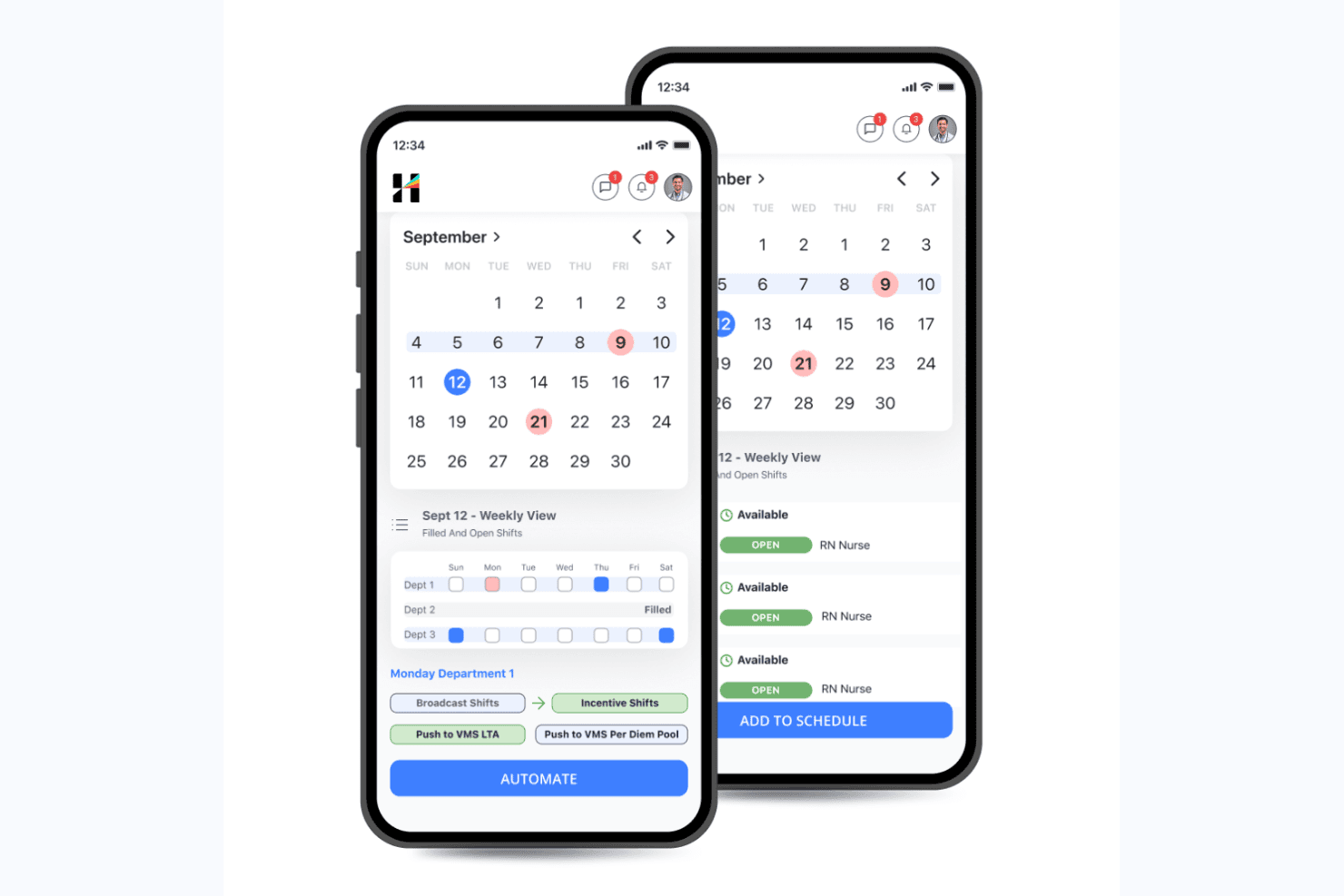
Hallmark Health Care Solutions lets managers schedule and automate open nursing shifts. Hallmark Health Care Solutions is an enterprise nurse scheduling and workforce management platform that combines AI-driven shift scheduling, internal float pool management, vendor management for external agencies, credential tracking, and predictive demand forecasting.
Who Is Hallmark Health Care Solutions Best For?
Hallmark is a strong fit for large hospitals and multi-hospital health systems that need to manage employed nurses, float pool staff, and external agency workers from a single platform.
Why I Picked Hallmark Health Care Solutions
Hallmark earns its spot on my shortlist because it's the only nurse scheduling platform I've found that manages employed nurses, internal float pools, and 750+ external staffing agencies from a single system. I particularly like the AI-Enabled Resourcing module, which compares internal versus agency labor in real time using acuity, HPPD, and census data, so your team isn't guessing which option is faster or cheaper to fill a shift. The Vendor Management System handles competitive bidding and fulfillment tracking across agencies without requiring separate tools.
Hallmark Health Care Solutions Key Features
- Demand forecasting: An AI model uses census data, callout patterns, seasonal trends, and length-of-stay metrics to project staffing needs at the unit and service line level weeks or months out.
- Talent intelligence: Captures individual nurse preferences for shift, location, and assignment type, then factors those preferences into AI-driven scheduling decisions alongside availability and skills.
- Credential expiration monitoring: Automatically tracks credential and licensure deadlines for current, active, and past workers, with proactive alerts and exception management built in.
- Executive workforce analytics: Dashboards consolidate overtime spend, agency utilization, compensation alignment, and patient outcomes into a single view designed for senior nursing and finance leadership.
Hallmark Health Care Solutions Integrations
Hallmark lists integrations with Epic, Cerner, Workday, UKG, QGenda, Okta, ADP, Paycom, Oracle, and SAP Concur. It supports API, Webhooks, EDI, HL7, FHIR, and SFTP connections for custom data exchanges.
Pros and Cons
Pros:
- Executive dashboards consolidate labor and patient data
- Unified internal float pool and agency management
- AI-driven staffing meets HPPD and acuity rules
Cons:
- Very few published peer user reviews
- No public pricing or free trial offered
Learn more about Hallmark Health Care Solutions: Best for enhancing team communication through a unified platform
- 30-day free trial + free demo available
- From AUD $5/user/month
Visit WebsiteCustomer Rating:4.6/5
Deputy's scheduling feature screenshot. Deputy, as a comprehensive nurse scheduling software, is designed to simplify workforce management and enhance team communication. It facilitates communication within a unified platform, making it the go-to solution for healthcare settings that prioritize smooth and effective interaction among staff.
Why I Picked Deputy:
Deputy caught my eye as an impressive scheduling tool that goes beyond just slotting shifts. Its commitment to fostering communication in healthcare teams through its platform made it stand out. Given the often frantic and high-stakes environment in healthcare, facilitating seamless communication between team members can significantly boost efficiency and morale.
This is precisely why I chose Deputy - it recognizes and addresses this often overlooked aspect of nurse scheduling.
Standout Features and Integrations:
With Deputy, not only can you create and share schedules easily, but you can also manage leave requests, track time and attendance, and even share instant updates with your team. The real-time communication feature makes it an ideal tool for nursing teams that need to stay connected and informed.
Key integrations include payroll systems like ADP and Gusto, HR platforms like BambooHR, and point-of-sale systems like Square and Vend.
Pros and Cons
Pros:
- Broad range of integrations with popular payroll and HR systems
- Easy-to-use interface that simplifies scheduling tasks
- Robust communication tools to ensure effective team coordination
Cons:
- Customer support can sometimes be slow to respond
- Limited customizability in comparison to some other tools on this list
- Advanced features are only available at a higher price tier
Learn more about Deputy: Best for facilitating mobile workforce management
- Free demo available
- Pricing upon request
Visit WebsiteCustomer Rating:4.2/5
Skedulo analytics dashboard Skedulo is a scheduling software designed to streamline mobile workforce management. It provides businesses with comprehensive tools to schedule, track, and manage their on-the-go employees, making it well-suited for industries reliant on field operations.
Why I Picked Skedulo:
In reviewing various scheduling tools, I picked Skedulo for its robust focus on mobile workforce management. Compared to other options, it provides specific features that cater to field operations, such as location-based scheduling and mobile job tracking.
I determined Skedulo to be best for facilitating mobile workforce management due to its comprehensive approach to mobile work coordination.
Standout Features and Integrations:
Key features of Skedulo include location-based scheduling, real-time visibility into job status, and robust analytics for performance assessment. These features are vital for businesses with significant field operations.
Skedulo integrates well with various CRM, HRM, and payroll systems. This includes prominent platforms such as Salesforce, providing businesses with the flexibility to incorporate Skedulo into their existing workflows.
Pros and Cons
Pros:
- Provides real-time visibility into job status for better management
- Integrates with popular CRM, HRM, and payroll systems, allowing for smooth workflow management
- Robust focus on mobile workforce management, ideal for businesses with significant field operations
Cons:
- Features may be overkill for businesses without a significant mobile workforce
- The platform may have a learning curve for those unfamiliar with such systems
- The starting price might be steep for small businesses or startups
Learn more about Skedulo: Best for remote access to schedules across multiple devices
- From $25/month (billed annually)
Visit WebsiteCustomer Rating:4.5/5
A screenshot in ScheduleAnywhere where employees' schedule can be seen. ScheduleAnywhere is a scheduling solution that provides accessible and easy-to-use features for scheduling staff across various industries. Its capacity to offer remote access to schedules across multiple devices underpins its capability to cater to modern, agile workplaces where mobility and flexibility are vital.
Why I Picked ScheduleAnywhere:
I picked ScheduleAnywhere for its robust mobile compatibility. This tool stands out because it allows employees and managers to access schedules on the go, which I found extremely important in today's dynamic work environments. In my judgment, ScheduleAnywhere is the best for enabling remote access to schedules across multiple devices.
Standout Features and Integrations:
ScheduleAnywhere offers vital features such as shift rotations, schedule copying, and multi-view options for different locations and departments. Additionally, mobile compatibility is an essential feature that facilitates remote access to schedules.
The tool provides essential integrations with payroll systems, which greatly simplifies the process of accounting for employee hours and overtime.
Pros and Cons
Pros:
- Features like schedule copying and shift rotations add convenience
- Integration with payroll systems aids in accounting for employee hours
- Mobile compatibility enables access to schedules on the go
Cons:
- The user interface might seem outdated compared to other modern scheduling tools
- Lack of a free version could deter potential users
- Higher price point may not be ideal for smaller organizations
Learn more about ScheduleAnywhere: Best for managing large, complex workforce schedules
- Free demo available
- Pricing upon request

Here's an overview of Shiftboard's all-device screenshot showing the published schedule dashboard. Shiftboard is a robust nurse scheduling software designed to handle the complexities of large workforce schedules. It expertly accommodates intricate rotations, variable shifts, and diverse skill sets, making it an optimal choice for larger healthcare institutions or settings with complex staffing needs.
Why I Picked Shiftboard:
When selecting this tool, I appreciated Shiftboard's exceptional handling of large, intricate workforce schedules. Compared to other options, it effectively stands out for its ability to seamlessly manage and navigate complexity.
I firmly believe that Shiftboard is "Best for managing large, complex workforce schedules" due to its comprehensive scheduling capabilities, robust features, and adaptability to diverse staffing requirements.
Standout Features and Integrations:
Shiftboard shines with its dynamic scheduling capabilities, including its ability to auto-generate schedules, manage overtime, and facilitate quick shift trades. Its demand-based scheduling is a major boon for large teams with variable staffing needs.
As for integrations, Shiftboard offers excellent compatibility with a wide range of systems. Key integrations include HR and payroll systems like ADP and Quickbooks, enhancing the end-to-end management of your workforce.
Pros and Cons
Pros:
- Advanced scheduling features enhance efficiency
- Integrates smoothly with HR and payroll systems
- Exceptional at managing complex staffing needs
Cons:
- The user interface may require some learning for optimal utilization
- Some features may be excessive for smaller healthcare settings
- Higher starting price compared to some alternatives
Learn more about Shiftboard: Best for addressing staffing challenges and reducing labor costs
- Free demo available
- Pricing upon request

OnShift's scheduling dashboard view OnShift is a human capital management software designed specifically for the healthcare industry, offering an array of features that address common staffing challenges and help reduce labor costs. It caters to organizations that deal with high employee turnover rates and those looking to maintain staffing levels while managing expenses.
Why I Picked OnShift:
I chose OnShift for its industry-specific approach to staffing challenges. It stands out for its attention to factors that particularly impact the healthcare industry, such as high turnover and fluctuating demand. Based on my analysis and comparisons, I determined that OnShift is best for addressing staffing challenges and reducing labor costs, thanks to its predictive and proactive management features.
Standout Features and Integrations:
OnShift provides notable features like predictive scheduling, employee engagement tools, and a recruitment platform to ensure staffing needs are met efficiently. It also offers proactive overtime control to manage labor costs effectively.
OnShift integrates with a range of payroll and HR systems, making it a versatile solution that can adapt to various administrative structures.
Pros and Cons
Pros:
- Offers integrations with multiple payroll and HR systems
- Employee engagement tools for improved morale and reduced turnover
- Predictive scheduling and proactive overtime control for cost-effectiveness
Cons:
- The user interface might require a learning curve for those unfamiliar with such systems
- The industry-specific approach might limit its applicability to non-healthcare industries
- Lack of transparent pricing information may deter potential users
Learn more about OnShift: 10Best for simplified shift planning and time tracking
Sling
- Free trial + free plan available
- From $1.70/user/month (billed annually)

Take a look at Sling's scheduling feature. Sling is a workforce management software that centralizes scheduling, time tracking, and employee coordination. Designed with ease of use in mind, it simplifies shift planning and time tracking, making it an excellent tool for businesses wanting to manage these tasks efficiently.
Why I Picked Sling:
Sling captured my attention with its focus on simplicity and ease of use in shift planning and time tracking. Its clean, intuitive interface sets it apart from other scheduling tools that can often seem overwhelming. I selected Sling as the best tool for simplified shift planning and time tracking due to its user-friendly design and focus on these core features.
Standout Features and Integrations:
Sling offers a robust set of features, including a built-in time clock, employee availability settings, and an efficient shift planning module. The time tracking component is particularly useful, allowing managers to monitor work hours and overtime accurately.
When it comes to integrations, Sling can be paired with multiple payroll software platforms to ensure a smooth transition from scheduling and time tracking to payroll processing.
Pros and Cons
Pros:
- Effective integration with payroll software
- Built-in time clock with overtime monitoring
- User-friendly interface makes shift planning and time tracking simple
Cons:
- The free plan is fairly limited, necessitating an upgrade for more comprehensive needs
- Lacks some of the advanced customization options found in competitors
- The annual billing cycle may not be preferable for all businesses
Learn more about Sling:
Outro software de gestão de horários de enfermagem
Eis algumas opções adicionais de software de gestão de horários de enfermagem que não integraram a minha lista final, mas que ainda vale a pena conhecer:
- 11TCP SoftwareBest for integrating with existing HR systems seamlessly
- 12Schedule360Best for advanced configurability and scalability options
- 13NurseGridBest for fostering nurse engagement and work-life balance
- 14ShiftWizardBest for reducing overtime with efficient labor management
- 15eScheduleBest for streamlining operations with custom automation features
- 16Deel HRBest for creating schedule policies
- 17RotageekBest for optimizing staffing with AI-powered scheduling
- 18Buddy PunchBest for drag-and-drop shift scheduling
- 19StaffScheduleCareGood for extensive staff scheduling in care environments
How I Evaluate Nurse Scheduling Software
I split my evaluation into two layers: the baseline capabilities a tool must have—like shift rotation and credential tracking—and the differentiators that set the best options apart.
Core Functionality (Table Stakes For This List)
When I'm selecting tools for my list, I rank each one on a scale from 0 (does not offer the functionality) to 5 (excels in this area) for each core functionality listed below. Then, I calculate the tool's total score into a percentage. Each tool needs to achieve a minimum total score of 65% to be considered for inclusion.
- Shift Scheduling & Rotations: I look for tools that handle complex rotating patterns, night shifts, and multi-unit coverage without requiring managers to rebuild schedules each period.
- Self-Service Shift Management: Staff should be able to request PTO, pick up open shifts, and initiate swaps from a mobile app rather than calling the charge nurse.
- Credential & Compliance Tracking: Each tool should store nursing licenses and certifications with expiration tracking so unqualified staff aren't accidentally scheduled.
- Staffing Ratio & Coverage Rules: I check whether the platform enforces nurse-to-patient ratios and skill-mix rules per unit rather than leaving coverage gaps to manual oversight.
- Time, Attendance & Payroll Integration: The tool should capture clock-in/out data and connect to payroll systems to reconcile overtime, shift differentials, and worked hours.
- Automated Notifications & Alerts: I evaluate how the platform pushes open-shift alerts, schedule changes, and coverage gap warnings through SMS, email, or push notifications.
Once I have a list of tools that meet this criteria, I consider what sets each platform apart.
Differentiating Factors (What Sets Vendors Apart)
Here's how I compare and contrast different vendors:
Standout Features
Acuity-based staffing is a big differentiator—I look for tools that adjust assignments based on real-time patient severity, not just headcount. Fatigue management matters too, especially for units running 12-hour shifts; the best platforms flag unsafe consecutive stretches before they happen. I also evaluate predictive demand forecasting. Tools that use historical census data to project staffing needs weeks ahead help managers avoid last-minute scrambles.
Beyond Features
Healthcare ecosystem integrations are one of the first things I check. A scheduling tool that connects to your EHR for real-time census data and syncs with payroll platforms like UKG or ADP saves hours of manual reconciliation each pay period. Compliance also carries real weight—I evaluate whether a platform meets HIPAA standards and supports role-based access for PHI. Finally, deployment fit matters. A five-location clinic network and a solo practice have very different needs, so I look at how pricing and scalability flex across practice sizes.
Como escolher um software de gestão de horários de enfermagem
É fácil perder-se em listas extensas de funcionalidades e estruturas de preços complexas. Para o ajudar a manter o foco enquanto analisa o seu processo único de seleção de software, eis uma lista de verificação dos fatores a ter em conta:
| Fator | O que deve considerar |
|---|---|
| FatorEscalabilidade | O que deve considerarO software consegue acompanhar o crescimento do número de funcionários? Verifique se permite gerir várias localizações ou departamentos e se os preços se ajustam à medida que a sua equipa cresce. |
| FatorIntegrações | O que deve considerarIntegra-se com os sistemas existentes, como o software de processamento salarial e de recursos humanos? Certifique-se de que é compatível com as ferramentas que já utiliza, para evitar a introdução manual de dados. |
| FatorPersonalização | O que deve considerarPode adaptar o software às suas regras e políticas de gestão de horários? Procure opções para ajustar modelos ou criar fluxos de trabalho personalizados. |
| FatorFacilidade de utilização | O que deve considerarA interface é intuitiva para todos os utilizadores? Considere se os funcionários precisarão de formação extensa ou se conseguirão aprender a utilizá-la rapidamente com o mínimo de orientação. |
| FatorImplementação e integração inicial | O que deve considerarQuanto tempo demora até estar operacional? Verifique se existem recursos, como vídeos de formação ou visitas guiadas, para ajudar a sua equipa a começar sem dificuldades. |
| FatorCusto | O que deve considerarQual é o custo total de propriedade? Não se limite ao preço apresentado. Tenha em conta as taxas ocultas relativas a funcionalidades ou suporte adicionais e compare os planos anuais com os mensais. |
| FatorMedidas de segurança | O que deve considerarEstá em conformidade com os regulamentos de proteção de dados? Certifique-se de que dispõe de encriptação, controlos de acesso e atualizações de segurança regulares para proteger os dados sensíveis dos funcionários. |
O que é um software de gestão de horários de enfermagem?
O software de gestão de turnos de enfermagem é uma ferramenta concebida para gerir e organizar os turnos e os horários dos enfermeiros. Os administradores de cuidados de saúde e os gestores de enfermagem utilizam habitualmente estas ferramentas para atribuir pessoal de forma eficiente e garantir o cumprimento da legislação laboral. O agendamento automatizado, as trocas de turnos e as notificações em tempo real ajudam a reduzir a carga de trabalho administrativo e a melhorar a cobertura dos turnos. De um modo geral, estas ferramentas aumentam a eficiência operacional e garantem melhores cuidados aos doentes através de uma gestão ideal do pessoal.
Funcionalidades
Ao escolher um software de gestão de turnos de enfermagem, procure as seguintes funcionalidades principais:
- Agendamento automatizado: Gere automaticamente os horários dos turnos com base na disponibilidade e nas preferências do pessoal, reduzindo os erros manuais e poupando tempo.
- Troca de turnos: Permita que os enfermeiros troquem facilmente de turno, garantindo a cobertura e acomodando simultaneamente as necessidades pessoais.
- Notificações em tempo real: Envie alertas instantâneos ao pessoal sobre alterações nos horários ou próximos turnos, mantendo todos informados.
- Acompanhamento da conformidade: Monitorize o cumprimento da legislação laboral e das políticas internas para evitar problemas legais e garantir um agendamento justo.
- Acesso móvel: Permita que o pessoal consulte e gira os seus horários em qualquer lugar através de dispositivos móveis, obtendo maior flexibilidade.
- Gestão da disponibilidade: Acompanhe os períodos em que o pessoal está disponível para trabalhar, facilitando o preenchimento dos turnos e a gestão dos pedidos de folga.
- Modelos personalizáveis: Utilize modelos para criar rapidamente horários que se adaptem às necessidades específicas dos departamentos ou aos padrões de turnos.
- Capacidades de integração: Ligue-se a sistemas existentes, como software de processamento salarial e de recursos humanos, para simplificar o fluxo de dados e reduzir as tarefas administrativas.
- Ferramentas de relatórios: Gere relatórios sobre métricas de agendamento para analisar a eficiência do pessoal e tomar decisões informadas.
- Permissões de utilizador: Controle o acesso aos dados e às ferramentas de agendamento com base nas funções do pessoal, mantendo a segurança e a integridade dos dados.
Vantagens
A implementação de um software de gestão de turnos de enfermagem proporciona várias vantagens à sua equipa e à sua empresa. Eis algumas das que pode esperar:
- Maior eficiência: O agendamento automatizado reduz o tempo despendido em tarefas manuais, permitindo que o pessoal se concentre nos cuidados aos doentes.
- Comunicação melhorada: As notificações em tempo real mantêm todos atualizados sobre as alterações nos horários, reduzindo os mal-entendidos.
- Melhor conformidade: As ferramentas de acompanhamento garantem que os horários cumprem a legislação laboral e as políticas internas, minimizando os riscos legais.
- Maior flexibilidade: A troca de turnos e o acesso móvel permitem que o pessoal gira convenientemente os seus horários, melhorando o equilíbrio entre a vida profissional e pessoal.
- Decisões baseadas em dados: As ferramentas de relatórios fornecem informações sobre os padrões de pessoal, ajudando-o a fazer ajustes informados para melhorar as operações.
- Poupança de custos: Um agendamento eficiente e a integração com sistemas de processamento salarial ajudam a controlar os custos laborais e a reduzir os encargos administrativos.
Custos e preços
A seleção de um software de gestão de turnos de enfermagem exige uma compreensão dos vários modelos de preços e planos disponíveis. Os custos variam consoante as funcionalidades, a dimensão da equipa, os complementos e outros fatores. A tabela abaixo resume os planos comuns, os respetivos preços médios e as funcionalidades normalmente incluídas nas soluções de software de gestão de turnos de enfermagem:
Tabela de comparação de planos para software de gestão de turnos de enfermagem
| Tipo de plano | Preço médio | Funcionalidades comuns |
|---|---|---|
| Tipo de planoPlano gratuito | Preço médio$0 | Funcionalidades comunsAgendamento básico, acesso limitado dos utilizadores e relatórios básicos. |
| Tipo de planoPlano pessoal | Preço médio$5-$25/utilizador/mês | Funcionalidades comunsAgendamento automatizado, troca de turnos e acesso móvel. |
| Tipo de planoPlano empresarial | Preço médio$30-$60/utilizador/mês | Funcionalidades comunsNotificações em tempo real, acompanhamento da conformidade e modelos personalizáveis. |
| Tipo de planoPlano empresarial avançado | Preço médio$70-$100/utilizador/mês | Funcionalidades comunsRelatórios avançados, capacidades de integração e suporte dedicado. |
Perguntas frequentes sobre software de agendamento de enfermeiros
Eis algumas respostas a perguntas comuns sobre software de agendamento de enfermeiros:
O software de agendamento de enfermeiros consegue gerir padrões de turnos rotativos?
Sim, a maioria dos softwares de agendamento de enfermeiros consegue gerir turnos rotativos, como ciclos de dia-tarde-noite. Pode configurar padrões que se repetem ao longo de dias ou semanas. Normalmente, o sistema permite atribuir profissionais a esses padrões ou ajustá-los manualmente, se necessário. Isto ajuda a garantir a cobertura necessária sem ter de começar do zero todas as semanas.
Como é que as atualizações das regras de conformidade afetam o horário?
Se as regras mudarem, terá de atualizar as definições no seu sistema de agendamento. O software utiliza depois essas regras atualizadas para assinalar conflitos ou impedir atribuições inválidas. Por exemplo, se os períodos de pausa ou os intervalos de descanso mudarem, o sistema deverá refletir essa alteração nos horários futuros. É aconselhável rever as definições sempre que houver uma alteração nas políticas.
É possível limitar o número de turnos noturnos atribuídos a um enfermeiro?
Sim, normalmente pode definir limites para o número de turnos noturnos por pessoa durante um determinado período. O software verifica essas regras ao gerar o horário ou ao atribuir turnos manualmente. Dessa forma, ninguém acaba por ter demasiados turnos indesejáveis consecutivos. Isto também ajuda a cumprir as regras sindicais ou dos acordos laborais.
É necessário receber formação para utilizar software de agendamento de enfermeiros?
A maioria dos softwares de agendamento de enfermeiros foi concebida para ser fácil de utilizar, mas alguma formação pode ser útil, especialmente para equipas que estejam a começar a utilizar o agendamento digital. Muitos fornecedores disponibilizam recursos de formação, como vídeos, seminários online e visitas guiadas ao produto. Tirar partido destes recursos pode reduzir o tempo de aprendizagem e garantir que a sua equipa utiliza o software de forma eficaz.
Como pode o software de agendamento de enfermeiros melhorar a conformidade?
O software de agendamento de enfermeiros pode ajudar a melhorar a conformidade através da automatização do acompanhamento dos horários e do envio de alertas sobre possíveis violações da legislação laboral ou das políticas da organização. Pode gerar relatórios que ajudam a monitorizar a conformidade e a fazer rapidamente os ajustes necessários. Esta funcionalidade é especialmente útil para organizações maiores com necessidades de agendamento complexas.