

O software EMR para medicina do trabalho é um sistema digital concebido para ajudar a gerir registos clínicos, acompanhar a saúde dos trabalhadores e apoiar a conformidade em ambientes de medicina do trabalho. Se procura uma forma de manter a sua clínica organizada, reduzir o trabalho administrativo e coordenar os cuidados entre a sua equipa, está no sítio certo.
Esta lista analisa as melhores plataformas EMR para medicina do trabalho, que ajudam a documentar exposições, acompanhar lesões no local de trabalho e lidar com requisitos regulamentares em constante evolução — para que possa tomar uma decisão informada para a sua clínica, serviço de saúde ou programa de saúde ocupacional do empregador.
Why Trust Our Software Recommendations
6,700+
Reviews
20
Industry experts
16+
Evaluation factors
14
Years
Our team has been testing and reviewing software since 2012. As medical practice leaders ourselves, we know how difficult—and important—it is to choose the right software.
For this guide, we evaluated tools using hands-on testing and independent research, scoring tools using our selection criteria.
Our reviews reflect our human editorial judgment, not a sales pitch.
Tabela comparativa de softwares EMR para medicina do trabalho
Esta tabela comparativa apresenta os preços das minhas principais escolhas de software EMR para medicina do trabalho:
Score legend (out of 5)
- Excellent4.5–5
- Good4–4.4
- Average3–3.9
- Below average2–2.9
- Poor1–1.9
Sorted by: Default
| Tool | Starting Price | Website | |||||||
|---|---|---|---|---|---|---|---|---|---|
Best for combining occupational health | 2.7 out of 5 | 4 | 3 | 2 | 2 | 3 | 2 | $30/user/month Free demo available | Website |
Best for medicine documentation | 3.3 out of 5 | 4 | 3 | 3 | 4 | 4 | 2 | Pricing upon request Free demo available | Website |
Best for managing occupational medicines | 3.0 out of 5 | 4 | 3 | 4 | 2 | 3 | 2 | Pricing upon request Free demo available | Website |
Best for urgent care clinic operations | 2.5 out of 5 | 4 | 2 | 3 | 1 | 3 | 2 | Pricing upon request Not available | Website |
Best for enterprise-wide occupational health | 3.3 out of 5 | 4 | 3 | 2 | 4 | 4 | 3 | Pricing upon request Free demo available | Website |
Best for configurable health EHR workflows | 3.0 out of 5 | 3 | 3 | 3 | 3 | 3 | 3 | Pricing upon request Free demo available | Website |
Best for managing injuries and employee records | 2.8 out of 5 | 5 | 2 | 2 | 3 | 4 | 1 | Pricing upon request Free demo available | Website |
Best for occupational medicine documentation | 2.8 out of 5 | 4 | 3 | 3 | 2 | 3 | 2 | Pricing upon request 30-day free trial | Website |


Avaliações dos melhores softwares EMR para medicina do trabalho
\u003cspan style=\u0022font-weight: 400\u0022\u003eSeguem-se os meus resumos detalhados dos melhores softwares EMR para medicina do trabalho que entraram na minha lista restrita. As minhas avaliações apresentam uma análise detalhada das funcionalidades, dos melhores casos de utilização e das integrações de cada software, para o ajudar a encontrar a melhor opção para si.\u003c/span\u003e
 Best for combining occupational health
- Free demo available
- From $30/user/month (billed annually, min 5 seats)
Visit WebsiteCustomer Rating:4.2/5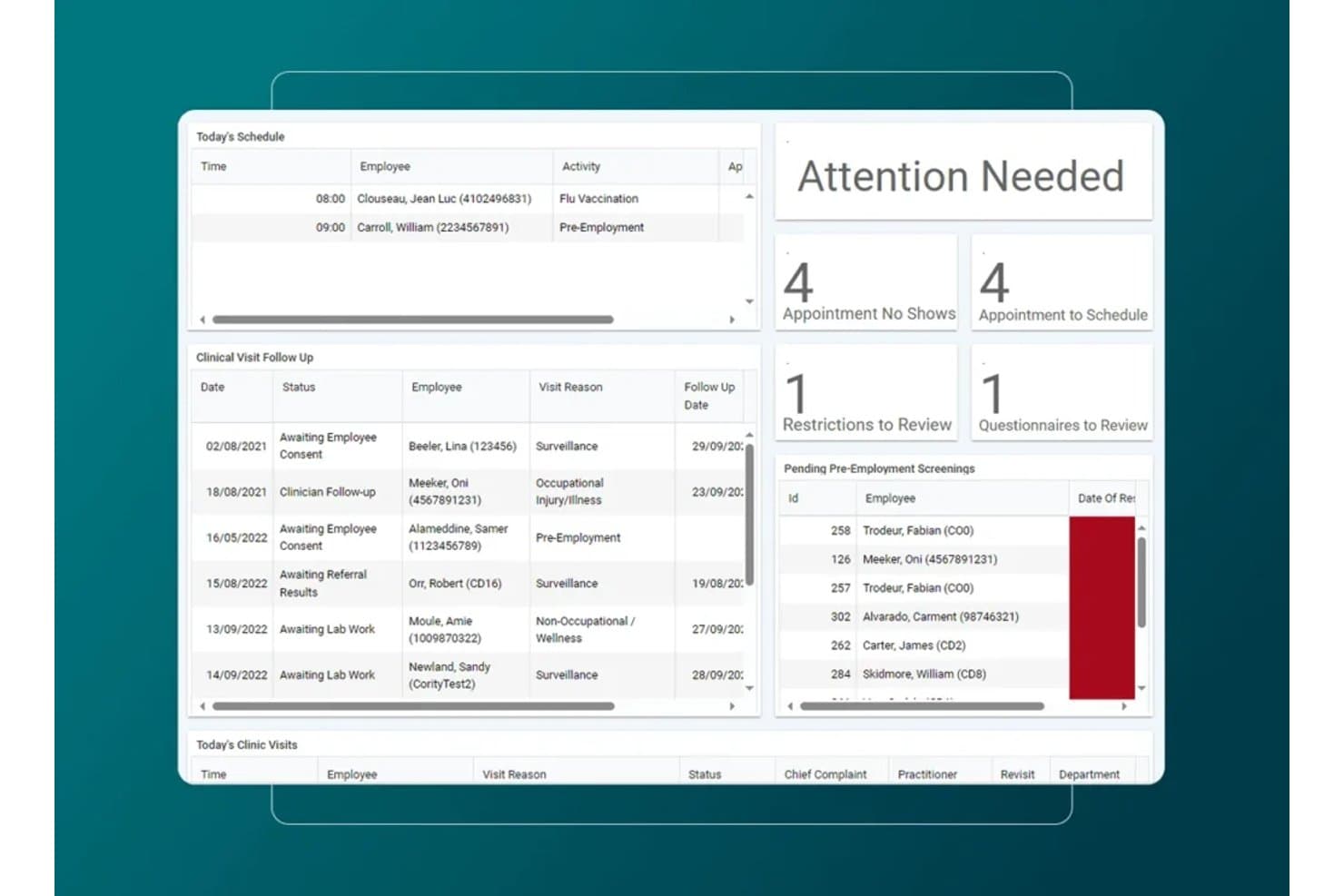
Cority offers an occupational health dashboard with today's schedule, clinical visit follow-ups, attention alerts, and pending pre-employment screenings. Cority is an enterprise occupational health EMR that covers medical surveillance, case management, and return-to-work tracking alongside industrial hygiene, safety, quality, and sustainability modules on a single platform.
Who Is Cority Best For?
Cority suits large enterprises in healthcare, manufacturing, chemicals, and energy that manage occupational health programs alongside complex EHS and compliance operations.
Why I Picked Cority
I picked Cority as one of the best because no other occupational EMR I've used ties clinical records so tightly to industrial hygiene and safety data. When managing a respiratory protection program, I can link audiometric surveillance results directly to exposure monitoring from the industrial hygiene module, all in one platform. The case management tool also lets me document RTW restrictions and modified duties alongside the original medical surveillance record.
Cority Key Features
- Automated OSHA recordkeeping: Generates OSHA 300, 300A, and 301 logs directly from clinical data.
- Employer portal access: Lets employer clients submit authorizations, check results, and review invoices online.
- Protocol-driven workflows: Applies employer-specific and regulatory protocols to exams based on job requirements.
- Integrated drug and alcohol testing: Provides native chain-of-custody, eCCF, and support for lab and MRO workflows.
Cority Integrations
Cority offers native integrations with SAP, IBM Maximo, Oracle, Infor, 3E SDS library, Protex AI, and supports occupational medicine workflows with Meddbase. An API is available for custom integrations.
Pros and Cons
Pros:
- Includes employer portal for client access
- Strong return-to-work and case management tools
- Deep protocol-driven occupational health library
Cons:
- Limited native support for eCCF lab workflows
- Overly complex for small clinics
Learn more about Cority: Best for medicine documentation
- Free demo available
- Pricing upon request
Visit WebsiteCustomer Rating:4/5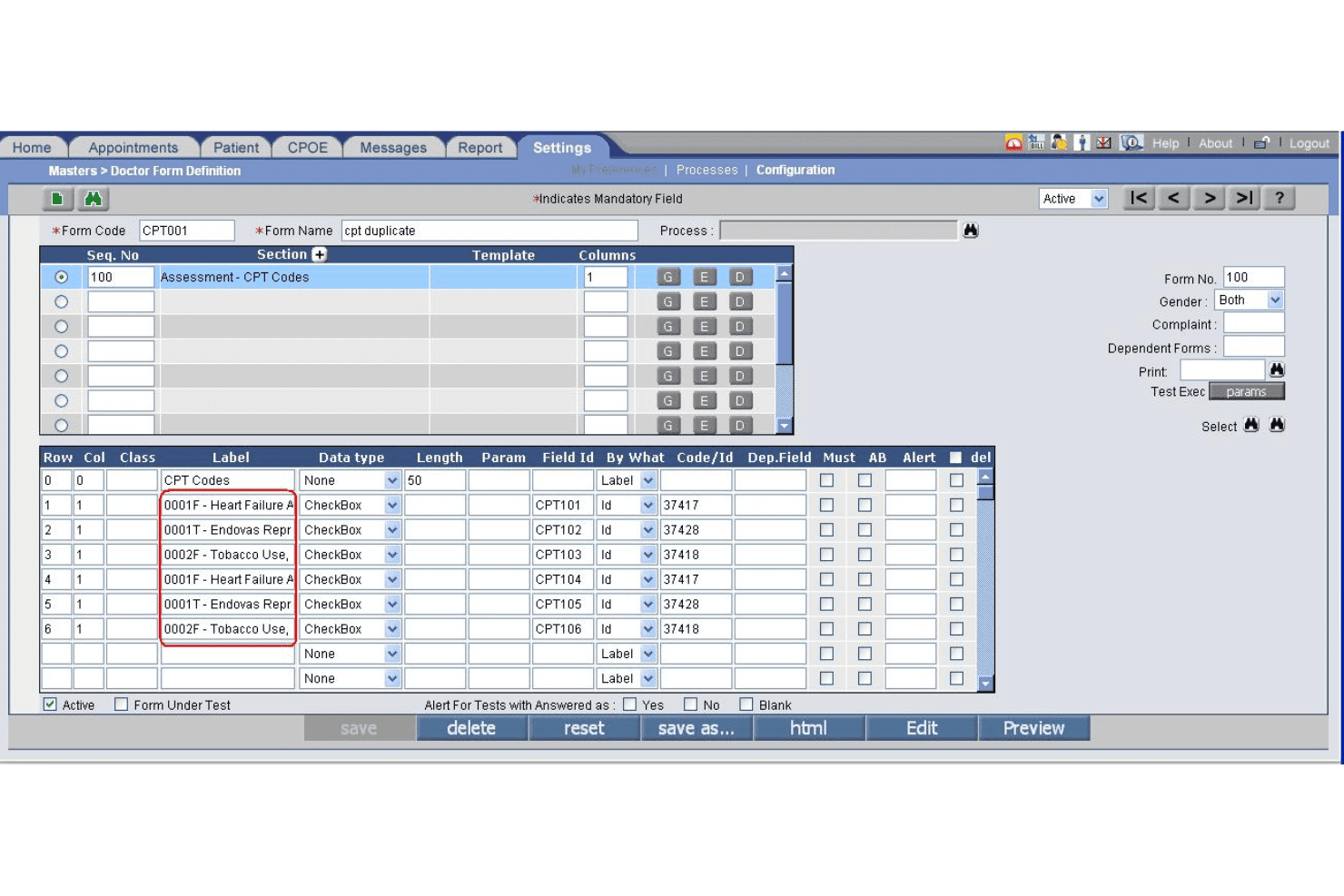
PrognoCIS specialty form builder supports custom reporting by clinical discipline. PrognoCIS is a cloud-based occupational medicine EHR that combines employer-specific documentation, DOT/FMCSA compliance workflows, drug and alcohol testing management, workers' compensation case tracking, and integrated practice management.
Who Is PrognoCIS Best For?
PrognoCIS is a strong fit for occupational medicine clinics and employer health programs that manage multi-employer accounts, DOT compliance exams, and workers' compensation cases.
Why I Picked PrognoCIS
PrognoCIS earns its spot on my shortlist because of how purpose-built its documentation is for occupational medicine specifically. I love that it auto-uploads DOT medical examiner forms directly to FMCSA, removing a manual step that creates compliance risk in a lot of occ med practices. The employer-specific template system also lets me tie custom protocols and charge codes directly to individual employer accounts, so documentation stays consistent across every encounter type.
PrognoCIS Key Features
- Employer portal access: Employers can securely submit authorizations, view results, and access invoices in real time.
- OSHA recordkeeping automation: Automatically creates OSHA 300, 300A, and 301 logs from clinical documentation.
- Protocol-driven workflows: Applies exam protocols for DOT exams, drug screens, respirator fit tests, and audiograms based on job role.
- Integrated drug and alcohol testing: Supports native chain-of-custody workflows and integrates with labs for result management.
PrognoCIS Integrations
PrognoCIS offers native integrations with Surescripts for e-prescribing, Medsender for electronic fax intake, FMCSA for DOT medical examiner form uploads, and supports lab and radiology interfaces. An API is available for custom integrations.
Pros and Cons
Pros:
- Built-in chain-of-custody drug test workflows
- Automated OSHA and DOT compliance reporting
- Employer-specific templates for multiple contract accounts
Cons:
- Interface can require multiple clicks for tasks
- Return-to-work tracking lacks automation
Learn more about PrognoCIS Psychiatry EHR: Best for managing occupational medicines
- Free demo available
- Pricing upon request
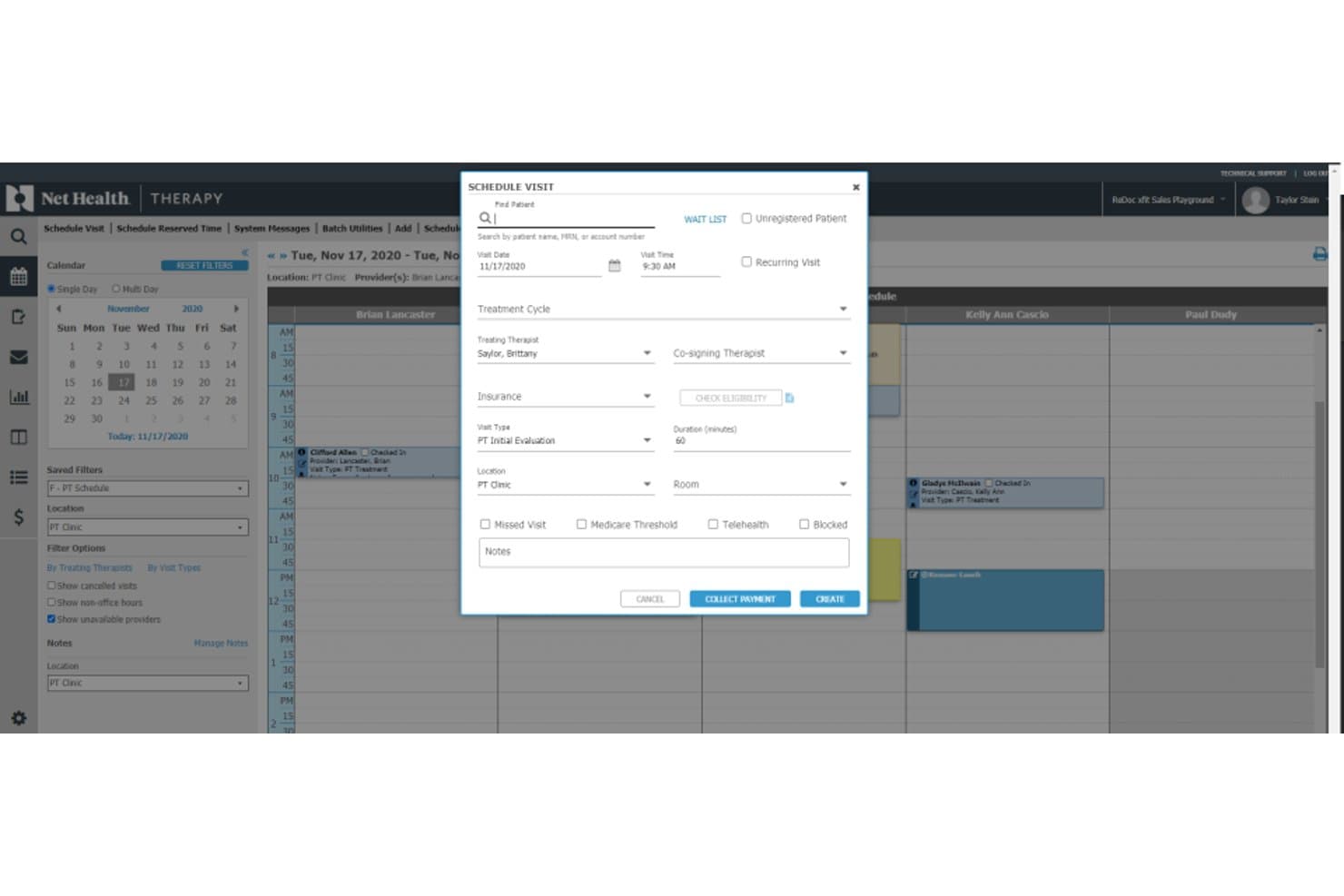
Net Health scheduling dashboard for managing patient visits, providers, insurance, and payments Net Health is an occupational medicine EMR built around employer account management, workers' comp documentation, split billing workflows, mobile immunization tracking, and OSHA compliance reporting.
Who Is Net Health Best For?
It's a strong fit for hospital-based occupational medicine departments and urgent care clinics managing employer accounts alongside workers' comp caseloads.
Why I Picked Net Health
Net Health earns its spot on my shortlist because of how it handles the billing complexity unique to occupational medicine. I particularly like the split billing engine, which separates workers' comp charges from employer-direct services and auto-generates invoices for each, all tied to employer-specific fee schedules. The built-in KPI dashboard tracks OM-specific metrics like new injury ratios, visit type breakdowns, and time from initial visit to case resolution.
Net Health Key Features
- OSHA recordkeeping automation: Automatically generates OSHA 300, 300A, and 301 logs from encounter data within the platform.
- Employer portal access: Offers secure, real-time portals for employer clients to view authorizations, results, and invoices.
- Protocol-driven exam workflows: Auto-applies DOT and employer-specific protocols for regulatory exams and screenings.
- Integrated drug and alcohol testing: Supports native chain-of-custody workflows and electronic lab integrations for drug and alcohol test management.
Net Health Integrations
Net Health offers native integrations with state immunization registries and automatically generates OSHA 300 logs. Native HR demographic software interfaces are supported. An API is available for custom integrations.
Pros and Cons
Pros:
- Protocol-driven workflows for DOT and drug tests
- OSHA reporting is automated from encounter data
- Employer account and billing management is built in
Cons:
- No built-in telemedicine for occ-med encounters
- Workers’ comp claims data import is limited
Learn more about Net Health: Best for urgent care clinic operations
- Not available
- Pricing upon request
Visit WebsiteCustomer Rating:2.7/5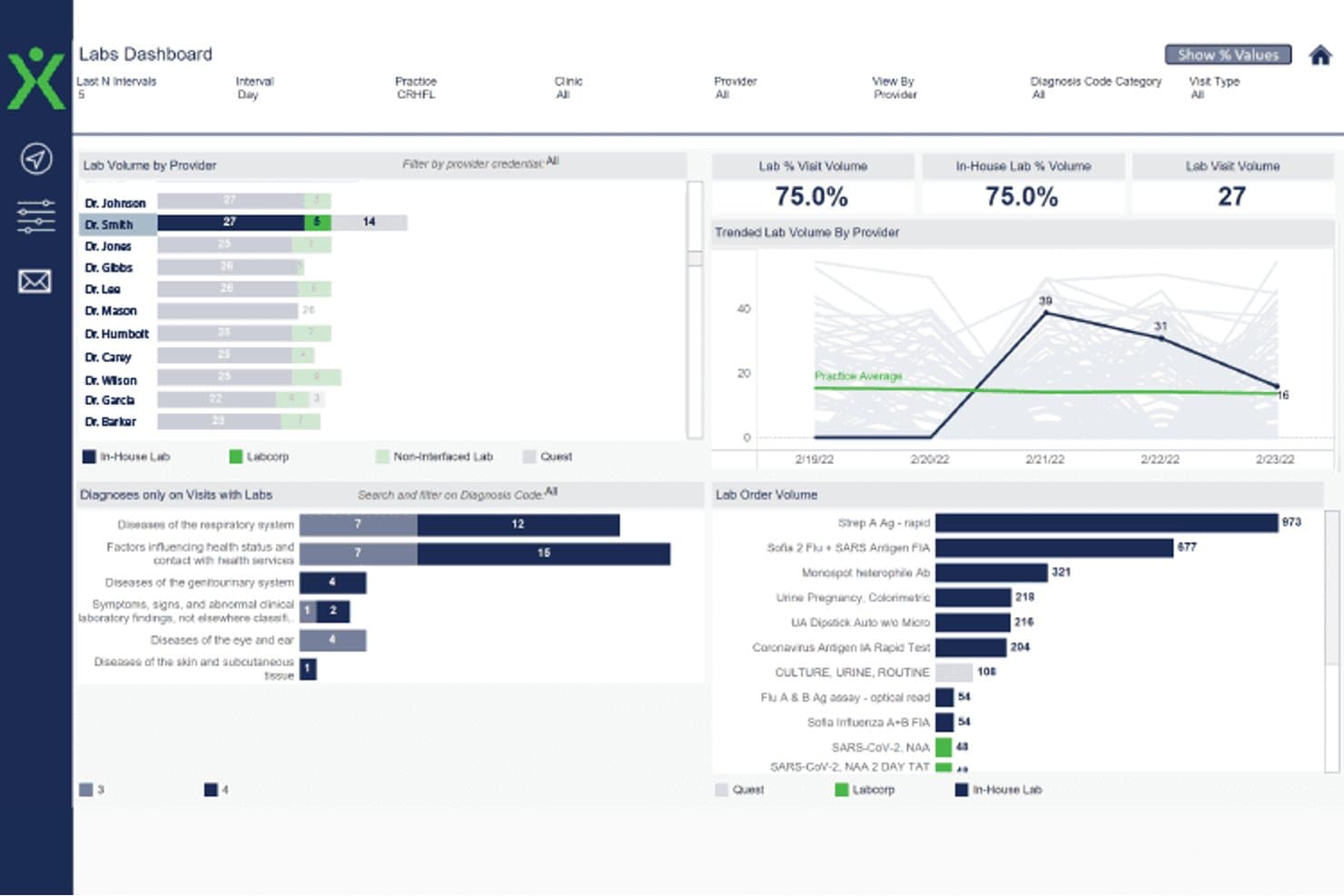
Experity labs dashboard showing provider lab volume, visit trends, diagnoses, and test orders Experity is an EMR and practice management platform built for urgent care and occupational medicine clinics, combining employer portal access, visit-specific OccMed workflows, and multi-payer billing for work-related encounters.
Who Is Experity Best For?
Experity is a strong fit for urgent care clinics that operate occupational medicine as a combined service line alongside standard urgent care visits.
Why I Picked Experity
I picked Experity as one of the best because it's the only platform I've used that handles urgent care and occupational medicine visits within a single, unified workflow. The configurable corporate protocols let my team set client-specific procedures and split billing rules without manual workarounds. The employer portal gives clients direct, secure access to visit data, work restrictions, and test results, so my staff spends less time fielding phone calls and printing records.
Experity Key Features
- Standardized OccMed exam templates: Pre-built templates for DOT physicals, drug testing, and regulatory compliance exams.
- Employer account management: Maintain unique employer profiles with protocols, authorized services, and billing settings.
- Automated OSHA recordkeeping: System auto-generates OSHA 300, 300A, and 301 logs from recorded encounter data.
- Integrated lab ordering: Support for chain-of-custody workflows and direct electronic orders to connected occupational health labs.
Experity Integrations
Experity offers native integrations with Waystar for clearinghouse services, its own OnePACS radiology system, electronic prescribing solutions, connected labs, and Experity Patient Engagement. An API is available for custom integrations.
Pros and Cons
Pros:
- Built-in OSHA recordkeeping feature
- Handles urgent care and OccMed in one system
- Employer portal for real-time visit updates
Cons:
- Lacks automated regulatory form generation
- Complex workflows for split OccMed billing
Learn more about Experity: Best for enterprise-wide occupational health
- Free demo available
- Pricing upon request
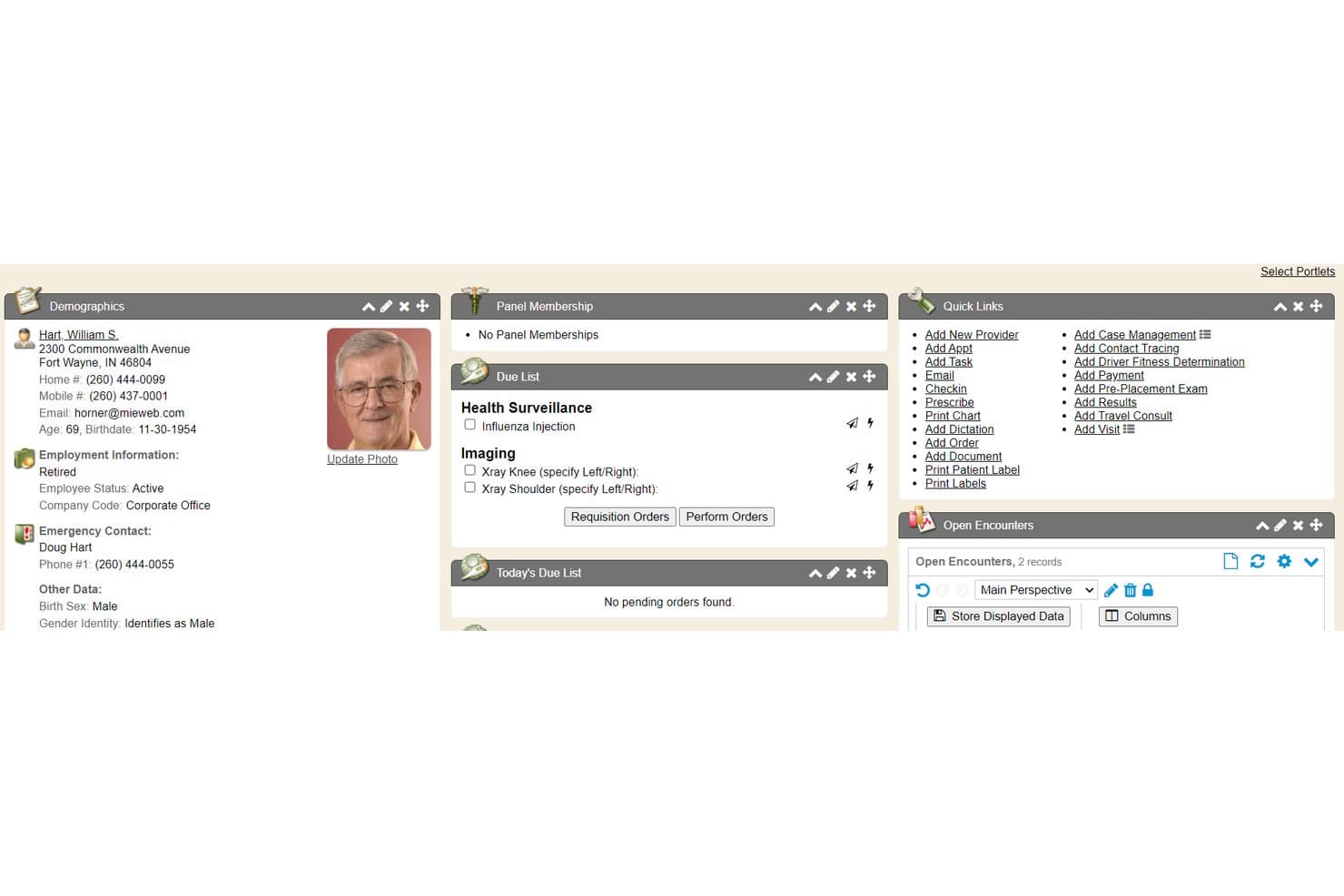
Enterprise Health offers a comprehensive patient summary chart tab featuring demographics, due lists, panel membership, quick links, and open encounters for occupational health management. Enterprise Health is an ONC-certified occupational health EMR built on a clinical EHR foundation, combining medical surveillance, workers' comp documentation, injury management, and compliance reporting in a single platform.
Who Is Enterprise Health Best For?
Enterprise Health is a strong fit for large employers and health systems running multi-site onsite clinics that need enterprise-scale occupational health management.
Why I Picked Enterprise Health
Enterprise Health earns its spot on my shortlist because it's the only occupational EMR built on an ONC-certified EHR foundation, which matters when you're running clinics across dozens of worksites. I particularly like the medical surveillance module, which tracks audiometry, pulmonary function, and respirator fit exams across the entire workforce and automates OSHA 300A electronic submission. The Ozwell AI assistant also speeds up encounter documentation directly within the platform.
Enterprise Health Key Features
- Employer portal access: Offers secure, role-based web access for employer clients to submit authorizations and view employee test results.
- Configurable protocol libraries: Enables users to apply DOT and employer-based protocols tailored for specific job roles or contracts.
- Lab and device integration: Connects with third-party labs and medical devices, supporting bi-directional data flow and automated result import.
- Automated OSHA form generation: Creates OSHA 300, 300A, and 301 forms directly from clinical documentation.
Enterprise Health Integrations
Enterprise Health offers native integrations with LabCorp, Quest Diagnostics, HR systems, billing and practice management systems, state immunization registries, audiometers, spirometers, DICOM/PACS, health information exchanges, and supports SAML 2.0 SSO. An API is available for custom integrations.
Pros and Cons
Pros:
- Employer portal for real-time communication
- Native medical surveillance and protocol libraries
- OSHA automation for large employer populations
Cons:
- Very limited support for urgent care workflows
- Implementation typically takes several months
Learn more about Enterprise Health: Best for configurable health EHR workflows
- Free demo available
- Pricing upon request
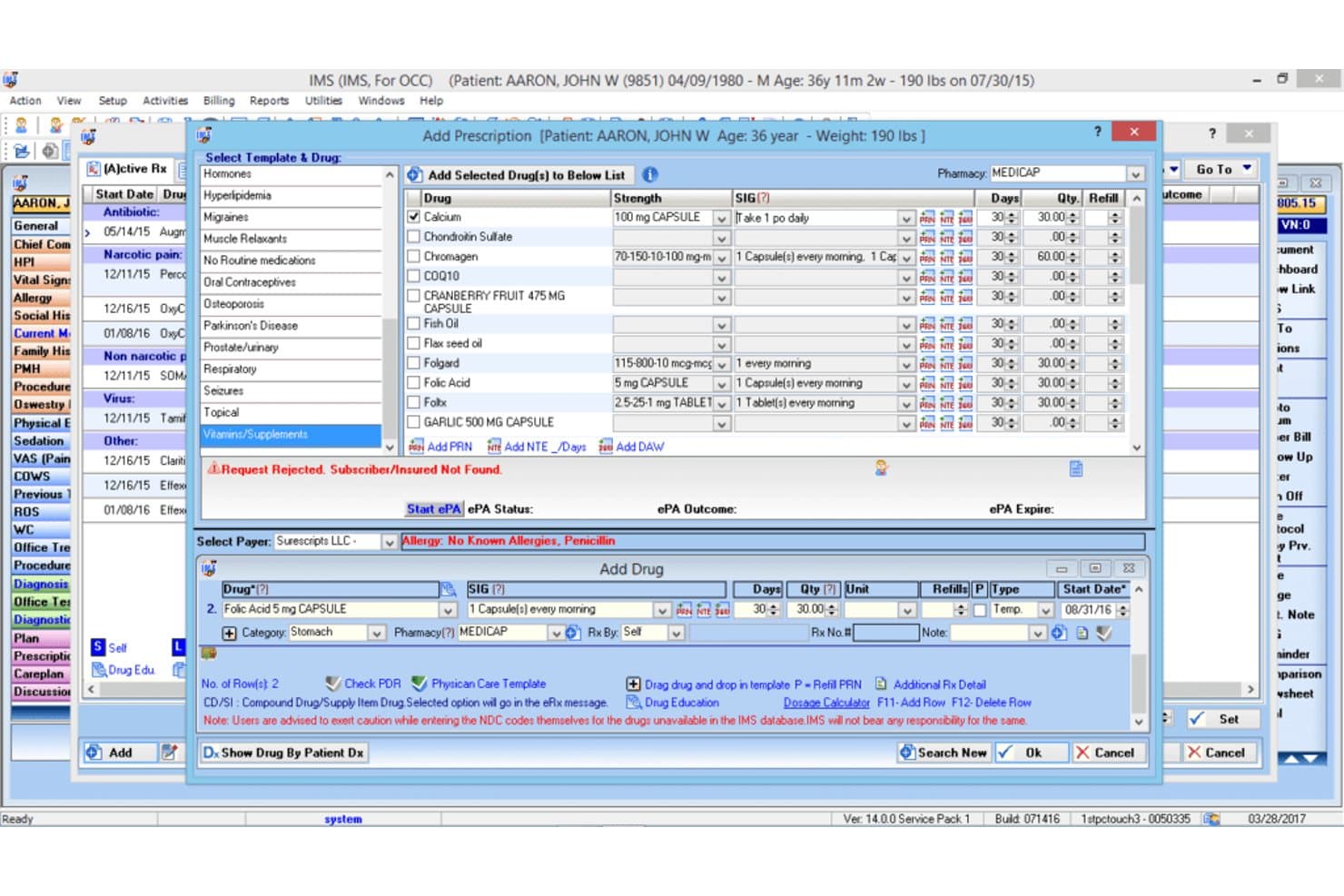
1st Providers Choice IMS offers an e-prescribing module with drug templates, prescription fields, and allergy alerts for occupational therapy EMR workflows. 1st Providers Choice IMS is a cloud-based occupational medicine EMR that combines configurable clinical workflows, employer portal management, DOT and OSHA compliance documentation, return-to-work planning, and integrated billing into a single platform.
Who Is 1st Providers Choice IMS Best For?
It's a strong fit for small to mid-size occupational medicine clinics that need a fully configurable, all-in-one EHR, billing, and practice management platform.
Why I Picked 1st Providers Choice IMS
1st Providers Choice IMS earns its spot on my shortlist because the level of workflow configurability it offers is genuinely rare in occupational medicine EMRs. I particularly like how return-to-work care plans are built around injury type and job role rather than generic templates. The built-in state and federal forms library, covering DOT, OSHA, and Workers' Comp documentation, means I'm not piecing together compliance workflows from separate tools.
1st Providers Choice IMS Key Features
- Employer portal access: Lets employers view employee records, submit authorizations, and access invoices through a secure web portal.
- OSHA recordkeeping automation: Automatically compiles required OSHA 300, 300A, and 301 logs from clinical encounter data.
- Protocol-driven workflows: Applies specific DOT, drug testing, and surveillance protocols based on employer and job classification.
- Integrated drug and alcohol testing: Provides native chain-of-custody documentation with digital orders and lab integrations.
1st Providers Choice IMS Integrations
Native integrations include Dragon Dictation, Availity, Optum Insight, Office Ally, Gateway EDI, Emdeon, and Realmed. An API is available for custom integrations.
Pros and Cons
Pros:
- Advanced workers’ comp case management workflows
- Employer portal with real-time authorization management
- OSHA and DOT regulatory reporting included
Cons:
- Few public user reviews or independent ratings
- Limited support for DOT chain-of-custody eCCF
Learn more about 1st Providers Choice IMS: Best for managing injuries and employee records
- Free demo available
- Pricing upon request
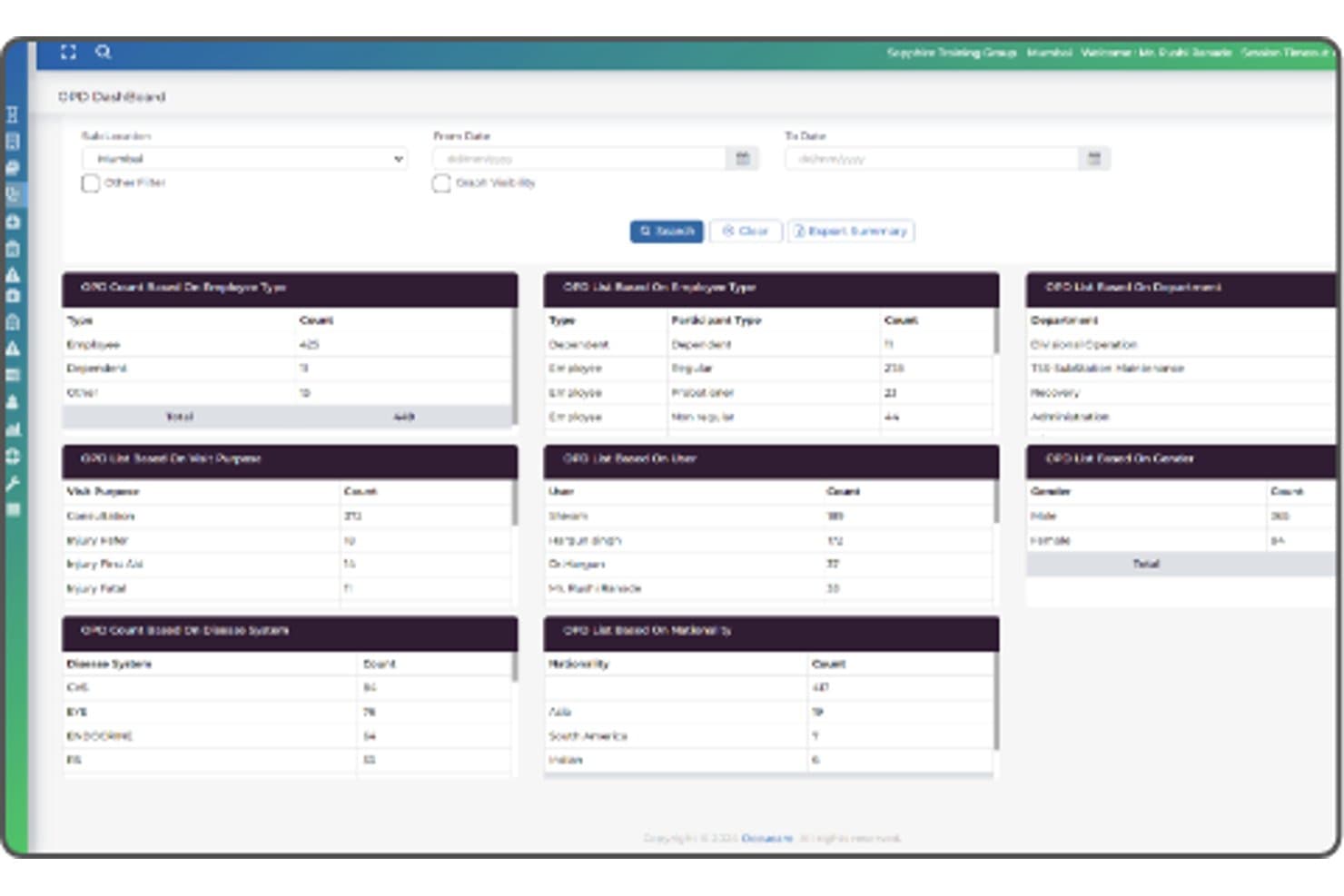
OccuCare offers a comprehensive OPD Dashboard with employee type, visit purpose, disease system, participant type, user, and nationality-based reporting panels. OccuCare is an occupational health EMR built for industrial and on-site clinics, combining employee health records, injury tracking, medical surveillance, drug and alcohol testing workflows, and OSHA and DOT compliance reporting.
Who Is OccuCare Best For?
OccuCare is a strong fit for mid-to-large industrial enterprises that run on-site occupational health clinics and need centralized health and safety management at scale.
Why I Picked OccuCare
I picked OccuCare as one of the best because of how it handles injury and employee record management within a single, structured system. I like that workplace injuries move through a complete documentation trail, from initial incident capture through treatment plans and follow-up, all tied directly to the employee's health record. The medical surveillance module also tracks recurring exams like audiometry and spirometry with exposure-based cohorts, so employee records stay current without manual chasing.
OccuCare Key Features
- Compliance reporting modules: Generate OSHA and DOT compliance reports directly from employee health data with built-in regulatory templates.
- Employer account management: Maintain separate employer profiles, each with designated protocols and access controls for multi-client setups.
- Occupational health protocol library: Access templates for physicals, drug testing, audiograms, spirometry, and respiratory exams configured for regulatory tracking.
- Automated appointment scheduling: Book, manage, and remind employees of physicals, screenings, and follow-up visits with calendar integration.
OccuCare Integrations
OccuCare supports integrations with HRIS, payroll, EHS, and billing systems, and offers an API for custom integrations. Native integrations are not clearly documented.
Pros and Cons
Pros:
- Centralized employee recordkeeping with roles-based access
- Injury documentation workflows tailored to industry
- Strong surveillance protocol management tools
Cons:
- Lacks DOT chain-of-custody lab integrations
- No US workers' compensation claim templates
Learn more about OccuCare: Best for occupational medicine documentation
- 30-day free trial
- Pricing upon request
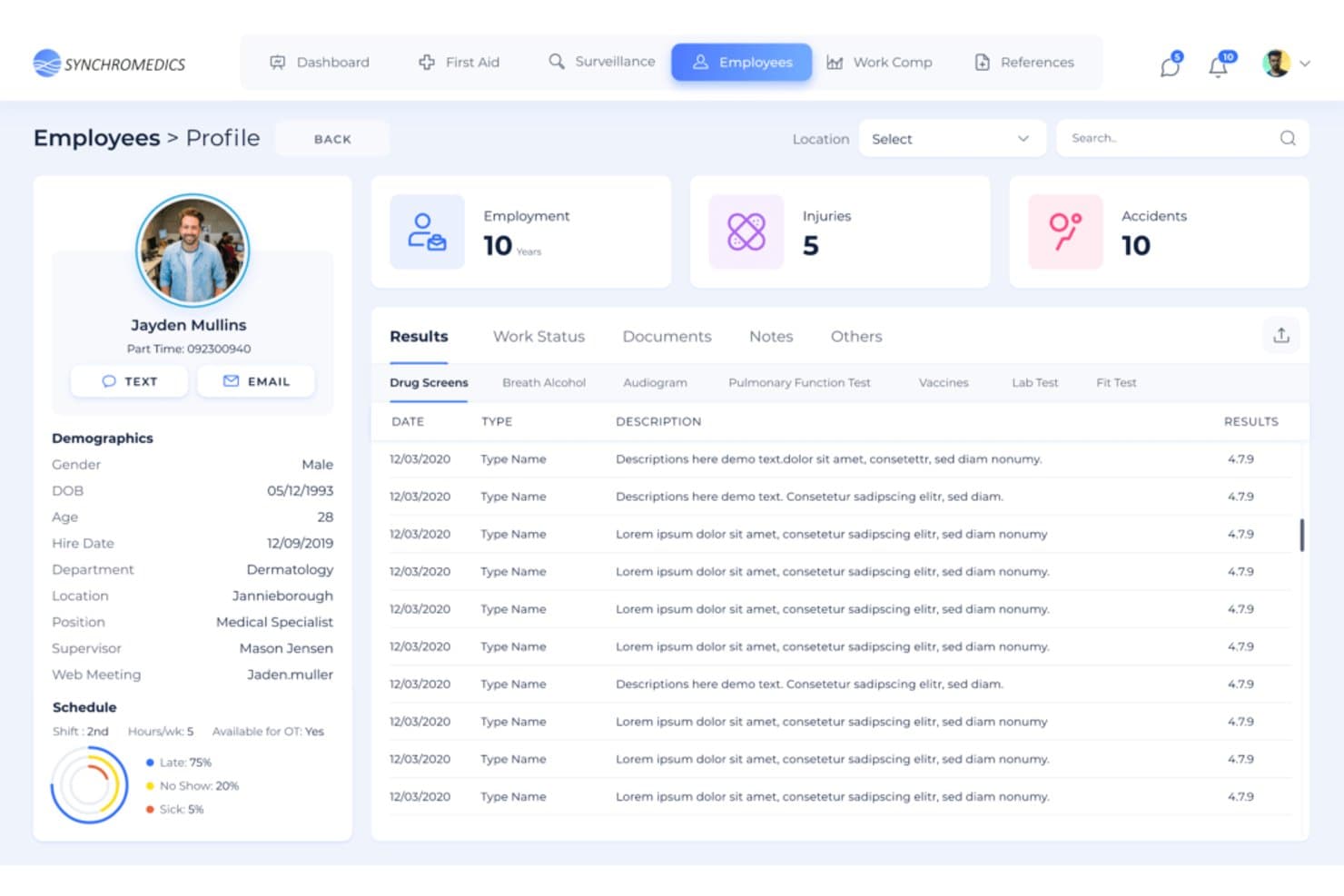
Synchromedics offers a detailed employee profile view with drug screen results, employment history, injuries, and scheduling data for occupational health management. Synchromedics is a cloud-based occupational medicine EHR platform that connects clinics directly to employers, with built-in drug screen ordering, OSHA compliance tracking, workers' compensation case management, and live employer resulting.
Who Is Synchromedics Best For?
Synchromedics is a strong fit for occupational medicine clinics that manage employer accounts and need to deliver real-time results without relying on fax or email.
Why I Picked Synchromedics
I picked Synchromedics as one of the best because of how it handles occupational medicine documentation at the clinic-to-employer layer. I love that work status reports update in real time, so employers can view, comment on, and request changes to documentation the moment a clinician enters it. The AI-powered record digitization is also something I find genuinely useful: upload historical paper records and the system converts them into structured, reportable data.
Synchromedics Key Features
- Employer portal access: Lets authorized employer reps view results, submit authorizations, and pull invoices in real time.
- OSHA recordkeeping automation: Automatically generates OSHA logs and forms from relevant clinical encounters.
- Protocol-driven workflows: Assigns standardized exam protocols based on job classification or employer contract details.
- Electronic invoicing: Creates and sends invoices to employers for occupational medicine services directly within the platform.
Synchromedics Integrations
Native integrations are not clearly documented. Synchromedics does not offer an API for custom integrations.
Pros and Cons
Pros:
- Employer-specific protocols applied automatically
- OSHA logs auto-generated from encounter data
- Live employer access to updated work status
Cons:
- Limited support and documentation resources
- No API or native integrations available
Learn more about Synchromedics:
How I Evaluate Occupational EMR Software
I split my evaluation into three parts, weighting core functions most: chart injury visits and physicals, link records to employers and claims, and track work restrictions. Next, I look for standout features such as specimen chain-of-custody tracking. Finally, I consider occupational-specific onboarding, ongoing support, and value as your clinic scales.
Core Functionality (Table Stakes For This List)
When I'm selecting tools for my list, I score each one on a scale from 0 (does not offer the functionality) to 5 (excels in this area) for each core functionality listed below. I then convert the total into a percentage to help assess each tool's overall fit, with extra weight on any functionalities I’ve deemed essential.
- Occupational Visit Documentation (Essential): I look for configurable templates for injury visits, physicals, drug screens, and fitness-for-duty exams—not general charting alone.
- Employer & Case Management (Essential): I check whether records link to employers, claims, and case status, so teams can follow care, costs, and outcomes across incidents.
- Compliance Reporting: I assess support for OSHA records, DOT exam forms, and workers' comp claim documents, including whether data can populate reports.
- Work Status Tracking: I review structured restrictions, return dates, functional capacity, and options for sharing updates with employers.
- Occupational Billing: I evaluate third-party billing workflows for employers, insurers, and workers' comp, including reconciliation.
- Clinical Records: I assess visit history, searchable notes, and retrieval of prior occupational findings across employee encounters.
Once I have a list of tools that meet the criteria, I consider what sets each platform apart.
Differentiating Factors (What Sets Vendors Apart)
Here's how I compare and contrast different vendors:
Standout Features
I check whether a platform supports documented chain-of-custody tracking for drug and alcohol testing specimens, since a broken chain can invalidate results and expose your clinic legally. I also evaluate employer portal access—can employers log in to view case status, work restrictions, and compliance reports without calling your front desk? Finally, I look at how well each system handles mobile or on-site service documentation, which matters when your team runs screenings at employer facilities away from the clinic.
Beyond Features
I evaluate whether a vendor specializes in occupational medicine or simply bolts occ-health modules onto a general EHR. Specialists tend to stay current with regulatory changes and offer onboarding tailored to employer contracts and fee schedules. I also check integration depth—can the platform connect with employer HR systems, third-party administrators, and lab or toxicology services? A clinic running on-site drug screens needs results flowing back without manual entry. Finally, I look at how licensing scales as you add employer accounts and provider seats.
Como escolher um software EMR para medicina do trabalho
É fácil perder-se em listas extensas de funcionalidades e estruturas de preços complexas. Para o ajudar a manter o foco enquanto avalia as suas necessidades específicas de seleção de software, eis uma lista de verificação dos fatores a ter em conta:
| Fator | O que considerar |
| Escalabilidade | O sistema acompanhará o crescimento da sua clínica à medida que adicionar localizações ou clientes empresariais? Pergunte aos fornecedores sobre limites, capacidade e opções de expansão. |
| Integrações | O EMR consegue ligar-se aos laboratórios, sistemas de faturação e dispositivos que já utiliza? Faça um levantamento dos seus sistemas atuais para evitar a introdução duplicada de dados. |
| Possibilidade de personalização | É possível adaptar modelos, protocolos de empregadores ou formatos de relatórios sem recorrer a trabalhos de desenvolvimento dispendiosos ou ao envolvimento do fornecedor? |
| Facilidade de utilização | A plataforma é intuitiva para a sua equipa? Considere demonstrações práticas, pergunte quanto tempo demora a integração e verifique se existem bloqueios frequentes nos fluxos de trabalho. |
| Implementação e integração | Qual é o calendário e o compromisso de recursos necessários para a entrada em produção? Tenha atenção a trabalhos de configuração ocultos, obstáculos à migração de dados ou necessidade de apoio informático. |
| Custo | O preço é adequado ao seu volume habitual de pedidos, dimensão da equipa e número de contas de empregadores? Esteja atento aos custos adicionais associados a módulos especializados. |
| Medidas de segurança | A plataforma mantém os dados dos pacientes e dos empregadores segregados, aplica regras de acesso dos utilizadores e suporta a HIPAA, além de outras necessidades de conformidade externa? |
| Requisitos de conformidade | O sistema consegue dar resposta às exigências do DOT, da OSHA e dos reguladores estaduais? Procure atualizações regulamentares integradas e suporte para requisitos em evolução. |
O que são os softwares EMR para medicina do trabalho?
O software EMR de saúde ocupacional consiste em plataformas digitais concebidas para gerir registos clínicos, protocolos dos empregadores e documentação regulamentar dos serviços de saúde ocupacional. Estes sistemas ajudam as clínicas a acompanhar lesões relacionadas com o trabalho, automatizar os relatórios de conformidade, coordenar os cuidados entre prestadores e clientes empregadores e apoiar consultas de telemedicina. Com o software EMR de saúde ocupacional, pode simplificar os fluxos de trabalho de indemnização por acidentes de trabalho, apoiar exames DOT e manter organizadas a faturação e os relatórios dos empregadores, tudo num ambiente unificado e seguro.
Funcionalidades do software EMR de saúde ocupacional
Ao selecionar software EMR de saúde ocupacional, procure as seguintes funcionalidades essenciais:
- Documentação de acidentes de trabalho: Modelos e fluxos de trabalho concebidos especificamente para registar detalhes de lesões profissionais, acompanhar casos e associar cada consulta ao empregador e ao sinistro específicos.
- Gestão de contas de empregadores: Mantenha perfis detalhados dos empregadores, com protocolos de serviço personalizados, regras contratuais e acordos de faturação específicos para cada cliente.
- Suporte para exames DOT e regulamentares: Modelos e protocolos integrados para exames como exames físicos DOT, autorizações para utilização de aparelhos respiratórios e audiogramas, além de ferramentas para acompanhar datas de validade e necessidades de acompanhamento.
- Gestão do regresso ao trabalho: Registe restrições físicas e alterações de funções e comunique as mudanças no estado profissional diretamente aos empregadores e pagadores.
- Fluxos de trabalho de faturação a vários pagadores: Gira a faturação direta aos empregadores, a faturação dividida com seguradoras e os sinistros de acidentes de trabalho, tudo num único sistema.
- Conformidade e relatórios OSHA: Automatize a criação dos registos OSHA 300, 300A e 301, dos relatórios DOT e apoie os requisitos de comunicação estaduais e federais.
- Integração de testes de drogas e álcool: Estabeleça ligação a redes de laboratórios para rastreios de drogas, fluxos de trabalho de cadeia de custódia e formulários eletrónicos de custódia e controlo.
- Acesso ao portal do empregador: Disponibilize aos empregadores acesso seguro online para submeter autorizações, consultar resultados de testes e acompanhar o estado dos trabalhadores em tempo real.
- Ferramentas de migração de dados: Ferramentas para transferir registos e modelos de sistemas antigos de medicina ocupacional sem necessidade de introdução manual significativa.
- Controlos de auditoria e acesso: Permissões baseadas em funções e registos detalhados para garantir a privacidade, a conformidade e a segurança dos dados dos empregadores e dos registos médicos.
Funcionalidades comuns de IA do software EMR de saúde ocupacional
Para além das funcionalidades padrão do software EMR de saúde ocupacional apresentadas acima, muitas destas soluções estão a incorporar IA com funcionalidades como:
- Análise preditiva do risco de lesões: Utiliza IA para analisar dados históricos e assinalar trabalhadores ou funções profissionais com maior risco de lesões no local de trabalho, ajudando clínicas e empregadores a direcionar os esforços de prevenção.
- Assistência automatizada à documentação: As ferramentas baseadas em IA sugerem expressões clínicas relevantes, completam automaticamente as notas das consultas e assinalam informações em falta para acelerar o registo clínico e reduzir erros.
- Monitorização inteligente da conformidade: Analisa continuamente os registos em busca de lacunas regulamentares ou requisitos em atraso, alertando os funcionários para documentação OSHA, DOT ou exigida pelo empregador que esteja em falta.
- Agendamento inteligente de consultas: A IA analisa os padrões das consultas, a disponibilidade dos prestadores e as necessidades dos empregadores para otimizar o agendamento, reduzir estrangulamentos e minimizar os tempos de espera dos doentes.
- Pesquisa por consultas em linguagem natural: Permite aos utilizadores pesquisar registos clínicos, protocolos dos empregadores ou registos de conformidade utilizando linguagem corrente, apresentando rapidamente as informações relevantes sem filtros complexos.
Benefícios do software EMR de saúde ocupacional
A implementação de software EMR de saúde ocupacional proporciona vários benefícios à sua equipa e à sua empresa. Eis alguns dos benefícios que pode esperar:
- Gestão simplificada dos acidentes de trabalho: Centraliza a documentação, a associação de sinistros e os relatórios para acelerar o tratamento dos casos de lesões e minimizar erros.
- Colaboração simplificada com os empregadores: Os portais dos empregadores e o acesso baseado em funções permitem trocar autorizações, resultados de testes e faturas sem intermináveis trocas de mensagens.
- Conformidade e relatórios mais rápidos: Automatiza a criação de relatórios OSHA, DOT e regulamentares, permitindo cumprir atempadamente os prazos de auditoria e conservação de registos.
- Fluxos de trabalho de faturação integrados: Suporta a faturação direta aos empregadores, a faturação a seguradoras e os sinistros de acidentes de trabalho numa única plataforma, reduzindo os obstáculos administrativos.
- Melhor coordenação do regresso ao trabalho: As ferramentas para acompanhar restrições e comunicar o estado profissional aos empregadores melhoram a segurança e ajudam os trabalhadores a regressar ao trabalho sem problemas.
- Segurança de dados reforçada: Separa as PHI sensíveis dos dados destinados aos empregadores e impõe controlos de acesso rigorosos para apoiar os requisitos de conformidade.
Custos e preços do software EMR ocupacional
A seleção de software EMR ocupacional requer uma compreensão dos vários modelos e planos de preços disponíveis. Os custos variam consoante as funcionalidades, o tamanho da equipa, os complementos e outros fatores. A tabela abaixo resume os planos comuns, os seus preços médios e as funcionalidades normalmente incluídas nas soluções de software EMR ocupacional:
Tabela comparativa de planos de software EMR ocupacional
| Tipo de plano | Preço médio | Funcionalidades comuns |
| Plano gratuito | $0 | Documentação básica de lesões, gestão limitada de empregadores, relatórios padrão e suporte mínimo. |
| Plano pessoal | $30-$75/utilizador/mês | Acesso individual do prestador, modelos clínicos padrão, ferramentas básicas de conformidade e suporte por e-mail. |
| Plano empresarial | $100-$200/utilizador/mês | Suporte para vários utilizadores, portais para empregadores, fluxos de trabalho orientados por protocolos, relatórios OSHA/DOT e integrações. |
| Plano empresarial de grande dimensão | $250-$400/utilizador/mês | Faturação avançada, integrações personalizadas, migração de dados, segurança premium, suporte dedicado e APIs. |
Perguntas frequentes sobre software EMR ocupacional
Eis algumas respostas a perguntas comuns sobre software EMR ocupacional:
Como é que o software EMR ocupacional apoia a conformidade regulamentar?
O software EMR ocupacional automatiza a documentação da OSHA, do DOT e de outros organismos regulamentares, gera relatórios e acompanha prazos de validade e seguimentos necessários. Isto ajuda a sua clínica a cumprir os requisitos de conformidade sem depender de acompanhamento manual ou correr o risco de falhar prazos.
O software EMR ocupacional pode integrar-se com os nossos fluxos de trabalho laboratoriais e de dispositivos existentes?
Sim, a maioria das plataformas EMR ocupacionais oferece integrações com laboratórios de referência, cabinas audiométricas, espirómetros, sistemas de faturação e registos médicos eletrónicos. Isto elimina a introdução duplicada de dados e permite fluxos de trabalho unificados para empregadores e prestadores.
O que devo considerar ao migrar dados de um EHR de saúde ocupacional mais antigo?
As ferramentas de migração de dados e o suporte do fornecedor são importantes. Verifique se o software oferece funcionalidades de importação estruturada para registos de consultas anteriores, contratos com empregadores e histórico de faturação, de modo a garantir uma transição tranquila.
Existe alguma forma de proporcionar aos clientes empregadores acesso seguro aos registos dos trabalhadores?
Sim, muitos sistemas EMR ocupacionais incluem portais para empregadores que utilizam permissões baseadas em funções, permitindo aos seus clientes consultar resultados de testes, enviar novos pedidos e descarregar faturas, mantendo simultaneamente os registos médicos seguros.
Como é que o software EMR ocupacional processa a faturação a empregadores e a seguradoras?
A maioria das soluções EMR ocupacionais suporta fluxos de trabalho de faturação dupla, permitindo-lhe faturar diretamente aos empregadores, enviar pedidos às seguradoras e gerir casos de acidentes de trabalho sem voltar a introduzir dados. Isto poupa tempo e reduz os erros de pagamento.