

ABA-faktureringsprogramvare er et spesialisert verktøy som hjelper terapivirksomheter med å håndtere innsending av krav, forsikringsfakturering og inntektsoppfølging for tjenester innen anvendt atferdsanalyse. Hvis du ser etter de beste alternativene, trenger du sannsynligvis måter å bruke mindre tid på papirarbeid og mer tid på klientene dine.
Kompliserte forsikringsvilkår, stadig nye krav til etterlevelse og store mengder krav kan gjøre selv rutinemessig fakturering overveldende. Denne veiledningen gjennomgår de beste ABA-faktureringsplattformene, slik at du trygt kan velge verktøy som passer arbeidsflyten din og oppfyller virksomhetens daglige behov.
Why Trust Our Software Recommendations
6,700+
Reviews
20
Industry experts
16+
Evaluation factors
14
Years
Our team has been testing and reviewing software since 2012. As medical practice leaders ourselves, we know how difficult—and important—it is to choose the right software.
For this guide, we evaluated tools using hands-on testing and independent research, scoring tools using our selection criteria.
Our reviews reflect our human editorial judgment, not a sales pitch.
Sammenligningstabell for ABA-faktureringsprogramvare
Denne sammenligningstabellen oppsummerer prisdetaljene for ABA-faktureringsprogramvaren min:
| Tool | Best For | Trial Info | Price | ||
|---|---|---|---|---|---|
| 1 | Best advanced reporting for clinicians | Free demo available | From $20/client/month | Website | |
| 2 | Best mobile documentation interface | Free demo available | Pricing upon request | Website | |
| 3 | Best support for insurance verification processes | 21-day free trial | Pricing upon request | Website | |
| 4 | Best options for multi-location operations | Free demo available | Pricing upon request | Website | |
| 5 | Best all-in-one billing and claims workflow | Free demo available | From $515/month | Website | |
| 6 | Best for simplified everyday administrative tasks | Free demo available | From $29.99/user/month | Website | |
| 7 | Best for large-scale clinical practice management | Free demo available | Price upon request | Website | |
| 8 | Best option for small provider practices | Free demo available | Price upon request | Website | |
| 9 | Best customizable workflow automation | Free demo available | From $24/month | Website | |
| 10 | Best integrated telehealth and clinical tools | Free demo available | Pricing upon request | Website |


Anmeldelser av den beste ABA-faktureringsprogramvaren
Nedenfor finner du mine detaljerte sammendrag av den beste ABA-faktureringsprogramvaren som kom med på kortlisten min. Anmeldelsene mine gir en detaljert oversikt over funksjonene, prisene og mulighetene i hver programvare, slik at du kan finne den beste løsningen for deg.
 Best advanced reporting for clinicians
- Free demo available
- From $20/client/month
Visit WebsiteCustomer Rating:4.8/5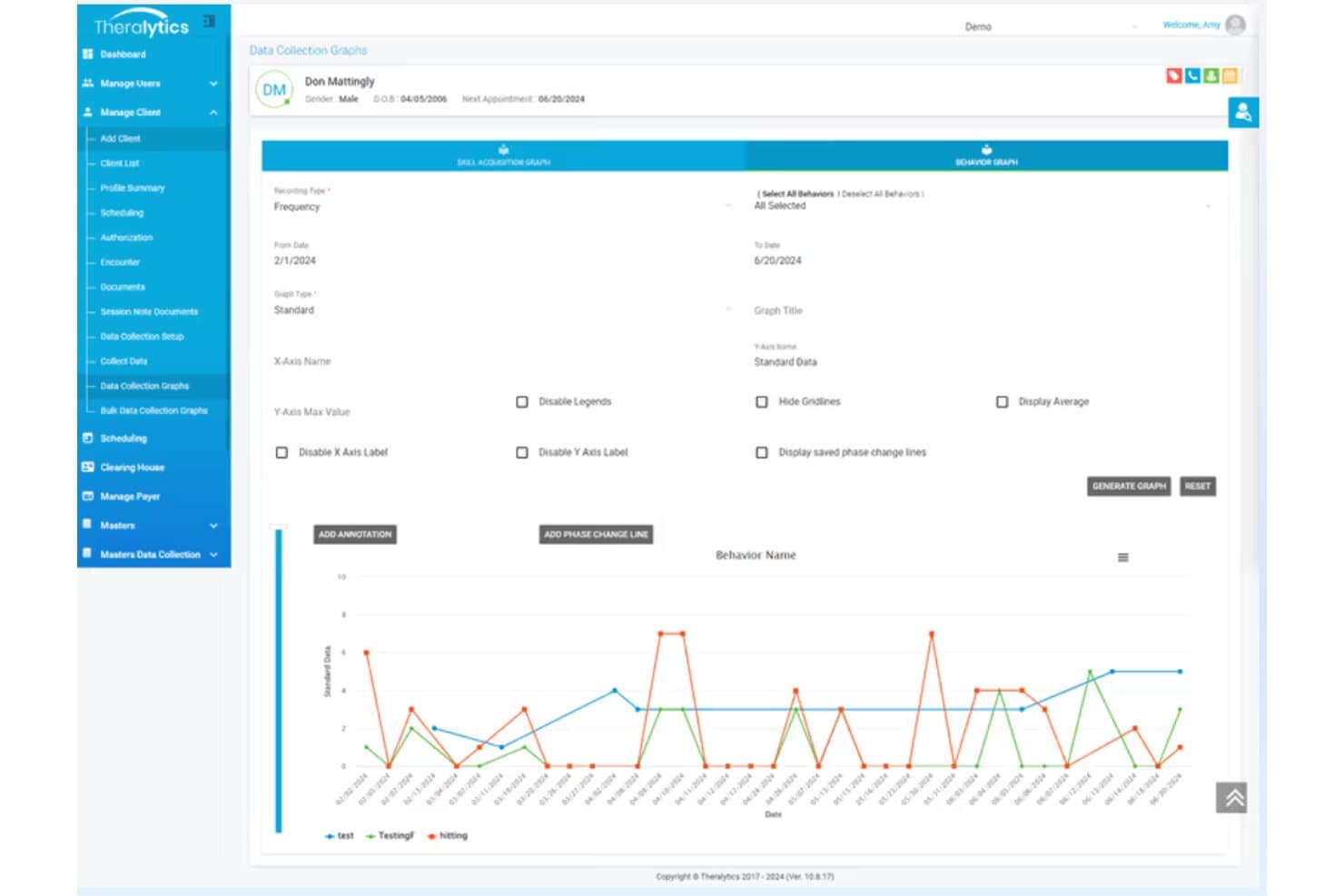
Theralytics offers a Data Collection Graphs feature with behavior tracking charts, date range filters, and graph customization options for ABA therapy clients. Theralytics is an ABA-specific practice management platform that handles billing and claims submission, authorization tracking, scheduling, session documentation, data collection, and financial reporting.
Who Is Theralytics Best For?
Theralytics is a strong fit for BCBA-led practices and growing ABA clinics that need an all-in-one billing and clinical management system without enterprise-level costs.
Why I Picked Theralytics
I picked Theralytics as one of the best because the reporting depth genuinely sets it apart. The platform produces granular reports across AR aging, RBT supervision hours, profit analysis, and canceled sessions, giving clinicians a complete picture of both clinical and financial performance. I especially like the billable hours and payer performance dashboards, which let me track exactly where revenue is slipping before it becomes a problem.
Theralytics Key Features
- Clearinghouse integrations: Submit ABA claims electronically and manage remittances directly through supported clearinghouses.
- Authorization tracking: Monitor authorized units, manage renewals, and set alerts for upcoming expirations tied to payer requirements.
- Session-to-claim workflow: Automatically convert completed appointments and session notes into billable claims with unit calculations.
- Mobile data collection app: Collect session data, obtain signatures, and complete documentation even when working offline.
Theralytics Integrations
Theralytics offers native integrations with multiple medical clearinghouses for electronic claims and ERA/EDI processing. An API is available for custom integrations.
Pros and Cons
Pros:
- Advanced reporting for clinicians and administrators
- Flexible automated billing workflows for ABA services
- Detailed ABA authorization and session tracking
Cons:
- No client-facing payment portal
- KPI calculations lack customizable formulas
Learn more about Theralytics: Best mobile documentation interface
- Free demo available
- Pricing upon request
Visit WebsiteCustomer Rating:4.4/5
Raven Health links mobile data, scheduling, session billing and managed service. Raven Health is a purpose-built ABA practice management platform that combines mobile data collection, session-to-claim billing, scheduling, and managed billing services in a single system.
Who Is Raven Health Best For?
Raven Health is a strong fit for small and growing ABA practices that want an all-in-one platform without the complexity of enterprise-grade billing systems.
Why I Picked Raven Health
I've included Raven Health in my top picks because the mobile documentation interface is genuinely built for the session floor. RBTs can collect data offline mid-session, and the platform syncs automatically when reconnected, so nothing gets lost between the clinic room and the billing queue. One-click AI session notes pull directly from trial data, converting completed sessions into billable claims without manual re-entry.
Raven Health Key Features
- Customizable treatment plan templates: Create and manage flexible templates for ABA intervention and assessment protocols.
- Recurring and drag-and-drop scheduling: Set up one-time or repeating appointments with a visual scheduling interface.
- Integrated claims submission and tracking: Generate and manage insurance claims, tracking their status from submission to payment.
- HIPAA-compliant caregiver portal: Share progress notes and reports securely with authorized family members and caregivers.
Raven Health Integrations
Raven Health offers a native integration with Inovalon Provider Cloud. Native integrations beyond Inovalon are not clearly documented.
Pros and Cons
Pros:
- Quick onboarding designed for BCBAs
- AI auto-generates session notes from trial data
- Mobile-first session documentation for RBTs
Cons:
- Authorization management less scalable for large teams
- Reporting and analytics features are limited
Learn more about Raven Health: Best support for insurance verification processes
- 21-day free trial
- Pricing upon request
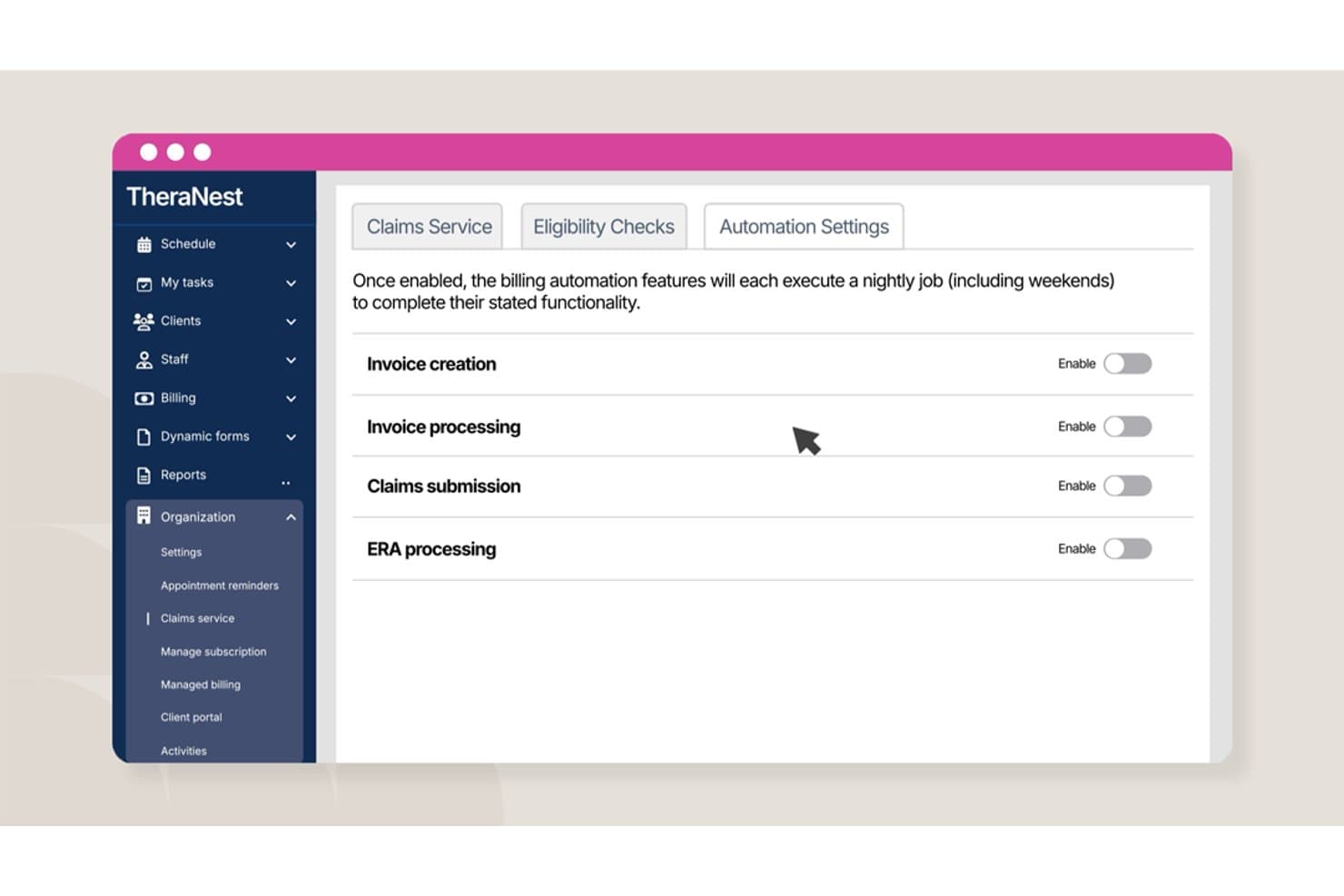
Ensora ABA Therapy offers billing automation settings including invoice creation, invoice processing, claims submission, and ERA processing toggles within TheraNest. Ensora ABA Therapy is a practice management and billing platform built specifically for ABA providers, covering scheduling, clinical documentation, authorization tracking, claims submission, and revenue cycle management.
Who Is Ensora ABA Therapy Best For?
It's a strong fit for small to mid-sized ABA clinics and BCBA-led practices that need billing and clinical workflows in a single, ABA-specific platform.
Why I Picked Ensora ABA Therapy
I picked Ensora ABA Therapy as one of the best because its authorization tracking is genuinely built for ABA billing complexity. It tracks units used against authorized amounts in real time, fires alerts before a client hits their limit, and flags expiring authorizations before they become a denial. I also like that billing rules are fully customizable by payer, so when a specific insurer requires a different unit rounding approach, the system accounts for it without manual workarounds.
Ensora ABA Therapy Key Features
- Session-to-SOAP note linking: Each scheduled session automatically connects with the related SOAP note for billing accuracy.
- Integrated clearinghouse: Submit, track, and receive responses on electronic claims directly from within the platform.
- Custom form builder: Create intake forms, treatment plans, and progress notes tailored to ABA workflows.
- Electronic visit verification (EVV): Capture GPS, caller ID, and e-signatures to meet EVV requirements for in-home ABA services.
Ensora ABA Therapy Integrations
Ensora ABA Therapy offers native integrations with Ensora Data Collection, Ensora Clearinghouse, Ensora RCM, Ensora Telehealth, Ensora Payments, and Ensora eRx. An API is available for custom integrations.
Pros and Cons
Pros:
- Customizable payer-specific billing rules
- Automated claim submission with clearinghouse
- Real-time insurance authorization tracking
Cons:
- Reporting features could be more advanced
- Limited third-party software integrations
Learn more about Ensora ABA Therapy: Best options for multi-location operations
- Free demo available
- Pricing upon request
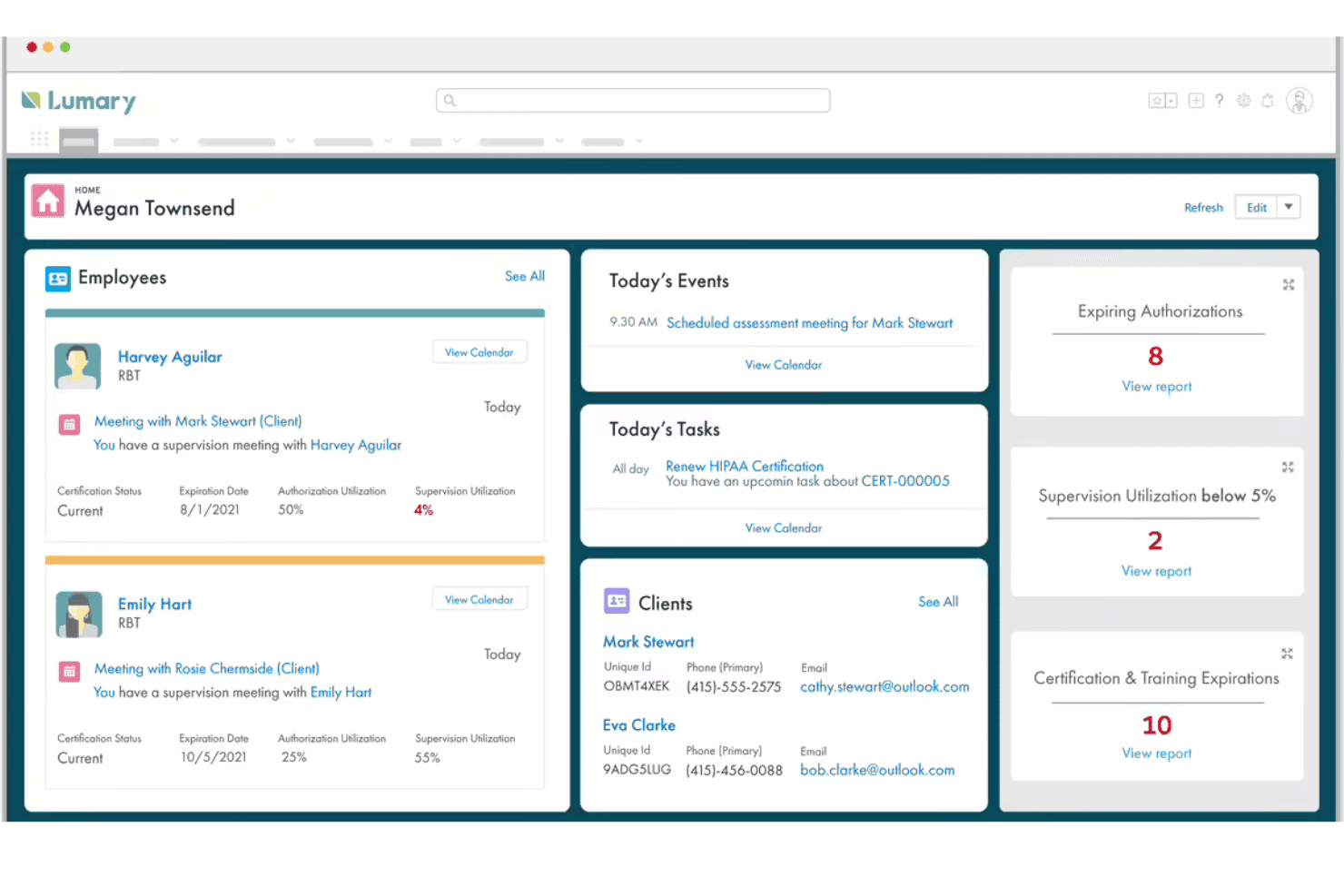
Lumary ABA suits multi-site teams managing billing, schedules, and compliance. Lumary ABA is a Salesforce-based practice management and billing platform built for autism therapy providers, combining claims submission, authorization tracking, denial management, and revenue cycle reporting in a single system.
Who Is Lumary ABA Best For?
I'd say Lumary ABA is the strongest fit for mid-to-large ABA organizations managing billing, scheduling, and compliance across multiple clinic locations.
Why I Picked Lumary ABA
Lumary ABA earns its spot on my shortlist because of how it handles billing operations at scale across multiple clinic sites. I particularly like the multi-clearinghouse setup, where my team can submit claims simultaneously through Change Healthcare, Availity, and Waystar without toggling between systems. On top of that, I rely on the live AR dashboards to track denial rates, collection percentages, and forecasted revenue across locations in a single view.
Lumary ABA Key Features
- Automated intake forms: Collect client information and create records directly from customized webforms.
- ABA-specific CPT code support: Bill sessions using preloaded ABA codes with modifier and unit logic built in.
- Real-time authorization tracking: Monitor units used, authorized, and remaining by payer and service code.
- Denial management tools: Track denials with payer-specific codes and manage rebilling workflows inside the platform.
Lumary ABA Integrations
Lumary ABA offers native integrations with Salesforce, Change Healthcare, Availity, and Waystar for claim submission and management. An API is available for custom integrations.
Pros and Cons
Pros:
- Automated payer rules for regional and school billing
- Enterprise-grade reporting for multi-location clinics
- Built for ABA and autism therapy workflows
Cons:
- Limited public reviews for independent feedback
- Not suited for small or solo practices
Learn more about Lumary ABA: Best all-in-one billing and claims workflow
- Free demo available
- From $515/month
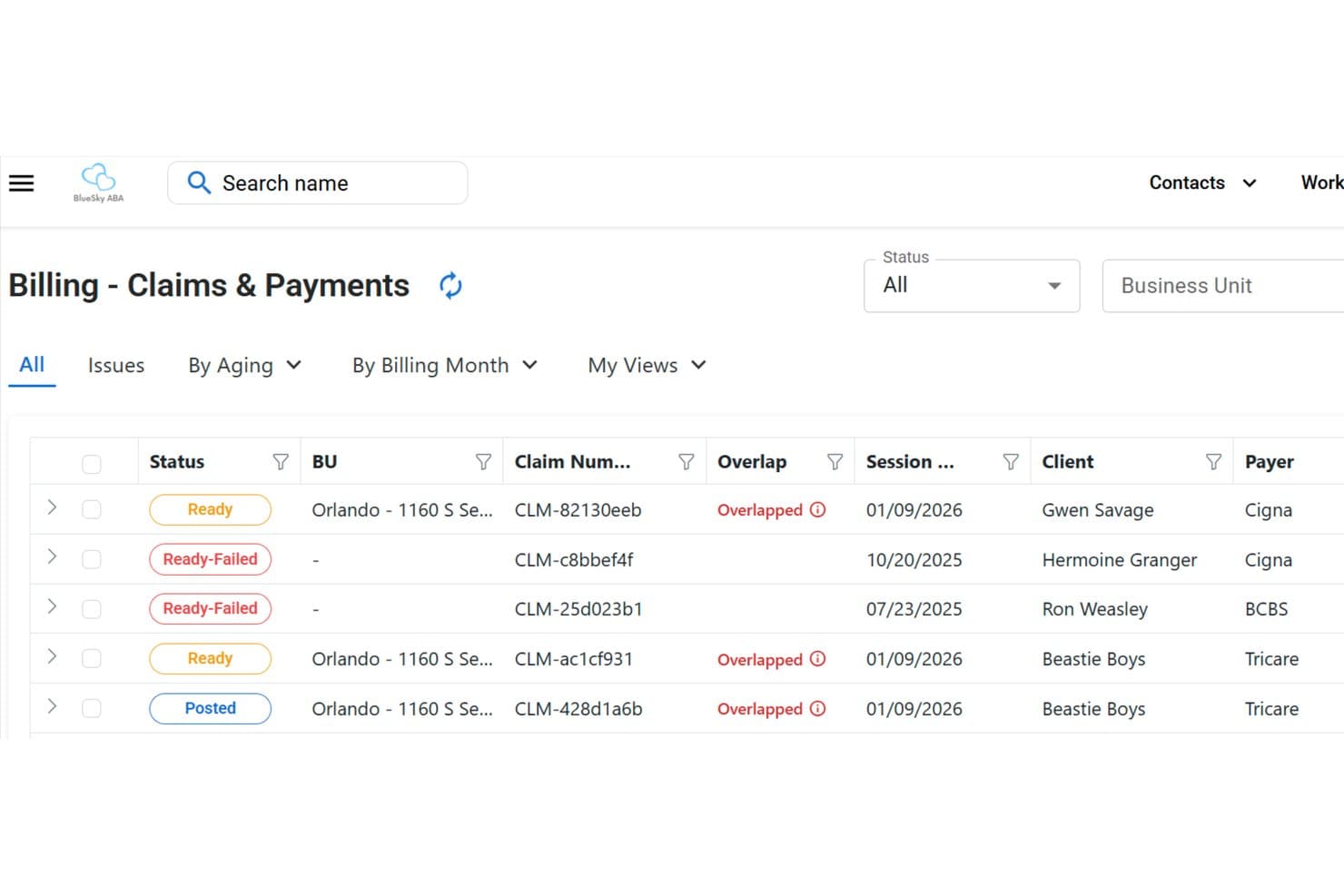
ABA Engine offers a Billing Claims & Payments screen displaying claim statuses, overlap flags, session dates, client names, and payer information in a structured list view. ABA Engine is a clinic operations platform built specifically for ABA practices, combining session-to-claim billing, payer rule configuration, claims auditing, and AR reporting in one system.
Who Is ABA Engine Best For?
ABA Engine is a strong fit for ABA clinic owners and practice administrators who need billing, scheduling, and intake managed in a single platform.
Why I Picked ABA Engine
ABA Engine earns its spot on my shortlist because of how tightly the billing workflow connects session notes to claims. I love that the Claims View lets my billing team filter by aging, status, and payer, then audit and batch-export only what's ready to submit. The payer-specific rule configuration, including overlap handling per payer, means I'm catching billing issues before they reach the clearinghouse.
ABA Engine Key Features
- Intake and onboarding automation: Custom intake forms and onboarding workflows streamline client setup within the platform.
- Parent and employee portals: Separate portals allow clients and staff to access relevant forms, schedules, and communications.
- Bank account integration: Directly connect bank accounts for reconciliation and financial tracking linked to billing activity.
- Tasking module with alerts: Built-in task management sends expiration reminders for time-sensitive administrative processes.
ABA Engine Integrations
ABA Engine offers native integrations with Google and Outlook for email connectivity, direct bank account connections for financial reconciliation, and native text/SMS integration. An API for custom integrations is not clearly documented.
Pros and Cons
Pros:
- Custom intake forms and onboarding tools
- Built-in payer rule configuration per code
- Session notes flow directly into claims
Cons:
- No client-facing scheduling interface
- Limited public third-party user reviews
Learn more about ABA Engine: Best for simplified everyday administrative tasks
- Free demo available
- From $29.99/user/month
Visit WebsiteCustomer Rating:4.9/5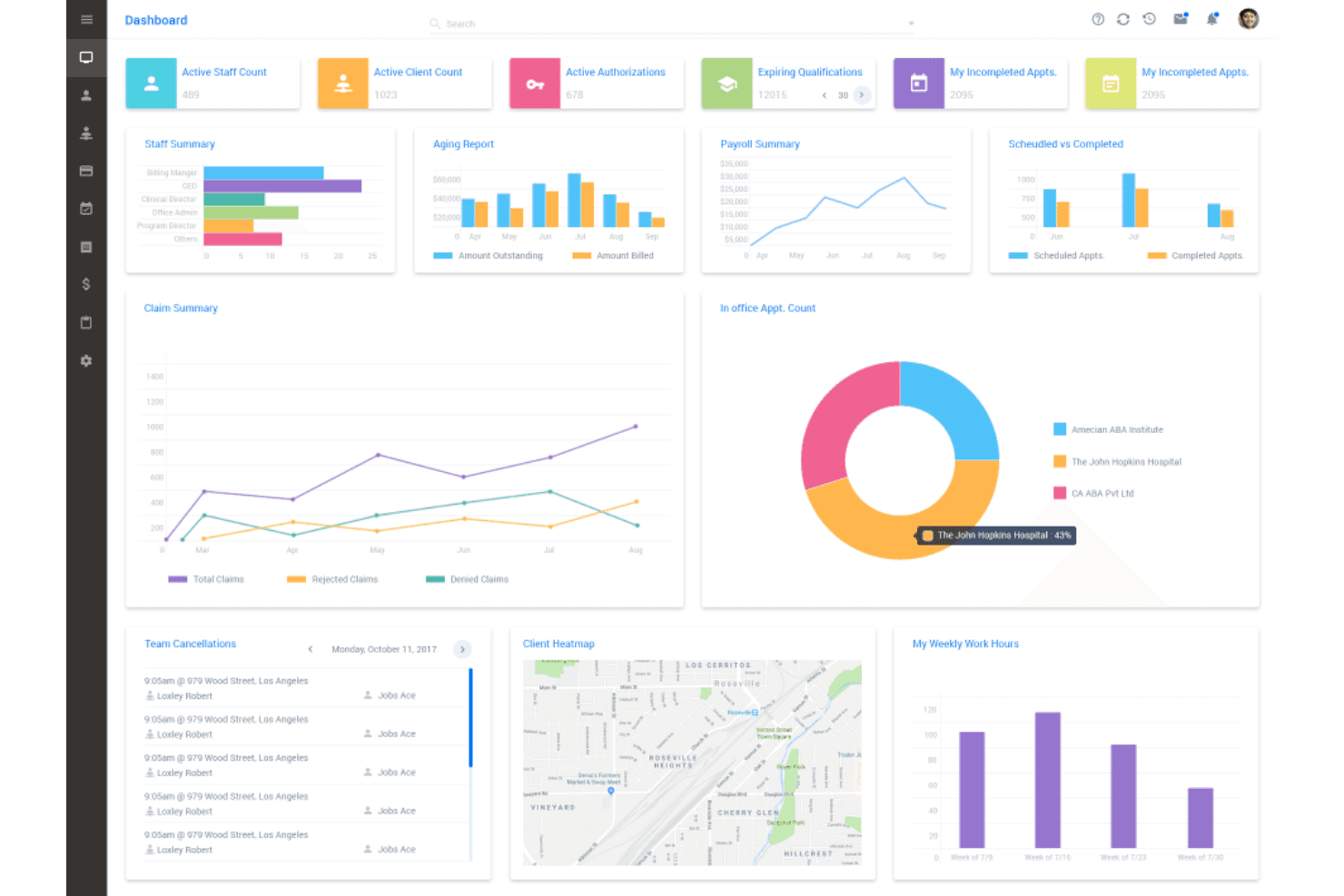
AlohaABA brings billing, scheduling, authorizations, payroll, AR, and claims. AlohaABA is a cloud-based practice management platform built for ABA providers, covering billing, scheduling, authorization tracking, payroll, accounts receivable, and session-to-claim workflows in a single system.
Who Is AlohaABA Best For?
AlohaABA is a strong fit for small to mid-sized ABA practices where the admin team manages billing, scheduling, and payroll without a large dedicated ops staff.
Why I Picked AlohaABA
AlohaABA earns its spot on my shortlist because I love how the session-to-claim pipeline removes manual steps from the daily billing cycle. Authorization tracking is built directly into the workflow, so I can see unit balances in real time without toggling between screens. Real-time claim validation with built-in insurance rules catches errors before submission, which keeps the claim queue moving without constant manual review.
AlohaABA Key Features
- Integrated payroll tools: Run payroll based on session data and staff schedules within the same platform.
- Multi-payer clearinghouse integration: Submit and track claims through Change Healthcare and Availity directly from AlohaABA.
- Accounts receivable reporting: View payer aging, collection status, and revenue forecasts in customizable reports.
- Practice management dashboard: Monitor scheduling, compliance, and billing tasks from a central visual interface.
AlohaABA Integrations
AlohaABA offers native integrations with Change Healthcare, Availity, Hi Rasmus, Twyll, Ensora Health, Stripe, Motivity, Sandata Technologies, TheraDriver, and Google Maps. An API is available for custom integrations.
Pros and Cons
Pros:
- Real-time claim validation before submission
- Built-in authorization unit tracking tools
- Automated session-to-claim billing workflow
Cons:
- Secondary billing features are less advanced
- Limited customization for financial reports
Learn more about AlohaABA: Best for large-scale clinical practice management
- Free demo available
- Price upon request
Visit WebsiteCustomer Rating:4.3/5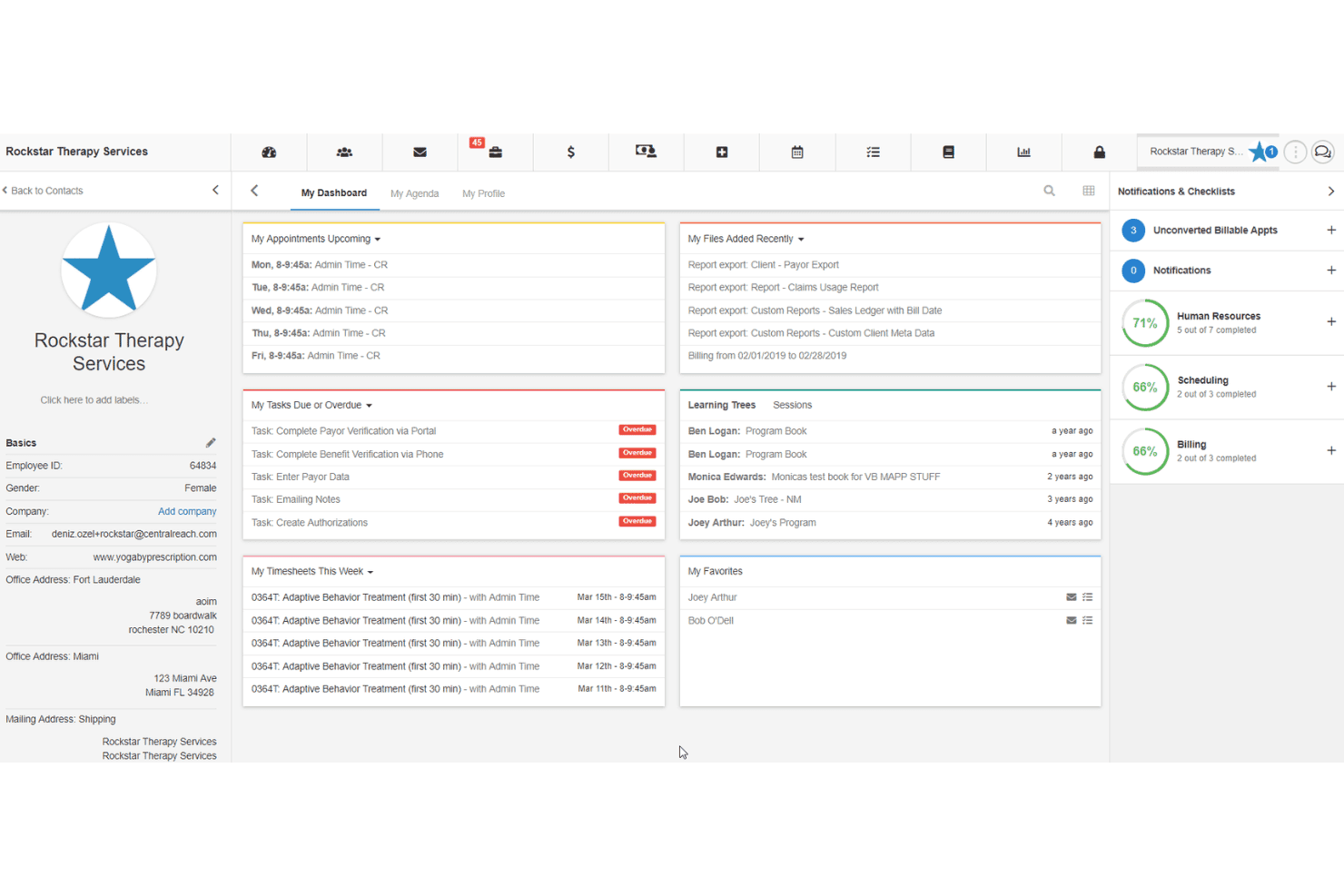
CentralReach unites ABA EMR, billing, claims, authorizations, denials, and AR. CentralReach is an ABA-native EMR and practice management platform that combines ABA billing, claims submission, authorization tracking, session-to-claim workflows, denial management, and AR reporting in one system.
Who Is CentralReach Best For?
CentralReach is a strong fit for mid-size to large ABA organizations running multi-site operations with dedicated billing and clinical teams.
Why I Picked CentralReach
CentralReach earns its spot on my shortlist because of how well it handles ABA billing at the scale of a large, multi-site practice. I specifically like ClaimCheckAI®, which audits every claim before submission to catch missing modifiers and incorrect units. Authorization tracking is also tightly tied to scheduling, so my team can monitor units consumed against approved limits without switching between systems.
CentralReach Key Features
- 835 ERA auto-posting: Automatically posts payer remittances and handles secondary claim billing.
- Custom ABA billing code library: Offers a full set of ABA CPT codes with customizable modifiers for different payer rules.
- Business intelligence dashboards: Provides 50+ dashboards to monitor revenue cycle KPIs and aging AR specific to ABA clinics.
- Session note audit automation: Uses NoteGuardAI™ to audit every clinical session note for compliance and completeness.
CentralReach Integrations
CentralReach offers native integrations with Change Healthcare and Collectly, supports RPA via Simple Fractal, and provides an API for custom integrations.
Pros and Cons
Pros:
- Detailed authorization and session tracking
- End-to-end ABA workflow automation
- Advanced AI-driven billing audits
Cons:
- Annual pricing escalations after signup
- Reported downtime and reliability issues
Learn more about CentralReach: Best option for small provider practices
- Free demo available
- Price upon request
Visit WebsiteCustomer Rating:4.3/5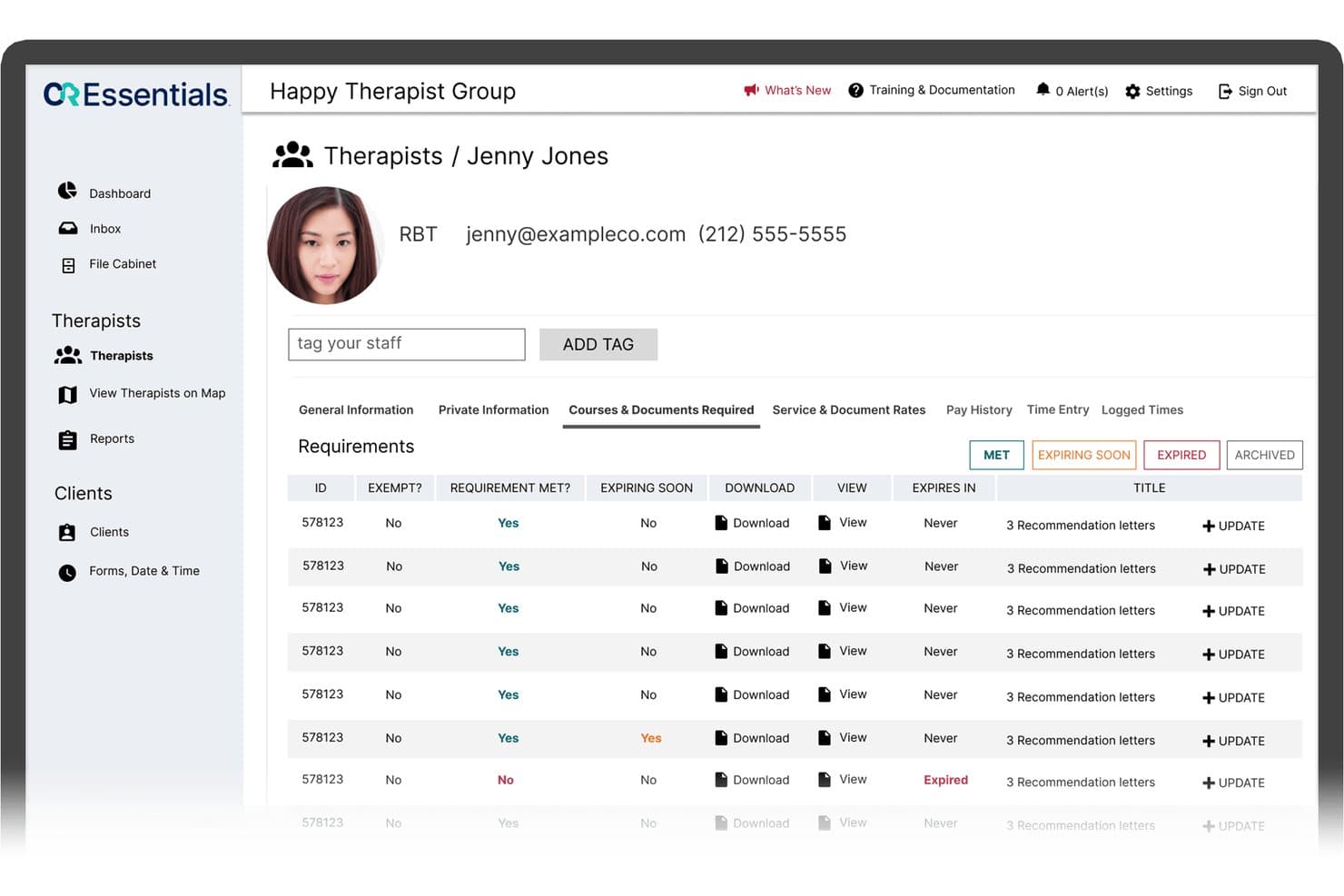
CR Essentials offers a therapist profile view with compliance tracking, showing courses and documents required, requirement statuses, and expiration details for staff management. CR Essentials is an ABA-specific practice management platform that combines clinical data collection, authorization tracking, electronic claims submission, and billing in a single system built for small therapy practices.
Who Is CR Essentials Best For?
CR Essentials is a strong fit for ABA clinic owners and BCBA directors launching or running early-stage practices who need billing and clinical tools in one place.
Why I Picked CR Essentials
I picked CR Essentials because it's the only ABA billing tool I've seen purpose-built for practices with fewer than 50 employees, without sacrificing the billing depth larger platforms offer. I like how authorization tracking auto-applies units to each session and fires expiration alerts before you hit a wall with a payer. The AI-powered session summary cuts documentation time and feeds directly into the claims pipeline, which is where I've seen small practices lose the most revenue.
CR Essentials Key Features
- Electronic claims submission: Send claims directly through integrated clearinghouse connections.
- CMS 1500 and EDI 837 exports: Generate industry-standard files for insurance billing compliance.
- Real-time EVV mobile app: Capture service delivery with electronic visit verification that integrates into billing workflows.
- Customizable progress notes: Build and complete payer-specific notes using custom templates and built-in e-signatures.
CR Essentials Integrations
CR Essentials offers native integrations with Change Healthcare, Optum, Stripe, CR Elements, and CR Institute. An API is available for custom integrations.
Pros and Cons
Pros:
- Built-in profit and payroll reporting tools
- AI note summaries accelerate documentation review
- Authorization tracking for multiple payers per client
Cons:
- Reporting lacks payer-level performance analytics
- Limited denial management workflows for insurance claims
Learn more about CR Essentials:
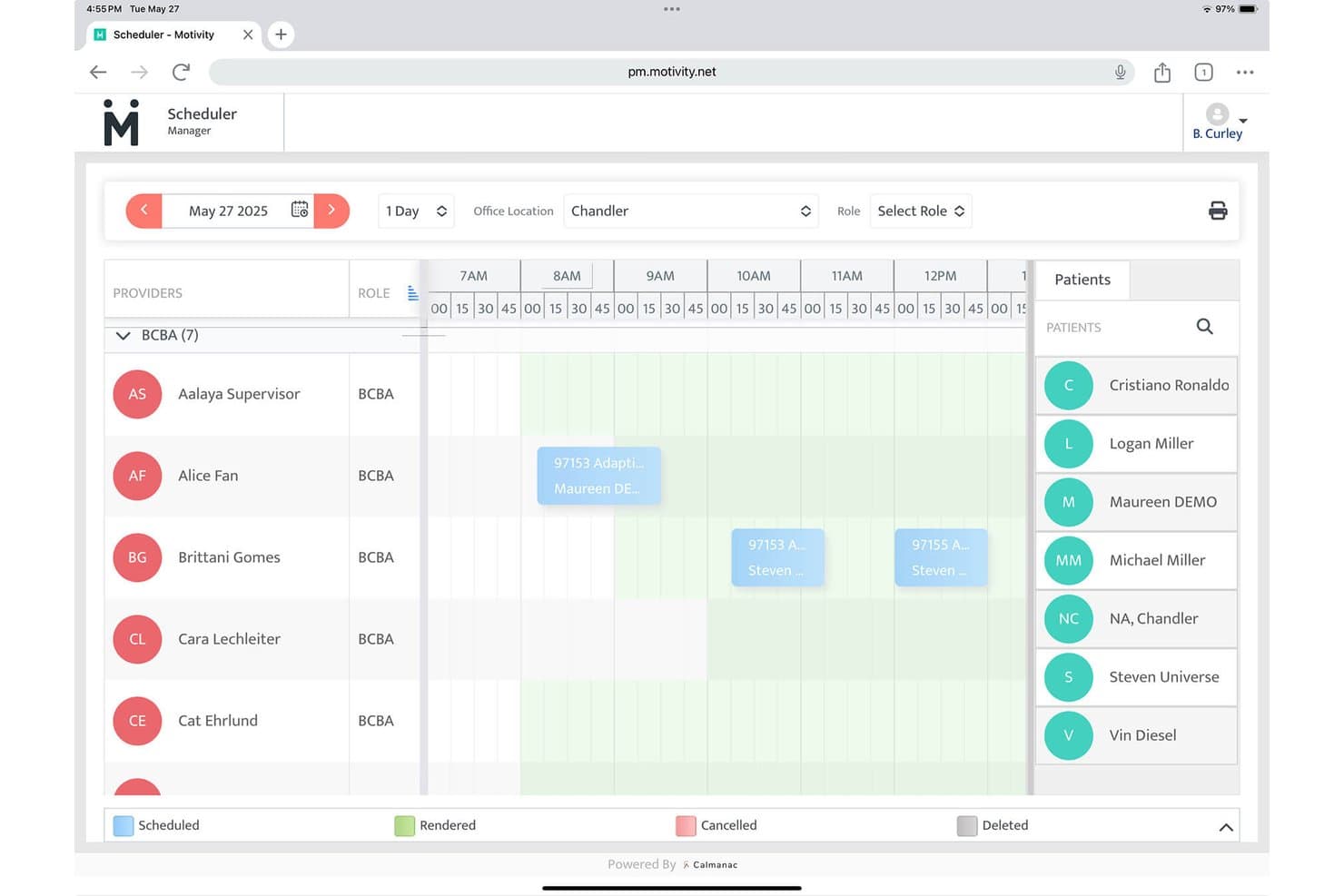
Motivity offers a visual scheduler with provider roles, patient lists, and color-coded appointment statuses for ABA practice management. Motivity is a native ABA platform that connects clinical data collection, session-to-claim billing, authorization tracking, and full-service revenue cycle management in a single system built specifically for ABA practices.
Who Is Motivity Best For?
Motivity suits BCBAs and ABA practice directors who need clinical data collection and billing managed within the same platform.
Why I Picked Motivity
I picked Motivity as one of the best because of how far the workflow customization actually extends into billing. I can configure payer-specific billing rules once, and Motivity automatically validates every claim against those rules before submission. The session-to-billing pipeline runs the same way, pulling completed session data directly into claims with unit conversion logic already built in, so there's no manual re-entry between a finished session note and a submitted claim.
Motivity Key Features
- Authorization tracking dashboard: Monitor units, expirations, and service codes in real time for each client.
- Integrated credential management: Track staff credentials and payor contracts with automated compliance checks.
- Real-time clinical data capture: Record discrete trial, interval, frequency, and ABC data during ABA sessions.
- Custom program template library: Access over 1,000 templates and contribute to a community library of ABA protocols.
Motivity Integrations
Motivity offers native integrations with AlohaABA, TherapyPM, Availity, Office Ally, Waystar, and Trizetto for clearinghouse and RCM functions. An API is available for custom integrations, and it integrates with payroll platforms like Gusto and QuickBooks.
Pros and Cons
Pros:
- Built-in credentialing and compliance tools
- Custom automated billing rules for each payer
- Session data flows directly to claims
Cons:
- Reporting customization is somewhat limited
- Workflow setup can take substantial time
Learn more about Motivity: Best integrated telehealth and clinical tools
- Free demo available
- Pricing upon request
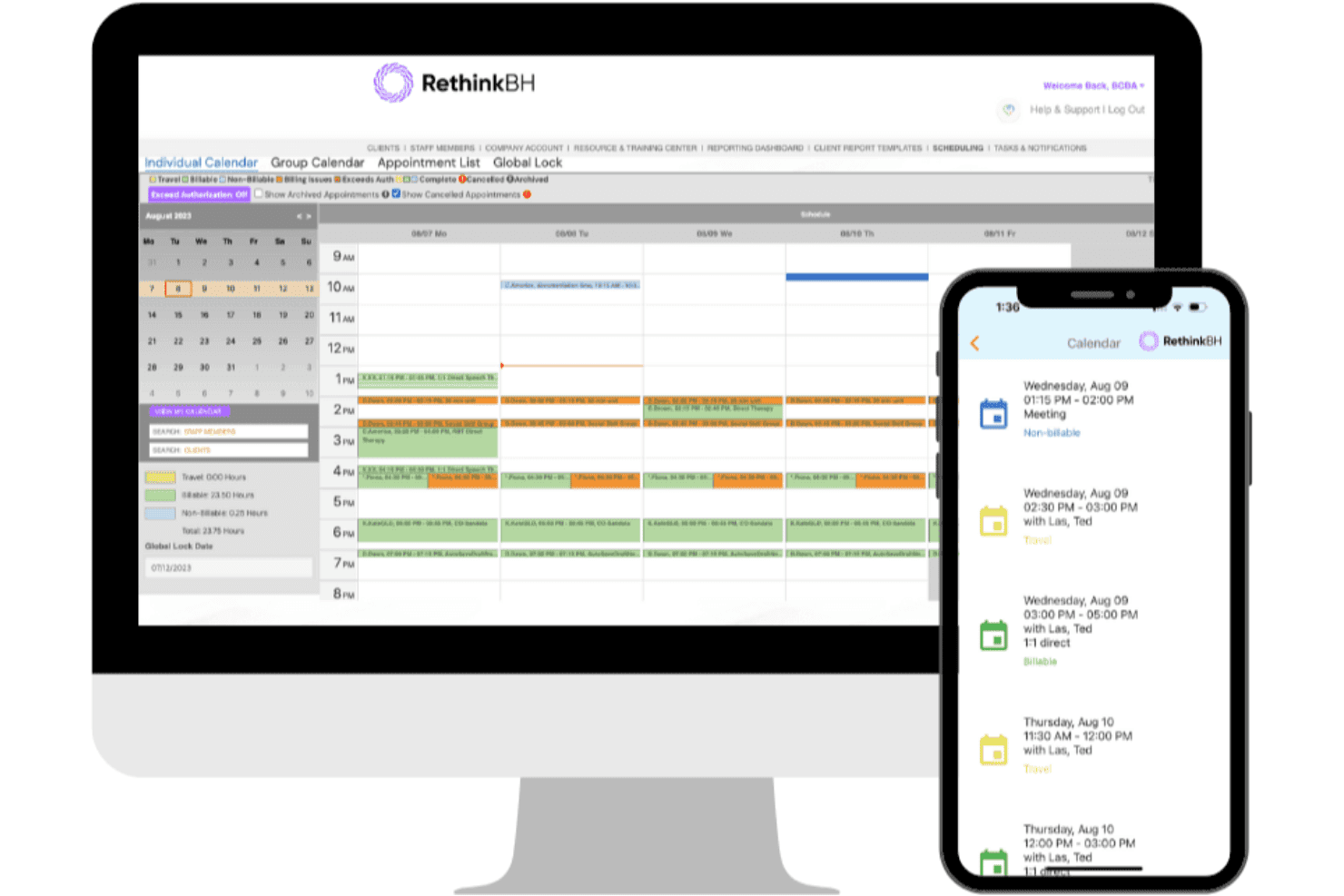
RethinkBH connects ABA data, session notes, scheduling, and AI claims billing. RethinkBH is an ABA-specific practice management platform that connects clinical data collection, session documentation, scheduling, and insurance billing through its AI-powered BillAI claims engine.
Who Is Rethink Behavioral Health Best For?
RethinkBH fits ABA clinic owners and practice directors managing multi-clinician teams who need clinical documentation and billing in one connected system.
Why I Picked Rethink Behavioral Health
I picked RethinkBH as one of the best because the clinical and billing layers share the same real-time data. Session Note AI generates audit-ready notes directly from live session data, and BillAI converts those completed notes into claims without any manual re-entry. That tightly connected pipeline is what separates RethinkBH from platforms where billing is a separate module you have to manually sync with clinical records.
Rethink Behavioral Health Key Features
- Custom ABA content library: Access over 1,500 pre-built ABA programs covering a wide range of skill areas.
- Integrated electronic visit verification (EVV): Capture visit data that meets payer compliance requirements for in-home and remote sessions.
- BACB-compliant RBT training: Deliver 40-hour RBT certification courses and manage ongoing CEUs directly within the platform.
- Real-time billing dashboards: Track claims, denials, reimbursements, and days in AR with up-to-date billing analytics.
Rethink Behavioral Health Integrations
RethinkBH offers native integration with the Stedi clearinghouse for direct claims submission and ERA processing. The platform also supports API access for custom integrations and connects with assessment tools like VB-MAPP, ABLLS-R, and PEAK.
Pros and Cons
Pros:
- Specialized ABA assessment content included
- Built-in audit-ready session documentation
- Clinical and billing data always connected
Cons:
- Contract auto-renewal catches some users off guard
- Reported issues with customer support responsiveness
Learn more about Rethink Behavioral Health:
Annen ABA-faktureringsprogramvare
Her er noen flere alternativer for ABA-faktureringsprogramvare som ikke kom med på kortlisten min, men som likevel er verdt å undersøke:
- 11Artemis ABABest data-driven insights for therapy practices
- 12NoteableBest collaborative session management tools
- 13ABA MatrixBest for customizable billing rules
- 14Passage HealthBest for major payer and clearinghouse connections
- 15Therap ServicesBest compliance management for therapy providers
- 16AccuPointBest automated electronic remittance posting
- 17TherapyPMSBest multi-specialty support for therapy practices
- 18MedEZBest for adapting to diverse healthcare settings
- 19VGPMBest dedicated onboarding assistance
- 20MeasurePMBest live eligibility checks for claims submission
How I Evaluate ABA Billing Software
I split my evaluation into the baseline requirements—CPT code support, authorization tracking, claims submission—and the factors that set one platform apart from another.
Core Functionality (Table Stakes for This List)
When I'm selecting tools for my list, I rank each one on a scale from 0 (does not offer the functionality) to 5 (excels in this area) for each core functionality listed below. Then, I calculate the tool's total score into a percentage. Each tool needs to achieve a minimum total score of 55% to be considered for inclusion.
- ABA CPT Code Support: I check whether the platform natively handles 97151–97158 codes with modifiers, unit calculations, and time-based billing rules built in.
- Authorization Tracking: Each tool should track authorized units against delivered sessions and alert staff before auths expire or unit limits are exceeded.
- Claims Submission & Management: I evaluate whether the platform generates 837P files, connects to a clearinghouse, and processes 835/ERA remittances without manual workarounds.
- Session-to-Billing Workflow: Converting a completed session note into a billable claim should include unit rounding logic and validation before submission.
- Payer Rules & Denial Management: I look for payer-specific rule sets and denial tracking with reason codes, since each payer handles ABA claims differently.
- Financial & AR Reporting: The platform should produce AR aging, collections, and payer performance reports so clinic owners can spot revenue gaps quickly.
Once I have a list of tools that meet the criteria, I consider what sets each platform apart.
Differentiating Factors (What Sets Vendors Apart)
Here's how I compare and contrast different vendors:
Standout Features
Concurrent billing support matters when a BCBA supervises an RBT during a session. Platforms that auto-apply rate adjustments for overlapping codes like 97155 and 97153 prevent common denials. I also evaluate automated denial management, looking for tools that categorize denial reasons and route rejected claims into resubmission queues. Telehealth modifier handling is another differentiator, since platforms that auto-apply GT/95 modifiers based on payer rules save billing staff from manually tracking which codes apply to remote sessions.
Beyond Features
ABA-specific payer expertise is a big differentiator. I look for platforms with pre-loaded fee schedules for major payers like Medicaid and TRICARE, plus regular updates when CPT codes or policies change. Implementation support also matters—migrating client authorizations and payer data from a legacy system is tricky, so I check whether vendors offer dedicated onboarding with ABA billing specialists. Practice size fit is another factor, since a solo BCBA and a multi-location clinic need very different pricing models and permission structures.
Slik velger du ABA-faktureringsprogramvare
Det er lett å gå seg vill i lange funksjonslister og kompliserte prisstrukturer. For å hjelpe deg med å holde fokus mens du går gjennom den unike prosessen med å velge programvare, finner du her en sjekkliste over faktorer du bør ha i bakhodet:
| Faktor | Hva du bør vurdere |
|---|---|
| FaktorSkalerbarhet | Hva du bør vurdereVil systemet støtte fremtidig vekst, for eksempel flere lokasjoner, nye behandlere eller økt mengde krav? Spør om brukertillatelser kan utvides i takt med teamet ditt. |
| FaktorIntegrasjoner | Hva du bør vurdereFungerer programvaren med dagens elektroniske pasientjournalsystem, planleggingssystem, oppgjørssentral eller regnskapsverktøy? Kartlegg de viktigste arbeidsflytene dine og se etter integrasjonsmangler eller risiko for dobbeltregistrering av data. |
| FaktorTilpasningsmuligheter | Hva du bør vurdereKan du tilpasse arbeidsflyter, roller og rapporttyper slik at de passer de spesifikke faktureringsprosessene dine? Vurder hva som må tilpasses for kravene til forsikringsbetalerne eller virksomheten din. |
| FaktorBrukervennlighet | Hva du bør vurdereEr grensesnittet intuitivt nok til at fakturamedarbeidere, BCBAs og administrativt personale lærer det raskt? Prøv en direktedemonstrasjon eller prøveperiode før du bestemmer deg. |
| FaktorImplementering og opplæring | Hva du bør vurdereTilbyr leverandøren dedikert støtte ved migrering og spesialisert opplæring i ABA-fakturering? Spør om tidsrammer, ressursbehov og garantier for dataoverføring. |
| FaktorKostnad | Hva du bør vurdereEr gebyrene per bruker, per krav eller prosentbaserte? Vei den totale kostnaden opp mot forventet volum, bemanningsmodellen din og andelen avviste krav. |
| FaktorSikkerhetstiltak | Hva du bør vurdereTilbyr plattformen HIPAA-kompatibel drift, revisjonsspor, kryptering og streng rollebasert tilgang? Bekreft at en databehandleravtale (BAA) er inkludert. |
| FaktorKrav til etterlevelse | Hva du bør vurdereVil løsningen hjelpe deg med å holde tritt med stadig nye krav fra Medicaid, forsikringsbetalere eller EVV? Undersøk leverandørens prosess for oppdatering av CPT-koder og endringer i reglene fra forsikringsbetalerne. |
Hva er ABA-faktureringsprogramvare?
ABA-faktureringsprogramvare er en spesialisert plattform for håndtering av krav, godkjenninger og regler fra forsikringsbetalere som er unike for terapi basert på anvendt atferdsanalyse (ABA). Denne programvaren automatiserer opprettelsen av krav fra øktnotater, sporer godkjente enheter og behandler forsikringsfakturering i henhold til ABA-spesifikke CPT-koder. Den hjelper klinikker, BCBAs og fakturamedarbeidere med å redusere avvisninger, håndtere krav til etterlevelse og forbedre nøyaktigheten i virksomhetens inntektsføring.
Hvis praksisen din også trenger innsamling av kliniske data, timeplanlegging og terapihåndtering, kan mer omfattende ABA-programvare samle disse arbeidsflytene med faktureringen.
Funksjoner i ABA-faktureringsprogramvare
Når du velger ABA-faktureringsprogramvare, bør du se etter følgende viktige funksjoner:
- Håndtering av ABA CPT-koder: Støtter alle nødvendige koder og modifikatorer for ABA-terapi, slik at kravene inneholder nøyaktige faktureringsdetaljer og tidskonverteringer for betalere.
- Sporing av autorisasjoner: Overvåker enhetsbruk, datoperioder og tjenestekoder, og sender varsler når du nærmer deg utløp eller grenser, slik at økter ikke faktureres utenfor autorisasjonen.
- Konvertering fra økt til krav: Gjør automatisk ferdige øktnotater eller avtaler om til forsikringskrav som er klare til innsending, noe som reduserer manuell registrering og manglende fakturering.
- Innsending av krav og betalingsoppgjør: Lar deg generere, sende inn og spore elektroniske krav (837P) med integrasjon mot et oppgjørssentral, og bokfører automatisk ERA-betalingsfiler (835).
- Arbeidsflyt for håndtering av avslag: Fanger opp avviste krav, logger årsakskoder og sender avvisninger til en arbeidskø for oppfølging, noe som forbedrer innkrevingen av krav.
- Tilpassbar rapportering: Produserer rapporter om økonomi, utestående fordringer og betalerprestasjoner som praksiseiere og ledere kan bruke til å overvåke inntekter og innbetalinger.
- HIPAA-kompatibel sikkerhet: Tilbyr datakryptering, revisjonslogger og tilgangskontroller for brukere for å opprettholde samsvar og beskytte pasientopplysninger.
- Støtte for telehelsefakturering: Bruker automatisk riktige modifikatorer og koder for tjenestested for eksterne økter i henhold til kravene fra hver betaler.
- Håndtering av regler for flere betalere: Lagrer og oppdaterer betalerspesifikke faktureringsregler for ABA, slik at krav samsvarer med retningslinjene for Medicaid, TRICARE og kommersielle forsikringsselskaper.
- Integrasjon med EHR og timeplanlegging: Synkroniserer avtaler, øktdokumentasjon og faktureringsdata med den elektroniske pasientjournalen og timeplanleggingssystemene dine for mer effektive arbeidsflyter.
Fordeler med ABA-faktureringsprogramvare
Implementering av ABA-faktureringsprogramvare gir flere fordeler for teamet og virksomheten din. Her er noen av fordelene du kan se frem til:
- Mer nøyaktige krav: Automatiserer riktig valg av CPT-koder, bruk av modifikatorer og beregning av enheter, slik at krav faktureres i henhold til gjeldende ABA-regler for betalere.
- Raskere refusjon: Sender inn feilfrie krav, reduserer avslag og behandler ERA-filer raskt, slik at klinikker kan få betalt tidligere.
- Redusert manuelt arbeid: Gjør øktnotater og avtaler automatisk om til krav, noe som minimerer gjentatt registrering, datafeil og tiden som brukes på fakturering.
- Samsvar med autorisasjoner: Sporer autoriserte enheter i sanntid og varsler teamet når tjenestegrenser eller utløpsdatoer nærmer seg, slik at økter som ikke kan faktureres, unngås.
- Bedre håndtering av avslag: Merker avviste krav, logger årsaker til avslag og organiserer arbeidsflyter for ny innsending for å øke andelen krav som blir betalt.
- Datadrevet beslutningstaking: Tilbyr rapporter og oversikter over utestående fordringer, betalerprestasjoner og praksisens inntekter, slik at eiere og ledere kan følge med på den økonomiske helsen.
- Bedre sikkerhet og samsvar: Opprettholder HIPAA-samsvar med revisjonsspor, kryptering og brukerbaserte tilgangskontroller for å beskytte sensitive pasient- og faktureringsdata.
Kostnader og priser for ABA-faktureringsprogramvare
Valg av ABA-faktureringsprogramvare krever en forståelse av de ulike prismodellene og abonnementene som er tilgjengelige. Kostnadene varierer basert på funksjoner, teamstørrelse, tillegg og mer. Tabellen nedenfor oppsummerer vanlige abonnementer, gjennomsnittsprisene deres og typiske funksjoner som er inkludert i løsninger for ABA-faktureringsprogramvare:
Sammenligningstabell for ABA-faktureringsprogramvare
| Abonnementstype | Gjennomsnittspris | Vanlige funksjoner |
|---|---|---|
| AbonnementstypeGratis abonnement | Gjennomsnittspris$0 | Vanlige funksjonerTilbyr grunnleggende kravsporing, begrenset støtte for CPT-koder, grunnleggende rapportering og støtte via e-post. |
| AbonnementstypePersonlig abonnement | Gjennomsnittspris$30-$60/bruker/måned | Vanlige funksjonerTilbyr alle ABA CPT-koder, enkel konvertering fra økt til krav, grunnleggende rapporter, standardsikkerhet og tilgang til brukerstøtte. |
| AbonnementstypeForretningsabonnement | Gjennomsnittspris$80-$120/bruker/måned | Vanlige funksjonerInkluderer full automatisering av krav, sporing av autorisasjoner, håndtering av avslag, betalerregler, telehelsefakturering og integrasjoner. |
| AbonnementstypeVirksomhetsabonnement | Gjennomsnittspris$150+/bruker/måned | Vanlige funksjonerLegger til tilpassede arbeidsflyter, avansert analyse, støtte for flere lokasjoner, førsteklasses oppstart og dedikert kontoadministrasjon. |
Vanlige spørsmål om ABA-faktureringsprogramvare
Her er noen svar på vanlige spørsmål om ABA-faktureringsprogramvare:
Hvordan bidrar ABA-faktureringsprogramvare til å redusere avviste krav?
ABA-faktureringsprogramvare bruker kodings- og modifikatorregler som er spesifikke for betaleren, markerer manglende data i øktnotater og automatiserer kontroller av vanlige krav fra betalere før innsending. Dette bidrar til å forhindre feil som vanligvis fører til at krav blir avvist.
Kan ABA-faktureringsprogramvare håndtere flere forsikringsbetalere og Medicaid?
Ja, de fleste plattformer støtter krav til kommersielle forsikringsselskaper og Medicaid, slik at du kan administrere faktureringsregler og godkjenninger som er spesifikke for hver betaler, i ett system, inkludert oppdatering av kodeverk når kravene endres.
Hva bør jeg se etter når jeg går over fra manuell fakturering eller papirfakturering?
Se etter løsninger som tilbyr dedikert oppstartshjelp, datainporteringstjenester og supportmedarbeidere med ABA-erfaring, slik at du kan flytte aktive godkjenninger, klientopplysninger og historikk over krav til det nye systemet med minst mulig forstyrrelse av arbeidsflyten.
Støttes fakturering av fjernbehandling for ABA-terapi?
Ja, ledende programvareløsninger kan automatisk legge til GT/95-modifikatorer og riktige koder for tjenestested, slik at krav for ABA-økter utført via fjernbehandling faktureres i henhold til de nyeste retningslinjene fra betaleren.
Hvordan vet jeg om programvaren oppfyller HIPAA-kravene?
Kontroller at plattformen tilbyr datakryptering, revisjonslogger, brukerrettigheter basert på roller og en databehandleravtale (BAA) som en del av tilbudet, slik at pasientopplysninger holdes sikre og i samsvar med kravene.