

EMR-programvare for arbeidsmedisin er et digitalt system som er utviklet for å hjelpe deg med å administrere kliniske journaler, følge opp ansattes helse og støtte etterlevelse av krav innen arbeidsmedisin. Hvis du ser etter en måte å holde praksisen organisert på, redusere papirarbeidet og koordinere behandlingen på tvers av teamet, har du kommet til rett sted.
Denne listen gjennomgår de beste EMR-plattformene for arbeidsmedisin, som hjelper deg med å dokumentere eksponeringer, følge opp arbeidsrelaterte skader og håndtere stadig nye regulatoriske behov – slik at du kan ta en trygg beslutning for klinikken, helsetjenesten eller arbeidsgiverens helseprogram.
Why Trust Our Software Recommendations
6,700+
Reviews
20
Industry experts
16+
Evaluation factors
14
Years
Our team has been testing and reviewing software since 2012. As medical practice leaders ourselves, we know how difficult—and important—it is to choose the right software.
For this guide, we evaluated tools using hands-on testing and independent research, scoring tools using our selection criteria.
Our reviews reflect our human editorial judgment, not a sales pitch.
Sammenligningstabell for EMR-programvare for arbeidsmedisin
Denne sammenligningstabellen viser prisene for mine beste utvalgte EMR-programmer for arbeidsmedisin:
| Tool | Best For | Trial Info | Price | ||
|---|---|---|---|---|---|
| 1 | Best for medicine documentation | Free demo available | Pricing upon request | Website | |
| 2 | Best for scheduling and clinical workflows | Free demo available | Pricing upon request | Website | |
| 3 | Best for configurable health EHR workflows | Free demo available | Pricing upon request | Website | |
| 4 | Best for managing injuries and employee records | Free demo available | Pricing upon request | Website | |
| 5 | Best for workforce risk management | Free demo available | Pricing upon request | Website | |
| 6 | Best for combining occupational health | Free demo available | From $30/user/month (billed annually, min 5 seats) | Website | |
| 7 | Best for integrated EHR and management workflows | Free demo available | Pricing upon request | Website | |
| 8 | Best for managing occupational medicines | Free demo available | Pricing upon request | Website | |
| 9 | Best for urgent care clinic operations | Not available | Pricing upon request | Website | |
| 10 | Best for enterprise-wide occupational health | Free demo available | Pricing upon request | Website |


Anmeldelser av den beste EMR-programvaren for arbeidsmedisin
Nedenfor finner du mine detaljerte sammendrag av den beste EMR-programvaren for arbeidsmedisin som kom med på kortlisten min. Anmeldelsene mine gir et detaljert innblikk i funksjonene, de beste bruksområdene og integrasjonene til hver programvare, slik at du kan finne den som passer best for deg.
 Best for medicine documentation
- Free demo available
- Pricing upon request
Visit WebsiteCustomer Rating:4.1/5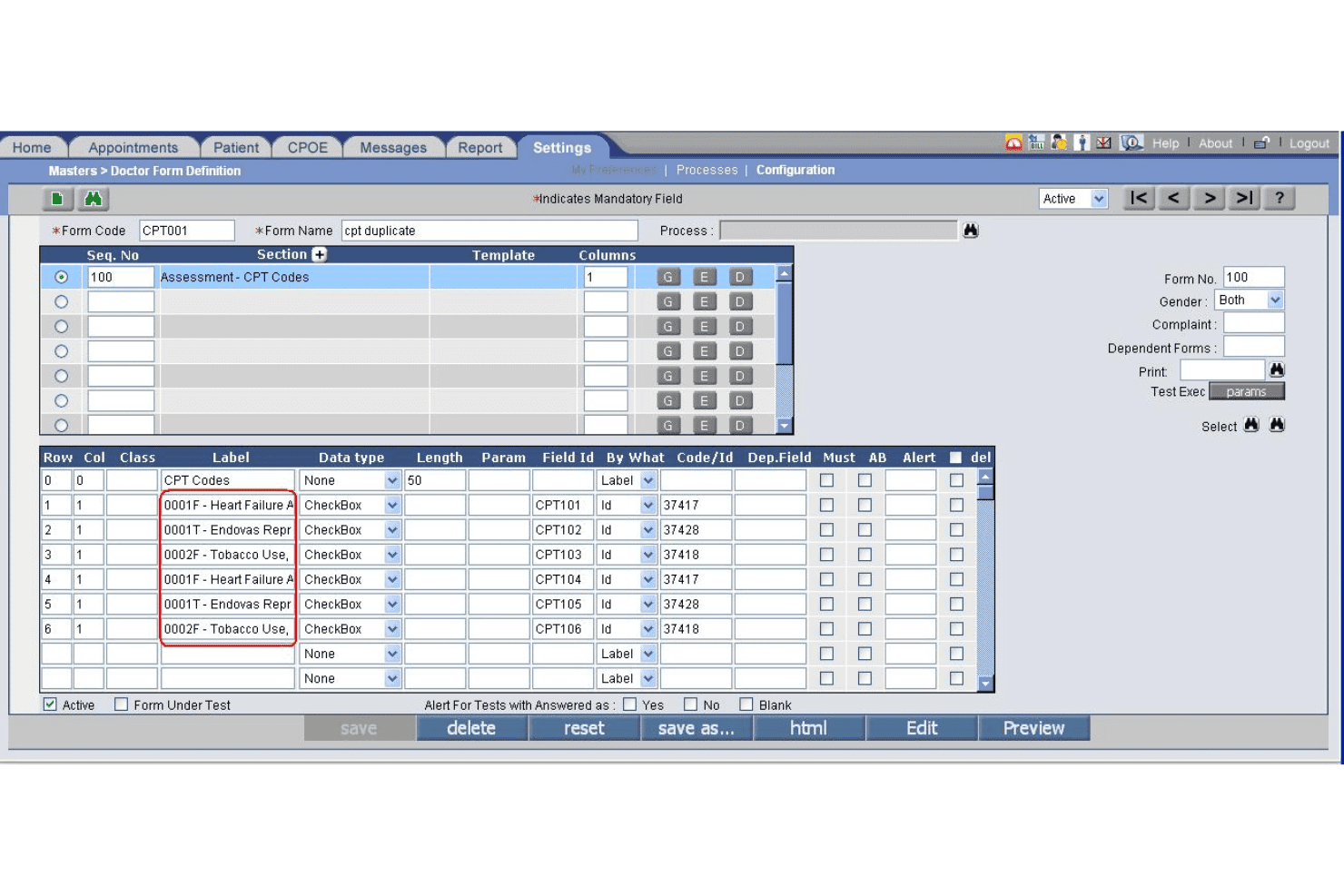
PrognoCIS specialty form builder supports custom reporting by clinical discipline. PrognoCIS is a cloud-based occupational medicine EHR that combines employer-specific documentation, DOT/FMCSA compliance workflows, drug and alcohol testing management, workers' compensation case tracking, and integrated practice management.
Who Is PrognoCIS Best For?
PrognoCIS is a strong fit for occupational medicine clinics and employer health programs that manage multi-employer accounts, DOT compliance exams, and workers' compensation cases.
Why I Picked PrognoCIS
PrognoCIS earns its spot on my shortlist because of how purpose-built its documentation is for occupational medicine specifically. I love that it auto-uploads DOT medical examiner forms directly to FMCSA, removing a manual step that creates compliance risk in a lot of occ med practices. The employer-specific template system also lets me tie custom protocols and charge codes directly to individual employer accounts, so documentation stays consistent across every encounter type.
PrognoCIS Key Features
- Employer portal access: Employers can securely submit authorizations, view results, and access invoices in real time.
- OSHA recordkeeping automation: Automatically creates OSHA 300, 300A, and 301 logs from clinical documentation.
- Protocol-driven workflows: Applies exam protocols for DOT exams, drug screens, respirator fit tests, and audiograms based on job role.
- Integrated drug and alcohol testing: Supports native chain-of-custody workflows and integrates with labs for result management.
PrognoCIS Integrations
PrognoCIS offers native integrations with Surescripts for e-prescribing, Medsender for electronic fax intake, FMCSA for DOT medical examiner form uploads, and supports lab and radiology interfaces. An API is available for custom integrations.
Pros and Cons
Pros:
- Built-in chain-of-custody drug test workflows
- Automated OSHA and DOT compliance reporting
- Employer-specific templates for multiple contract accounts
Cons:
- Interface can require multiple clicks for tasks
- Return-to-work tracking lacks automation
Learn more about PrognoCIS: Best for scheduling and clinical workflows
- Free demo available
- Pricing upon request
Visit WebsiteCustomer Rating:3.6/5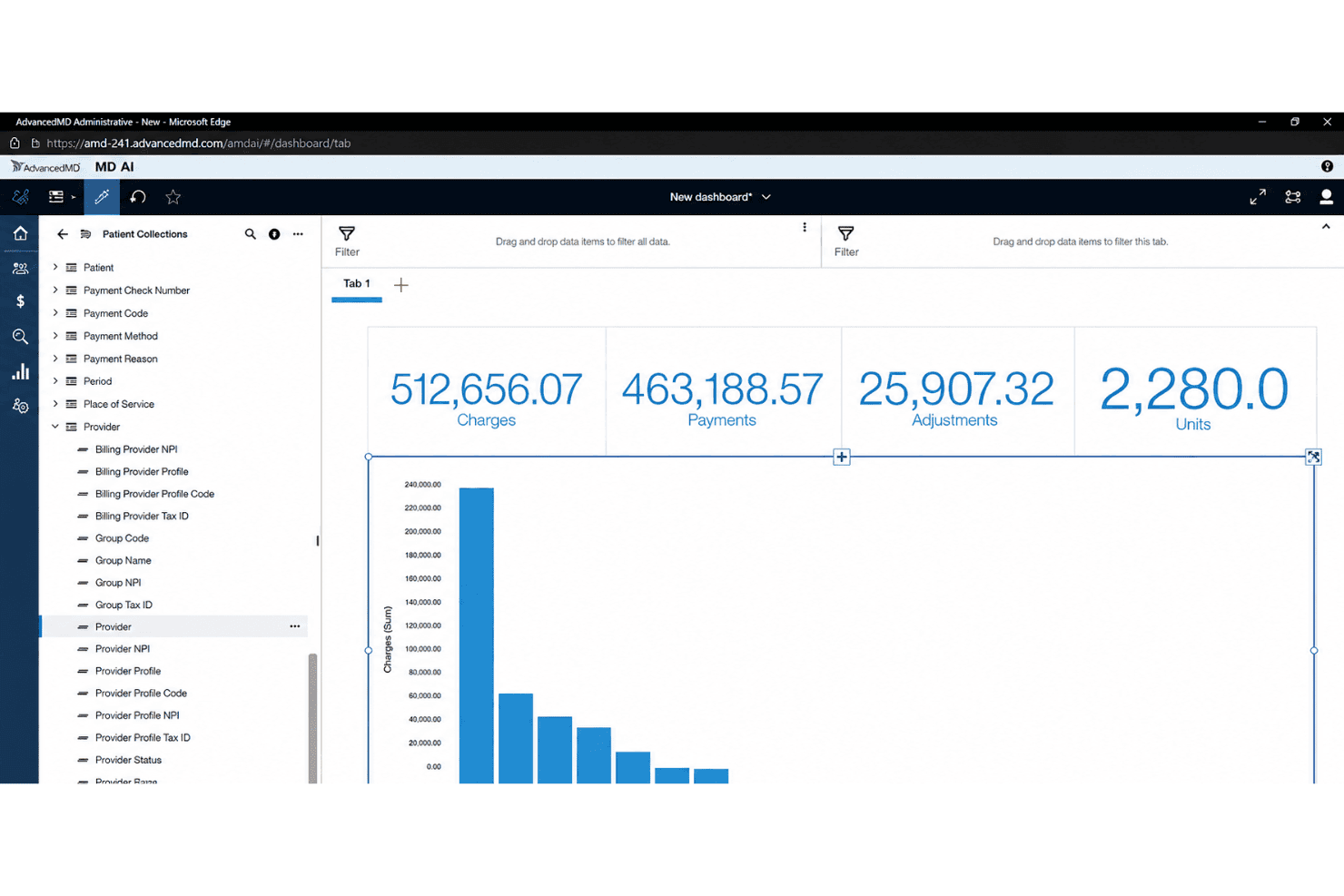
AdvancedMD centralizes EHR, billing, claims, eligibility, and patient payments. AdvancedMD is a cloud-based EHR and practice management platform that combines clinical documentation, appointment scheduling, billing, and patient engagement tools for independent ambulatory practices.
Who Is AdvancedMD Best For?
AdvancedMD is a strong fit for independent, small-to-mid-size medical practices that need a unified platform covering scheduling, charting, and billing in one system.
Why I Picked AdvancedMD
I picked AdvancedMD as one of the best because its scheduling and clinical workflow tools are genuinely well-built for high-volume, appointment-driven practices. The customizable template library lets providers tailor documentation to specific encounter types, which matters when you're moving through a mix of injury visits, follow-ups, and physicals in a single day. I also like the AI-enabled ambient documentation, which reduces charting time during back-to-back visits, and the waitlist and recall management tools that keep appointment slots filled when cancellations happen.
AdvancedMD Key Features
- Customizable charting templates: Build and modify encounter notes to match your clinical and regulatory needs.
- Integrated patient portal: Enable patients to complete intake forms, view documents, and message your practice securely.
- Insurance eligibility verification: Check patient coverage and benefits directly in the platform before visits.
- Electronic prescribing (eRx): Send prescriptions, including controlled substances, to pharmacies with built-in compliance tools.
AdvancedMD Integrations
AdvancedMD offers native integrations with Quest Diagnostics, LabCorp, Appriss Health, DrFirst, Surescripts, and Amazon Web Services, and provides an API for custom integrations.
Pros and Cons
Pros:
- Electronic prescription tools for controlled substances
- Custom chart templates for encounter documentation
- Appointment workflows support high-volume scheduling needs
Cons:
- Lacks employer and occupational health protocol tools
- No workers’ compensation documentation workflows
 Best for configurable health EHR workflows
- Free demo available
- Pricing upon request
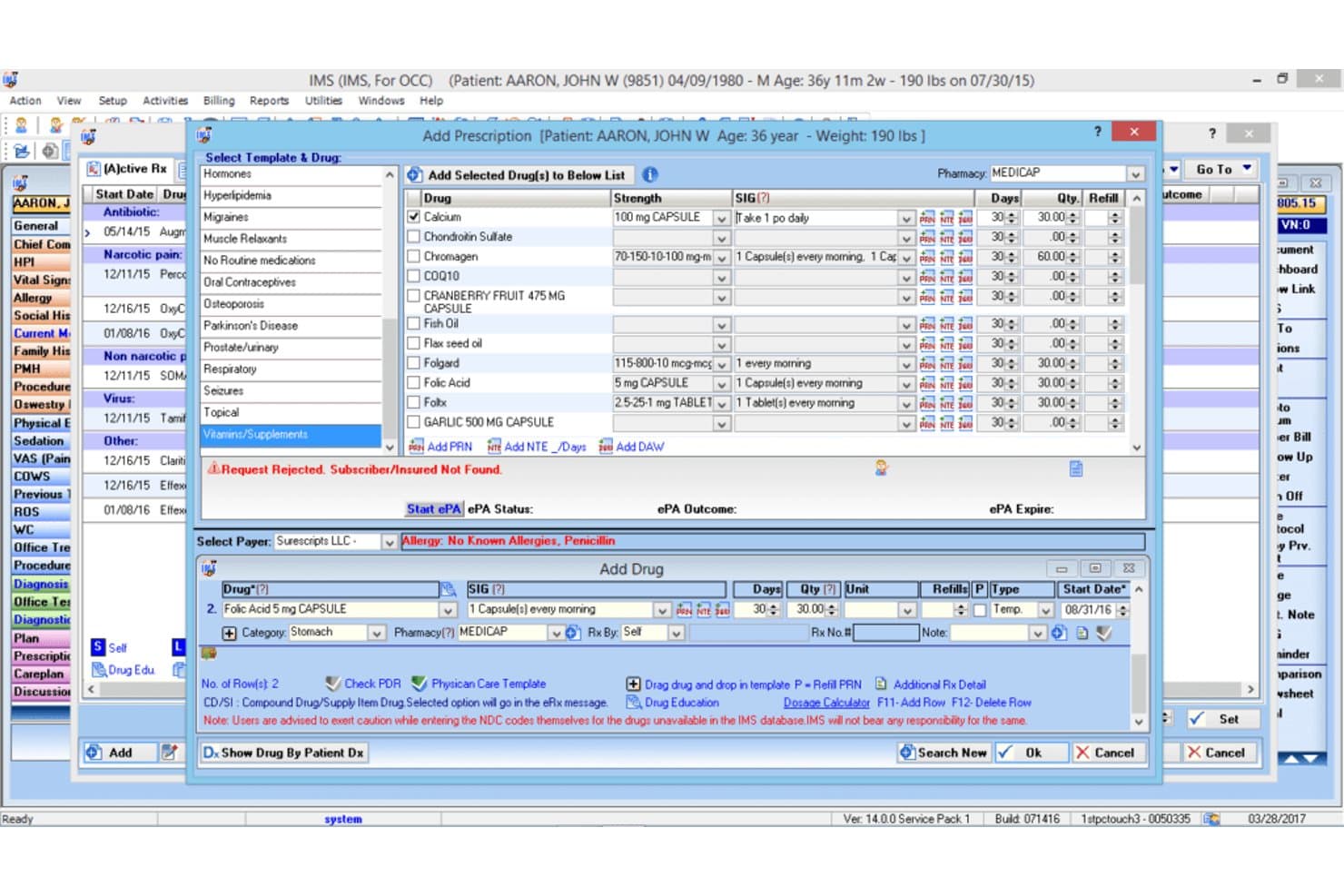
1st Providers Choice IMS offers an e-prescribing module with drug templates, prescription fields, and allergy alerts for occupational therapy EMR workflows. 1st Providers Choice IMS is a cloud-based occupational medicine EMR that combines configurable clinical workflows, employer portal management, DOT and OSHA compliance documentation, return-to-work planning, and integrated billing into a single platform.
Who Is 1st Providers Choice IMS Best For?
It's a strong fit for small to mid-size occupational medicine clinics that need a fully configurable, all-in-one EHR, billing, and practice management platform.
Why I Picked 1st Providers Choice IMS
1st Providers Choice IMS earns its spot on my shortlist because the level of workflow configurability it offers is genuinely rare in occupational medicine EMRs. I particularly like how return-to-work care plans are built around injury type and job role rather than generic templates. The built-in state and federal forms library, covering DOT, OSHA, and Workers' Comp documentation, means I'm not piecing together compliance workflows from separate tools.
1st Providers Choice IMS Key Features
- Employer portal access: Lets employers view employee records, submit authorizations, and access invoices through a secure web portal.
- OSHA recordkeeping automation: Automatically compiles required OSHA 300, 300A, and 301 logs from clinical encounter data.
- Protocol-driven workflows: Applies specific DOT, drug testing, and surveillance protocols based on employer and job classification.
- Integrated drug and alcohol testing: Provides native chain-of-custody documentation with digital orders and lab integrations.
1st Providers Choice IMS Integrations
Native integrations include Dragon Dictation, Availity, Optum Insight, Office Ally, Gateway EDI, Emdeon, and Realmed. An API is available for custom integrations.
Pros and Cons
Pros:
- Advanced workers’ comp case management workflows
- Employer portal with real-time authorization management
- OSHA and DOT regulatory reporting included
Cons:
- Few public user reviews or independent ratings
- Limited support for DOT chain-of-custody eCCF
Learn more about 1st Providers Choice IMS: Best for managing injuries and employee records
- Free demo available
- Pricing upon request
OccuCare offers a comprehensive OPD Dashboard with employee type, visit purpose, disease system, participant type, user, and nationality-based reporting panels. OccuCare is an occupational health EMR built for industrial and on-site clinics, combining employee health records, injury tracking, medical surveillance, drug and alcohol testing workflows, and OSHA and DOT compliance reporting.
Who Is OccuCare Best For?
OccuCare is a strong fit for mid-to-large industrial enterprises that run on-site occupational health clinics and need centralized health and safety management at scale.
Why I Picked OccuCare
I picked OccuCare as one of the best because of how it handles injury and employee record management within a single, structured system. I like that workplace injuries move through a complete documentation trail, from initial incident capture through treatment plans and follow-up, all tied directly to the employee's health record. The medical surveillance module also tracks recurring exams like audiometry and spirometry with exposure-based cohorts, so employee records stay current without manual chasing.
OccuCare Key Features
- Compliance reporting modules: Generate OSHA and DOT compliance reports directly from employee health data with built-in regulatory templates.
- Employer account management: Maintain separate employer profiles, each with designated protocols and access controls for multi-client setups.
- Occupational health protocol library: Access templates for physicals, drug testing, audiograms, spirometry, and respiratory exams configured for regulatory tracking.
- Automated appointment scheduling: Book, manage, and remind employees of physicals, screenings, and follow-up visits with calendar integration.
OccuCare Integrations
OccuCare supports integrations with HRIS, payroll, EHS, and billing systems, and offers an API for custom integrations. Native integrations are not clearly documented.
Pros and Cons
Pros:
- Centralized employee recordkeeping with roles-based access
- Injury documentation workflows tailored to industry
- Strong surveillance protocol management tools
Cons:
- Lacks DOT chain-of-custody lab integrations
- No US workers' compensation claim templates
Learn more about OccuCare:
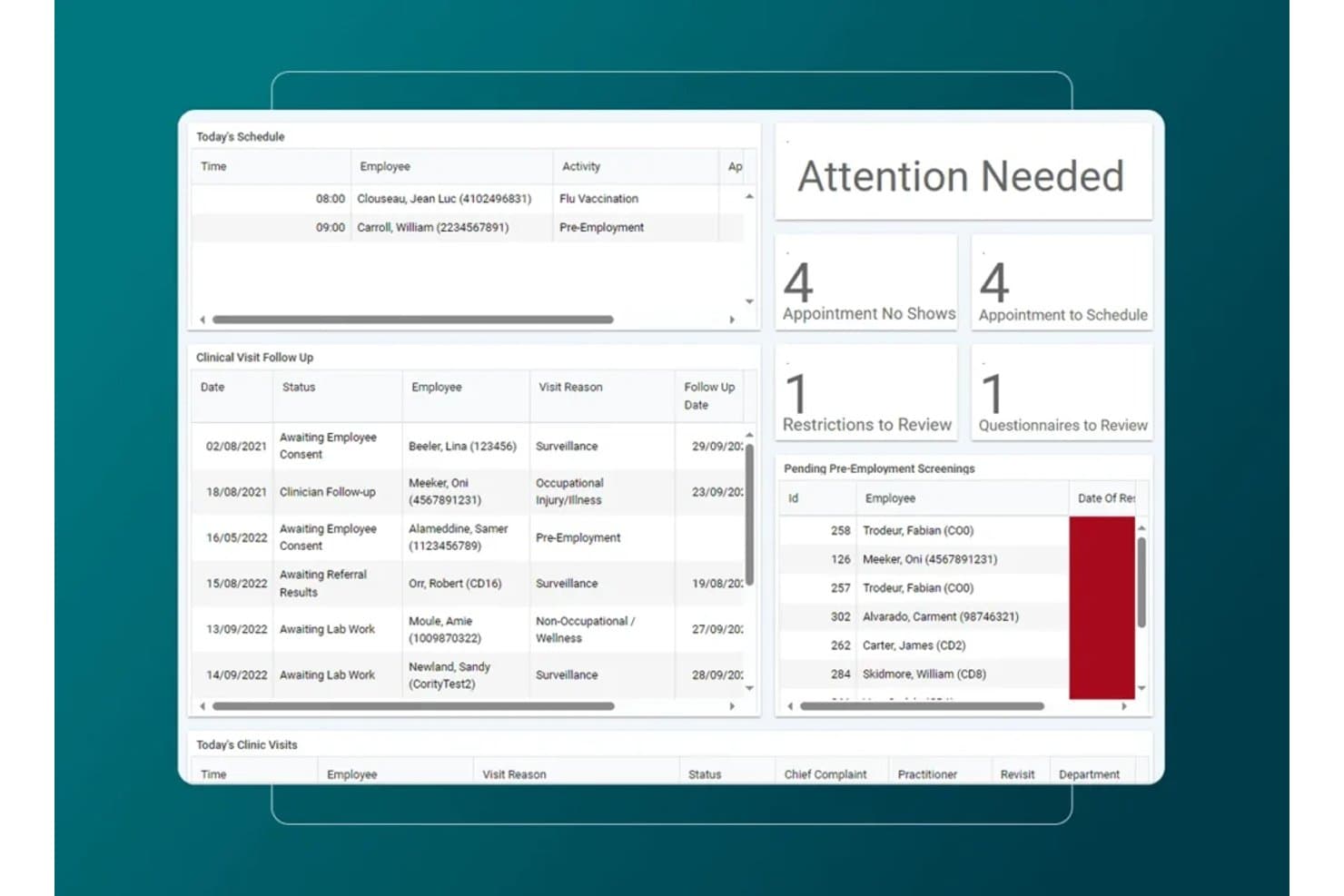
Medgate offers an occupational health dashboard with today's schedule, clinical visit follow-ups, attention alerts, and pending pre-employment screenings. Medgate is an enterprise occupational medicine EMR that combines clinic management, medical surveillance, employer protocol configuration, workers' compensation case tracking, and multi-payer billing for employer-based health programs.
Who Is Medgate Best For?
Medgate fits large enterprises in pharmaceuticals, healthcare, and regulated manufacturing that run dedicated occupational health clinics or employee health programs.
Why I Picked Medgate
I picked Medgate as one of the best because its Employer Protocols module lets you configure workflows, authorized services, and billing rules per employer, which is core to workforce risk management at scale. I also like how the medical surveillance module ties test results, immunizations, and case histories to individual employee profiles, and the disability case management module links directly to incident management so my team can track a work injury from first report through return-to-work.
Medgate Key Features
- OSHA reporting automation: Instantly generates required OSHA 300, 300A, and 301 logs from clinical encounters.
- Employer portal access: Lets employer clients securely authorize services, view statuses, and retrieve invoices.
- Protocol-driven workflows: Applies employer-specific and DOT exam protocols to visits based on job classification.
- Integrated drug and alcohol testing: Connects with leading occupational labs and MRO workflows for compliant testing.
Medgate Integrations
Medgate offers native integrations with SAP, Microsoft SharePoint, and 3E's safety data sheet library. The platform provides a RESTful API for custom integrations with ERP and HRIS systems.
Pros and Cons
Pros:
- Deep support for multi-site clinic environments
- Automated OSHA and incident compliance reporting
- Employer-specific protocols and billing management
Cons:
- Slow report generation for large client databases
- Limited ready-to-use DOT exam templates
Learn more about Medgate: Best for combining occupational health
- Free demo available
- From $30/user/month (billed annually, min 5 seats)
Visit WebsiteCustomer Rating:4.2/5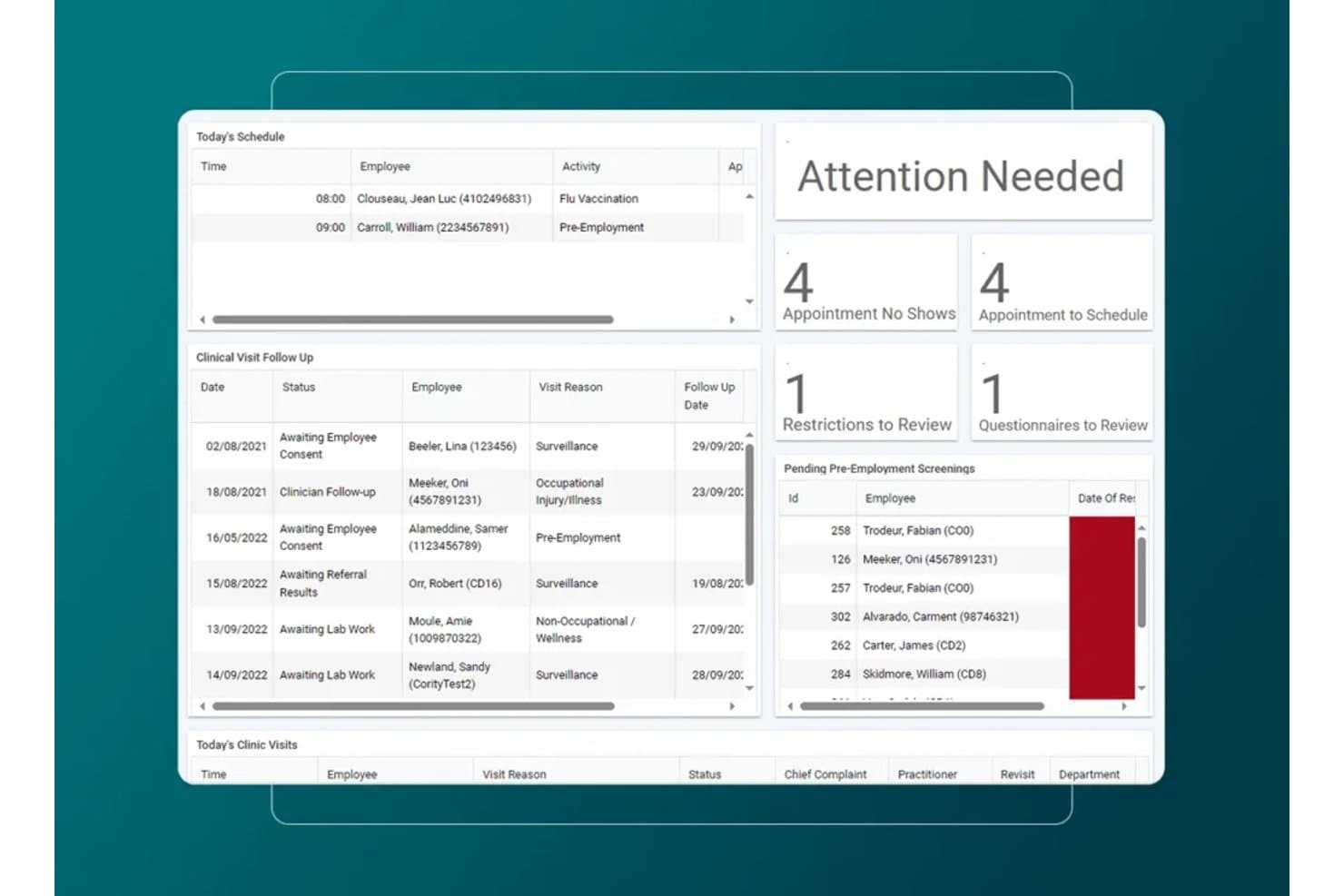
Cority offers an occupational health dashboard with today's schedule, clinical visit follow-ups, attention alerts, and pending pre-employment screenings. Cority is an enterprise occupational health EMR that covers medical surveillance, case management, and return-to-work tracking alongside industrial hygiene, safety, quality, and sustainability modules on a single platform.
Who Is Cority Best For?
Cority suits large enterprises in healthcare, manufacturing, chemicals, and energy that manage occupational health programs alongside complex EHS and compliance operations.
Why I Picked Cority
I picked Cority as one of the best because no other occupational EMR I've used ties clinical records so tightly to industrial hygiene and safety data. When managing a respiratory protection program, I can link audiometric surveillance results directly to exposure monitoring from the industrial hygiene module, all in one platform. The case management tool also lets me document RTW restrictions and modified duties alongside the original medical surveillance record.
Cority Key Features
- Automated OSHA recordkeeping: Generates OSHA 300, 300A, and 301 logs directly from clinical data.
- Employer portal access: Lets employer clients submit authorizations, check results, and review invoices online.
- Protocol-driven workflows: Applies employer-specific and regulatory protocols to exams based on job requirements.
- Integrated drug and alcohol testing: Provides native chain-of-custody, eCCF, and support for lab and MRO workflows.
Cority Integrations
Cority offers native integrations with SAP, IBM Maximo, Oracle, Infor, 3E SDS library, Protex AI, and supports occupational medicine workflows with Meddbase. An API is available for custom integrations.
Pros and Cons
Pros:
- Includes employer portal for client access
- Strong return-to-work and case management tools
- Deep protocol-driven occupational health library
Cons:
- Limited native support for eCCF lab workflows
- Overly complex for small clinics
Learn more about Cority: Best for integrated EHR and management workflows
- Free demo available
- Pricing upon request
Visit WebsiteCustomer Rating:3.7/5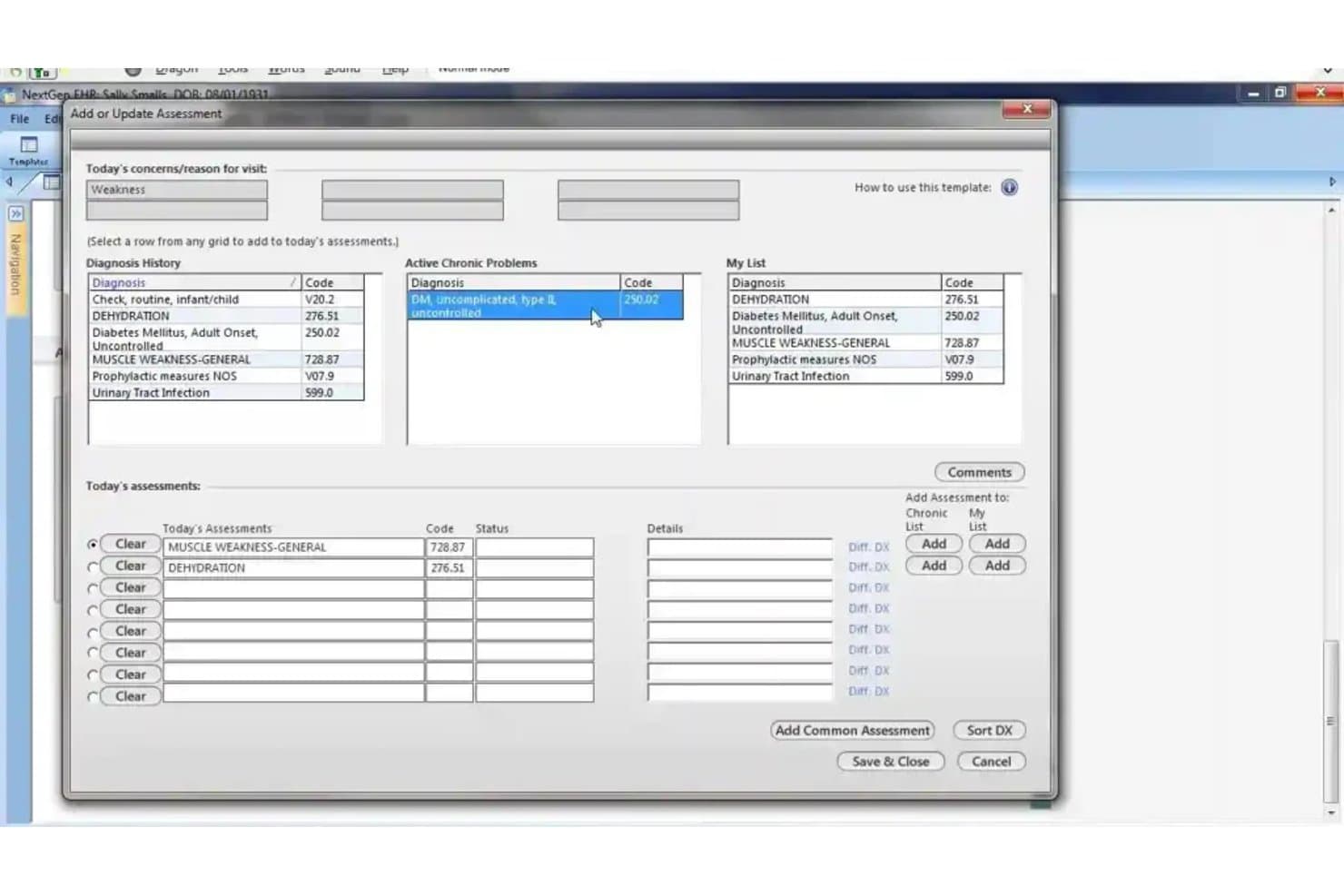
NextGen Healthcare offers an 'Add or Update Assessment' dialog that allows clinicians to manage patient diagnoses, chronic problems, and today's assessments in one streamlined view. NextGen Healthcare is an ambulatory EHR and practice management platform with configurable clinical templates, integrated revenue cycle management, and AI-assisted documentation tools across 26+ supported specialties, including occupational medicine.
Who Is NextGen Healthcare Best For?
NextGen Healthcare suits mid-sized to large ambulatory practices running multiple providers who need EHR, practice management, and billing under one connected system.
Why I Picked NextGen Healthcare
I picked NextGen Healthcare because of how tightly its EHR, practice management, and revenue cycle tools connect within a single system. When documenting an occupational medicine encounter, the clinical note, charge creation, and claims scrubbing all move through one workflow without manual handoffs. I also like Ambient Assist, which converts provider-patient conversations into structured SOAP notes in real time, cutting documentation time during busy injury visit days.
NextGen Healthcare Key Features
- Specialty content templates: Offers 26+ configurable clinical templates across numerous medical specialties, including occupational medicine options.
- Integrated lab ordering: Connects with over 700 labs for electronic ordering and results delivery directly in the EHR.
- Multi-payer claims processing: Provides rules-based claims creation and scrubbing for insurance, workers' comp, and third-party billing.
- API marketplace connectivity: Features an API marketplace to add third-party apps and integrations specific to your workflow needs.
NextGen Healthcare Integrations
NextGen Healthcare offers native integrations with Quest Diagnostics, LabCorp, the AWS ecosystem, Apple Health, and hundreds of labs through NextGen Share Diagnostic Hub. An API marketplace is available for adding third-party apps and custom integrations.
Pros and Cons
Pros:
- Connects directly to major diagnostic labs
- Supports custom specialty documentation templates
- Built-in RCM and claims management tools
Cons:
- Lacks employer contract and portal management
- No native workflows for workers’ compensation
Learn more about NextGen Healthcare: Best for managing occupational medicines
- Free demo available
- Pricing upon request
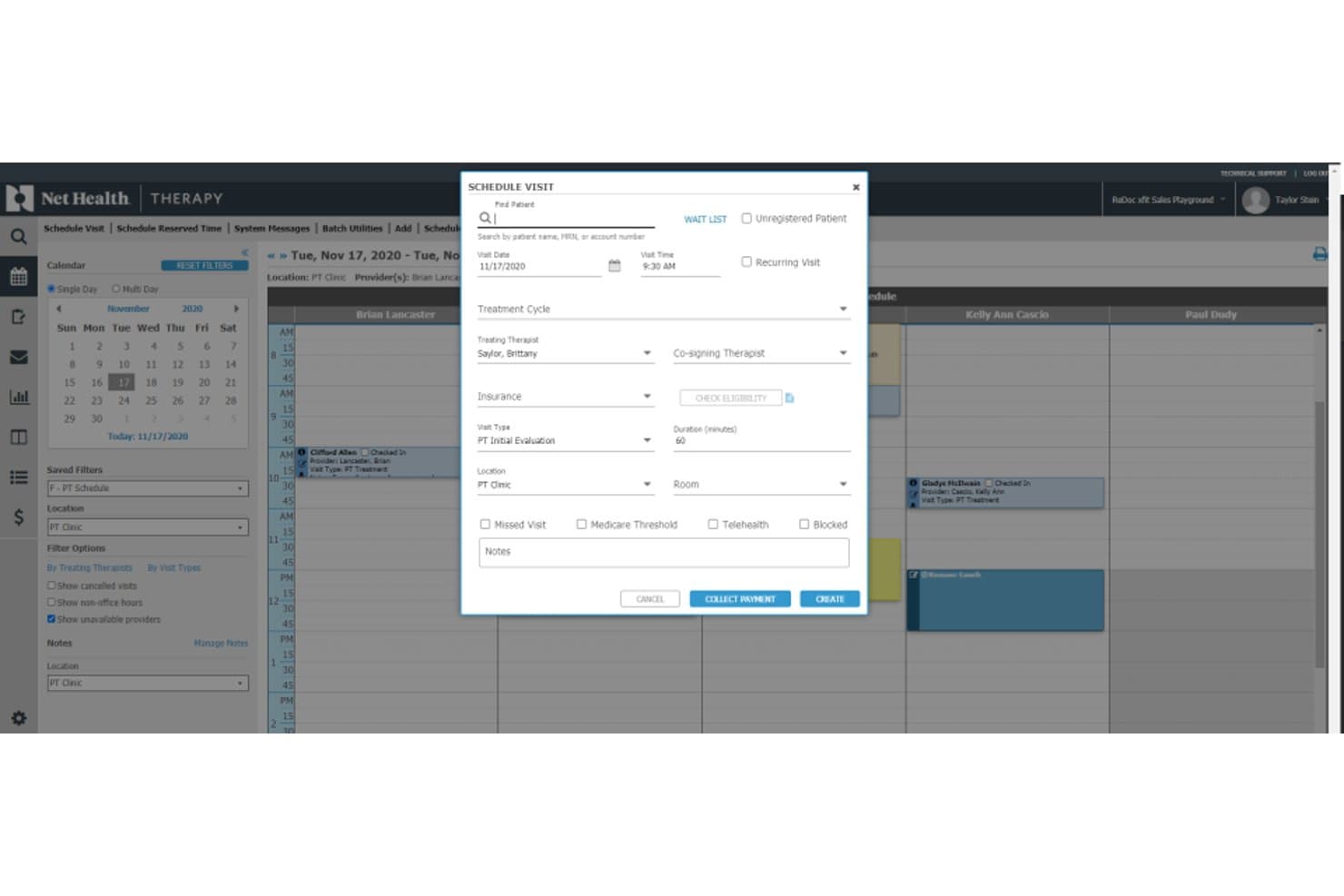
Net Health scheduling dashboard for managing patient visits, providers, insurance, and payments Net Health is an occupational medicine EMR built around employer account management, workers' comp documentation, split billing workflows, mobile immunization tracking, and OSHA compliance reporting.
Who Is Net Health Best For?
It's a strong fit for hospital-based occupational medicine departments and urgent care clinics managing employer accounts alongside workers' comp caseloads.
Why I Picked Net Health
Net Health earns its spot on my shortlist because of how it handles the billing complexity unique to occupational medicine. I particularly like the split billing engine, which separates workers' comp charges from employer-direct services and auto-generates invoices for each, all tied to employer-specific fee schedules. The built-in KPI dashboard tracks OM-specific metrics like new injury ratios, visit type breakdowns, and time from initial visit to case resolution.
Net Health Key Features
- OSHA recordkeeping automation: Automatically generates OSHA 300, 300A, and 301 logs from encounter data within the platform.
- Employer portal access: Offers secure, real-time portals for employer clients to view authorizations, results, and invoices.
- Protocol-driven exam workflows: Auto-applies DOT and employer-specific protocols for regulatory exams and screenings.
- Integrated drug and alcohol testing: Supports native chain-of-custody workflows and electronic lab integrations for drug and alcohol test management.
Net Health Integrations
Net Health offers native integrations with state immunization registries and automatically generates OSHA 300 logs. Native HR demographic software interfaces are supported. An API is available for custom integrations.
Pros and Cons
Pros:
- Protocol-driven workflows for DOT and drug tests
- OSHA reporting is automated from encounter data
- Employer account and billing management is built in
Cons:
- No built-in telemedicine for occ-med encounters
- Workers’ comp claims data import is limited
Learn more about Net Health: Best for urgent care clinic operations
- Not available
- Pricing upon request
Visit WebsiteCustomer Rating:2.7/5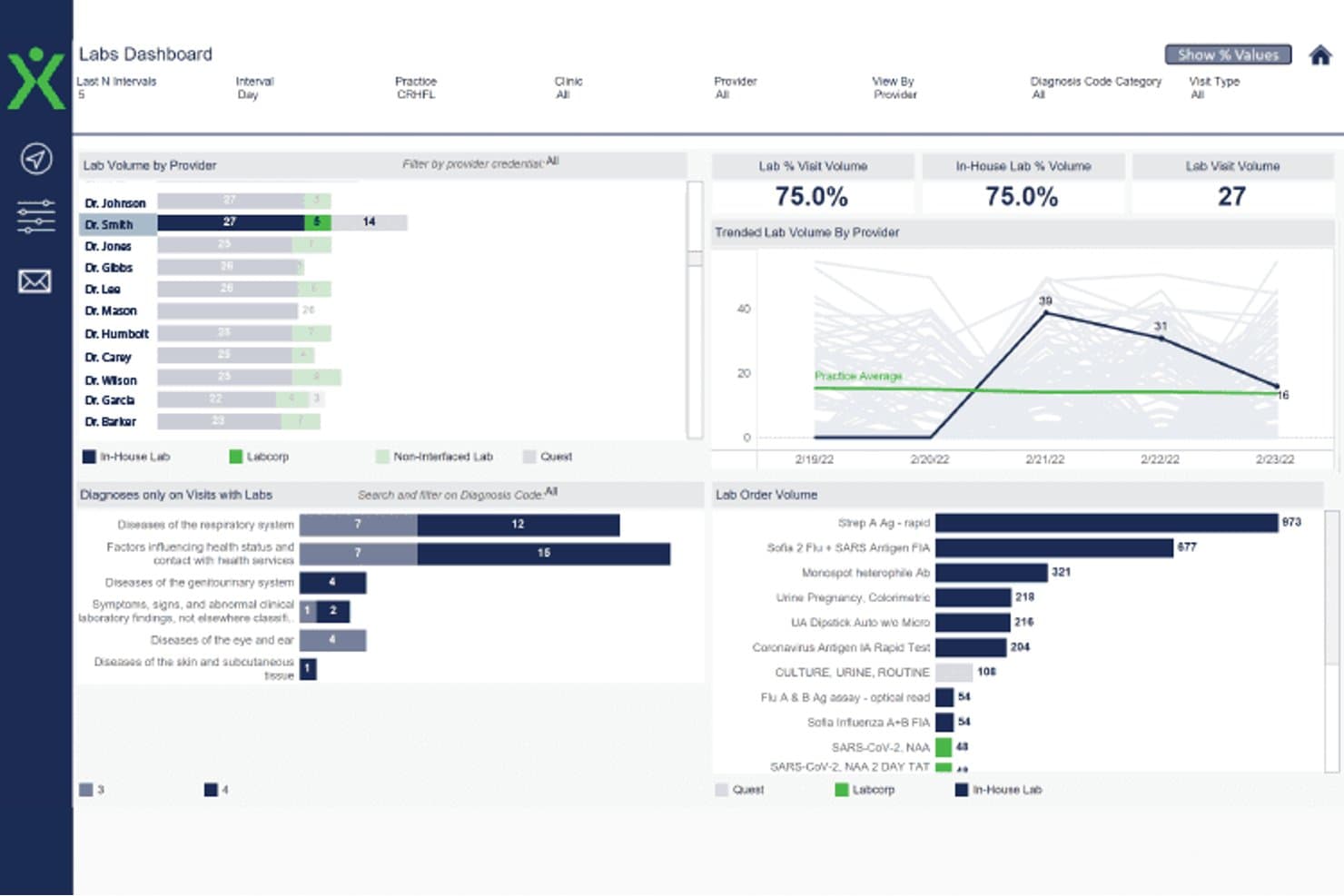
Experity labs dashboard showing provider lab volume, visit trends, diagnoses, and test orders Experity is an EMR and practice management platform built for urgent care and occupational medicine clinics, combining employer portal access, visit-specific OccMed workflows, and multi-payer billing for work-related encounters.
Who Is Experity Best For?
Experity is a strong fit for urgent care clinics that operate occupational medicine as a combined service line alongside standard urgent care visits.
Why I Picked Experity
I picked Experity as one of the best because it's the only platform I've used that handles urgent care and occupational medicine visits within a single, unified workflow. The configurable corporate protocols let my team set client-specific procedures and split billing rules without manual workarounds. The employer portal gives clients direct, secure access to visit data, work restrictions, and test results, so my staff spends less time fielding phone calls and printing records.
Experity Key Features
- Standardized OccMed exam templates: Pre-built templates for DOT physicals, drug testing, and regulatory compliance exams.
- Employer account management: Maintain unique employer profiles with protocols, authorized services, and billing settings.
- Automated OSHA recordkeeping: System auto-generates OSHA 300, 300A, and 301 logs from recorded encounter data.
- Integrated lab ordering: Support for chain-of-custody workflows and direct electronic orders to connected occupational health labs.
Experity Integrations
Experity offers native integrations with Waystar for clearinghouse services, its own OnePACS radiology system, electronic prescribing solutions, connected labs, and Experity Patient Engagement. An API is available for custom integrations.
Pros and Cons
Pros:
- Built-in OSHA recordkeeping feature
- Handles urgent care and OccMed in one system
- Employer portal for real-time visit updates
Cons:
- Lacks automated regulatory form generation
- Complex workflows for split OccMed billing
Learn more about Experity: Best for enterprise-wide occupational health
- Free demo available
- Pricing upon request
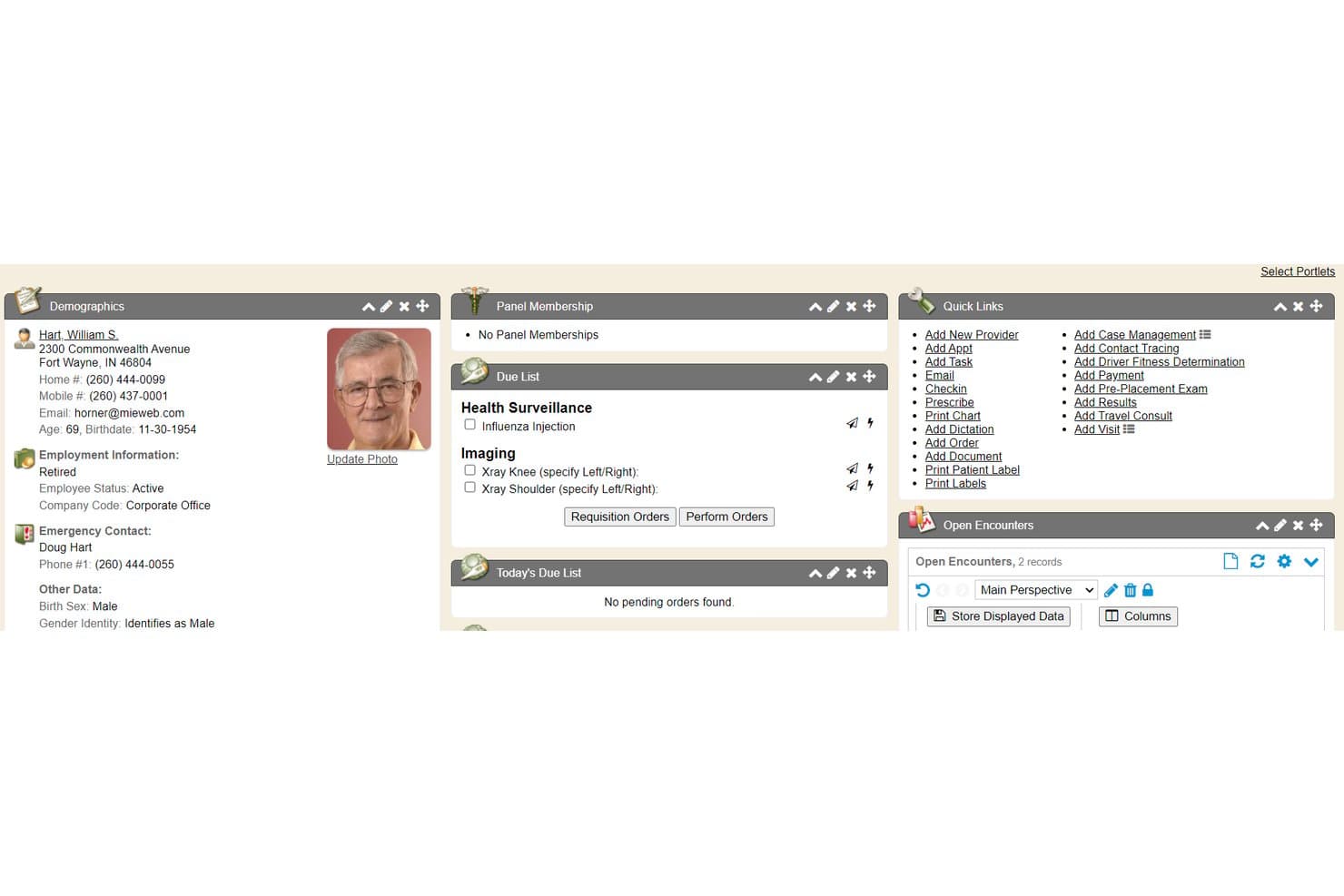
Enterprise Health offers a comprehensive patient summary chart tab featuring demographics, due lists, panel membership, quick links, and open encounters for occupational health management. Enterprise Health is an ONC-certified occupational health EMR built on a clinical EHR foundation, combining medical surveillance, workers' comp documentation, injury management, and compliance reporting in a single platform.
Who Is Enterprise Health Best For?
Enterprise Health is a strong fit for large employers and health systems running multi-site onsite clinics that need enterprise-scale occupational health management.
Why I Picked Enterprise Health
Enterprise Health earns its spot on my shortlist because it's the only occupational EMR built on an ONC-certified EHR foundation, which matters when you're running clinics across dozens of worksites. I particularly like the medical surveillance module, which tracks audiometry, pulmonary function, and respirator fit exams across the entire workforce and automates OSHA 300A electronic submission. The Ozwell AI assistant also speeds up encounter documentation directly within the platform.
Enterprise Health Key Features
- Employer portal access: Offers secure, role-based web access for employer clients to submit authorizations and view employee test results.
- Configurable protocol libraries: Enables users to apply DOT and employer-based protocols tailored for specific job roles or contracts.
- Lab and device integration: Connects with third-party labs and medical devices, supporting bi-directional data flow and automated result import.
- Automated OSHA form generation: Creates OSHA 300, 300A, and 301 forms directly from clinical documentation.
Enterprise Health Integrations
Enterprise Health offers native integrations with LabCorp, Quest Diagnostics, HR systems, billing and practice management systems, state immunization registries, audiometers, spirometers, DICOM/PACS, health information exchanges, and supports SAML 2.0 SSO. An API is available for custom integrations.
Pros and Cons
Pros:
- Employer portal for real-time communication
- Native medical surveillance and protocol libraries
- OSHA automation for large employer populations
Cons:
- Very limited support for urgent care workflows
- Implementation typically takes several months
Learn more about Enterprise Health:
Annen EMR-programvare for arbeidsmedisin
Her er noen flere alternativer innen EMR-programvare for arbeidsmedisin som ikke kom med på kortlisten min, men som likevel er verdt å se nærmere på:
- 11WebChart MDBest for streamlined occupational health charting
- 12SynchromedicsBest for occupational medicine documentation
- 13eClinicalWorksBest for connecting occupational health records
- 14Mercury MedicalBest for managing occupational medicine clinics
- 15WorkCareBest for employer-based occupational programs
- 16BlueHiveBest for coordinating employer health services
How I Evaluate Occupational EMR Software
I split my evaluation into baseline requirements—like workers' comp documentation and DOT protocol support—and differentiators that separate one platform from another.
Core Functionality (Table Stakes For This List)
When I'm selecting tools for my list, I rank each one on a scale from 0 (does not offer the functionality) to 5 (excels in this area) for each core functionality listed below. Then, I calculate the tool's total score into a percentage. Each tool needs to achieve a minimum total score of 65% to be considered for inclusion.
- Workers' Comp Documentation: I look for purpose-built templates that tie injury encounters and first reports of injury directly to employer accounts and claim numbers.
- Employer & Payer Management: Each tool should let you maintain separate employer profiles with unique protocols, authorized services, and multi-payer billing rules.
- Occupational Health Protocols: I evaluate whether the platform includes pre-configured protocols for DOT physicals, drug screens, audiograms, and respirator clearance exams.
- Return-to-Work Tracking: Structured fields for work status, physical restrictions, and duty modifications matter more than free-text notes buried in a chart.
- Compliance Reporting: I check for automated generation of OSHA 300 logs, DOT forms, and state-specific regulatory reports rather than manual data exports.
- Drug Screen & Lab Integration: The platform should support chain-of-custody workflows and connect to occupational lab networks like Quest or LabCorp for specimen tracking.
Once I have a list of tools that meet the criteria, I consider what sets each platform apart.
Differentiating Factors (What Sets Vendors Apart)
Here's how I compare and contrast different vendors:
Standout Features
Employer portal access is a big differentiator. I look for platforms that let employer clients submit authorizations, view test results, and pull invoices without calling your front desk. Protocol-driven workflows also matter—the best tools auto-apply the correct exam bundle based on job classification, so your staff doesn't manually build each visit. I evaluate how well a platform handles OSHA recordkeeping automation, since auto-generating 300 and 301 logs from encounter data saves hours of manual compilation at year-end. Integrated drug and alcohol testing with native chain-of-custody and eCCF support rounds out what I consider most valuable.
Beyond Features
Billing flexibility is a major consideration. I look for dual billing that handles employer direct-bill invoicing and workers' comp claims in the same workflow, since most clinics juggle both daily. Compliance and regulatory fit also carry weight—proper segregation of PHI from employer-facing data and adherence to 42 CFR Part 2 for substance testing records are details I check closely. Integration with devices like audiometric booths, spirometers, and vision testers matters too, because manual data entry from those exams slows your clinic down.
Slik velger du EMR-programvare for arbeidsmedisin
Det er lett å gå seg vill i lange funksjonslister og kompliserte prismodeller. For å hjelpe deg med å holde fokus mens du går gjennom den unike prosessen med å velge programvare, får du her en sjekkliste over faktorer du bør ha i tankene:
| Faktor | Hva du bør vurdere |
| Skalerbarhet | Vil systemet vokse sammen med klinikken når du legger til lokasjoner eller arbeidsgiverkunder? Spør leverandørene om begrensninger, kapasitet og utvidelsesmuligheter. |
| Integrasjoner | Kan EMR-systemet kobles til laboratorier, faktureringssystemer og enheter du allerede bruker? Kartlegg de nåværende systemene dine for å unngå dobbel dataregistrering. |
| Tilpasningsmuligheter | Kan du tilpasse maler, arbeidsgiverprotokoller eller rapporteringsformater uten kostbart utviklingsarbeid eller involvering fra leverandøren? |
| Brukervennlighet | Er plattformen intuitiv for teamet ditt? Vurder praktiske demonstrasjoner, spør om tiden det tar å komme i gang, og se etter hyppige flaskehalser i arbeidsflyten. |
| Implementering og oppstart | Hva er tidsplanen og ressursbehovet for produksjonssetting? Vær oppmerksom på skjult konfigurasjonsarbeid, utfordringer med datamigrering eller nødvendig IT-støtte. |
| Kostnad | Passer prisen til det typiske antallet krav, personalets størrelse og antallet arbeidsgiverkontoer? Vær oppmerksom på tilleggskostnader knyttet til spesialmoduler. |
| Sikkerhetstiltak | Holder plattformen pasient- og arbeidsgiverdata adskilt, håndhever regler for brukertilgang og støtter HIPAA samt eksterne krav til etterlevelse? |
| Krav til etterlevelse | Kan systemet håndtere krav fra DOT, OSHA og statlige tilsynsmyndigheter? Se etter innebygde regulatoriske oppdateringer og støtte for krav som er under utvikling. |
Hva er EMR-programvare for arbeidsmedisin?
Yrkesmedisinsk EMR-programvare er digitale plattformer utviklet for å håndtere kliniske journaler, arbeidsgiverprotokoller og regulatorisk dokumentasjon for yrkesmedisinske tjenester. Disse systemene hjelper klinikker med å følge opp arbeidsrelaterte skader, automatisere samsvarsrapportering, koordinere behandling mellom behandlere og arbeidsgiverkunder samt støtte telehelsebesøk. Med yrkesmedisinsk EMR-programvare kan du effektivisere arbeidsflyter for yrkesskadeerstatning, støtte DOT-undersøkelser og holde arbeidsgiverfakturering og rapportering organisert, alt i et samlet og sikkert miljø.
Funksjoner i yrkesmedisinsk EMR-programvare
Når du velger yrkesmedisinsk EMR-programvare, bør du se etter følgende viktige funksjoner:
- Dokumentasjon av yrkesskadeerstatning: Spesialutformede maler og arbeidsflyter for registrering av detaljer om arbeidsrelaterte skader, oppfølging av saker og kobling av hvert møte til den aktuelle arbeidsgiveren og skaden.
- Administrasjon av arbeidsgiverkontoer: Vedlikehold detaljerte arbeidsgiverprofiler med tilpassede tjenesteprotokoller, kontraktsregler og unike faktureringsordninger for hver kunde.
- Støtte for DOT- og regulatoriske undersøkelser: Innebygde maler og protokoller for undersøkelser som DOT-fysiske undersøkelser, klareringer for bruk av åndedrettsvern og audiogrammer, i tillegg til verktøy for å følge opp utløpsdatoer og behov for oppfølging.
- Administrasjon av tilbakeføring til arbeid: Dokumenter fysiske begrensninger og endringer i arbeidsoppgaver, og kommuniser endringer i arbeidsstatus direkte til arbeidsgivere og betalere.
- Arbeidsflyter for fakturering av flere betalere: Håndter direkte fakturering av arbeidsgivere, delt fakturering med forsikringsselskaper og yrkesskadeerstatningskrav – alt i ett system.
- Samsvar og OSHA-rapportering: Automatiser genereringen av OSHA 300-, 300A- og 301-loggføringer, DOT-rapporter og støtte for statlige og føderale rapporteringskrav.
- Integrasjon for rusmiddel- og alkoholtesting: Koble til laboratorienettverk for rusmiddeltester, arbeidsflyter for kontroll av prøvens besittelseskjede og elektroniske skjemaer for besittelse og kontroll.
- Tilgang til arbeidsgiverportal: Gi arbeidsgivere sikker tilgang på nett for å sende inn godkjenninger, se testresultater og følge ansattes status i sanntid.
- Verktøy for datamigrering: Verktøy for å overføre journaler og maler fra eldre systemer for yrkesmedisin uten omfattende manuell registrering.
- Kontroll av revisjon og tilgang: Rollebaserte tillatelser og detaljert logging for å sikre personvern, samsvar og datasikkerhet på tvers av arbeidsgiver- og medisinske journaler.
Vanlige AI-funksjoner i yrkesmedisinsk EMR-programvare
I tillegg til standardfunksjonene i yrkesmedisinsk EMR-programvare som er nevnt ovenfor, tar mange av disse løsningene i bruk AI med funksjoner som:
- Prediktiv analyse av skaderisiko: Bruker AI til å analysere historiske data og flagge ansatte eller jobbroller med høyere risiko for arbeidsrelaterte skader, slik at klinikker og arbeidsgivere kan målrette forebyggende tiltak.
- Automatisert dokumentasjonsstøtte: AI-drevne verktøy foreslår relevante kliniske formuleringer, fullfører journalnotater automatisk og flagger manglende informasjon for å gjøre journalføringen raskere og redusere feil.
- Intelligent samsvarsovervåking: Skanner kontinuerlig journaler for regulatoriske mangler eller utløpte krav og varsler ansatte om manglende OSHA-, DOT- eller arbeidsgiverpålagt dokumentasjon.
- Smart timebestilling: AI analyserer besøksmønstre, behandlernes tilgjengelighet og arbeidsgivernes behov for å optimalisere timeplanleggingen, redusere flaskehalser og minimere pasientenes ventetid.
- Søk med naturlig språk: Lar brukere søke i kliniske journaler, arbeidsgiverprotokoller eller samsvarslogger ved hjelp av daglig språk, slik at relevant informasjon vises raskt uten kompliserte filtre.
Fordeler med yrkesmedisinsk EMR-programvare
Implementering av yrkesmedisinsk EMR-programvare gir flere fordeler for teamet og virksomheten din. Her er noen av fordelene du kan se frem til:
- Forenklet håndtering av yrkesskadeerstatning: Sentraliserer dokumentasjon, kobling av krav og rapportering for å gjøre behandlingen av skadesaker raskere og redusere feil.
- Effektivisert samarbeid med arbeidsgivere: Arbeidsgiverportaler og rollebasert tilgang lar deg utveksle godkjenninger, testresultater og fakturaer uten endeløs frem-og-tilbake-kommunikasjon.
- Raskere samsvar og rapportering: Automatiserer genereringen av OSHA-, DOT- og regulatoriske rapporter, slik at du ligger i forkant av frister for revisjoner og journalføring.
- Integrerte faktureringsarbeidsflyter: Støtter direkte fakturering av arbeidsgivere, forsikringsfakturering og yrkesskadeerstatningskrav i én plattform, noe som reduserer administrativ friksjon.
- Bedre koordinering av tilbakeføring til arbeid: Verktøy for å følge opp begrensninger og kommunisere arbeidsstatus til arbeidsgivere forbedrer sikkerheten og hjelper ansatte tilbake i arbeid på en smidig måte.
- Forbedret datasikkerhet: Skiller sensitive helseopplysninger fra arbeidsgiverrettede data og håndhever strenge tilgangskontroller for å støtte samsvarskrav.
Kostnader og priser for EMR-programvare for arbeidshelse
Valg av EMR-programvare for arbeidshelse krever en forståelse av de ulike prismodellene og abonnementene som er tilgjengelige. Kostnadene varierer basert på funksjoner, teamstørrelse, tillegg og mer. Tabellen nedenfor oppsummerer vanlige abonnementer, gjennomsnittsprisene deres og typiske funksjoner som er inkludert i EMR-programvareløsninger for arbeidshelse:
Sammenligningstabell for EMR-programvare for arbeidshelse
| Plantype | Gjennomsnittlig pris | Vanlige funksjoner |
| Gratisabonnement | $0 | Grunnleggende skadedokumentasjon, begrenset arbeidsgiveradministrasjon, standardrapportering og minimal brukerstøtte. |
| Personlig abonnement | $30-$75/bruker/måned | Tilgang for individuell behandler, standardiserte kliniske maler, grunnleggende verktøy for samsvar og brukerstøtte via e-post. |
| Bedriftsabonnement | $100-$200/bruker/måned | Støtte for flere brukere, arbeidsgiverportaler, protokollstyrte arbeidsflyter, OSHA/DOT-rapportering og integrasjoner. |
| Virksomhetsabonnement | $250-$400/bruker/måned | Avansert fakturering, tilpassede integrasjoner, datamigrering, førsteklasses sikkerhet, dedikert brukerstøtte og API-er. |
Vanlige spørsmål om EMR-programvare for arbeidshelse
Her er noen svar på vanlige spørsmål om EMR-programvare for arbeidshelse:
Hvordan støtter EMR-programvare for arbeidshelse samsvar med myndighetskrav?
EMR-programvare for arbeidshelse automatiserer OSHA-, DOT- og annen myndighetsdokumentasjon, genererer rapporter og sporer utløpsdatoer og nødvendige oppfølginger. Dette hjelper klinikken med å oppfylle kravene til samsvar uten å være avhengig av manuell sporing eller risikere å gå glipp av frister.
Kan EMR-programvare for arbeidshelse integreres med våre eksisterende arbeidsflyter for laboratorier og utstyr?
Ja, de fleste EMR-plattformer for arbeidshelse tilbyr integrasjoner med referanselaboratorier, audiometribåser, spirometre, faktureringssystemer og elektroniske pasientjournaler. Dette eliminerer dobbeltregistrering og støtter enhetlige arbeidsflyter for både arbeidsgivere og behandlere.
Hva bør jeg vurdere når jeg migrerer data fra et eldre EHR-system for arbeidshelse?
Verktøy for datamigrering og støtte fra leverandøren er viktig. Kontroller om programvaren tilbyr strukturerte importmuligheter for tidligere konsultasjonsoppføringer, arbeidsgiveravtaler og faktureringshistorikk, slik at overgangen blir smidig.
Finnes det en måte å gi arbeidsgiverkunder sikker tilgang til ansattopplysninger på?
Ja, mange EMR-systemer for arbeidshelse inkluderer arbeidsgiverportaler som bruker rollebaserte tillatelser. Dermed kan kundene se testresultater, sende inn nye forespørsler og laste ned fakturaer, samtidig som pasientopplysningene holdes sikre.
Hvordan håndterer EMR-programvare for arbeidshelse både fakturering til arbeidsgivere og forsikringsfakturering?
De fleste EMR-løsninger for arbeidshelse støtter arbeidsflyter for dobbel fakturering, slik at du kan fakturere arbeidsgivere direkte, sende inn krav til forsikringsselskaper og håndtere yrkesskadesaker uten å registrere data på nytt. Dette sparer tid og reduserer betalingsfeil.