

EMR-programvare for gastroenterologi støtter endoskopirapportering og GI-spesifikke maler, slik at teamet ditt kan fokusere på å forbedre gjennomstrømningen av prosedyrer. Dokumentasjon av skopier og laboratorieintegrasjon kan være utfordrende, men riktig støtte kan forbedre nøyaktigheten og redusere tiden som brukes på administrative oppgaver.
I denne artikkelen sammenligner og vurderer jeg de beste EMR-programvareverktøyene for gastroenterologi for å støtte kjøpsbeslutningen din.
Why Trust Our Software Recommendations
6,700+
Reviews
20
Industry experts
16+
Evaluation factors
14
Years
Our team has been testing and reviewing software since 2012. As medical practice leaders ourselves, we know how difficult—and important—it is to choose the right software.
For this guide, we evaluated tools using hands-on testing and independent research, scoring tools using our selection criteria.
Our reviews reflect our human editorial judgment, not a sales pitch.
Sammenligningstabell: EMR-programvare for gastroenterologi
Denne sammenligningstabellen oppsummerer prisopplysningene for mine beste utvalgte EMR-programvareløsninger for gastroenterologi.
| Tool | Best For | Trial Info | Price | ||
|---|---|---|---|---|---|
| 1 | Best for its robust mobile support | Free demo available | Pricing upon request | Website | |
| 2 | Best for large-scale health systems | Not available | Pricing upon request | Website | |
| 3 | Best for its data analytics capabilities | Free demo available | Pricing upon request | Website | |
| 4 | Best for comprehensive workflow management | Free demo available | Pricing upon request | Website | |
| 5 | Best for GI billing and surveillance automation | Free demo available | From $229/user/month | Website | |
| 6 | Best for multi-specialty practices | Free demo available | Pricing upon request | Website | |
| 7 | Best for AI-driven endoscopy documentation | Free demo available | Pricing upon request | Website | |
| 8 | Best for AI-aided endoscopy procedure notes | Free demo available | Pricing upon request | Website | |
| 9 | Best for GI coding and pathology-linked recalls | Free demo available | From $200/prescriber/month | Website | |
| 10 | Best for flexible and scalable solutions | Free demo available | Pricing upon request | Website |


Anmeldelser av den beste EMR-programvaren for gastroenterologi
Nedenfor finner du mine detaljerte sammendrag av den beste EMR-programvaren for gastroenterologi som kom med på kortlisten min. Anmeldelsene mine gir en detaljert gjennomgang av de viktigste funksjonene, fordelene og ulempene, integrasjonene og ideelle bruksområdene for hvert verktøy, slik at du kan finne det som passer best for deg.
 Best for its robust mobile support
- Free demo available
- Pricing upon request
Visit WebsiteCustomer Rating:4.5/5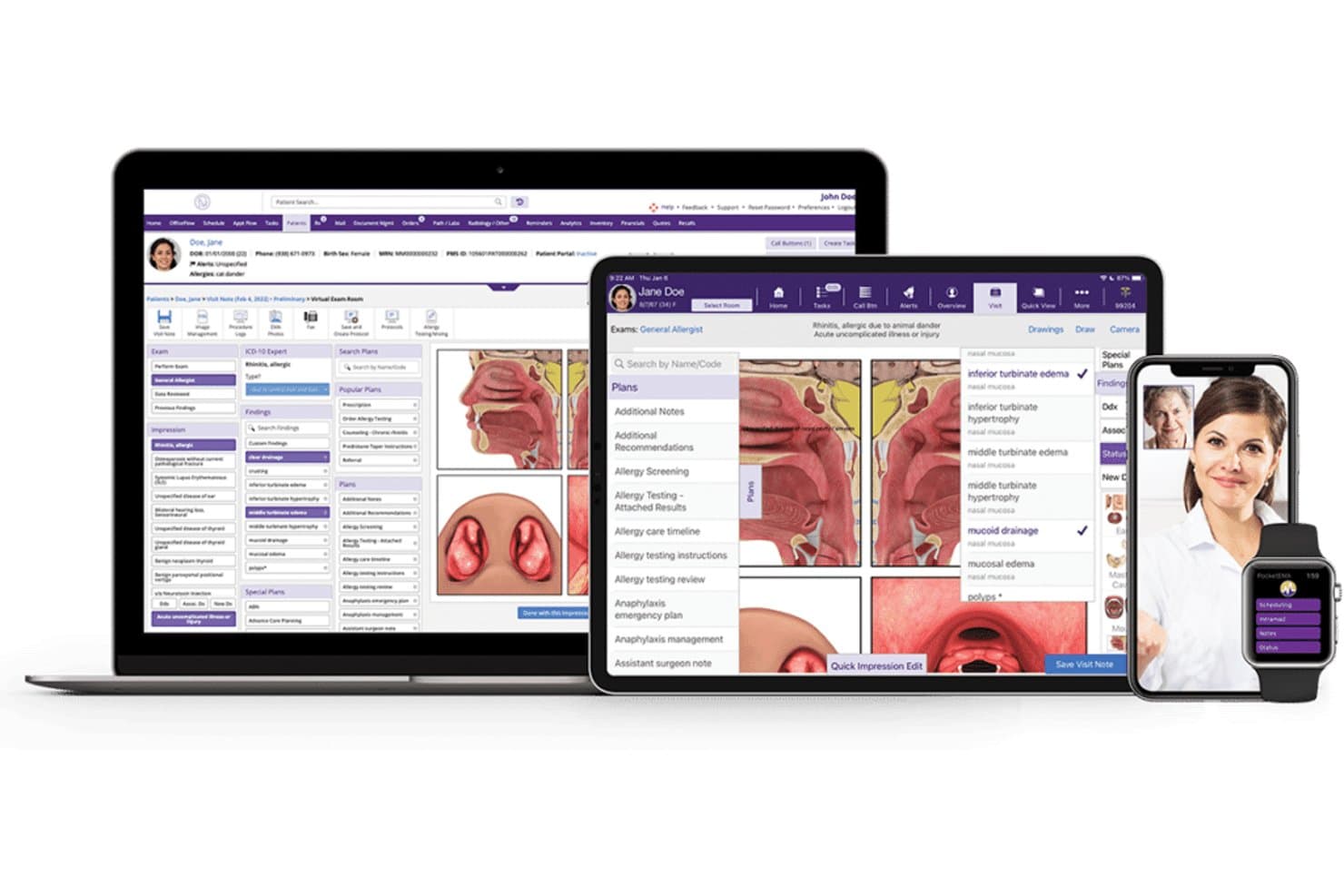
Here's the EMR software interface of ModMed in desktop and mobile view. ModMed, also known as Modernizing Medicine, is an integrated healthcare platform that combines specialty-specific EHR, practice management, telehealth, patient engagement, and mobile tools.
Who Is ModMed Best For?
ModMed works well for specialty medical practices that need mobile access to clinical and administrative workflows from smartphones and tablets.
Why I Picked ModMed
I picked ModMed because its mobile capabilities help providers access patient information, review schedules, document encounters, and manage clinical tasks while away from a desktop computer. Its specialty-focused workflows also connect mobile charting with practice management, telehealth, and patient engagement tools. This makes ModMed a strong option for practices that want an integrated healthcare platform with reliable mobile functionality.
ModMed Key Features
- Mobile EHR access: Review patient charts, document visits, manage schedules, and complete clinical tasks from supported mobile devices.
- Specialty-specific workflows: Use templates and clinical tools designed around the needs of different medical specialties.
- Practice management: Manage appointment scheduling, billing, patient information, and administrative tasks from one platform.
- Integrated telehealth: Conduct virtual visits while keeping documentation and patient information connected to the EHR.
ModMed Integrations
ModMed connects its EHR with practice management, telehealth, revenue cycle management, analytics, and patient engagement tools. It also supports connections with laboratories, pharmacies, clearinghouses, and other healthcare services to streamline clinical and administrative data exchange.
Pros and Cons
Pros:
- Intuitive and user-friendly interface
- Integrates with a variety of medical tools and services
- Excellent mobile support for on-the-go access
Cons:
- Limited customization options
- Higher pricing tier compared to some competitors
Learn more about ModMed: 2Best for large-scale health systems
Epic
- Not available
- Pricing upon request
Visit WebsiteCustomer Rating:4.2/5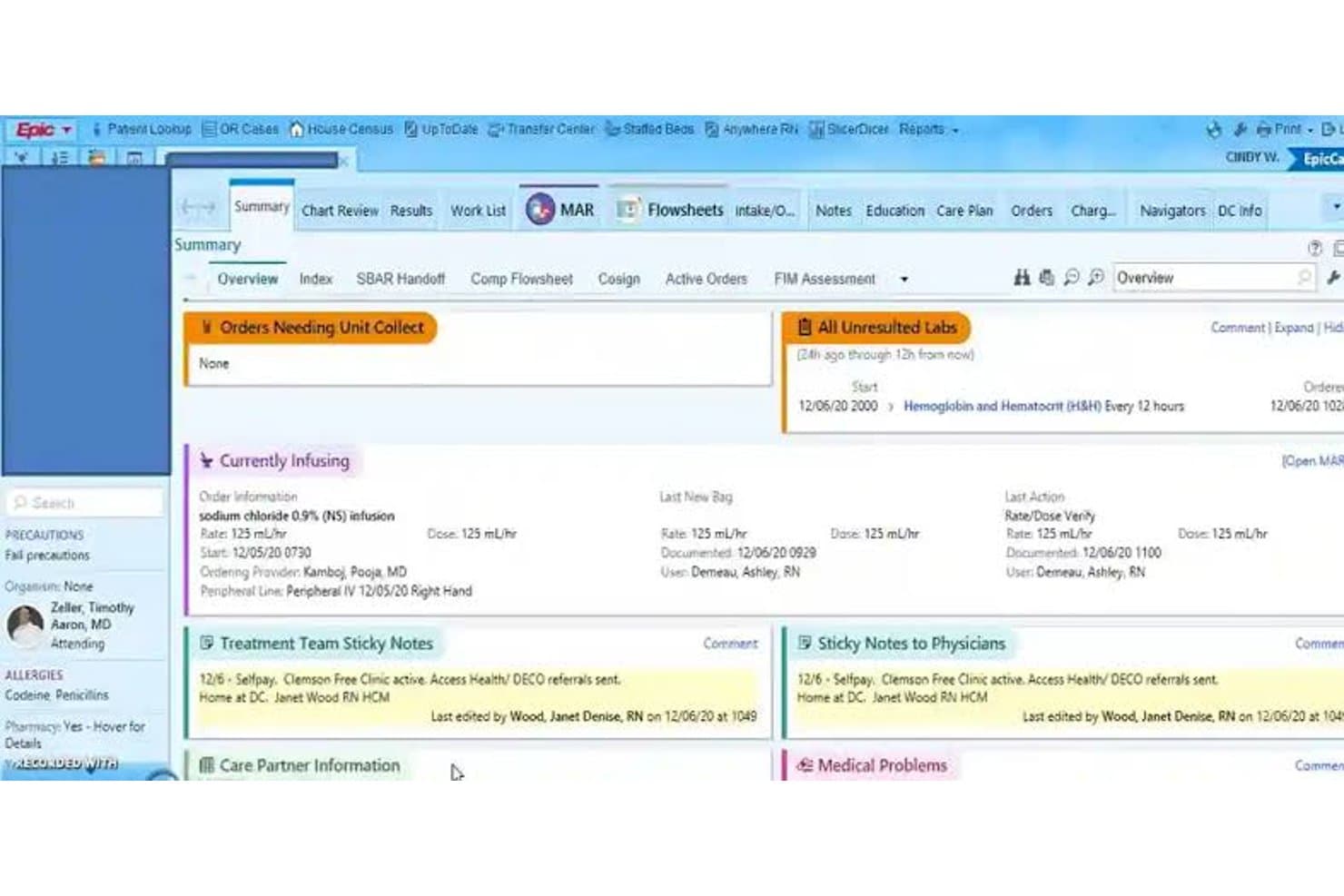
Epic patient care summary dashboard Epic is a comprehensive healthcare software platform that combines electronic health records, patient engagement, telehealth, revenue cycle tools, and enterprise-wide clinical workflows.
Who Is Epic Best For?
Epic works well for large hospitals, academic medical centers, and multi-site health systems that need a scalable platform for managing complex clinical, operational, and patient care workflows.
Why I Picked Epic
I picked Epic because it is built to support large, highly complex healthcare organizations. Its broad feature set connects clinical documentation, scheduling, billing, patient communication, analytics, and care coordination across departments and facilities. Epic’s scalability and interoperability also make it a strong option for health systems that need a unified platform capable of supporting extensive provider networks and large patient populations.
Epic Key Features
- Enterprise EHR: Manage clinical documentation, orders, medications, patient histories, and care plans across multiple departments.
- Patient engagement: Give patients access to appointments, test results, messages, bills, and telehealth services through digital tools.
- Practice and revenue cycle management: Support scheduling, claims, billing, payments, and administrative workflows across the organization.
- Telehealth capabilities: Enable virtual visits and remote care while keeping documentation connected to the patient record.
Epic Integrations
Epic supports interoperability with laboratories, pharmacies, imaging systems, health information exchanges, medical devices, and third-party healthcare applications. Its integration tools help large health systems exchange clinical and administrative data across internal departments and external care networks.
Pros and Cons
Pros:
- Strong interoperability and integrations
- Extensive suite of features
- Highly scalable for large health systems
Cons:
- Implementing the system across a large organization may be challenging
- Pricing and contract terms can be complex due to customization
Learn more about Epic: Best for its data analytics capabilities
- Free demo available
- Pricing upon request
Visit WebsiteCustomer Rating:3.4/5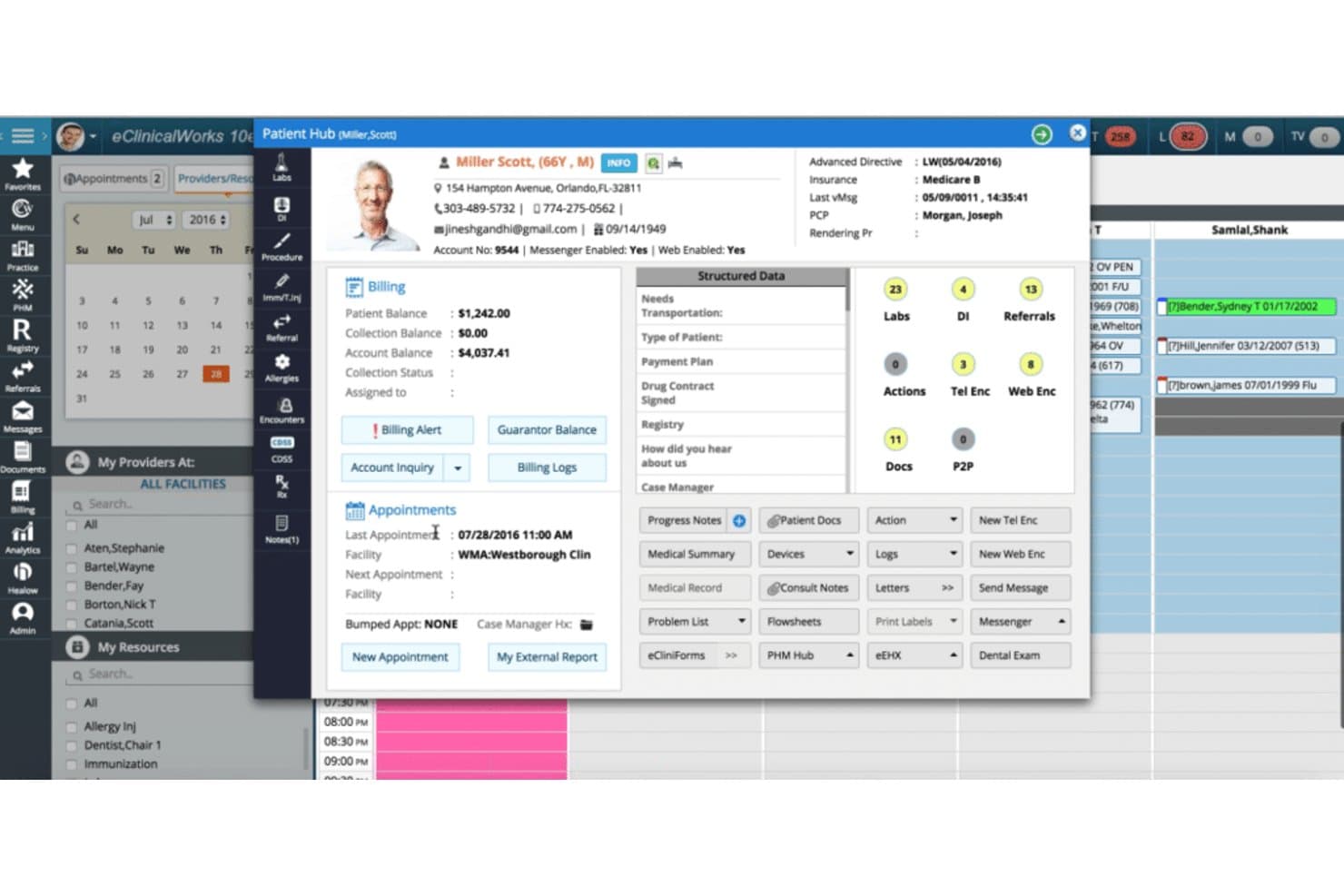
The patient hub of eClinicalWorks provides all the information necessary to provide excellent patient care. eClinicalWorks is a healthcare IT platform that combines electronic health records, practice management, medical billing, patient engagement, and data analytics tools.
Who Is eClinicalWorks Best For?
eClinicalWorks works well for healthcare organizations that want to use clinical, operational, and financial data to improve practice performance and patient care.
Why I Picked eClinicalWorks
I picked eClinicalWorks because its analytics capabilities help practices monitor performance across clinical and administrative workflows. Healthcare organizations can use dashboards and reporting tools to evaluate patient outcomes, identify operational bottlenecks, track revenue cycle performance, and support more informed decisions. Its combination of analytics, interoperability, EHR, and billing tools makes it a strong option for practices that want a data-driven healthcare platform.
eClinicalWorks Key Features
- Data analytics dashboards: Monitor clinical, financial, and operational performance through centralized reports and visual dashboards.
- Electronic health records: Manage patient histories, clinical documentation, orders, prescriptions, and care plans.
- Practice management: Handle scheduling, billing, claims, patient registration, and other administrative processes.
- Interoperability tools: Exchange patient information with connected healthcare organizations and external systems.
eClinicalWorks Integrations
eClinicalWorks supports connections with laboratories, pharmacies, billing systems, imaging services, clearinghouses, and other healthcare IT platforms. These integrations help practices exchange clinical and financial data while maintaining more complete patient records.
Pros and Cons
Pros:
- Comprehensive suite of healthcare IT tools
- Strong interoperability with other systems
- Advanced data analytics capabilities
Cons:
- Some users report that customer service can be improved
- Steep learning curve for new users
Learn more about eClinicalWorks: Best for comprehensive workflow management
- Free demo available
- Pricing upon request
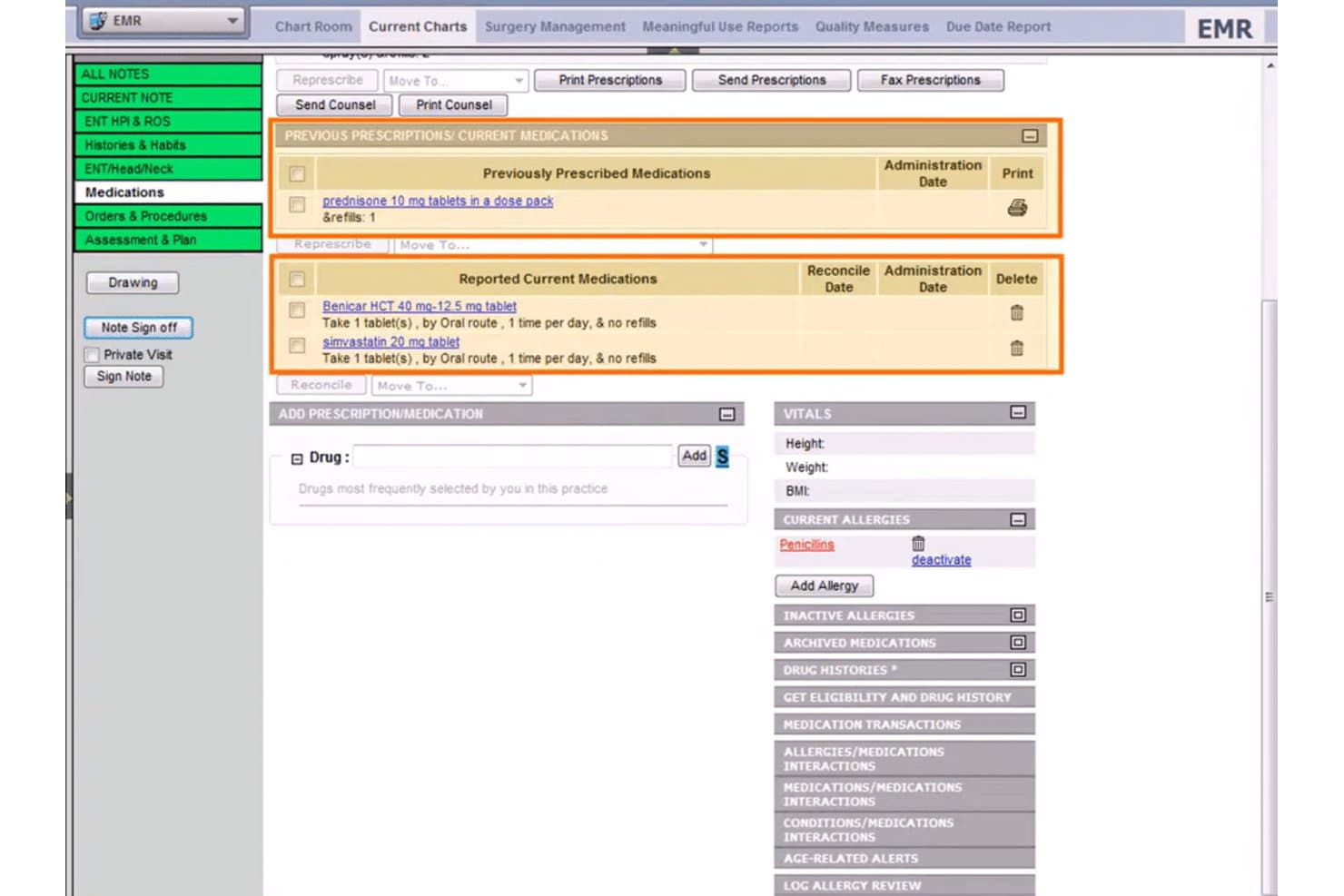
Welcome to the patient medications tab inside WRS Health. WRS Health is a cloud-based gastroenterology EMR and practice management platform that combines GI-specific clinical documentation, procedure reporting, scheduling, and integrated billing.
Who Is WRS Health Best For?
WRS Health fits GI practices that want clinical documentation, scheduling, and billing managed within a single platform—from solo physicians to multi-location groups.
Why I Picked WRS Health
WRS Health earns its spot on my shortlist because it ties clinical documentation, scheduling, and billing into one connected workflow built specifically for GI. I like how the GI superbill auto-populates charges as procedures are charted, which cuts the lag between documentation and claim submission. The built-in procedure queue walks teams through colonoscopy and endoscopy from pre-op to post-op, with consent forms and global-period tracking handled along the way.
WRS Health Key Features
- AI scribe: Captures GI patient histories—including abdominal pain, GERD, and colonoscopy follow-ups—and pre-fills templates automatically.
- MIPS quality reporting: Tracks GI-specific measures like colorectal cancer screening, IBD monitoring, and hepatitis C management for compliance reporting.
- Digital consent management: Stores e-signed consent forms for colonoscopy, endoscopy, and liver biopsy directly in the patient chart.
- Online patient intake forms: GI-specific questionnaires—including colonoscopy pre-screening and IBS/IBD symptom trackers—flow directly into the patient record.
WRS Health Integrations
WRS Health supports integrations with Surescripts, Medicity, OptumInsight, EMR Direct phiMail, and MDToolBox, plus two-way lab interfaces. It also offers FHIR and EDI connectivity for custom data exchange.
Pros and Cons
Pros:
- Inbound fax routing reduces result-handling work
- Prebuilt GI templates shorten procedure charting
- GI procedure queues connect notes to charges
Cons:
- Patient registration can create duplicate accounts
- ASC and anesthesia workflows remain undocumented
Learn more about WRS Health: Best for GI billing and surveillance automation
- Free demo available
- From $229/user/month
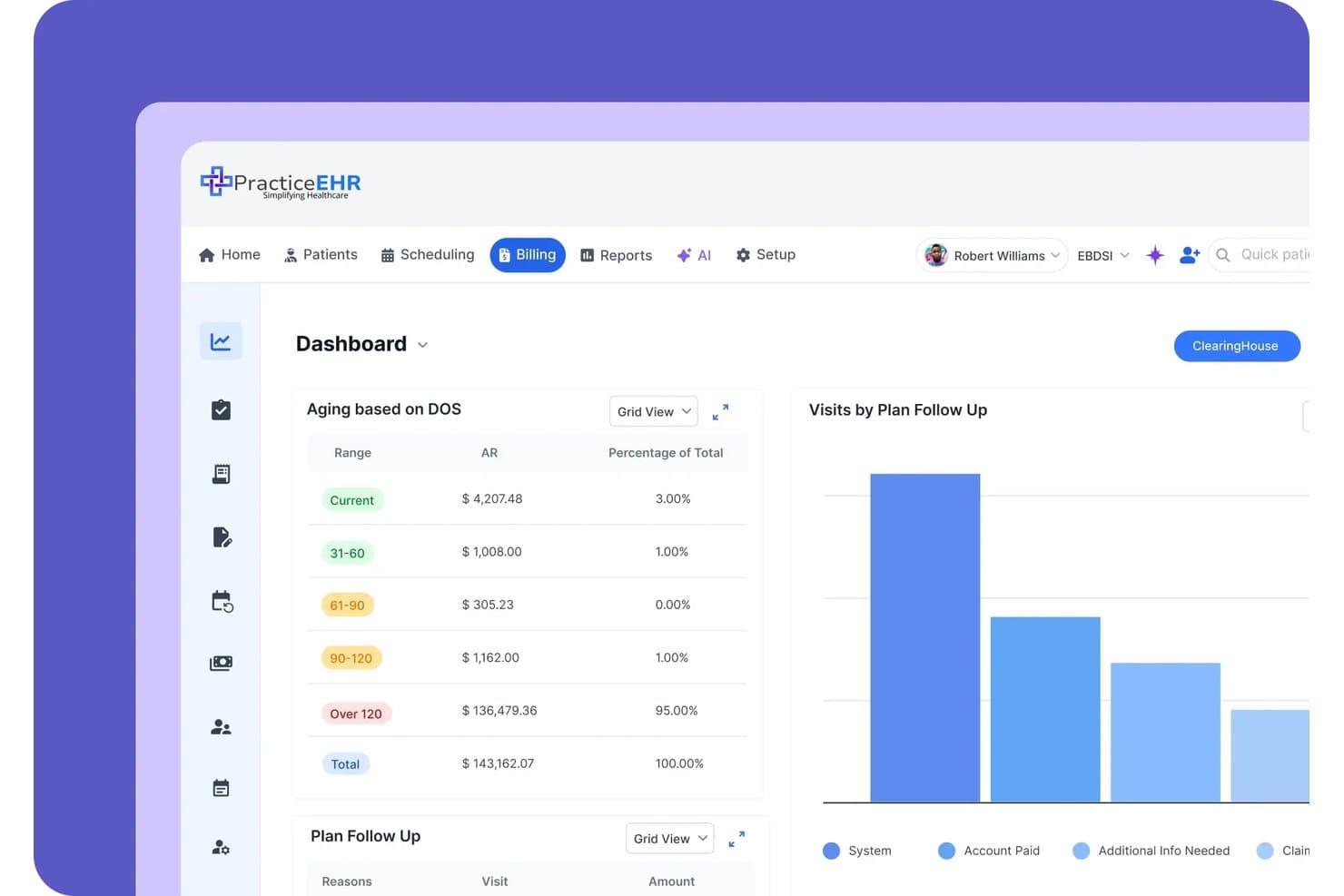
Practice EHR tracks aging AR and plan follow-up data on one billing dashboard. Practice EHR is a cloud-based EHR, practice management, and revenue cycle management platform built for independent practices, with GI-specific workflows spanning clinical documentation, pathology-linked surveillance recalls, ASC billing, and AI-assisted coding and claim editing.
Who Is Practice EHR Best For?
Practice EHR fits independent GI practices that want billing automation and surveillance recall workflows without managing separate RCM or PM systems.
Why I Picked Practice EHR
Practice EHR earns its spot on my shortlist because its billing automation is genuinely built around GI workflows, not retrofitted from a generic template. I like that the AI Claim Editor checks claims line by line and flags denial risk before submission, which matters when you're billing complex ASC cases with both facility and professional components. Pathology results link directly to scope cases and automatically trigger 3-, 5-, or 10-year surveillance recalls, cutting the manual follow-up work that bogs down independent GI practices.
Practice EHR Key Features
- AI Scribe: Transcribes patient visits in 20+ languages and auto-drafts SOAP notes with suggested ICD/CPT codes for provider review.
- GIQuIC registry reporting: Automatically submits quality data, including adenoma detection rate, to the GI quality registry for MIPS compliance.
- Biologic prior authorization tracking: Monitors prior auth status and visit limits for IBD biologics like Humira, Stelara, and Entyvio.
- AI no-show prediction: Scores each appointment for cancellation risk so your front desk can prioritize outreach before a scope slot goes to waste.
Practice EHR Integrations
Practice EHR integrates with LabCorp, Quest, Kno2, Carequality, TEFCA, Surescripts, and unnamed endoscopy report writers. It offers a FHIR R4 API for custom integrations and supports HL7 connections with imaging centers.
Pros and Cons
Pros:
- AI claim editing flags denial risks
- Supports dual ASC and professional billing
- Automates pathology-driven surveillance recalls
Cons:
- Template setup requires detailed staff input
- Structured procedure documentation remains underdeveloped
Learn more about Practice EHR: Best for multi-specialty practices
- Free demo available
- Pricing upon request
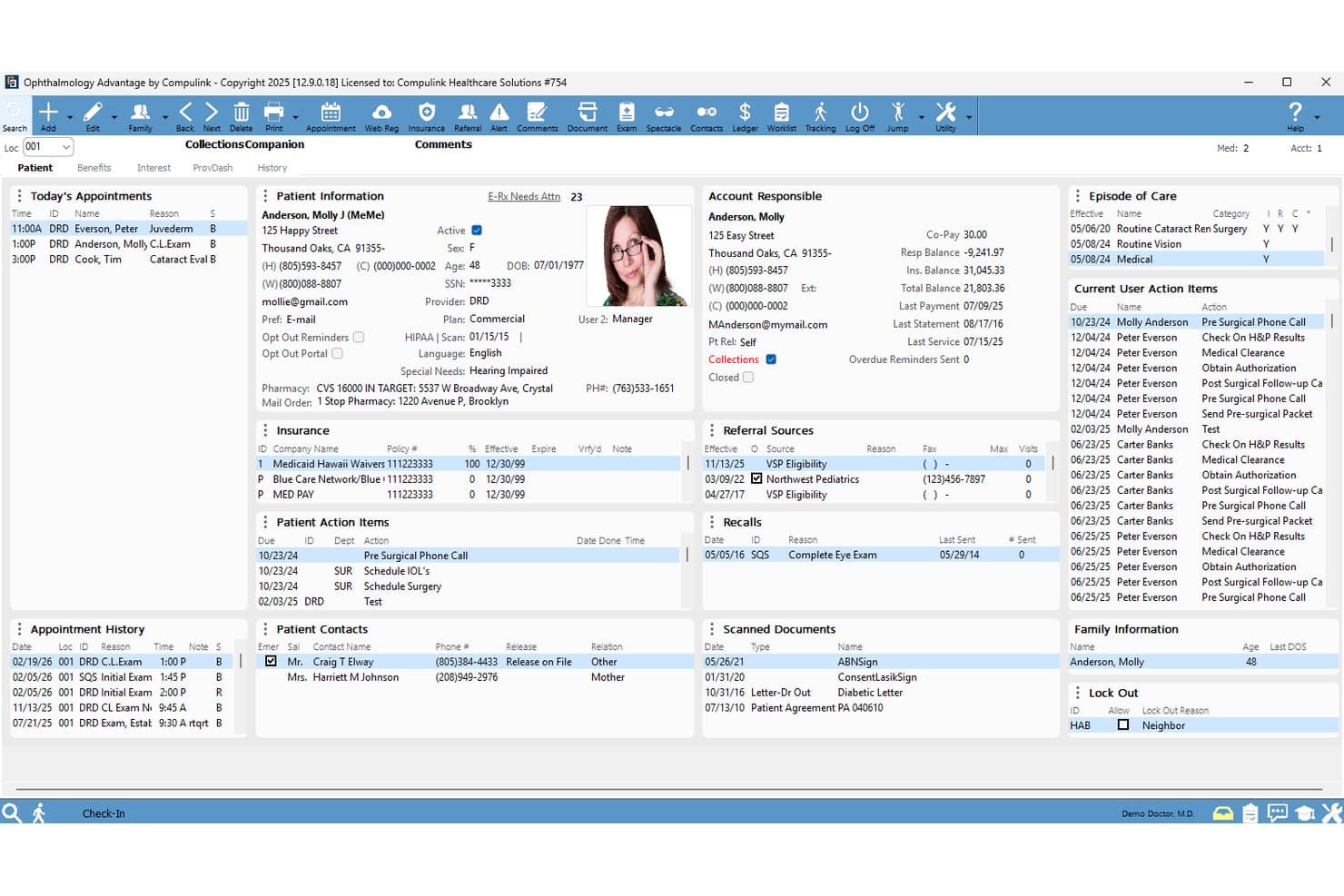
Here's a screenshot of the patient portal inside Compulink Healthcare Solutions. Patient records such as diagnosis and medical history is securely stored here to provide not just gastroenterology care solutions. Compulink Healthcare Solutions is a specialty-focused EMR platform that combines GI-specific clinical documentation, procedure reporting, scheduling, and integrated revenue cycle management tools in a single database.
Who Is Compulink Healthcare Solutions Best For?
Compulink is a strong fit for GI practices that also run an ambulatory surgery center and need one system to manage clinic scheduling, procedure documentation, and billing across both settings.
Why I Picked Compulink Healthcare Solutions
I picked Compulink Healthcare Solutions because it's one of the few GI EMR platforms that genuinely handles both a clinic and an ambulatory surgery center from a single database. I especially like how its combined clinic/ASC scheduling coordinates procedure rooms, anesthesia availability, and recovery capacity in one view, so nothing falls through the cracks on a busy scope day. The Standard of Care Engine also flags undercoding tied directly to documented findings, which I find valuable for GI practices where CPT and modifier selection can make or break reimbursement.
Compulink Healthcare Solutions Key Features
- AI ambient scribe: Quantum AI listens to patient visits and maps documentation into 350+ discrete EHR fields across 18 languages in real time.
- Standard of Care Engine: Flags undercoding and unbilled services by linking care rules to appointment reasons and documented findings before and after the visit.
- AdvantageRCM outsourced billing: An optional service pairing your practice with a dedicated US-based billing manager who handles denials, appeals, and on-demand reporting.
- ONC-certified MIPS/MACRA reporting: Built-in GI-specific quality measure tracking covers ADR, colorectal cancer screening follow-up, and ASC reporting workflows.
Compulink Healthcare Solutions Integrations
Documented integrations include Surescripts for e-prescribing and Quantum AI for ambient scribing. Compulink also offers a FHIR API using US Core 6.1.0 and clearinghouse connectivity for billing workflows.
Pros and Cons
Pros:
- Finding-linked coding and charge capture
- Customizable single-screen charting layouts
- Combined clinic and ASC scheduling
Cons:
- Updates can disrupt scheduler workflows
- GI-specific user feedback remains scarce
Learn more about Compulink Healthcare Solutions: Best for AI-driven endoscopy documentation
- Free demo available
- Pricing upon request
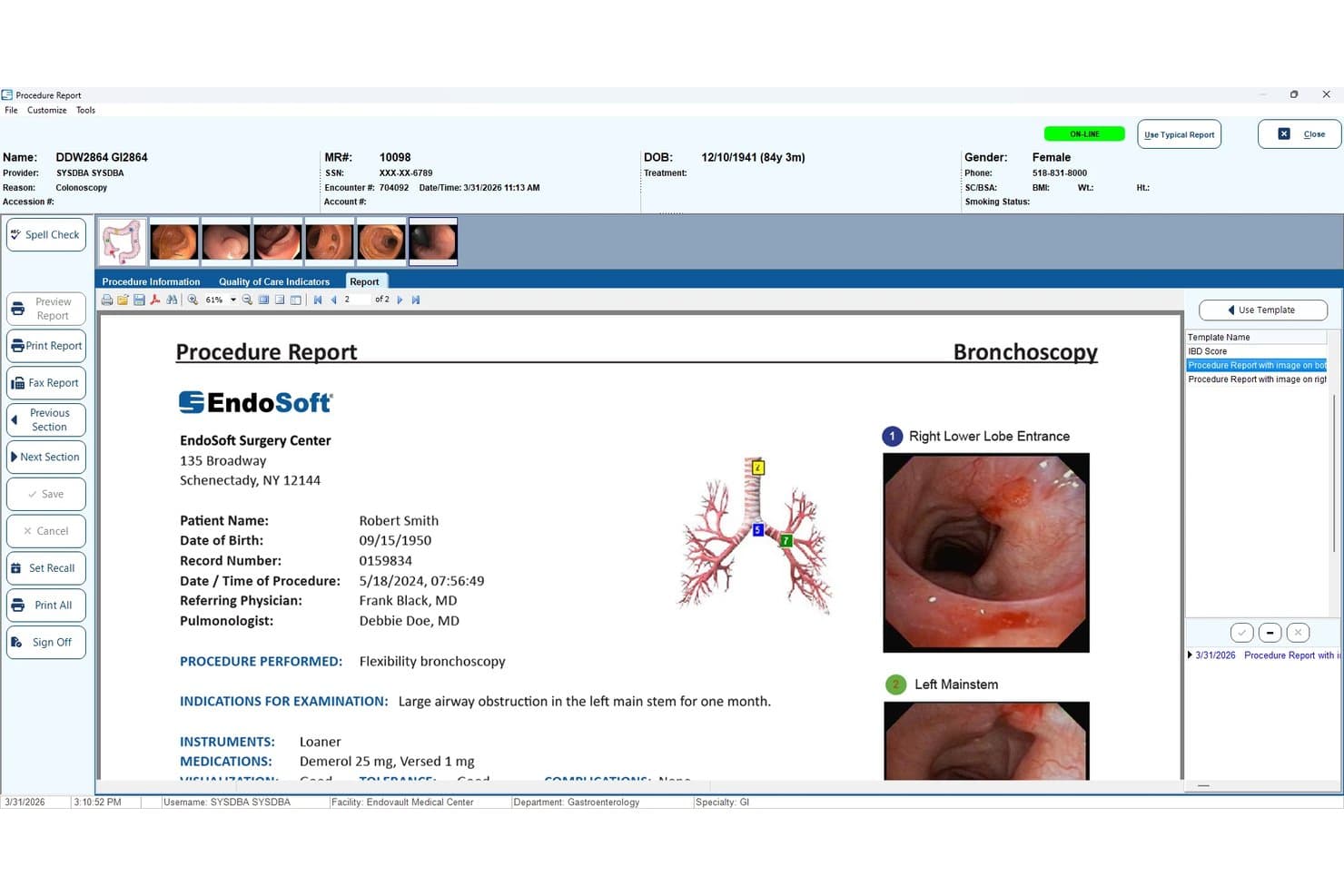
EndoSoft generates bronchoscopy procedure reports with embedded images. EndoVault® by EndoSoft is a GI-native EHR that combines AI-assisted voice documentation, structured endoscopy procedure reporting, image and video capture, and quality registry reporting for gastroenterology practices and ASCs.
Who Is EndoSoft Best For?
EndoSoft suits GI physicians and practice administrators in endoscopy-focused practices or ASCs who need AI-assisted procedure documentation and quality registry reporting built into their EHR.
Why I Picked EndoSoft
I've included EndoSoft in my top picks because its Argus AI voice documentation is genuinely built for the endoscopy suite, not bolted on as an afterthought. During a colonoscopy, Argus NLP captures what the physician says and sorts it directly into the right report fields, auto-filling quality metrics like ADR, withdrawal time, and bowel prep scores without manual entry. I also like that specimen jar labels print in real time via voice command, cutting a step that typically slows post-procedure charting.
EndoSoft Key Features
- GIQuIC-certified quality registry reporting: Automatically extracts procedure data for GIQuIC, MIPS/MACRA, and CDC submissions without manual data entry.
- Multi-source HD image and video capture: Records up to four simultaneous video sources during complex procedures, with built-in PACS and a DICOM viewer for image management.
- HL7 pathology interface with automated ADR calculation: Pulls pathology results directly into EndoVault and calculates adenoma detection rates and sessile serrated adenoma rates automatically.
- Legacy system data migration: Moves patient records, images, reports, quality metrics, and billing data from EndoWorks, EndoPRO, and Endobase with no data loss.
EndoSoft Integrations
EndoSoft integrates with Epic, Oracle Cerner, VA CPRS, and VistA, plus Olympus, Pentax, and Fuji scopes. It supports HL7, FHIR, DICOM, IHE, and an API for custom connections.
Pros and Cons
Pros:
- Scope-neutral imaging links directly to reports
- Automated quality metrics support GI reporting
- AI voice capture structures procedure reports
Cons:
- Users report errors and outdated interfaces
- Setup can challenge smaller organizations
Learn more about EndoSoft: Best for AI-aided endoscopy procedure notes
- Free demo available
- Pricing upon request
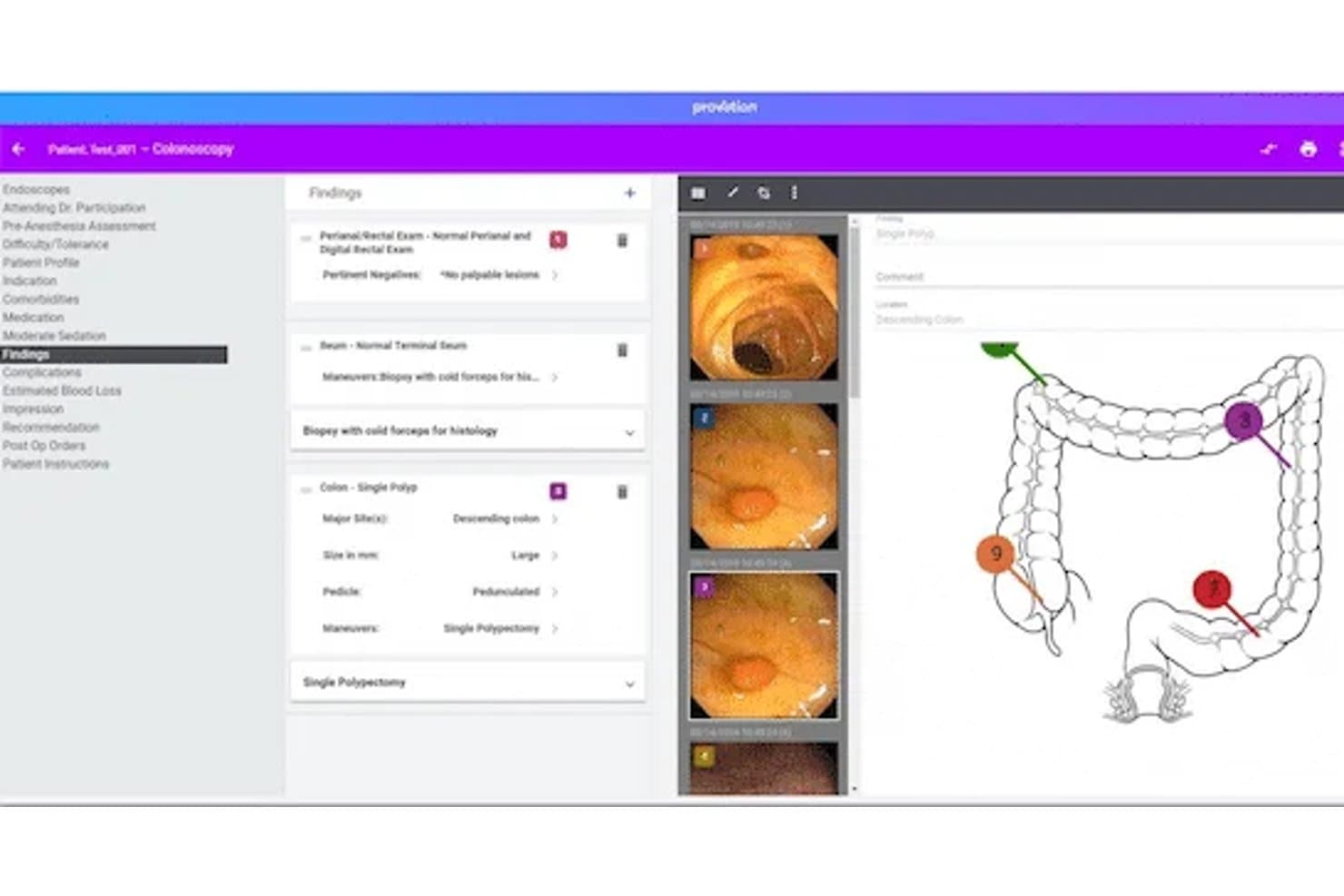
Provation Apex streamlines colonoscopy documentation with findings and imaging. Provation Apex is a cloud-based GI procedure documentation and endoscopy reporting platform that covers physician notes, nursing charting, anesthesia records, pathology integration, and patient tracking across the full procedural episode—from pre-op to post-op.
Who Is Provation Apex Best For?
Provation Apex is a strong fit for GI-focused hospitals and ambulatory surgery centers that need deep, procedure-level documentation but already have a separate EHR handling outpatient records and scheduling.
Why I Picked Provation Apex
I picked Provation Apex as one of the best because its AI voice documentation tool, Mira, turns spoken commentary during a colonoscopy or upper GI endoscopy into a structured procedure note in real time—no dictation cleanup required afterward. It also generates CPT and ICD-10 codes automatically from the note selections, covering 150+ CPT/HCPCS codes tied to the procedure. What seals it for me is the native scope-to-note image capture, which pulls images directly from the endoscope into the report without a manual import step.
Provation Apex Key Features
- GIQuIC quality registry submission: Structured procedure data feeds directly into GIQuIC for benchmarking and quality reporting, available in Standard and Premium packages.
- Electronic specimen collection and label printing: Specimen data is logged digitally during the procedure and auto-populates into the physician's note.
- Real-time patient tracking board: An electronic board replaces paper and whiteboards, showing live patient and room status across the care team.
- Pathology lab interface: Results from approved partner labs like LabCorp and Quest Diagnostics automatically populate into procedure notes through a built-in interface.
Provation Apex Integrations
Provation Apex integrates with Epic, Oracle Health/Cerner, MEDITECH, LabCorp, Quest Diagnostics, Sonic Healthcare USA, and other approved pathology labs. Its Secure Communication Connector supports HL7, pathology PDFs, vitals, and DICOM data.
Pros and Cons
Pros:
- GI templates cover advanced procedures and pediatrics
- Native scope image capture supports procedure reporting
- AI converts endoscopy speech into structured notes
Cons:
- Reported support availability varies by user experience
- No longitudinal outpatient record or native scheduling
Learn more about Provation Apex: Best for GI coding and pathology-linked recalls
- Free demo available
- From $200/prescriber/month
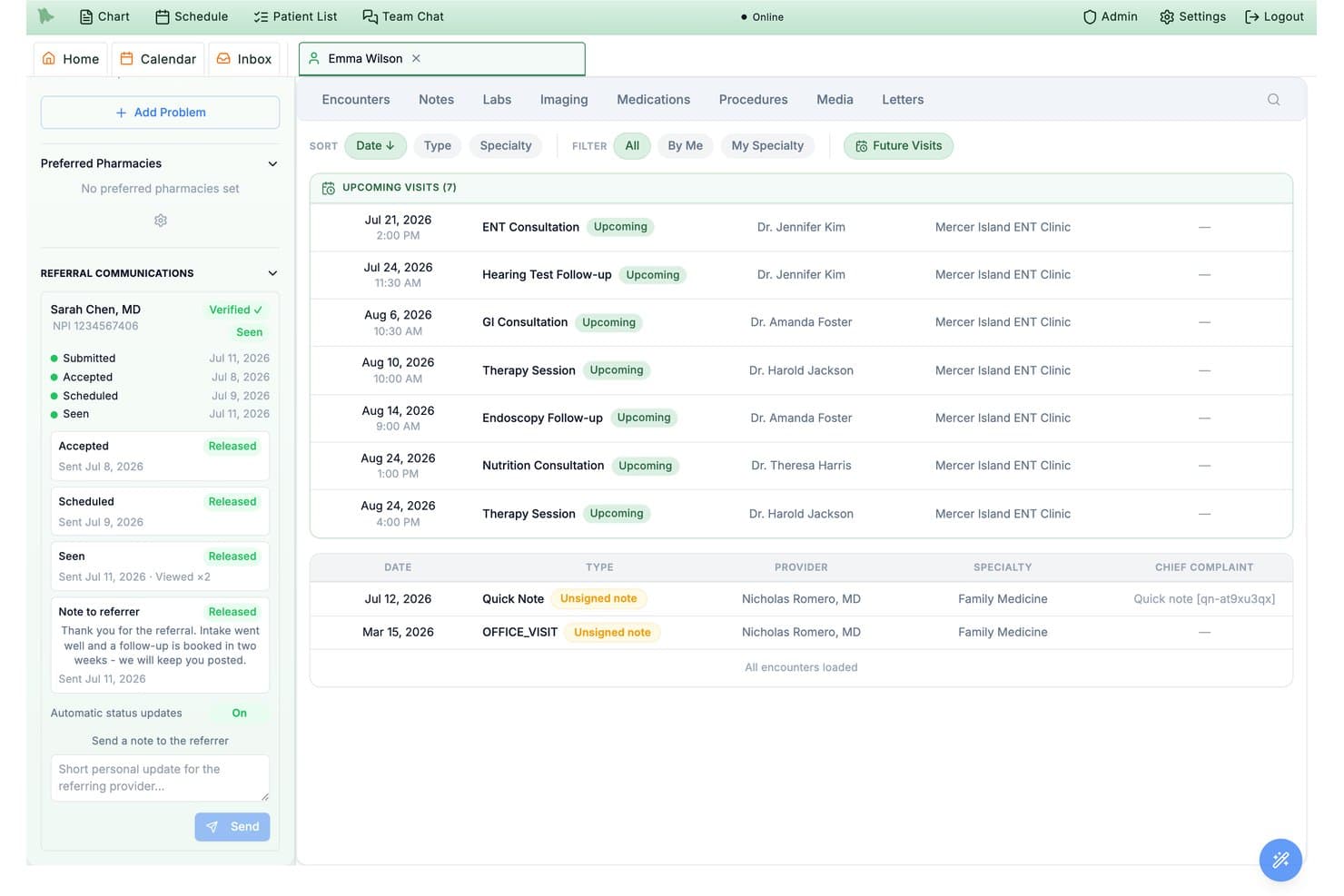
Hero EMR tracks referral communication status and upcoming specialist visits. Hero EMR is a gastroenterology-focused EMR platform that combines GI-specific clinical documentation, structured endoscopy reporting, pathology-linked surveillance recalls, and specialty coding support.
Who Is Hero EMR Best For?
Hero EMR is a strong fit for independent GI practices where billing staff need accurate coding support and clinicians want pathology-linked surveillance built directly into their workflow.
Why I Picked Hero EMR
I've included Hero EMR in my top picks because its GI coding logic goes deeper than most platforms I've seen. Smart Coding Intelligence automatically switches a screening colonoscopy to a therapeutic code when the procedure converts, then applies the correct PT or 33 modifier without manual lookup. I also like that pathology results are matched directly to colonoscopy findings, with surveillance intervals calculated under US Multi-Society Task Force guidelines and recall alerts pushed practice-wide.
Hero EMR Key Features
- AI scribe with disease scoring: Drafts structured GI office visit notes and automatically calculates disease activity scores like Mayo and Harvey-Bradshaw for IBD and hepatology follow-ups.
- Live quality dashboard: Tracks ADR, serrated lesion detection rate, withdrawal time, and prep adequacy against GIQuIC registry benchmarks and ASGE-ACG targets.
- GI dotphrases: Typed shortcuts like
.colonoscopy,.ibdscoremayo, and.liverpanelinsert structured templates and calculators directly into the note editor. - Specimen jar tracking: Assigns each polyp to a specimen jar and tracks it from the procedure through to the matched pathology report.
Hero EMR Integrations
Hero EMR documents integrations with Quest, Epic FHIR, Rayus, Surescripts, Zoom, Office Ally, Availity, Stedi, Optum, and UHC.
Pros and Cons
Pros:
- Structured reports capture polyp-level details
- Pathology findings trigger surveillance recalls
- GI coding handles screening-to-therapeutic conversion
Cons:
- Scope capture and ASC billing undocumented
- GI capabilities lack independent user validation
Learn more about Hero EMR: 10Best for flexible and scalable solutions
NextGEN
- Free demo available
- Pricing upon request
Visit WebsiteCustomer Rating:5/5
The main page of NextGen gives easy access to important links, as well as profile information and the latest news. NextGen is a comprehensive healthcare technology platform that offers solutions including electronic health records (EHR), practice management, and telehealth services. Its flexibility and scalability make it an ideal option for growing practices that need a system that can evolve with their changing needs.
Why I Picked NextGen: I chose NextGen for its exceptional adaptability and scalability. In a field where change is the only constant, having a flexible tool that scales with the growth of your practice is essential. NextGen distinguishes itself with its capacity to adapt to various sizes and types of medical practices, making it the best option for practices seeking a flexible and scalable solution.
Standout features & integrations:
Among the many features of NextGen, its robust EHR, comprehensive practice management, and flexible telehealth services stand out. The platform integrates well with many other medical systems and tools, simplifying workflows and improving patient care.
Pros and Cons
Pros:
- Good integration with other systems and tools
- Comprehensive feature set, including EHR, practice management, and telehealth
- Highly flexible and scalable, adjusting to the size of the practice
Cons:
- User interface could be more intuitive
- Initial setup can be complex
- Some users report a steep learning curve
Learn more about NextGEN:
How I Evaluate Gastroenterology EMR Software
I split my evaluation into three parts, weighting core functionality most: document GI visits, capture endoscopy findings, and link procedures to billing. Next, I look for standout features such as pathology matching, linking biopsies to procedures. Finally, I consider support, onboarding, pricing, and multi-location fit.
Core Functionality (Table Stakes For This List)
When I'm selecting tools for my list, I score each one on a scale from 0 (does not offer the functionality) to 5 (excels in this area) for each core functionality listed below. I then convert the total into a percentage to help assess each tool’s overall fit, with extra weight on any functionalities I’ve deemed essential.
- GI Documentation (Essential): I look for structured templates covering GI conditions, visit types, terminology, and recurring documentation needs.
- Endoscopy Reporting (Essential): I assess structured reports for procedures, findings, images, biopsy details, and linked follow-up outcomes.
- Patient Health Records: I check whether teams can review longitudinal histories, medications, allergies, referrals, and visit records in one chart.
- Coding & Billing Support: I evaluate procedure and diagnosis coding workflows for common GI services, claim review, and billing handoffs.
- Lab & Pathology Results: I look for results linked to the correct patient and procedure, with clear review workflows for clinicians.
- Scheduling & Care Coordination: I assess scheduling tied to patient records, procedures, preparation instructions, and follow-up appointments.
Once I have a list of tools that meet the criteria, I consider what sets each platform apart.
Differentiating Factors (What Sets Vendors Apart)
Here's how I compare and contrast different vendors:
Standout Features
I check whether a platform can automatically match biopsy specimens to returning pathology results and link them back to the originating procedure note. Without that connection, clinicians end up manually cross-referencing reports—a real risk for errors on high-volume scoping days. I also evaluate scope integration, since pulling endoscopy images directly into the procedure report saves documentation time and keeps findings in context. Ambulatory surgery center billing matters too; I look for dual workflows that cleanly separate professional fees from facility fees.
Beyond Features
I evaluate how each vendor handles referral network connectivity, since GI practices live on inbound referrals for colonoscopy screening and consults. A platform that can receive referrals and automatically route procedure reports back to the referring provider saves real coordination time. I also check total cost of ownership—some vendors charge separate fees for endoscopy reporting modules or per-interface lab connections, which adds up fast as you grow. Finally, support for MIPS/MACRA quality reporting matters; I look for built-in measure tracking so your team isn't manually compiling data at reporting deadlines.
Slik velger du EMR-programvare for gastroenterologi
Det er lett å gå seg vill i lange funksjonslister og kompliserte prisstrukturer. For å hjelpe deg med å holde fokus mens du arbeider deg gjennom den unike prosessen med å velge programvare, får du her en sjekkliste over faktorer du bør ha i tankene:
| Faktor | Hva bør du vurdere? |
|---|---|
| FaktorSkalerbarhet | Hva bør du vurdere?Vil denne programvaren vokse sammen med praksisen din? Tenk på fremtidig pasientvolum og om verktøyet kan håndtere en økning uten ytelsesproblemer. |
| FaktorIntegrasjoner | Hva bør du vurdere?Kan den kobles til de eksisterende systemene dine? Kontroller kompatibilitet med laboratoriesystemer, faktureringsprogramvare og andre verktøy du bruker daglig. |
| FaktorTilpasningsmuligheter | Hva bør du vurdere?Kan du tilpasse den til arbeidsflytene dine? Se etter alternativer for å tilpasse maler og brukergrensesnitt slik at de samsvarer med behovene i praksisen din. |
| FaktorBrukervennlighet | Hva bør du vurdere?Er grensesnittet intuitivt for teamet ditt? Sørg for at det reduserer opplæringstiden og gjør det mulig for de ansatte å utføre oppgaver effektivt uten frustrasjon. |
| FaktorImplementering og innføring | Hva bør du vurdere?Hvor smidig er overgangen? Vurder støtten som tilbys under oppsettet, inkludert opplæringsmateriell og hjelp med migrering. |
| FaktorKostnad | Hva bør du vurdere?Passer den inn i budsjettet ditt? Sammenlign prisnivåene, og vurder både kostnader på forhånd og langsiktige utgifter som vedlikehold og oppgraderinger. |
| FaktorSikkerhetstiltak | Hva bør du vurdere?Er pasientdataene beskyttet? Kontroller samsvar med HIPAA og andre forskrifter, og sørg for at kryptering og tilgangskontroller er på plass. |
| FaktorOverholdelse av krav | Hva bør du vurdere?Oppfyller den bransjestandardene? Kontroller at relevante helseregler følges, slik at du unngår juridiske problemer og ivaretar pasientsikkerheten. |
Hva er EMR-programvare for gastroenterologi?
EMR-programvare for gastroenterologi er utviklet for spesialister innen mage- og tarmsykdommer. Den inkluderer maler for endoskopi, koloskopirapporter og oppfølging av fordøyelseshelsen. Dette verktøyet forenkler rapporteringen og forbedrer prosedyrebasert dokumentasjon.
Funksjoner
Når du velger EMR-programvare for gastroenterologi, bør du se etter følgende viktige funksjoner:
- Håndtering av pasientjournaler: Organiserer og lagrer pasientinformasjon på en sikker måte, slik at den er lett tilgjengelig for helsepersonell.
- Timebestilling: Effektiviserer bestillingsprosessen, bidrar til å redusere uteblivelser og gjør det enklere å håndtere pasientflyten.
- Håndtering av regelverksetterlevelse: Sikrer at helseforskrifter følges, beskytter pasientdata og bidrar til å unngå juridiske problemer.
- Tilpassbare maler: Gjør det mulig for praksiser å tilpasse dokumentasjonen til sine spesifikke behov, noe som forbedrer nøyaktighet og arbeidsflyt.
- Dataanalyse: Gir innsikt i virksomhetens resultater og pasientutfall, og bidrar til bedre beslutninger og strategier.
- Funksjoner for telemedisin: Legger til rette for konsultasjoner på avstand, noe som øker tilgangen til behandling og gjør det enklere for pasientene.
- Tilgang til pasientportal: Gir pasientene mulighet til å se helseopplysningene sine og kommunisere med helsepersonell, noe som styrker pasientengasjementet.
- Integrasjon med laboratoriesystemer: Kobler sammen laboratorietjenester for sømløs datautveksling, noe som forbedrer diagnostisk nøyaktighet.
- Sikker datakryptering: Beskytter sensitiv informasjon mot uautorisert tilgang og sikrer pasientenes konfidensialitet.
- Interaktive opplæringsverktøy: Tilbyr ressurser som videoer og veiledninger for å gjøre introduksjonsprosessen enklere for nye brukere.
Fordeler
Implementering av EMR-programvare for gastroenterologi gir flere fordeler for teamet og virksomheten din. Her er noen av fordelene du kan se frem til:
- Forbedret pasientbehandling: Tilgang til organiserte pasientjournaler og pasienthistorikk gir mer nøyaktige diagnoser og behandlingsplaner.
- Operasjonell effektivitet: Funksjoner som timebestilling og dataanalyse bidrar til å effektivisere arbeidsflyter og forvalte ressurser på en god måte.
- Overholdelse av regelverk: Verktøy for håndtering av regelverksetterlevelse sikrer at helseforskrifter følges, og reduserer risikoen for sanksjoner.
- Større pasientengasjement: Pasientportaler muliggjør bedre kommunikasjon og tilgang til helseopplysninger, og legger til rette for sterkere relasjoner mellom pasienter og helsepersonell.
- Økt tilgjengelighet: Telemedisinske funksjoner gjør konsultasjoner på avstand mulig og utvider behandlingsalternativene for pasientene.
- Datasikkerhet: Sikker datakryptering beskytter pasientinformasjon og sikrer personvern og tillit.
- Kostnadsbesparelser: Effektiv håndtering av driften og redusert papirarbeid bidrar til lavere kostnader totalt sett.
Kostnader og priser
Når du velger EMR-programvare for gastroenterologi, må du ha en forståelse av de ulike prismodellene og abonnementene som er tilgjengelige. Kostnadene varierer basert på funksjoner, teamstørrelse, tillegg og mer. Tabellen nedenfor oppsummerer vanlige abonnementer, gjennomsnittsprisene deres og typiske funksjoner som er inkludert i EMR-programvareløsninger for gastroenterologi:
Sammenligningstabell for abonnementer for EMR-programvare for gastroenterologi
| Abonnementstype | Gjennomsnittspris | Vanlige funksjoner |
|---|---|---|
| AbonnementstypeGratisabonnement | Gjennomsnittspris$0 | Vanlige funksjonerGrunnleggende håndtering av pasientjournaler, timebestilling og begrenset brukerstøtte. |
| AbonnementstypePersonlig abonnement | Gjennomsnittspris$20-$50/bruker/måned | Vanlige funksjonerHåndtering av pasientjournaler, timebestilling og håndtering av regelverksetterlevelse. |
| AbonnementstypeBedriftsabonnement | Gjennomsnittspris$50-$100/bruker/måned | Vanlige funksjonerTilpassbare maler, dataanalyse og tilgang til pasientportal. |
| AbonnementstypeVirksomhetsabonnement | Gjennomsnittspris$100+/bruker/måned | Vanlige funksjonerAvansert datasikkerhet, funksjoner for telemedisin og integrasjon med laboratoriesystemer. |
Vanlige spørsmål om EMR-programvare for gastroenterologi
Her er noen svar på vanlige spørsmål om EMR-programvare for gastroenterologi:
Hvordan forbedrer EMR-programvare for gastroenterologi pasientbehandlingen?
EMR-programvare for gastroenterologi forbedrer pasientbehandlingen ved å sikre nøyaktig og rettidig tilgang til pasientjournaler og testresultater. Den gjør det mulig for teamet ditt å raskt gjennomgå pasienthistorikk, administrere legemidler og følge behandlingsresultater. Dette fører til bedre informerte beslutninger og forbedrer den generelle kvaliteten på behandlingen som gis.
Hvordan hjelper EMR-systemer med fakturering og timeplanlegging?
EMR-systemer effektiviserer fakturering og timeplanlegging ved å automatisere disse prosessene og redusere manuelle feil. De integreres med faktureringsprogramvare for å sikre korrekt innsending av krav og tilbyr verktøy for effektiv timeplanlegging. Dette hjelper praksisen din med å spare tid og forbedre styringen av kontantstrømmen.
Kan EMR-programvare integreres med andre helsesystemer?
Ja, mange EMR-løsninger for gastroenterologi tilbyr funksjoner for samhandling som gjør det mulig å integrere med andre helsesystemer. Dette omfatter laboratoriesystemer, bildediagnostiske sentre og andre EHR-plattformer. Integrasjon sikrer sømløs datautveksling, noe som forbedrer koordineringen og kommunikasjonen mellom ulike helsepersonell.
Hvilke sikkerhetstiltak finnes i EMR-programvare for gastroenterologi?
EMR-programvare for gastroenterologi omfatter vanligvis sikkerhetstiltak som datakryptering, tilgangskontroller og regelmessige revisjoner for å beskytte pasientopplysninger. Sørg for at programvaren overholder helsereguleringer som HIPAA, slik at sensitive data beskyttes og pasientenes konfidensialitet opprettholdes.
Hvordan vurderer jeg kostnadene ved EMR-programvare?
Når du skal vurdere kostnadene ved EMR-programvare, bør du ta hensyn til faktorer som prismodell, abonnementsavgifter og eventuelle tilleggskostnader for funksjoner eller kundestøtte. Sammenlign disse kostnadene med fordelene programvaren gir, for å avgjøre hvilken verdi den har for praksisen din. Se etter tydelige prisstrukturer for å unngå skjulte gebyrer.