

Il software per la gestione delle spese nel settore sanitario aiuta la tua organizzazione a monitorare, controllare e rendicontare le spese aziendali nell'ambito delle attività cliniche, amministrative e operative. Se stai cercando un modo per ridurre i processi manuali, migliorare la conformità e ottenere una visibilità in tempo reale sulle spese, la piattaforma giusta può fare una differenza concreta.
Con normative rigorose, flussi di approvazione complessi e la necessità di allocare accuratamente i costi, i team del settore sanitario hanno bisogno di soluzioni software intuitive che riducano il carico amministrativo e siano progettate per il loro ambiente specifico. Questo elenco ti aiuterà a confrontare i principali strumenti per la gestione delle spese, così potrai scegliere il software più adatto ai tuoi flussi di lavoro, in grado di supportare le tue esigenze di conformità e di permetterti di concentrarti sull'assistenza ai pazienti.
Perché fidarsi dei nostri consigli sui software
6,700+
Reviews
20
Industry experts
16+
Evaluation factors
14
Years
Il nostro team testa e recensisce software dal 2012. In quanto leader di studi medici noi stessi, sappiamo quanto sia difficile — e importante — scegliere il software giusto.
Per questa guida, abbiamo valutato gli strumenti attraverso test pratici e ricerche indipendenti, assegnando un punteggio agli strumenti in base ai nostri criteri di selezione.
Le nostre recensioni riflettono il nostro giudizio editoriale umano, non un discorso di vendita.
Tabella comparativa dei software per la gestione delle spese nel settore sanitario
La tabella seguente confronta i dettagli dei prezzi dei migliori software per la gestione delle spese nel settore sanitario che ho selezionato.
| Tool | Best For | Trial Info | Price | ||
|---|---|---|---|---|---|
| 1 | Ideale per i controlli sulle spese dei professionisti sanitari in sedi multiple | Demo gratuita disponibile | Prezzi su richiesta | Website | |
| 2 | Ideale per i flussi delle spese delle carte aziendali | Demo gratuita disponibile | A partire da $11.99/utente/mese (con fatturazione annuale) | Website | |
| 3 | Ideale per la gestione di viaggi e spese nelle cliniche | Piano gratuito + demo gratuita disponibile | Prezzi su richiesta | Website | |
| 4 | Ideale per l'automazione dei pagamenti ai fornitori globali | Demo gratuita disponibile | Da $99/mese | Website | |
| 5 | Ideale per il monitoraggio della conformità negli ambienti clinici | Demo gratuita disponibile | Prezzo su richiesta | Website | |
| 6 | Ideale per l'acquisizione mobile degli scontrini da parte del personale sanitario | Demo gratuita disponibile | Prezzo su richiesta | Website | |
| 7 | Ideale per l’allocazione delle spese su sovvenzioni e fondi | Demo gratuita disponibile | Da $400/mese | Website | |
| 8 | Ideale per l'automazione AP negli studi medici di gruppo | Piano gratuito + demo gratuita disponibile | Da $49/utente/mese | Website | |
| 9 | Ideale per l'applicazione delle policy in tempo reale sulle richieste | Demo gratuita disponibile | Da $11.99/utente/mese (fatturato annualmente) | Website | |
| 10 | Ideale per il controllo degli acquisti sanitari su più sedi | Demo gratuita disponibile | Da $499/mese (fatturazione annuale) | Website |


Recensioni dei software per la gestione delle spese nel settore sanitario
Di seguito trovi le mie sintesi dettagliate dei software per la gestione delle spese nel settore sanitario inclusi nella mia selezione. Le mie recensioni offrono una panoramica dettagliata delle funzionalità, dei casi d’uso ideali e delle integrazioni di ciascuna piattaforma, per aiutarti a trovare quella più adatta a te.
 Ideale per i controlli sulle spese dei professionisti sanitari in sedi multiple
- Demo gratuita disponibile
- Prezzi su richiesta
Visit WebsiteCustomer Rating:4.8/5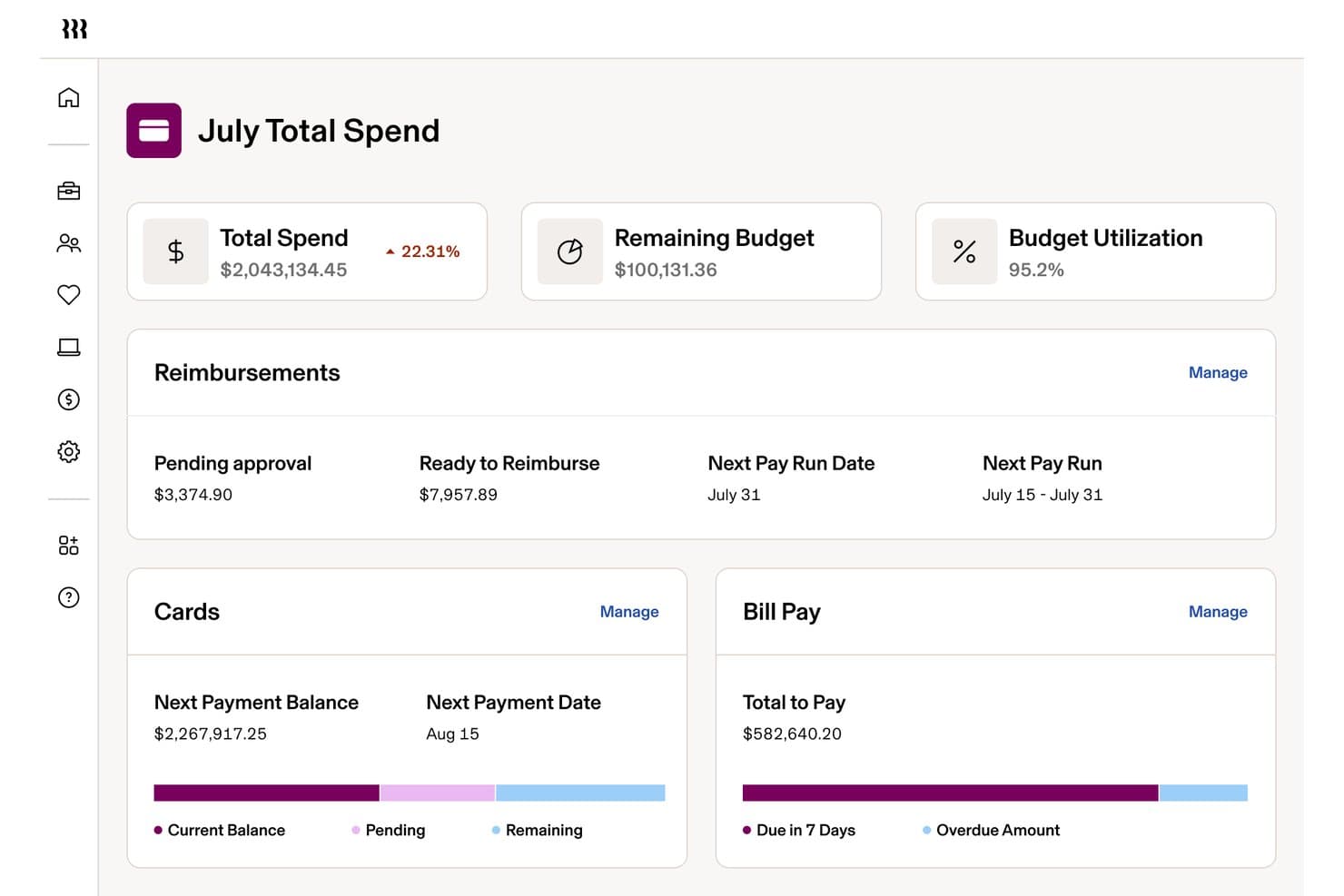
Rippling Spend monitora le spese totali, i rimborsi e il pagamento delle fatture in un unico pannello di controllo. Rippling Spend è una piattaforma per la gestione delle spese che riunisce carte aziendali, rimborsi, pagamento delle fatture e prenotazione dei viaggi in un unico motore di policy basato sui dati HR dei dipendenti in tutti i reparti, ruoli e sedi.
Per chi è più adatto Rippling Spend?
Rippling Spend è una soluzione particolarmente adatta a gruppi medici multisede e reti sanitarie che necessitano di controlli granulari sulle spese, basati sui dati HR, per professionisti sanitari, reparti e sedi.
Perché ho scelto Rippling Spend
Rippling Spend è entrato nella mia selezione perché il suo motore di policy basato sui dati HR gestisce i controlli sulle spese in più sedi di professionisti sanitari. Apprezzo la possibilità di emettere automaticamente carte aziendali con limiti personalizzati in base al ruolo, alla sede e al reparto di un professionista, aggiornando poi automaticamente tali policy quando il personale cambia posizione. Per un gruppo medico che gestisce diverse cliniche, un controllo così granulare a livello di sede è davvero difficile da replicare con uno strumento autonomo per la gestione delle spese.
Funzionalità principali di Rippling Spend
- Elaborazione globale dei rimborsi: Rippling paga dipendenti e collaboratori in oltre 185 Paesi e con più di 100 valute direttamente tramite il proprio sistema paghe, risultando pratica per le organizzazioni con medici in viaggio o personale medico a contratto.
- Acquisizione delle ricevute basata sull'IA: L'applicazione mobile utilizza l'OCR per estrarre i dati delle singole voci dalle ricevute, convertire automaticamente le valute e segnalare gli invii duplicati prima che vengano finalizzati.
- Pannelli di controllo delle spese basati sui ruoli: I responsabili finanziari e i capi reparto visualizzano i dati sulle spese pertinenti al proprio livello, con tabelle pivot, campi personalizzati ed esportazioni sincronizzate con l'ERP per la reportistica di fine mese.
- Prenotazione integrata dei viaggi aziendali: Rippling Travel collega la prenotazione di voli, hotel e auto a noleggio direttamente al sistema delle spese, con limiti di prezzo dinamici e assistenza 24 ore su 24, 7 giorni su 7 da parte di agenti di viaggio.
Integrazioni di Rippling Spend
Rippling Spend offre integrazioni native con QuickBooks Online, Xero, NetSuite e Sage Intacct, oltre a più di 70 integrazioni con partner HRIS, tra cui Workday, BambooHR e ADP. Non sono elencate integrazioni native per Epic, Cerner o le principali piattaforme di gestione degli studi medici.
Pros and Cons
Pros:
- Controlli granulari sulle spese per professionisti sanitari in sedi multiple
- Supporto ai rimborsi globali per i medici in viaggio
- Acquisizione delle ricevute basata sull'IA e rilevamento dei duplicati
Cons:
- Nessun BAA HIPAA per i dati della gestione delle spese
- Nessuna categoria di spesa sanitaria preconfigurata
Learn more about Rippling Spend: Ideale per i flussi delle spese delle carte aziendali
- Demo gratuita disponibile
- A partire da $11.99/utente/mese (con fatturazione annuale)
Visit WebsiteCustomer Rating:4.6/5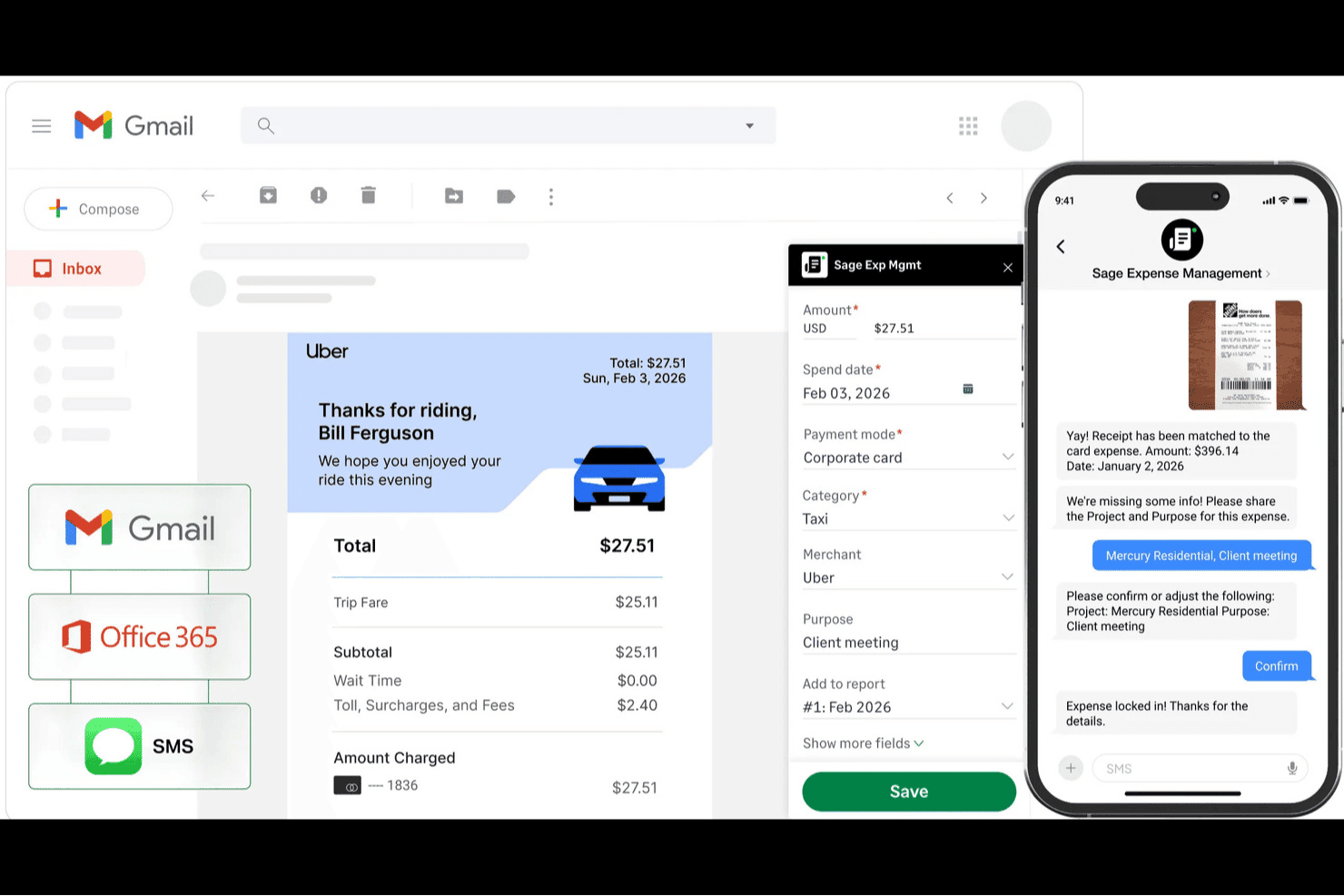
Sage Expense Management acquisisce automaticamente le ricevute da Gmail e SMS nelle note spese. Sage Expense Management è una piattaforma di gestione delle spese per le PMI che automatizza l'acquisizione delle ricevute, la riconciliazione delle carte aziendali, i flussi di approvazione e la sincronizzazione contabile con strumenti come QuickBooks, Xero e Sage Intacct.
Per chi è più adatto Sage Expense Management?
Sage Expense Management è una soluzione particolarmente adatta ai team finanziari e della contabilità fornitori di organizzazioni sanitarie piccole e medie che devono automatizzare la riconciliazione delle carte aziendali e il rimborso delle spese senza cambiare fornitore delle carte.
Perché ho scelto Sage Expense Management
Sage Expense Management si è guadagnato un posto nella mia lista ristretta grazie al modo in cui gestisce in tempo reale i flussi delle spese delle carte aziendali. Quando un membro del personale utilizza una carta, riceve immediatamente un avviso via SMS e può rispondere con una foto della ricevuta, che il sistema legge e associa automaticamente alla transazione. Apprezzo particolarmente questa funzionalità per i team sanitari, per i quali la riconciliazione delle carte tra reparti o strutture rappresenta un onere costante. Il caso di Bluegrass Health Partners è un buon esempio: un operatore di case di riposo con 13 gruppi ha utilizzato campi personalizzati per i centri di costo, raggiungendo una precisione del 99% nella classificazione delle spese e riducendo la chiusura di fine mese da 15 giorni a 5.
Funzionalità principali di Sage Expense Management
- Instradamento delle approvazioni su più livelli: I flussi di approvazione basati su regole consentono di configurare l'instradamento in base all'importo, alla categoria, al reparto o al progetto, con promemoria programmati per le approvazioni in sospeso.
- Controlli in tempo reale delle politiche di spesa: Il motore delle politiche segnala ricevute mancanti, invii duplicati e sforamenti del budget prima che una nota spese raggiunga un approvatore.
- Etichettatura personalizzata di centri di costo e campi: È possibile creare menu a discesa e campi personalizzati, come un selettore 'Struttura', per associare ogni spesa a uno specifico reparto, luogo o entità.
- Acquisizione offline delle spese tramite dispositivo mobile: L'app mobile salva localmente le spese, i chilometri percorsi e le note spese e li sincronizza automaticamente una volta ripristinata la connessione.
Integrazioni di Sage Expense Management
Sage Expense Management offre integrazioni native con QuickBooks Online, Xero, Sage Intacct, Sage 50 (beta) e Sage 300 CRE. I piani aziendali includono anche integrazioni API per connessioni personalizzate con i sistemi delle risorse umane e delle paghe.
Pros and Cons
Pros:
- Gli avvisi in tempo reale delle carte sollecitano l'acquisizione delle ricevute
- Le etichette delle strutture supportano la codifica delle spese su più sedi
- L'acquisizione offline aiuta il personale clinico in trasferta
Cons:
- Nessuna garanzia dichiarata relativa a HIPAA o BAA
- Gli errori di abbinamento delle ricevute possono richiedere correzioni
Learn more about Sage Expense Management (formerly Fyle): Ideale per la gestione di viaggi e spese nelle cliniche
- Piano gratuito + demo gratuita disponibile
- Prezzi su richiesta
Visit WebsiteCustomer Rating:4.7/5
Navan semplifica la prenotazione dei viaggi e la gestione delle spese per i team sanitari. Navan offre una piattaforma integrata per la gestione delle prenotazioni di viaggio e delle spese, progettata per cliniche e organizzazioni sanitarie. Si rivolge ad amministratori e team finanziari che necessitano di controllare i costi di viaggio e semplificare i processi di rimborso. Lo strumento aiuta ad affrontare sfide come la conformità alle politiche, il monitoraggio delle spese in tempo reale e la gestione centralizzata dei viaggi per ambienti clinici impegnati.
Per chi è ideale Navan?
Navan è indicato per cliniche e organizzazioni sanitarie che devono gestire i viaggi dello staff e le relative spese in una piattaforma centralizzata.
Perché ho scelto Navan
Ho scelto Navan perché unisce la prenotazione di viaggi e la gestione delle spese in un'unica piattaforma, particolarmente utile per le cliniche con personale che si sposta tra sedi diverse o partecipa a corsi di formazione esterni. Navan consente di impostare politiche di viaggio, automatizzare le approvazioni e registrare le spese direttamente dalle prenotazioni, riducendo l'inserimento manuale e gli errori. Apprezzo inoltre che offra informazioni e visibilità in tempo reale sulla spesa per i viaggi, così i team finanziari possono monitorare i budget e garantire la conformità. Queste funzionalità rendono Navan una scelta pratica per le organizzazioni sanitarie che devono gestire in modo efficiente sia la logistica dei viaggi sia le spese connesse.
Caratteristiche principali di Navan
Oltre alla gestione di viaggi e spese per le cliniche, ho trovato anche altre funzionalità degne di nota:
- Monitoraggio della spesa in tempo reale: La piattaforma offre visibilità aggiornata su tutte le transazioni di viaggio e spesa man mano che avvengono.
- Carte virtuali integrate: Navan emette carte virtuali per acquisti specifici, aiutando a controllare le spese e ridurre il rischio di frodi.
- App mobile per la gestione in mobilità: Gli utenti possono prenotare viaggi, inviare spese e approvare richieste direttamente dai loro dispositivi mobili.
- Applicazione automatica delle politiche: Il sistema segnala prenotazioni e spese fuori policy, supportando la conformità alle linee guida della clinica.
Integrazioni di Navan
Le integrazioni includono NetSuite, QuickBooks Online, Xero, Sage Intacct e Workday.
Pros and Cons
Pros:
- OCR con intelligenza artificiale per la scansione delle ricevute sanitarie
- Conformità automatica a IRS e audit fiscali
- Sincronizzazione diretta con i principali strumenti HRIS ed ERP
Cons:
- Notevole consumo della batteria GPS su dispositivi mobili
- Costo elevato rispetto ai concorrenti base
Learn more about Navan: Ideale per l'automazione dei pagamenti ai fornitori globali
- Demo gratuita disponibile
- Da $99/mese
Visit WebsiteCustomer Rating:4.5/5
Tipalti automatizza i pagamenti sanitari, l'onboarding dei fornitori e la conformità globale. Tipalti è una piattaforma di automazione dei pagamenti progettata per le organizzazioni sanitarie che gestiscono reti di fornitori complesse e pagamenti internazionali. È adatta a team di finanza e approvvigionamento che desiderano ridurre l'elaborazione manuale dei pagamenti e migliorare la conformità alle normative globali. La piattaforma aiuta ad affrontare sfide come pagamenti transfrontalieri, onboarding dei fornitori e riconciliazione dei pagamenti in contesti sanitari.
Per chi è Tipalti?
Tipalti è una scelta solida per le organizzazioni sanitarie con reti di fornitori globali che hanno bisogno di automatizzare e gestire pagamenti internazionali.
Perché ho scelto Tipalti
Ho scelto Tipalti perché affronta le sfide uniche che le organizzazioni sanitarie incontrano nei pagamenti ai fornitori in diversi paesi e valute. La piattaforma automatizza i pagamenti globali, gestisce la conformità fiscale e supporta una vasta gamma di metodi di pagamento: elementi essenziali per i team finanziari sanitari che lavorano con fornitori e collaboratori internazionali. Inoltre, apprezzo che Tipalti includa strumenti integrati per l'onboarding e la validazione dei fornitori, riducendo il rischio di errori e frodi nei pagamenti. Queste funzionalità lo rendono una soluzione pratica per le organizzazioni sanitarie che devono ottimizzare e mettere in sicurezza i processi di pagamento ai fornitori globali.
Funzionalità principali di Tipalti
Altre caratteristiche che rendono Tipalti una scelta valida per le organizzazioni sanitarie includono:
- Gestione della conformità fiscale: La piattaforma raccoglie e verifica i moduli fiscali, aiutando le organizzazioni a rispettare i requisiti dell’IRS e delle normative fiscali globali.
- Portale self-service per i fornitori: I fornitori possono registrarsi autonomamente, aggiornare i dati di pagamento e monitorare lo stato dei pagamenti senza l'intervento manuale del team.
- Elaborazione automatizzata delle fatture: Tipalti utilizza OCR e AI per acquisire i dati delle fatture e abbinarli agli ordini di acquisto, riducendo l’inserimento manuale dei dati.
- Riconciliazione dei pagamenti: Il sistema riconcilia automaticamente i pagamenti con i registri bancari, semplificando la chiusura mensile e la preparazione delle verifiche contabili.
Integrazioni di Tipalti
Le integrazioni includono Oracle NetSuite, Sage Intacct, Microsoft Dynamics 365, Intuit QuickBooks, Everflow e LinkTrust.
Pros and Cons
Pros:
- Protezione dei dati SOC 1 & 2 e HIPAA
- Automatizza i pagamenti sanitari globali a massa
- Abbinamento PO a 3 vie basato su AI per cliniche
Cons:
- L'app mobile non offre controlli amministrativi avanzati
- Errori di sincronizzazione con alcuni vecchi sistemi EMR
Learn more about Tipalti: Ideale per il monitoraggio della conformità negli ambienti clinici
- Demo gratuita disponibile
- Prezzo su richiesta

SAP Concur automatizza la rendicontazione delle spese sanitarie con strumenti di conformità e visibilità. SAP Concur è una piattaforma di gestione delle spese basata sul cloud progettata per le organizzazioni sanitarie che devono gestire spese complesse e requisiti normativi. Si rivolge ad amministratori clinici e team finanziari che desiderano automatizzare la rendicontazione delle spese e ottenere visibilità sui modelli di spesa. Lo strumento aiuta ad affrontare sfide come l'applicazione delle politiche, la preparazione agli audit e l'integrazione dei dati di spesa con altri sistemi sanitari.
Per chi è ideale SAP Concur?
SAP Concur è indicato per organizzazioni sanitarie e amministratori clinici che necessitano di monitorare attentamente le spese e garantire la conformità normativa tra vari reparti.
Perché ho scelto SAP Concur
Ciò che rende SAP Concur una scelta solida per la gestione delle spese in ambito sanitario è l'attenzione al monitoraggio della conformità negli ambienti clinici. L'ho scelto perché offre applicazione automatica delle politiche, tracciabilità degli audit e avvisi in tempo reale per spese fuori politica, aspetti essenziali per le organizzazioni sottoposte a rigorosi controlli normativi. La piattaforma supporta inoltre la documentazione dettagliata e l'acquisizione digitale delle ricevute, facilitando ai team sanitari la tenuta di registri accurati per gli audit. Queste funzionalità aiutano gli amministratori sanitari a ridurre i rischi di non conformità e a garantire che le spese siano in linea con le politiche interne e le normative esterne.
Funzionalità principali di SAP Concur
Altre funzionalità che rendono SAP Concur utile per la gestione delle spese sanitarie includono:
- Acquisizione spese da mobile: Gli utenti possono inviare ricevute e spese direttamente dai loro dispositivi mobili per una gestione più rapida.
- Workflows di rimborso automatizzati: La piattaforma instrada i report spese attraverso catene di approvazione personalizzabili per adattarsi alle strutture delle organizzazioni sanitarie.
- Integrazione con strumenti di prenotazione viaggi: Collega le prenotazioni di viaggi di lavoro alla rendicontazione delle spese per assicurare che tutti i costi vengano tracciati e categorizzati.
- Supporto multi-valuta e multilingue: Sostiene organizzazioni sanitarie globali con personale e operazioni in diversi paesi.
Integrazioni di SAP Concur
Le integrazioni includono SAP, ADP, NetSuite, QuickBooks, Xero e Microsoft Dynamics 365.
Pros and Cons
Pros:
- Supporta l'acquisizione digitale delle ricevute per utenti mobili
- Offre applicazione automatica delle politiche per le spese
- Si integra con i principali sistemi ERP e HR
Cons:
- Ritardi occasionali nell'elaborazione dei rimborsi spese
- Configurazione complessa per gruppi sanitari multi-entità
Learn more about SAP Concur: Ideale per l'acquisizione mobile degli scontrini da parte del personale sanitario
- Demo gratuita disponibile
- Prezzo su richiesta

Emburse semplifica la raccolta, l'approvazione e la conformità al rimborso delle spese sanitarie. Emburse offre soluzioni di gestione delle spese progettate per organizzazioni sanitarie con team distribuiti e personale mobile. Si rivolge ad amministratori e professionisti della finanza che devono acquisire, approvare e rimborsare le spese rapidamente mantenendo la conformità. La piattaforma aiuta ad affrontare sfide come scontrini persi, inserimento manuale dei dati e applicazione delle politiche in ambienti clinici frenetici.
Per Chi è Ideale Emburse?
Emburse è adatto alle organizzazioni sanitarie con personale mobile che deve acquisire e gestire le spese mentre è in movimento.
Perché Ho Scelto Emburse
Ho scelto Emburse perché offre l'acquisizione mobile degli scontrini, in linea con il ritmo veloce e itinerante del lavoro sanitario. Il personale può scattare foto degli scontrini direttamente dal telefono e caricarli all'istante, riducendo la perdita di documentazione e velocizzando i rimborsi. Apprezzo anche che Emburse utilizzi la tecnologia OCR per estrarre dati dagli scontrini, riducendo l'inserimento manuale e gli errori. Queste caratteristiche facilitano enormemente la gestione delle spese da parte dei team sanitari mentre si spostano tra cliniche, sedi di pazienti o uffici amministrativi.
Funzionalità Principali di Emburse
Altre funzionalità che rendono Emburse particolarmente adatto alle organizzazioni sanitarie sono:
- Creazione automatica dei report spesa: la piattaforma genera automaticamente i report delle spese dagli scontrini caricati e dalle transazioni delle carte.
- Workflow di approvazione personalizzati: gli amministratori possono impostare processi di approvazione multilivello su misura per le politiche aziendali.
- Integrazione con sistemi contabili: Emburse si collega con le principali piattaforme contabili ed ERP per sincronizzare i dati delle spese.
- Tracciamento chilometrico: gli utenti possono registrare e calcolare le spese per i viaggi direttamente sulla piattaforma per il rimborso.
Integrazioni di Emburse
Le integrazioni includono NetSuite, QuickBooks Online, Xero, Sage Intacct e Amazon Business.
Pros and Cons
Pros:
- Si integra con database CMS e NPI
- Automatizza le piste di controllo per la sanità
- L'intelligenza artificiale aiuta a segnalare violazioni delle politiche mediche
Cons:
- Il supporto clienti può essere lento a rispondere
- Alti costi di implementazione per piccoli laboratori
Learn more about Emburse: Ideale per l’allocazione delle spese su sovvenzioni e fondi
- Demo gratuita disponibile
- Da $400/mese

DATABASICS è una piattaforma cloud per la gestione delle spese sanitarie e il monitoraggio della conformità. DATABASICS è una piattaforma cloud per la gestione delle spese, progettata per organizzazioni sanitarie con esigenze complesse di finanziamento e rendicontazione. È particolarmente adatta a team finanziari e amministratori che devono monitorare le spese su più sovvenzioni, fondi o centri di costo. La piattaforma aiuta ad affrontare sfide come conformità, trasparenza e allocazione dettagliata delle spese sanitarie.
Per chi è pensato DATABASICS?
DATABASICS è ideale per i team finanziari sanitari che devono allocare e tracciare le spese tra diversi finanziamenti, fondi o centri di costo.
Perché ho scelto DATABASICS
Ho scelto DATABASICS perché offre strumenti dettagliati per allocare le spese a sovvenzioni e fondi specifici, che rappresentano una sfida frequente nella finanza sanitaria. La piattaforma permette di etichettare e suddividere le spese tra diverse fonti di finanziamento, facilitando la conformità ai requisiti delle sovvenzioni e alle politiche interne. Apprezzo anche che DATABASICS metta a disposizione report integrati per il monitoraggio dei fondi e il supporto agli audit, così i team finanziari possono generare rapidamente tutta la documentazione necessaria per controlli e rimborsi. Queste funzioni lo rendono una scelta pratica per le organizzazioni sanitarie che gestiscono flussi di finanziamento complessi.
Caratteristiche principali di DATABASICS
Oltre alla gestione dell’allocazione delle spese su sovvenzioni e fondi, ho riscontrato anche altre funzionalità che supportano le organizzazioni sanitarie:
- Acquisizione ricevute da mobile: Gli utenti possono caricare le ricevute direttamente dai dispositivi mobili, facilitando la documentazione delle spese mentre sono in movimento.
- Applicazione automatica delle policy: Il sistema segnala automaticamente le spese fuori policy, aiutando i team a mantenere la conformità con le normative interne ed esterne.
- Supporto multivaluta: DATABASICS consente di presentare e gestire spese in diverse valute, utile per organizzazioni con attività o finanziamenti internazionali.
- Flussi di approvazione personalizzati: Gli amministratori possono configurare processi di approvazione multilivello in base alle esigenze specifiche di revisione delle spese dell’organizzazione.
Integrazioni di DATABASICS
Le integrazioni includono Sage Intacct, NetSuite, Microsoft Dynamics 365, Paylocity e Oracle Financial.
Pros and Cons
Pros:
- Regole automatiche per ore lavorative e audit
- Assistenza clienti reattiva 24/7
- Unisce gestione di tempi e spese in una sola app
Cons:
- Costo di accesso elevato per piccole cliniche
- Il generatore di report personalizzati non è intuitivo
Learn more about DATABASICS: 8Ideale per l'automazione AP negli studi medici di gruppo
BILL
- Piano gratuito + demo gratuita disponibile
- Da $49/utente/mese

BILL automatizza i conti da pagare per i team sanitari, semplificando pagamenti e approvazioni. BILL offre automazione dei conti da pagare progettata per studi medici di gruppo e organizzazioni sanitarie. Si rivolge ai team finanziari e agli amministratori che necessitano di gestire pagamenti ai fornitori, approvazioni e documentazione in un'unica piattaforma. La soluzione aiuta a ridurre l'inserimento manuale dei dati e supporta la conformità ai processi finanziari sanitari.
Per chi è BILL?
BILL è adatto ai team finanziari di studi medici di gruppo di medie e grandi dimensioni per flussi di lavoro automatizzati nei conti da pagare.
Perché ho scelto BILL
Ho scelto BILL perché automatizza le attività dei conti da pagare che spesso richiedono molto tempo agli studi medici di gruppo. La piattaforma consente di digitalizzare l'acquisizione delle fatture, configurare flussi di approvazione a più livelli e programmare pagamenti ai fornitori direttamente dal sistema. Apprezzo inoltre che BILL fornisca tracciabilità delle revisioni e archiviazione dei documenti, agevolando le organizzazioni sanitarie nell'essere ordinate e conformi. Queste funzionalità semplificano la gestione di grandi volumi di fatture e pagamenti senza la necessità di documenti cartacei manuali.
Caratteristiche principali di BILL
Oltre alle sue capacità di automazione AP per studi medici di gruppo, ho trovato anche diverse altre funzionalità che supportano i team finanziari healthcare:
- Archiviazione digitale dei documenti: La piattaforma archivia fatture, ricevute e documenti di supporto in un archivio digitale sicuro e ricercabile.
- Flussi di approvazione dei pagamenti personalizzati: Gli amministratori possono configurare processi di approvazione a più fasi per soddisfare le esigenze di controllo interno e conformità.
- Strumenti di gestione fornitori: BILL permette di inserire, gestire e comunicare con i fornitori direttamente all'interno della piattaforma.
- Programmazione automatica dei pagamenti: Gli utenti possono impostare pagamenti ricorrenti o singoli ai fornitori, riducendo l'intervento manuale.
Integrazioni BILL
Le integrazioni includono NetSuite, QuickBooks Online, Xero, Sage Intacct, Tallie e Intacct.
Pros and Cons
Pros:
- Accesso basato sui ruoli protegge i dati dei pazienti
- Sincronizzazione diretta con i principali ERP sanitari
- Visibilità in tempo reale della spesa medica
Cons:
- Richiede configurazione specifica per l'uso HIPAA
- Ritardi occasionali nella sincronizzazione con la contabilità
Learn more about BILL: Ideale per l'applicazione delle policy in tempo reale sulle richieste
- Demo gratuita disponibile
- Da $11.99/utente/mese (fatturato annualmente)

Sage Expense Management automatizza le note spese nel settore sanitario garantendo conformità e controllo. Sage Expense Management offre alle organizzazioni sanitarie un modo per automatizzare e controllare la gestione delle note spese in tutti i reparti. È pensato per i team finanziari e gli amministratori che devono gestire le spese mantenendo la conformità con le normative sanitarie. La piattaforma aiuta ad affrontare sfide come il rispetto delle policy, la visibilità in tempo reale e la riduzione degli errori manuali nell'elaborazione delle spese.
Per chi è ideale Sage Expense Management?
Sage Expense Management è una scelta solida per i team finanziari del settore sanitario che necessitano di controlli rigorosi e automatizzati sulle note spese.
Perché ho scelto Sage Expense Management
Ho scelto Sage Expense Management perché applica in tempo reale le policy sulle spese, un aspetto particolarmente importante per le organizzazioni sanitarie con rigidi requisiti di conformità. La piattaforma verifica automaticamente ogni richiesta rispetto a regole personalizzate al momento dell'invio, segnalando le violazioni prima che raggiungano la fase di approvazione. Apprezzo inoltre che fornisca feedback istantanei agli utenti, aiutando a prevenire errori e riducendo gli scambi tra il personale e i team finanziari. Questo livello di automazione sostiene gli amministratori sanitari che devono mantenere un rigoroso controllo delle spese e della conformità normativa, oltre a garantire efficienza operativa.
Caratteristiche principali di Sage Expense Management
Altre funzionalità che rendono Sage Expense Management utile nei flussi di lavoro delle note spese sanitarie includono:
- Scansione automatica delle ricevute: Gli utenti possono caricare le ricevute e il sistema estrae e abbina automaticamente i dati alle richieste di rimborso.
- Flussi di approvazione multilivello: Gli amministratori possono impostare catene di approvazione personalizzate in base alla gerarchia aziendale.
- Analisi delle spese in tempo reale: I team finanziari possono accedere a dashboard che suddividono le spese per reparto, categoria o utente.
- Monitoraggio chilometraggio e diaria: La piattaforma supporta il personale sanitario che deve registrare le spese di viaggio secondo le policy dell'organizzazione.
Integrazioni di Sage Expense Management
Le integrazioni includono Sage Intacct, Sage 300 CRE, Sage 50, QuickBooks Online e American Express.
Pros and Cons
Pros:
- Sicurezza dei dati conforme a HIPAA
- Audit trail integrati per la conformità
- Visibilità in tempo reale sulle spese della clinica
Cons:
- Necessaria una configurazione iniziale complessa
- L'app mobile non dispone di tutte le funzionalità della versione web
Learn more about Sage Expense Management: 10Ideale per il controllo degli acquisti sanitari su più sedi
Precoro
- Demo gratuita disponibile
- Da $499/mese (fatturazione annuale)
Visit WebsiteCustomer Rating:4.8/5
Precoro aiuta i team sanitari a gestire acquisti, approvazioni e budget su più sedi. Precoro offre alle organizzazioni sanitarie un modo per gestire acquisti e spese aziendali su più sedi da un'unica piattaforma. È particolarmente adatto ai team finanziari e agli amministratori che devono coordinare approvvigionamento, approvazioni e monitoraggio dei budget in ambienti sanitari complessi. Lo strumento aiuta a ridurre la documentazione cartacea e supporta una supervisione chiara delle spese aziendali e dei dipendenti tra i vari reparti o strutture.
Per chi è più adatto Precoro?
Precoro è indicato per le organizzazioni sanitarie con più sedi che necessitano di un controllo centralizzato su acquisti e approvazioni delle spese.
Perché ho scelto Precoro
Ciò che distingue Precoro è il modo in cui affronta le sfide della gestione di acquisti e spese in più sedi sanitarie. L'ho scelto perché permette di impostare flussi di approvazione e controlli di budget specifici per ciascuna sede, così ogni struttura può seguire le proprie regole pur riportando a un sistema centrale. La piattaforma tiene inoltre traccia di ordini, consegne e fatture per sede, aiutando i team finanziari a monitorare spese e conformità sia a livello locale che organizzativo. Questo livello di controllo è particolarmente importante per i gruppi sanitari che devono bilanciare autonomia e supervisione.
Funzionalità principali di Precoro
Oltre ai controlli di acquisto per più sedi, Precoro offre altre funzionalità utili per la gestione delle spese in ambito sanitario:
- Gestione cataloghi: Mantieni un catalogo centralizzato di fornitori e prodotti approvati per acquisti coerenti in tutte le sedi.
- Matching a tre vie: Allinea automaticamente ordini di acquisto, fatture e documenti di consegna per ridurre errori e prevenire pagamenti doppi.
- Reportistica personalizzata: Genera report dettagliati su spese, performance dei fornitori e cronologia degli ordini, adattati alle esigenze sanitarie.
- Controlli di accesso basati sul ruolo: Assegna permessi in base alle funzioni lavorative per proteggere dati sensibili finanziari e di approvvigionamento.
Integrazioni Precoro
Le integrazioni includono NetSuite, QuickBooks Online, Xero e Sage Intacct.
Pros and Cons
Pros:
- Offre il matching a tre vie per le fatture
- Centralizza la gestione di fornitori e contratti
- Flussi di approvazione personalizzabili per la conformità sanitaria
Cons:
- La personalizzazione dei report può richiedere supporto tecnico
- La configurazione del catalogo può richiedere tempo per sistemi grandi
Learn more about Precoro:
Altri software per la gestione delle spese nel settore sanitario
Ecco alcune ulteriori opzioni di software per la gestione delle spese nel settore sanitario che non sono entrate nella mia selezione, ma che vale comunque la pena prendere in considerazione:
Come Valuto i Software di Gestione Spese per il Settore Sanitario
Valuto questi strumenti su due livelli: i requisiti fondamentali come la conformità HIPAA e l'automatizzazione delle ricevute, e poi i fattori di differenziazione che contano di più per gli amministratori di studi che gestiscono spese su più sedi.
Funzionalità di Base (Requisiti Essenziali di Questa Lista)
Quando seleziono gli strumenti per la mia lista, valuto ciascuno su una scala da 0 (l'area non è coperta dalla funzionalità) a 5 (eccelle in quest'area) per ogni funzione di base elencata di seguito. Poi, calcolo il punteggio totale dello strumento come percentuale. Ogni strumento deve raggiungere almeno un punteggio totale minimo del 55% per essere preso in considerazione.
- Categoria delle Spese Sanitarie: Verifico se uno strumento offre categorie specifiche mediche come ECM, assicurazione per responsabilità professionale e forniture cliniche, invece di costringere l’utente a crearle da zero.
- Gestione dei Dati Conforme a HIPAA: Ricevute e fatture collegate all’assistenza ai pazienti possono contenere PHI, quindi cerco BAAs firmati, controlli di accesso basati sui ruoli e registrazione degli audit.
- Automazione di Ricevute e Rimborsi: Valuto l'intero flusso di lavoro dalla cattura delle ricevute da mobile, l’estrazione con OCR fino all’instradamento per l’approvazione, soprattutto per i rimborsi a medici e clinici itineranti.
- Carta Aziendale e Controlli di Spesa: Gli amministratori di studio devono poter fissare limiti di spesa per dipartimento o per fornitore, quindi analizzo le opzioni di emissione della carta e quanto siano dettagliati i controlli sulle policy.
- Monitoraggio Multi-Sede e per Fornitore: Gli studi associati e le MSO necessitano di allocare le spese tra cliniche, dipartimenti e singoli fornitori. Valuto come ogni strumento gestisce la mappatura dei centri di costo e la reportistica consolidata.
- Integrazioni con la Contabilità Sanitaria: Collegarsi a piattaforme come QuickBooks, Sage Intacct o NetSuite è fondamentale, ma verifico anche la compatibilità con sistemi di gestione degli studi medici come Athenahealth o NextGen.
Una volta individuati gli strumenti che soddisfano questi criteri, considero ciò che distingue ciascuna piattaforma.
Fattori Differenzianti (Cosa Distingue i Fornitori)
Ecco come confronto e metto a confronto i diversi fornitori:
Caratteristiche Distintive
Il monitoraggio dedicato per ECM e credenziali rappresenta un’importante differenza. Cerco strumenti che permettano di etichettare le spese per licenze e formazione per fornitore con promemoria integrati per le scadenze. Anche l’applicazione delle policy tramite intelligenza artificiale è rilevante, soprattutto per segnalare invii doppi o spese fuori policy prima che arrivino all’approvatore. Per le strutture legate a finanziamenti per la ricerca o a contratti di assistenza basata sul valore, valuto se uno strumento permette di associare le spese a specifici pagatori o fonti di finanziamento per una riconciliazione agevole in sede di audit.
Oltre le Caratteristiche
Considero quanto bene una piattaforma si adatta alla dimensione del vostro studio. Uno studio di dermatologia singolo ha esigenze molto diverse rispetto a un gruppo multispecialistico che cresce tramite acquisizioni. Anche il supporto all’implementazione ha un peso: cerco fornitori che offrano modelli di piano dei conti predefiniti e risorse di onboarding pensate per lo staff clinico che non è composto da professionisti della finanza. La sicurezza completa il quadro; oltre alla conformità HIPAA, certificazioni come SOC 2 Type II e HITRUST sono segnali che un fornitore prende sul serio la governance dei dati sanitari.
Come scegliere un software per la gestione delle spese nel settore sanitario
È facile perdersi in lunghi elenchi di funzionalità e strutture tariffarie complesse. Per aiutarti a rimanere concentrato mentre affronti il tuo processo di selezione del software, ecco una lista di controllo dei fattori da tenere a mente:
| Fattore | Cosa considerare |
| Scalabilità | Il software sarà in grado di gestire i volumi attuali e previsti di fatture e pagamenti man mano che la tua attività cresce? |
| Integrazioni | Lo strumento si connette nativamente al tuo EHR, ai sistemi contabili e a quelli per la gestione delle buste paga, evitando l'inserimento manuale dei dati? |
| Personalizzazione | Puoi adattare i flussi di approvazione, i ruoli degli utenti e la reportistica alla struttura e alle politiche della tua organizzazione? |
| Semplicità d'uso | Il personale clinico e amministrativo sarà in grado di utilizzare il sistema con una formazione o un'interruzione minime? |
| Implementazione e avvio iniziale | Quanto tempo sarà necessario per iniziare a utilizzare il sistema e quali risorse o forme di assistenza fornisce il fornitore durante la configurazione? |
| Costo | Tutti i costi sono trasparenti, comprese le tariffe di configurazione, assistenza e integrazione? I prezzi sono compatibili con il tuo budget e con le tue modalità di utilizzo? |
| Misure di sicurezza | Il software offre una gestione dei dati conforme all'HIPAA, registri di audit e controlli degli accessi degli utenti per proteggere le informazioni sensibili? |
| Requisiti di conformità | Il sistema è in grado di supportare le tue esigenze di documentazione, conservazione e audit relative alle normative sanitarie e ai requisiti dei pagatori? |
Che cos'è il software di gestione delle spese per il settore sanitario?
Il software di gestione delle spese per il settore sanitario è uno strumento digitale che aiuta le organizzazioni mediche a monitorare, approvare e documentare le spese relative alle operazioni, alle forniture e ai servizi. Questi sistemi automatizzano l'elaborazione delle fatture, gestiscono i pagamenti ai fornitori e garantiscono la conformità alle normative sanitarie. Centralizzando i dati e i flussi di lavoro relativi alle spese, supportano una rendicontazione accurata, riducono gli errori manuali e aiutano i team sanitari a mantenere il controllo finanziario tra reparti e strutture.
Funzionalità del software di gestione delle spese per il settore sanitario
Quando scegli un software di gestione delle spese per il settore sanitario, presta attenzione alle seguenti funzionalità principali:
- Acquisizione delle fatture: Digitalizza e importa le fatture dalle e-mail, tramite scansioni o caricamenti, riducendo l'inserimento manuale e aiutando i team a elaborare rapidamente grandi volumi di fatture dei fornitori.
- Flussi di approvazione: Inoltra le spese attraverso catene di approvazione personalizzabili e multilivello per garantire la conformità alle politiche interne e ai requisiti normativi.
- Gestione dei fornitori: Centralizza i dati di contatto dei fornitori, i termini di pagamento e la cronologia delle transazioni, facilitando il monitoraggio dei rapporti e la risoluzione dei problemi di pagamento.
- Pianificazione dei pagamenti: Consente agli utenti di impostare le date dei pagamenti, automatizzare i pagamenti ricorrenti e gestire il flusso di cassa allineando le erogazioni ai cicli di budget.
- Archiviazione dei documenti: Conserva ricevute, contratti e documenti di supporto in modo sicuro, offrendo un facile accesso per audit e verifiche di conformità.
- Rendicontazione delle spese: Genera report dettagliati sulle spese per reparto, fornitore o categoria, supportando l'analisi del budget e la pianificazione finanziaria.
- Tracce di audit: Registra ogni azione eseguita su una spesa o una fattura, creando un registro trasparente per la conformità e la revisione interna.
- Funzionalità di integrazione: Si collega ai software di contabilità, ai sistemi paghe e ai sistemi EHR per sincronizzare i dati e ridurre l'inserimento duplicato tra le piattaforme.
- Autorizzazioni utente: Consente agli amministratori di controllare l'accesso ai dati finanziari sensibili assegnando ruoli e autorizzazioni in base alla funzione lavorativa.
- Accesso da dispositivi mobili: Consente al personale di esaminare, approvare o presentare le spese da smartphone o tablet, supportando i flussi di lavoro a distanza e in mobilità.
Funzionalità comuni di intelligenza artificiale nei software di gestione delle spese per il settore sanitario
Oltre alle funzionalità standard dei software di gestione delle spese per il settore sanitario elencate sopra, molte di queste soluzioni stanno integrando l'intelligenza artificiale con funzionalità come:
- Estrazione automatizzata dei dati: Utilizza l'intelligenza artificiale per leggere ed estrarre i dettagli principali da fatture, ricevute e altri documenti, riducendo l'inserimento manuale e minimizzando gli errori.
- Rilevamento delle anomalie: Analizza continuamente i modelli di spesa per segnalare transazioni insolite o potenziali frodi, aiutando le organizzazioni sanitarie a mantenere la conformità e l'integrità finanziaria.
- Instradamento intelligente delle approvazioni: Apprende dalle decisioni di approvazione storiche per suggerire o automatizzare l'instradamento delle spese agli approvatori appropriati, accelerando i tempi di elaborazione.
- Analisi predittiva del flusso di cassa: Applica modelli di intelligenza artificiale per prevedere le spese future e le esigenze di flusso di cassa sulla base dei dati storici, supportando una pianificazione finanziaria proattiva.
- Rilevamento dei duplicati: Identifica potenziali fatture o richieste di rimborso duplicate confrontando i dettagli dei documenti, riducendo il rischio di doppi pagamenti.
Vantaggi del software di gestione delle spese per il settore sanitario
L'implementazione di un software di gestione delle spese per il settore sanitario offre diversi vantaggi al tuo team e alla tua azienda. Eccone alcuni di cui potrai beneficiare:
- Conformità migliorata: I flussi di lavoro automatizzati per le approvazioni e le tracce di controllo aiutano la tua organizzazione a rispettare le normative sanitarie e i requisiti delle policy interne.
- Elaborazione più rapida delle fatture: L'acquisizione digitale e l'estrazione dei dati basata sull'intelligenza artificiale riducono l'inserimento manuale, velocizzando l'intero ciclo dalla fattura al pagamento.
- Maggiore visibilità finanziaria: I report e le analisi in tempo reale offrono ai team finanziari una visione chiara delle spese nei vari reparti e fornitori.
- Riduzione del rischio di errori: Il rilevamento automatico dei duplicati e gli avvisi sulle anomalie riducono al minimo la possibilità di doppi pagamenti o transazioni fraudolente.
- Gestione semplificata dei documenti: L'archiviazione centralizzata di fatture, ricevute e contratti facilita il recupero dei documenti per audit o revisioni.
- Integrazione migliorata: Le connessioni fluide con i sistemi contabili, di gestione paghe e delle cartelle cliniche elettroniche eliminano i silos di dati e riducono il lavoro di riconciliazione manuale.
- Flussi di lavoro scalabili: Le catene di approvazione e le autorizzazioni utente personalizzabili supportano la crescita e si adattano ai cambiamenti della struttura organizzativa.
Costi e prezzi dei software per la gestione delle spese sanitarie
La scelta di un software per la gestione delle spese sanitarie richiede la comprensione dei diversi modelli e piani tariffari disponibili. I costi variano in base alle funzionalità, alle dimensioni del team, agli extra e ad altri fattori. La tabella seguente riassume i piani più comuni, i relativi prezzi medi e le funzionalità tipicamente incluse nelle soluzioni software per la gestione delle spese sanitarie:
Tabella comparativa dei piani per i software di gestione delle spese sanitarie
| Tipo di piano | Prezzo medio | Funzionalità comuni |
| Piano gratuito | $0 | Acquisizione di base delle fatture, archiviazione limitata dei documenti, accesso per un singolo utente e report semplici. |
| Piano personale | $15-$49/utente/mese | Supporto per più utenti, flussi di lavoro di approvazione di base, report standard e integrazioni limitate. |
| Piano aziendale | $100-$999/month | Catene di approvazione avanzate, gestione dei fornitori, integrazione con i sistemi contabili e tracce di controllo. |
| Piano aziendale avanzato | Personalizzato | Flussi di lavoro personalizzati, sicurezza avanzata, strumenti per la conformità, assistenza dedicata e analisi avanzate. |
Domande frequenti sui software per la gestione delle spese sanitarie
Ecco alcune risposte alle domande comuni sui software per la gestione delle spese sanitarie:
In che modo i software per la gestione delle spese aiutano a garantire la conformità nel settore sanitario?
I software per la gestione delle spese contribuiscono a mantenere la conformità applicando flussi di lavoro di approvazione, conservando le tracce di controllo e supportando la gestione dei documenti conforme allo standard HIPAA. Queste funzionalità facilitano il rispetto dei requisiti normativi e la preparazione agli audit.
I software per la gestione delle spese possono integrarsi con i sistemi delle cartelle cliniche elettroniche (EHR)?
Sì, molte soluzioni per la gestione delle spese offrono integrazioni con i sistemi EHR. Ciò consente una condivisione fluida dei dati tra i sistemi finanziari e clinici, riducendo l’inserimento manuale e supportando un monitoraggio accurato dei costi.
Cosa dovrebbero cercare le organizzazioni sanitarie nella sicurezza dei software per la gestione delle spese?
Cerca funzionalità come la gestione dei dati conforme allo standard HIPAA, i controlli di accesso degli utenti, la crittografia e registri di audit dettagliati. Queste misure di sicurezza proteggono le informazioni finanziarie e relative ai pazienti da accessi non autorizzati o violazioni.
L'accesso mobile è importante per la gestione delle spese sanitarie?
Sì, l’accesso mobile consente a medici e personale di inviare, esaminare o approvare le spese ovunque si trovino. Questa flessibilità è particolarmente utile per i team che lavorano in più sedi o in ambienti clinici dinamici.
Quanto tempo occorre per implementare un software per la gestione delle spese in un contesto sanitario?
I tempi di implementazione variano, ma la maggior parte delle soluzioni basate sul cloud può essere configurata in poche settimane. Fattori come la migrazione dei dati, le esigenze di integrazione e la formazione del personale possono influire sui tempi complessivi; pertanto, se necessario, pianifica un’implementazione graduale.