

Sağlık hizmetleri için dijital tabela yazılımı, ekibinizin kliniklerde, hastanelerde veya muayenehanelerde ekranlarda görsel içerik oluşturmasına, yönetmesine ve görüntülemesine olanak tanıyan dijital bir araçtır. Personel ve hastalarla önemli güncellemeleri, sağlık ipuçlarını, programları veya acil durum bildirimlerini paylaşmanın en iyi yollarını arıyorsanız doğru yerdesiniz.
Doğru çözüm, manuel iletişimi azaltmanıza, güvenlik uygulamalarını pekiştirmenize ve idari iş yükünüze ek yük getirmeden herkesi bilgilendirmenize yardımcı olabilir. Bu kılavuzda, 2026 yılında sağlık hizmetleri için dijital tabela alanındaki en iyi seçenekleri bulacaksınız. Her bir seçenek, günümüzün bakım ve iletişim gereksinimlerini karşılamanıza yardımcı olabilecek özelliklere ve güçlü yönlere sahiptir.
Why Trust Our Software Recommendations
6,700+
Reviews
20
Industry experts
16+
Evaluation factors
14
Years
Our team has been testing and reviewing software since 2012. As medical practice leaders ourselves, we know how difficult—and important—it is to choose the right software.
For this guide, we evaluated tools using hands-on testing and independent research, scoring tools using our selection criteria.
Our reviews reflect our human editorial judgment, not a sales pitch.
Sağlık Hizmetleri İçin Dijital Tabela Yazılımları Karşılaştırma Tablosu
Aşağıdaki tablo, sağlık hizmetleri için en iyi dijital tabela yazılımı seçimlerimin fiyatlandırma ayrıntılarını karşılaştırmaktadır.
Sorted by: Default
| Tool | Starting Price | Website | |
|---|---|---|---|
Best for interactive healthcare displays | 4.9 out of 5 | $14/screen/month Free demo + 30-day free trial available | Website |
Best for simple clinic signage | 4.4 out of 5 | $29/month Free demo available | Website |
Best for secure healthcare signage | 4.5 out of 5 | $16.50/display/month Free demo available | Website |
Best for enterprise signage management | 4.3 out of 5 | $14/player/month Free demo + 30-day free trial available | Website |
Best for customizable signage workflows | 5.0 out of 5 | $9/month 30-day free trial | Website |
Best for waiting room engagement | 4.6 out of 5 | Pricing upon request Free demo available | Website |
Best for healthcare content management | 4.6 out of 5 | $450 one-time Free demo available | Website |
Best for wayfinding and digital signage | 5.0 out of 5 | Pricing upon request Free demo available | Website |
Best for hospital communication displays | 2.7 out of 5 | Pricing upon request Free demo available | Website |
Best for patient education displays | Not rated | Pricing upon request Not available | Website |


Sağlık Hizmetleri İçin En İyi Dijital Tabela Yazılımları İncelemeleri
Kısa listeme giren sağlık hizmetleri için en iyi dijital tabela yazılımlarına ilişkin ayrıntılı özetlerim aşağıdadır. İncelemelerim, size en uygun seçeneği bulmanıza yardımcı olmak için her yazılımın özelliklerine, kullanım alanlarına ve entegrasyonlarına ayrıntılı bir bakış sunmaktadır.
 Best for interactive healthcare displays
- Free demo + 30-day free trial available
- From $14/screen/month (billed annually)
Visit WebsiteCustomer Rating:4.9/5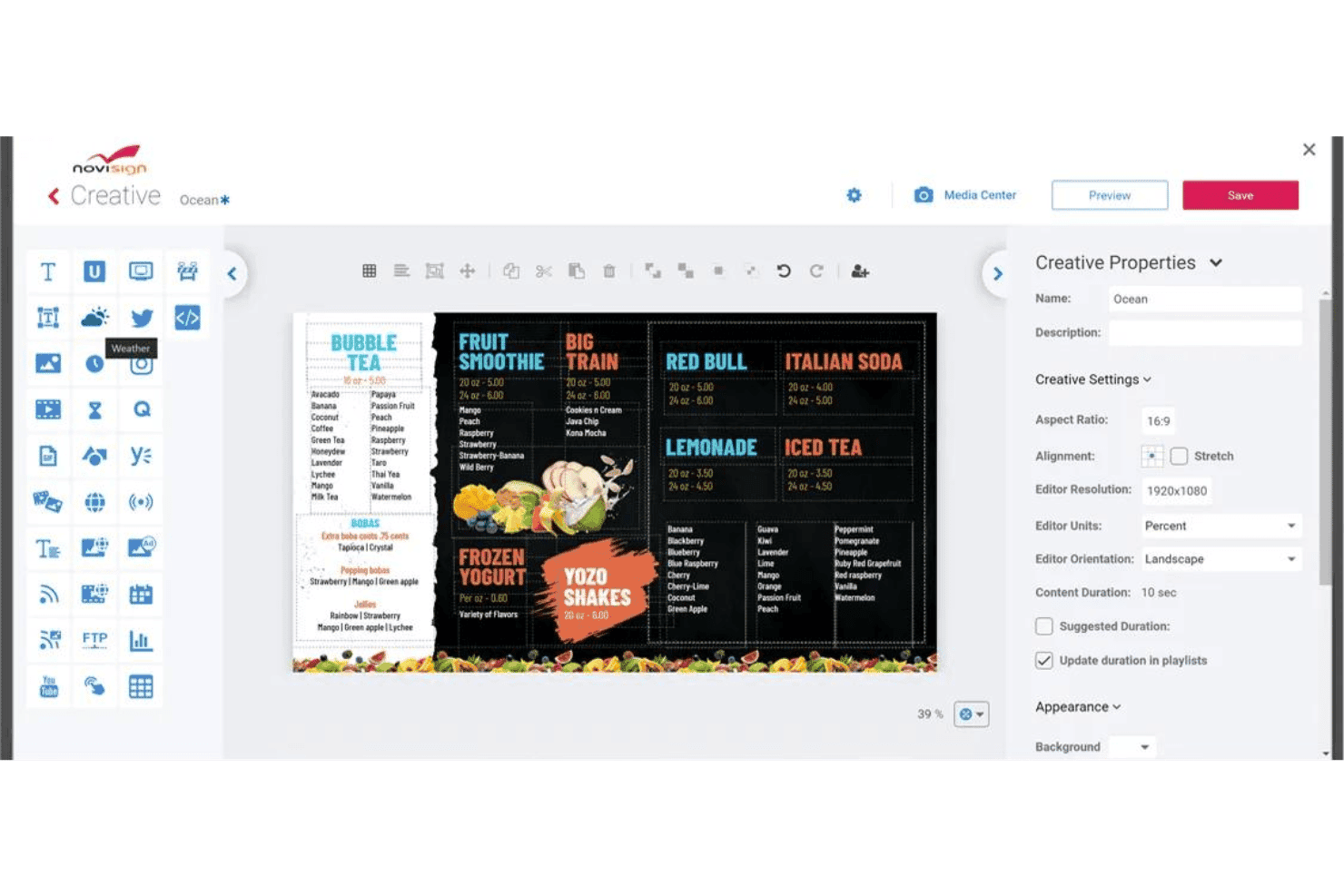
NoviSign offers a drag-and-drop digital signage creative editor with customizable menu board templates and content properties. NoviSign is a cloud-based digital signage platform for healthcare settings that supports interactive touchscreen displays, multi-zone screen layouts, real-time queue and wait time widgets, and remote content management across multiple locations and screens.
Who Is NoviSign Best For?
NoviSign suits clinic administrators and patient experience teams managing interactive waiting room displays across multiple healthcare locations.
Why I Picked NoviSign
NoviSign earns its spot on my shortlist because of how well its interactive touchscreen and kiosk capabilities translate to real waiting room scenarios. I love that you can build multi-zone layouts that simultaneously display a virtual queue widget, health education videos, and branded messaging on a single screen. The IoT and RFID event triggers also let my team configure touch-activated content zones that respond to patient interactions in real time.
NoviSign Key Features
- SOC 2 Type II certified security: Ensures secure content delivery and meets strict data protection requirements for healthcare organizations.
- Centralized cloud management: Lets your team update, schedule, and monitor screens at multiple clinic locations from a single dashboard.
- Multi-platform hardware support: Works with Windows, Android, Chrome OS, Samsung Tizen, LG webOS, BrightSign, and more.
- Proof-of-play and audit reporting: Tracks media playback, screen status, and user actions for compliance and operational visibility.
NoviSign Integrations
NoviSign offers native integrations with Toast POS, PowerBI, Tableau, Amadeus Delphi, SharePoint, Google Drive, Dropbox, Outlook, and Google Calendar, and connects with Zapier. An API is available for custom integrations.
Pros and Cons
Pros:
- Verified healthcare facility deployments across hospitals and clinics
- Remote content updates require no on-site hardware access
- Touchscreen kiosk setup runs in under an hour
Cons:
- Per-screen billing adds up quickly across large multi-screen deployments
- No documented native EHR or practice management integrations
Learn more about NoviSign:

truDigital Signage offers a lobby welcome directory display with room listings, time, and branding for corporate office environments. truDigital Signage is a cloud-based digital signage platform for healthcare settings that combines a healthcare-specific content library, multi-location screen management, and pre-built medical infotainment templates.
Who Is truDigital Signage Best For?
truDigital is a good fit for small to mid-sized clinics, dental offices, and medical practices that need ready-to-deploy signage without complex IT setup.
Why I Picked truDigital Signage
I've included truDigital Signage in my top picks because the pre-built healthcare content libraries genuinely reduce setup time for clinics. Rather than building slides from scratch, I can pull from dedicated Medical, Cardiology, and Dental Infotainment libraries, which is exactly what a front-desk or practice management team needs. The Sign Player also ships pre-configured and already assigned to your account, so getting a waiting room screen live takes minutes, not days.
truDigital Signage Key Features
- Campaigns tool: Schedule and publish digital signage content across multiple clinic locations from a single dashboard.
- Infotainment app library: Access 500+ pre-built apps, including specialized medical news, wellness tips, and animated health content.
- Multi-zone layout support: Combine video, text, weather, and news into segmented content zones on one screen.
- Proprietary sign player hardware: Plug-and-play device that connects to clinic screens with offline content caching and remote management.
truDigital Signage Integrations
truDigital Signage offers native integrations with Google Drive, Google Calendar, Google Sheets, Microsoft PowerPoint, Excel, Word, Power BI, Slack, Yammer, Domo, Klipfolio, and Vimeo. An API is available for custom integrations.
Pros and Cons
Pros:
- Multi-location scheduling from one dashboard
- Sign Player ships pre-configured and ready
- Pre-built dental and medical infotainment libraries
Cons:
- No documented BAA for HIPAA compliance
- No native EHR integration for wait times
Learn more about truDigital Signage: Best for secure healthcare signage
- Free demo available
- From $16.50/display/month
Visit WebsiteCustomer Rating:4.5/5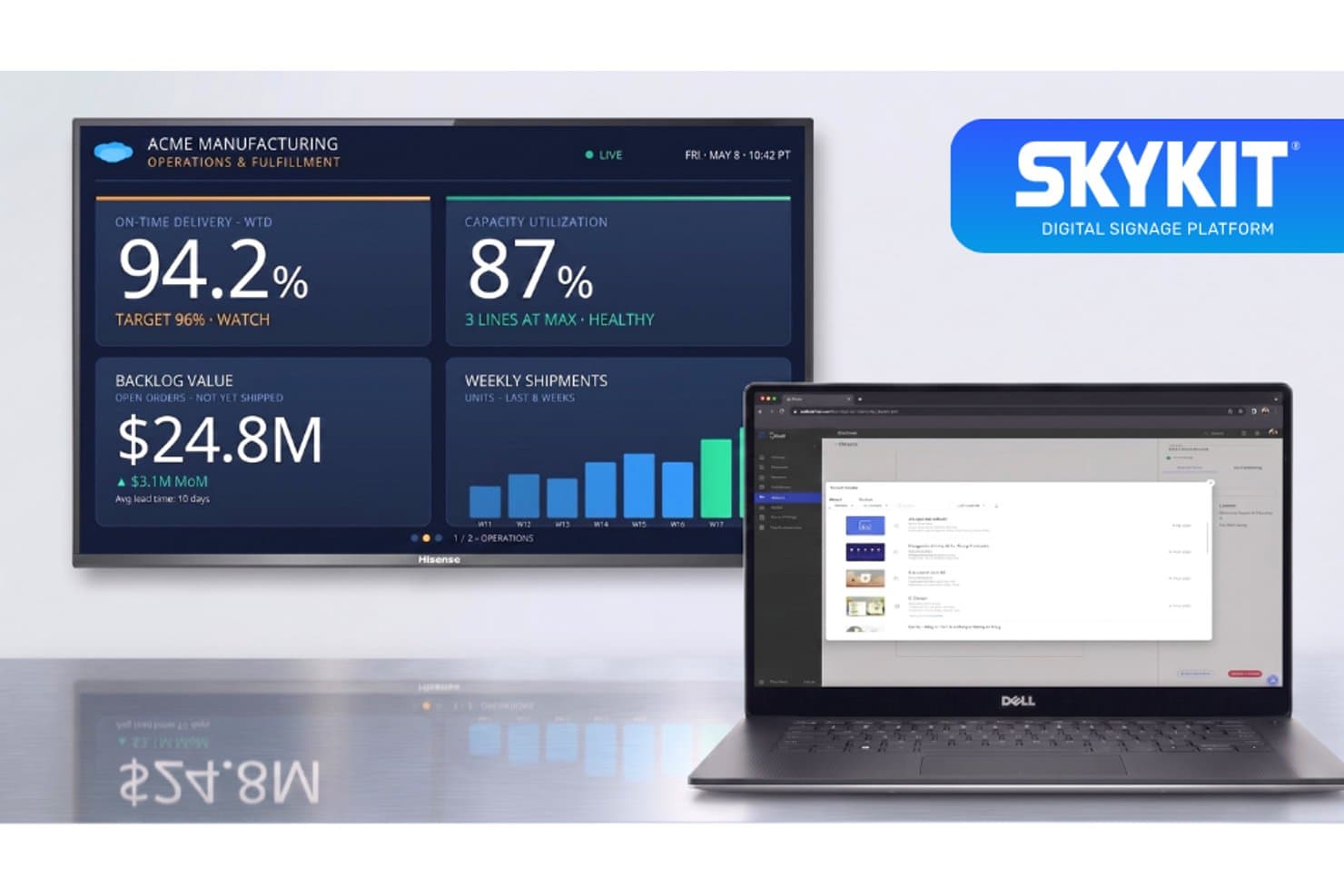
Skykit offers a digital signage platform that displays real-time operations dashboards on large screens, manageable remotely via a laptop interface. Skykit is a cloud-based digital signage platform built for healthcare environments, supporting multi-location content management, real-time BI dashboard display, emergency alerts, and secure device management across hospital and clinic networks.
Who Is Skykit Best For?
Skykit is a strong fit for IT administrators and operations teams managing digital signage across large, multi-site health systems and hospital networks.
Why I Picked Skykit
Skykit earns its spot on my shortlist because of its security posture, which is genuinely built for healthcare environments. I picked it specifically for its SOC 2 Type 2 certification, role-based access controls, and SAML-based SSO with Okta and Microsoft, which give IT teams verifiable control over who can push content to which screens. I also like that emergency alert overrides are built into the Pro plan, with Alertus integration available for instant, network-wide alerts across a facility.
Skykit Key Features
- Multi-location management: Centrally schedule, update, and manage content across all screens and facilities from a single cloud dashboard.
- Real-time dashboard display: Display live BI dashboards or operational queues using integrations with Power BI, Tableau, Grafana, and other tools.
- Flexible screen layouts: Configure multiple content zones per display to show videos, health tips, live data, and announcements at the same time.
- Emergency alert integration: Trigger instant override messages or critical alerts through native integrations with systems like Alertus and InformaCast.
Skykit Integrations
Skykit offers over 60 native integrations, including Power BI, Tableau, Grafana, Salesforce, Datadog, Alertus, InformaCast, Google Workspace, and Microsoft 365. An API is available for custom integrations.
Pros and Cons
Pros:
- Enterprise-grade RBAC and SAML SSO support
- Manages 65,000+ endpoints from one dashboard
- SOC 2 Type 2 certification built in natively
Cons:
- No native EHR or patient queue integration
- No pre-built healthcare content library included
Learn more about Skykit: Best for enterprise signage management
- Free demo + 30-day free trial available
- From $14/player/month (USD, Cloud Essential)
Visit WebsiteCustomer Rating:4.3/5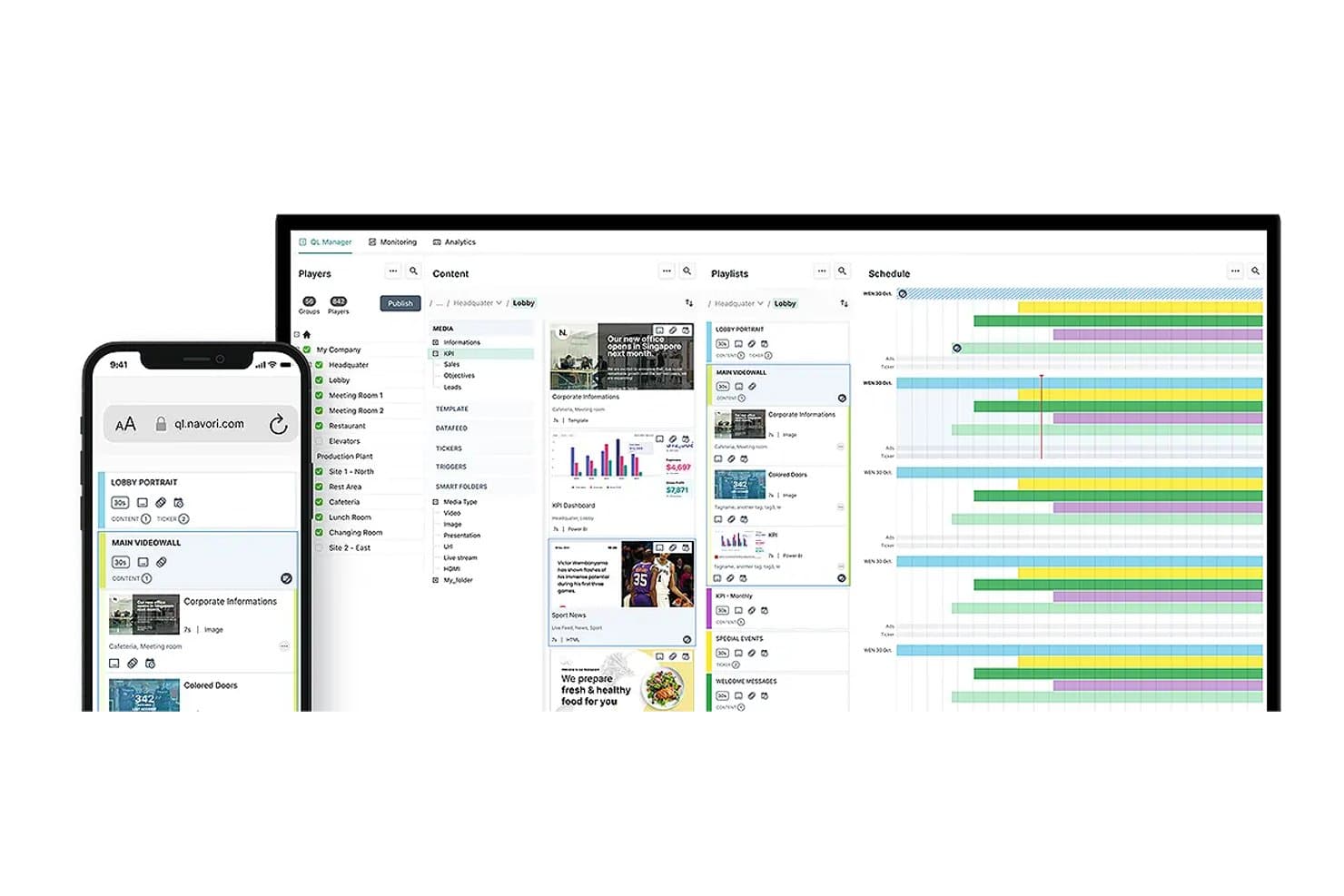
Navori offers a multi-panel CMS interface with content management, playlists, and scheduling tools visible across desktop and mobile views. Navori is an enterprise digital signage platform with a cloud and on-premise CMS, AI-driven content automation, real-time data integration, and healthcare-specific features like wait time displays, emergency alerts, and interactive wayfinding.
Who Is Navori Best For?
Navori suits large health systems and multi-site clinic networks where IT administrators need centralized control over content across dozens or hundreds of screens.
Why I Picked Navori
Navori earns its spot as one of the best on my shortlist because of how it handles enterprise-scale screen networks without losing granular control. I like that the role-based CMS lets a central team govern brand and compliance messaging while individual clinic locations still manage their own scheduling. In practice, that means a health system running 500 screens across 40 locations can push emergency alert overrides network-wide in seconds while a local coordinator updates waiting room content independently.
Navori Key Features
- Role-based content controls: Assign permissions by facility, clinic, or department for content editing and scheduling.
- Real-time data integrations: Connect patient queue feeds, appointment systems, and health data directly to display content.
- Emergency alert override rules: Instantly trigger alert messaging and override scheduled content from a central dashboard.
- Configurable multi-zone layouts: Display live wait times, videos, and branded messages in segmented sections on each screen.
Navori Integrations
Navori offers native integrations with Microsoft 365, Power BI, Tableau, Salesforce, SAP, Adobe Experience Manager, and social platforms like LinkedIn, Facebook, and Instagram. An API is available for custom integrations and real-time data feeds.
Pros and Cons
Pros:
- SOC 2 Type II security certification included
- Real-time EHR data feeds for queue displays
- Enterprise-scale multi-site screen network management
Cons:
- No pre-built licensed healthcare content library
- No explicitly documented HIPAA BAA available
Learn more about Navori: Best for customizable signage workflows
- 30-day free trial
- From $9/month
Visit WebsiteCustomer Rating:5/5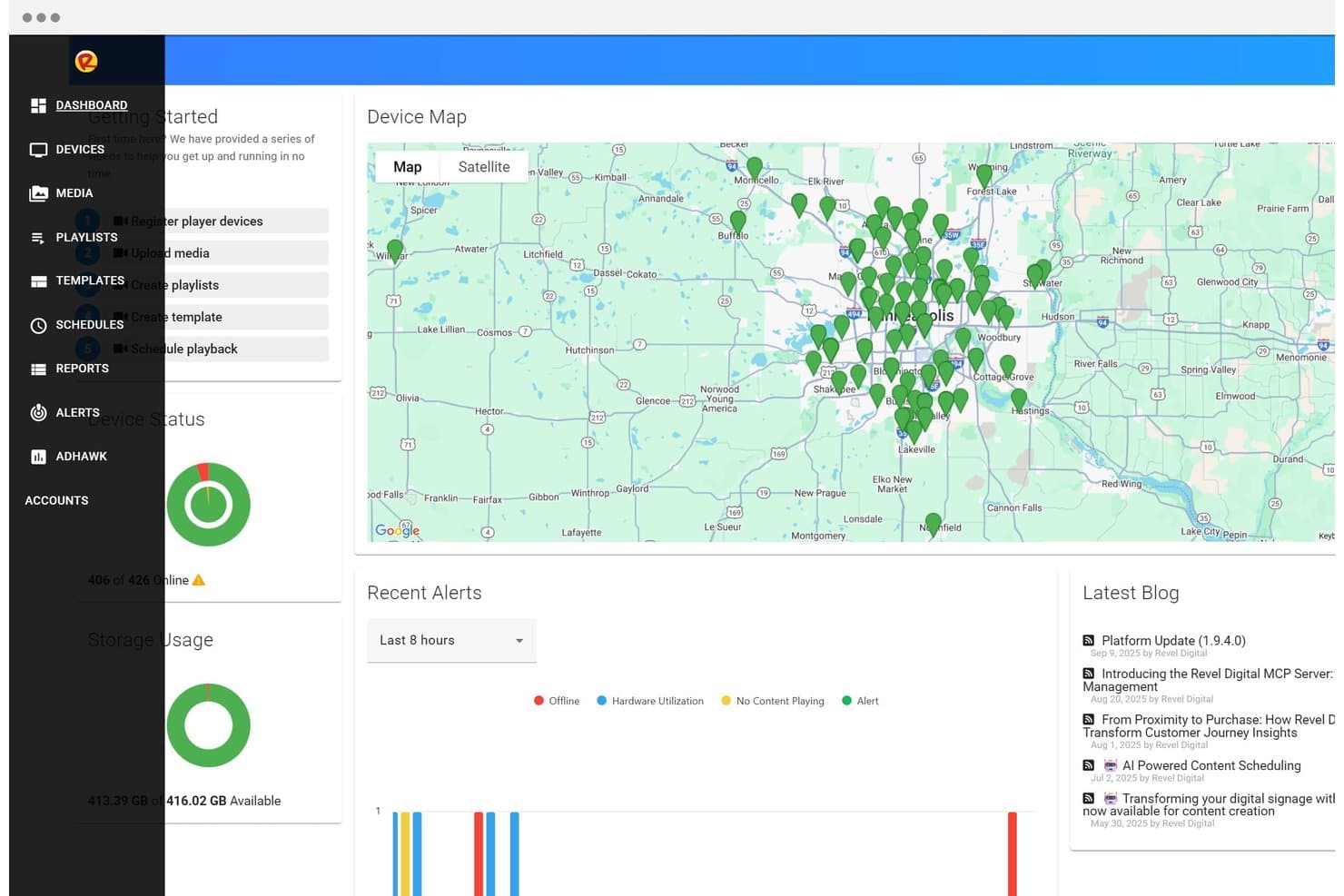
Revel Digital offers a centralized dashboard with a device map, real-time device status, storage usage, and recent alerts for managing digital signage deployments. Revel Digital is a cloud-based digital signage platform for healthcare facilities that covers wayfinding kiosks, patient queue displays, emergency alert overrides, and multi-location content management across hospital campuses and clinics.
Who Is Revel Digital Best For?
Revel Digital is a strong fit for clinic IT administrators and patient experience teams managing signage across multi-location hospital systems or large medical campuses.
Why I Picked Revel Digital
I picked Revel Digital as one of the best because its Smart Scheduling system builds trigger-based content rules driven by time, location, beacons, and motion sensors. In a hospital setting, that means a waiting room screen can automatically shift from health education content to queue updates when foot traffic spikes. I also like that Pro-tier layouts support unlimited screen zones, so a single display can simultaneously run branded messaging, live wait times, and a rotating health tip.
Revel Digital Key Features
- Emergency alert override: Instantly pushes urgent messages to all screens with one click for event or disaster notifications.
- EHR integration API: Connects with systems like Epic and Cerner to automate patient queue data for display.
- Multi-campus dashboard: Manages content scheduling and device monitoring across multiple clinics or hospital locations from one interface.
- Role-based permissions: Controls editing and publishing rights for different users and departments.
Revel Digital Integrations
Revel Digital offers native integrations with Epic, Cerner, Allscripts, Google Slides, Power BI, Slack, Instagram, Microsoft Teams, and social media feeds. An API is available for custom integrations.
Pros and Cons
Pros:
- Trigger-based scheduling adapts content by location
- Unlimited screen zones available on Pro tier
- One-click emergency override across all campus screens
Cons:
- Limited third-party reviews from verified healthcare users
- BAA availability not publicly documented
Learn more about Revel Digital : Best for waiting room engagement
- Free demo available
- Pricing upon request
Visit WebsiteCustomer Rating:4.6/5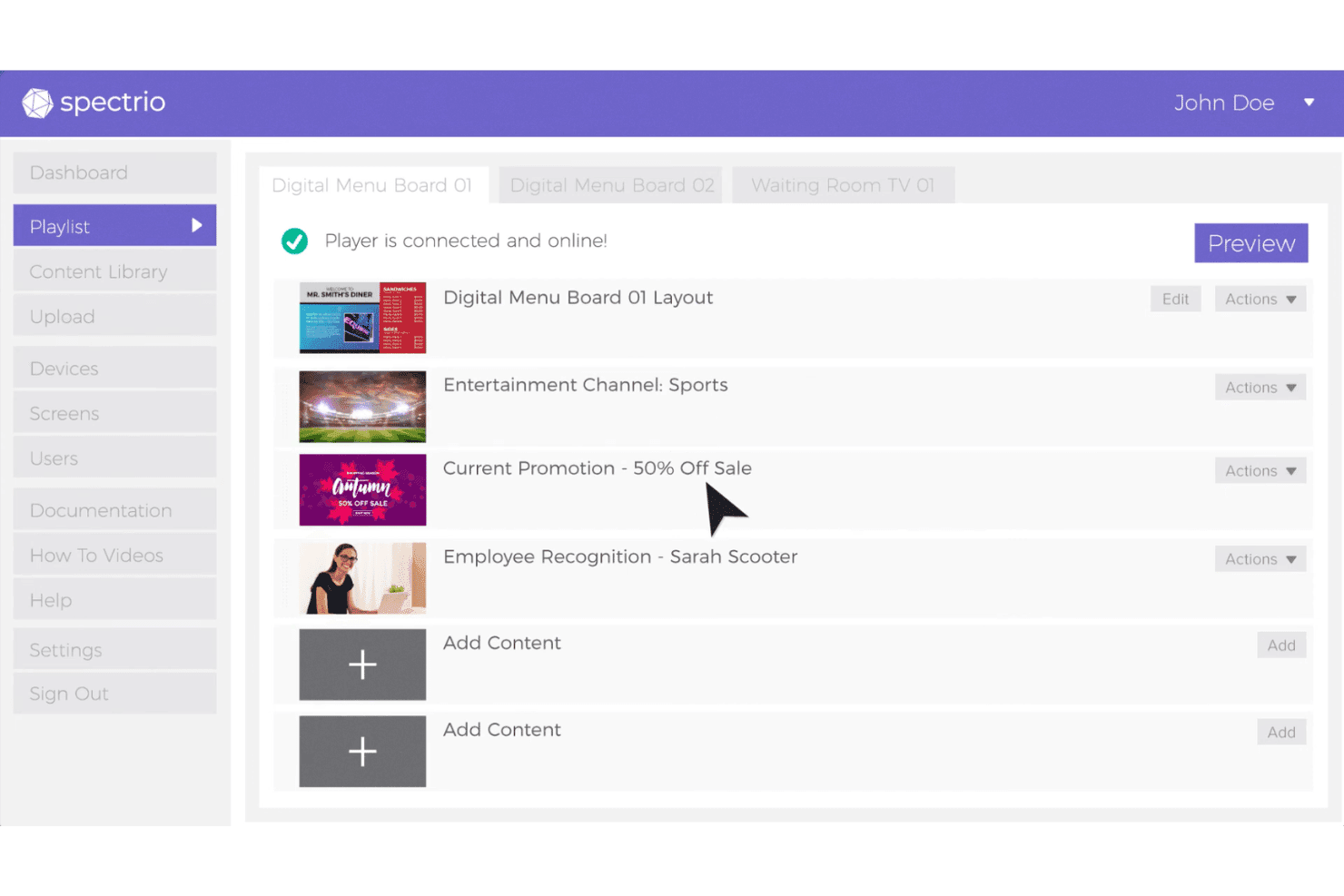
Spectrio includes a playlist management interface where users can organize digital signage content across multiple screen locations. Spectrio is a healthcare-focused digital signage platform that combines wait boards, a medical content library, wayfinding kiosks, and a cloud-based CMS for managing patient-facing displays across clinic locations.
Who Is Spectrio Best For?
Spectrio is a strong fit for hospitals, senior living communities, and multi-location healthcare practices that need turnkey, professionally managed patient-facing displays.
Why I Picked Spectrio
I picked Spectrio as one of the best because its Healthcare Content Library gives waiting room screens a constant rotation of patient education videos without requiring your team to build content from scratch. The Wait Board feature is purpose-built to reduce perceived wait times by pairing entertainment with health messaging, and every piece of content goes through a HIPAA-compliant approval workflow before it ever displays on screen.
Spectrio Key Features
- Zoned screen layouts: Configure multiple content zones to show videos, health tips, news, and branded messages on a single display.
- Interactive wayfinding kiosks: Guide visitors with touchscreen directions and downloadable facility maps for hospital navigation.
- Cloud-based content management: Control, schedule, and deploy updates to displays across multiple locations through a centralized dashboard.
- Live TV pass-thru with branding: Overlay practice branding and promotions alongside live television feeds in public areas.
Spectrio Integrations
Native integrations include Instagram, Twitter, Facebook, and support for RSS feeds and real-time data sources. An API is available for custom integrations.
Pros and Cons
Pros:
- Manages displays across 150,000+ locations centrally
- In-house creative team produces custom medical content
- Pre-built HIPAA-compliant healthcare content library
Cons:
- Hardware devices reported as occasionally defective
- No documented real-time EHR or queue integration
Learn more about Spectrio: 7Best for healthcare content management
Mvix
- Free demo available
- From $450 one-time
Visit WebsiteCustomer Rating:4.6/5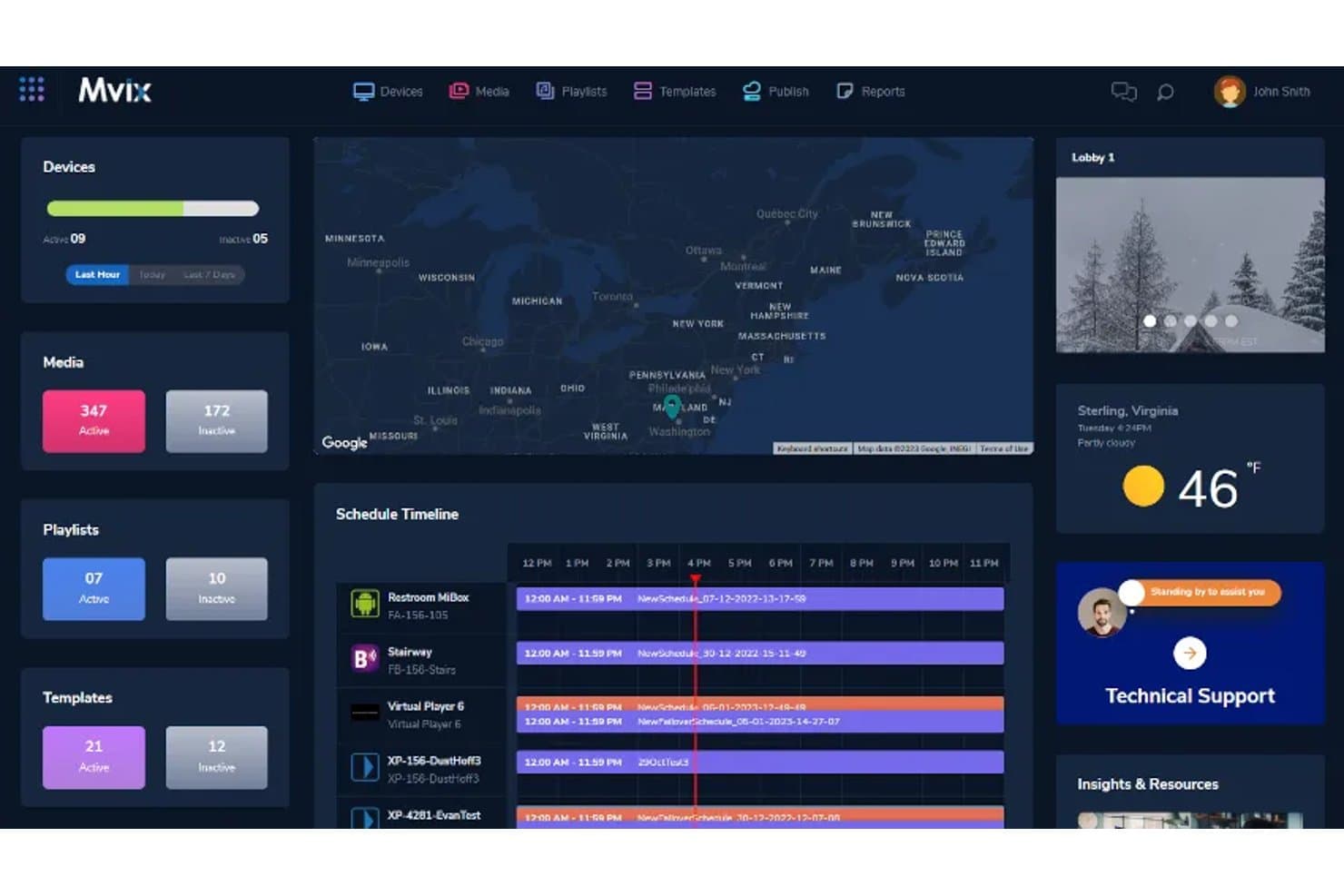
Mvix offers a centralized CMS dashboard with device management, schedule timelines, media tracking, and live weather widgets suited for multi-location healthcare facility deployments. Mvix is a cloud-based digital signage platform that combines a hardware media player with a free perpetual CMS license to manage waiting room displays, wayfinding, emergency alerts, and staff dashboards across multi-site healthcare facilities.
Who Is Mvix Best For?
Mvix suits IT administrators and operations teams managing digital signage across multi-location healthcare networks, hospitals, and outpatient clinics.
Why I Picked Mvix
I've included Mvix in my top picks because of how it handles healthcare content management at scale. The zone-based layouts (up to 10 on the Pro tier) let you run wait time displays, wellness tips, and branded messaging simultaneously on a single screen. I also like the content expiration and day-parting tools, which mean a seasonal flu campaign or visiting hours update won't linger on screens past its relevance.
Mvix Key Features
- Device health portal: Monitor device connectivity, temperature, WiFi status, and receive offline notifications from a centralized dashboard.
- Emergency/IPAWS/CAP alert integration: Trigger immediate alert messaging across displays with automated overrides for urgent or campus-wide situations.
- Role-based access controls: Assign user permissions for editing, publishing, and scheduling content across departments or clinic locations.
- Interactive touchscreen kiosk support: Deploy check-in, wayfinding, or visitor directories on touch-enabled displays.
Mvix Integrations
Mvix offers native integrations with Canva, Google Docs, Google Sheets, Google Slides, Microsoft Office 365, Microsoft Teams, Slack, Facebook, Instagram, Twitter (X), and YouTube. An API is available for custom integrations.
Pros and Cons
Pros:
- Multi-zone layouts display wait times and health content simultaneously
- CMS license included with hardware, no ongoing subscription fee
- IPAWS/CAP alert integration for instant campus-wide overrides
Cons:
- Hardware devices prone to connectivity drops and offline screens
- No documented HIPAA compliance or BAA availability
Learn more about Mvix: Best for wayfinding and digital signage
- Free demo available
- Pricing upon request
Visit WebsiteCustomer Rating:5/5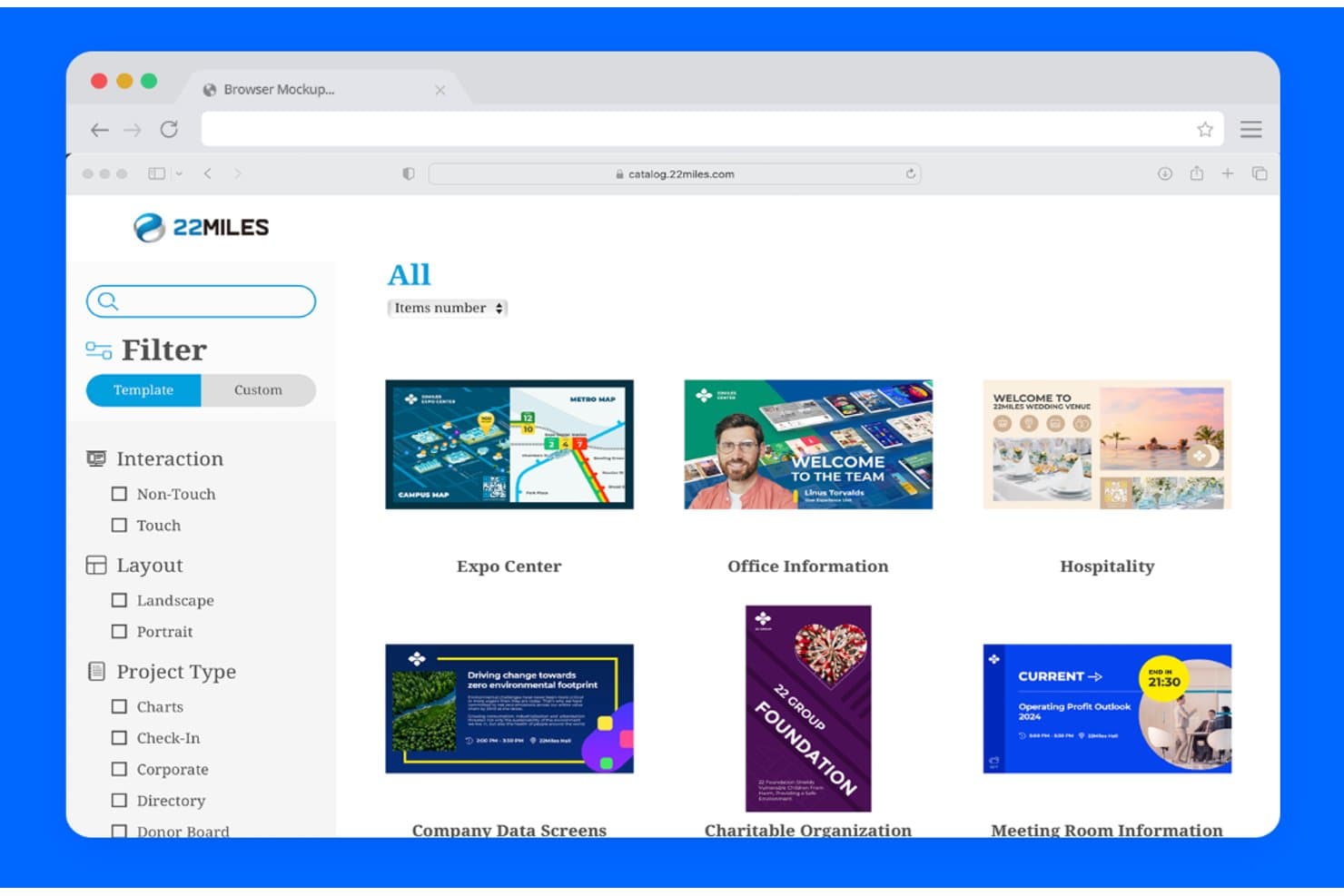
22Miles template library for digital signage, wayfinding, check-in, and information displays 22Miles is a digital signage and wayfinding platform built for healthcare environments, combining an AI-driven 3D interactive mapping engine with a cloud-based CMS for managing patient-facing content across multiple screens and locations.
Who Is 22Miles Best For?
22Miles is a strong fit for large hospital networks and multi-site health systems that need enterprise-grade signage and wayfinding across complex facilities.
Why I Picked 22Miles
22Miles earns its spot on my shortlist because no other platform combines AI-generated 3D wayfinding with a full digital signage CMS built specifically for hospital-scale deployments. I particularly like the Carry2Mobile feature, which lets patients scan a QR code to transfer their wayfinding route directly to their phone. The AI 3D Map Generation in V7.5 means my team can build accurate, interactive campus maps without needing a dedicated GIS team.
22Miles Key Features
- Unlimited multi-location management: Centrally control content and scheduling for hundreds of screens and locations from a single cloud dashboard.
- Emergency alert messaging: Instantly trigger campus-wide overrides to display emergency codes, alerts, or notifications across all signage displays.
- Drag-and-drop zone editor: Design fully customized multi-zone layouts combining dynamically updating videos, directories, and health tips on each screen.
- Healthcare content template library: Access a large collection of ready-to-use, healthcare-focused content templates and display assets for patient communication.
22Miles Integrations
Native integrations are not clearly documented. 22Miles provides an open API for custom integrations and supports MTR and Webex integrations for meeting room and collaboration solutions.
Pros and Cons
Pros:
- Instant emergency alert override across all screens
- Enterprise-grade multi-site content management built-in
- AI-generated 3D wayfinding for hospital campuses
Cons:
- Overkill for small single-location practices
- No clearly documented HIPAA compliance or BAA
Learn more about 22Miles: Best for hospital communication displays
- Free demo available
- Pricing upon request
Visit WebsiteCustomer Rating:2.7/5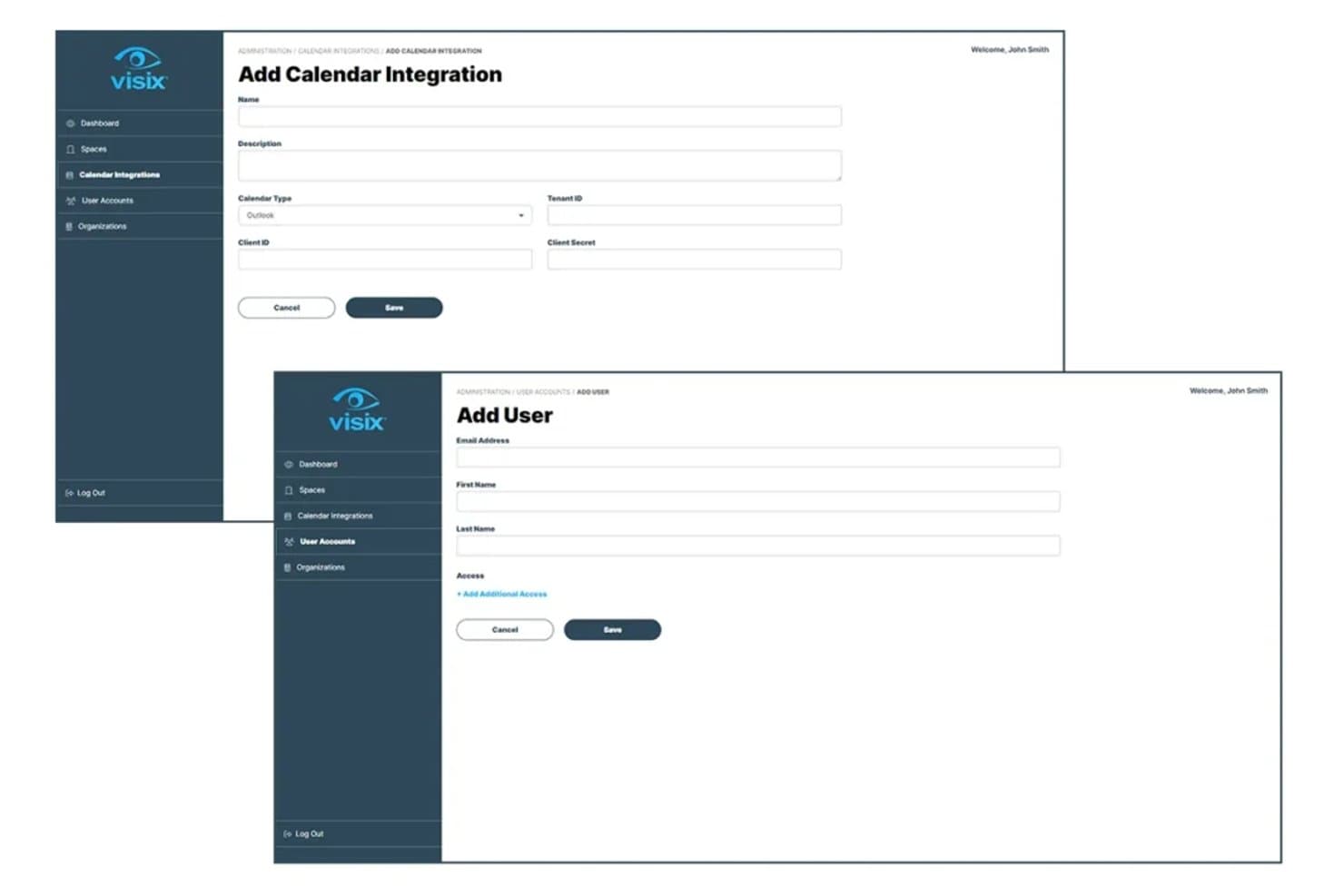
Visix dashboard for managing calendar integrations and digital signage user accounts Visix is a healthcare-focused enterprise digital signage platform with cloud and on-premise CMS options, built around wayfinding, emergency alert overrides, queue displays, and multi-site content management across hospital and clinic networks.
Who Is Visix Best For?
Visix is a strong fit for large hospital systems and multi-site health networks that need centralized control over displays across many locations and departments.
Why I Picked Visix
I picked Visix as one of the best because its Alert Management System is built on Common Alerting Protocol (CAP) standards and connects directly to platforms like Alertus and Everbridge for instant, facility-wide emergency broadcasts. I also like its interactive wayfinding for large hospital campuses, including voice user interface support for hands-free navigation. Multi-zone layouts let my team display queue data, health content, and branded messaging on a single screen simultaneously.
Visix Key Features
- Cloud or on-premise CMS options: Choose between scalable cloud management or on-premise deployment to meet organization security requirements.
- Active Directory SSO integration: Manage user authentication and permissions using existing AD environments for secure multi-user access.
- Healthcare content templates: Access fill-in-the-blank healthcare templates and messaging tools for fast updates and consistent branding.
- Room and event scheduling integrations: Sync calendars from Exchange, Office 365, Google, and EMS to automate meeting and room display updates.
Visix Integrations
Visix offers native integrations with Microsoft Exchange, Office 365, Google Calendar, EMS, Alertus, Everbridge, Rave Mobile Safety, and supports Active Directory SSO. An API is available for custom integrations.
Pros and Cons
Pros:
- Interactive wayfinding with voice and touch support
- Enterprise multi-site management with granular permissions
- Built-in CAP-based emergency alert overrides
Cons:
- Complex setup for smaller single-clinic practices
- No publicly documented HIPAA BAA or certification
Learn more about Visix:
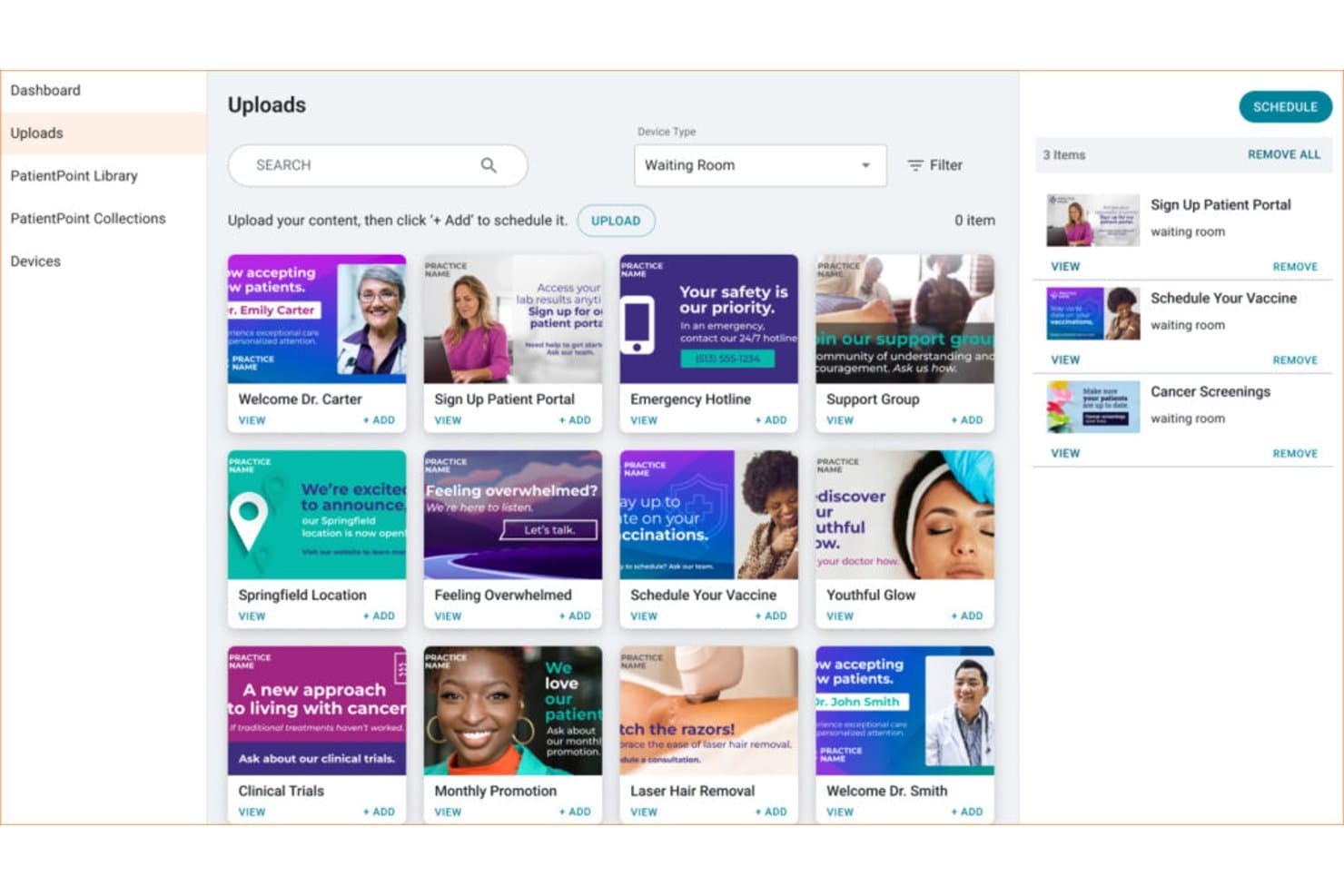
PatientPoint dashboard for uploading and scheduling healthcare content on waiting room displays PatientPoint is a managed point-of-care network that delivers specialty-specific patient education content across waiting room displays, exam room touchscreens, and staff meeting room screens in physician offices.
Who Is PatientPoint Best For?
It's a strong fit for independent physician practices and specialty clinics that want professionally managed patient education content without building or maintaining a content library in-house.
Why I Picked PatientPoint
PatientPoint earns its spot on my shortlist because the depth of its patient education content is genuinely hard to replicate with a general-purpose digital signage tool. I particularly like the exam room touchscreens, which display interactive 3D anatomicals and procedure videos tied to a patient's specific condition. The waiting room displays are also programmed with specialty-specific content across 14+ care areas, so a dermatology practice and an oncology clinic aren't showing the same generic health tips.
PatientPoint Key Features
- Waiting room displays: Deliver specialty-tailored educational programming to patients while they wait for their appointments.
- Staff meeting room screens: Share internal communications, specialty news, and practice management content with care teams.
- Pre-visit and post-visit content sharing: Push patient education or follow-up materials via email, SMS, or QR code links.
- Practice-specific customization: Update screens with unique messages, provider bios, and announcements tailored to each clinic’s needs.
PatientPoint Integrations
Native integrations are not clearly documented. PatientPoint distributes content by connecting with check-in, intake, and patient portal systems through partner networks and supports sharing via email, SMS, and QR code.
Pros and Cons
Pros:
- No content creation required from practice staff
- Medically vetted content updated regularly
- Specialty-specific content across 14+ care areas
Cons:
- No queue or wait time display features
- No self-serve content management dashboard for practices
Learn more about PatientPoint:
Sağlık Hizmetleri İçin Diğer Dijital Tabela Yazılımları
Kısa listeme giremeyen, ancak yine de göz atmaya değer bazı ek sağlık hizmetleri için dijital tabela yazılımı seçenekleri şunlardır:
- 11Mood MediaBest for patient experience content
- 12Carousel Digital SignageBest for hospital-wide communications
- 13ScreenCloudBest for multi-location screen management
- 14YodeckBest for affordable cloud signage
- 15PickcelBest for scalable clinic signage
- 16OptiSignsBest for easy healthcare displays
- 17Rise VisionBest for waiting room information
- 18AppspaceBest for internal healthcare communications
How I Evaluate Digital Signage Software for Healthcare
I evaluate healthcare digital signage tools across two layers: the baseline features every solution needs—like HIPAA compliance and queue display—and the differentiators that separate good from great.
Core Functionality (Table Stakes for This List)
When I'm selecting tools for my list, I rank each one on a scale from 0 (does not offer the functionality) to 5 (excels in this area) for each core functionality listed below. Then, I calculate the tool's total score into a percentage. Each tool needs to achieve a minimum total score of 55% to be considered for inclusion.
- HIPAA Compliance: I check whether the vendor offers a BAA and supports access controls, so patient-facing displays showing queue names or room assignments stay protected.
- Queue & Wait Time Display: Real-time queue feeds pulled from your EHR or practice management system matter here—static text that staff update manually doesn't cut it.
- Healthcare Content Library: I look for pre-built templates and licensed patient education media you can load into waiting room screens without sourcing content from scratch.
- Multi-Location Management: For health systems running dozens of clinics, I evaluate whether the dashboard supports role-based permissions and location-specific scheduling from one login.
- Emergency & Alert Messaging: The ability to push an instant override across all screens—for code alerts, severe weather, or safety lockdowns—is something I look for in every tool I evaluate.
- Zoned Screen Layouts: I check whether you can split a single display into zones that show a welcome video, health tips, and live wait times all at once with flexible layout options.
Once I have a list of tools that meet the criteria, I consider what sets each platform apart.
Differentiating Factors (What Sets Vendors Apart)
Here's how I compare and contrast different vendors:
Standout Features
EMR/HIS integrations are a big differentiator. I look for direct data pipelines from systems like Epic, Cerner, or Meditech that auto-populate OR status boards and patient queues without manual input. Interactive wayfinding kiosks also stand out—especially for large hospital campuses where patients need turn-by-turn, ADA-compliant touchscreen navigation across multiple buildings. Emergency alert overrides matter too. I evaluate whether a platform can trigger an instant campus-wide screen takeover for Code Blue or severe weather events using pre-built templates and API connections to mass notification systems.
Beyond Features
Deployment model matters a lot in healthcare. I evaluate whether a vendor offers both cloud and on-premise options, since some facilities have strict network isolation policies. Hardware compatibility is another key factor—your IT team shouldn't need to replace existing BrightSign or Samsung Tizen players just to adopt new software. I also look at total cost of ownership, including whether content libraries come bundled or carry add-on fees, and whether per-screen licensing scales reasonably as you grow across locations.
Sağlık Hizmetleri İçin Dijital Tabela Yazılımı Nasıl Seçilir
Uzun özellik listeleri ve karmaşık fiyatlandırma yapılarına takılıp kalmak kolaydır. Kendinize özgü yazılım seçimi sürecinizi yürütürken odağınızı korumanıza yardımcı olmak için aşağıda aklınızda bulundurmanız gereken etkenlerin bir kontrol listesini bulabilirsiniz:
| Kriter | Dikkate alınması gerekenler |
| Ölçeklenebilirlik | İhtiyaçlar değiştikçe yazılımınız tesisinizle birlikte departmanlar, klinikler veya yeni konumlar genelinde büyüyebilecek mi? |
| Entegrasyonlar | Mevcut EHR, PM veya tesis sistemlerinize bağlanabiliyor mu, yoksa verileri eşitlemek daha fazla manuel iş mi yaratacak? |
| Özelleştirilebilirlik | Farklı departmanları ve bakım ortamlarını desteklemek için düzenleri, iş akışlarını veya izin düzeylerini uyarlayabiliyor musunuz? |
| Kullanım kolaylığı | Teknik olmayan personel ve yöneticiler ekranları güncelleyebilecek, içerikleri değiştirebilecek veya uyarıları hızlı bir şekilde etkinleştirebilecek mi? |
| Uygulama ve başlangıç süreci | Satıcı hangi başlangıç kaynaklarını ve eğitimleri sunuyor? Birden fazla konuma dağıtım veya özgün sağlık hizmetleri senaryoları için rehberlik sağlıyor mu? |
| Maliyet | Fiyatlandırma yapısı kullanım senaryonuza (ekran başına, kullanıcı başına veya paket içerik şeklinde) uyuyor mu? Gerekli tüm özellikler dahil mi, yoksa ek ücretlerle mi karşılaşacaksınız? |
| Güvenlik önlemleri | Erişim denetimleri, denetim kayıtları ve satıcı sözleşmeleri (BAA gibi) önceden açıkça belirtilmiş ve uyumluluk süreçlerinizle uyumlu mu? |
| Destek erişilebilirliği | Özellikle ekranlarınız karardığında veya klinik saatleri sırasında acil güncellemeler gerektiğinde desteğe ne kadar hızlı ulaşabilirsiniz? |
Sağlık Hizmetleri İçin Dijital Tabela Yazılımları Nedir?
Sağlık hizmetleri için dijital tabela yazılımı, kliniklerin, hastanelerin ve muayenehanelerin tesislerindeki ekranlarda mesajları, programları, bekleme sürelerini ve eğitici içerikleri yönetip görüntülemesine olanak tanıyan bir platformdur. Bu araçlar, iletişimi merkezileştirmenize, HIPAA uyumlu mesajlaşmayı desteklemenize ve içerikleri bekleme odaları, personel alanları veya tüm kampüsler için tek bir kontrol panelinden uyarlamanıza yardımcı olur.
Özellikler
Sağlık hizmetleri için dijital tabela yazılımı seçerken aşağıdaki temel özelliklere dikkat edin:
- HIPAA uyumlu mesajlaşma: Gizliliği ve mevzuata uyumu sağlarken kuyruklar veya oda atamaları gibi hasta bilgilerini güvenli bir şekilde görüntüleyin.
- EHR entegrasyonu: Hasta durumu, randevular veya işlemler hakkında gerçek zamanlı güncellemeler sunmak için elektronik sağlık kayıtlarınıza doğrudan bağlanın.
- Sağlık hizmetleri içerik kitaplığı: Hasta eğitimi ve sağlıklı yaşam mesajlarına uyarlanmış, önceden hazırlanmış şablon, video ve grafiklerden oluşan bir kitaplığa erişin.
- Birden çok konum yönetimi: Tek bir bulut panosundan birden fazla klinik veya departmandaki ekranların içeriklerini yönetin ve zamanlayın.
- Acil durum uyarısı geçersiz kılma: Normal ekran içeriğinin yerini alacak acil mesajları, güvenlik uyarılarını veya kod bildirimlerini anında yayınlayın.
- Bölümlendirilmiş ekran düzenleri: Sağlık ipuçları, bekleme süreleri ve markalı medya gibi farklı içerik türlerini eş zamanlı görüntülemek için ekranları birden fazla bölgeye ayırın.
- Role dayalı erişim denetimleri: Farklı kullanıcılara izinler atayarak yalnızca yetkili personelin belirli ekranlardaki içeriği güncelleyebilmesini veya yönetebilmesini sağlayın.
- Uzaktan cihaz izleme: Ekran durumunu takip edin ve sorunları her yerden giderin; böylece BT ekibinizin ekranları çalışır durumda tutmasına yardımcı olun.
- İçerik zamanlama: Belirli mesajların, kampanyaların veya sezonluk materyallerin farklı ekranlarda ne zaman görüntüleneceğini planlayın ve otomatikleştirin.
- Yön bulma desteği: Ekran haritaları ve dizinler aracılığıyla sunulan etkileşimli veya sabit yönlendirmelerle hastaların büyük tesislerde yollarını bulmalarına yardımcı olun.
Faydalar
Sağlık hizmetleri için dijital tabela yazılımını uygulamak, ekibiniz ve işletmeniz için çeşitli faydalar sağlar. Yararlanabileceğiniz birkaç faydayı aşağıda bulabilirsiniz:
- Geliştirilmiş hasta iletişimi: Hastaların ziyaretleri boyunca bilgilendirilmelerini sağlamak için bekleme sürelerini, randevu güncellemelerini ve eğitici bilgileri gerçek zamanlı olarak paylaşın.
- Geliştirilmiş operasyonel verimlilik: Personelinizin manuel iş yükünü azaltmak için birden fazla konumdaki içerik güncellemelerini, ekran yönetimini ve acil durum uyarılarını merkezileştirin.
- Artırılmış mevzuat uyumu: Sağlık hizmetleri ortamlarına uyarlanmış HIPAA uyumlu mesajlaşma ve erişim denetimlerinden yararlanarak hasta bilgilerini koruyun.
- Esnek içerik sunumu: Çok bölgeli düzenler ve içerik zamanlama araçlarıyla mesajları departmana, kitleye veya tesisin ihtiyaçlarına göre kolayca özelleştirin.
- Kolaylaştırılmış yön bulma: Entegre dijital haritalar ve yönlendirme ekranlarıyla hastaların ve ziyaretçilerin büyük veya karmaşık tesislerde yollarını bulmalarına yardımcı olun.
- Artırılmış hasta etkileşimi: Daha ilgi çekici bir deneyim sunan sağlıklı yaşam içeriklerini, haberleri veya sağlık ipuçlarını paylaşmak için sağlık hizmetlerine özel bir içerik kitaplığı ve etkileşimli ekranlar kullanın.
- Hızlı acil durum müdahalesi: Kritik durumlarda net iletişim sağlamak için normal içeriği acil uyarılarla veya güvenlik mesajlarıyla anında değiştirin.
Maliyetler ve Fiyatlandırma
Sağlık hizmetleri için dijital tabela yazılımı seçerken mevcut çeşitli fiyatlandırma modellerini ve planları anlamak gerekir. Maliyetler özelliklere, ekip büyüklüğüne, eklentilere ve diğer unsurlara göre değişir. Aşağıdaki tablo, sağlık hizmetleri çözümlerine yönelik dijital tabela yazılımlarında yaygın planları, ortalama fiyatlarını ve genellikle sunulan özellikleri özetlemektedir:
Sağlık Hizmetleri İçin Dijital Tabela Yazılımı Plan Karşılaştırma Tablosu
| Plan Türü | Ortalama Fiyat | Yaygın Özellikler |
| Ücretsiz Plan | $0 | Sınırlı ekran sayısı, temel içerik kitaplığı, manuel güncellemeler ve topluluk desteği. |
| Kişisel Plan | $10-$30/ay | Tek konum desteği, içerik zamanlama, temel şablonlar ve e-posta desteği. |
| İşletme Planı | $40-$100/ay | Birden çok konum yönetimi, EHR entegrasyonları, acil durum uyarıları, sağlık hizmetleri şablonları ve uzaktan cihaz izleme. |
| Kurumsal Plan | $150+/ay | Özel entegrasyonlar, şirket içi veya bulut dağıtımı, gelişmiş güvenlik, özel başlangıç desteği ve 7/24 destek. |
Sağlık Hizmetleri İçin Dijital Tabela Yazılımı Hakkında SSS
Sağlık hizmetleri için dijital tabela yazılımı hakkında sık sorulan bazı soruların yanıtlarını burada bulabilirsiniz:
Dijital tabela yazılımı hasta bilgilerinin güvenliğini nasıl sağlar?
Sağlık hizmetleri için dijital tabela yazılımı, HIPAA uyumlu mesajlaşma, erişim kontrolleri ve denetim günlükleri kullanarak hasta bilgilerinin kamuya açık ekranlarda veya ortak kullanılan ekranlarda yetkisiz şekilde ifşa edilmesini önler.
Mevcut ekranlarımı ve donanımımı yeni yazılımla kullanabilir miyim?
Evet, çoğu dijital tabela platformu Windows bilgisayarları, BrightSign oynatıcıları ve akıllı TV’ler dahil olmak üzere çok çeşitli ekran donanımını destekler; bu nedenle çoğu zaman hâlihazırda sahip olduğunuz ekranları kullanabilirsiniz.
Sağlık hizmetleri ortamında ne tür içerikler gösterebiliriz?
Bekleme sürelerini, klinik duyurularını, sağlık eğitimi videolarını, tesis haritalarını, acil durum uyarılarını ve hatta farklı hasta kitlelerine göre uyarlanmış çok dilli veya departmana özel içerikleri gösterebilirsiniz.
Birden fazla konumdaki ekranları yönetmek zor mu?
Hayır, çoğu sağlayıcı içerik yönetimi, kullanıcı izinleri ve izleme için merkezi panolar sunar; bu da birçok klinik veya departmandaki ekranları aynı anda güncellemeyi ve izlemeyi pratik hâle getirir.
Acil durum uyarıları ne kadar hızlı görüntülenebilir?
Acil durum uyarılarını normal içeriğin yerini alacak şekilde anında tetikleyebilirsiniz—çoğu zaman yalnızca birkaç tıklamayla—böylece herkes mesajı hemen görür. Birçok sistem, harici güvenlik platformlarından gelen otomatik uyarıları destekler.