

Software-ul pentru chiropractică este o platformă digitală care gestionează fișele pacienților, facturarea, programările și fluxurile de lucru pentru îngrijire în clinicile de chiropractică. Dacă sunteți în căutarea celui mai bun software pentru chiropractică, probabil doriți să reduceți documentele, să automatizați sarcinile administrative zilnice și să le ușurați munca membrilor echipei dumneavoastră.
Găsirea opțiunii potrivite este importantă, deoarece alegerea greșită poate crea obstacole, poate duce la erori de documentare sau poate încetini facturarea. În acest ghid, vă voi prezenta cele mai bune soluții software pentru chiropractică în 2026, astfel încât să puteți compara rapid funcțiile, să evaluați opțiunile și să luați decizia potrivită pentru cabinetul dumneavoastră.
Why Trust Our Software Recommendations
6,700+
Reviews
20
Industry experts
16+
Evaluation factors
14
Years
Our team has been testing and reviewing software since 2012. As medical practice leaders ourselves, we know how difficult—and important—it is to choose the right software.
For this guide, we evaluated tools using hands-on testing and independent research, scoring tools using our selection criteria.
Our reviews reflect our human editorial judgment, not a sales pitch.
Tabel comparativ al soluțiilor software pentru chiropractică
Acest tabel comparativ sintetizează detaliile despre prețuri pentru selecția mea de soluții software pentru chiropractică:
Score legend (out of 5)
- Excellent4.5–5
- Good4–4.4
- Average3–3.9
- Below average2–2.9
- Poor1–1.9
Sorted by: Default
| Tool | Starting Price | Website | |||||||
|---|---|---|---|---|---|---|---|---|---|
Best for patient self-service appointment booking | 4.2 out of 5 | 5 | 4 | 4 | 4 | 5 | 3 | $59/month Free demo available | Website |
Best for voice-enabled charting | 3.8 out of 5 | 5 | 3 | 4 | 4 | 4 | 3 | $28.05/month 14-day free trial | Website |
Best for integrated patient mobile app | 3.8 out of 5 | 5 | 3 | 4 | 3 | 4 | 4 | $299/month Free demo available | Website |
Best for AI-assisted charting | 4.0 out of 5 | 4 | 3 | 4 | 5 | 4 | 4 | $119/month Free demo available | Website |
Best for in-depth care plan tracking | 4.5 out of 5 | 5 | 5 | 4 | 4 | 5 | 4 | $2/visit Free demo available | Website |
Best for Mac environment compatibility | 4.0 out of 5 | 4 | 3 | 5 | 4 | 4 | 4 | Pricing upon request Free demo available | Website |
Best for integrated compliance management | 4.3 out of 5 | 5 | 5 | 4 | 5 | 3 | 4 | $349/month Free demo available | Website |
Best for real-time clearinghouse claim management | 4.0 out of 5 | 5 | 3 | 4 | 5 | 3 | 4 | $129/month Free demo available | Website |
Best for multi-location management | 4.2 out of 5 | 4 | 3 | 4 | 5 | 5 | 4 | $2/visit Free demo available | Website |
Best for tracking campaigns to booked visits | 4.5 out of 5 | 5 | 4 | 4 | 5 | 5 | 4 | $299/month Free demo available | Website |


Recenzii ale celor mai bune soluții software pentru chiropractică
Mai jos sunt prezentate rezumatele mele detaliate ale celor mai bune soluții software pentru chiropractică incluse în lista mea scurtă. Recenziile mele oferă o perspectivă detaliată asupra funcțiilor, celor mai potrivite cazuri de utilizare și prețurilor fiecărei soluții software, pentru a vă ajuta să o găsiți pe cea mai potrivită pentru dumneavoastră.
 1Best for patient self-service appointment booking
Jane
- Free demo available
- From $59/month
Visit WebsiteCustomer Rating:4.8/5
Jane makes chiropractic charting easier with organized notes, spine mapping, and patient record tools. Jane is a cloud-based clinic management platform for chiropractic practices that covers online booking, scheduling, clinical documentation, billing, and patient communications in a single system.
Who Is Jane Best For?
Jane is a strong fit for independent and small group chiropractic clinics that want patients to handle their own booking without staff involvement.
Why I Picked Jane
I've included Jane in my top picks because its patient self-booking experience is one of the most complete I've seen in chiropractic software. Patients get a 24/7 booking portal where they can schedule, reschedule, cancel, and even complete intake and consent forms before they arrive. I also like that you can control exactly which treatments, practitioners, and time slots are bookable online, so the system works within your clinical workflow rather than around it. The built-in waitlist feature automatically notifies patients when a slot opens up, which keeps your schedule full without any manual follow-up.
Jane Key Features
- Customizable charting templates: Build and reuse SOAP note templates tailored to chiropractic assessments and treatment documentation.
- Integrated online payments: Patients can pay invoices directly through Jane, and you can store cards on file for faster checkout.
- Built-in telehealth: Run secure video appointments from within Jane without needing a third-party video tool.
- Class and group scheduling: Set up and manage recurring group appointments or wellness classes alongside individual patient bookings.
Jane Integrations
Jane offers a smaller set of native integrations compared to some chiropractic-specific platforms, including Claim.MD for insurance claims and eligibility checks, Fullscript for supplement dispensing and lab ordering, Mailchimp, Cyberimpact, TrustDrivenCare, Physitrack, Wibbi, Google Analytics, and Documo for outbound faxing. Jane does not have an open API, and Zapier support is not documented.
Pros and Cons
Pros:
- Patients manage their own appointments directly
- Shared community template library with thousands of forms
- Automated reminders and confirmations reduce no-shows
Cons:
- No direct connection to accounting software
- Chiropractic-specific chart templates are hard to customize
Learn more about Jane: Best for voice-enabled charting
- 14-day free trial
- From $28.05/month (billed annually)
Visit WebsiteCustomer Rating:4.8/5
Noterro makes it easy to manage intake forms and track patient completion status. Noterro is a chiropractic practice management platform that combines clinical charting, online booking, billing, and patient intake into a single web-based system built specifically for solo practitioners and small multi-disciplinary clinics.
Who Is Noterro Best For?
Noterro is a natural fit for solo chiropractors and small clinic owners who want an all-in-one system without the overhead of enterprise-level software.
Why I Picked Noterro
Noterro earns its spot as one of the best on my shortlist because of how well it handles clinical documentation without slowing you down. Noterro Scribe, its built-in voice-to-chart tool, listens during patient sessions and generates a preliminary clinical note automatically, filtering out small talk. I also like the Snippets feature, where you type a forward slash to instantly insert pre-saved phrases, treatment plans, or assessment language directly into your SOAP notes.
Noterro Key Features
- Online booking portal: Patients can self-schedule appointments directly through a booking link you embed on your clinic website, without calling your office.
- Snapshots: A running health summary per patient that tracks conditions, injuries, medications, and surgeries, visible directly within your charting workflow.
- Insurance billing: Submit and track claims through TELUS eClaims (Canada) or Availity (US), with bulk editing tools to update or submit multiple claims at once.
- Custom intake forms: Build forms from scratch or use templates, with an AI-generated summary that converts completed forms into audio or bullet-point notes before appointments.
Noterro Integrations
Noterro offers a smaller set of native integrations, including Mailchimp, TELUS eClaims, Google Calendar, Google Translate, Square, Shift4, and Availity. It also supports data exports to QuickBooks and Xero for accounting. Zapier and API support are not clearly documented.
Pros and Cons
Pros:
- Clinic-branded patient booking app included
- Supports multi-location clinic management
- Voice-to-chart speeds up SOAP documentation
Cons:
- Automated forms sometimes land in patient spam folders
- Billing tools can feel incomplete for insurance-heavy practices
Learn more about Noterro: Best for integrated patient mobile app
- Free demo available
- $299/month
Visit WebsiteCustomer Rating:4.8/5
ChiroHD gives practices a clear view of appointment data and performance metrics in one dashboard. ChiroHD is a cloud-based EHR and practice management platform built exclusively for chiropractors, covering scheduling, SOAP note charting, patient engagement, and a dedicated patient mobile app.
Who Is ChiroHD Best For?
ChiroHD is a good fit for chiropractic practices of any size, from solo providers to multi-location franchises, that want a patient-facing mobile app built directly into their practice management workflow.
Why I Picked ChiroHD
I've included ChiroHD in my top picks because its patient mobile app is genuinely built into the platform, not bolted on as an afterthought. Patients can self-schedule, complete mobile check-in, view their x-rays and documents, and even check in multiple family members at once, all from the app. I like that this directly reduces front-desk phone volume. The app is available on both iOS and Android, and it works as a real extension of the EHR rather than a separate patient portal.
ChiroHD Key Features
- Smart SOAP note macros: Build custom rapid-entry SOAP note buttons, with macro chaining and auto-complete to speed up note creation.
- Two-way automated texting: Send automated appointment reminders and let patients reply directly, with staff alerts appearing inside ChiroHD.
- Custom system triggers: Set event-based triggers tied to visit counts or care plan milestones to automate patient and staff notifications.
- Chief complaint tracking: Record, categorize, and report on patient chief complaint history across the full course of care.
ChiroHD Integrations
ChiroHD offers a small set of integrations, including Fortis for payment processing, Cash Practice Systems for care plan billing, Twilio for SMS messaging, SKED for patient scheduling and automation, and Birdeye for reputation management. It connects with Zapier for additional workflows.
Pros and Cons
Pros:
- Responsive team implements user-requested features
- Billing, texting, and email in one platform
- SOAP note macros cut daily documentation time
Cons:
- Notes don't autosave while actively editing
- Financial reports don't always match external records
Learn more about ChiroHD:

zHealth gives clinics a clear view of revenue, overdue balances, and insurance receivables. zHealth is a cloud-based practice management and EHR platform built specifically for chiropractors, covering SOAP note charting, appointment scheduling, insurance billing, and patient engagement tools.
Who Is zHealth Best For?
zHealth is a good fit for independent chiropractors and small chiropractic practices that need a single platform to handle clinical documentation, billing, and patient communication.
Why I Picked zHealth
I picked zHealth as one of the best because its AI Scribe tool is built natively into the EHR, which sets it apart from competitors that rely on third-party scribing integrations. During a visit, AI Scribe listens to the patient encounter, then generates a full SOAP note automatically using a large language model trained on actual chiropractic terminology, including subluxation patterns, adjustment techniques, and range of motion findings. Providers review, edit if needed, and sign before the note is finalized, so clinical control stays with the doctor throughout.
zHealth Key Features
- Online scheduling: Patients book appointments online and your calendar updates in real time.
- Digital patient intake: Patients complete intake forms remotely before their visit, removing clipboard-based paperwork from the front desk.
- Electronic claims submission: Submit insurance claims electronically in three clicks directly from the platform.
- Two-way text messaging: Send and receive SMS messages with patients for appointment reminders, follow-ups, and general communication.
zHealth Integrations
zHealth offers a small set of native integrations, including Google Calendar and clearinghouse connectivity for electronic claims. The Professional plan also includes an email marketing integration. I don't think zHealth offers an open API or Zapier support based on its current documentation.
Pros and Cons
Pros:
- Supports running a practice without front desk staff
- Intake forms support multiple languages
- SOAP notes support typing, clicking, or dictation
Cons:
- Less suited to large multi-provider clinics
- SOAP note template edits require vendor assistance
Learn more about zHealth: Best for in-depth care plan tracking
- Free demo available
- From $2/visit
Visit WebsiteCustomer Rating:4.6/5
Genesis by ClinicMind makes it easier to manage patient appointments and provider schedules. Genesis by ClinicMind is a chiropractic EHR platform that connects clinical documentation, care plan management, scheduling, and integrated billing in a single system built specifically for chiropractic practices.
Who Is Genesis by ClinicMind Best For?
Genesis by ClinicMind is a strong fit for chiropractic clinic owners and office managers who need detailed visibility into patient care plan progress alongside their billing and scheduling workflows.
Why I Picked Genesis by ClinicMind
I picked Genesis by ClinicMind as one of the best because its care plan tracking goes deeper than most chiropractic platforms I've seen. Each plan logs insurance, cash, and free visit counts separately, consuming them in order and triggering check-in alerts when a patient hits a defined threshold. I also like that the built-in care plan ledger lets you forecast upcoming visits and expected insurance collections, so you're never caught off guard when a patient's plan is winding down.
Genesis by ClinicMind Key Features
- AI Scribe: Ambient transcription captures visit audio and converts it into structured SOAP notes automatically.
- Online self-scheduling: Patients book appointments in real time using live provider availability, with intake forms completed before arrival.
- CredEdge credentialing: A built-in credentialing portal tracks payer enrollment, manages provider documents, and connects to billing so claims can go out as soon as a provider's enrollment is approved.
- PART and AT-modifier prompts: The documentation workflow prompts providers to address PART criteria and the AT modifier before signing a note.
Genesis by ClinicMind Integrations
Native integrations include CredEdge, ClinicMindPay, MyClinicMind Portal, and PatientHub. API availability for custom integrations isn’t documented.
Pros and Cons
Pros:
- Connects care plans with billing workflows
- Prompts PART and AT-modifier documentation
- Tracks insurance, cash, and free visits
Cons:
- Some users report crowded billing screens
- Care-plan alerts trigger at check-in
Learn more about Genesis by ClinicMind: Best for Mac environment compatibility
- Free demo available
- Pricing upon request
Visit WebsiteCustomer Rating:3.7/5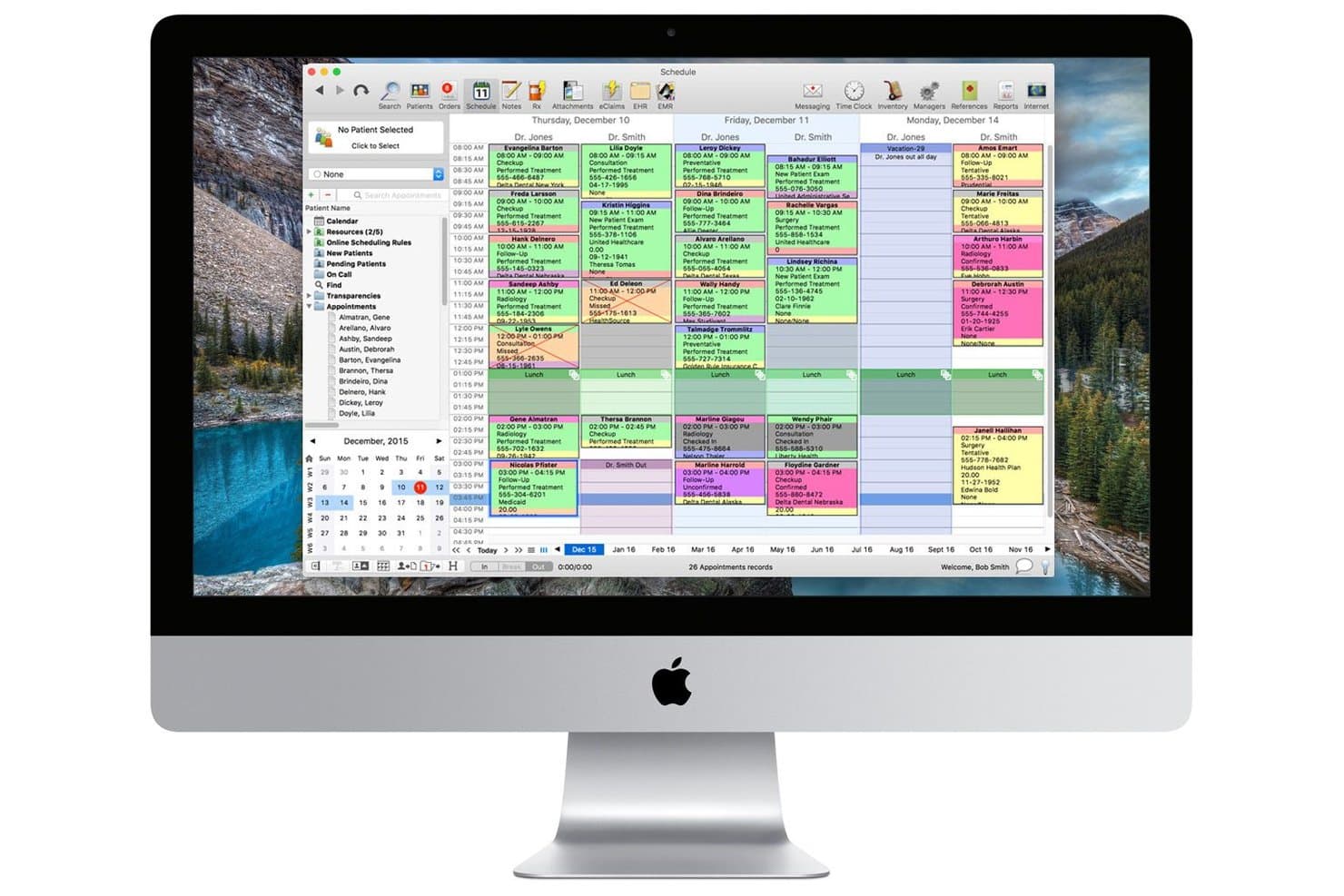
MacPractice DC displays multi-provider daily schedules across a week. MacPractice DC is a Mac-native chiropractic practice management and clinical software that covers scheduling, EHR/EMR documentation, billing, eClaims, and patient records.
Who Is MacPractice DC Best For?
MacPractice DC is a strong fit for chiropractic clinics that run entirely on Apple hardware and want practice management, EHR, and billing in one Mac-native system.
Why I Picked MacPractice DC
MacPractice DC earns its spot on my shortlist because it's built exclusively for Apple hardware, making it a natural fit for clinics that run on Mac. I love that the software supports Apple Silicon M1 and M2 processors natively, so there's no performance compromise on modern Mac setups. The EHR works across Mac desktops and iPads via the companion iEHR app, letting providers switch between devices mid-visit without breaking their charting workflow.
MacPractice DC Key Features
- Drag-and-drop scheduling: The Schedule Ability lets staff book, move, and manage appointments using drag-and-drop, with multicolor appointment types and automated text, email, and voice reminders.
- eClaims submission and ERA receipt: Staff can submit insurance claims electronically to a clearinghouse and receive electronic remittance advice directly within the system.
- Patient portal: Patients can view visit summaries, lab results, and upcoming appointments, complete registration forms online, and send secure messages to the practice.
- Over 100 built-in reports: MacPractice Reports includes more than 100 interactive reports with saved filters and an Auto Reports Manager for running multiple reports at once.
MacPractice DC Integrations
MacPractice DC documents connections with QuickBooks for accounting exports, NewCrop for electronic prescribing, and Updox for internet-based fax and document management. API availability and an integration count aren’t stated.
Pros and Cons
Pros:
- Scheduling, claims, and records share one system
- Chiropractic templates support detailed visit documentation
- Mac-native workflow across desktop and iPad
Cons:
- Note-to-billing corrections can delay claims
- Users report slowdowns during busy periods
Learn more about MacPractice DC:
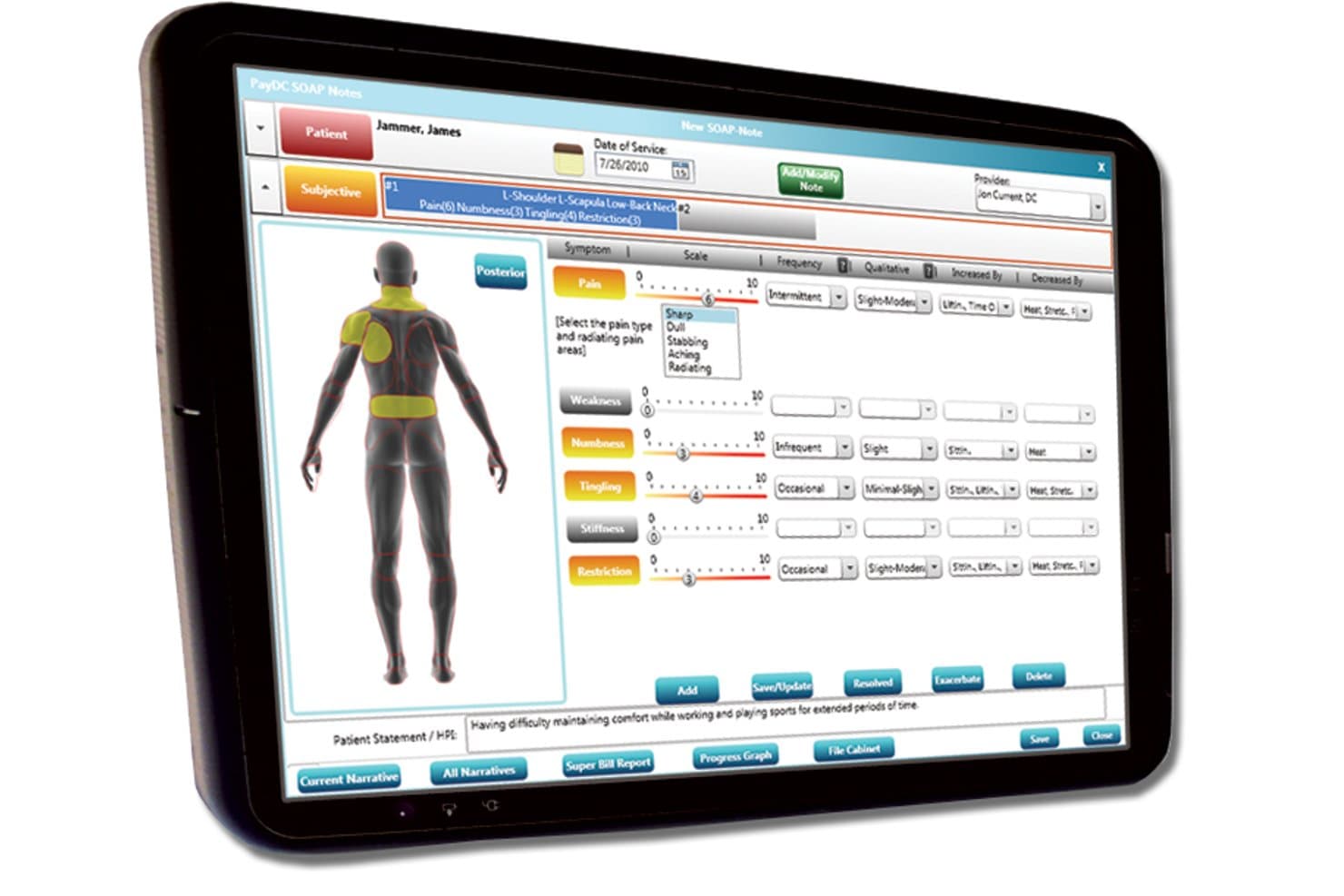
PayDC lets users document patient symptoms visually on a body diagram. PayDC is a chiropractic-specific EHR and practice management platform that bundles SOAP note documentation, billing and claims, patient scheduling, care plans, and a patient portal into a single system.
Who Is PayDC Best For?
PayDC is a strong fit for chiropractic clinic owners and administrators who want documentation, billing, and compliance workflows managed in one purpose-built system.
Why I Picked PayDC
I've included PayDC in my top picks because its compliance architecture is built directly into the clinical workflow, not bolted on after the fact. I particularly like how its SOAP note system generates audit-ready documentation and flags coding issues before a claim is ever submitted. Its Care Plan Wizard ties visit frequency and financial estimates to federal guidelines, so if an audit happens, the documentation trail is already there.
PayDC Key Features
- Multi-provider appointment calendar: Color-coded scheduling supports multiple providers and locations, with one-click patient check-in and a live waiting-room view.
- Integrated e-file cabinet: Stores patient documents, X-rays, insurance cards, and scanned files directly within patient accounts for quick access.
- Patient portal: Lets patients complete intake forms, view upcoming appointments, review visit history, and make online payments from any device.
- Integrated credit card processing: Accepts card swipes, phone payments, cards on file, and contactless payments, with transactions posted directly to patient accounts.
PayDC Integrations
PayDC has documented native integrations with OpenEdge, Ingenico, Apple Pay, and Android Pay for payment processing, card readers, and contactless transactions. Its API availability and broader integration count aren’t stated.
Pros and Cons
Pros:
- Recent reviewers praise responsive onboarding support
- Connected notes and billing reduce duplicate entry
- Detailed chiropractic notes support audit preparation
Cons:
- Limited Mac, iPad, and phone compatibility
- Front-desk workflows can require many clicks
Learn more about PayDC: Best for real-time clearinghouse claim management
- Free demo available
- $129/month

ChiroFusion makes clinical documentation easier with organized exam, assessment, and treatment entry tools. ChiroFusion is a cloud-based EHR and practice management platform built for chiropractors, covering scheduling, SOAP note documentation, billing, claims management, and an integrated clearinghouse.
Who Is ChiroFusion Best For?
ChiroFusion is a strong fit for solo and small chiropractic practices that want built-in clearinghouse access without managing a separate billing service.
Why I Picked ChiroFusion
I've included ChiroFusion in my top picks because it's the only chiropractic EHR with a fully integrated clearinghouse built in. In practice, that means I can submit electronic claims and receive ERA auto-posting without toggling between a billing platform and a separate clearinghouse portal. I also like that claims are auto-generated directly from SOAP notes, which cuts the manual entry that usually creates submission errors. The result is a tighter claims workflow with fewer rejections.
ChiroFusion Key Features
- Online patient scheduling: Patients can book appointments 24/7 through an online portal, with custom appointment types and no-show tracking built in.
- Digital outcomes assessments: Score and store a variety of standardized outcomes assessments directly inside patient records to validate care.
- Online intake forms with self check-in: Patients complete intake paperwork online before arriving and check themselves in at the front desk.
- Practice dashboard: View real-time key performance indicators, financial metrics, care plan tracking, and a to-do list from a single screen.
ChiroFusion Integrations
ChiroFusion offers a small set of native integrations, including Office Ally for clearinghouse claims processing, OpenEdge for integrated payment processing, and Physitrack for exercise prescriptions and outcomes tracking. API and Zapier support are not clearly documented.
Pros and Cons
Pros:
- Text and email appointment reminders included
- Integrated clearinghouse built into the platform
- SOAP notes autofill after initial follow-up
Cons:
- Billing module navigation feels redundant at times
- Charting templates lack flexibility for detail
Learn more about ChiroFusion:
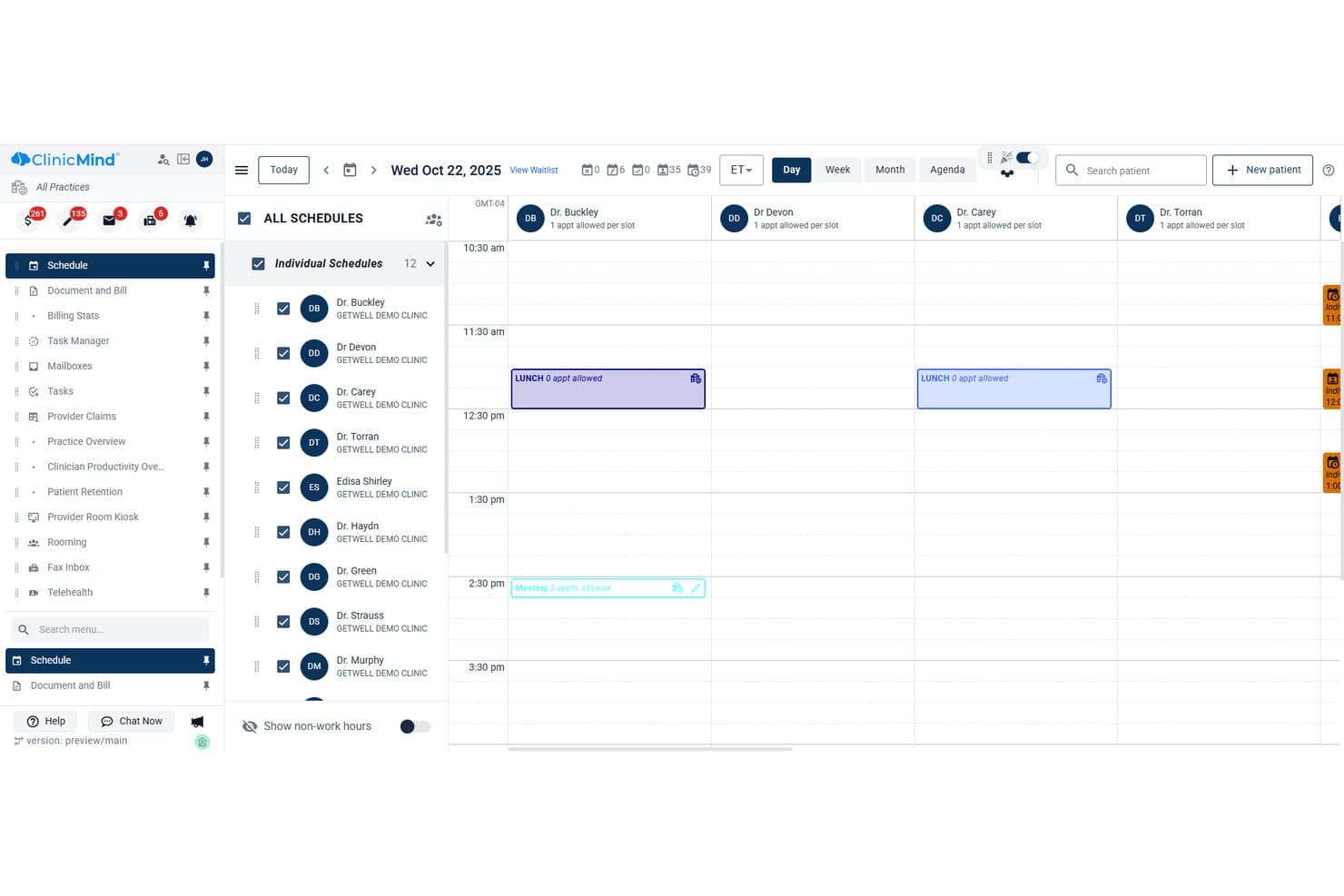
ClinicMind displays multi-provider daily schedules with lunch blocks and meetings. ClinicMind is a cloud-based chiropractic EHR and practice management platform that covers clinical documentation, scheduling, billing, patient engagement, and revenue cycle management in a single system.
Who Is ClinicMind Best For?
ClinicMind is a strong fit for chiropractic practice owners and administrators managing multiple clinic locations who need centralized billing, reporting, and documentation across sites.
Why I Picked ClinicMind
I've included ClinicMind in my top picks because it's built to handle the operational complexity that comes with running multiple chiropractic locations from one platform. I especially like that you can roll up and drill down on collections, denials, A/R, and provider productivity by site in real time. Each location keeps its own patient data, fee schedules, and permissions, while still inheriting shared payer rules and denial patterns across the network.
ClinicMind Key Features
- Chiropractic SOAP macros: Pre-built macros with PART criteria prompts and AT-modifier flags let you complete chiropractic-specific notes at the point of care.
- AI Scribe: Ambient transcription captures your clinical encounter and drafts a structured SOAP note—including HPI, exam, assessment, and plan—for your review.
- Automated appointment reminders: The platform sends SMS and email confirmations and reminders, and routes cancellations to a waitlist to fill open slots.
- PatientHub reactivation campaigns: Identify overdue patients and send targeted email and SMS sequences to bring them back in for care.
ClinicMind Integrations
ClinicMind integrates with Google and Facebook for routed positive reviews. PatientHub can sync with 20+ practice management systems, though names aren’t disclosed, and ClinicMind provides an API for custom integrations.
Pros and Cons
Pros:
- Reviewers value integrated records and scheduling
- Chiropractic macros flag PART and AT-modifiers
- Location-level collections and denial reporting
Cons:
- Users report billing follow-up and schedule navigation friction
- Care-plan progress alerts remain limited
Learn more about ClinicMind: Best for tracking campaigns to booked visits
- Free demo available
- From $299/month
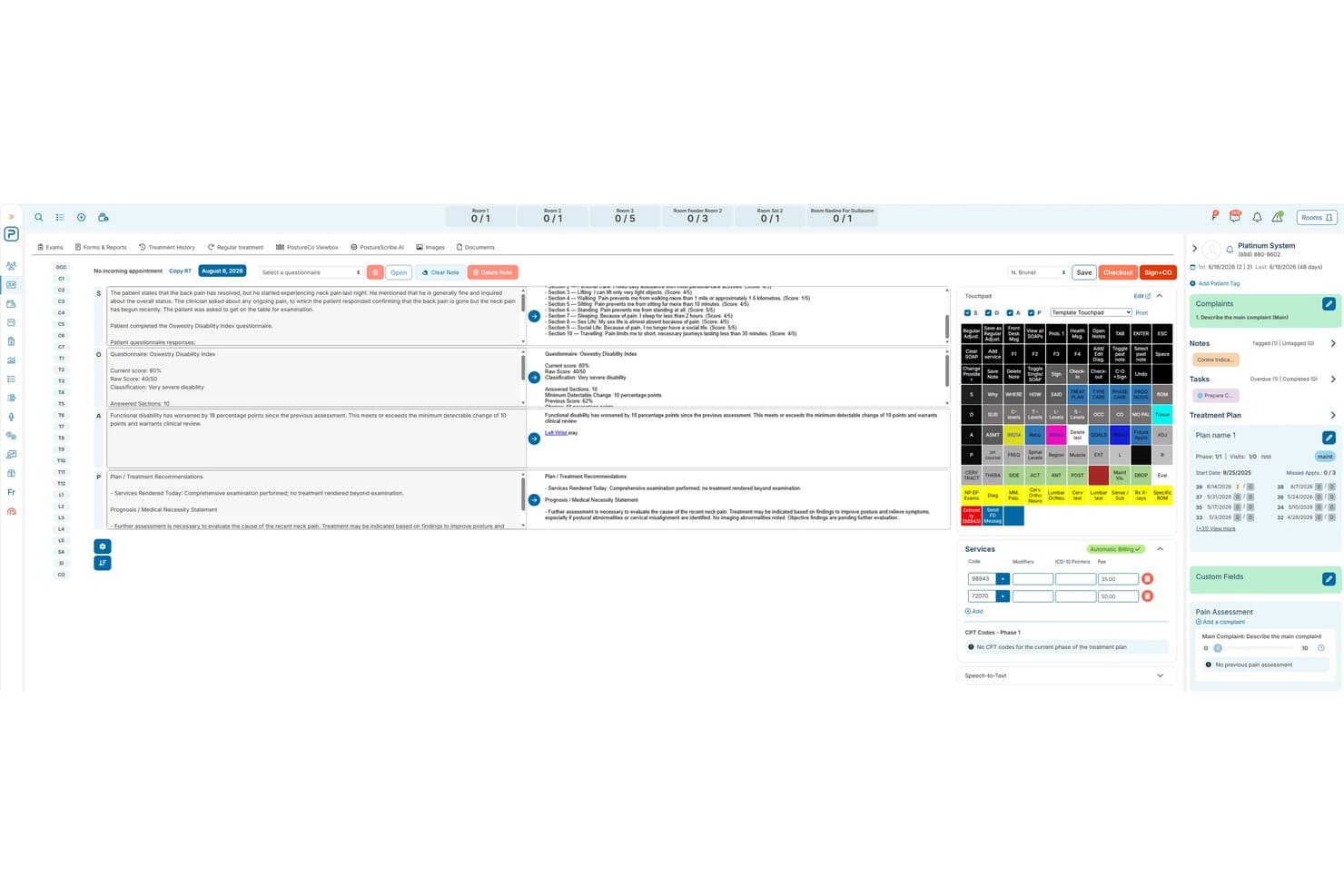
Platinum System displays SOAP notes and billing codes side by side. Platinum System is a chiropractic-specific practice operating system that brings together EHR, SOAP note charting, scheduling, billing and RCM, payments, patient engagement, CRM, and analytics in a single cloud-based platform.
Who Is Platinum System Best For?
Platinum System suits chiropractic clinics that want a single platform to run their full practice, from EHR and scheduling to billing and patient growth.
Why I Picked Platinum System
I picked Platinum System as one of the best because it's the only tool on my list that tracks marketing campaigns all the way through to booked visits, closing a gap most chiropractic platforms leave open. Its CRM module runs segmented email and SMS journeys, then ties each campaign's results directly to appointment conversions so you can see exactly which outreach is filling your schedule. I also like that AI growth recommendations flag patients at risk of dropping out and suggest next actions before a gap in care becomes a lost patient.
Platinum System Key Features
- AI clinical scribe: Transcribes patient encounters and drafts structured SOAP notes for the clinician to review and sign before they enter the chart.
- Claim scrubbing and denial management: Checks claims against payer rules before submission and tracks denials to support follow-up and appeals.
- Care-plan scheduling: Books a full phase of recurring appointments based on a patient's prescribed visit frequency in a single workflow.
- Posture and range-of-motion analysis: Uses AI to analyze photos and measurements, then generates annotated visual reports you can compare across visits.
Platinum System Integrations
Platinum System integrates with TriZetto / Availity for electronic claims and real-time eligibility verification, plus QuickBooks through its marketplace. Enterprise plans include API access for custom integrations.
Pros and Cons
Pros:
- Connects signed notes directly to billing
- Books recurring visits from prescribed care plans
- Best for tracking campaigns to booked visits
Cons:
- EOB posting takes too many steps
- Corrected claims can create payment posting problems
Learn more about Platinum System:
How I Evaluate Chiropractic Software
I split my evaluation into three parts, giving the most weight to core needs: chart SOAP notes and spine findings, and schedule recurring care visits. Next, I look for patient self-scheduling and outcome surveys. Finally, I consider chiropractic-specific onboarding, support, and pricing as clinics grow.
Core Functionality (Table Stakes For This List)
When I'm selecting tools for my list, I score each one on a scale from 0 (does not offer the functionality) to 5 (excels in this area) for each core functionality listed below. I then convert the total into a percentage to help assess each tool's overall fit, with extra weight on any functionalities I’ve deemed essential.
- Chiropractic Documentation (Essential): I look for SOAP templates, spine or pain diagrams, and exam fields that support documenting musculoskeletal findings across visits.
- Patient Scheduling (Essential): I check for recurring appointments, reminders, and calendars that help staff coordinate follow-up visits across providers.
- Billing & Claims: I evaluate charge capture, invoicing, electronic claims, and superbills for common chiropractic services.
- Patient Records: I look for searchable histories that connect intake details, visit notes, and treatment plans in one patient record.
- Privacy & Security: I assess safeguards such as role-based access, audit logs, and secure handling of protected health information.
- Care Plan Tracking: I check whether teams can track visit packages and progress against a plan, such as noting completed and remaining visits.
Once I have a list of tools that meet the criteria, I consider what sets each platform apart.
Differentiating Factors (What Sets Vendors Apart)
Here's how I compare and contrast different vendors:
Standout Features
I check whether patients can book, reschedule, or join waitlists online without calling the front desk. That single feature reshapes how a high-volume clinic manages its schedule. I also evaluate outcome assessment tools—built-in surveys like the Oswestry or Neck Disability Index help document medical necessity and give care teams measurable progress data. Custom macros matter too; I look for provider-configurable shorthand that cuts charting time when you're seeing 30-plus patients a day.
Beyond Features
I evaluate whether a vendor's licensing model scales with your clinic. Per-provider pricing works for a solo office but can double or triple costs when you add associates or open a second location. Payer-specific compliance matters just as much. Chiropractic billing has unique rules around Medicare visit limits, AT modifiers, and personal injury claims, so I check for built-in compliance checks and superbill templates that match those requirements. I also look at onboarding support, specifically whether the vendor offers chiropractic-specific training rather than generic EHR walkthroughs.
Cum să alegeți software-ul pentru chiropractică
Este ușor să vă pierdeți în liste lungi de funcții și structuri complexe de prețuri. Pentru a vă ajuta să rămâneți concentrați pe parcursul procesului unic de selectare a software-ului, iată o listă de factori de care trebuie să țineți cont:
| Factor | Ce trebuie luat în considerare |
| Scalabilitate | Sistemul va putea susține creșterea numărului de furnizori sau de locații? Căutați licențe flexibile pentru utilizatori și posibilitatea unei extinderi facile. |
| Integrări | Se conectează la serviciul dumneavoastră de facturare, la casa de compensare sau la software-ul de imagistică? Verificați existența conexiunilor integrate sau a accesului la un API deschis. |
| Posibilitate de personalizare | Puteți adapta formularele de primire a pacienților, șabloanele de note sau rapoartele pentru a corespunde fluxului dumneavoastră de lucru, nu doar standardelor din domeniu? |
| Ușurință în utilizare | Cât de repede se pot obișnui personalul și cadrele clinice să îl folosească? Căutați o interfață simplificată și resurse de instruire accesibile. |
| Implementare și integrare inițială | Ce instruire, migrare a datelor sau asistență pentru configurare sunt oferite? Planurile clare de implementare pot preveni problemele atât pentru clinicile individuale, cât și pentru cele cu mai mulți specialiști. |
| Cost | Prețul este stabilit per furnizor, per locație sau ca tarif fix? Luați în calcul de la început costurile suplimentare, precum asistența, integrările sau migrarea datelor. |
| Măsuri de securitate | Instrumentul respectă legislația regională privind confidențialitatea, permisiunile utilizatorilor și jurnalele de audit? Confirmați protocoalele pentru datele sensibile ale pacienților. |
| Disponibilitatea asistenței | Ce intervale orare și canale sunt disponibile pentru asistență tehnică, în special în afara programului obișnuit? |
Ce este software-ul pentru chiropractică?
Software-ul pentru chiropractică este o soluție digitală specializată care îi ajută pe chiropracticieni să gestioneze într-un singur loc fișele pacienților, programările, facturarea și documentația clinică. Aceste platforme simplifică operațiunile zilnice, sprijină conformitatea și oferă acces securizat la datele pacienților, facilitând furnizarea unor servicii de îngrijire organizate și eficiente.
Funcțiile software-ului pentru chiropractică
Atunci când alegeți software pentru chiropractică, acordați atenție următoarelor funcții esențiale:
- Documentarea notelor SOAP: Oferă șabloane structurate pentru crearea și actualizarea notelor pacienților, contribuind la asigurarea acurateței clinice și a conformității legale.
- Programarea consultațiilor: Vă permite să gestionați programările pacienților, să reprogramați ședințele și să administrați listele de așteptare dintr-un singur calendar, cu disponibilitate în timp real.
- Gestionarea asigurărilor și a facturării: Oferă suport pentru trimiterea cererilor de despăgubire, urmărește autorizările și gestionează plățile asigurărilor pentru a simplifica procesele ciclului veniturilor.
- Portalul pacientului: Oferă pacienților acces securizat la dosarele lor, calendarele programărilor și extrasele de cont, sporind implicarea și reducând apelurile către cabinet.
- Formulare digitale de preluare a datelor: Le permite pacienților să completeze online istoricul medical și formularele de consimțământ, îmbunătățind acuratețea și economisind timpul personalului de la recepție.
- Reamintiri automate: Trimite pacienților reamintiri la timp prin e-mail sau SMS pentru a reduce absențele și a menține programările ocupate.
- Raportare și analiză: Generează rapoarte personalizabile privind performanța financiară, retenția pacienților și frecvența vizitelor pentru a sprijini deciziile bazate pe date.
- Gestionarea documentelor: Organizează fișele, scanările și corespondența, astfel încât furnizorii de servicii medicale să poată găsi sau încărca rapid informațiile esențiale despre pacienți.
- Urmărirea inventarului: Monitorizează consumabilele, suplimentele și articolele de vânzare cu amănuntul pentru a preveni epuizarea stocurilor și a eficientiza comenzile.
- Controale de acces bazate pe roluri: Restricționează accesul la datele sensibile pentru personalul autorizat și impune standarde de confidențialitate și conformitate.
Funcții AI comune ale software-ului chiropractic
Pe lângă funcțiile standard ale software-ului chiropractic enumerate mai sus, multe dintre aceste soluții integrează AI cu funcții precum:
- Asistență la documentarea bazată pe AI: Analizează contextul vizitei și sugerează expresii relevante sau completează automat notele SOAP, ajutând furnizorii să documenteze mai eficient și mai precis.
- Optimizarea predictivă a programărilor: Utilizează datele istorice privind prezența și disponibilitatea furnizorilor pentru a recomanda ore de programare care reduc absențele și maximizează gradul de utilizare al cabinetului.
- Sugestii automate pentru codificare și facturare: Analizează documentația clinică și recomandă coduri de facturare corecte, minimizând respingerea cererilor și sprijinind rambursarea corespunzătoare.
- Informații despre implicarea pacienților: Identifică pacienții care riscă să rateze vizitele de urmărire și declanșează acțiuni de contact personalizate, ajutând cabinetele să îmbunătățească retenția și continuitatea îngrijirii.
- Extragerea datelor din limbaj natural: Procesează răspunsurile în text liber ale pacienților din formularele de preluare a datelor, completând automat câmpurile structurate pentru o analiză și o revizuire mai ușoare.
Beneficiile software-ului chiropractic
Implementarea software-ului chiropractic oferă mai multe beneficii echipei și companiei dumneavoastră. Iată câteva dintre cele pe care le puteți anticipa:
- Gestionarea simplificată a evidențelor: Șabloanele digitale pentru notele SOAP reduc documentele completate manual și facilitează găsirea și actualizarea istoricului pacienților.
- Eficiență sporită a programărilor: Programările online, reamintirile automate și calendarele contribuie la organizarea fluxului zilnic și la reducerea absențelor.
- Facturare mai rapidă și mai precisă: Trimiterea integrată a informațiilor către asigurări și urmărirea electronică a cererilor reduc erorile administrative și scurtează timpul de rambursare.
- Implicare sporită a pacienților: Portalurile securizate pentru pacienți și formularele digitale de preluare a datelor le permit pacienților să își gestioneze online informațiile medicale și programările.
- Conformitate și securitate sporite: Controalele de acces bazate pe roluri și jurnalele de audit detaliate contribuie la protejarea datelor sensibile ale pacienților și sprijină conformitatea cu reglementările.
- Informații operaționale: Instrumentele integrate de raportare și analiză vă ajută să identificați tendințele, să monitorizați sănătatea financiară și să optimizați performanța cabinetului.
- Control mai bun al inventarului: Urmărirea automată a inventarului asigură menținerea în stoc și disponibilitatea suplimentelor și a articolelor de vânzare cu amănuntul pentru îngrijirea pacienților.
Costurile și prețurile software-ului chiropractic
Alegerea software-ului chiropractic necesită înțelegerea diferitelor modele și planuri de tarifare disponibile. Costurile variază în funcție de funcții, dimensiunea echipei, suplimente și alți factori. Tabelul de mai jos rezumă planurile comune, prețurile medii ale acestora și funcțiile incluse de obicei în soluțiile software chiropractice:
Tabel comparativ al planurilor pentru software chiropractic
| Tipul planului | Preț mediu | Funcții comune |
| Plan gratuit | $0 | Programare de bază, stocare limitată a dosarelor pacienților, documentare simplă și asistență prin e-mail. |
| Plan personal | $25-$50/utilizator/lună | Gestionarea programărilor, instrumente de facturare, formulare digitale de preluare a datelor și note de bază despre pacienți. |
| Plan pentru companii | $75-$150/utilizator/lună | Documentare avansată, procesarea cererilor de despăgubire, portaluri pentru pacienți, reamintiri automate și instrumente de raportare. |
| Plan pentru întreprinderi | $200-$400+/lună | Gestionarea mai multor locații, opțiuni de personalizare, controale avansate de securitate, integrări personalizate și asistență prioritară. |
Întrebări frecvente despre software-ul chiropractic
Iată câteva răspunsuri la întrebările frecvente despre software-ul chiropractic:
Cum sprijină software-ul chiropractic respectarea reglementărilor privind confidențialitatea?
Software-ul chiropractic sprijină respectarea reglementărilor prin funcții precum piste de audit, controale de acces bazate pe roluri și stocarea securizată a documentelor, contribuind la protejarea datelor pacienților și la respectarea standardelor de reglementare.
Poate fi integrat software-ul chiropractic cu sisteme de imagistică sau de radiografie?
Da, multe soluții software pentru chiropractică se pot integra cu sisteme de imagistică sau de radiografie, permițând stocarea și accesarea fără întreruperi a imaginilor de diagnostic în fișa pacientului.
Ce tipuri de cabinete beneficiază cel mai mult de software-ul chiropractic?
Atât practicienii independenți, cât și clinicile cu mai mulți furnizori beneficiază de software-ul chiropractic, deoarece acesta gestionează mai eficient fișele pacienților, programările și facturarea.
Este dificilă migrarea datelor de pe suport de hârtie sau din alte sisteme?
Migrarea datelor poate fi o provocare, însă mulți furnizori de software oferă asistență la integrare și instrumente de import pentru a ajuta echipele cabinetelor să transfere datele de pe suport de hârtie sau din sisteme vechi.
Cât de des sunt lansate actualizări sau funcții noi în software-ul chiropractic?
Majoritatea furnizorilor lansează actualizări periodic, adesea lunar sau trimestrial, pentru a îmbunătăți securitatea, a adăuga funcții și a ține pasul cu cerințele industriei.