

Programele de facturare pentru laboratoare sunt sisteme digitale care ajută laboratoarele să gestioneze cererile de plată, plățile, procesarea asigurărilor și sarcinile de conformitate. Dacă evaluați opțiunile pentru laboratorul dvs., aveți nevoie de mai mult decât un instrument generic de facturare — aveți nevoie de un program adaptat fluxurilor de lucru medicale, care reduce erorile și ține pasul cu schimbările de reglementare.
Alegerea sistemului de facturare potrivit vă poate ajuta să gestionați cerințele complexe ale plătitorilor, să evitați pierderile de venituri și să eliberați timp pentru îngrijirea pacienților. În acest ghid, voi analiza principalele platforme de facturare pentru laboratoare, astfel încât să puteți compara funcțiile care acoperă totul, de la urmărirea cererilor de plată la jurnalele de audit și integrarea cu sistemele de gestionare a laboratorului.
Why Trust Our Software Recommendations
6,700+
Reviews
20
Industry experts
16+
Evaluation factors
14
Years
Our team has been testing and reviewing software since 2012. As medical practice leaders ourselves, we know how difficult—and important—it is to choose the right software.
For this guide, we evaluated tools using hands-on testing and independent research, scoring tools using our selection criteria.
Our reviews reflect our human editorial judgment, not a sales pitch.
Tabel comparativ al programelor de facturare pentru laboratoare
Acest tabel comparativ sintetizează detaliile privind prețurile programelor mele de facturare pentru laboratoare:
Sorted by: Default
| Tool | Starting Price | Website | |
|---|---|---|---|
Best for real-time claim status tracking | 4.1 out of 5 | Pricing upon request Free demo available | Website |
Best for integrated EHR connectivity | Not rated | Pricing upon request Free demo available | Website |
Best designed for pathology workflows | Not rated | Pricing upon request Free demo available | Website |
Best for tailored revenue cycle modules | Not rated | Pricing upon request Free demo available | Website |
Best for small to mid-sized lab operations | Not rated | Pricing upon request Free demo available | Website |
Best unified LIS and billing platform | 4.6 out of 5 | Pricing upon request Free demo available | Website |
Best for high-volume claims management | 3.8 out of 5 | Pricing upon request Free demo available | Website |
Best for complex multi-site integration | Not rated | Pricing upon request Free demo available | Website |
Best with customizable workflow automation | Not rated | Pricing upon request Free demo available | Website |
Best for practices needing advanced analytics | Not rated | Pricing upon request Free demo available | Website |


Recenzii ale celor mai bune programe de facturare pentru laboratoare
Mai jos sunt prezentate rezumatele mele detaliate ale celor mai bune programe de facturare pentru laboratoare care au ajuns pe lista mea scurtă. Recenziile mele oferă o privire detaliată asupra funcțiilor, celor mai potrivite cazuri de utilizare și integrărilor fiecărei platforme, pentru a vă ajuta să o găsiți pe cea mai potrivită pentru dvs.
 Best for real-time claim status tracking
- Free demo available
- Pricing upon request
Visit WebsiteCustomer Rating:4.1/5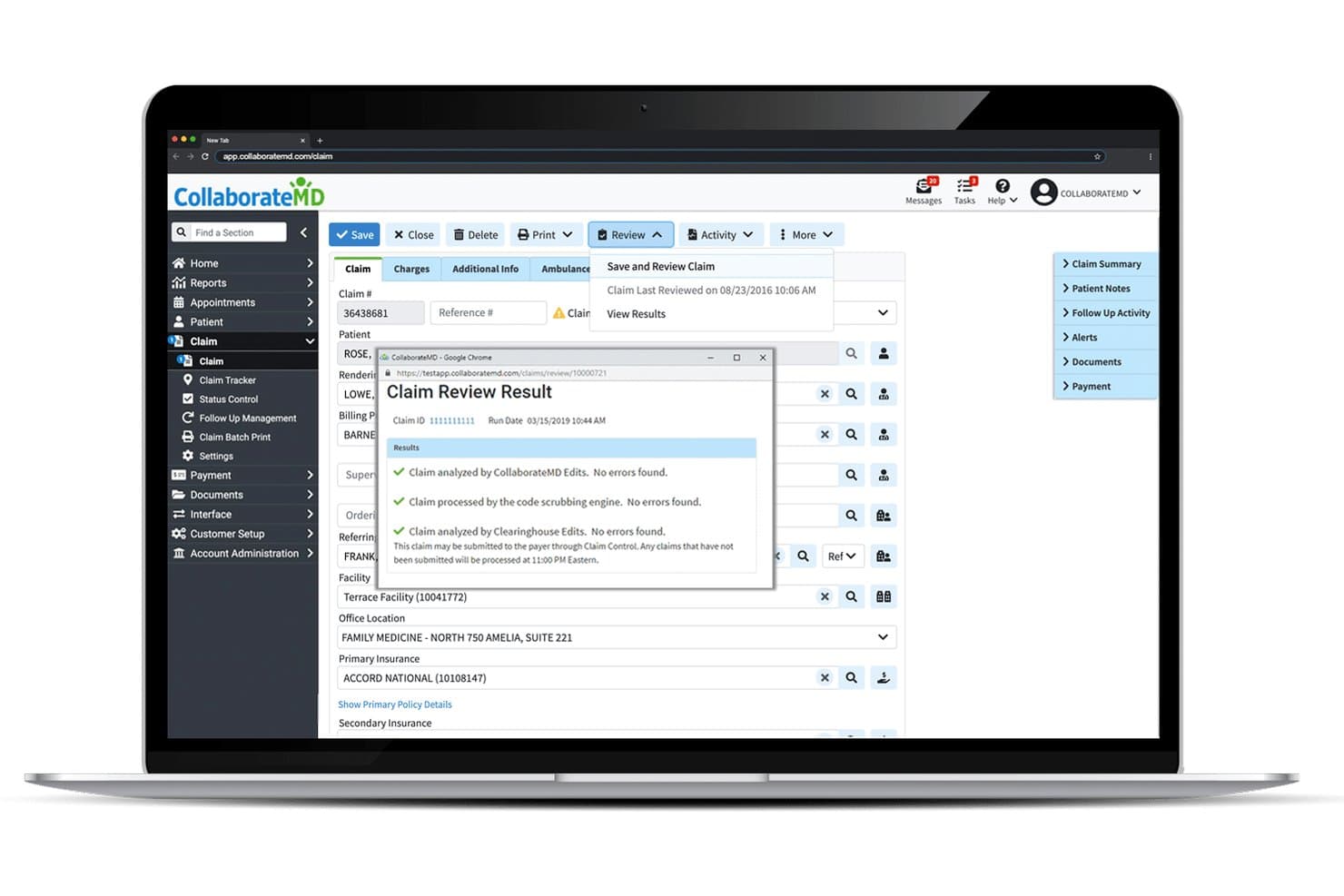
CollaborateMD offers a Claim Review Result modal that displays real-time claim validation checks, including CollaborateMD Edits, code scrubbing, and Clearinghouse Edits with no errors found. CollaborateMD is a cloud-based practice management and medical billing platform with a built-in clearinghouse, lab-specific claim scrubbing, direct LIS integrations, real-time eligibility verification, and patient billing tools.
Who Is CollaborateMD Best For?
CollaborateMD is a strong fit for small to mid-size independent labs, pathology practices, and medical billing companies managing lab claims across multiple specialties.
Why I Picked CollaborateMD
I picked CollaborateMD as one of the best because its built-in clearinghouse gives lab billing teams real-time claim status visibility without relying on a third-party clearinghouse portal. I particularly like the Level 2 Claim Edits, which run NCD, LCD, LMRP, and CCI checks before submission, catching the exact errors that trigger denials on high-volume lab claims. The AI-powered rejection explanations translate cryptic payer rejection codes into plain language, so my team can act on a denial the same day it comes back.
CollaborateMD Key Features
- Direct lab interfaces: Connects with Quest Diagnostics, LabCorp, and LabDAQ for automatic lab charge capture.
- Patient payment portal: Lets patients pay bills and set up payment plans online through a secure portal.
- Customizable reporting: Offers 125+ reports and dashboard tools tailored to lab billing workflow details.
- Intelligent intake forms: Provides digital forms for efficient collection of patient and ordering provider information.
CollaborateMD Integrations
CollaborateMD offers native integrations with Quest Diagnostics, LabCorp, LabDAQ, Practice Fusion, Nexus Clinical, Alleva, and MDTech. An API is available for custom integrations and additional HL7 interfaces.
Pros and Cons
Pros:
- Direct connections to major lab systems
- Level 2 claim edits for lab denials
- Real-time claim status for lab billing
Cons:
- No dedicated CLIA compliance tracking
- Reporting filters limited for complex needs
Learn more about CollaborateMD: Best for integrated EHR connectivity
- Free demo available
- Pricing upon request
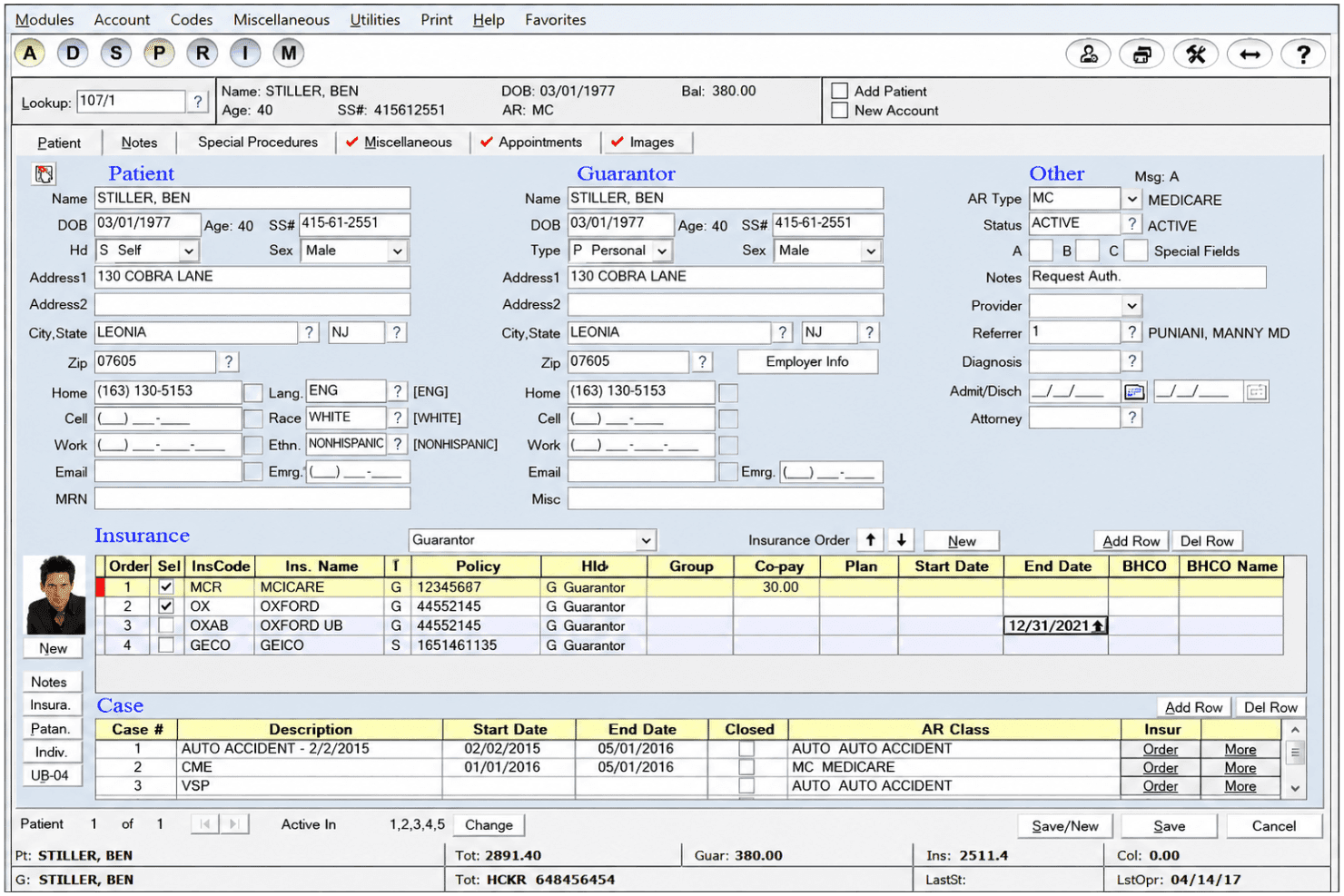
Advanced Data Systems Corporation’s patient management screen displays demographics, guarantor details, insurance policies, case records, and account balances. Advanced Data Systems Corporation is a practice management and revenue cycle platform built for clinical and reference laboratories, covering EDI claims submission, denial management, eligibility verification, and LIS/LIMS-integrated charge capture.
Who Is Advance Data System Corporation Best For?
ADS is a strong fit for pathology practices and clinical reference labs that need billing tightly connected to their existing LIS/LIMS environment.
Why I Picked Advance Data System Corporation
ADS earns its spot on my shortlist because of how it connects to virtually any LIS/LIMS and EHR without requiring a system overhaul. I like that MedicsPremier pulls requisition and order data directly into the billing workflow, removing manual charge entry from the process. Its FHIR compliance and Cures Act certification mean those connections meet current federal interoperability standards, which matters when payers and auditors scrutinize data exchange practices.
Advance Data System Corporation Key Features
- Automated prior authorizations: Flag and process prior auth requirements before submitting lab claims.
- Denials manager: Edit and quickly resubmit denied claims directly from within the platform.
- Customizable lab fee schedules: Set up lab-specific pricing based on CPT, payer, or other criteria.
- Mobile sales activity portal: Sales teams can enter and track lab-related sales activity from phones or tablets.
Advance Data System Corporation Integrations
MedicsPremier integrates with virtually any LIS or LIMS system and is compatible with any EHR and PACS. An API is available for custom integrations.
Pros and Cons
Pros:
- Fully customizable reporting with Excel exports
- Handles explosion codes for multi-CPT lab claims
- Supports multi-entity, multi-location laboratory billing
Cons:
- No dedicated mobile billing app available
- Interface design appears outdated to users
Learn more about Advance Data System Corporation: Best designed for pathology workflows
- Free demo available
- Pricing upon request
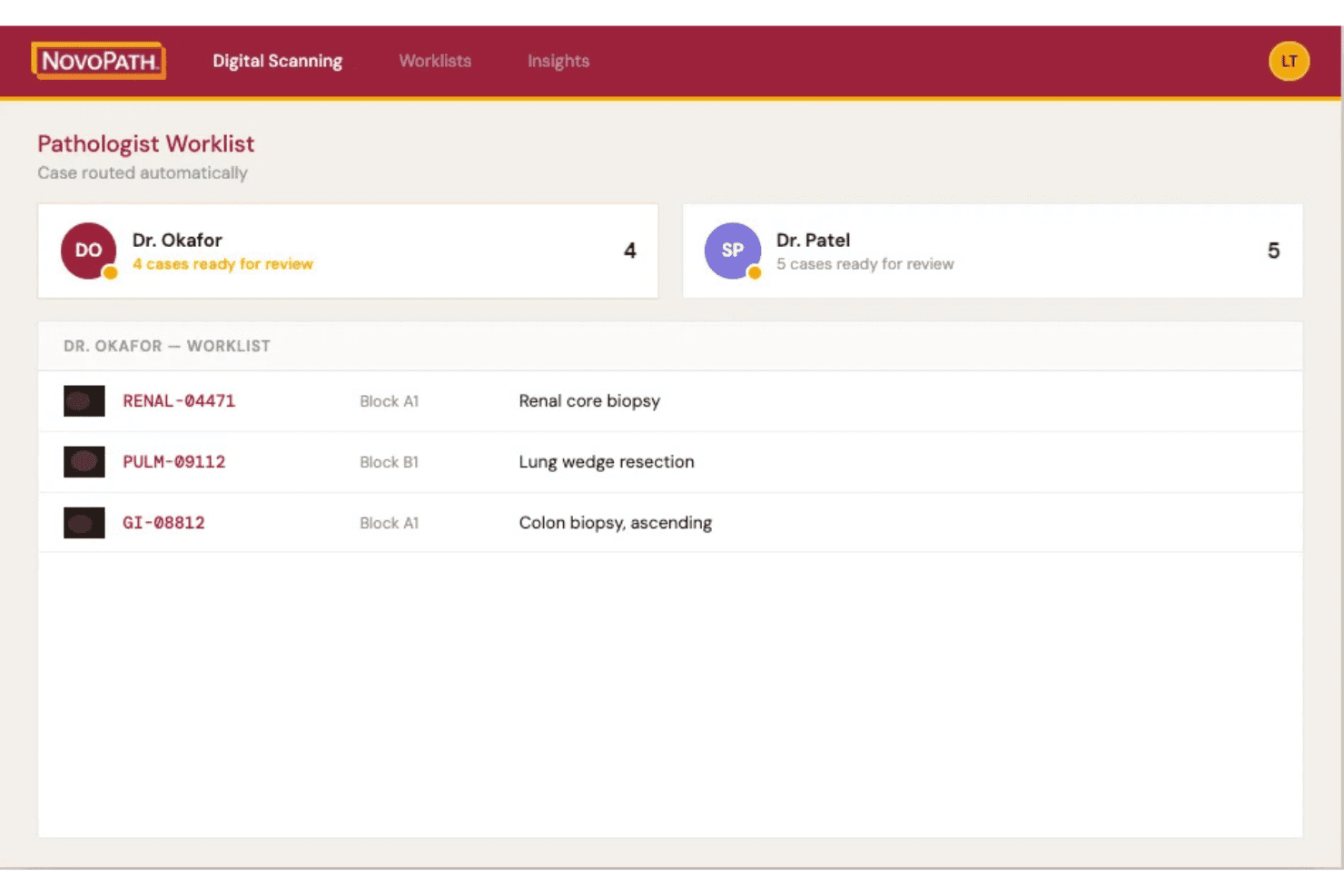
NovoPath 360 connects pathology LIS, billing, claims, charges and case tracking. NovoPath 360 is a cloud-based anatomic pathology LIS with an integrated billing module that covers charge capture, TC/PC billing, claims processing, and specimen tracking across the full pathology case workflow.
Who Is NovoPath 360 Best For?
It's a strong fit for anatomic pathology labs that need billing and LIS functionality managed within a single platform.
Why I Picked NovoPath 360
I picked NovoPath 360 because it handles TC/PC billing natively within the same system where pathologists sign off cases. In practice, that means charge capture happens at the point of case completion rather than being re-entered downstream. The platform's built-in case distribution and accession-to-storage tracking tie directly into billing, so my team isn't reconciling data across separate systems when claims go out.
NovoPath 360 Key Features
- Hands-free grossing with voice recognition: Lets users document gross descriptions and procedures by voice during specimen processing.
- Customizable report templates: Supports building and editing lab-specific reports with flexible layout options.
- Role-based access controls: Administrators can configure user permissions and audit user activity for compliance.
- Real-time dashboards: Displays lab performance, worklists, and analytics for operational insights across billing and LIS workflows.
NovoPath 360 Integrations
NovoPath 360 offers native integrations with Modernizing Medicine and Paragon HIS, supports agnostic HL7 and API connections for EMR and digital pathology systems, and provides an API for custom integrations.
Pros and Cons
Pros:
- Seamless accession-to-storage specimen tracking
- Built-in support for TC/PC billing workflows
- Direct charge capture at case completion
Cons:
- Patient statements and online payments not supported
- No denial management or appeals automation
Learn more about NovoPath 360: Best for tailored revenue cycle modules
- Free demo available
- Pricing upon request
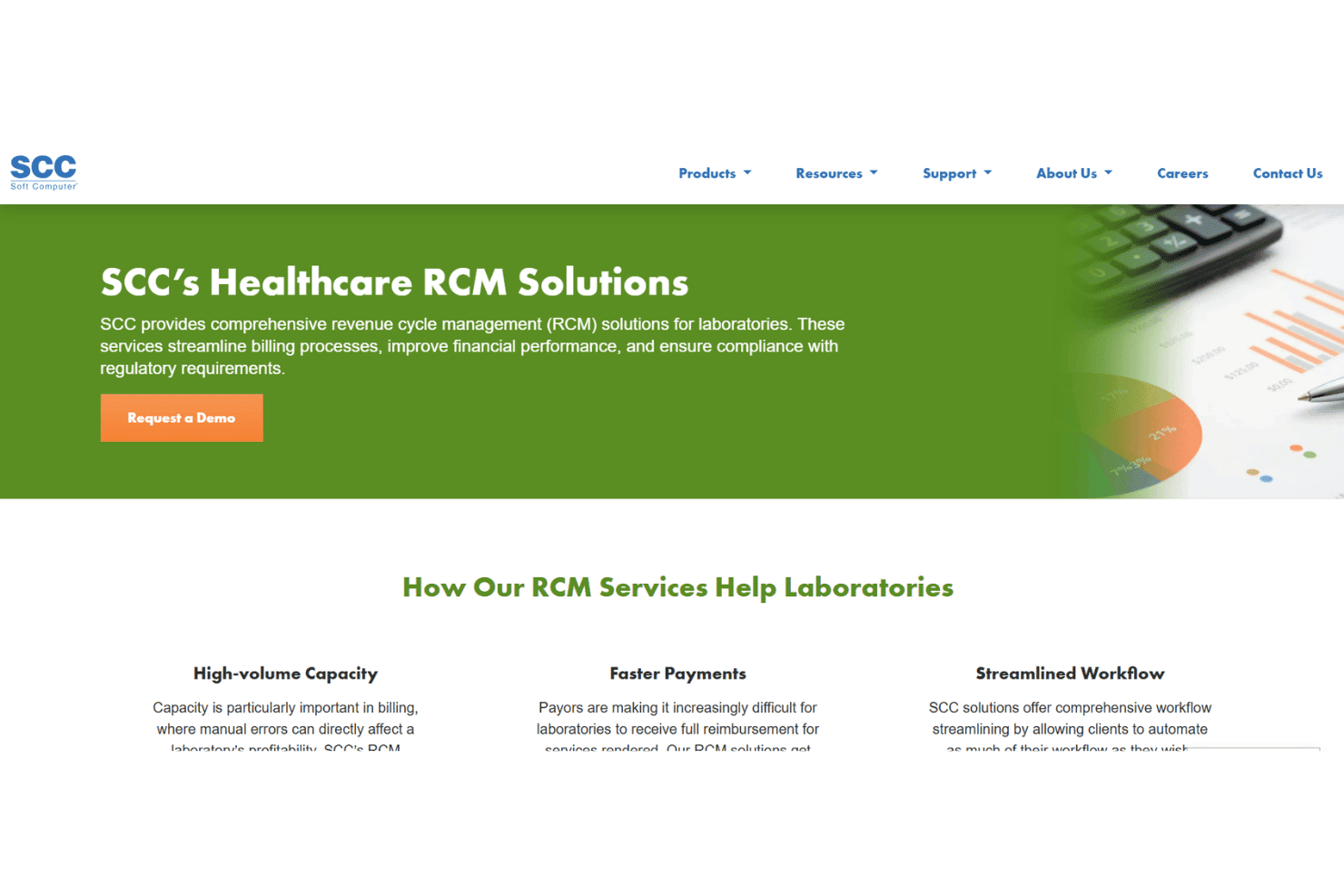
SCC Soft Computer links lab claims, LIS, eligibility checks, and AR management. SCC Soft Computer is a laboratory-focused revenue cycle management platform covering claims automation, LIS integration, eligibility verification, and AR management across clinical, pathology, genetics, and molecular lab settings.
Who Is SCC Soft Computer Best For?
It's a strong fit for mid-to-large clinical, pathology, genetics, and molecular labs that need billing tightly coupled with their existing laboratory information system.
Why I Picked SCC Soft Computer
SCC Soft Computer earns its spot on my shortlist because the RCM platform is built around lab type, not retrofitted for it. I particularly like the Demographic Bridge, which pulls patient demographics and insurance directly from a physician's PMS into the lab ordering system, eliminating manual reentry at claim time. For genetics and pathology labs, the companion SoftGenomics and SoftPath modules add billing logic specific to those disciplines, which most general RCM tools don't offer.
SCC Soft Computer Key Features
- EMR Connectivity hub: Creates two-way connectivity with 500+ EMR and practice management systems.
- Financial analytic reporting: Compares expected versus actual reimbursement to pinpoint payer errors.
- Courier tracking module: Manages route dispatch and specimen pickup documentation across locations.
- Inventory management tools: Tracks lab outreach supply inventories and back orders in real time.
SCC Soft Computer Integrations
SCC Soft Computer offers native integrations with 500+ EMR and practice management systems, including SoftLab, SoftPath, SoftGenomics, and SoftMolecular, with an API available for custom integrations.
Pros and Cons
Pros:
- Dedicated modules for genetics and pathology labs
- Advanced financial analytic and AR tools
- Deep integration with SoftLab LIS ecosystem
Cons:
- Sales-led onboarding, no self-service setup
- Outdated user interface on older modules
Learn more about SCC Soft Computer: Best for small to mid-sized lab operations
- Free demo available
- Pricing upon request
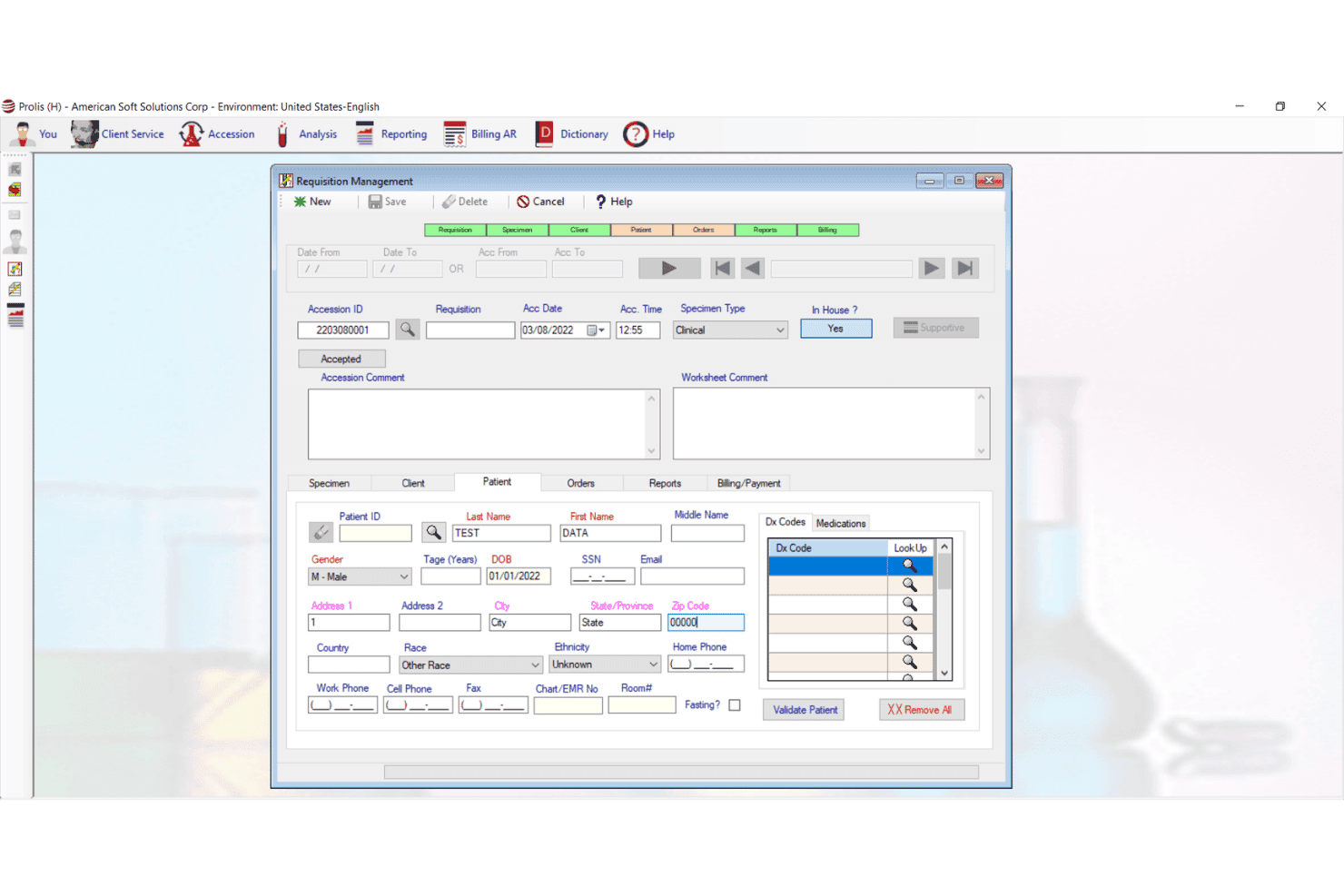
Prolis LIS offers a Requisition Management screen with patient demographics, accession details, diagnosis codes, and billing fields for streamlined laboratory billing workflows. Prolis LIS is a unified laboratory information system with a built-in revenue cycle management engine covering lab-specific coding, claims scrubbing, eligibility verification, and denial management across clinical, pathology, toxicology, and molecular lab settings.
Who Is Prolis LIS Best For?
Prolis LIS suits independent and small to mid-sized labs that want billing and LIS functionality in a single system without managing a separate integration.
Why I Picked Prolis LIS
I've included Prolis LIS in my top picks because the billing engine is built directly into the LIS, meaning small labs don't need a separate RCM vendor. I particularly like the specialty coding modules, which handle toxicology G-codes, molecular MAAA and PLA codes, and anatomic pathology 88xxx codes natively. Real-time eligibility checks across 1,800+ payers, including ABN generation at order entry, catch coverage issues before claims go out.
Prolis LIS Key Features
- Multi-analyzer and instrument connectivity: Connects directly to lab machines using HL7 or ASTM interfaces for automated data flow.
- Revenue intelligence dashboards: Tracks Days in AR, denial rate, net collection ratio, and clean claim rate for lab billing performance.
- Automated claim scrubbing: Built-in payer edit rules validate ANSI X12 837 files and catch errors before submission.
- Patient payment portal: Lets labs send digital statements and collect patient payments online.
Prolis LIS Integrations
Prolis LIS offers native integrations with Epic, Cerner, Athenahealth, and DrChrono through bi-directional HL7 and FHIR interfaces. Analyzer connectivity is enabled via Prolis Bridge, and an API is available for custom integrations.
Pros and Cons
Pros:
- Offers robust root-cause denial analytics
- Handles specialty lab codes and panels
- Built-in LIS and billing in one platform
Cons:
- Limited patient payment plan options
- Outdated desktop-style interface design
Learn more about Prolis LIS: Best unified LIS and billing platform
- Free demo available
- Pricing upon request
Visit WebsiteCustomer Rating:4.6/5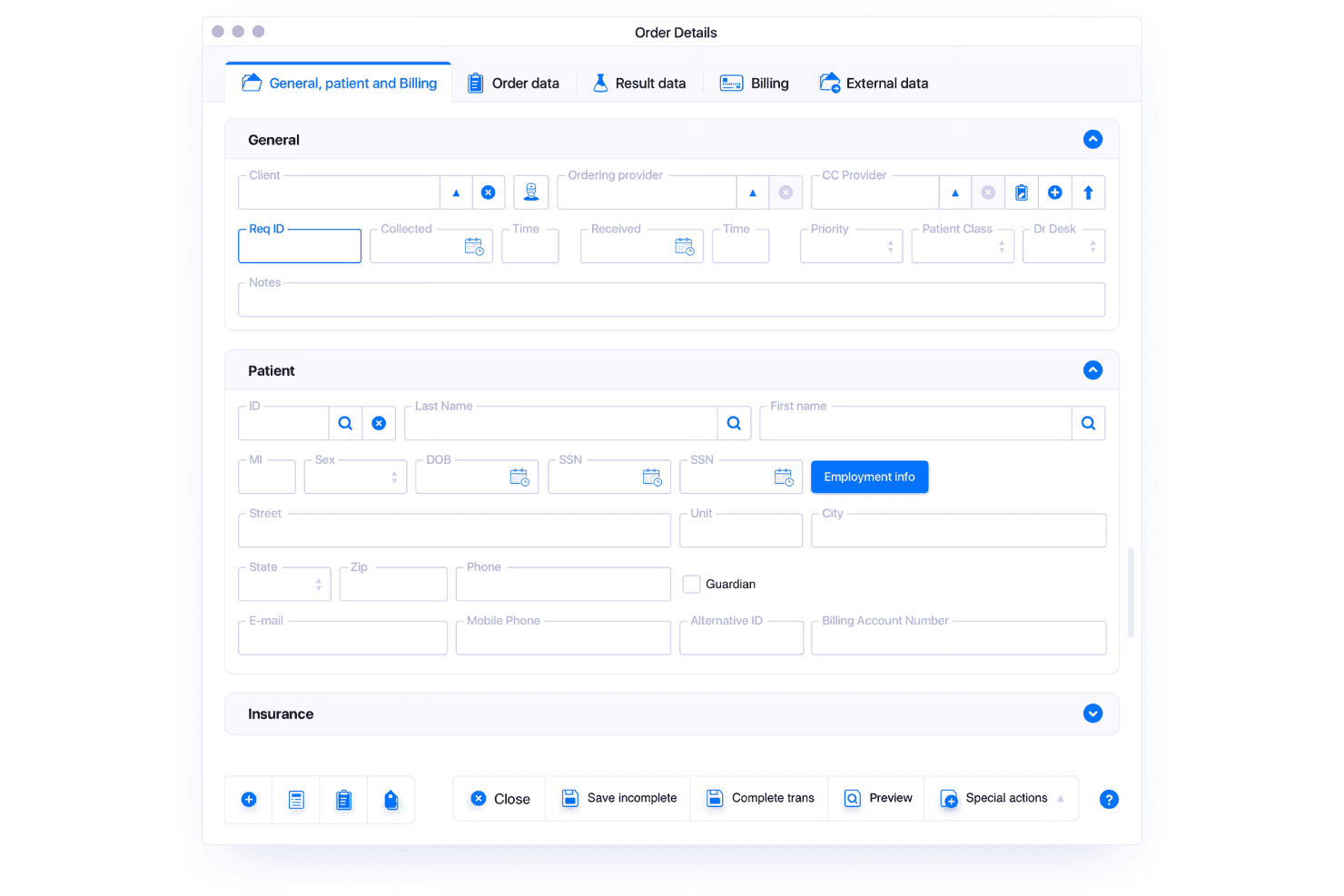
LigoLab unifies LIS, RCM, coding, claims, eligibility, and denial workflows. LigoLab is a unified laboratory informatics platform that combines a full LIS with an integrated RCM module, supporting anatomic pathology, clinical pathology, molecular diagnostics, automated CPT/ICD coding, claims scrubbing, eligibility verification, and denial management on a single shared database.
Who Is LigoLab Best For?
LigoLab is built for mid-to-large clinical laboratories and pathology groups that need both LIS and billing managed within a single platform.
Why I Picked LigoLab
LigoLab earns its spot as one of the best on my shortlist because the LIS and RCM modules share one database, so coding, scrubbing, and eligibility checks happen within the same workflow as specimen processing. I particularly like the rule engine, which covers AMA guidelines, Medicare policies, and custom payer requirements without manual workarounds. Automated CPT and ICD coding pulls from case data directly, giving coders instant access to reports, diagnoses, and stains when building claims.
LigoLab Key Features
- Integrated document management: Store and manage all case-related documentation within a single platform.
- Direct-to-consumer module: Support home collection workflows and direct patient ordering for lab tests.
- Peer review tools: Facilitate structured review and approval workflows for pathology cases.
- Patient portal: Give patients access to lab results, statements, and billing through a secure online portal.
LigoLab Integrations
LigoLab offers native integrations with Beckman Coulter, Roche, Siemens, ZEBRA, USPS, and General Data for lab instruments, data exchange, and billing workflows. An API is available for custom integrations.
Pros and Cons
Pros:
- Supports high-volume sample and claims processing
- Real-time claims scrubbing with rule engine
- Unified LIS and billing on one platform
Cons:
- Requires significant onboarding for configuration setup
- Limited documentation for patient payment plans
Learn more about LigoLab: Best for high-volume claims management
- Free demo available
- Pricing upon request
Visit WebsiteCustomer Rating:3.8/5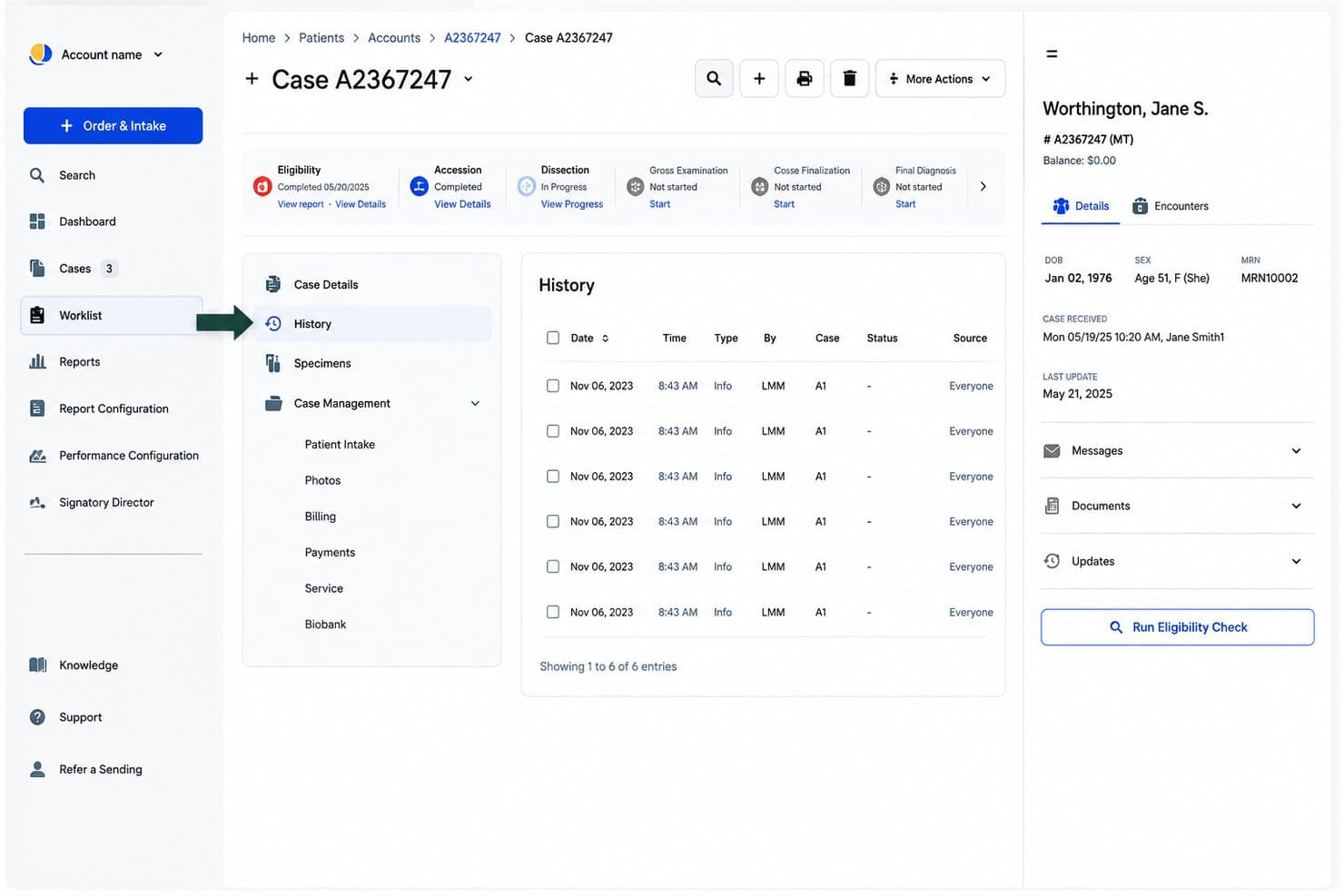
Quadax coordinates claims, eligibility, authorizations, denials, and billing. Quadax is a laboratory revenue cycle management platform that covers claims submission, eligibility verification, prior authorization, denial management, and patient billing across clinical, pathology, and molecular testing workflows.
Who Is Quadax Best For?
Quadax is a strong fit for mid-to-large clinical and pathology labs with high claim volumes that need full RCM coverage across BPO, SaaS, or hybrid delivery models.
Why I Picked Quadax
I picked Quadax as one of the best because its Xpeditor clearinghouse is built specifically to handle the editing complexity that comes with high-volume lab claims. Where most billing tools process claims generically, Xpeditor runs payer-specific EDI edits before submission, catching errors that would otherwise generate denials across thousands of daily claims. I also like that the prior authorization module verifies medical necessity criteria at the pre-claim stage, so denials don't pile up downstream.
Quadax Key Features
- Real-time eligibility verification: Check patient insurance coverage instantly before processing claims.
- Decision Intelligence analytics: Get actionable data for revenue tracking and workflow transparency.
- Patient billing portal: Allow patients to view and pay lab invoices online through a secure portal.
- Integrated PAMA reporting: Collect and submit required Protecting Access to Medicare Act data automatically.
Quadax Integrations
Native integrations are not clearly documented. The tool supports integrations via API and offers connectivity with EHR systems like MEDITECH.
Pros and Cons
Pros:
- Built-in PAMA and compliance reporting features
- Robust denial and appeal management options
- High-volume claims scrubbing tailored for labs
Cons:
- Limited public documentation for self-serve setup
- LIS integration specifics unclear pre-sales
Learn more about Quadax: Best for complex multi-site integration
- Free demo available
- Pricing upon request
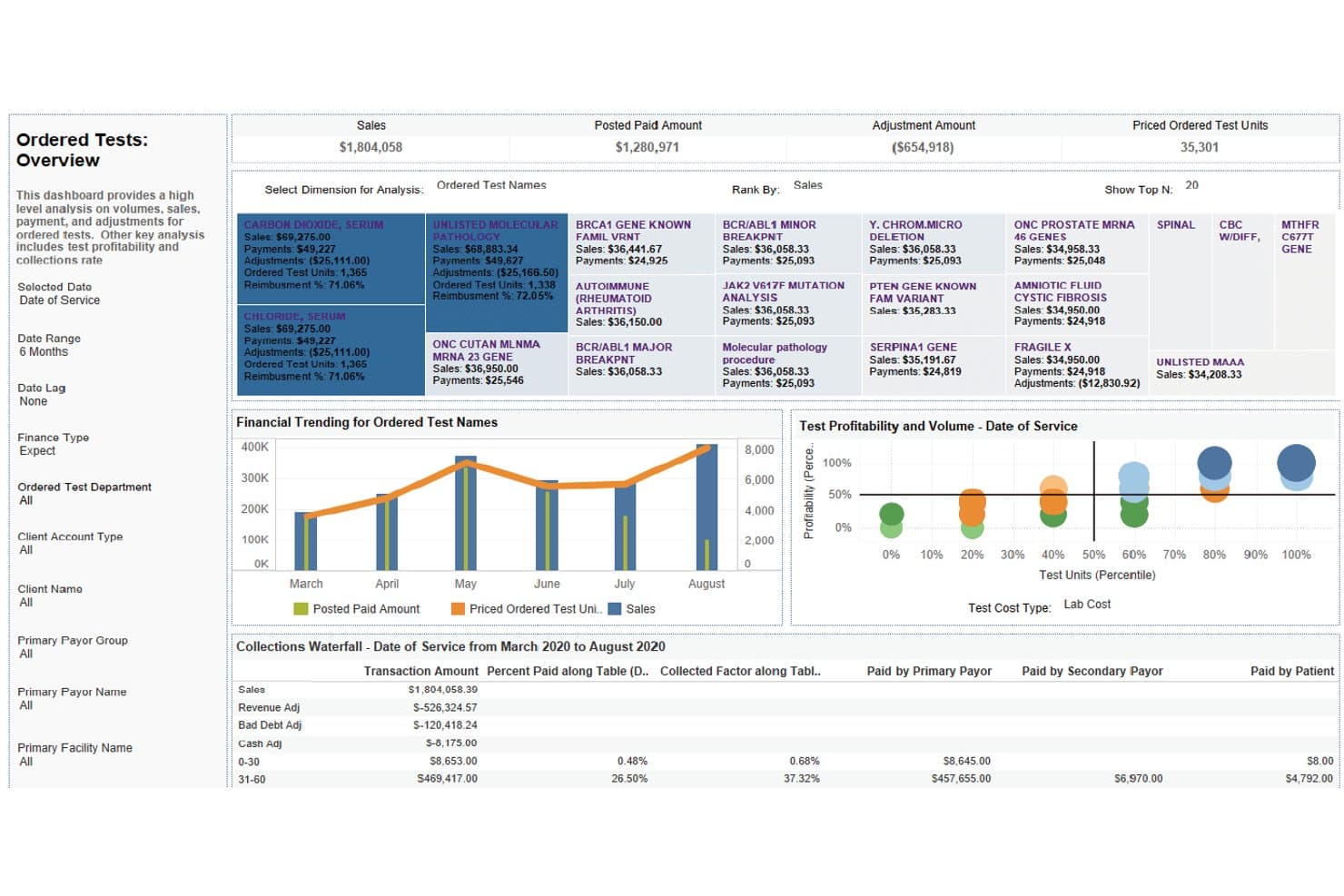
XiFin RPM offers an Ordered Tests Overview dashboard with financial trending, test profitability, and collections waterfall analysis for laboratory billing management. XiFin RPM is a diagnostic-specific revenue cycle management platform that handles claims submission, denial management, eligibility verification, and patient billing for clinical laboratories and diagnostic providers.
Who Is XiFin RPM Best For?
XiFin RPM is a strong fit for large diagnostic providers and health systems running high-volume lab billing across multiple sites or acquired facilities.
Why I Picked XiFin RPM
I picked XiFin RPM as one of the best because its sub-client ID system lets each department or acquired facility be tracked independently within a single billing environment. I particularly like how billing teams can configure separate fee schedules, invoice frequencies, and sort orders on a per-client basis. RPM 10 also includes dedicated tools for lab acquisition and divestiture workflows, keeping billing continuity intact during organizational changes.
XiFin RPM Key Features
- Machine learning-driven claims scrubbing: Applies real-time edits and payer-specific rules during claim preparation.
- Patient responsibility estimator: Provides out-of-pocket estimates within a patient portal for greater transparency.
- Automated insurance discovery: Pulls enhanced patient demographic data to reduce eligibility rejections.
- Denial analytics dashboard: Visualizes denial root causes and payer trends with interactive business intelligence tools.
XiFin RPM Integrations
XiFin RPM offers native integrations with Dendi LIS and IAL (InterActive Lab). Expanded web service capabilities are available for interoperability, and an API is available for custom integrations.
Pros and Cons
Pros:
- Patient responsibility estimator included
- Detailed denial root cause analysis tools
- Complex multi-site lab structures supported
Cons:
- Initial system setup can be lengthy
- Native LIS integrations are limited
Learn more about XiFin RPM: Best with customizable workflow automation
- Free demo available
- Pricing upon request
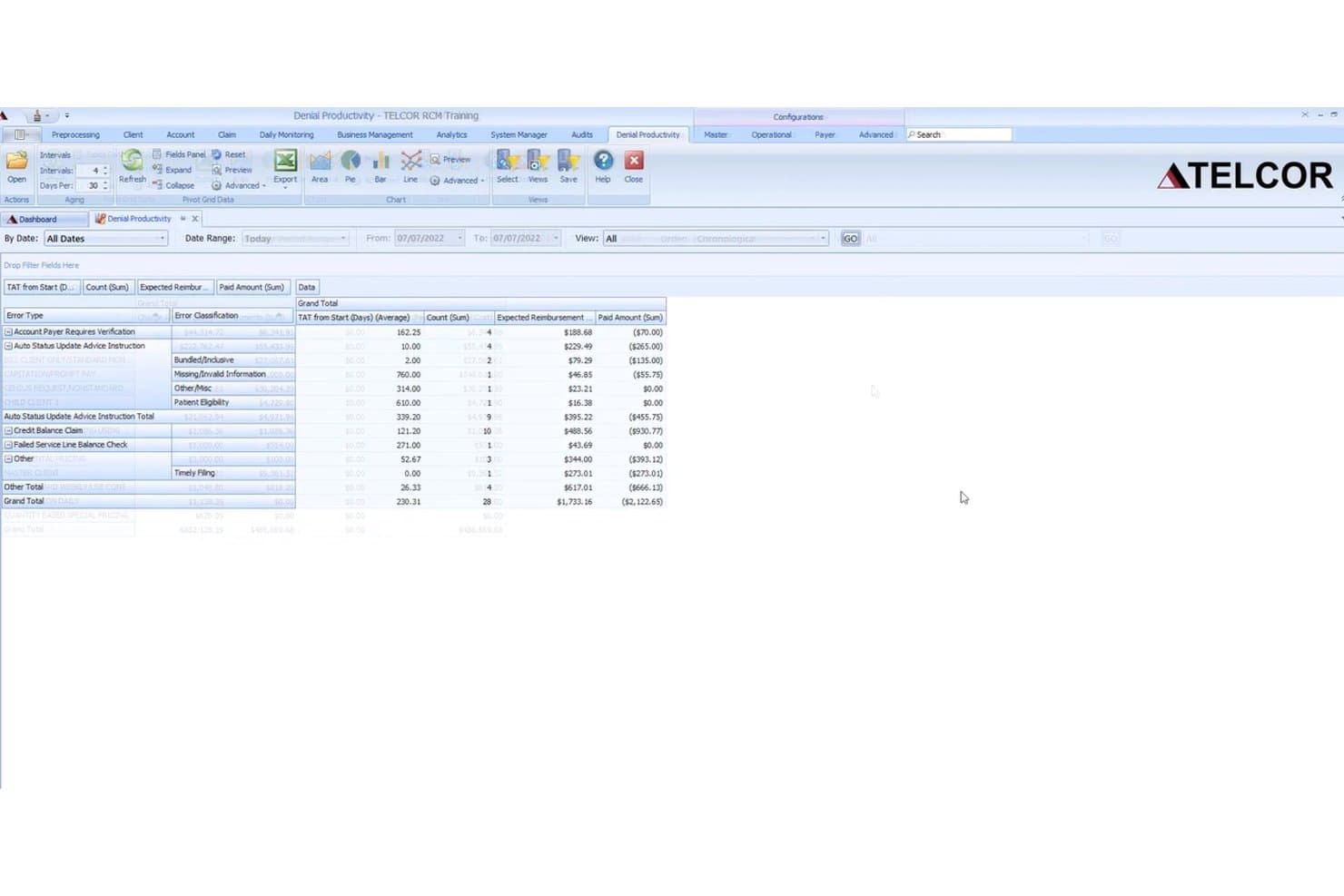
TELCOR RCM offers a Denial Productivity dashboard that displays error types, TAT averages, claim counts, expected reimbursements, and paid amounts to help laboratories manage billing denials. TELCOR RCM is a revenue cycle management platform built specifically for clinical, pathology, molecular, and toxicology labs, covering claims scrubbing, denial management, remittance processing, and patient and client billing.
Who Is TELCOR RCM Best For?
TELCOR RCM is a strong fit for pathology practices and high-volume clinical labs that need configurable billing workflows across multiple payer types.
Why I Picked TELCOR RCM
I picked TELCOR RCM as one of the best because the workflow customization goes well beyond standard settings. I can configure workqueue routing, automation rules, and payer-specific edits at the user-profile level, so each billing specialist sees only what's relevant to their claim type. The rules engine handles MUE rule application and split billing for professional and technical components, which are genuinely lab-specific needs.
TELCOR RCM Key Features
- Denial management dashboard: Track, categorize, and analyze denial trends with real-time and historical reporting tools.
- Automated remittance posting: Process unlimited 835 electronic remittance files for automatic payment reconciliation.
- Patient and client billing portals: Enable online payments for clients and patients through integrated web portals.
- Productivity tracking: Monitor over 1,700 user and system events for granular insight into billing team activity.
TELCOR RCM Integrations
TELCOR RCM offers native integrations with laboratory information systems, electronic health records, and clearinghouses, and provides an API for custom integrations. It also supports lockbox integrations for automated payment posting.
Pros and Cons
Pros:
- Granular productivity and denial reporting tools
- Advanced payer-specific rules engine for claims
- Fully configurable workflow automation for labs
Cons:
- No transparent pricing or online quote
- Eligibility verification depth is limited
Learn more about TELCOR RCM: Best for practices needing advanced analytics
- Free demo available
- Pricing upon request
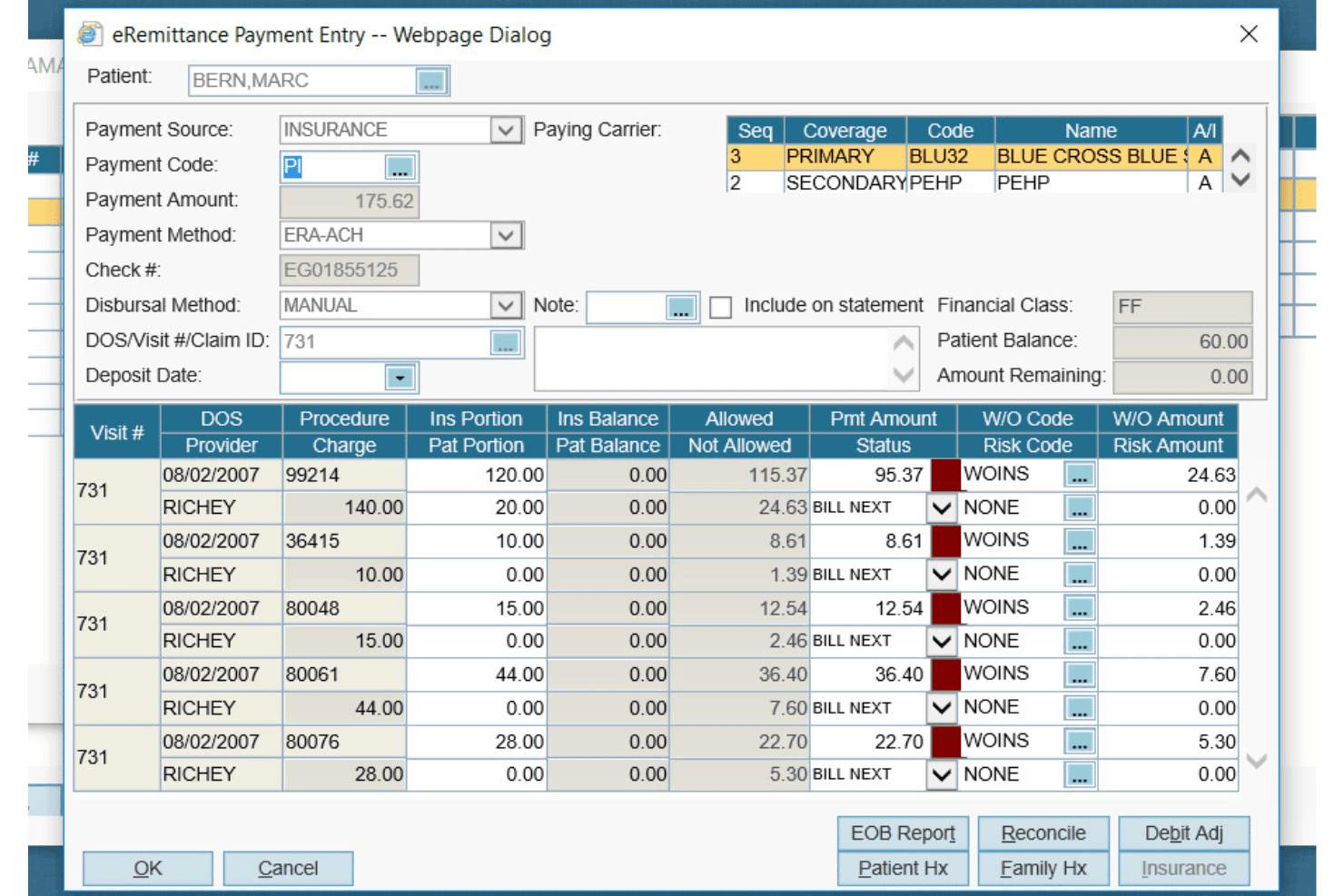
AdvancedMD Laboratory handles claims, eligibility, denials, billing and charges. AdvancedMD Laboratory is a cloud-based laboratory billing software built for independent and pathology labs, covering LIMS-integrated charge capture, claims scrubbing, eligibility verification, denial management, and patient billing.
Who Is AdvancedMD Laboratory Best For?
It's a strong fit for independent clinical and pathology labs that manage complex payer mixes and need a purpose-built billing platform rather than a generic medical billing solution.
Why I Picked AdvancedMD Laboratory
AdvancedMD Laboratory earns its spot on my shortlist because of AdvancedInsight, a pathology-specific analytics layer built on top of a 650-report engine. I use it to break down revenue by payer, test type, and denial reason in ways a standard billing platform can't. ClaimInspector adds pre-submission intelligence too, running 3.5 million edits against CCI, LCD, and carrier-specific rules before a claim ever reaches the clearinghouse.
AdvancedMD Laboratory Key Features
- LIMS integration: Connects bi-directionally to leading laboratory information management systems for synchronized requisition and charge data.
- Automated clearinghouse: Submits lab claims electronically to over 1,800 insurance carriers with built-in remittance management.
- Eligibility verification: Provides real-time patient insurance checks before processing lab orders with options for batch or one-click validation.
- Patient billing by specimen: Allows labs to bill by individual specimen or order and automate statement triggers and collections handoff.
AdvancedMD Laboratory Integrations
AdvancedMD Laboratory offers native integrations with leading laboratory information management systems (LIMS), AWS for cloud hosting, and supports QuickBooks export via CSV. An API is available for custom integrations.
Pros and Cons
Pros:
- Automated claim edits for laboratory codes
- Centralized denial and AR worklists
- Advanced analytics for payer and test tracking
Cons:
- Interface may feel dated compared to alternatives
- Limited scheduling features for lab appointments
Learn more about AdvancedMD Laboratory:
Alte programe de facturare pentru laboratoare
Iată câteva opțiuni suplimentare de programe de facturare pentru laboratoare care nu au ajuns pe lista mea scurtă, dar care merită totuși analizate:
- 11PGM BillingBest for outsourced billing partnership
- 12CGM SCHUYLABBest for multi-language interface support
- 13ClinisysBest for scalable enterprise deployments
- 14Imagine SoftwareBest with AI-powered claim scrubbing
- 15CurlWareBest for pathology billing automation
- 16eLabAssistBest for mobile result accessibility
- 17LIM SIQBest for multi-country compliance standards
- 18Psyche SystemsBest for specialty lab customization
- 19Avalon Laboratory SystemBest for toxicology lab workflows
- 20Lifepoint InformaticsBest for integrated connectivity solutions
How I Evaluate Laboratory Billing Software
I evaluate lab billing tools across two layers: the baseline requirements—like LIS integration and CPT/HCPCS support—and the differentiators, like denial automation and payer rules engines.
Core Functionality (Table Stakes For This List)
When I'm selecting tools for my list, I rank each one on a scale from 0 (does not offer the functionality) to 5 (excels in this area) for each core functionality listed below. Then, I calculate the tool's total score into a percentage. Each tool needs to achieve a minimum total score of 65% to be considered for inclusion.
- Lab-Specific Coding: I check whether the platform natively supports lab CPT, HCPCS, and ICD-10 codes with built-in LCD/NCD validation and edits for molecular or genetic testing panels.
- LIS/LIMS Integration: Bi-directional data flow between billing and your LIS matters. I evaluate whether requisitions, orders, and results feed directly into charge capture via HL7 or API.
- Claims Scrubbing & Submission: I look for automated scrubbing engines that catch lab-specific errors—like missing modifiers on 14x TOB claims—before electronic submission to clearinghouses.
- Denial & AR Management: High-volume labs deal with thousands of low-dollar denials. I evaluate whether the tool offers denial categorization, appeals workflows, and AR aging reports by test type.
- Eligibility & Medical Necessity: Real-time eligibility checks at order entry prevent downstream issues. I look for ABN generation and automated medical necessity screening tied to payer coverage policies.
- Patient Billing & Payments: With patient responsibility balances growing, I evaluate whether the platform supports digital statements, online payment portals, and self-pay payment plan options.
Once I have a list of tools that meet the criteria, I consider what sets each platform apart.
Differentiating Factors (What Sets Vendors Apart)
Here's how I compare and contrast different vendors:
Standout Features
Molecular and genetic test billing is a major differentiator. I look for platforms that handle stacked CPT codes, Z-codes, and MolDX requirements without manual workarounds—labs running genomic panels need this built in, not bolted on. A payer rules engine also separates strong platforms from average ones, since automated LCD/NCD updates catch denial-prone claims before they're submitted. I evaluate client bill management closely too, because labs that serve referring physicians and hospitals need split billing on the same requisition with flexible fee schedules.
Beyond Features
Lab specialty fit is something I weigh heavily. A platform built for clinical chemistry billing won't handle anatomic pathology CPT codes or specimen-level charge capture the same way. I also evaluate the service model—whether a vendor offers software-only, full-service RCM, or a hybrid—since labs with lean billing teams often need end-to-end outsourcing. Compliance posture matters too. I check for HIPAA and SOC 2 certifications, PAMA reporting support, and audit trail depth to withstand ZPIC or RAC reviews.
Cum să alegeți programul de facturare pentru laborator
Este ușor să vă pierdeți în liste lungi de funcții și structuri complexe de prețuri. Pentru a vă menține concentrarea pe măsură ce parcurgeți procesul unic de selectare a programului, iată o listă de verificare cu factorii de care trebuie să țineți cont:
| Factor | Aspecte de luat în considerare |
|---|---|
| FactorScalabilitate | Aspecte de luat în considerareVa ține programul pasul pe măsură ce volumul testelor, mixul de plătitori sau numărul de sedii ale laboratorului crește? Întrebați furnizorii despre scenarii similare planurilor dvs. de dezvoltare. |
| FactorIntegrări | Aspecte de luat în considerareSe integrează instrumentul bidirecțional cu LIS-ul, EHR-ul și partenerii dvs. de procesare a cererilor? Confirmați compatibilitatea interfețelor, taxele recurente și responsabilitățile furnizorului privind mentenanța. |
| FactorPosibilități de personalizare | Aspecte de luat în considerarePot fi adaptate regulile de facturare, rapoartele și fluxurile de lucru ale utilizatorilor la specializările unice ale laboratorului și la nevoile clienților, fără intervenții extinse din partea furnizorului? |
| FactorUșurința în utilizare | Aspecte de luat în considerareEste interfața intuitivă pentru personalul de facturare și cel al laboratorului? Configurările complexe pot cauza dificultăți de instruire și întârzieri în adoptare. Solicitați o demonstrație adaptată fluxurilor dvs. reale de lucru. |
| FactorImplementare și integrare inițială | Aspecte de luat în considerareCât durează procesul de configurare? Cine coordonează implementarea și ce se solicită din partea personalului dvs.? Obțineți detalii despre migrarea datelor, configurare și termenele pentru conectarea la LIS. |
| FactorCost | Aspecte de luat în considerareCum sunt structurate taxele — per cerere, tarif fix, procent din încasări? Asigurați-vă că toate elementele de cost, costurile suplimentare și flexibilitatea contractului pentru modificări viitoare sunt clar precizate. |
| FactorMăsuri de securitate | Aspecte de luat în considerareCe certificări și protocoale sunt implementate pentru protejarea informațiilor medicale protejate și a datelor financiare? Confirmați conformitatea cu HIPAA și întrebați despre auditurile și controalele de securitate recente. |
| FactorCerințe de conformitate | Aspecte de luat în considerareAbordează platforma reglementările actuale privind facturarea de laborator, regulile plătitorilor și cerințele specifice țării sau statului? Întrebați cum sunt comunicate și gestionate actualizările. |
Ce este programul de facturare pentru laborator?
Programele de facturare pentru laboratoare sunt platforme specializate care gestionează fluxurile unice de codificare, cereri de plată și plăți necesare laboratoarelor clinice și de anatomie patologică. Acestea conectează datele testelor, gestionează cerințele de asigurare pentru testele specifice laboratoarelor și contribuie la reducerea respingerilor cererilor de plată, automatizarea facturării pacienților și asigurarea conformității cu reglementările din domeniul sănătății. Sistemele de facturare pentru laboratoare sunt concepute pentru a susține medii cu volume mari și multe detalii, în care acuratețea și integrarea fluxurilor de lucru sunt esențiale.
Funcțiile programelor de facturare pentru laboratoare
Atunci când selectați un program de facturare pentru laborator, urmăriți următoarele funcții esențiale:
- Codificare specifică laboratorului: Acceptă codurile de laborator CPT, HCPCS și ICD-10, cu validare integrată pentru cerințele testelor complexe și moleculare.
- Verificarea cererilor: Verifică automat cererile pentru erori, date lipsă și cerințe specifice plătitorului înainte de trimitere, pentru a reduce respingerile.
- Integrare LIS/LIMS: Se conectează bidirecțional cu sistemele informatice de laborator pentru a prelua comenzile de teste, rezultatele și datele pacienților în fluxurile de facturare.
- Gestionarea respingerilor: Urmărește și clasifică cererile respinse și oferă fluxuri de lucru pentru soluționarea acestora, inclusiv contestații automatizate și analiză a cauzei principale.
- Verificarea eligibilității în timp real: Confirmă acoperirea asigurării și verifică necesitatea medicală la introducerea comenzii, pentru a reduce cererile respinse.
- Portal de facturare pentru pacienți: Oferă situații de plată digitale, opțiuni de plată online și gestionarea planurilor de plată pentru plata directă de către pacient și facturarea soldurilor.
- Gestionarea facturării clienților: Permite facturarea împărțită, acceptă diferite grile de tarife și gestionează facturarea clientului, a asigurării și a pacientului pe aceeași solicitare.
- Monitorizarea conformității: Monitorizează respectarea HIPAA, CLIA și a politicilor plătitorilor, cu actualizări automatizate și documentație pregătită pentru audit.
- Raportare automatizată: Oferă tablouri de bord și rapoarte personalizate pentru finanțe, vechimea creanțelor, mixul plătitorilor și tendințele respingerilor, pentru luarea unor decizii informate.
- Fluxuri de lucru pentru autorizarea prealabilă: Simplifică procesul pentru testele care necesită aprobări, automatizând urmărirea documentației și trimiterea acesteia către plătitori.
Beneficiile software-ului de facturare pentru laboratoare
Implementarea unui software de facturare pentru laboratoare oferă mai multe beneficii echipei și afacerii dumneavoastră. Iată câteva dintre avantajele de care vă puteți bucura:
- Rambursare mai rapidă: Trimiterea și verificarea automatizată a cererilor contribuie la reducerea erorilor, accelerând plățile atât din partea plătitorilor, cât și a pacienților.
- Rate mai mici de respingere: Editările în timp real, regulile plătitorilor și verificările eligibilității reduc de la început numărul cererilor respinse sau refuzate.
- Fluxuri de lucru simplificate: Integrarea bidirecțională cu LIS și instrumentele de gestionare a respingerilor economisesc timpul personalului și reduc introducerea manuală a datelor pe parcursul ciclului veniturilor.
- Conformitate îmbunătățită: Validările integrate mențin procesele de facturare aliniate cu cerințele HIPAA, CLIA și ale politicilor plătitorilor, reducând riscurile asociate auditurilor.
- Vizibilitate financiară mai bună: Raportarea automatizată, tablourile de bord analitice și urmărirea creanțelor facilitează identificarea tendințelor, problemelor și oportunităților.
- Plăți optimizate pentru pacienți: Situațiile de plată digitale, portalurile online și opțiunile pentru planuri de plată îmbunătățesc implicarea pacienților și ajută laboratoarele să recupereze soldurile restante.
- Facturare flexibilă: Acceptarea facturării împărțite între client, pacient și asigurare asigură procese fluide pentru laboratoarele specializate, de referință și cu volum mare.
Costurile și prețurile software-ului de facturare pentru laboratoare
Selectarea unui software de facturare pentru laboratoare necesită înțelegerea diferitelor modele și planuri de tarifare disponibile. Costurile variază în funcție de caracteristici, dimensiunea echipei, suplimente și alți factori. Tabelul de mai jos rezumă planurile obișnuite, prețurile medii ale acestora și caracteristicile incluse de obicei în soluțiile software de facturare pentru laboratoare:
Tabel comparativ al planurilor pentru software-ul de facturare pentru laboratoare
| Tipul planului | Preț mediu | Caracteristici comune |
|---|---|---|
| Tipul planuluiPlan gratuit | Preț mediu$0 | Caracteristici comuneGestionarea de bază a cererilor, suport limitat pentru codificare, trimiterea manuală a cererilor și raportare minimă. |
| Tipul planuluiPlan personal | Preț mediu$50-$150/utilizator/lună | Caracteristici comuneFuncții standard de codificare, integrare LIS simplă, cereri electronice și urmărire limitată a respingerilor. |
| Tipul planuluiPlan pentru companii | Preț mediu$300-$600/lună | Caracteristici comuneBiblioteci avansate de coduri, verificare automatizată a cererilor, integrări solide cu LIS/EHR, fluxuri de lucru pentru respingeri, verificări ale eligibilității și instrumente de facturare pentru pacienți. |
| Tipul planuluiPlan pentru întreprinderi | Preț mediu$1000+/lună | Caracteristici comuneSuport complet pentru codurile de laborator, integrări în timp real, fluxuri de lucru personalizabile, instrumente de conformitate, analize detaliate, suport pentru mai multe locații și integrare inițială dedicată. |
Întrebări frecvente despre software-ul de facturare pentru laboratoare
Iată câteva răspunsuri la întrebările frecvente despre software-ul de facturare pentru laboratoare:
Ce tipuri de laboratoare folosesc software pentru facturarea de laborator?
Laboratoarele clinice, de biologie moleculară, de anatomie patologică, de toxicologie și de referință folosesc soluții specializate de facturare, adaptate fluxului lor de lucru, cerințelor de codificare și cerințelor unice ale plătitorilor.
Cum reduce software-ul de facturare pentru laboratoare respingerile cererilor de plată?
Platformele de facturare pentru laboratoare folosesc verificări în timp real ale cererilor de plată, reguli încorporate ale plătitorilor și verificări de eligibilitate pentru a identifica erorile frecvente și problemele de acoperire înainte de trimiterea cererilor, reducând la minimum respingerile și întârzierile la plată.
Se poate integra software-ul de facturare pentru laboratoare cu LIS sau EHR-ul existent?
Da, majoritatea soluțiilor de top oferă conexiuni bidirecționale HL7 sau API cu principalele platforme LIS și EHR, permițând transferul fără întreruperi al datelor privind comenzile, rezultatele și facturarea.
Ce standarde de conformitate ar trebui să respecte software-ul de facturare pentru laboratoare?
Ar trebui să vă așteptați la conformitate cu HIPAA, certificare SOC 2, piste de audit și compatibilitate cu reglementările actuale privind facturarea de laborator, precum PAMA și Legea privind interzicerea facturilor medicale surpriză.
Cât timp durează implementarea software-ului de facturare pentru laboratoare?
Durata implementării variază, dar de obicei este cuprinsă între câteva săptămâni și câteva luni, în funcție de dimensiunea laboratorului, integrarea sistemelor și necesitățile de migrare a datelor. Planificarea din timp a instruirii personalului poate simplifica procesul.