

O software de faturação laboratorial é um sistema digital que ajuda os laboratórios a gerir reclamações, pagamentos, processamento de seguros e tarefas de conformidade. Se está a avaliar opções para o seu laboratório, precisa de mais do que uma ferramenta de faturação genérica—precisa de software adaptado aos fluxos de trabalho médicos, que reduza os erros e acompanhe a evolução da regulamentação.
Escolher o sistema de faturação adequado pode ajudá-lo a acompanhar requisitos complexos das entidades pagadoras, evitar perda de receitas e libertar tempo para os cuidados prestados aos doentes. Neste guia, apresentarei as principais plataformas de faturação laboratorial, para que possa comparar funcionalidades que abrangem desde o acompanhamento de reclamações até aos registos de auditoria e à integração com os seus sistemas de gestão laboratorial.
Why Trust Our Software Recommendations
6,700+
Reviews
20
Industry experts
16+
Evaluation factors
14
Years
Our team has been testing and reviewing software since 2012. As medical practice leaders ourselves, we know how difficult—and important—it is to choose the right software.
For this guide, we evaluated tools using hands-on testing and independent research, scoring tools using our selection criteria.
Our reviews reflect our human editorial judgment, not a sales pitch.
Tabela comparativa de software de faturação laboratorial
Esta tabela comparativa resume os detalhes de preços do meu software de faturação laboratorial:
| Tool | Best For | Trial Info | Price | ||
|---|---|---|---|---|---|
| 1 | Best for real-time claim status tracking | Free demo available | Pricing upon request | Website | |
| 2 | Best for integrated EHR connectivity | Free demo available | Pricing upon request | Website | |
| 3 | Best designed for pathology workflows | Free demo available | Pricing upon request | Website | |
| 4 | Best for tailored revenue cycle modules | Free demo available | Pricing upon request | Website | |
| 5 | Best for small to mid-sized lab operations | Free demo available | Pricing upon request | Website | |
| 6 | Best unified LIS and billing platform | Free demo available | Pricing upon request | Website | |
| 7 | Best for high-volume claims management | Free demo available | Pricing upon request | Website | |
| 8 | Best for complex multi-site integration | Free demo available | Pricing upon request | Website | |
| 9 | Best with customizable workflow automation | Free demo available | Pricing upon request | Website | |
| 10 | Best for practices needing advanced analytics | Free demo available | Pricing upon request | Website |


Avaliações do melhor software de faturação laboratorial
Apresento abaixo os meus resumos detalhados do melhor software de faturação laboratorial que integrou a minha lista restrita. As minhas avaliações oferecem uma análise pormenorizada das funcionalidades, dos melhores casos de utilização e das integrações de cada plataforma, para o ajudar a encontrar a opção mais adequada para si.
 Best for real-time claim status tracking
- Free demo available
- Pricing upon request
Visit WebsiteCustomer Rating:4.1/5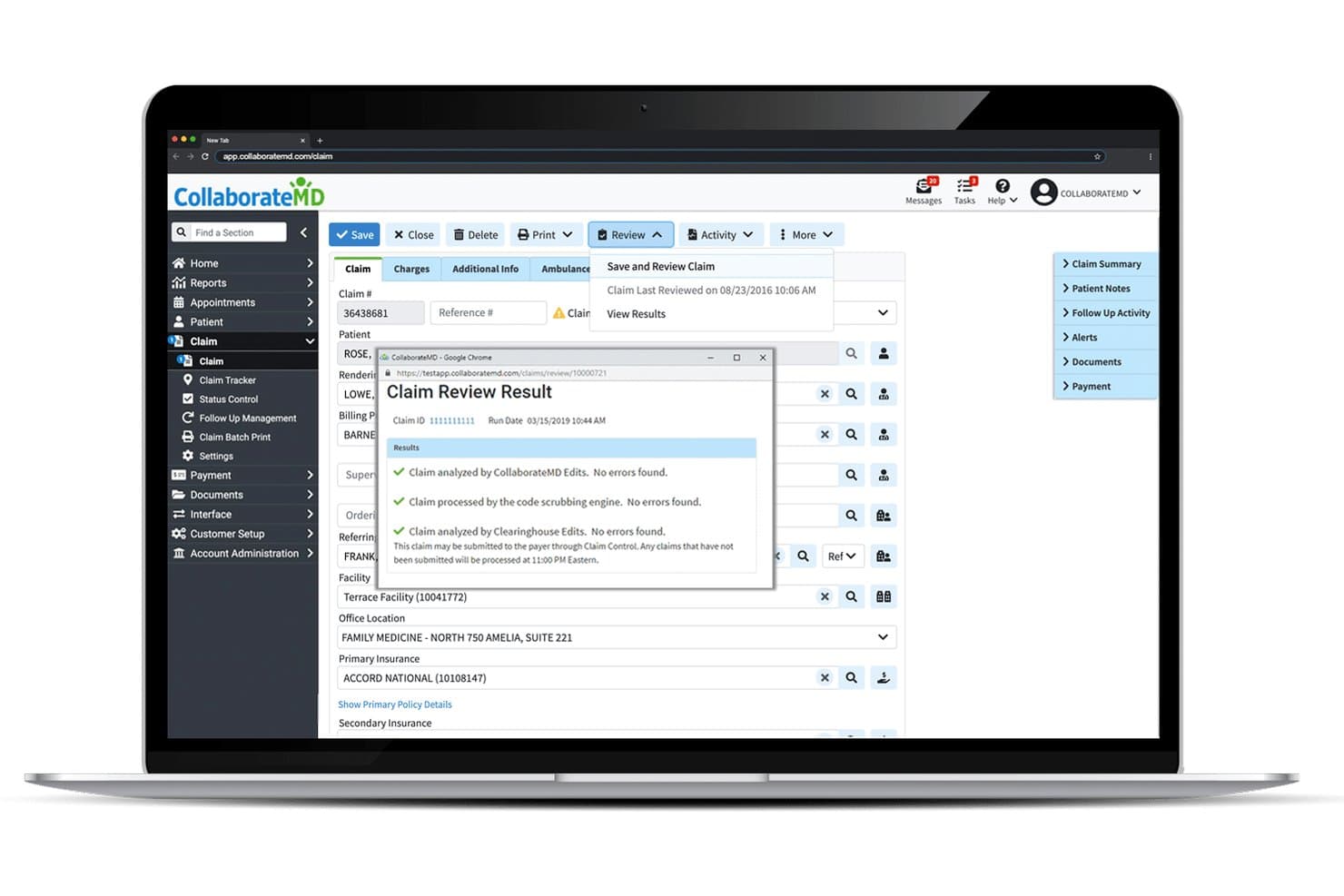
CollaborateMD offers a Claim Review Result modal that displays real-time claim validation checks, including CollaborateMD Edits, code scrubbing, and Clearinghouse Edits with no errors found. CollaborateMD is a cloud-based practice management and medical billing platform with a built-in clearinghouse, lab-specific claim scrubbing, direct LIS integrations, real-time eligibility verification, and patient billing tools.
Who Is CollaborateMD Best For?
CollaborateMD is a strong fit for small to mid-size independent labs, pathology practices, and medical billing companies managing lab claims across multiple specialties.
Why I Picked CollaborateMD
I picked CollaborateMD as one of the best because its built-in clearinghouse gives lab billing teams real-time claim status visibility without relying on a third-party clearinghouse portal. I particularly like the Level 2 Claim Edits, which run NCD, LCD, LMRP, and CCI checks before submission, catching the exact errors that trigger denials on high-volume lab claims. The AI-powered rejection explanations translate cryptic payer rejection codes into plain language, so my team can act on a denial the same day it comes back.
CollaborateMD Key Features
- Direct lab interfaces: Connects with Quest Diagnostics, LabCorp, and LabDAQ for automatic lab charge capture.
- Patient payment portal: Lets patients pay bills and set up payment plans online through a secure portal.
- Customizable reporting: Offers 125+ reports and dashboard tools tailored to lab billing workflow details.
- Intelligent intake forms: Provides digital forms for efficient collection of patient and ordering provider information.
CollaborateMD Integrations
CollaborateMD offers native integrations with Quest Diagnostics, LabCorp, LabDAQ, Practice Fusion, Nexus Clinical, Alleva, and MDTech. An API is available for custom integrations and additional HL7 interfaces.
Pros and Cons
Pros:
- Direct connections to major lab systems
- Level 2 claim edits for lab denials
- Real-time claim status for lab billing
Cons:
- No dedicated CLIA compliance tracking
- Reporting filters limited for complex needs
Learn more about CollaborateMD: Best for integrated EHR connectivity
- Free demo available
- Pricing upon request
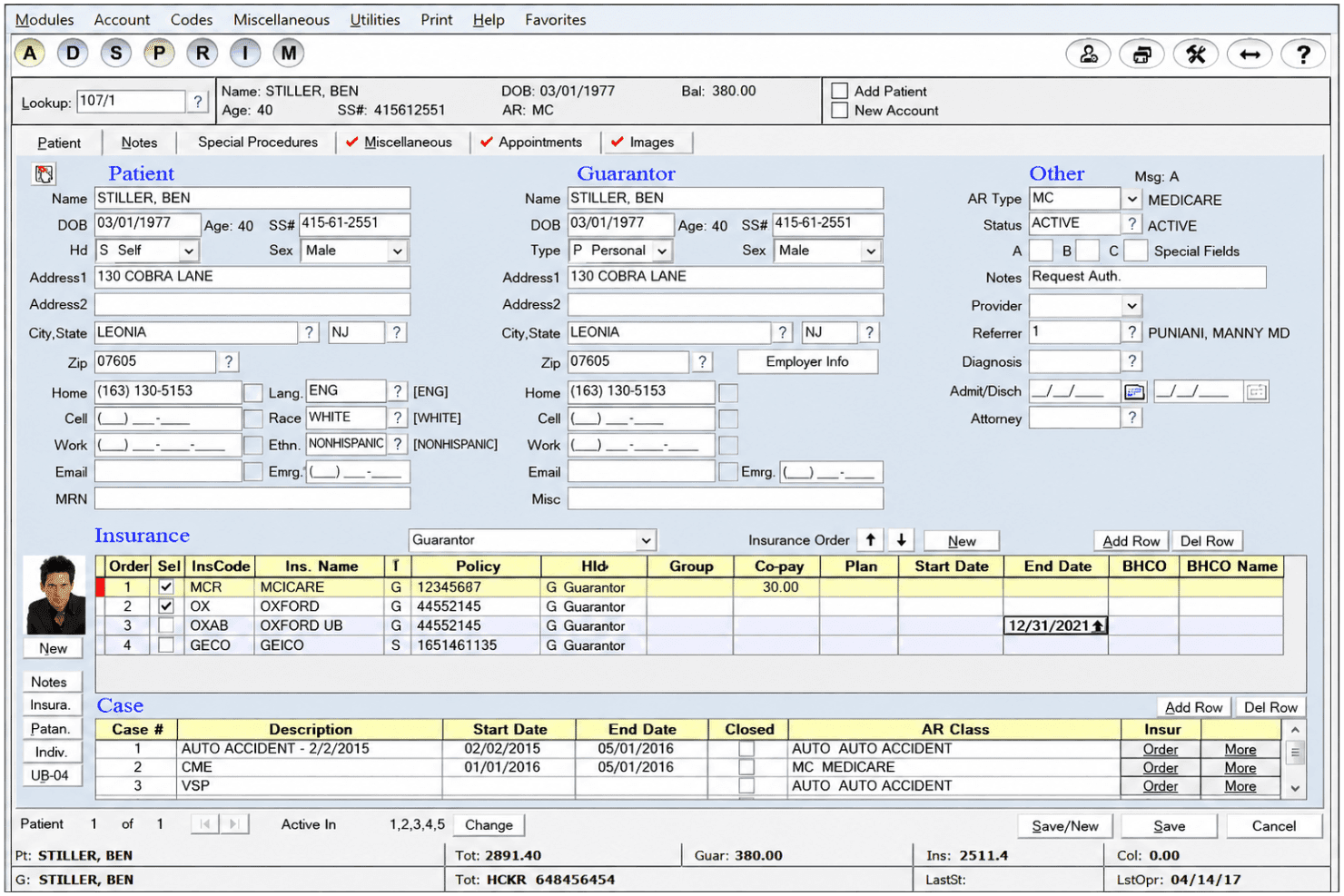
Advanced Data Systems Corporation’s patient management screen displays demographics, guarantor details, insurance policies, case records, and account balances. Advanced Data Systems Corporation is a practice management and revenue cycle platform built for clinical and reference laboratories, covering EDI claims submission, denial management, eligibility verification, and LIS/LIMS-integrated charge capture.
Who Is Advance Data System Corporation Best For?
ADS is a strong fit for pathology practices and clinical reference labs that need billing tightly connected to their existing LIS/LIMS environment.
Why I Picked Advance Data System Corporation
ADS earns its spot on my shortlist because of how it connects to virtually any LIS/LIMS and EHR without requiring a system overhaul. I like that MedicsPremier pulls requisition and order data directly into the billing workflow, removing manual charge entry from the process. Its FHIR compliance and Cures Act certification mean those connections meet current federal interoperability standards, which matters when payers and auditors scrutinize data exchange practices.
Advance Data System Corporation Key Features
- Automated prior authorizations: Flag and process prior auth requirements before submitting lab claims.
- Denials manager: Edit and quickly resubmit denied claims directly from within the platform.
- Customizable lab fee schedules: Set up lab-specific pricing based on CPT, payer, or other criteria.
- Mobile sales activity portal: Sales teams can enter and track lab-related sales activity from phones or tablets.
Advance Data System Corporation Integrations
MedicsPremier integrates with virtually any LIS or LIMS system and is compatible with any EHR and PACS. An API is available for custom integrations.
Pros and Cons
Pros:
- Fully customizable reporting with Excel exports
- Handles explosion codes for multi-CPT lab claims
- Supports multi-entity, multi-location laboratory billing
Cons:
- No dedicated mobile billing app available
- Interface design appears outdated to users
Learn more about Advance Data System Corporation: Best designed for pathology workflows
- Free demo available
- Pricing upon request
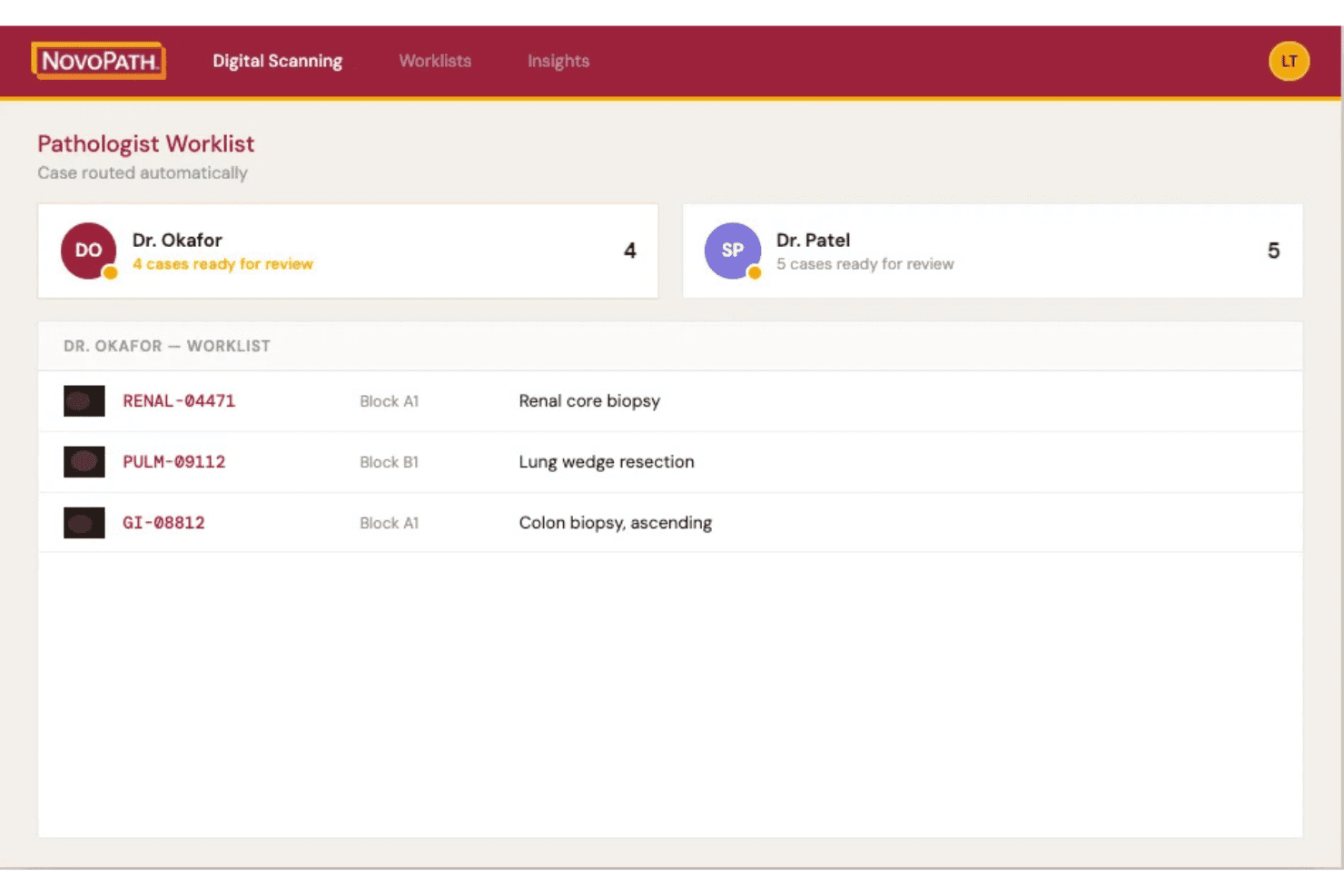
NovoPath 360 connects pathology LIS, billing, claims, charges and case tracking. NovoPath 360 is a cloud-based anatomic pathology LIS with an integrated billing module that covers charge capture, TC/PC billing, claims processing, and specimen tracking across the full pathology case workflow.
Who Is NovoPath 360 Best For?
It's a strong fit for anatomic pathology labs that need billing and LIS functionality managed within a single platform.
Why I Picked NovoPath 360
I picked NovoPath 360 because it handles TC/PC billing natively within the same system where pathologists sign off cases. In practice, that means charge capture happens at the point of case completion rather than being re-entered downstream. The platform's built-in case distribution and accession-to-storage tracking tie directly into billing, so my team isn't reconciling data across separate systems when claims go out.
NovoPath 360 Key Features
- Hands-free grossing with voice recognition: Lets users document gross descriptions and procedures by voice during specimen processing.
- Customizable report templates: Supports building and editing lab-specific reports with flexible layout options.
- Role-based access controls: Administrators can configure user permissions and audit user activity for compliance.
- Real-time dashboards: Displays lab performance, worklists, and analytics for operational insights across billing and LIS workflows.
NovoPath 360 Integrations
NovoPath 360 offers native integrations with Modernizing Medicine and Paragon HIS, supports agnostic HL7 and API connections for EMR and digital pathology systems, and provides an API for custom integrations.
Pros and Cons
Pros:
- Seamless accession-to-storage specimen tracking
- Built-in support for TC/PC billing workflows
- Direct charge capture at case completion
Cons:
- Patient statements and online payments not supported
- No denial management or appeals automation
Learn more about NovoPath 360: Best for tailored revenue cycle modules
- Free demo available
- Pricing upon request
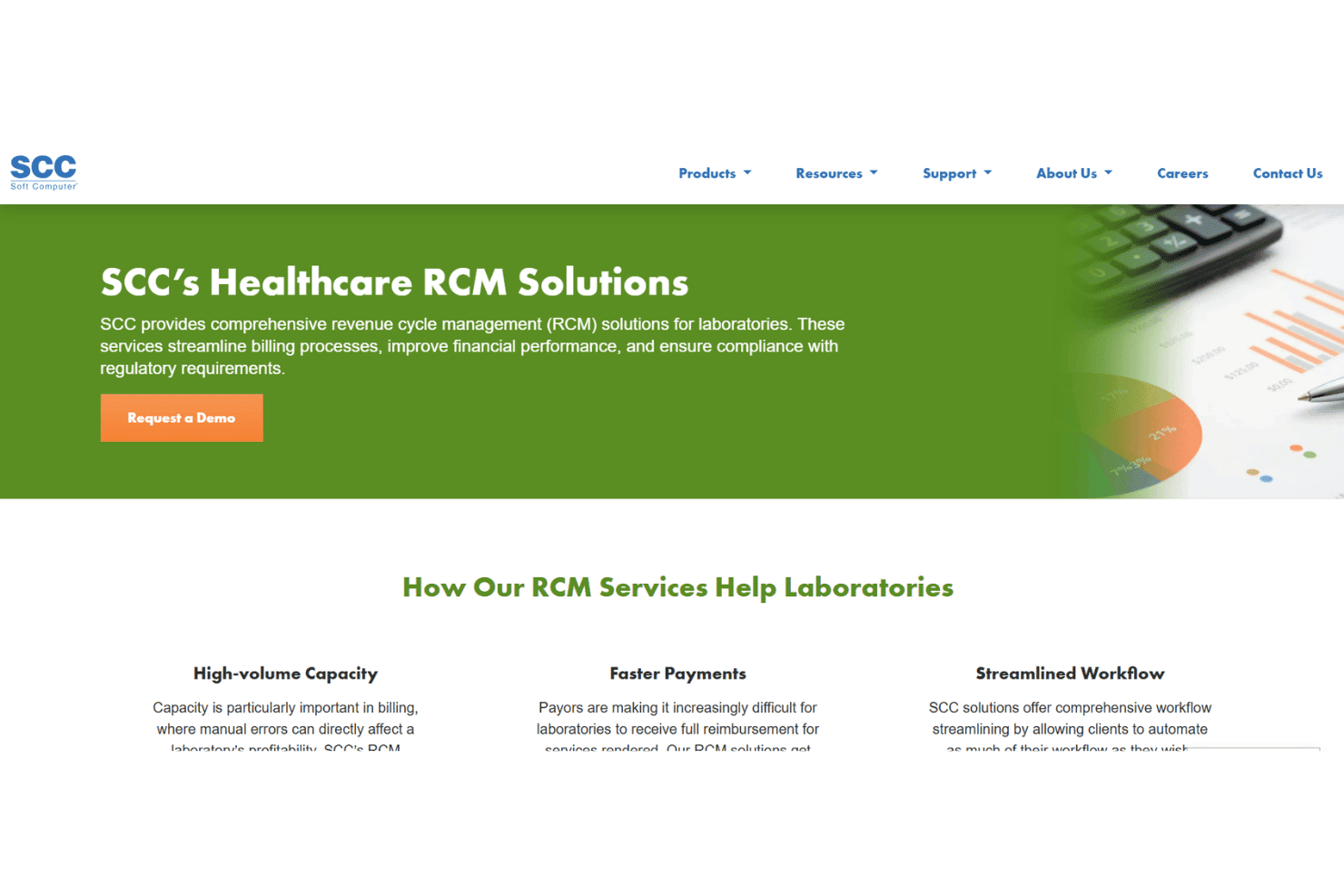
SCC Soft Computer links lab claims, LIS, eligibility checks, and AR management. SCC Soft Computer is a laboratory-focused revenue cycle management platform covering claims automation, LIS integration, eligibility verification, and AR management across clinical, pathology, genetics, and molecular lab settings.
Who Is SCC Soft Computer Best For?
It's a strong fit for mid-to-large clinical, pathology, genetics, and molecular labs that need billing tightly coupled with their existing laboratory information system.
Why I Picked SCC Soft Computer
SCC Soft Computer earns its spot on my shortlist because the RCM platform is built around lab type, not retrofitted for it. I particularly like the Demographic Bridge, which pulls patient demographics and insurance directly from a physician's PMS into the lab ordering system, eliminating manual reentry at claim time. For genetics and pathology labs, the companion SoftGenomics and SoftPath modules add billing logic specific to those disciplines, which most general RCM tools don't offer.
SCC Soft Computer Key Features
- EMR Connectivity hub: Creates two-way connectivity with 500+ EMR and practice management systems.
- Financial analytic reporting: Compares expected versus actual reimbursement to pinpoint payer errors.
- Courier tracking module: Manages route dispatch and specimen pickup documentation across locations.
- Inventory management tools: Tracks lab outreach supply inventories and back orders in real time.
SCC Soft Computer Integrations
SCC Soft Computer offers native integrations with 500+ EMR and practice management systems, including SoftLab, SoftPath, SoftGenomics, and SoftMolecular, with an API available for custom integrations.
Pros and Cons
Pros:
- Dedicated modules for genetics and pathology labs
- Advanced financial analytic and AR tools
- Deep integration with SoftLab LIS ecosystem
Cons:
- Sales-led onboarding, no self-service setup
- Outdated user interface on older modules
Learn more about SCC Soft Computer: Best for small to mid-sized lab operations
- Free demo available
- Pricing upon request
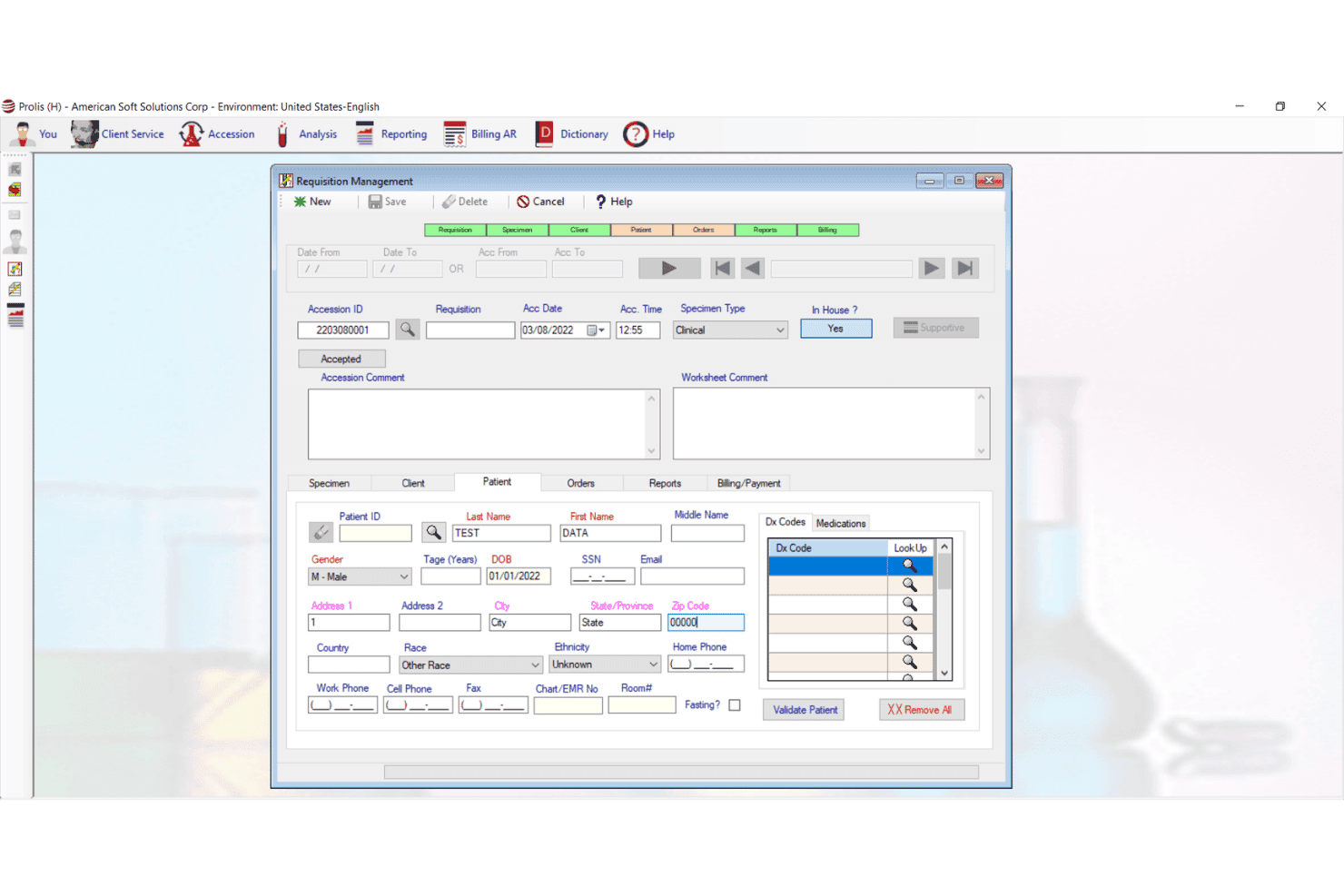
Prolis LIS offers a Requisition Management screen with patient demographics, accession details, diagnosis codes, and billing fields for streamlined laboratory billing workflows. Prolis LIS is a unified laboratory information system with a built-in revenue cycle management engine covering lab-specific coding, claims scrubbing, eligibility verification, and denial management across clinical, pathology, toxicology, and molecular lab settings.
Who Is Prolis LIS Best For?
Prolis LIS suits independent and small to mid-sized labs that want billing and LIS functionality in a single system without managing a separate integration.
Why I Picked Prolis LIS
I've included Prolis LIS in my top picks because the billing engine is built directly into the LIS, meaning small labs don't need a separate RCM vendor. I particularly like the specialty coding modules, which handle toxicology G-codes, molecular MAAA and PLA codes, and anatomic pathology 88xxx codes natively. Real-time eligibility checks across 1,800+ payers, including ABN generation at order entry, catch coverage issues before claims go out.
Prolis LIS Key Features
- Multi-analyzer and instrument connectivity: Connects directly to lab machines using HL7 or ASTM interfaces for automated data flow.
- Revenue intelligence dashboards: Tracks Days in AR, denial rate, net collection ratio, and clean claim rate for lab billing performance.
- Automated claim scrubbing: Built-in payer edit rules validate ANSI X12 837 files and catch errors before submission.
- Patient payment portal: Lets labs send digital statements and collect patient payments online.
Prolis LIS Integrations
Prolis LIS offers native integrations with Epic, Cerner, Athenahealth, and DrChrono through bi-directional HL7 and FHIR interfaces. Analyzer connectivity is enabled via Prolis Bridge, and an API is available for custom integrations.
Pros and Cons
Pros:
- Offers robust root-cause denial analytics
- Handles specialty lab codes and panels
- Built-in LIS and billing in one platform
Cons:
- Limited patient payment plan options
- Outdated desktop-style interface design
Learn more about Prolis LIS: Best unified LIS and billing platform
- Free demo available
- Pricing upon request
Visit WebsiteCustomer Rating:4.6/5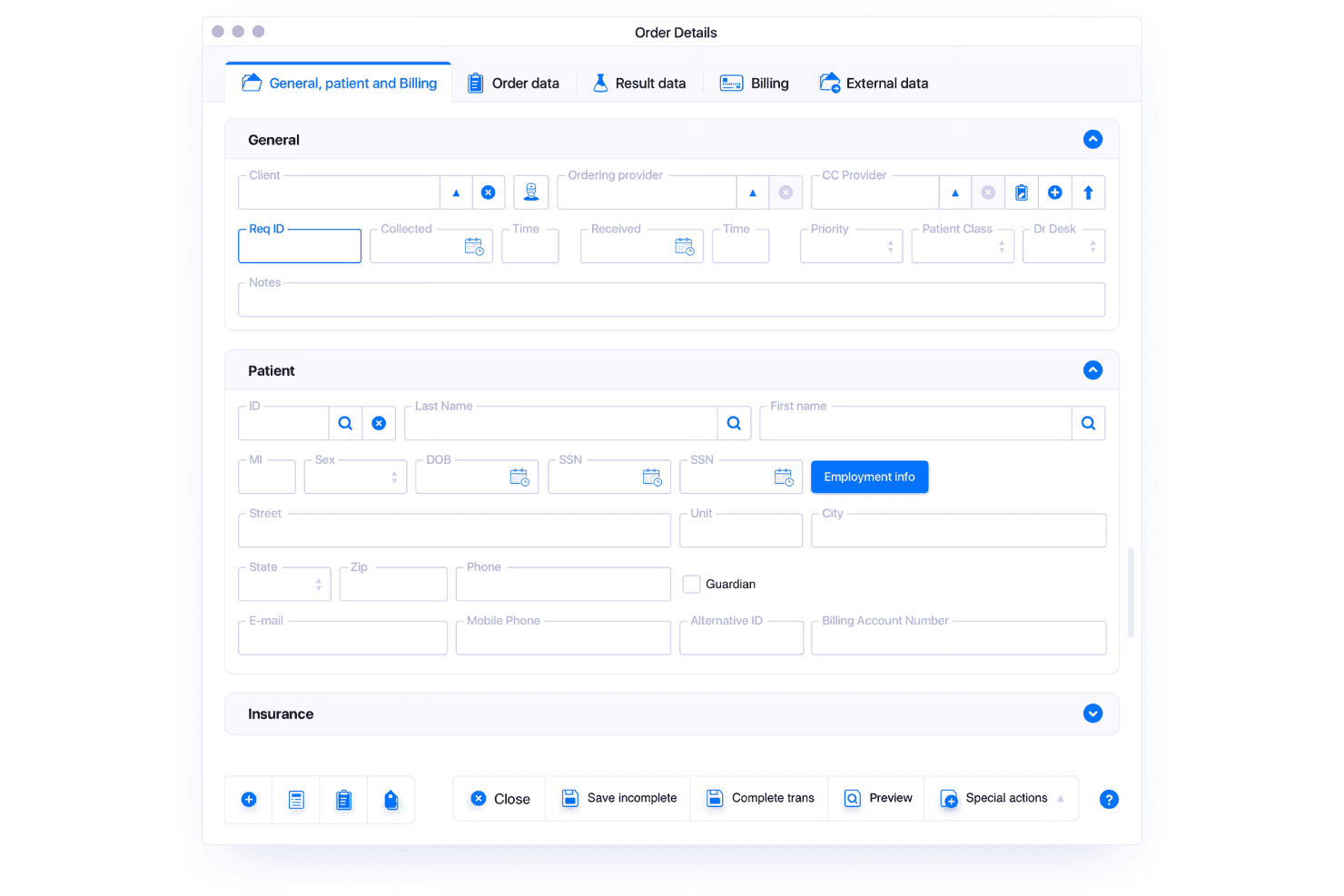
LigoLab unifies LIS, RCM, coding, claims, eligibility, and denial workflows. LigoLab is a unified laboratory informatics platform that combines a full LIS with an integrated RCM module, supporting anatomic pathology, clinical pathology, molecular diagnostics, automated CPT/ICD coding, claims scrubbing, eligibility verification, and denial management on a single shared database.
Who Is LigoLab Best For?
LigoLab is built for mid-to-large clinical laboratories and pathology groups that need both LIS and billing managed within a single platform.
Why I Picked LigoLab
LigoLab earns its spot as one of the best on my shortlist because the LIS and RCM modules share one database, so coding, scrubbing, and eligibility checks happen within the same workflow as specimen processing. I particularly like the rule engine, which covers AMA guidelines, Medicare policies, and custom payer requirements without manual workarounds. Automated CPT and ICD coding pulls from case data directly, giving coders instant access to reports, diagnoses, and stains when building claims.
LigoLab Key Features
- Integrated document management: Store and manage all case-related documentation within a single platform.
- Direct-to-consumer module: Support home collection workflows and direct patient ordering for lab tests.
- Peer review tools: Facilitate structured review and approval workflows for pathology cases.
- Patient portal: Give patients access to lab results, statements, and billing through a secure online portal.
LigoLab Integrations
LigoLab offers native integrations with Beckman Coulter, Roche, Siemens, ZEBRA, USPS, and General Data for lab instruments, data exchange, and billing workflows. An API is available for custom integrations.
Pros and Cons
Pros:
- Supports high-volume sample and claims processing
- Real-time claims scrubbing with rule engine
- Unified LIS and billing on one platform
Cons:
- Requires significant onboarding for configuration setup
- Limited documentation for patient payment plans
Learn more about LigoLab: Best for high-volume claims management
- Free demo available
- Pricing upon request
Visit WebsiteCustomer Rating:3.8/5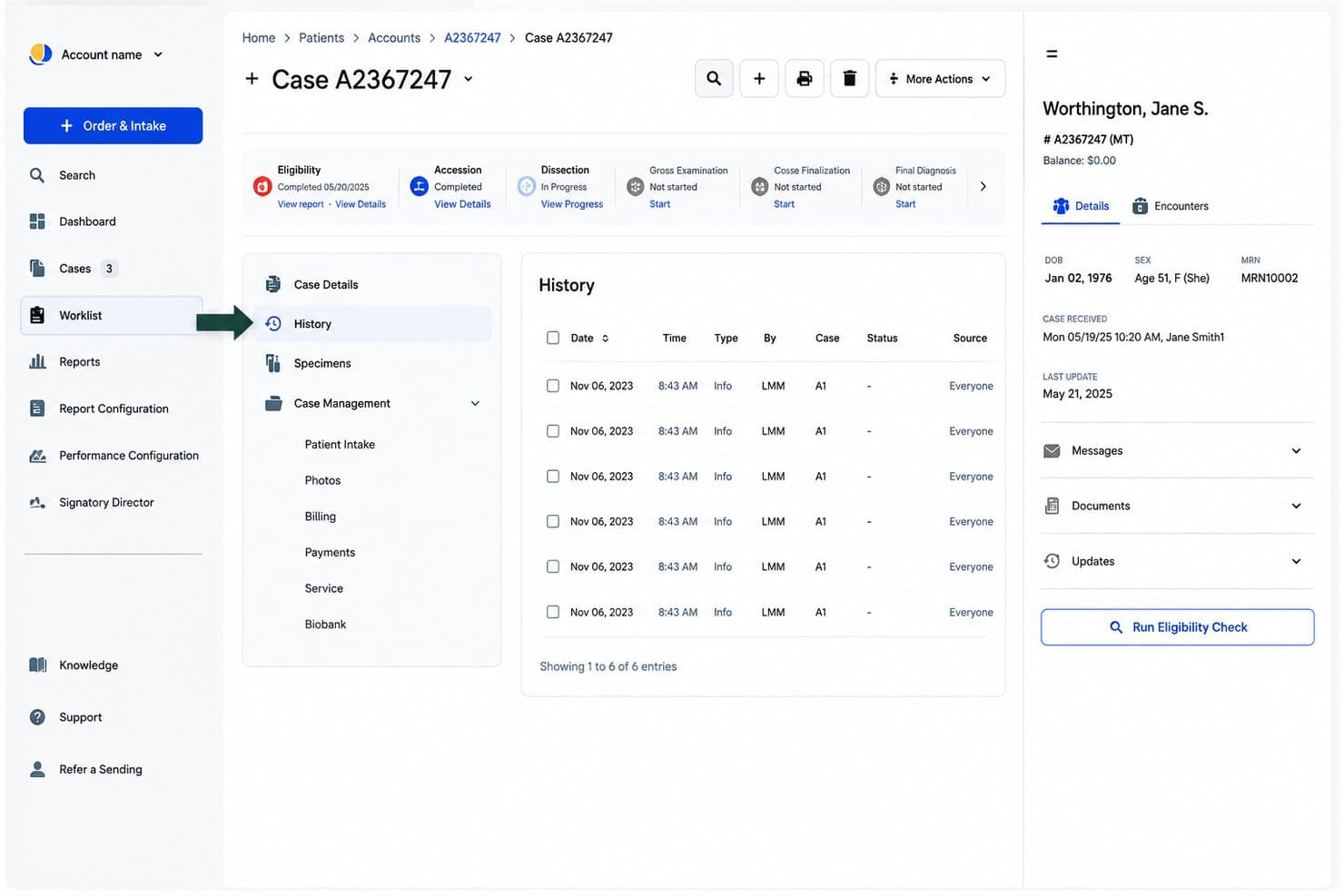
Quadax coordinates claims, eligibility, authorizations, denials, and billing. Quadax is a laboratory revenue cycle management platform that covers claims submission, eligibility verification, prior authorization, denial management, and patient billing across clinical, pathology, and molecular testing workflows.
Who Is Quadax Best For?
Quadax is a strong fit for mid-to-large clinical and pathology labs with high claim volumes that need full RCM coverage across BPO, SaaS, or hybrid delivery models.
Why I Picked Quadax
I picked Quadax as one of the best because its Xpeditor clearinghouse is built specifically to handle the editing complexity that comes with high-volume lab claims. Where most billing tools process claims generically, Xpeditor runs payer-specific EDI edits before submission, catching errors that would otherwise generate denials across thousands of daily claims. I also like that the prior authorization module verifies medical necessity criteria at the pre-claim stage, so denials don't pile up downstream.
Quadax Key Features
- Real-time eligibility verification: Check patient insurance coverage instantly before processing claims.
- Decision Intelligence analytics: Get actionable data for revenue tracking and workflow transparency.
- Patient billing portal: Allow patients to view and pay lab invoices online through a secure portal.
- Integrated PAMA reporting: Collect and submit required Protecting Access to Medicare Act data automatically.
Quadax Integrations
Native integrations are not clearly documented. The tool supports integrations via API and offers connectivity with EHR systems like MEDITECH.
Pros and Cons
Pros:
- Built-in PAMA and compliance reporting features
- Robust denial and appeal management options
- High-volume claims scrubbing tailored for labs
Cons:
- Limited public documentation for self-serve setup
- LIS integration specifics unclear pre-sales
Learn more about Quadax: Best for complex multi-site integration
- Free demo available
- Pricing upon request
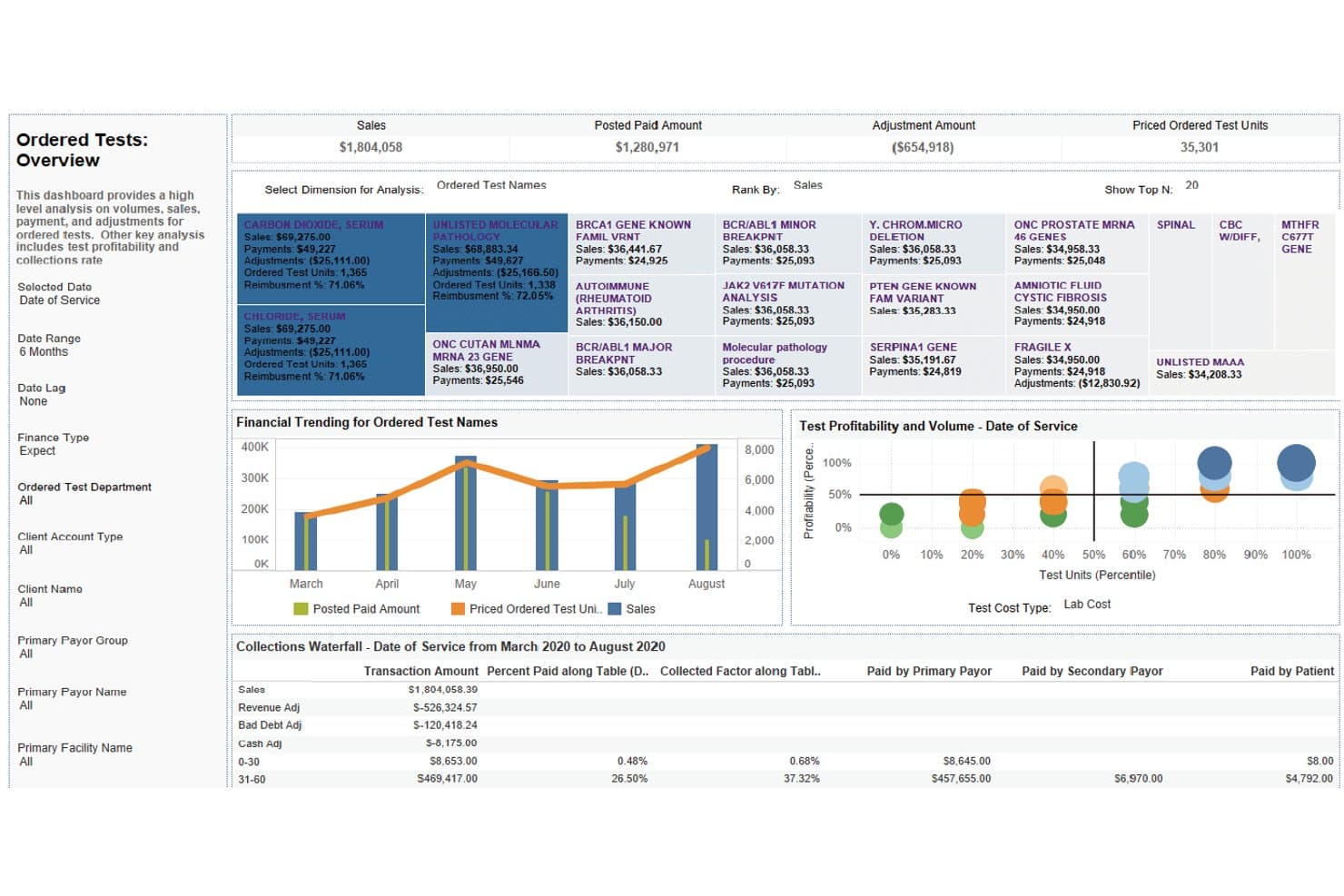
XiFin RPM offers an Ordered Tests Overview dashboard with financial trending, test profitability, and collections waterfall analysis for laboratory billing management. XiFin RPM is a diagnostic-specific revenue cycle management platform that handles claims submission, denial management, eligibility verification, and patient billing for clinical laboratories and diagnostic providers.
Who Is XiFin RPM Best For?
XiFin RPM is a strong fit for large diagnostic providers and health systems running high-volume lab billing across multiple sites or acquired facilities.
Why I Picked XiFin RPM
I picked XiFin RPM as one of the best because its sub-client ID system lets each department or acquired facility be tracked independently within a single billing environment. I particularly like how billing teams can configure separate fee schedules, invoice frequencies, and sort orders on a per-client basis. RPM 10 also includes dedicated tools for lab acquisition and divestiture workflows, keeping billing continuity intact during organizational changes.
XiFin RPM Key Features
- Machine learning-driven claims scrubbing: Applies real-time edits and payer-specific rules during claim preparation.
- Patient responsibility estimator: Provides out-of-pocket estimates within a patient portal for greater transparency.
- Automated insurance discovery: Pulls enhanced patient demographic data to reduce eligibility rejections.
- Denial analytics dashboard: Visualizes denial root causes and payer trends with interactive business intelligence tools.
XiFin RPM Integrations
XiFin RPM offers native integrations with Dendi LIS and IAL (InterActive Lab). Expanded web service capabilities are available for interoperability, and an API is available for custom integrations.
Pros and Cons
Pros:
- Patient responsibility estimator included
- Detailed denial root cause analysis tools
- Complex multi-site lab structures supported
Cons:
- Initial system setup can be lengthy
- Native LIS integrations are limited
Learn more about XiFin RPM: Best with customizable workflow automation
- Free demo available
- Pricing upon request
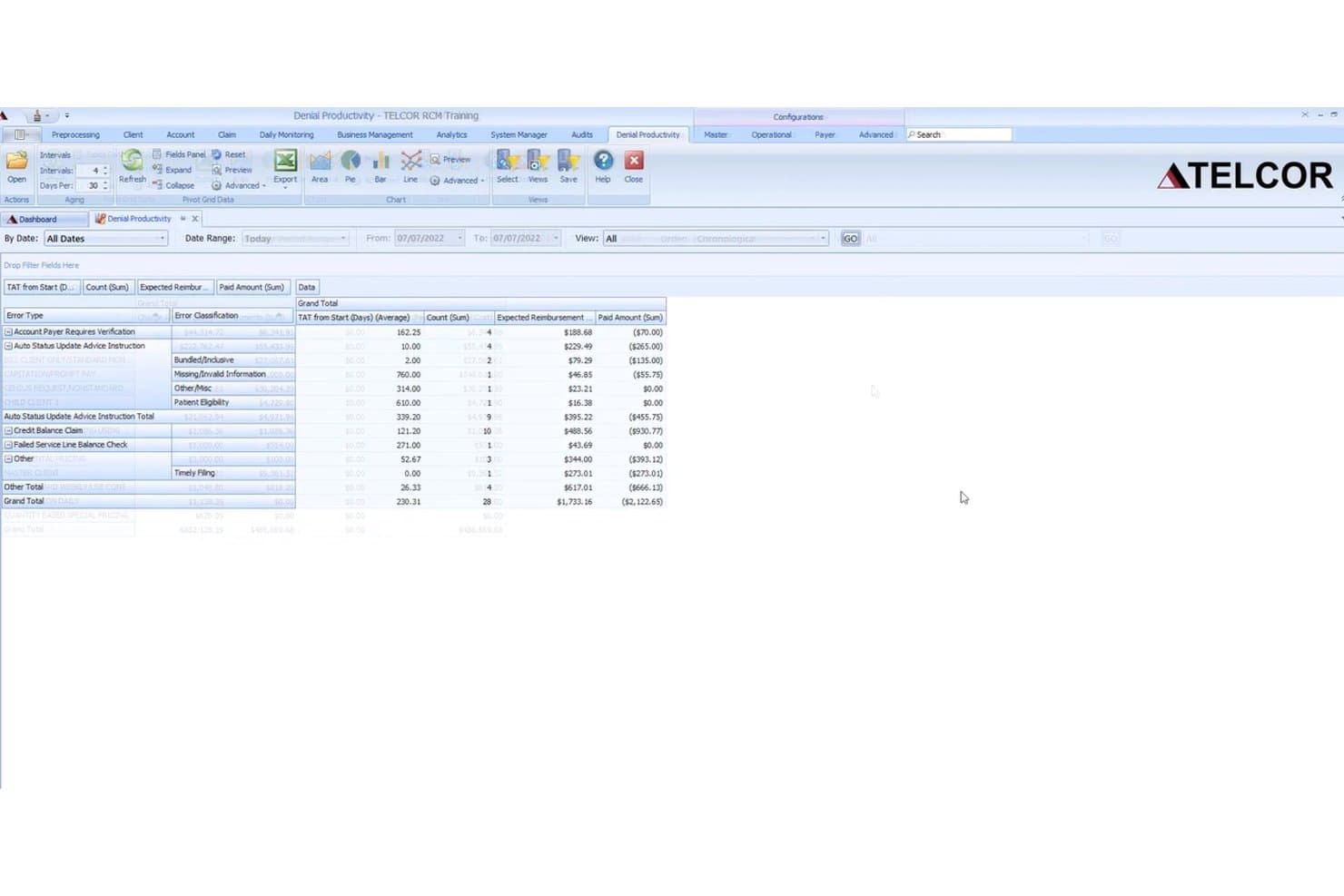
TELCOR RCM offers a Denial Productivity dashboard that displays error types, TAT averages, claim counts, expected reimbursements, and paid amounts to help laboratories manage billing denials. TELCOR RCM is a revenue cycle management platform built specifically for clinical, pathology, molecular, and toxicology labs, covering claims scrubbing, denial management, remittance processing, and patient and client billing.
Who Is TELCOR RCM Best For?
TELCOR RCM is a strong fit for pathology practices and high-volume clinical labs that need configurable billing workflows across multiple payer types.
Why I Picked TELCOR RCM
I picked TELCOR RCM as one of the best because the workflow customization goes well beyond standard settings. I can configure workqueue routing, automation rules, and payer-specific edits at the user-profile level, so each billing specialist sees only what's relevant to their claim type. The rules engine handles MUE rule application and split billing for professional and technical components, which are genuinely lab-specific needs.
TELCOR RCM Key Features
- Denial management dashboard: Track, categorize, and analyze denial trends with real-time and historical reporting tools.
- Automated remittance posting: Process unlimited 835 electronic remittance files for automatic payment reconciliation.
- Patient and client billing portals: Enable online payments for clients and patients through integrated web portals.
- Productivity tracking: Monitor over 1,700 user and system events for granular insight into billing team activity.
TELCOR RCM Integrations
TELCOR RCM offers native integrations with laboratory information systems, electronic health records, and clearinghouses, and provides an API for custom integrations. It also supports lockbox integrations for automated payment posting.
Pros and Cons
Pros:
- Granular productivity and denial reporting tools
- Advanced payer-specific rules engine for claims
- Fully configurable workflow automation for labs
Cons:
- No transparent pricing or online quote
- Eligibility verification depth is limited
Learn more about TELCOR RCM: Best for practices needing advanced analytics
- Free demo available
- Pricing upon request
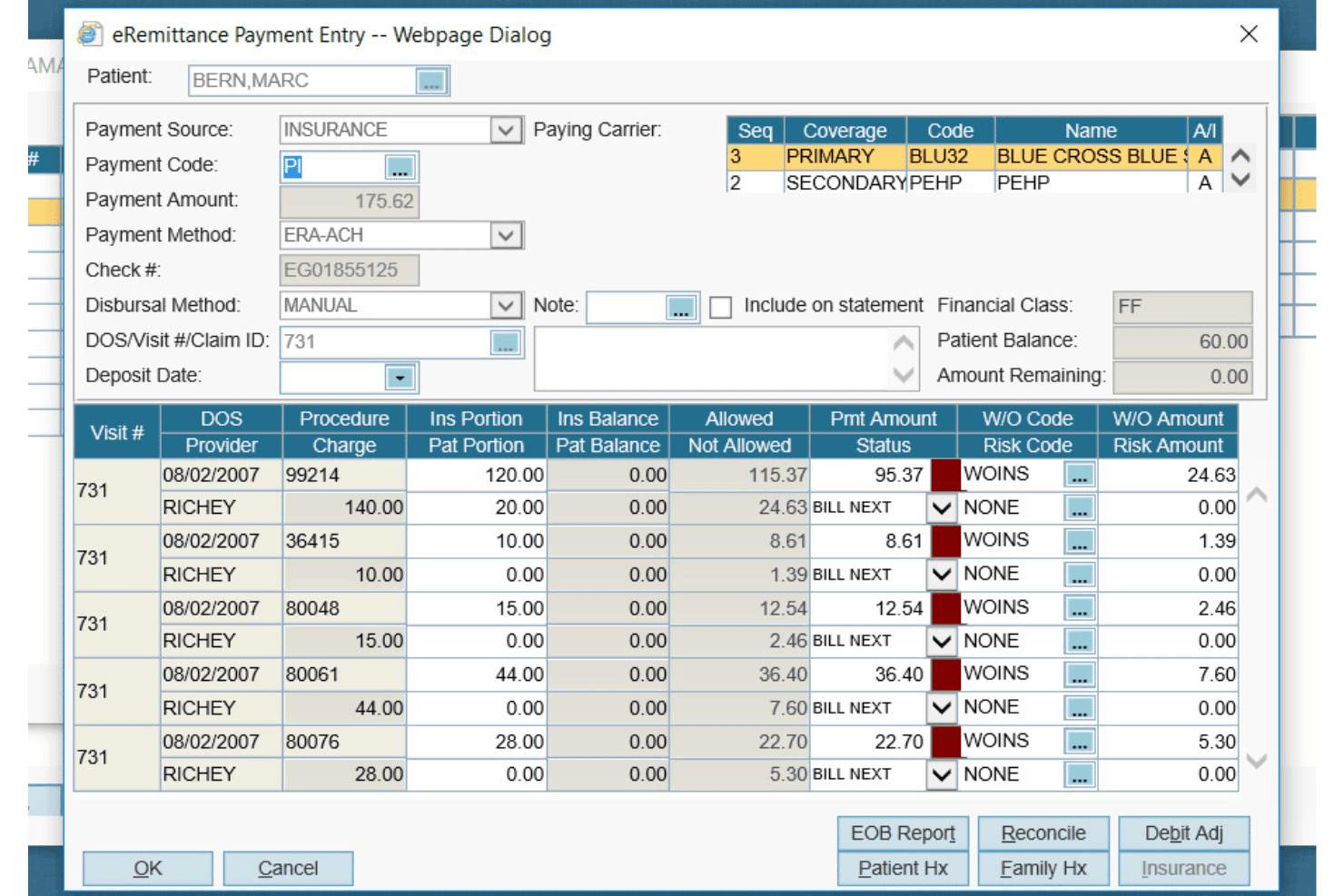
AdvancedMD Laboratory handles claims, eligibility, denials, billing and charges. AdvancedMD Laboratory is a cloud-based laboratory billing software built for independent and pathology labs, covering LIMS-integrated charge capture, claims scrubbing, eligibility verification, denial management, and patient billing.
Who Is AdvancedMD Laboratory Best For?
It's a strong fit for independent clinical and pathology labs that manage complex payer mixes and need a purpose-built billing platform rather than a generic medical billing solution.
Why I Picked AdvancedMD Laboratory
AdvancedMD Laboratory earns its spot on my shortlist because of AdvancedInsight, a pathology-specific analytics layer built on top of a 650-report engine. I use it to break down revenue by payer, test type, and denial reason in ways a standard billing platform can't. ClaimInspector adds pre-submission intelligence too, running 3.5 million edits against CCI, LCD, and carrier-specific rules before a claim ever reaches the clearinghouse.
AdvancedMD Laboratory Key Features
- LIMS integration: Connects bi-directionally to leading laboratory information management systems for synchronized requisition and charge data.
- Automated clearinghouse: Submits lab claims electronically to over 1,800 insurance carriers with built-in remittance management.
- Eligibility verification: Provides real-time patient insurance checks before processing lab orders with options for batch or one-click validation.
- Patient billing by specimen: Allows labs to bill by individual specimen or order and automate statement triggers and collections handoff.
AdvancedMD Laboratory Integrations
AdvancedMD Laboratory offers native integrations with leading laboratory information management systems (LIMS), AWS for cloud hosting, and supports QuickBooks export via CSV. An API is available for custom integrations.
Pros and Cons
Pros:
- Automated claim edits for laboratory codes
- Centralized denial and AR worklists
- Advanced analytics for payer and test tracking
Cons:
- Interface may feel dated compared to alternatives
- Limited scheduling features for lab appointments
Learn more about AdvancedMD Laboratory:
Outro software de faturação laboratorial
Eis algumas opções adicionais de software de faturação laboratorial que não chegaram à minha lista restrita, mas que ainda vale a pena conhecer:
- 11PGM BillingBest for outsourced billing partnership
- 12CGM SCHUYLABBest for multi-language interface support
- 13ClinisysBest for scalable enterprise deployments
- 14Imagine SoftwareBest with AI-powered claim scrubbing
- 15CurlWareBest for pathology billing automation
- 16eLabAssistBest for mobile result accessibility
- 17LIM SIQBest for multi-country compliance standards
- 18Psyche SystemsBest for specialty lab customization
- 19Avalon Laboratory SystemBest for toxicology lab workflows
- 20Lifepoint InformaticsBest for integrated connectivity solutions
How I Evaluate Laboratory Billing Software
I evaluate lab billing tools across two layers: the baseline requirements—like LIS integration and CPT/HCPCS support—and the differentiators, like denial automation and payer rules engines.
Core Functionality (Table Stakes For This List)
When I'm selecting tools for my list, I rank each one on a scale from 0 (does not offer the functionality) to 5 (excels in this area) for each core functionality listed below. Then, I calculate the tool's total score into a percentage. Each tool needs to achieve a minimum total score of 65% to be considered for inclusion.
- Lab-Specific Coding: I check whether the platform natively supports lab CPT, HCPCS, and ICD-10 codes with built-in LCD/NCD validation and edits for molecular or genetic testing panels.
- LIS/LIMS Integration: Bi-directional data flow between billing and your LIS matters. I evaluate whether requisitions, orders, and results feed directly into charge capture via HL7 or API.
- Claims Scrubbing & Submission: I look for automated scrubbing engines that catch lab-specific errors—like missing modifiers on 14x TOB claims—before electronic submission to clearinghouses.
- Denial & AR Management: High-volume labs deal with thousands of low-dollar denials. I evaluate whether the tool offers denial categorization, appeals workflows, and AR aging reports by test type.
- Eligibility & Medical Necessity: Real-time eligibility checks at order entry prevent downstream issues. I look for ABN generation and automated medical necessity screening tied to payer coverage policies.
- Patient Billing & Payments: With patient responsibility balances growing, I evaluate whether the platform supports digital statements, online payment portals, and self-pay payment plan options.
Once I have a list of tools that meet the criteria, I consider what sets each platform apart.
Differentiating Factors (What Sets Vendors Apart)
Here's how I compare and contrast different vendors:
Standout Features
Molecular and genetic test billing is a major differentiator. I look for platforms that handle stacked CPT codes, Z-codes, and MolDX requirements without manual workarounds—labs running genomic panels need this built in, not bolted on. A payer rules engine also separates strong platforms from average ones, since automated LCD/NCD updates catch denial-prone claims before they're submitted. I evaluate client bill management closely too, because labs that serve referring physicians and hospitals need split billing on the same requisition with flexible fee schedules.
Beyond Features
Lab specialty fit is something I weigh heavily. A platform built for clinical chemistry billing won't handle anatomic pathology CPT codes or specimen-level charge capture the same way. I also evaluate the service model—whether a vendor offers software-only, full-service RCM, or a hybrid—since labs with lean billing teams often need end-to-end outsourcing. Compliance posture matters too. I check for HIPAA and SOC 2 certifications, PAMA reporting support, and audit trail depth to withstand ZPIC or RAC reviews.
Como escolher software de faturação laboratorial
É fácil perder-se em listas extensas de funcionalidades e estruturas de preços complexas. Para o ajudar a manter-se concentrado enquanto percorre o seu processo específico de seleção de software, apresentamos uma lista de verificação com os fatores a ter em conta:
| Fator | O que considerar |
|---|---|
| FatorEscalabilidade | O que considerarO software acompanhará o crescimento à medida que o volume de testes, a combinação de entidades pagadoras ou os locais do laboratório aumentarem? Pergunte aos fornecedores sobre cenários semelhantes aos seus planos de crescimento. |
| FatorIntegrações | O que considerarA ferramenta integra-se bidirecionalmente com o seu LIS, EHR e parceiros de plataformas de compensação? Confirme a compatibilidade das interfaces, as taxas recorrentes e as responsabilidades de manutenção do fornecedor. |
| FatorPersonalização | O que considerarAs regras de faturação, os relatórios e os fluxos de trabalho dos utilizadores podem ser adaptados às especialidades específicas do seu laboratório e às necessidades dos clientes sem uma intervenção extensa do fornecedor? |
| FatorFacilidade de utilização | O que considerarA interface é intuitiva para as equipas de faturação e do laboratório? Configurações complexas podem criar dificuldades de formação e atrasos na adoção. Solicite uma demonstração adaptada aos seus fluxos de trabalho reais. |
| FatorImplementação e integração inicial | O que considerarQuanto tempo demora o processo de configuração? Quem orienta a implementação e o que é necessário da parte da sua equipa? Obtenha informações detalhadas sobre a migração de dados, a configuração e os prazos de ligação ao LIS. |
| FatorCusto | O que considerarComo estão estruturadas as taxas—por reclamação, taxa fixa, percentagem das cobranças? Assegure-se de que todos os itens estão claros, incluindo custos adicionais e flexibilidade contratual para futuras alterações. |
| FatorMedidas de segurança | O que considerarQue certificações e protocolos estão implementados para proteger os dados de saúde protegidos (PHI) e os dados financeiros? Confirme a conformidade com a HIPAA e pergunte por auditorias e controlos de segurança recentes. |
| FatorRequisitos de conformidade | O que considerarA plataforma aborda a regulamentação atual da faturação laboratorial, as regras das entidades pagadoras e os requisitos específicos de cada país ou estado? Pergunte como são comunicadas e geridas as atualizações. |
O que é software de faturação laboratorial?
O software de faturação laboratorial é uma plataforma especializada que gere os fluxos de trabalho específicos de codificação, reclamações e pagamentos necessários aos laboratórios clínicos e de anatomia patológica. Liga os dados dos testes, trata dos requisitos dos seguros relativos a testes específicos de laboratório e ajuda a reduzir as reclamações rejeitadas, automatizar a faturação dos doentes e garantir a conformidade com a regulamentação dos cuidados de saúde. Os sistemas de faturação laboratorial foram concebidos para apoiar ambientes de grande volume e com muitos detalhes, nos quais a precisão e a integração dos fluxos de trabalho são fundamentais.
Funcionalidades do software de faturação laboratorial
Ao selecionar um software de faturação laboratorial, procure as seguintes funcionalidades principais:
- Codificação específica para laboratórios: Suporta códigos laboratoriais CPT, HCPCS e ICD-10, com validação integrada para requisitos de testes complexos e moleculares.
- Verificação de pedidos: Verifica automaticamente os pedidos quanto a erros, dados em falta e requisitos específicos das entidades pagadoras antes da submissão, para reduzir as recusas.
- Integração com LIS/LIMS: Liga-se bidirecionalmente aos sistemas de informação laboratorial para importar pedidos de testes, resultados e dados dos doentes para os fluxos de faturação.
- Gestão de recusas: Acompanha e categoriza pedidos recusados e disponibiliza fluxos de trabalho para a sua resolução, incluindo recursos automatizados e análise da causa principal.
- Verificação da elegibilidade em tempo real: Confirma a cobertura do seguro e verifica a necessidade médica no momento da introdução do pedido, para reduzir os pedidos rejeitados.
- Portal de faturação dos doentes: Disponibiliza extratos digitais, opções de pagamento online e gestão de planos de pagamento para pagamentos diretos e faturação de saldos.
- Gestão da faturação dos clientes: Permite a faturação dividida, suporta diferentes tabelas de preços e gere a faturação do cliente, do seguro e do doente numa única requisição.
- Acompanhamento da conformidade: Monitoriza a conformidade com a HIPAA, a CLIA e as políticas das entidades pagadoras, através de atualizações automáticas e documentação pronta para auditorias.
- Relatórios automatizados: Disponibiliza painéis e relatórios personalizados sobre finanças, antiguidade das contas a receber, distribuição das entidades pagadoras e tendências das recusas, para apoiar a tomada de decisões.
- Fluxos de trabalho para autorizações prévias: Simplifica o processo relativo a testes que exigem aprovação, automatizando o acompanhamento da documentação e a submissão às entidades pagadoras.
Vantagens do software de faturação laboratorial
A implementação de um software de faturação laboratorial proporciona várias vantagens para a sua equipa e para a sua empresa. Eis algumas que pode esperar:
- Reembolsos mais rápidos: A submissão e a verificação automatizadas dos pedidos ajudam a reduzir os erros, acelerando os pagamentos das entidades pagadoras e dos doentes.
- Menores taxas de recusa: As edições em tempo real, as regras das entidades pagadoras e as verificações de elegibilidade reduzem os pedidos rejeitados ou recusados desde o início.
- Fluxos de trabalho simplificados: A integração bidirecional com o LIS e as ferramentas de gestão de recusas poupam tempo à equipa e reduzem a introdução manual de dados em todo o ciclo de receitas.
- Conformidade melhorada: As validações integradas mantêm os processos de faturação alinhados com os requisitos da HIPAA, da CLIA e das políticas das entidades pagadoras, reduzindo os riscos de auditoria.
- Maior visibilidade financeira: Os relatórios automatizados, os painéis de análise e o acompanhamento das contas a receber facilitam a identificação de tendências, problemas e oportunidades.
- Pagamentos dos doentes otimizados: Os extratos digitais, os portais online e as opções de planos de pagamento melhoram o envolvimento dos doentes e ajudam os laboratórios a cobrar os saldos em dívida.
- Faturação flexível: O suporte para faturação dividida entre cliente, doente e seguro assegura processos eficientes em contextos laboratoriais especializados, de referência e de grande volume.
Custos e preços do software de faturação laboratorial
A seleção de um software de faturação laboratorial exige uma compreensão dos vários modelos de preços e planos disponíveis. Os custos variam consoante as funcionalidades, a dimensão da equipa, os complementos e outros fatores. A tabela abaixo resume os planos comuns, os respetivos preços médios e as funcionalidades normalmente incluídas nas soluções de software de faturação laboratorial:
Tabela de comparação de planos para software de faturação laboratorial
| Tipo de plano | Preço médio | Funcionalidades comuns |
|---|---|---|
| Tipo de planoPlano gratuito | Preço médio$0 | Funcionalidades comunsGestão básica de pedidos, suporte limitado à codificação, submissão manual de pedidos e relatórios mínimos. |
| Tipo de planoPlano pessoal | Preço médio$50-$150/utilizador/mês | Funcionalidades comunsFuncionalidades de codificação padrão, integração LIS simples, pedidos eletrónicos e acompanhamento limitado de recusas. |
| Tipo de planoPlano empresarial | Preço médio$300-$600/mês | Funcionalidades comunsBibliotecas de codificação avançadas, verificação automatizada, integrações robustas com LIS/EHR, fluxos de trabalho para recusas, verificações de elegibilidade e ferramentas de faturação dos doentes. |
| Tipo de planoPlano empresarial avançado | Preço médio$1000+/mês | Funcionalidades comunsSuporte completo para códigos laboratoriais, integrações em tempo real, fluxos de trabalho personalizáveis, ferramentas de conformidade, análises detalhadas, suporte para vários locais e integração inicial dedicada. |
Perguntas frequentes sobre software de faturação laboratorial
Eis algumas respostas a perguntas comuns sobre software de faturação laboratorial:
Que tipos de laboratórios utilizam software de faturação laboratorial?
Os laboratórios clínicos, moleculares, de anatomia patológica, de toxicologia e de referência utilizam soluções de faturação especializadas, adaptadas aos seus fluxos de trabalho, requisitos de codificação e exigências das entidades pagadoras.
Como é que o software de faturação laboratorial reduz as rejeições de pedidos?
As plataformas de faturação laboratorial utilizam validações de pedidos em tempo real, regras integradas das entidades pagadoras e verificações de elegibilidade para detetar erros comuns e problemas de cobertura antes do envio dos pedidos, minimizando rejeições e atrasos nos pagamentos.
O software de faturação laboratorial pode integrar-se com o meu LIS ou SIE existente?
Sim, a maioria das soluções líderes disponibiliza ligações bidirecionais HL7 ou API com as principais plataformas LIS e SIE, permitindo a transferência contínua de dados de pedidos, resultados e faturação.
Que normas de conformidade deve cumprir o software de faturação laboratorial?
Deve esperar conformidade com a HIPAA, certificação SOC 2, registos de auditoria e suporte para a regulamentação atual da faturação laboratorial, como a PAMA e a No Surprises Act.
Quanto tempo demora a implementar um software de faturação laboratorial?
Os prazos de implementação variam, mas normalmente situam-se entre algumas semanas e vários meses, dependendo da dimensão do laboratório, da integração dos sistemas e das necessidades de migração de dados. Planear antecipadamente a formação dos colaboradores pode agilizar o processo.