

O software de faturação de farmácias é um sistema digital que automatiza e gere pedidos de reembolso, comparticipações e processamento de pagamentos para farmácias. Se está à procura de formas de simplificar a faturação, reduzir erros dispendiosos e lidar com as complexidades dos seguros, está no lugar certo.
O seu fluxo de trabalho diário depende de uma faturação precisa, de reembolsos atempados e do cumprimento das normas — os erros afetam diretamente os seus resultados e mantêm a sua equipa enterrada em papelada. Este guia apresenta o melhor software de faturação de farmácias, destacando aquilo em que cada solução é melhor, para que possa encontrar a opção certa para a sua farmácia em 2026.
Why Trust Our Software Recommendations
6,700+
Reviews
20
Industry experts
16+
Evaluation factors
14
Years
Our team has been testing and reviewing software since 2012. As medical practice leaders ourselves, we know how difficult—and important—it is to choose the right software.
For this guide, we evaluated tools using hands-on testing and independent research, scoring tools using our selection criteria.
Our reviews reflect our human editorial judgment, not a sales pitch.
Tabela comparativa de software de faturação de farmácias
Esta tabela comparativa apresenta os preços das minhas principais escolhas de software de faturação de farmácias.
| Tool | Best For | Trial Info | Price | ||
|---|---|---|---|---|---|
| 1 | Best for long-term care pharmacy workflows | Free demo available | Pricing upon request | Website | |
| 2 | Best for prescription management and patient care | Free demo available | Pricing upon request | Website | |
| 3 | Best for large pharmacy chains | Free demo not available | Pricing upon request | Website | |
| 4 | Best for pharmacy workflow automation | Not available | Pricing upon request | Website | |
| 5 | Best for cloud-based pharmacy management | Free demo available | Pricing upon request | Website | |
| 6 | Best for retail pharmacy management | Free demo available | Pricing upon request | Website | |
| 7 | Best for independent pharmacy management | Free demo available | Pricing upon request | Website | |
| 8 | Best for community pharmacy workflows | Free demo available | Pricing upon request | Website | |
| 9 | Best for prescription processing and billing | Not available | Pricing upon request | Website | |
| 10 | Best for pharmacy dispensing and operations | Not available | Pricing upon request | Website |


Avaliações do melhor software de faturação de farmácias
\u003cspan style=\u0022font-weight: 400;\u0022\u003eApresento abaixo os meus resumos detalhados do melhor software de faturação de farmácias que entrou na minha seleção. As minhas avaliações oferecem uma análise detalhada das funcionalidades, dos preços e das integrações de cada software, para o ajudar a encontrar a melhor opção para si.\u003c/span\u003e
 Best for long-term care pharmacy workflows
- Free demo available
- Pricing upon request
Visit WebsiteCustomer Rating:4.5/5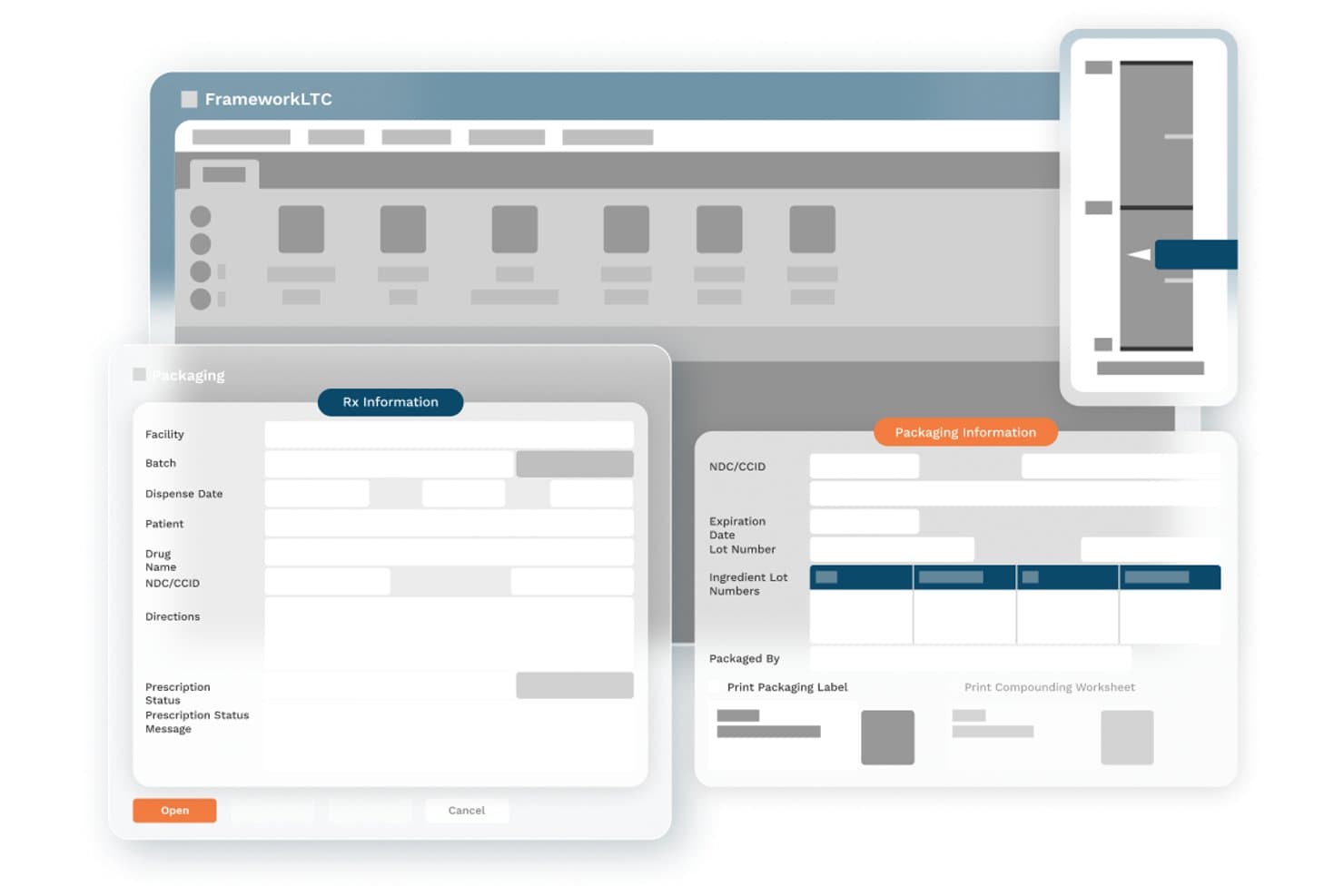
FrameworkLTC offers a packaging module with Rx Information and Packaging Information panels displaying fields for facility, batch, patient, drug name, NDC/CCID, directions, expiration date, lot numbers, and label printing options. FrameworkLTC is a pharmacy management platform built exclusively for long-term care pharmacies, covering dispensing workflows, multi-payer claim adjudication, patient billing, and accounts receivable through a modular, integrated suite.
Who Is FrameworkLTC Best For?
FrameworkLTC is a strong fit for closed-door LTC pharmacies serving skilled nursing facilities, assisted living, hospice, and PACE programs.
Why I Picked FrameworkLTC
FrameworkLTC earns its spot on my shortlist because no other platform handles the full spectrum of LTC billing methods natively, including Medicare Part D, Medicaid, hospice, PACE, and split billing, in a single workflow. I especially like how the platform decouples prescription filling from billing activities, so my billing team can process claims and manage AR without waiting on dispensing queues to clear. That separation keeps month-end reconciliation clean and auditable.
FrameworkLTC Key Features
- Automated refill processing: Automates cycle fills, refill management, and too-soon prescription edits for LTC workflows.
- HIPAA-compliant document storage: Stores, searches, and manages patient and prescription records securely within the platform.
- Rules-based order workflow engine: Customizes prescription handling, medication packaging, and delivery workflows using built-in automation rules.
- Integrated eMAR and robotic dispensing: Connects in real time to major eMAR and medication packaging systems for synchronized dispensing and documentation.
FrameworkLTC Integrations
FrameworkLTC offers over 200 native integrations, including PointClickCare, MatrixCare, Epic, NetSmart, Omnicell, Parata, ScriptPro, ARxIUM, BD Pyxis, Cardinal Health, and AR Proactive. An API is available for custom integrations.
Pros and Cons
Pros:
- Decouples prescription processing from billing tasks
- Supports split billing and 340B workflows
- Handles all LTC and specialty billing scenarios
Cons:
- Limited advanced denial analytics and dashboards
- Financial reporting module is outdated
Learn more about FrameworkLTC: Best for prescription management and patient care
- Free demo available
- Pricing upon request
Visit WebsiteCustomer Rating:4/5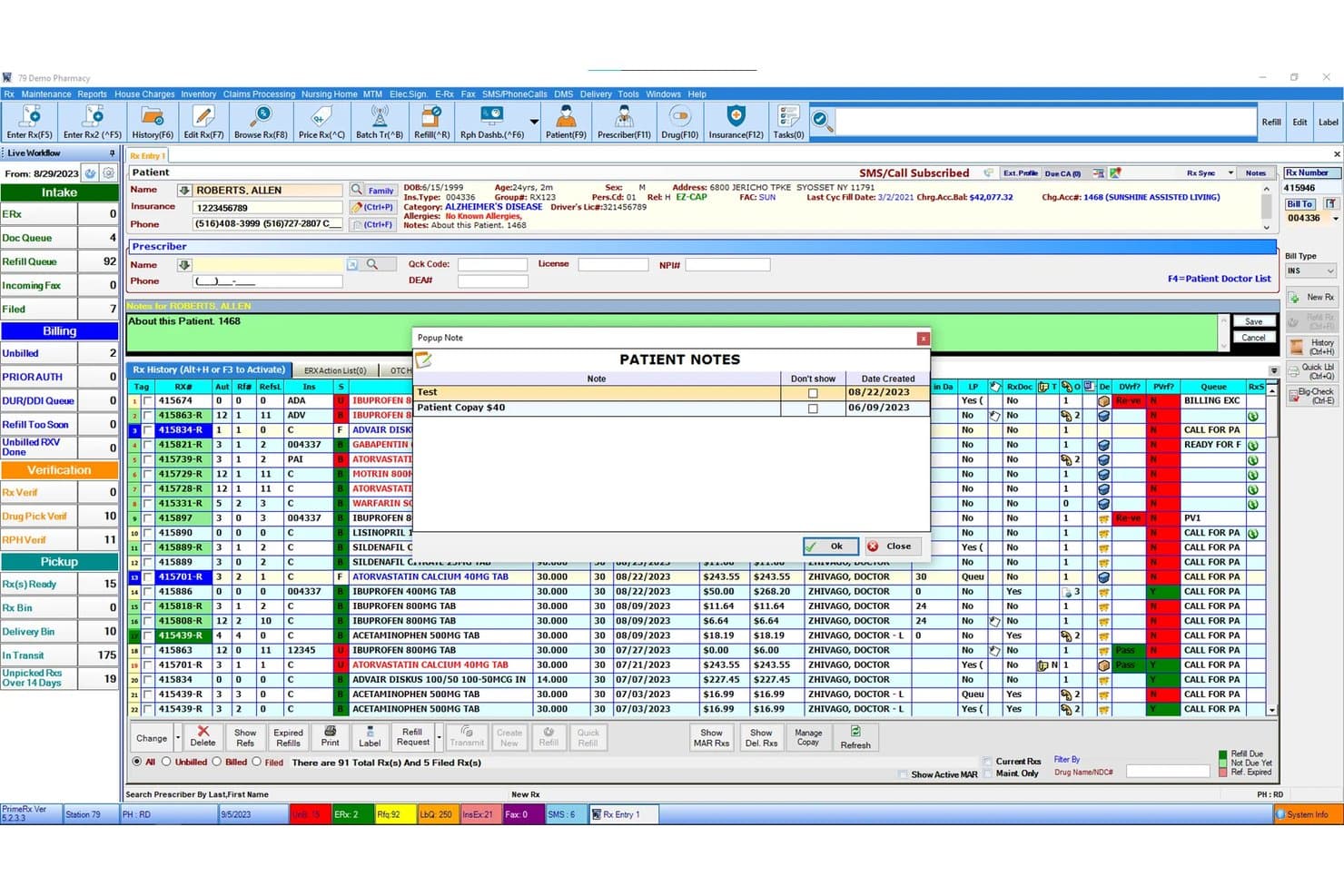
PrimeRx dashboard showing prescriptions, patient records, refill queues, and pharmacy workflow PrimeRx is a pharmacy management and billing platform that handles prescription processing, multi-payer claims transmission, patient co-pay collection, and inventory management across retail, specialty, LTC, and mail order pharmacy settings.
Who Is PrimeRX Best For?
PrimeRx is a strong fit for independent pharmacy owners and LTC pharmacy managers who need dispensing and billing in a single integrated system.
Why I Picked PrimeRx
I picked PrimeRx as one of the best because of how tightly prescription management and patient billing are woven together in a single workflow. When a prescription is filled, the system automatically queues the claim for transmission and calculates the patient co-pay, including FSA/HSA payment processing at the point of sale. I also like the Refill Compliance Dashboard, which tracks medication adherence and flags expired refills so billing isn't delayed by dispensing gaps.
PrimeRX Key Features
- Batch claim billing: Process multiple insurance claims in a single batch without grouping by payer or patient.
- House charge and AR module: Track on-account billing, generate patient statements, and manage payments directly from patient accounts.
- Integrated POS with FSA/HSA support: Accept flexible and health savings account payments alongside standard credit and debit cards.
- Central management portal: Monitor and manage billing and dispensing activity across multiple pharmacy locations from one dashboard.
PrimeRX Integrations
PrimeRx offers 100+ native integrations, including Change Healthcare, RelayHealth, RxLinc, Net-Rx, CoverMyMeds, Surescripts, QuickMAR, Parata, ScriptPro, RxSafe, and Worldpay. An API is available for custom integrations.
Pros and Cons
Pros:
- Dedicated LTC and specialty pharmacy modules
- Batch billing across all payer types
- Real-time claim transmission with immediate PBM feedback
Cons:
- No dedicated denial management workflow
- Reconciliation depends on third-party integration
Learn more about PrimeRX: Best for large pharmacy chains
- Free demo not available
- Pricing upon request
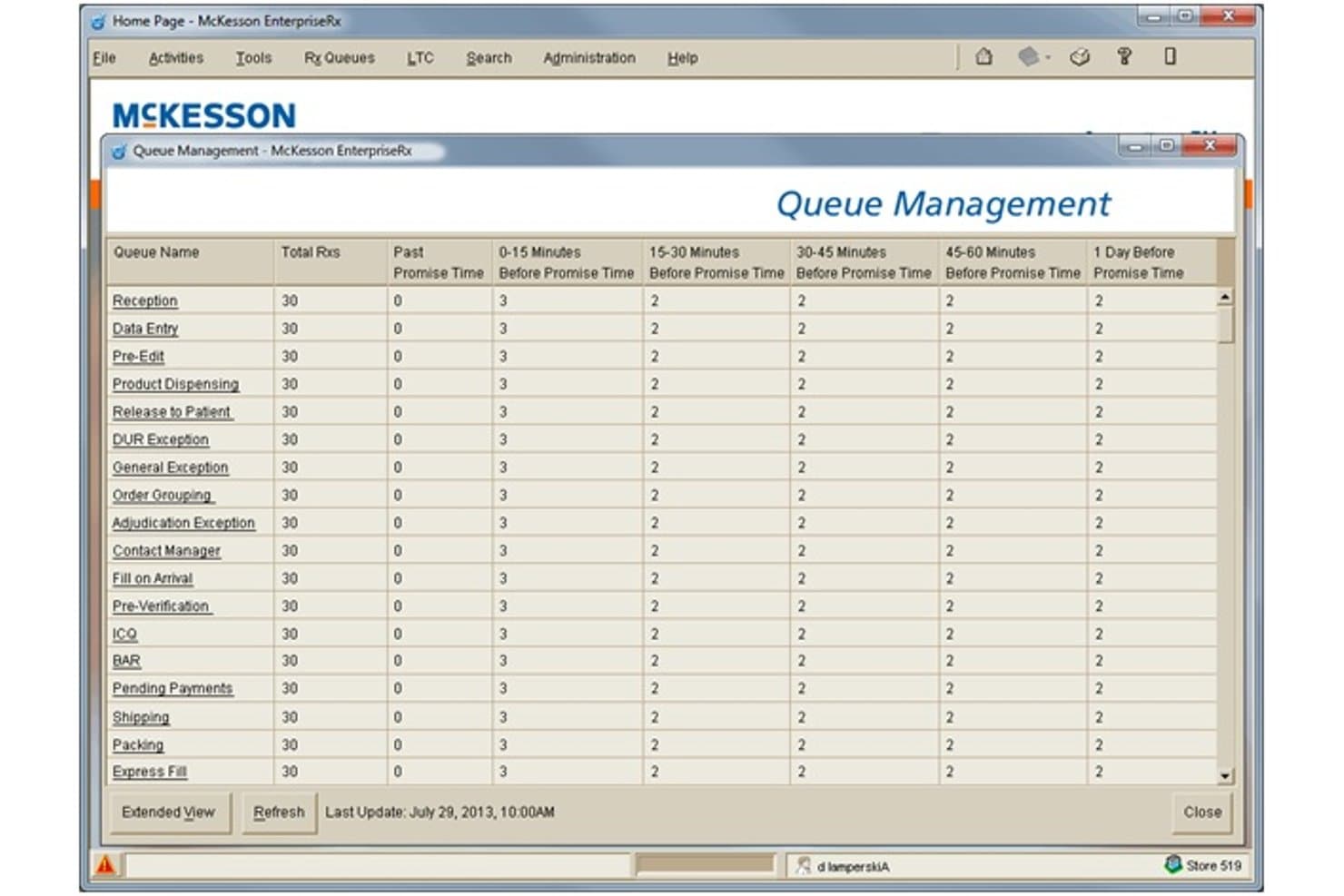
McKesson EnterpriseRx offers a Queue Management dashboard that displays prescription workload distribution across multiple pharmacy workflow stages and time windows. McKesson EnterpriseRx is a cloud-based pharmacy management system that handles prescription processing, insurance claim adjudication, multi-payer billing, and centralized workflow management across multi-site pharmacy operations.
Who Is McKesson EnterpriseRx Best For?
It's a strong fit for pharmacy chains and high-volume retail pharmacy networks that need centralized billing, dispensing, and clinical operations managed across multiple locations.
Why I Picked McKesson EnterpriseRx
McKesson EnterpriseRx earns its spot on my shortlist because no other pharmacy billing system handles multi-site claim volume the way it does. I like how the Adjudication Exceptions Queue works alongside the RelayRx Prescriber Authority Service, catching prescriber authority problems before a claim is ever submitted. I also rely on the CoverMyMeds network connection to manage reimbursement claims and flag audit risks across locations, which is exactly the kind of chain-scale billing infrastructure independent tools can't replicate.
McKesson EnterpriseRx Key Features
- Central fill automation: Automates high-volume prescription filling and fulfillment across multiple pharmacy locations from a central hub.
- 340B certification: Supports split-billing and regulatory compliance for entities participating in the 340B Drug Pricing Program.
- EnterpriseRx Data Insights: Provides interactive dashboards for operational and financial analytics on claims, billing, and pharmacy workflow.
- Supported equipment schedule: Maintains current compatibility lists for pharmacy hardware integrations including POS, printers, and scanning devices.
McKesson EnterpriseRx Integrations
McKesson EnterpriseRx offers native integrations with CoverMyMeds, RelayHealth (RelayRx), RetailSTARx POS, FrameworkLTC, and ConnectPointz, and provides an API for custom integrations.
Pros and Cons
Pros:
- Advanced real-time prescriber authority validation
- Supports complex workflows like 340B and LTC
- Handles centralized claims across large chain networks
Cons:
- Core billing features not tailored for independents
- Limited transparency in patient billing statements
Learn more about McKesson EnterpriseRx: Best for pharmacy workflow automation
- Not available
- Pricing upon request
Visit WebsiteCustomer Rating:3.3/5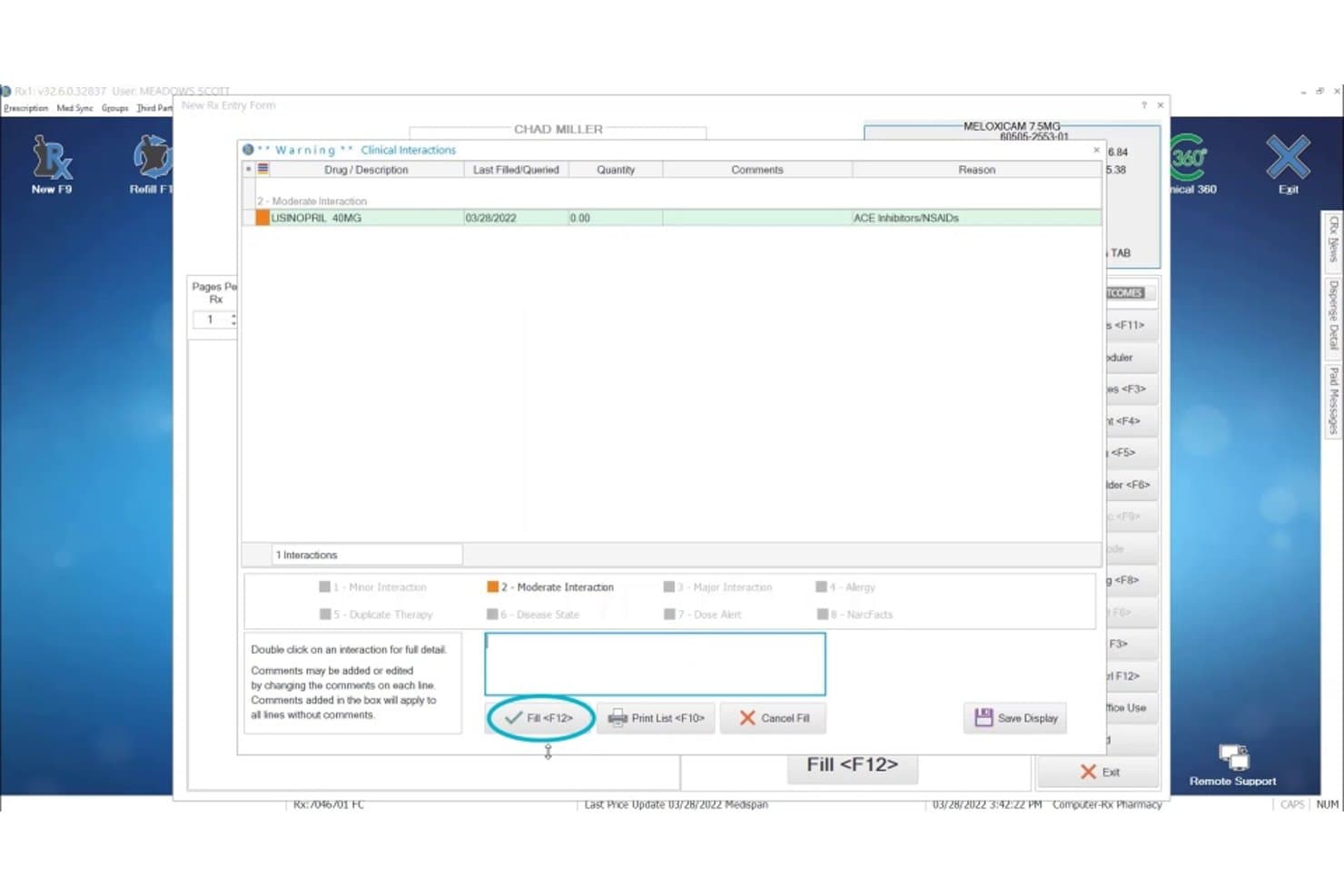
Computer-Rx displays a clinical drug interaction warning popup when filling a Meloxicam prescription that conflicts with Lisinopril, helping pharmacists catch billing and safety issues. Computer-Rx is a pharmacy management system that handles prescription dispensing, real-time claim adjudication, multi-payer billing, patient co-pay processing, and integrated point-of-sale within a single platform built for independent and specialty pharmacies.
Who Is Computer-Rx Best For?
Computer-Rx suits community and long-term care pharmacies that process high prescription volumes and need claim adjudication, refill automation, and billing built into a single dispensing system.
Why I Picked Computer-Rx
Computer-Rx earns its spot on my shortlist because of how tightly its billing workflows connect to prescription dispensing. I love Xpress Fill, which automates refill processing, claim adjudication, and label printing in one pass, cutting manual steps between the dispensing queue and the PBM. I also like Clinical 360, which surfaces paid clinical intervention opportunities directly inside the normal dispensing workflow, so revenue capture happens without a separate billing step.
Computer-Rx Key Features
- Multi-payer claim switching: Routes insurance claims through NCPDP-compliant switches for Medicare, Medicaid, commercial, and secondary payers.
- DIR fee tracking: Calculates Direct and Indirect Remuneration fees per claim for accurate reimbursement insights.
- 340B split-billing support: Segregates eligible prescriptions to maintain compliance with 340B program requirements.
- Prior authorization automation: Submits and tracks prior authorization requests electronically to help reduce processing delays.
Computer-Rx Integrations
Computer-Rx offers native integrations with Surescripts, CoverMyMeds, AmerisourceBergen, eRx Network, RelayHealth, Cardinal Health, Updox, Digital Pharmacist, Worldpay, and Fujitsu. An API is also available for custom integrations.
Pros and Cons
Pros:
- Prior authorization automation is built in
- Supports DIR fee and 340B split-billing tracking
- Fully integrated billing and dispensing workflow
Cons:
- Slow product updates following Outcomes acquisition
- Reporting tools are limited for reimbursement analysis
Learn more about Computer-Rx: Best for cloud-based pharmacy management
- Free demo available
- Pricing upon request
Visit WebsiteCustomer Rating:2.6/5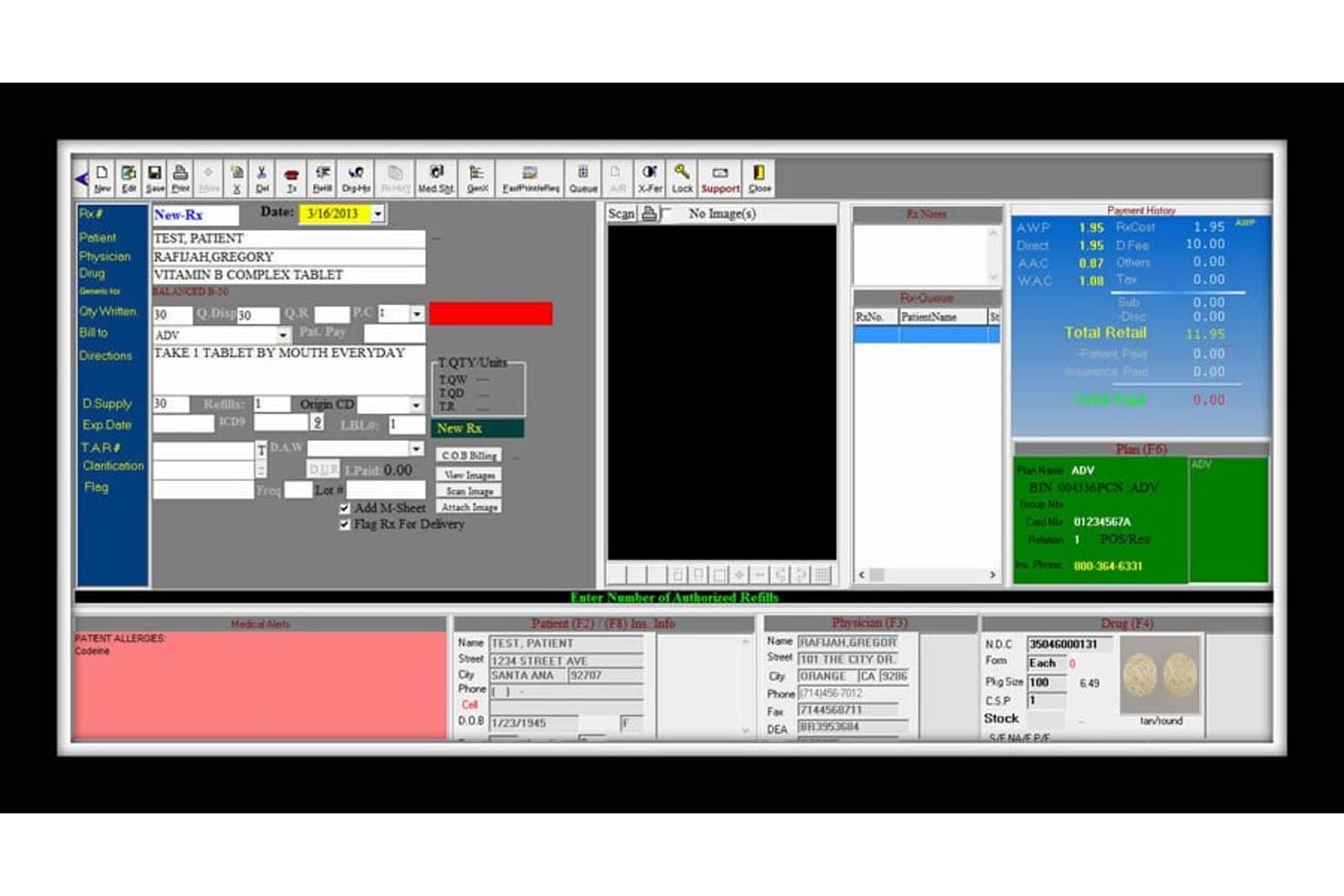
digitalRX offers a detailed prescription entry interface with patient, physician, drug, billing, and insurance plan fields for streamlined pharmacy billing. digitalRX is a Windows-based pharmacy management system that covers real-time PBM claim adjudication, COB billing, automated insurance reconciliation, A/R tracking, and multi-payer billing across retail, compounding, and long-term care pharmacy workflows.
Who Is digitalRX Best For?
digitalRX is a strong fit for independent pharmacy owners and long-term care pharmacy managers who need multi-payer billing, A/R management, and LTC workflows in one system.
Why I Picked digitalRX
digitalRX earns its spot on my shortlist because of how it handles future-billed prescriptions automatically. The nightly auto-billing feature transmits claims on the exact date a prescription becomes billable, so no fills are missed due to timing. I also like that the COB billing module sequences primary and secondary payer claims automatically, and rejected claims connect directly to a CoverMyMeds prior-auth submission without leaving the rejection screen.
digitalRX Key Features
- Accounts receivable module: Track patient, facility, and insurance balances with real-time aging and statement generation.
- Integrated Point of Sale (POS): Connect front-end sales and prescription pickup through a pharmacy-specific POS system.
- Automated government reporting: Upload data to state immunization registries and controlled substance databases directly from the platform.
- Compounding workflow support: Build, manage, and price compound formulas with full ingredient tracking and documentation.
digitalRX Integrations
digitalRX offers native integrations with Surescripts, Emdeon, RelayHealth, CoverMyMeds, Parata, Kirby Lester, ScriptPro, Innovation, Eyecon, Cubex, Heartland Payment Systems, and FedEx. An API is available for custom integrations.
Pros and Cons
Pros:
- COB billing for primary and secondary payers
- Automated insurance reconciliation with aging reports
- Real-time claim adjudication with PBMs
Cons:
- Windows-only platform, cloud option not native
- No patient self-service billing portal
Learn more about digitalRX: Best for retail pharmacy management
- Free demo available
- Pricing upon request
Visit WebsiteCustomer Rating:4.9/5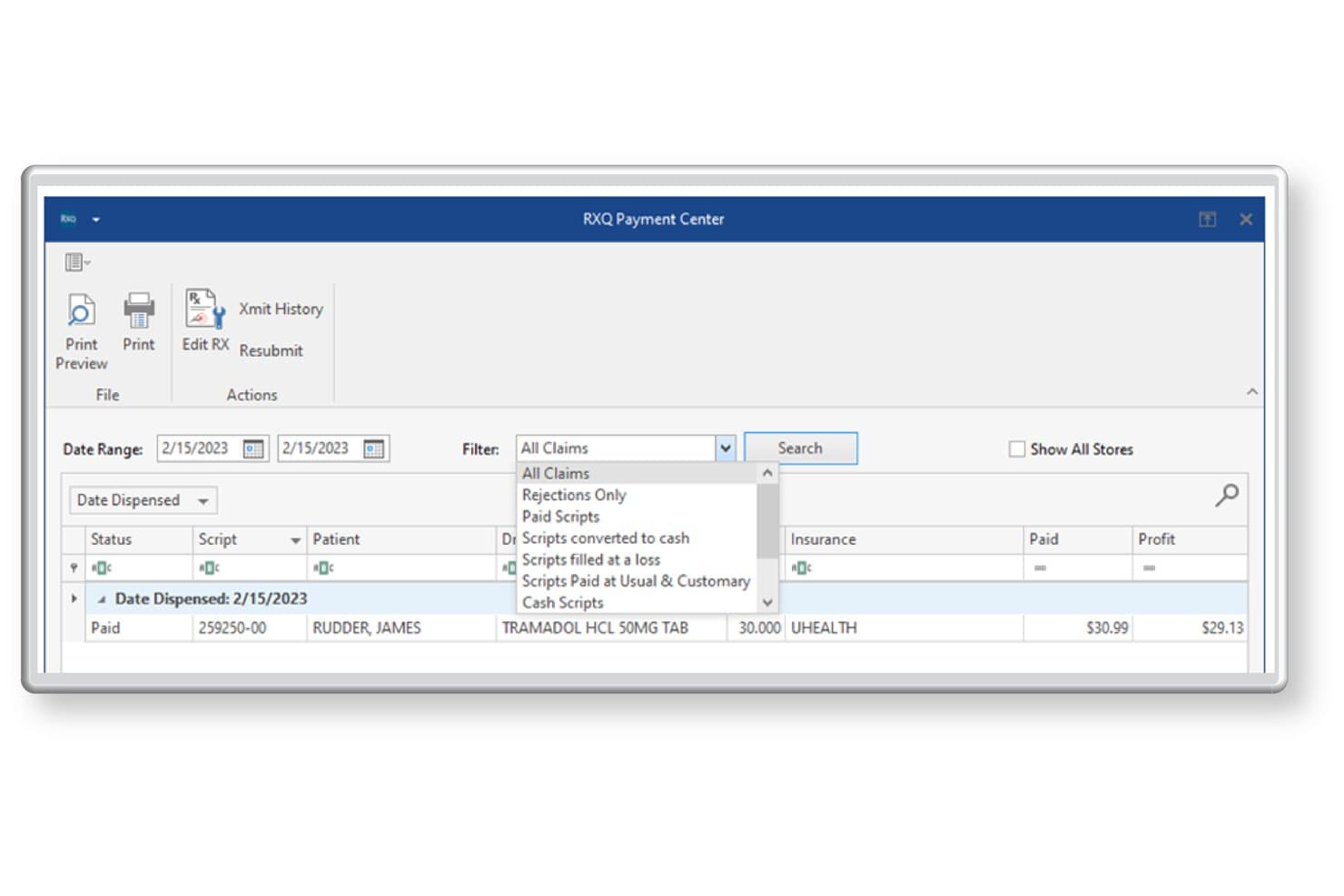
Liberty Software offers an RXQ Payment Center with filtering options to view all claims, rejections, paid scripts, and more for efficient pharmacy billing management. Liberty Software is a pharmacy management platform built for independent and multi-chain retail pharmacies, combining real-time PBM claim adjudication, third-party reconciliation, compounding billing, and an integrated POS in a single system.
Who Is Liberty Software Best For?
Liberty Software is a good fit for independent retail pharmacy owners who need a single platform to handle dispensing, insurance billing, and front-end POS without stitching together multiple vendors.
Why I Picked Liberty Software
I picked Liberty Software as one of the best because it's the only platform I know where the dispensing system and billing engine are genuinely the same product. What I like most is the built-in Profit Protection feature, which flags claim errors and audit risks before submission, directly at the point of fill. The AWP Reclaim tool also lets me resubmit underpaid claims automatically, which is where a lot of retail pharmacies quietly lose revenue.
Liberty Software Key Features
- Third-party reconciliation: Automatically matches remittance data from PBMs and flags underpaid or denied claims for follow-up.
- 340B split-billing workflows: Segregates and processes 340B-eligible and non-eligible prescription claims for covered entity compliance.
- DIR fee tracking: Calculates and tracks Direct and Indirect Remuneration fees per claim for accurate reimbursement reporting.
- Integrated eCare plans: Enables creation and transmission of eCare plans directly from the pharmacy management system for clinical documentation.
Liberty Software Integrations
Liberty Software offers over 40 native integrations, including DocStation, CoverMyMeds, Surescripts, Net-Rx, EnlivenHealth, ScriptPro, Parata, RxSafe, QuickBooks, and AthenaHealth. An API is available for custom integrations.
Pros and Cons
Pros:
- Automatic third-party reconciliation and claim resubmission
- Accurate DIR fee and 340B claim tracking
- NCPDP adjudication and dispensing in one system
Cons:
- Not suited for hospital outpatient pharmacy billing
- DME medical billing workflows not fully supported
Learn more about Liberty Software: Best for independent pharmacy management
- Free demo available
- Pricing upon request
Visit WebsiteCustomer Rating:4.7/5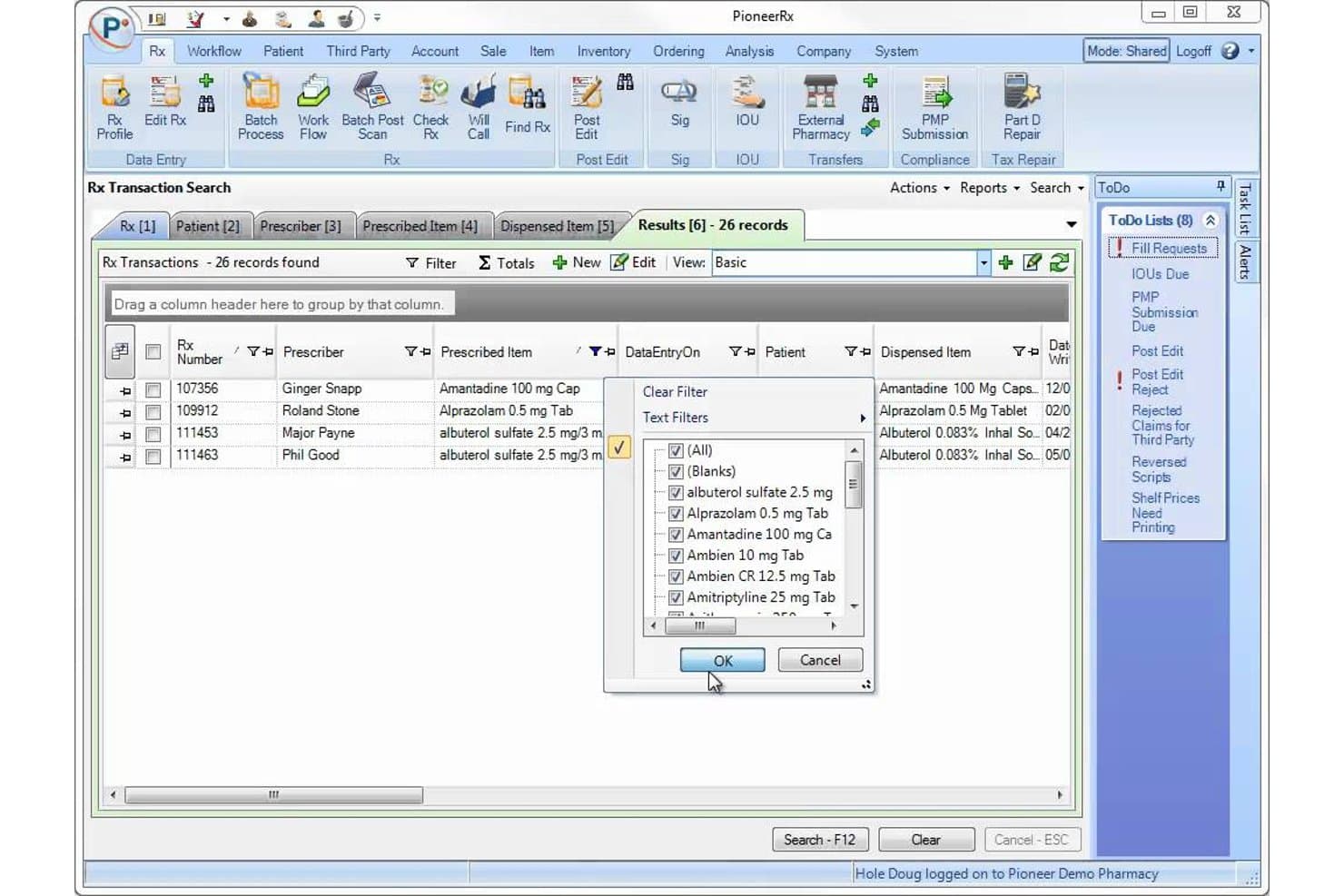
PioneerRx offers an Rx Transaction Search interface with filtering tools, prescribed item lists, and dispensed item records for streamlined pharmacy billing management. PioneerRx is a pharmacy management platform built for community pharmacies, combining real-time NCPDP claim adjudication, automated 835 reconciliation, DIR fee tracking, and dispensing-integrated billing workflows.
Who Is PioneerRx Best For?
PioneerRx is built for independent and community pharmacy owners who need billing, dispensing, and reconciliation in a single integrated system.
Why I Picked PioneerRx
PioneerRx earns its spot on my shortlist because billing isn't a separate module. It's native to the dispensing workflow. I particularly like the pre-adjudication edit suite, which flags issues like low-profit fills, invalid DAW codes, and obsolete NDCs before a claim hits a PBM. The automated overnight 835 reconciliation, with DIR fee auto-application and negative gross profit alerts, gives independent pharmacy owners precise control over reimbursement tracking without manual intervention.
PioneerRx Key Features
- Automatic compound billing: Submits compound prescriptions to third parties with correct NCPDP field mapping and reimbursement logic.
- DIR fee management: Applies pharmacy-specific DIR fee rates to claims and tracks estimated DIR deductions per transaction.
- Multi-inventory support: Maintains separate inventories for retail, 340B, and patient assistance programs in one system.
- 835 remittance automation: Downloads and posts electronic remittance files overnight, updating claims and accounts automatically.
PioneerRx Integrations
PioneerRx offers native integrations with CoverMyMeds, Parata, AmerisourceBergen, RxSafe, OutcomesMTM, IMS, SureCost, Truentity Health, RedSail Pay, Asteres, and Synerio, and provides additional integrations across its Connected Vendors network. An API is available for custom integrations.
Pros and Cons
Pros:
- Built-in multi-inventory and 340B support
- Automated PBM remittance and DIR reconciliation
- Real-time NCPDP claim adjudication workflow
Cons:
- No patient self-service billing portal
- Limited reporting customization for financial data
Learn more about PioneerRx: Best for community pharmacy workflows
- Free demo available
- Pricing upon request
Visit WebsiteCustomer Rating:4.6/5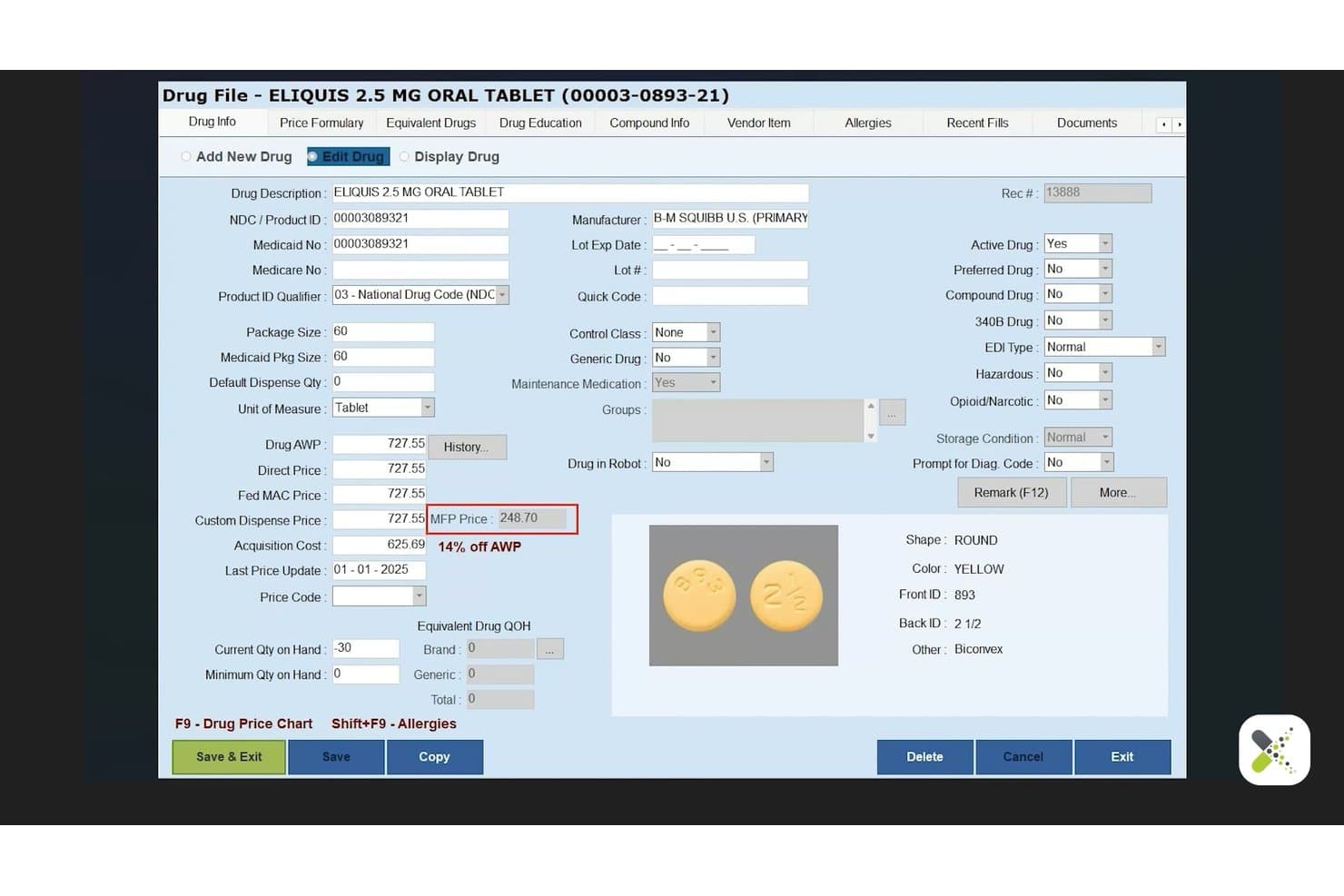
BestRX offers a detailed drug file management screen displaying pricing, NDC, dosage, and pill identification information for ELIQUIS 2.5 MG tablets. BestRx is a pharmacy management system built for independent and community pharmacies that combines real-time NCPDP claim adjudication, e-remittance reconciliation, co-pay processing, and prescription dispensing in a single platform.
Who Is BestRX Best For?
BestRx is a strong fit for independent pharmacy owners who manage billing, dispensing, and patient communication without a dedicated revenue cycle team.
Why I Picked BestRX
BestRx earns its spot on my shortlist because of how tightly it wraps dispensing and billing into one system built specifically for community pharmacy operations. I particularly like the cloud-based pre- and post-claim editing (PPE), which catches claim errors before they reach the PBM, reducing rejections at the source rather than after the fact. The automated refill tools, KwikFill and NightTech, run overnight claim transmission and label printing without staff input, which is exactly how a lean community pharmacy team needs to operate.
BestRX Key Features
- E-remittance reconciliation: Match third-party remittance files to claims and click to reconcile payment status.
- Integrated POS system: Handle prescription sales and over-the-counter transactions from a single interface.
- Mobile delivery app: Manage and track prescription deliveries, collect signatures, and optimize delivery routes.
- Patient messaging tools: Send custom text or email notifications about refills, prescription status, and reminders.
BestRX Integrations
BestRx offers 125+ native integrations, including Surescripts, WENO, AmerisourceBergen, Cardinal Health, Parrata, Omnicell, ScriptPro, Inmar, Net-Rx, Nimble, and PointClickCare. An API is also available for custom integrations.
Pros and Cons
Pros:
- Real-time remittance reconciliation for third-party payers
- Automated claim editing reduces billing errors
- Fully integrated with pharmacy dispensing workflows
Cons:
- Reports of delayed customer support after acquisition
- Lacks advanced denial management analytics
Learn more about BestRX: 9Best for prescription processing and billing
Rx30
- Not available
- Pricing upon request
Visit WebsiteCustomer Rating:4/5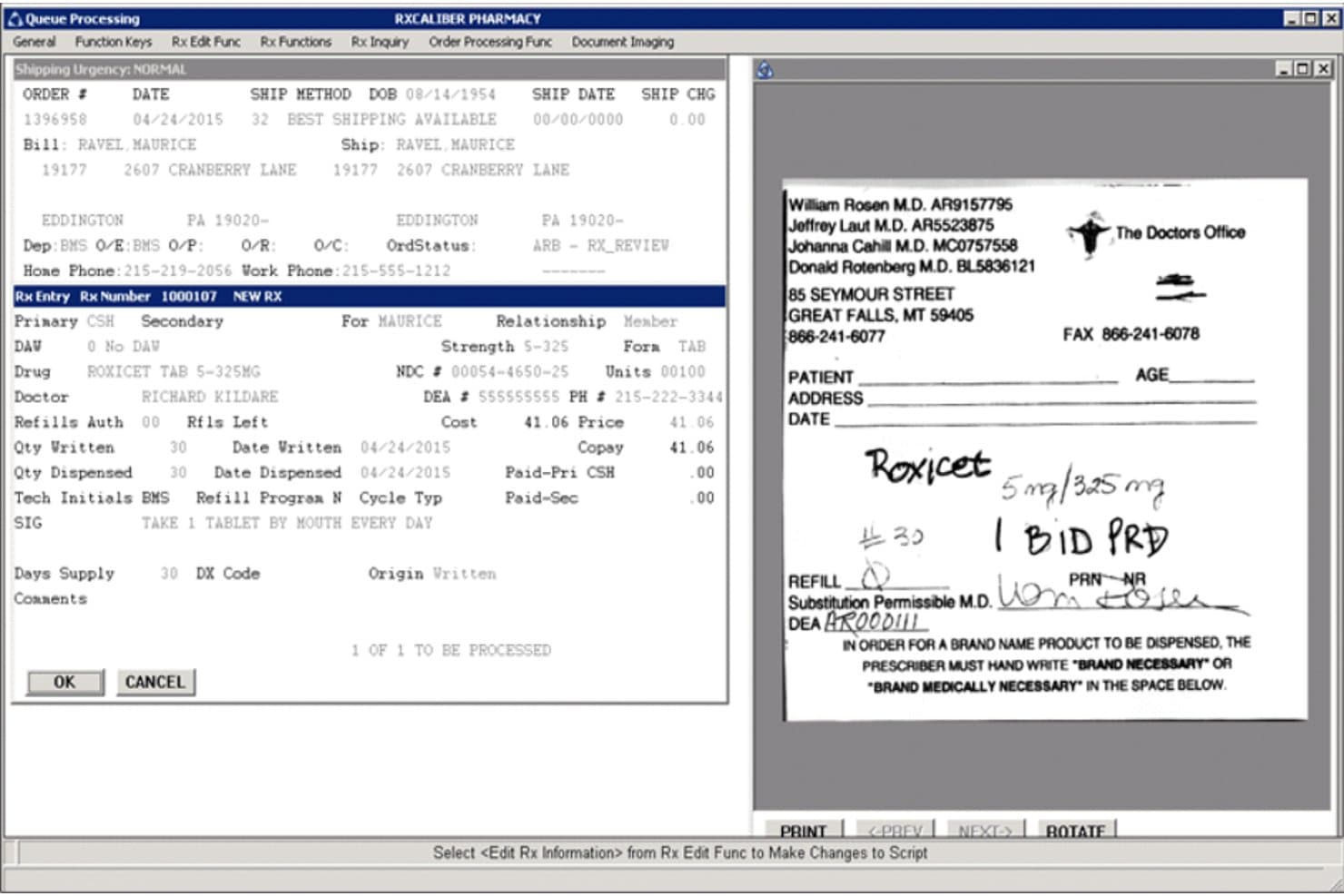
Rx30 offers a queue processing screen that displays prescription entry details, patient billing information, and a scanned prescription image side by side for efficient pharmacy billing workflow. Rx30 is a pharmacy management system built for independent, LTC, specialty, and compounding pharmacies that combines prescription dispensing with integrated claims adjudication, payer reconciliation, and accounts receivable in a single platform.
Who Is Rx30 Best For?
Rx30 is a strong fit for independent pharmacy owners and revenue cycle administrators who need a single system to handle both dispensing and multi-payer billing without stitching together separate platforms.
Why I Picked Rx30
I picked Rx30 as one of the best because its Virtual Pharmacist feature handles the full billing cycle autonomously, adjudicating claims, billing insurance, and printing labels without staff input. Its pre and post claim edits catch errors on both sides of adjudication, reducing rejections before they become a problem. The integrated Reconciliation module then matches remittance directly against submitted claims within the same system where prescriptions are dispensed.
Rx30 Key Features
- Integrated POS system: Processes patient payments, co-pays, and tracks sales directly within Rx30.
- Multi-payer billing workflows: Handles Medicare, Medicaid, commercial, DME, and secondary billing in a single software environment.
- Automated accounts receivable module: Tracks outstanding balances and remittances tied to specific claims and patients.
- Clinical opportunity indicator: Flags opportunities for clinical interventions directly from the dispensing dashboard.
Rx30 Integrations
Rx30 offers native integrations with Surescripts, CoverMyMeds, eRx Network, RelayHealth, Digital Pharmacist, Updox, AmerisourceBergen, Cardinal, Global Payments, Worldpay by FIS, and HP. An API is available for custom integrations.
Pros and Cons
Pros:
- Automated payer reconciliation and A/R tracking
- Real-time claim adjudication with pre-edit checks
- Handles dispensing and billing in one system
Cons:
- No built-in patient payment portal
- Manual steps needed for split billing refills
Learn more about Rx30: 10Best for pharmacy dispensing and operations
QS/1
- Not available
- Pricing upon request
Visit WebsiteCustomer Rating:3.4/5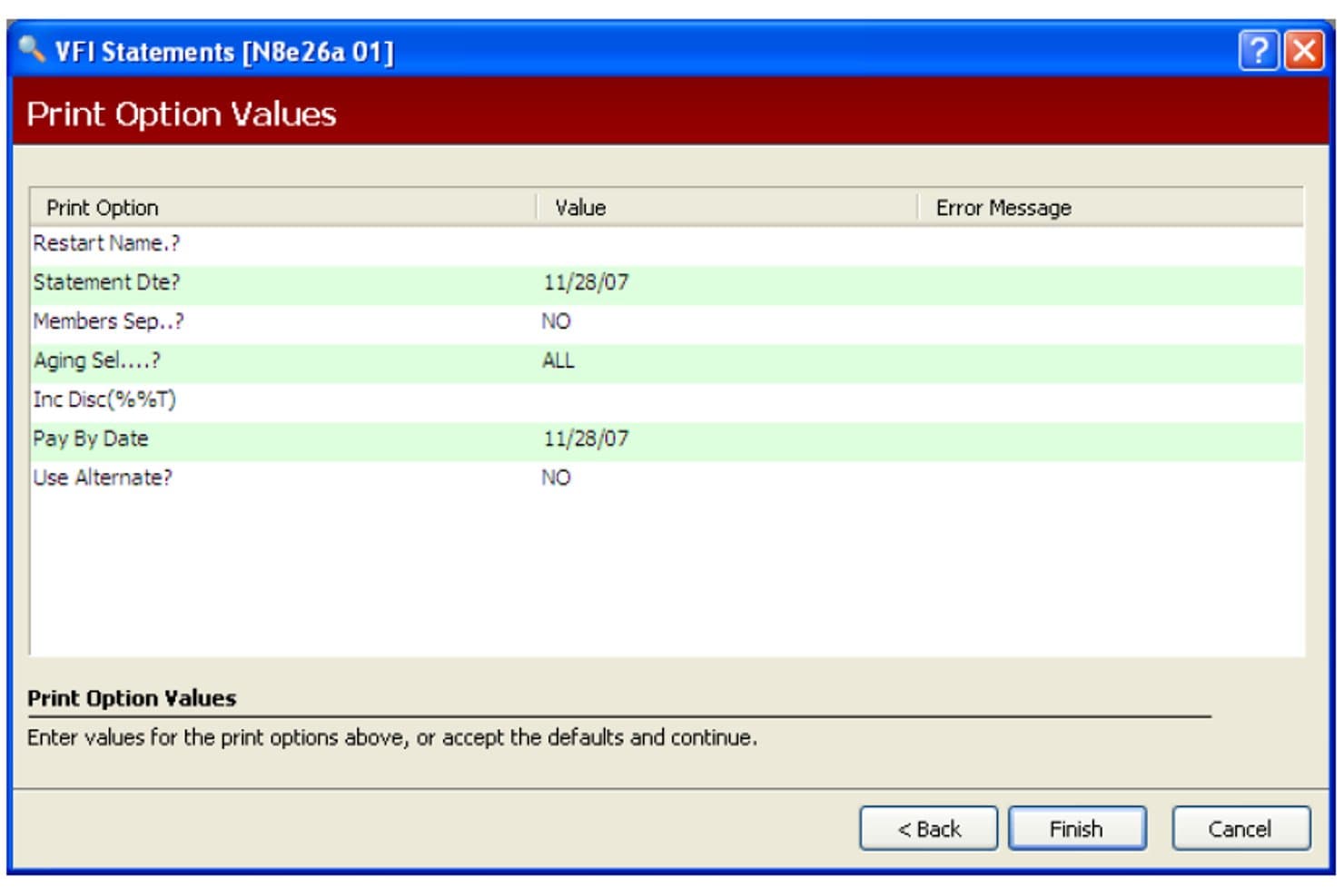
QS/1 offers a Print Option Values screen for configuring VFI patient statement parameters such as statement date, aging selection, and pay-by date. QS/1 is a pharmacy management system built for community, long-term care, and specialty pharmacies, combining prescription dispensing with third-party claim adjudication, multi-payer billing, and patient co-pay processing in a single integrated platform.
Who Is QS/1 Best For?
QS/1 fits independent pharmacy owners and LTC pharmacy managers who need dispensing and billing handled in one system rather than across separate platforms.
Why I Picked QS/1
I picked QS/1 as one of the best because billing is built directly into the dispensing workflow, not bolted on as a separate module. When a prescription is filled, claim data moves straight into third-party adjudication without manual re-entry. I also like how it handles the full payer spectrum, including 340B compliance, meds-to-beds facility billing, and HME/DME billing via SystemOne, covering scenarios most standalone billing tools simply don't support.
QS/1 Key Features
- Third-party reconciliation: Automatically matches remittance advice to submitted claims, helping identify discrepancies in reimbursement.
- 340B split-billing support: Segregates eligible 340B claims from non-eligible transactions within pharmacy workflows.
- Prior authorization automation: Submits and tracks electronic prior authorizations for prescriptions requiring payer approval.
- DIR fee tracking: Calculates and monitors Direct and Indirect Remuneration fees on a per-claim basis for reimbursement clarity.
QS/1 Integrations
QS/1 offers native integrations with AR Proactive, Etactics, SystemOne for HME/DME billing, Multi-Site Management, IVR modules, DocuTrack, and pharmacy management solutions. An API is available for custom integrations.
Pros and Cons
Pros:
- Native dispensing and POS workflow integration
- Handles 340B, LTC, and DME billing scenarios
- Real-time claim adjudication for insurance billing
Cons:
- Limited support for web-based remote access
- Product is scheduled to sunset in 2027
Learn more about QS/1:
Outro software de faturação de farmácias
\u003cspan style=\u0022font-weight: 400;\u0022\u003eEis algumas opções adicionais de software de faturação de farmácias que não entraram na minha seleção, mas que vale a pena conhecer:\u003c/span\u003e
- 11PrimeCare (Integra/RedSail)Best for institutional and long-term care
- 12Kroll Pharmacy SoftwareBest for Canadian pharmacy operations
- 13WellSkyBest for post-acute pharmacy workflows
- 14InovalonBest for pharmacy data and clinical workflows
- 15EnlivenHealth ReconcileBest for pharmacy claims reconciliation
How I Evaluate Pharmacy Billing Software
I split my evaluation into baseline capabilities every tool must cover—like NCPDP adjudication and PBM reconciliation—and differentiators like 340B split billing or DIR fee tracking.
Core Functionality (Table Stakes For This List)
When I'm selecting tools for my list, I rank each one on a scale from 0 (does not offer the functionality) to 5 (excels in this area) for each core functionality listed below. Then, I calculate the tool's total score into a percentage. Each tool needs to achieve a minimum total score of 65% to be considered for inclusion.
- Claim Adjudication: I check for real-time NCPDP submission to major PBMs, so claims resolve at the counter instead of sitting in a batch queue.
- Payer Reconciliation: Each tool should auto-match remittance advice against submitted claims and flag underpayments or missing payments for follow-up.
- Multi-Payer Billing: I look for support across Medicare Part D, Medicaid, commercial plans, DME, and secondary or tertiary payers including split billing.
- Co-Pay Processing: The tool needs to calculate and track patient co-pays, deductibles, and self-pay balances tied to each prescription fill.
- Rejection Management: I evaluate how the system categorizes rejected claims by reason code and whether it offers guided resubmission workflows.
- Dispensing Integration: A billing tool should pull prescription data directly from dispensing systems like PioneerRx or QS/1 without manual re-entry.
Once I have a list of tools that meet the criteria, I consider what sets each platform apart.
Differentiating Factors (What Sets Vendors Apart)
Here's how I compare and contrast different vendors:
Standout Features
340B split-billing support matters a lot if you're a covered entity. I look for tools that cleanly segregate eligible prescriptions from standard claims so your program stays compliant without manual workarounds. DIR fee tracking is another feature I evaluate closely—knowing your true reimbursement margin per claim helps you make smarter contract and formulary decisions. I also check whether a platform offers prior authorization automation, since electronic PA submissions that track approval status can prevent dispensing delays and rejected claims before they pile up.
Beyond Features
Pharmacy setting fit is one of the first things I consider. A retail pharmacy filling hundreds of scripts a day has very different billing needs than a long-term care operation running cycle billing across multiple facilities. Integrations matter just as much—I check whether the platform connects with your dispensing system, EHR, and wholesaler so billing data flows without double entry. Pricing transparency is also worth evaluating, since some vendors charge per claim while others use flat subscriptions, and hidden switch or clearinghouse fees can eat into margins fast.
Como escolher um software de faturação de farmácias
É fácil ficar perdido entre listas extensas de funcionalidades e estruturas de preços complexas. Para o ajudar a manter o foco enquanto percorre o seu processo específico de seleção de software, eis uma lista de fatores a ter em conta:
| Fator | O que considerar |
| Escalabilidade | O software suportará o crescimento, a expansão para novas localizações ou novos contratos com entidades pagadoras sem alterações significativas? |
| Integrações | Estabelece ligação de forma fluida ao seu sistema de farmácia, EHR e grossistas, ou terá de recorrer a soluções alternativas? |
| Personalização | Pode adaptar os fluxos de trabalho de faturação, os relatórios e as regras das entidades pagadoras às operações da sua farmácia? |
| Facilidade de utilização | Quão fácil é para os funcionários aprenderem a utilizar o sistema diariamente — a formação ou uma curva de aprendizagem irão atrasar o seu trabalho? |
| Implementação e integração inicial | Quanto tempo demorará a configuração, a migração de dados e a formação inicial, e quem ficará responsável por cada etapa? |
| Custo | Os modelos de preços são transparentes — por pedido de reembolso, uma tarifa mensal fixa, ou existem taxas ocultas de mudança ou integração? |
| Medidas de segurança | A plataforma disponibiliza encriptação, conformidade com a HIPAA e controlos robustos de permissões para os seus dados? |
| Requisitos de conformidade | Suporta as regras do Medicare, Medicaid e das autoridades reguladoras estaduais relativas a pedidos de reembolso eletrónicos e relatórios? |
O que é um software de faturação de farmácias?
O software de faturação de farmácias é um sistema digital concebido para automatizar o envio de pedidos de reembolso a seguradoras, o acompanhamento de reembolsos e a faturação de utentes nas farmácias. Estas plataformas permitem a adjudicação em tempo real com as entidades pagadoras, simplificam a reconciliação com terceiros e gerem vários cenários de faturação — incluindo Medicare, Medicaid e seguros comerciais — mantendo simultaneamente a conformidade. A utilização de software de faturação de farmácias ajuda a sua equipa a reduzir erros, recuperar receitas não cobradas e manter todos os aspetos do fluxo de trabalho de faturação da farmácia organizados.
Funcionalidades do software de faturação de farmácias
Ao selecionar um software de faturação para farmácias, tenha em atenção as seguintes funcionalidades essenciais:
- Processamento de reclamações de terceiros: Envia e processa reclamações de seguros em tempo real, permitindo-lhe ver as respostas das entidades pagadoras no ponto de venda e resolver rapidamente problemas de elegibilidade ou cobertura.
- Reconciliação com as entidades pagadoras: Faz corresponder automaticamente os pagamentos e os avisos de remessa às reclamações, assinalando discrepâncias, pagamentos inferiores ao devido ou saldos pendentes, para que possa acompanhar receitas não cobradas.
- Suporte para faturação a várias entidades pagadoras: Processa o Medicare Parte D, o Medicaid, planos comerciais, DME e faturação repartida ou secundária, permitindo-lhe lidar com cenários complexos sem cálculos manuais.
- Processamento de copagamentos dos pacientes: Calcula, cobra e acompanha copagamentos, franquias e saldos dos pacientes, associando diretamente cada cobrança aos aviamentos das receitas para uma contabilidade transparente.
- Gestão de rejeições e recusas: Assinala reclamações rejeitadas, acompanha códigos de motivo e permite fluxos de trabalho simplificados para o reenvio, reduzindo recusas e acelerando os reembolsos.
- Integração com o sistema de dispensa: Liga-se ao software de gestão e dispensa de farmácias, para que os dados das receitas e da faturação sejam sincronizados automaticamente, reduzindo a introdução manual e os erros.
- Suporte para autorizações prévias: Facilita o envio eletrónico de autorizações prévias e o acompanhamento do respetivo estado, ajudando a resolver os requisitos de cobertura antes do envio das reclamações e minimizando atrasos.
- Funcionalidades de faturação repartida 340B: Separa as transações elegíveis para o programa 340B das reclamações padrão, mantendo a conformidade e maximizando as poupanças para as entidades abrangidas.
- Acompanhamento de taxas DIR: Monitoriza as taxas de remuneração direta e indireta ao nível da reclamação, permitindo-lhe prever o reembolso real e gerir as margens de forma mais eficaz.
Benefícios do software de faturação para farmácias
A implementação de um software de faturação para farmácias proporciona vários benefícios à sua equipa e à sua empresa. Eis alguns dos benefícios que pode esperar:
- Reembolso mais rápido: O processamento de reclamações em tempo real e a reconciliação automática aceleram os pagamentos das entidades pagadoras e reduzem o número de dias das contas a receber.
- Menos rejeições de reclamações: O acompanhamento integrado de rejeições, os fluxos de trabalho de correção e as funcionalidades de autorização prévia ajudam a sua equipa a detetar e resolver problemas antes do envio.
- Melhor captação de receitas: O cálculo rigoroso dos copagamentos, o suporte para várias entidades pagadoras e o acompanhamento das taxas DIR ajudam-no a recuperar todos os montantes devidos e a minimizar pagamentos inferiores ao devido.
- Maior conformidade: A lógica de faturação automatizada suporta a HIPAA, as normas NCPDP e os requisitos do Medicare e do Medicaid, mantendo os seus fluxos de trabalho preparados para auditorias.
- Processo de faturação simplificado: A integração direta com sistemas de dispensa e de RSE mantém os dados em circulação e reduz a introdução manual ou os estrangulamentos administrativos.
- Comunicação clara com os pacientes: A faturação automatizada dos pacientes e o acompanhamento dos copagamentos fornecem informações de faturação transparentes e rigorosas para cada aviamento de receita.
- Menor pressão operacional: Os fluxos de trabalho concebidos especificamente para farmácias reduzem a carga administrativa, permitindo que a sua equipa se concentre mais nos cuidados clínicos e no atendimento ao cliente.
Custos e preços do software de faturação para farmácias
A seleção de um software de faturação para farmácias exige uma compreensão dos vários modelos de preços e planos disponíveis. Os custos variam consoante as funcionalidades, o tamanho da equipa, os complementos e outros fatores. A tabela abaixo resume os planos comuns, os respetivos preços médios e as funcionalidades normalmente incluídas nas soluções de software de faturação para farmácias:
Tabela de comparação de planos de software de faturação para farmácias
| Tipo de plano | Preço médio | Funcionalidades comuns |
| Plano gratuito | $0 | Volume limitado de reclamações, relatórios básicos, introdução manual das entidades pagadoras e ausência de integrações. |
| Plano pessoal | $50-$150/mês | Acesso para um único utilizador, envio padrão de reclamações, processamento de copagamentos, acompanhamento básico de rejeições e suporte padrão. |
| Plano empresarial | $300-$800/mês | Acesso para vários utilizadores, reconciliação automatizada com as entidades pagadoras, integração com o sistema de dispensa, faturação a várias entidades pagadoras e relatórios avançados. |
| Plano empresarial de grande dimensão | $1,000-$2,500/mês | Fluxos de trabalho personalizados, integrações de API, suporte prioritário, ferramentas de conformidade regulamentar e integração e formação dedicadas. |
Perguntas frequentes sobre software de faturação de farmácias
Eis algumas respostas a perguntas frequentes sobre software de faturação de farmácias:
Como é que o software de faturação de farmácias ajuda a resolver rejeições de pedidos de comparticipação?
O software de faturação de farmácias assinala as rejeições de pedidos, fornece códigos de motivo e orienta-o ao longo dos passos para a reapresentação. Isto permite que a sua equipa resolva os problemas rapidamente e reduz os atrasos nos pagamentos ou no aviamento de receitas.
O software de faturação de farmácias consegue processar a faturação a vários pagadores para uma única receita?
Sim, a maioria dos softwares de faturação de farmácias permite a faturação a vários pagadores. Isto significa que pode faturar ao Medicare, ao Medicaid, a seguradoras comerciais e até a pagadores secundários ou terciários, conforme necessário para cada receita.
Que integrações devo esperar de um software de faturação de farmácias?
Deve procurar integrações com o seu sistema de gestão da farmácia, software de dispensa, plataformas de EHR/EMR e, por vezes, fornecedores grossistas. Esta conectividade reduz a introdução manual de dados e mantém as suas informações sincronizadas enquanto avia e fatura as receitas.
O software de faturação de farmácias está em conformidade com a HIPAA?
Sim, o software de faturação de farmácias de fornecedores reputados é concebido para cumprir os regulamentos da HIPAA relativos à privacidade e segurança dos dados. Confirme sempre se as medidas de segurança e as certificações de conformidade estão atualizadas antes de escolher um fornecedor.
Como é que o software de faturação de farmácias apoia a conformidade com o programa 340B?
A maioria das soluções avançadas disponibiliza ferramentas de faturação dividida que separam as transações elegíveis para o 340B das restantes. Isto permite que a sua farmácia maximize as poupanças do 340B e evite riscos de conformidade associados a pedidos mistos e ao acompanhamento manual.
Que apoio está disponível se a minha equipa se deparar com problemas de faturação?
A maioria dos fornecedores disponibiliza acesso a especialistas em faturação de farmácias, centros de ajuda online e, por vezes, apoio telefónico ou por chat 24 horas por dia, 7 dias por semana. Verifique se o seu plano inclui integração inicial, formação, gestão de conta dedicada, integrações com distribuidores, apoio de CRM ou assistência em faturação de lojas de produtos médicos para cenários mais complexos.
Quanto tempo demora a implementação de um software de faturação de farmácias?
Os prazos de implementação variam, mas a configuração pode demorar desde alguns dias, no caso de farmácias pequenas, até várias semanas, no caso de operações maiores, especialmente se forem necessárias migrações de dados ou integrações complexas.