

O software de faturação médica de código aberto é uma tecnologia de faturação cujo código está disponível publicamente, permitindo-lhe utilizá-lo, personalizá-lo e adaptá-lo à sua prática de cuidados de saúde. Se procura uma alternativa a ferramentas de faturação restritivas e dispendiosas — ou se pretende ter mais controlo sobre os seus fluxos de trabalho de faturação — os sistemas de código aberto colocam as rédeas nas suas mãos.
Este guia apresenta as melhores opções de software de faturação médica de código aberto, ajudando-o a identificar quais se adequam ao seu fluxo de trabalho, aos seus recursos e às necessidades dos seus pacientes. Obterá uma visão geral rápida do que torna cada solução única, para poder tomar uma decisão segura e bem fundamentada.
Why Trust Our Software Recommendations
6,700+
Reviews
20
Industry experts
16+
Evaluation factors
14
Years
Our team has been testing and reviewing software since 2012. As medical practice leaders ourselves, we know how difficult—and important—it is to choose the right software.
For this guide, we evaluated tools using hands-on testing and independent research, scoring tools using our selection criteria.
Our reviews reflect our human editorial judgment, not a sales pitch.
Tabela comparativa de software de faturação médica de código aberto
Esta tabela comparativa resume os detalhes de preços do meu software de faturação médica de código aberto:
| Tool | Best For | Trial Info | Price | ||
|---|---|---|---|---|---|
| 1 | Best for offline-first billing in remote locations | Free demo available | Pricing upon request | Website | |
| 2 | Best for public health billing in limited settings | Not available | Pricing upon request | Website | |
| 3 | Best for FHIR-based interoperability support | Free plan available | From $349/provider/month | Website | |
| 4 | Best for API-driven custom billing solutions | Free plan available | Pricing upon request | Website | |
| 5 | Best for unified ERP and healthcare billing | Free trial available | Pricing upon request | Website | |
| 6 | Best for integrated EHR and billing workflows | Free demo available | Pricing upon request | Website | |
| 7 | Best for modular clinical and billing extension | Free demo available | Free | Website | |
| 8 | Best for specialty template customization | Not available | Pricing upon request | Website | |
| 9 | Best for multi-facility billing and care | Free demo available | Free | Website | |
| 10 | Best for intuitive physician-friendly interface | Free demo available | Pricing upon request | Website |


Avaliações dos melhores softwares de faturação médica de código aberto
Apresentamos abaixo os meus resumos detalhados dos melhores softwares de faturação médica de código aberto que entraram na minha lista restrita. As minhas avaliações oferecem uma análise detalhada das funcionalidades, dos melhores casos de utilização e das integrações de cada plataforma, para o ajudar a encontrar a melhor opção para si.
 Best for offline-first billing in remote locations
- Free demo available
- Pricing upon request
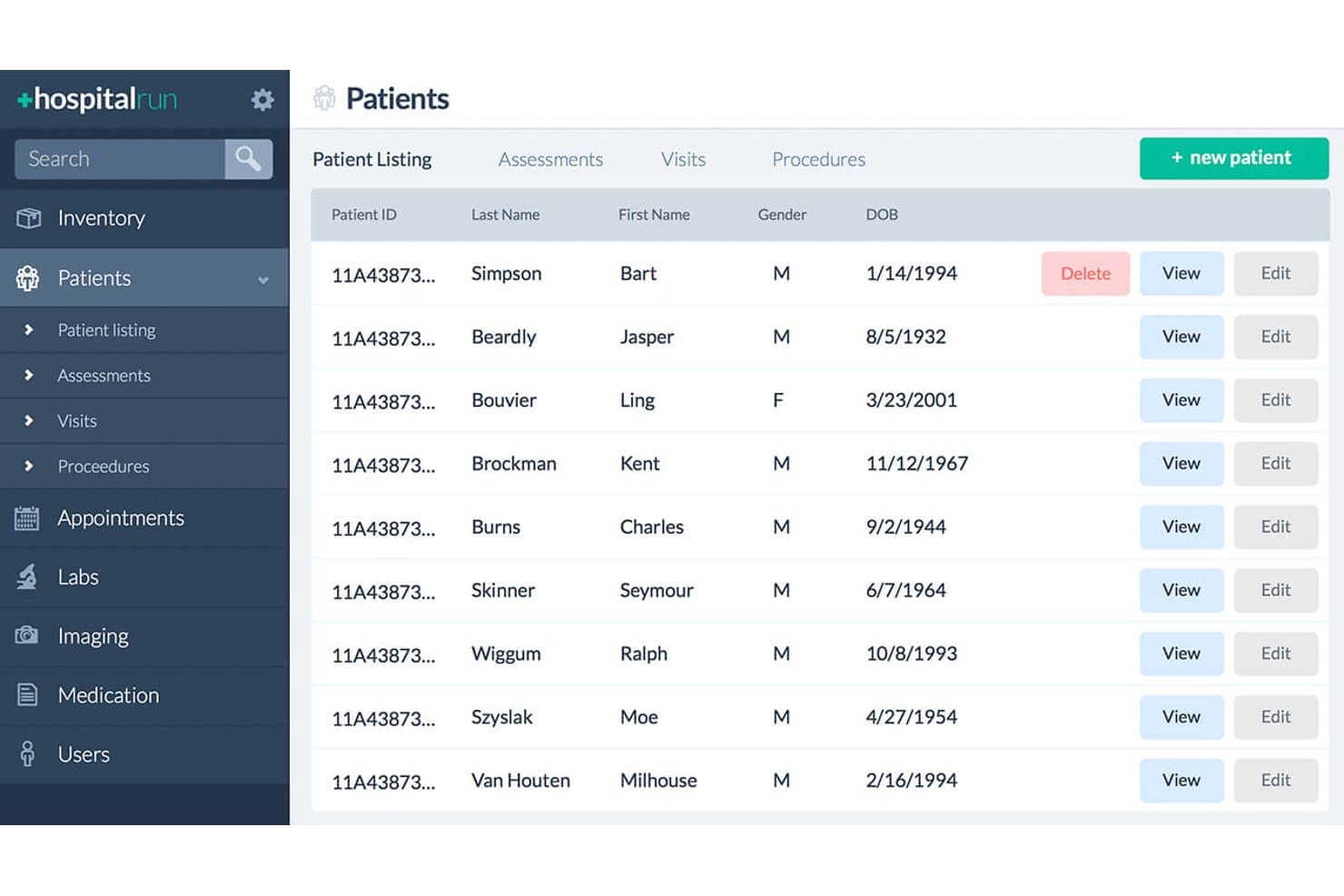
HospitalRun offers a patient listing interface displaying patient IDs, names, gender, date of birth, and action buttons for managing records. HospitalRun is an open-source hospital information system with offline-first billing, invoicing, patient management, and pharmacy modules built for clinics operating in low-connectivity environments.
Who Is Hospital Run Best For?
Health IT developers and NGO-run clinics in low-resource, remote regions who need a self-hosted, offline-capable hospital information system.
Why I Picked Hospital Run
I picked HospitalRun because its PouchDB-to-CouchDB sync architecture lets clinics record patient billing and invoices locally, then sync automatically when a connection becomes available. That offline-first design means a billing desk in a remote facility can keep working through an internet outage without losing any financial records. I also like that it's GPL-licensed and Docker-deployable, giving technical teams full control over the codebase and where patient data lives.
Hospital Run Key Features
- Patient management module: Manage patient records, demographics, and visit histories in a single dashboard.
- Pharmacy inventory tracking: Monitor medication inventory and manage pharmacy dispensing activity within the system.
- Role-based access controls: Assign different permission levels based on user roles for enhanced security in clinical and billing operations.
- Docker deployment package: Deploy the software on various operating systems using a prebuilt Docker image for easier setup.
Hospital Run Integrations
HospitalRun offers a native integration with MedDream for DICOM medical imaging and provides native lab system integration. An API is available for custom integrations.
Pros and Cons
Pros:
- Open-source codebase for customization
- Enables on-premise control over billing data
- Supports offline operation in remote environments
Cons:
- Lacks built-in medical coding libraries
- No insurance claims or eligibility features
Learn more about Hospital Run: Best for public health billing in limited settings
- Not available
- Pricing upon request
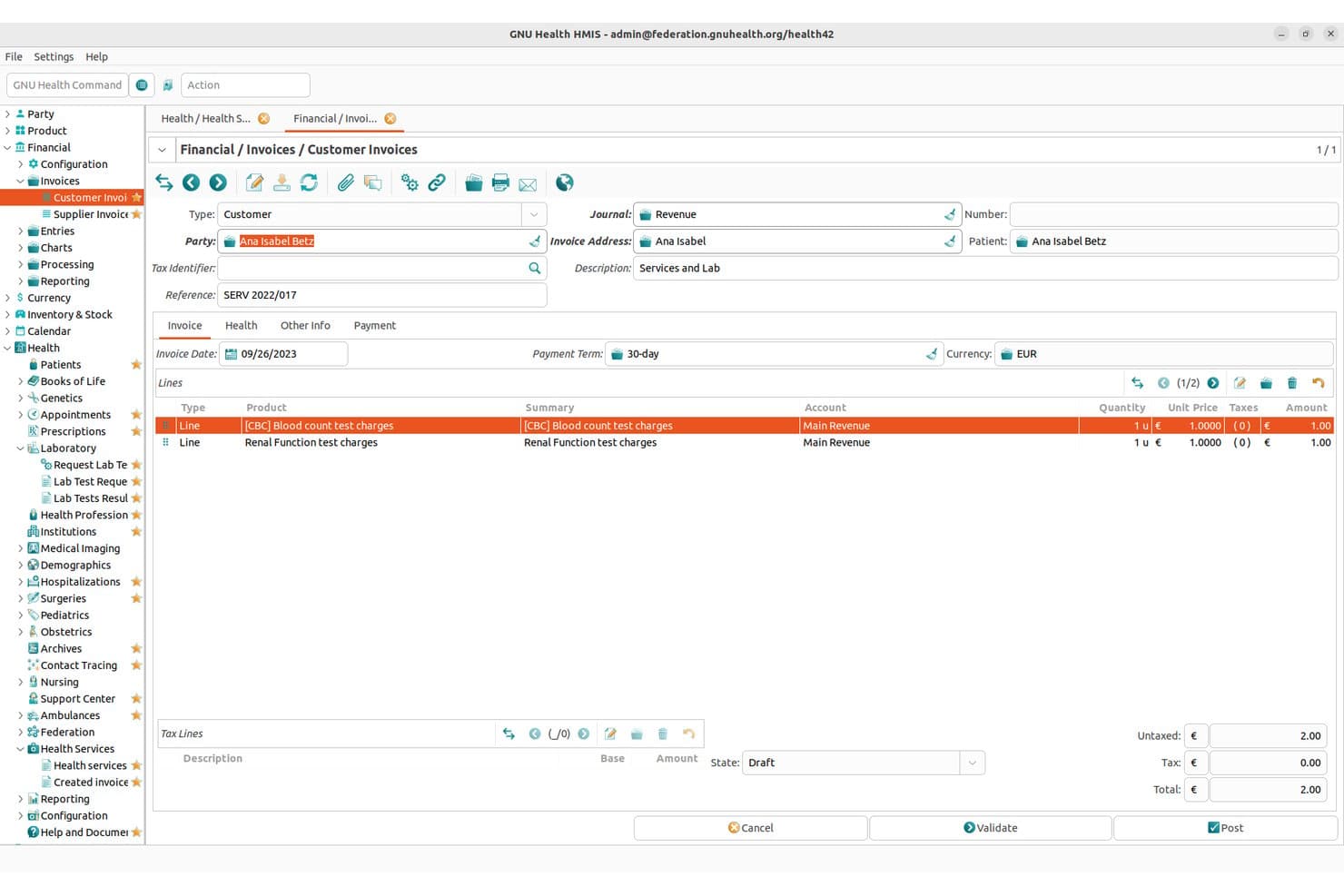
GNU Health offers a detailed customer invoice interface displaying line items, payment terms, currency, and billing totals for medical lab services. GNU Health is a free/libre, GPL-licensed hospital and health information system built on Python and Tryton, covering electronic health records, laboratory management, pharmacy, and health center billing.
Who Is GNU Health Best For?
GNU Health is a strong fit for health IT developers and public sector implementers deploying hospital information systems in resource-limited or international settings.
Why I Picked GNU Health
I've included GNU Health in my top picks because its Services & Billing module links patient encounters and hospitalizations directly to invoices, which is exactly the workflow public health clinics in low-resource settings rely on. I also like that ICD-10 and ICD-10PCS coding are built into the distribution, so care teams can document and bill procedures without bolting on a separate coding tool. The full stack runs on Linux or FreeBSD with PostgreSQL, meaning it's deployable on minimal hardware where commercial SaaS simply isn't an option.
GNU Health Key Features
- Modular hospital management: Configure clinical, administrative, and billing modules based on your implementation needs.
- Built-in ICD-10PCS support: Access standard procedure codes for accurate service documentation and billing.
- Tryton-based accounting: Leverage integrated general ledger and invoicing backed by the Tryton ERP platform.
- Healthcare statistics and analytics: Generate health center statistics and financial analysis reports directly from encounter and billing data.
GNU Health Integrations
GNU Health offers native integrations with HL7 FHIR, DICOM (via Orthanc), CalDAV for appointment management, and Tryton ERP. An API is available for custom integrations.
Pros and Cons
Pros:
- Modular for clinics, hospitals, and laboratories
- Embedded ICD-10 and ICD-10PCS code sets
- Fully open source with public codebase
Cons:
- Lacks automated insurance eligibility verification
- No CMS-1500 or 837 claims support
Learn more about GNU Health: Best for FHIR-based interoperability support
- Free plan available
- From $349/provider/month
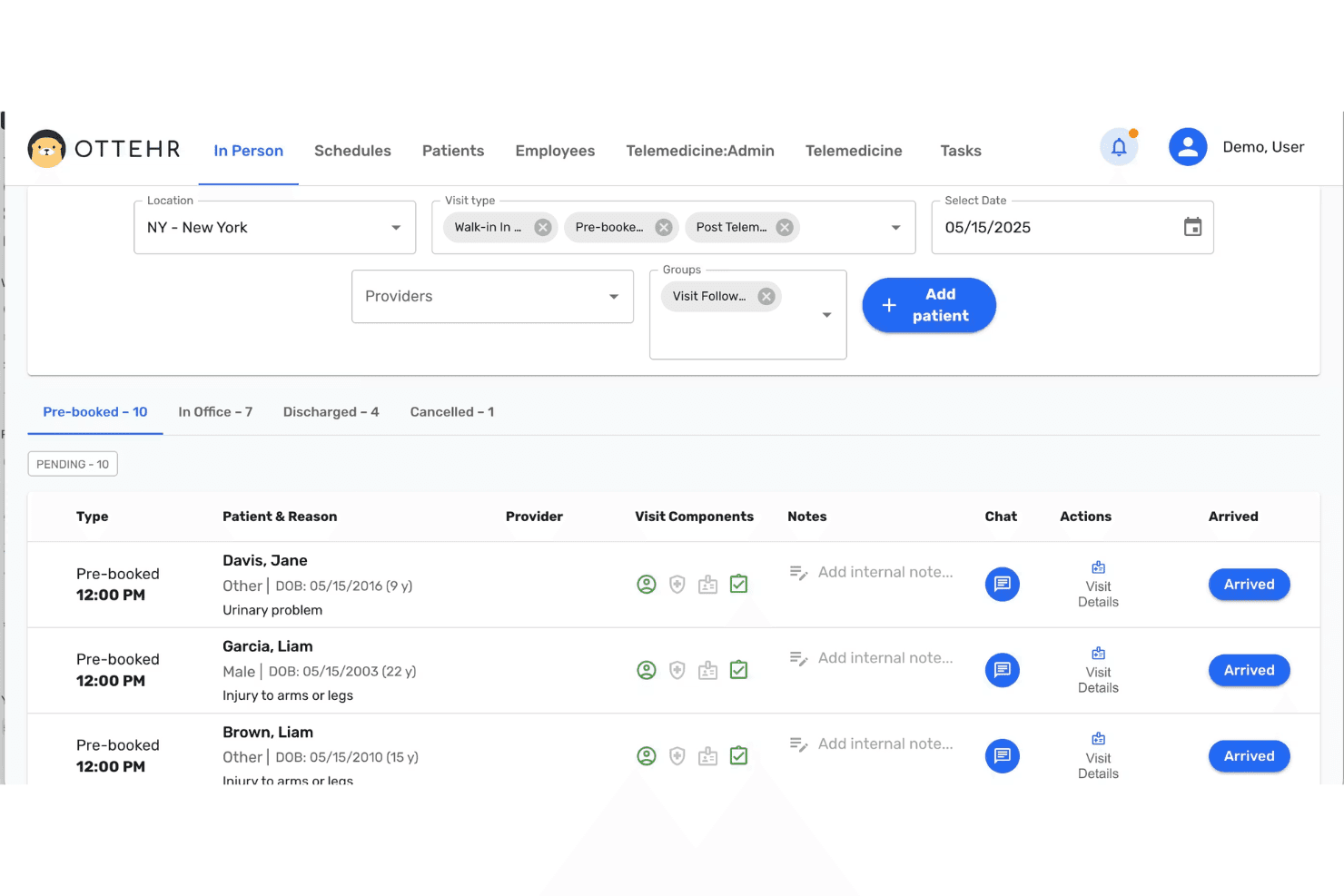
Ottehr delivers FHIR-based EHR, claims, denials, patient billing, and RCM. Ottehr is an open-source, FHIR-native EHR platform with built-in revenue cycle management, claims submission, denial tracking, and patient billing tools designed for urgent care and clinical practices.
Who Is Ottehr Best For?
Ottehr is a strong fit for health IT developers and technically resourced urgent care practices that want a forkable, self-hostable EHR with billing built in.
Why I Picked Ottehr
I picked Ottehr as one of the best because its FHIR R4/R5-native architecture means billing and clinical data share the same structured format across the entire encounter. The same FHIR API that powers the EHR also drives the RCM layer, keeping claims data consistent from documentation through 837P submission. Its built-in HIE and QHIN connectivity means practices exchanging records with outside payers or systems don't need separate middleware to stay interoperable.
Ottehr Key Features
- Patient portal: Lets patients self-register, schedule visits, complete intake forms, and view appointment history online.
- Customizable encounter templates: Enables practices to tailor charting forms and note structures for different specialties or workflows.
- Integrated RCM dashboard: Provides real-time visibility of claims status, denials, receivables, and financial performance within the EHR.
- AI ambient scribe: Converts patient-provider conversations into structured clinical notes in real time during encounters.
Ottehr Integrations
Ottehr offers native integrations with eClinicalWorks EHR, eRx, radiology, in-house and external diagnostic labs, and payment processors. An API is available for custom integrations.
Pros and Cons
Pros:
- Built-in AI coding assistant
- Fully open source with active GitHub repo
- FHIR-native EHR and billing engine
Cons:
- Limited presence on third-party review sites
- Claims and RCM features require paid tier
Learn more about Ottehr: Best for API-driven custom billing solutions
- Free plan available
- Pricing upon request
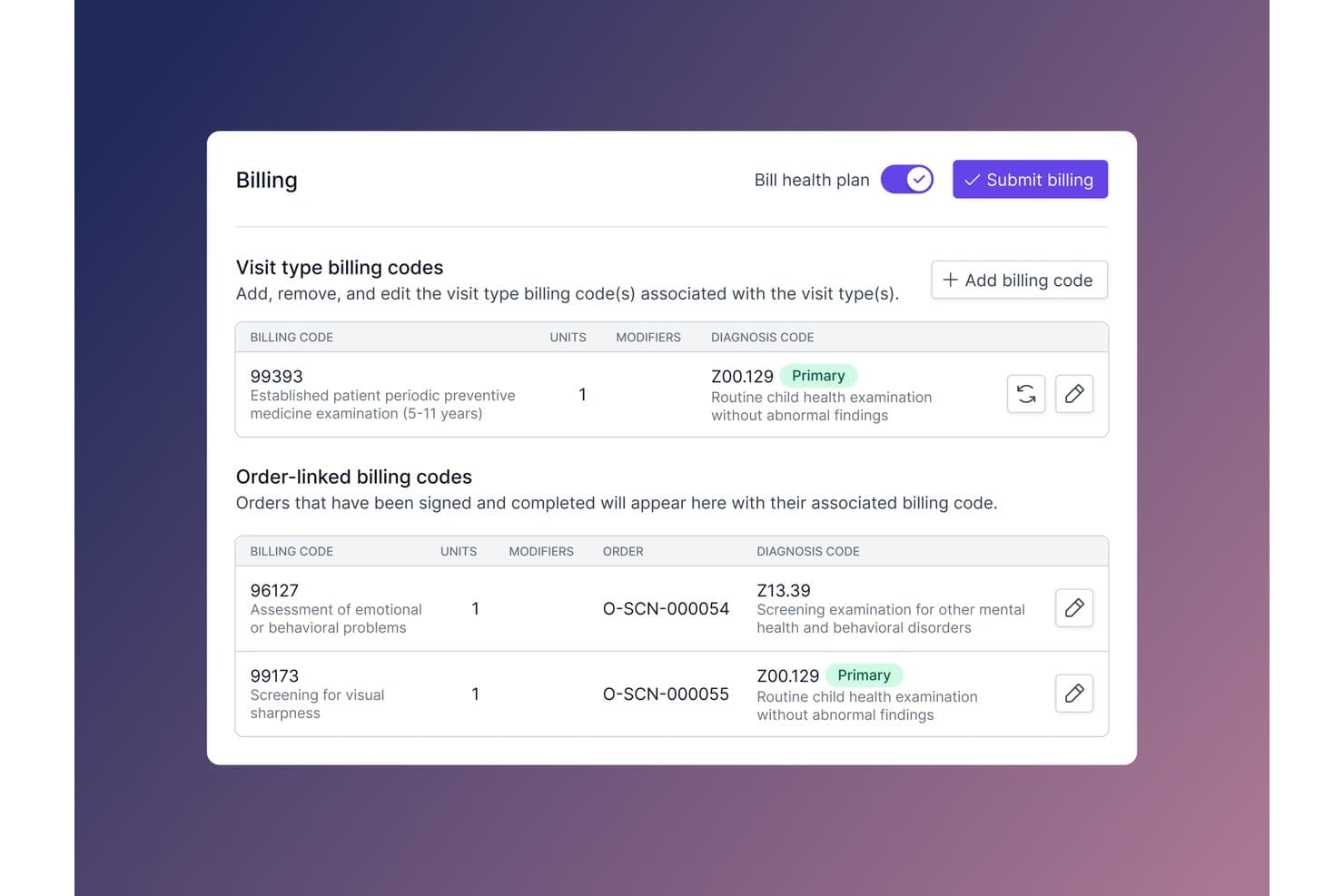
Medplum offers a billing interface with visit type and order-linked billing codes, diagnosis codes, and a one-click submit billing feature. Medplum is an open source, FHIR-native developer platform for building healthcare applications, with built-in support for revenue cycle management, claims tracking, and custom billing workflow automation.
Who Is Medplum Best For?
Medplum is a strong fit for health IT engineering teams at digital health startups and telehealth companies building custom RCM workflows on a FHIR-native foundation.
Why I Picked Medplum
I've included Medplum in my top picks because its Bot framework is the most direct path I've seen to building API-driven billing logic on a FHIR-native backend. Bots execute custom JavaScript whenever a FHIR Claim or ExplanationOfBenefit resource changes, so I can route submissions or push events to a clearinghouse without a separate service layer. The Enterprise Claims Dashboard then surfaces real-time claim status and payor-level tracking in one place.
Medplum Key Features
- FHIR-native data storage: All information is structured according to the FHIR R4 standard for interoperability.
- Open source licensing: Distributed under the Apache 2.0 license with code available for self-hosting and modification.
- Enterprise Master Patient Index (EMPI): Automated patient deduplication to ensure accurate demographics across records.
- Role-based access and audit logs: Fine-grained permissions management and built-in logging for security and compliance.
Medplum Integrations
Medplum offers native integrations with Candid Health, Labcorp, Quest Diagnostics, Health Gorilla, Epic Systems, Okta, Azure SSO, Google SSO, Datadog, Splunk, and Sumo Logic. An API is available for custom integrations.
Pros and Cons
Pros:
- Active open source community and frequent updates
- Bot framework allows custom billing automations
- Full FHIR-native architecture enables interoperability
Cons:
- Billing features require significant developer resources
- No built-in patient statement generation
Learn more about Medplum: Best for unified ERP and healthcare billing
- Free trial available
- Pricing upon request
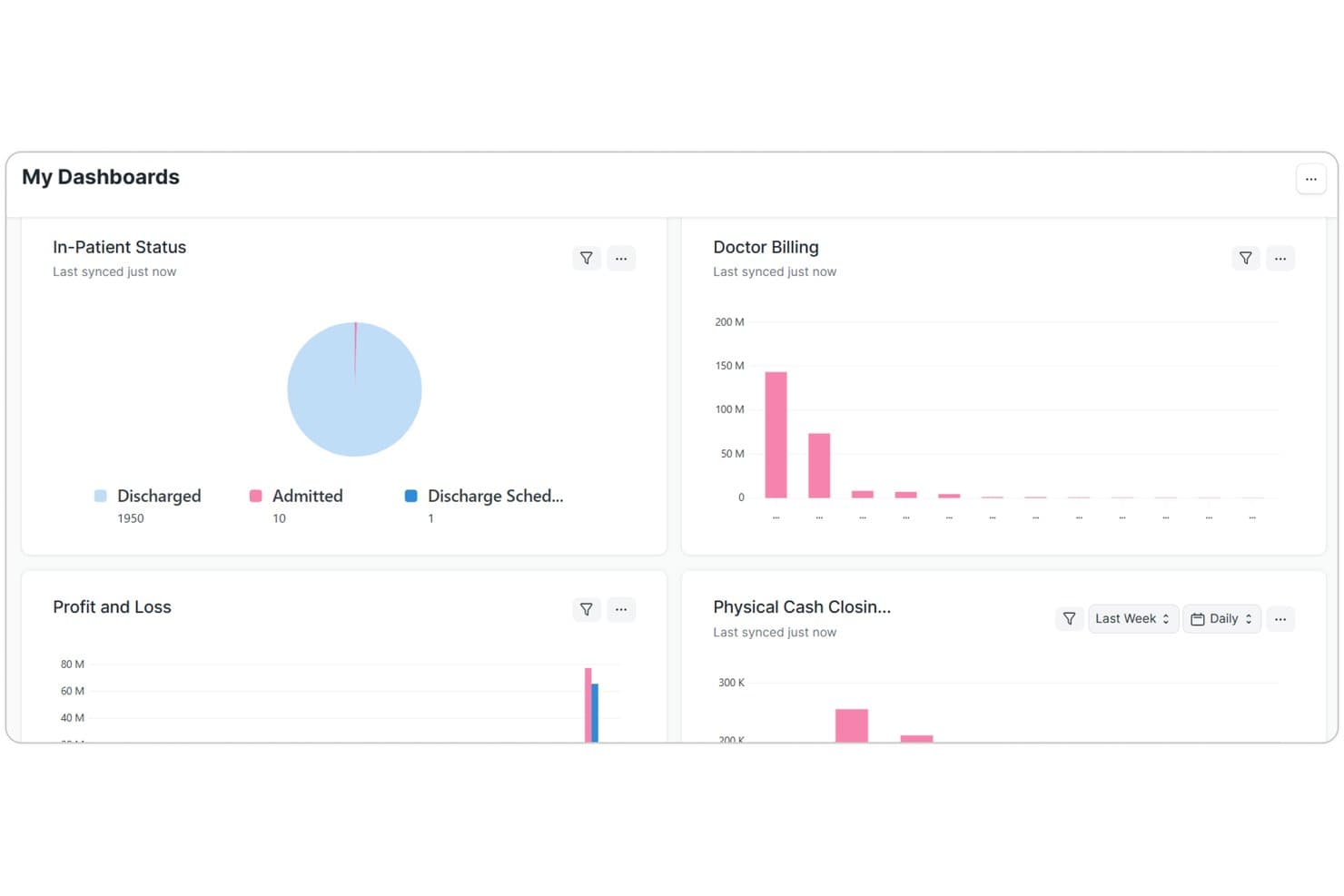
ERPNext Healthcare offers a centralized dashboard displaying in-patient status, doctor billing, profit and loss, and physical cash closing metrics for streamlined medical billing management. ERPNext Healthcare is an open-source ERP platform with a built-in healthcare module that covers patient billing, insurance management, pharmacy, lab operations, and clinical documentation in a single system.
Who Is ERPNext Healthcare Best For?
It's a strong fit for health IT developers and technically capable clinic operators who want to self-host and customize a full ERP stack without licensing costs.
Why I Picked ERPNext Healthcare
ERPNext Healthcare earns its spot on my shortlist because of how tightly billing connects to every clinical operation in the system. I like that when a patient is discharged, invoices auto-generate from lab tests, pharmacy dispensing, room charges, and procedures, without manual entry across separate tools. The insurance and payor configuration lets my team define coverage rules and co-pay calculations inside the same ERP, all within a codebase I can audit and modify freely.
ERPNext Healthcare Key Features
- Centralized patient records: All patient data, clinical notes, and documentation are stored and managed within a unified electronic record.
- Automated pharmacy management: Inventory levels, medication expirations, and dispensing are tracked and managed with barcode support.
- Lab and radiology integration: Orders, sample tracking, and result delivery for lab and imaging services are managed within the same system.
- Customizable insurance setup: Payer details, insurance policies, and coverage rules can be configured and linked to individual patient accounts.
ERPNext Healthcare Integrations
Native integrations are not clearly documented. ERPNext Healthcare provides an API for custom integrations and supports connecting to external systems through configurable webhooks.
Pros and Cons
Pros:
- Unified patient, billing, and clinical records
- Customizable healthcare modules for unique workflows
- Fully open source with public code repository
Cons:
- Lacks built-in insurance eligibility checks
- No native claim forms for US billing
Learn more about ERPNext Healthcare: Best for integrated EHR and billing workflows
- Free demo available
- Pricing upon request
Visit WebsiteCustomer Rating:3.9/5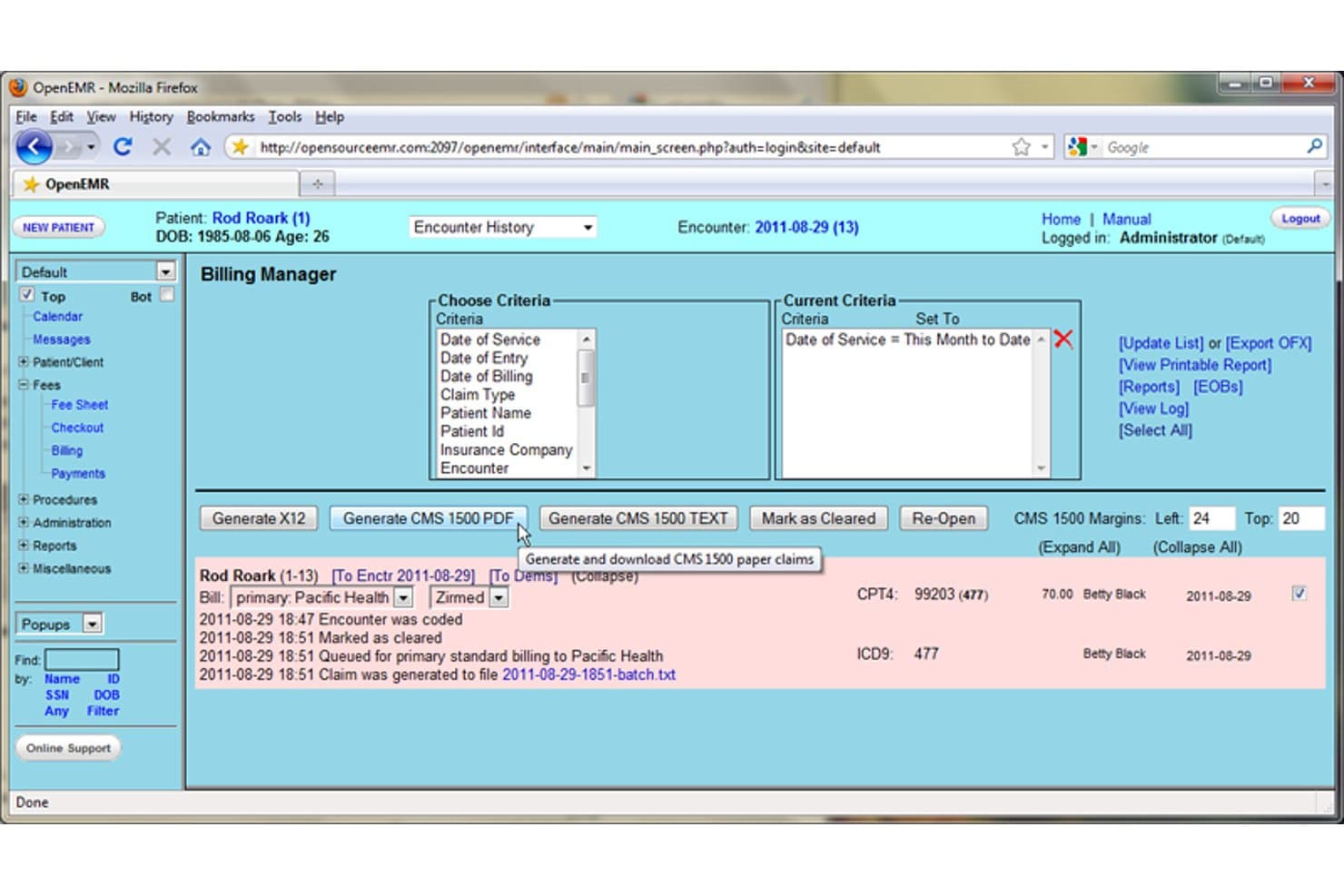
OpenEMR offers a Billing Manager interface with CMS 1500 claim generation, insurance billing status, and date-of-service filtering tools. OpenEMR is an open-source EMR and practice management platform that combines patient scheduling, medical billing, e-prescribing, lab integration, and clinical documentation in a single self-hostable system.
Who Is OpenEMR Best For?
OpenEMR is a strong fit for independent practices and health IT teams that need a self-hosted, fully customizable EHR and billing system without licensing costs.
Why I Picked OpenEMR
OpenEMR earns its spot on my shortlist because the billing module and EHR aren't bolted together as an afterthought—they're built as one system. When I create an encounter note, the CPT and ICD-10 codes feed directly into the claim without manual re-entry. I also like that it transmits 837P claims hourly via connected clearinghouses and handles ERA posting natively, keeping the revenue cycle tied directly to the clinical record.
OpenEMR Key Features
- Open source licensing: Distributed under the GNU GPL, with a public repository for modifying and self-hosting the code.
- Insurance and eligibility management: Supports payer setup, insurance verification, and ERA (835) posting for remittance reconciliation.
- Standard code set support: Includes up-to-date ICD-10, CPT, and HCPCS code sets with modifier support for detailed medical coding.
- Custom reporting tools: Provides financial and productivity reports, plus audit logging and role-based access to support HIPAA compliance.
OpenEMR Integrations
OpenEMR offers native integrations with NewCrop, Weno Exchange, Allscripts, Quest Diagnostics, and LabCorp, and supports clearinghouse connections like ClaimRev for claims submission and eligibility verification. An API is available for custom integrations.
Pros and Cons
Pros:
- Allows unlimited customization for specialty workflows
- Provides full ICD-10 and CPT coding support
- Offers integrated EHR and billing in one system
Cons:
- Denial management tools are basic out of the box
- Patient statement automation is limited
Learn more about OpenEMR: Best for modular clinical and billing extension
- Free demo available
- Free
Visit WebsiteCustomer Rating:4.8/5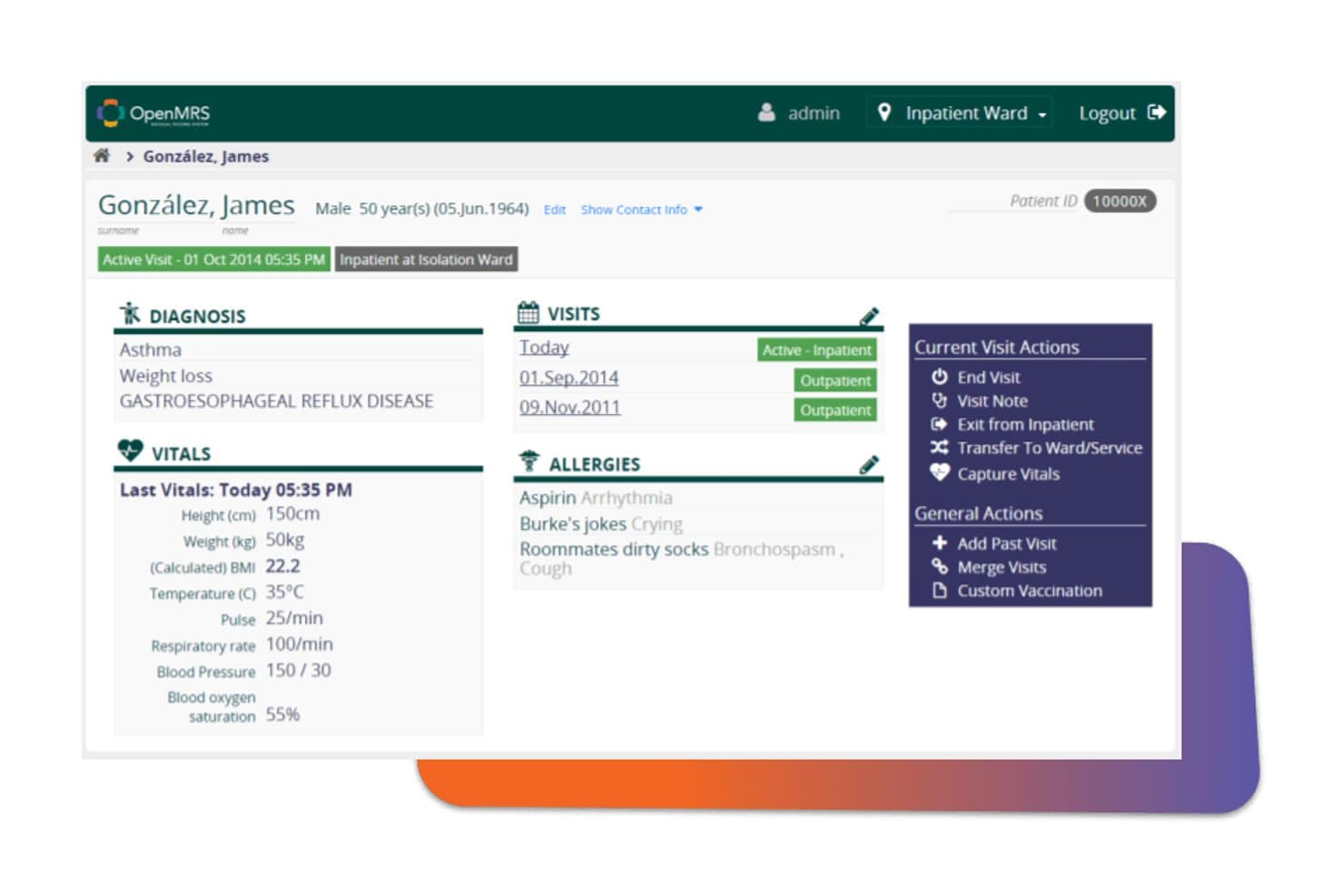
OpenMRS displays a patient dashboard with diagnosis, vitals, visit history, allergies, and clinical action options for inpatient management. OpenMRS is an open-source EMR platform with a modular billing add-on that handles patient bill creation, payment processing, receipt generation, and multi-payment-mode transaction tracking across clinical facilities.
Who Is OpenMRS Best For?
OpenMRS is a strong fit for health IT developers and technical teams building or extending self-hosted clinical systems in resource-constrained or international healthcare settings.
Why I Picked OpenMRS
I picked OpenMRS as one of the best because its billing functionality is a true add-on module, not baked into the core EMR. The Billing Module supports bill creation with multiple line items, multi-payment-mode processing (cash, insurance, mobile money), and configurable Jasper Report receipts. I also like the bill state tracking (draft, posted, adjusted) with full audit trails, which lets technical teams extend financial workflows without touching the clinical core.
OpenMRS Key Features
- Role-based user management: Set granular user access and permissions for data visibility, editing, and billing operations.
- REST and FHIR APIs: Connect billing modules with external EHRs and third-party systems through standards-based APIs.
- Multi-language interface support: Enable billing staff to navigate the system in multiple languages, including right-to-left script compatibility.
- Extensive concept dictionary: Incorporate standard medical coding libraries and custom clinical or billing code sets for flexible data capture.
OpenMRS Integrations
OpenMRS provides native integrations through REST and FHIR APIs for connectivity with EHRs, ERPs like Odoo, DHIS2, and laboratory systems. An API is available for custom integrations.
Pros and Cons
Pros:
- Large global community for support and development
- Modular architecture for adding billing extensions
- Handles multi-currency and multi-payment billing
Cons:
- Insurance eligibility and ERA posting not included
- No CMS-1500 or 837P claims workflow
Learn more about OpenMRS: Best for specialty template customization
- Not available
- Pricing upon request
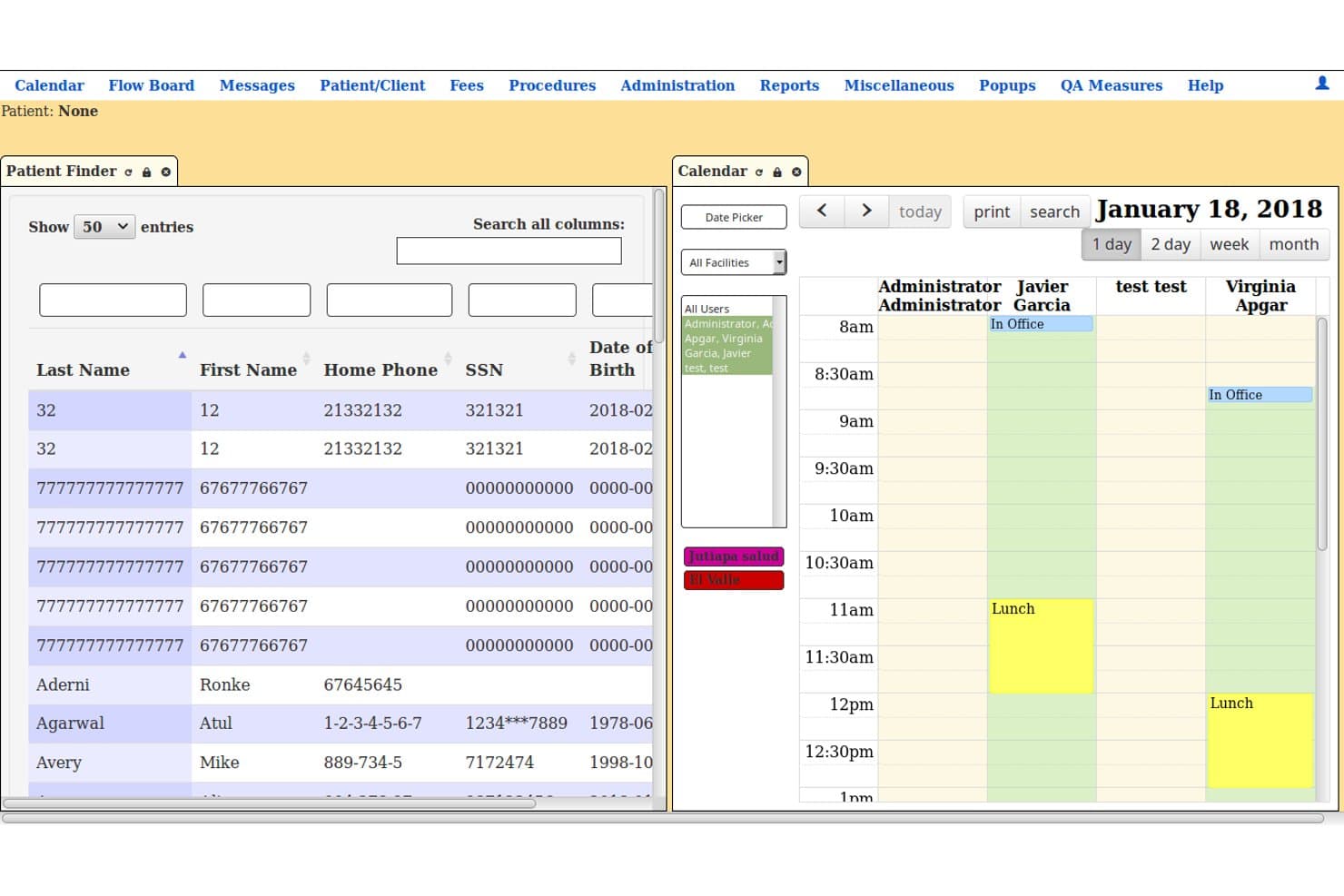
LibreHealth EHR offers a dual-panel interface with a Patient Finder list and a daily calendar view showing provider schedules and appointments. LibreHealth EHR is a free, open-source electronic health record and practice management system that covers clinical documentation, medical billing, scheduling, and medical coding on a modular, self-hostable platform.
Who Is LibreHealth EHR Best For?
Health IT developers and mission-driven clinics that need a fully self-hosted, customizable EHR and billing platform without licensing costs will find it most applicable.
Why I Picked LibreHealth EHR
LibreHealth EHR earns its spot on my shortlist because of how far its modular architecture lets you take specialty-specific customization. I like that the platform's web component system lets developers configure clinical and billing templates tailored to a specific specialty, whether that's behavioral health, orthopedics, or community medicine. The REST API built into the LibreHealth Toolkit makes that level of configuration practical without rewriting the core codebase.
LibreHealth EHR Key Features
- Open source licensing: Code is available under MPL 2.0 and GPL 2+ for full modification and self-hosting.
- Patient billing statements: Generate and print patient statements and track outstanding balances for each account.
- Medical coding libraries: Supports ICD-10, CPT, and HCPCS code libraries within billing workflows.
- Financial reporting tools: Includes basic financial and accounts receivable reports for revenue cycle monitoring.
LibreHealth EHR Integrations
Native integrations are not clearly documented. LibreHealth EHR supports integrations via its REST API and can connect with external labs, pharmacies, billing systems, and other EHRs through standards-based interfaces.
Pros and Cons
Pros:
- Modular design for advanced customization
- Fully open source and self-hostable
- Specialty-specific clinical and billing templates
Cons:
- Security vulnerabilities reported by project maintainers
- No recent updates or active maintenance
Learn more about LibreHealth EHR:
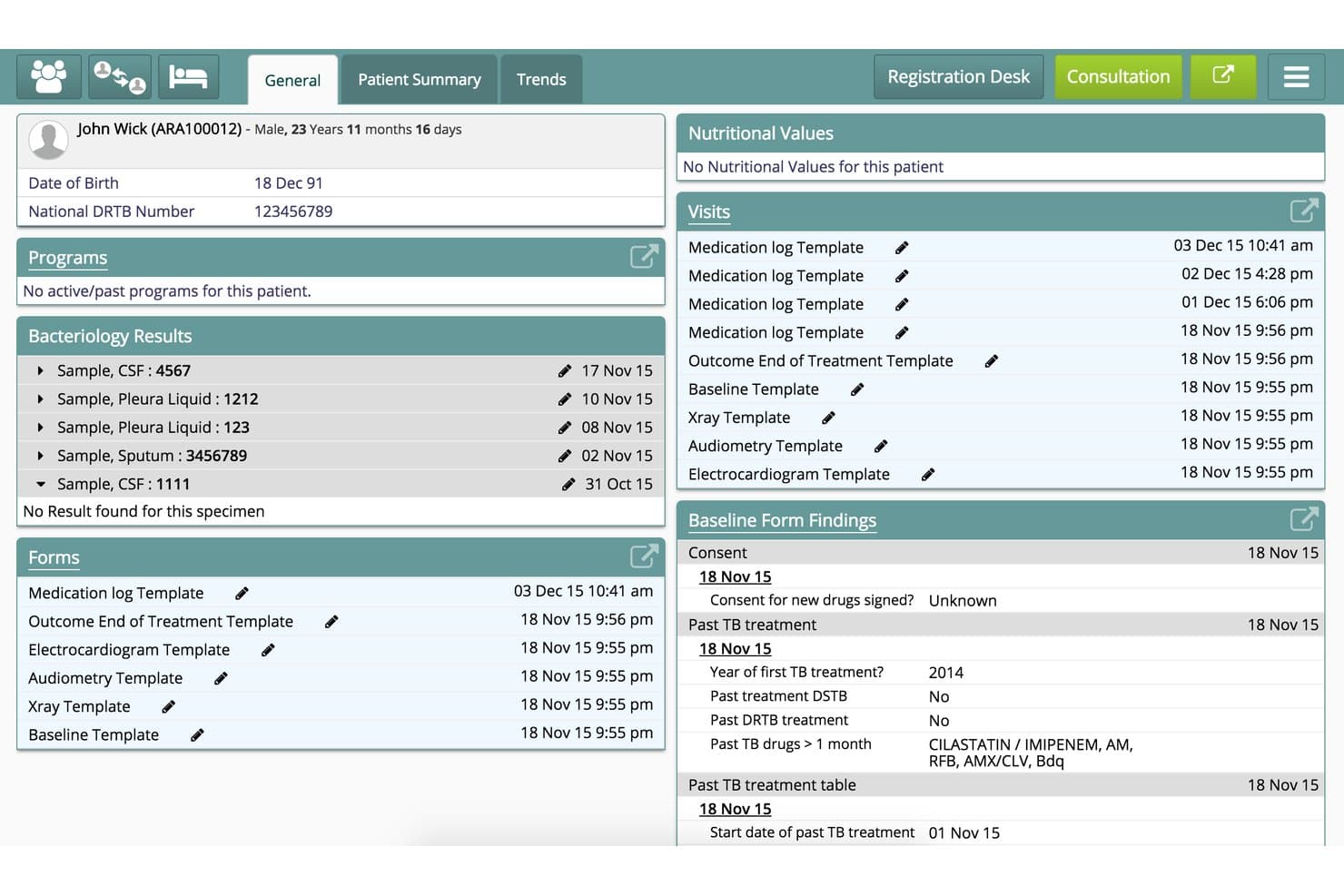
Bahmni offers a comprehensive patient dashboard displaying bacteriology results, visit logs, forms, and baseline clinical findings for medical record management. Bahmni is a free, open-source hospital information system that integrates patient registration, clinical records, inpatient management, laboratory workflows, pharmacy, and Odoo-based billing and accounting into a single platform.
Who Is Bahmni Best For?
Bahmni is a strong fit for health IT teams and developers deploying hospital information systems across NGO, government, or multi-facility clinical environments in low-resource settings.
Why I Picked Bahmni
Bahmni earns its spot as one of the best on my shortlist because its Odoo-based billing connects directly to clinical workflows across multiple facilities. When a drug order is placed in the clinical module, a draft bill generates automatically, keeping billing tied to care delivery at every site. I also like that each facility can maintain its own stock, dispensing records, and financial accounts while sharing a central patient registry.
Bahmni Key Features
- OpenMRS-based clinical data capture: Collects structured clinical data and links it with billing and inventory.
- Odoo-powered billing engine: Tracks charges, taxes, payments, and generates patient invoices using open source accounting tools.
- Multi-module laboratory integration: Supports orders, results, and workflows for lab tests mapped to billing codes.
- Custom reporting with Bahmni Mart: Enables financial, operational, and clinical reporting using prebuilt or user-defined datasets.
Bahmni Integrations
Bahmni offers native integrations with OpenMRS, Odoo, OpenELIS, DCM4CHEE, SNOMED CT through Snowstorm, Metabase, and Keycloak. An API is available for custom integrations.
Pros and Cons
Pros:
- Designed for multi-facility clinical deployments
- SNOMED CT and ICD-10 terminology support
- Modular architecture supports billing, labs, pharmacy
Cons:
- No electronic insurance eligibility verification
- No native CMS-1500 claim generation
Learn more about Bahmni: Best for intuitive physician-friendly interface
- Free demo available
- Pricing upon request
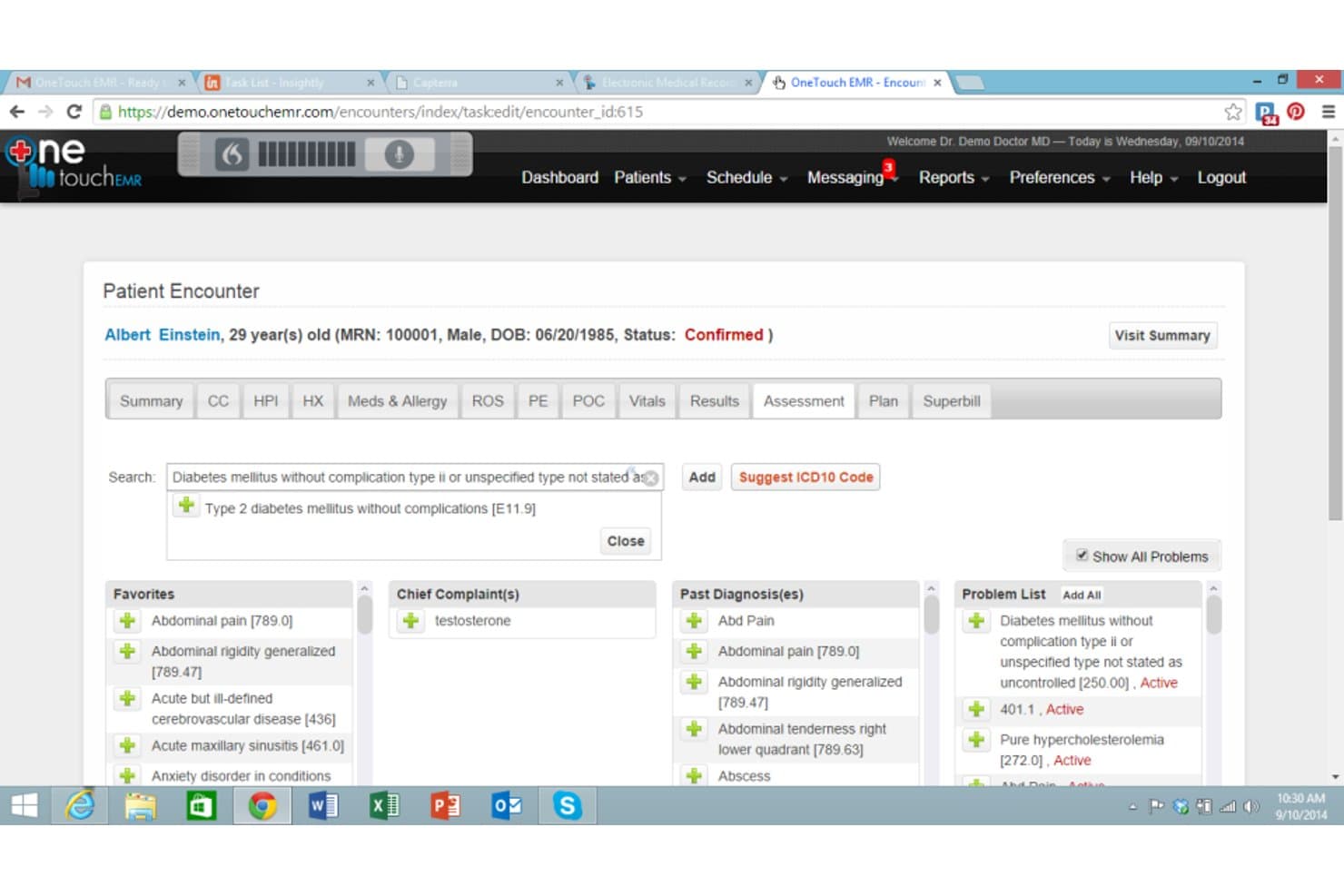
Onetouch EMR offers a patient encounter screen with ICD-10 code search, problem list management, and diagnosis tracking for streamlined medical billing workflows. OneTouch EMR is a physician-designed, cloud-based EMR platform that combines clinical documentation, e-prescribing, practice management, and integrated medical billing with claims submission and eligibility verification.
Who Is Onetouch EMR Best For?
It's a good fit for independent physicians and small-to-mid-size practices that want a single platform covering both clinical documentation and billing.
Why I Picked Onetouch EMR
I picked OneTouch EMR because it's one of the few billing-integrated platforms actually built by a practicing physician, and that origins story is visible in how the clinical interface is structured. Specialty-specific ROS and PE templates come pre-designed, so physicians aren't rebuilding note frameworks from scratch for every encounter type. I also like the AI ambient listening feature, which captures spoken clinical conversations and converts them into structured notes without manual input.
Onetouch EMR Key Features
- Integrated clearinghouse for claims: Submit electronic claims directly to payers with claim scrubbing and real-time status updates.
- ERA auto-posting: Automatically apply 835 electronic remittance information to patient ledgers for easier payment reconciliation.
- Patient payment portal: Let patients access bills and pay balances online using QuickPay and QR codes.
- Insurance eligibility verification: Verify insurance coverage in real time before appointments or claims submission.
Onetouch EMR Integrations
Native integrations include Dragon Medical, Mailchimp, integrated clearinghouses, eFax, and lab systems. An API is available for custom integrations.
Pros and Cons
Pros:
- Claims scrubbing and integrated clearinghouse are included
- Offers customizable specialty clinical templates
- Includes built-in eligibility and ERA auto-posting
Cons:
- Limited interoperability with other open source EHRs
- Closed-source and cannot be self-hosted
Learn more about Onetouch EMR:
Outros softwares de faturação médica de código aberto
Eis algumas opções adicionais de software de faturação médica de código aberto que não entraram na minha lista restrita, mas que vale a pena consultar:
- 11NoshBest for self-hosted solo practices
- 12FreeMEDBest for veteran community-driven enhancements
- 13Open DentalBest for dental practice billing features
- 14OSCAR EMRBest for customizable billing templates
- 15OpenClinic GABest for unified inpatient and outpatient billing
- 16SolismedBest for multi-provider billing administration
- 17FreeMedForms EMRBest for connected prescribing and billing
- 18ClearHealthBest for advanced insurance eligibility checks
- 19HOSxPBest for large site network billing support
- 20Fossible HISBest for doctor-led revenue tracking
How I Evaluate Open Source Medical Billing Software
I split my evaluation into two layers: the baseline requirements every tool must meet—like claims submission and ERA posting—and the differentiators that distinguish one platform from another.
Core Functionality (Table Stakes for This List)
When I'm selecting tools for my list, I rank each one on a scale from 0 (does not offer the functionality) to 5 (excels in this area) for each core functionality listed below. Then, I calculate the tool's total score into a percentage. Each tool needs to achieve a minimum total score of 65% to be considered for inclusion.
- Open source licensing: I check that each tool ships under a recognized OSI-approved license like GPL, MIT, or Apache, with source code you can actually fork and self-host.
- Claims management: The platform should handle electronic 837P/837I submission through a clearinghouse, not just generate paper CMS-1500 forms you print and mail.
- Insurance and eligibility: I look for payer setup, 835 ERA posting, and coordination of benefits so your team isn't manually keying in every remittance line item.
- Medical coding support: Built-in ICD-10, CPT, and HCPCS code sets with modifier support matter—tools like OpenEMR and LibreHealth EHR handle this differently.
- Patient billing and statements: Generating patient statements, posting payments, and tracking A/R balances are table stakes for any practice managing its own billing cycle.
- Reporting and compliance: Financial reports like A/R aging and collections summaries should pair with HIPAA-aligned controls such as audit logs and role-based access.
Once I have a list of tools that meet the criteria, I consider what sets each platform apart.
Differentiating Factors (What Sets Vendors Apart)
Here's how I compare and contrast different vendors:
Standout Features
Claim scrubbing engines make a real difference—I look for tools that catch payer-specific edits and CMS rule violations before submission, since even one missed modifier can trigger a denial. ERA auto-posting is another separator; platforms that ingest 835 files and post payments directly to patient ledgers save your team hours of manual reconciliation. I also evaluate denial management workflows, especially dashboards that let billers track rejected claims, assign follow-up tasks, and document appeal steps in one place.
Beyond Features
The license type matters more than people realize—GPL and AGPL carry different implications for how you can modify and redistribute code, which shapes your long-term flexibility. I also evaluate community health by checking GitHub activity, release frequency, and whether a commercial support network exists for practices without in-house developers. HIPAA compliance rounds out my assessment. Self-hosted deployments put the security burden on you, so I look for audit logging, role-based access controls, encryption at rest and in transit, and 2FA support.
Como escolher um software de faturação médica de código aberto
É fácil ficar atolado em listas extensas de funcionalidades e estruturas de preços complexas. Para o ajudar a manter o foco enquanto avalia o seu processo específico de seleção de software, apresentamos uma lista de verificação dos fatores a ter em conta:
| Fator | O que deve considerar |
|---|---|
| FatorEscalabilidade | O que deve considerarA solução será capaz de acompanhar o crescimento previsto, várias localizações ou um aumento do volume de pedidos? |
| FatorIntegrações | O que deve considerarPode ligar a faturação ao seu EHR, à entidade de processamento de pedidos, ao gateway de pagamentos ou às ferramentas de gestão da prática? |
| FatorPersonalização | O que deve considerarOs fluxos de trabalho, os conjuntos de códigos e a lógica de faturação podem ser personalizados para se adaptarem à sua especialidade ou às necessidades locais? |
| FatorFacilidade de utilização | O que deve considerarA navegação diária é intuitiva para a sua equipa, que pode ter diferentes níveis de conhecimentos tecnológicos? |
| FatorImplementação e integração inicial | O que deve considerarDe que recursos, documentação ou apoio do fornecedor/comunidade necessitará para uma implementação sem problemas? |
| FatorCusto | O que deve considerarPara além do código-fonte gratuito, quais são os custos reais — alojamento, tempo da equipa de TI, contratos com entidades de processamento de pedidos e serviços de apoio? |
| FatorMedidas de segurança | O que deve considerarConsegue gerir com confiança a privacidade das PHI, as permissões dos utilizadores e os controlos relacionados com a HIPAA no seu ambiente? |
| FatorComplexidade da configuração técnica | O que deve considerarA sua equipa tem experiência para gerir servidores Linux, cópias de segurança e atualizações regulares, ou necessitará de ajuda externa? |
O que é um software de faturação médica de código aberto?
O software de faturação médica de código aberto é uma tecnologia de faturação cujo código-fonte pode consultar e modificar, podendo alojá-la localmente ao abrigo de uma licença permissiva. Suporta funções essenciais como o envio de pedidos, a codificação, a gestão de seguros e a faturação aos pacientes.
Por ser aberto, oferece-lhe flexibilidade para personalizar fluxos de trabalho, integrar o seu EHR e controlar a segurança dos dados — dando às práticas controlo direto sobre os custos, a conformidade e o desenvolvimento contínuo do software.
Funcionalidades do software de faturação médica de código aberto
Ao selecionar um software de faturação médica de código aberto, esteja atento às seguintes funcionalidades essenciais:
- Gestão de sinistros: Trata da criação, validação, submissão e acompanhamento de sinistros eletrónicos e em papel, permitindo gerir todo o fluxo de trabalho de sinistros num único sistema.
- Verificação da elegibilidade do seguro: Liga-se às bases de dados dos pagadores para verificar a cobertura do paciente e a elegibilidade dos benefícios antes de submeter os sinistros, reduzindo as taxas de recusa.
- Suporte à codificação médica: Disponibiliza conjuntos de códigos ICD-10, CPT e HCPCS atualizados, com modificadores, para codificar corretamente os episódios e cumprir os regulamentos de faturação.
- Registo automático de ERA/EOB: Importa ficheiros eletrónicos de pagamentos (835) para registar automaticamente pagamentos, ajustamentos e recusas nas contas dos pacientes, poupando trabalho manual.
- Faturação e extratos dos pacientes: Gera extratos claros para os pacientes, suporta o processamento de pagamentos online e offline e acompanha os saldos pendentes para melhorar as cobranças.
- Fluxos de trabalho de gestão de recusas: Disponibiliza ferramentas para acompanhar, atribuir e resolver sinistros recusados ou rejeitados, ajudando os funcionários a gerir eficazmente os acompanhamentos e os recursos.
- Relatórios financeiros: Produz relatórios detalhados sobre contas a receber, cobranças, desempenho dos pagadores e principais métricas do ciclo de receitas, para apoiar a tomada de decisões informadas.
- Controlos de acesso baseados em funções: Permite definir permissões por função de utilizador para proteger informações de saúde sensíveis e apoiar a conformidade regulamentar.
- Modelos e fluxos de trabalho personalizáveis: Permite às clínicas ajustar formulários de faturação, fluxos de trabalho e modelos de acordo com os requisitos específicos da especialidade e da organização.
- Capacidades de integração: Suporta ligações a sistemas de EHR, gestão de clínicas e câmaras de compensação através de APIs ou formatos padrão, simplificando o processo de faturação.
Vantagens do software de faturação médica de código aberto
A implementação de software de faturação médica de código aberto proporciona várias vantagens à sua equipa e à sua empresa. Eis algumas das que pode esperar:
- Controlo e segurança dos dados: A auto-hospedagem permite proteger as informações dos pacientes e manter a conformidade com os regulamentos de privacidade através da gestão do seu próprio PHI.
- Flexibilidade de personalização: Adapte fluxos de trabalho, regras de faturação e conjuntos de códigos à especialidade e às preferências operacionais da sua clínica.
- Menor custo total de propriedade: Evite a dependência de fornecedores e as taxas de subscrição contínuas, orçamentando apenas o alojamento, a câmara de compensação e o suporte conforme necessário.
- Capacidade de integração: Ligue facilmente o seu sistema de faturação às ferramentas de EHR, gestão de clínicas e câmaras de compensação existentes.
- Melhorias impulsionadas pela comunidade: Beneficie de fóruns públicos, correções partilhadas e resolução coletiva de problemas em comunidades ativas de utilizadores e programadores de código aberto.
- Transparência e independência dos fornecedores: Reveja e ajuste o código-fonte conforme necessário, garantindo que o seu sistema evolui com a sua clínica e com os padrões do setor.
- Relatórios e acompanhamento melhorados: Aceda a funcionalidades robustas de elaboração de relatórios sobre contas a receber, cobranças, recusas e produtividade, apoiando decisões empresariais baseadas em dados.
Custos e preços do software de faturação médica de código aberto
A seleção de software de faturação médica de código aberto exige uma compreensão dos vários modelos de preços e planos disponíveis. Os custos variam consoante as funcionalidades, a dimensão da equipa, os complementos e outros fatores. A tabela abaixo resume os planos mais comuns, os seus preços médios e as funcionalidades normalmente incluídas nas soluções de software de faturação médica de código aberto:
Tabela comparativa de planos para software de faturação médica de código aberto
| Tipo de plano | Preço médio | Funcionalidades comuns |
|---|---|---|
| Tipo de planoPlano gratuito | Preço médio$0 | Funcionalidades comunsAcesso ao código-fonte, gestão básica de sinistros, contas de utilizador limitadas, suporte da comunidade e relatórios básicos. |
| Tipo de planoPlano pessoal | Preço médio$10–$50/utilizador/mês | Funcionalidades comunsFluxos de trabalho padrão para sinistros, suporte à codificação médica, gestão simples de seguros e ajuda por e-mail. |
| Tipo de planoPlano empresarial | Preço médio$50–$150/utilizador/mês | Funcionalidades comunsFuncionalidades avançadas de faturação, registo automático de ERA/EOB, ferramentas de integração, permissões baseadas em funções e suporte prioritário. |
| Tipo de planoPlano empresarial avançado | Preço médio$150–$400+/utilizador/mês | Funcionalidades comunsAcesso completo à API, personalização de fluxos de trabalho específicos por especialidade, SSO, registo de auditoria, apoio à integração e suporte SLA contratual. |
Perguntas frequentes sobre software de faturação médica de código aberto
Eis algumas respostas a perguntas comuns sobre software de faturação médica de código aberto:
As ferramentas de faturação médica de código aberto são realmente gratuitas?
Sim, o código-fonte é normalmente gratuito para descarregar e utilizar, mas poderá ainda ter de pagar pelo alojamento, suporte, serviços de processamento de pedidos e configuração técnica.
As plataformas de faturação médica de código aberto podem integrar-se com o meu EHR?
Sim, muitas soluções de faturação de código aberto permitem a integração com EHR através de APIs ou formatos padrão como HL7 ou FHIR, mas deve sempre confirmar a compatibilidade antes de fazer a sua escolha.
Como posso garantir a conformidade com a HIPAA ao utilizar software de faturação de código aberto?
Tem de gerir a sua própria segurança dos dados, ativando registos de auditoria, utilizando encriptação, limitando o acesso dos utilizadores e implementando boas práticas para o tratamento de PHI.
Que tipo de suporte está disponível para sistemas de faturação de código aberto?
O suporte provém frequentemente de fóruns de utilizadores e documentação, mas alguns fornecedores ou grupos de consultoria oferecem contratos de suporte pagos e assistência na implementação.
O software de faturação de código aberto é adequado para consultórios de maior dimensão ou com várias localizações?
Sim, desde que escolha uma plataforma que ofereça suporte para vários utilizadores, fluxos de trabalho personalizáveis e escalabilidade para maiores volumes de pedidos. Avalie sempre as funcionalidades de escalabilidade de cada ferramenta antes de se comprometer.