

O software de transcrição em conformidade com a HIPAA é um tipo de ferramenta de documentação médica concebida para converter voz ou áudio em texto de forma segura, cumprindo todos os requisitos de privacidade e segurança da HIPAA. Se procura formas de proteger os dados dos doentes, reduzir os erros de documentação e acompanhar os rigorosos regulamentos do setor da saúde, é essencial escolher o software de transcrição adequado. Esta lista ajudá-lo-á a comparar as principais opções em conformidade com a HIPAA para 2026, para que possa encontrar uma solução que responda às suas necessidades clínicas, administrativas e de conformidade.
Why Trust Our Software Recommendations
6,700+
Reviews
20
Industry experts
16+
Evaluation factors
14
Years
Our team has been testing and reviewing software since 2012. As medical practice leaders ourselves, we know how difficult—and important—it is to choose the right software.
For this guide, we evaluated tools using hands-on testing and independent research, scoring tools using our selection criteria.
Our reviews reflect our human editorial judgment, not a sales pitch.
Tabela de comparação de software de transcrição em conformidade com a HIPAA
Esta tabela de comparação resume os detalhes de preços das minhas principais escolhas de software de transcrição em conformidade com a HIPAA:
| Tool | Best For | Trial Info | Price | ||
|---|---|---|---|---|---|
| 1 | Best for automated waitlist and cancellation fills | 14-day free trial | From $29/month | Website | |
| 2 | Best for centralized practice operations | Free demo available | From $100/user/month (billed annually) | Website | |
| 3 | Best for therapist-friendly documentation | 14-day free trial | From $19.99/month | Website | |
| 4 | Best for hands-free clinical dictation | 7-day free trial | From $39/month | Website | |
| 5 | Best for scalable voice-to-text integration | Free plan available | Pricing upon request | Website | |
| 6 | Best for automated conversation analytics | Free plan available | From $39/month | Website | |
| 7 | Best for meeting documentation automation | Free plan + free demo available | From $10/user/month (billed annually) | Website | |
| 8 | Best for real-time collaboration with teams | 7-day free trial + free demo available | From $19.99/month (billed annually) | Website | |
| 9 | Best for human-verified medical accuracy | Not available | From $0.07/min | Website | |
| 10 | Best for specialty medical fields | Free trial available | Pricing upon request | Website |


Avaliações do melhor software de transcrição em conformidade com a HIPAA
Seguem-se os meus resumos detalhados dos melhores softwares de transcrição em conformidade com a HIPAA que entraram na minha lista. As minhas avaliações apresentam uma análise detalhada das funcionalidades, integrações e melhores casos de utilização de cada plataforma, para o ajudar a encontrar a melhor opção para si.
 Best for automated waitlist and cancellation fills
- 14-day free trial
- From $29/month
Visit WebsiteCustomer Rating:4.7/5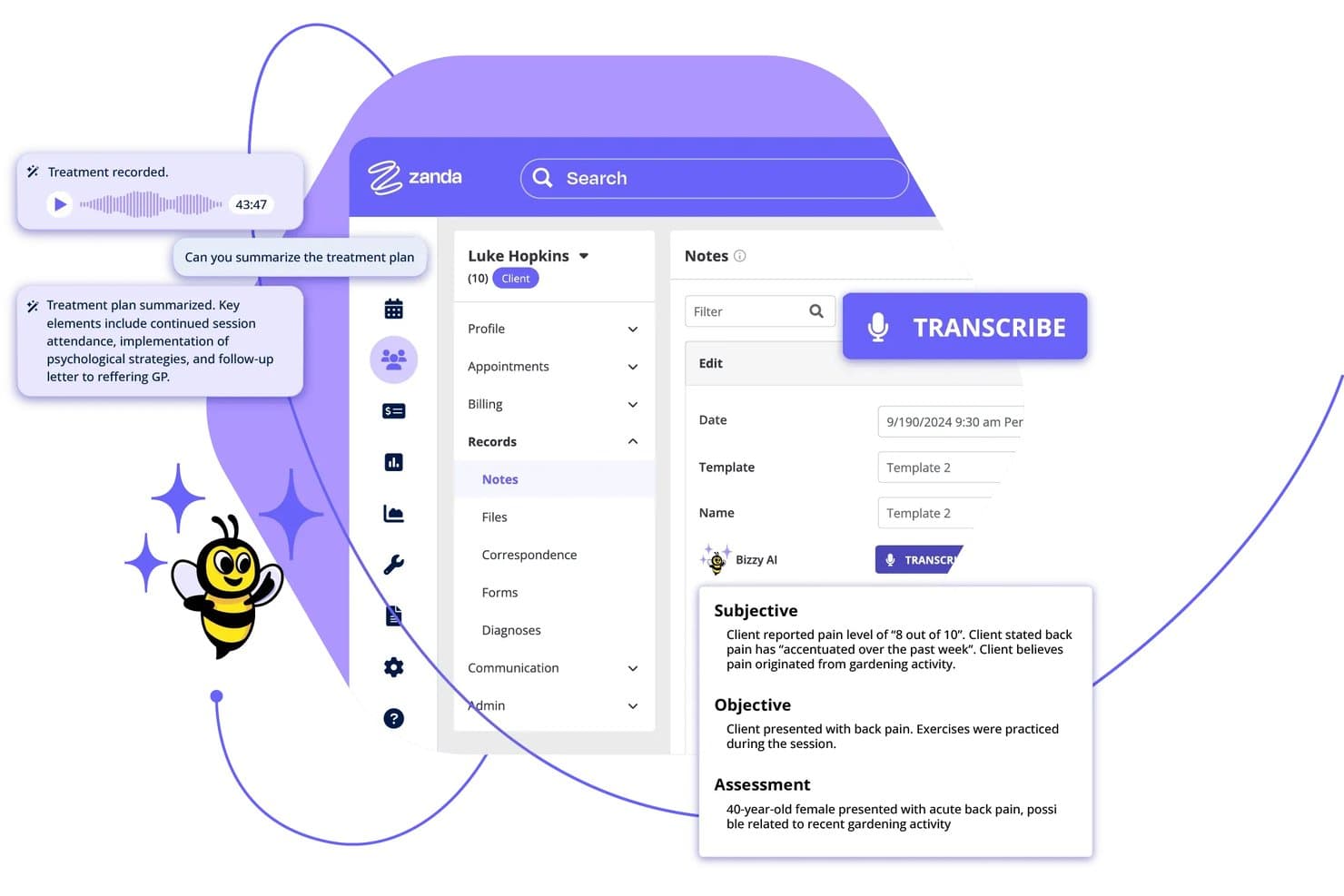
Zanda offers an AI-powered transcription feature called Bizzy AI that automatically converts session recordings into structured clinical notes with Subjective, Objective, and Assessment sections. Zanda is a HIPAA-compliant practice management platform for allied health practitioners that combines AI session transcription, appointment scheduling, clinical notes, billing, and client communication in one system.
Who Is Zanda Best For?
Zanda is a strong fit for solo and small-group allied health practitioners—such as therapists, psychologists, and physiotherapists—who want scheduling and AI transcription in a single platform.
Why I Picked Zanda
I picked Zanda as one of the best because of how it handles late cancellations. When a slot opens, it automatically prompts you to SMS the next waitlisted client and fill it before the gap costs you a session. I also like that BizzyAI: Scribe, Zanda's HIPAA-compliant transcription tool, sits inside the same platform, so every recovered appointment flows into AI-drafted clinical notes. Client audio is never used to train AI models, which matters under HIPAA.
Zanda Key Features
- Integrated AI transcription: Accurately transcribes client sessions directly within your calendar and notes workflow.
- Client portal: Enables clients to manage appointments, complete intake forms, and access communications securely.
- Role-based access controls: Lets you define user permissions to maintain strict HIPAA compliance for sensitive records.
- Paperless intake forms: Collects client demographic and assessment data electronically before sessions.
Zanda Integrations
Zanda offers native integrations with Stripe, Zoom, Xero, Mailchimp, Physitrack, Outlook, Google Calendar, and more.
Pros and Cons
Pros:
- Session notes organized alongside appointment records
- Instant waitlist notifications for canceled appointments
- Automated AI-powered clinical session transcription
Cons:
- Limited advanced voice editing controls
- No offline transcription mode available
Learn more about Zanda: Best for centralized practice operations
- Free demo available
- From $100/user/month (billed annually)
Visit WebsiteCustomer Rating:5/5
DocVilla centralizes patient records, SOAP notes, and clinical workflows. DocVilla is a HIPAA-compliant, cloud-based EHR platform with built-in AI medical dictation, speech-to-text transcription, clinical documentation, practice management, medical billing, and telehealth—all within a single system.
Who Is DocVilla Best For?
DocVilla is a good fit for independent and small-to-mid-size medical practices that want EHR, billing, scheduling, and dictation in one platform.
Why I Picked DocVilla
I picked DocVilla as one of the best because I love how it's genuinely built around the idea that a practice shouldn't need five different tools to run. The dictation feature ties directly into customizable SOAP note templates, so you can dictate an encounter and have it populate the right fields in real time, rather than transcribing into a blank text box and reformatting later. What makes that especially useful in a busy clinic is the role-based access control and audit trail built into the same system, so every dictated note is HIPAA-compliant without any extra steps. I also think the cross-device dictation (desktop, tablet, smartphone) is genuinely practical, not a marketing checkbox, especially for providers moving between exam rooms or managing notes after telehealth visits.
DocVilla Key Features
- Speech-to-text dictation: Built-in HIPAA compliant speech-to-text converts spoken notes directly into the EHR without a third-party app.
- HL7 FHIR integration: Supports health information exchange so dictated records move across systems without manual data re-entry.
- Role-based access controls: Admins can assign permissions by provider role, limiting who can view or edit transcribed patient records.
- Lab result documentation: Lab orders and results tie directly into the patient record alongside dictated notes, keeping the full clinical picture in one place.
DocVilla Integrations
DocVilla offers native integrations with Fullscript, MedlinePlus, AccuReference Medical Lab, Quest Diagnostics, and Vibrant. It supports webhooks, OAuth, and an HL7 FHIR API for custom practice management workflows.
Pros and Cons
Pros:
- Voice command navigation for hands-free use
- Multi-specialty templates for clinical notes
- Direct dictation into patient charts
Cons:
- Heavy local processor demand requirements
- No mobile dictation app available
Learn more about DocVilla: Best for therapist-friendly documentation
- 14-day free trial
- From $19.99/month
Visit WebsiteCustomer Rating:4.5/5
Mentalyc creates AI-powered, compliant therapy notes quickly. Mentalyc is a HIPAA compliant AI documentation platform for mental health professionals that generates clinical notes, treatment plans, and cross-session progress tracking directly from session recordings.
Who Is Mentalyc Best For?
Mentalyc is a strong fit for individual therapists and small mental health practices that want to reduce documentation time without changing how they conduct sessions.
Why I Picked Mentalyc
I picked Mentalyc as one of the best because of how intentionally it's designed around clinical documentation workflows. I particularly like Alliance Genie, which derives therapeutic alliance scores from session content without sending questionnaires to clients. Its cross-session progress tracking also automatically extracts symptoms, goals, and behaviors across sessions and trends them over time. These aren't features you find in standard AI note tools, and they're built directly into the documentation workflow.
Mentalyc Key Features
- Multiple note format support: Generate notes in SOAP, DAP, BIRP, EMDR, and other formats based on your treatment approach.
- Group session notes: Document group therapy sessions with individual client summaries generated from a single recording.
- Supervision note generation: Create supervision notes for student clinicians and supervisors directly within the platform.
- Multi-language transcription: Transcribe and generate notes from sessions conducted in languages other than English.
Mentalyc Integrations
Mentalyc offers direct integrations with six mental health-specific EHRs, including TherapyNotes, ICANotes, TheraNest, Valant, SimplePractice, and TheraBill, plus a Chrome Extension that one-click autofills generated notes into SimplePractice, Jane App, and any other web-based EHR.
Pros and Cons
Pros:
- Audio upload for post-session transcription
- Supports multiple note formats, including DAP
- AI generates behavioural health-specific progress notes
Cons:
- Limited to behavioural health documentation workflows
- No real-time transcription during live sessions
Learn more about Mentalyc: Best for hands-free clinical dictation
- 7-day free trial
- From $39/month
Visit WebsiteCustomer Rating:5/5
Freed AI automates medical charting and transcription for clinicians. Freed AI is an AI-powered medical scribe and clinical dictation platform that converts patient conversations into specialty-specific clinical notes, with built-in coding assistance and EHR push capabilities.
Who Is Freed AI Best For?
Freed AI is built specifically for independent and community-based clinics where clinicians carry both the patient care and documentation load themselves.
Why I Picked Freed AI
I've included Freed AI in my top picks because its ambient listening feature genuinely removes documentation from the clinical encounter. I like that it runs passively in the background on a mobile device during a visit, then generates a specialty-formatted SOAP note the moment the conversation ends. Its custom note style feature lets you train the AI to match your exact documentation preferences, so output doesn't need heavy editing before it hits your EHR.
Freed AI Key Features
- Visit prep summary: Freed auto-generates a summary of the patient's prior visit, last note, and outstanding follow-up items before each appointment.
- Post-visit letter generation: Freed creates referral letters, return-to-work certifications, sick notes, and caregiver letters from the visit context, with 14+ letter types available.
- ICD-10, CPT, and E/M code suggestions: Billing codes appear directly in your Freed note the moment the visit note is complete, with specialty-aware recommendations.
- Patient instructions: Freed converts clinical note content into plain-language patient instructions that are ready to send immediately after the visit.
Freed AI Integrations
Freed AI works with any browser-based EHR through its Chrome extension, with optimized EHR push support for athenahealth, Practice Fusion, eClinicalWorks, Tebra/Kareo, Elation, SimplePractice, Kipu, Optimantra, ModMed, and DrChrono.
Pros and Cons
Pros:
- Patient consent workflow built into the app
- Multi-specialty templates for tailored documentation
- Hands-free SOAP note generation during visits
Cons:
- Limited support for non-English languages
- No offline transcription capability available
Learn more about Freed AI: Best for scalable voice-to-text integration
- Free plan available
- Pricing upon request
Visit WebsiteCustomer Rating:4.6/5
Amazon Transcribe Medical converts clinical speech into searchable text. Amazon Transcribe Medical is an AWS-native automatic speech recognition service built specifically for medical terminology, offering both real-time streaming and batch transcription through a developer API.
Who Is Amazon Transcribe Medical Best For?
Amazon Transcribe Medical is a strong fit for development teams at health systems or digital health companies building voice-enabled clinical applications directly within AWS infrastructure.
Why I Picked Amazon Transcribe Medical
I picked Amazon Transcribe Medical as one of the best because it's built to scale without any infrastructure management on my end. The API handles both real-time streaming and batch transcription, so I can process a single dictation or thousands of patient encounters simultaneously. It's also trained on medical-specific vocabularies across specialties like cardiology and neurology, which cuts down on post-processing corrections that slow clinical documentation down.
Amazon Transcribe Medical Key Features
- HIPAA eligibility under AWS BAA: Amazon Transcribe Medical is covered under the AWS Business Associate Agreement, making it eligible for use with protected health information.
- Speaker diarization: Automatically labels and separates multiple speakers in a recording, useful for capturing multi-provider conversations or patient-clinician interactions.
- Custom vocabulary: Add facility-specific terms, drug names, or rare medical phrases to improve transcription accuracy beyond the default medical model.
- PHI identification: Detects and flags protected health information within transcripts, supporting downstream redaction or compliance workflows.
Amazon Transcribe Medical Integrations
Amazon Transcribe Medical operates as an API-first service connecting natively with AWS ecosystem tools like Amazon Comprehend Medical, Amazon S3, and AWS HealthScribe. An API is available for custom EHR integrations.
Pros and Cons
Pros:
- Automatic redaction of sensitive patient information
- Medical vocabulary tuned for healthcare terminology
- Real-time transcription for live clinical conversations
Cons:
- Limited native integrations with EHR systems
- No built-in human review for accuracy
Learn more about Amazon Transcribe Medical: Best for automated conversation analytics
- Free plan available
- From $39/month
Visit WebsiteCustomer Rating:5/5
Upheal offers automated conversation analytics and progress notes. Upheal is an AI-native EHR for mental health therapists that combines HIPAA-compliant session transcription, AI-generated clinical notes, conversation analytics, built-in telehealth, and practice management tools in one platform.
Who Is Upheal Best For?
Upheal is a good fit for therapists who want session analytics alongside note generation, particularly those running telehealth practices who want client progress data built into their clinical workflow.
Why I Picked Upheal
I picked Upheal as one of the best because its session analytics go well beyond what other HIPAA-compliant transcription tools offer. Upheal measures talking ratios and client sentiment scores directly from transcribed sessions, giving you quantitative data on session dynamics without any extra steps. Its compliance checker also automatically audits notes against payer standards before you sign, which is a genuinely useful layer of protection I haven't seen built this tightly into a note tool elsewhere.
Upheal Key Features
- AI treatment plan generation: Build SMART treatment plans automatically from past session data, with goal tracking that carries forward across appointments.
- Client portal: Give clients a self-serve space to book sessions, complete intake forms, sign consent documents, and message you securely.
- AI assistant: Use a conversational AI tool to handle practice tasks like scheduling changes, drafting client messages, and pulling up client history.
- Automated superbill generation: Pull diagnostic and procedure codes directly from signed notes to generate and send superbills without manual data entry.
Upheal Integrations
Upheal offers a native Zoom app available through the Zoom App Marketplace, a two-way sync with Google Calendar, and calendar connections with other platforms like Alma and Headway via iCal. Its Chrome extension and Smart Paste feature let you copy AI-generated notes directly into any web-based EHR.
Pros and Cons
Pros:
- Supports both audio and video session recording
- Visualizes session trends and client progress
- AI highlights therapeutic interventions in transcripts
Cons:
- Limited offline access for session documentation
- High local system storage usage
Learn more about Upheal: Best for meeting documentation automation
- Free plan + free demo available
- From $10/user/month (billed annually)

Fireflies offers automated meeting capture and recap controls. Fireflies is an AI meeting assistant for healthcare that transcribes, summarizes, and analyzes clinical conversations with built-in HIPAA compliance, BAAs, private storage, and GPT-4-powered note generation.
Who Is Fireflies Best For?
Fireflies is a strong fit for healthcare teams that conduct a high volume of virtual or in-person consultations and need automated, HIPAA compliant meeting documentation.
Why I Picked Fireflies
I've included Fireflies in my top picks because its approach to meeting documentation automation is genuinely built around clinical workflow, not retrofitted for it. I use the AI Soundbites and AskFred features to pull specific moments from patient consultations without replaying full recordings, which cuts documentation time significantly. Fireflies' zero-day data retention policy is also worth noting: vendors are contractually prohibited from using ePHI for AI model training, which is a meaningful compliance distinction.
Fireflies Key Features
- Real-time transcription: Fireflies generates live transcripts during consultations as the conversation happens, not after.
- Admin access controls: Workspace admins can manage user permissions, control meeting visibility, and restrict access to sensitive recordings.
- Private storage: Consultation data is stored in dedicated, organization-specific cloud storage, separate from shared infrastructure.
- Rules engine: Set automated rules to control how Fireflies joins, routes, or shares specific meeting types across your team.
Fireflies Integrations
Fireflies offers 100+ native integrations, including Zoom, Google Meet, Microsoft Teams, Slack, Salesforce, HubSpot, Notion, Google Docs, Confluence, and RingCentral. It's also available on Zapier and has a GraphQL API for custom integrations.
Pros and Cons
Pros:
- Zero-day ePHI data retention policy
- Speaker identification across multi-person calls
- Automated AI summaries after every consultation
Cons:
- No built-in video recording on lower plans
- Struggles with overlapping speakers or accents
Learn more about Fireflies: Best for real-time collaboration with teams
- 7-day free trial + free demo available
- From $19.99/month (billed annually)

Supanote offers a shared workspace for collaborative clinical documentation. Supanote is a HIPAA compliant AI scribe platform built specifically for mental health professionals, offering session recording, automated clinical note generation across SOAP, DAP, and intake formats, and EHR-compatible exports.
Who Is Supanote Best For?
Supanote is a strong fit for mental health clinicians and therapy practices that need secure, AI-assisted note generation without adding administrative overhead.
Why I Picked Supanote
I've included Supanote in my top picks because it's one of the few HIPAA compliant transcription tools built specifically around team-based mental health practice. Its group practice mode lets multiple clinicians work within a shared workspace, which means supervisors can review and sign off on notes generated by associate therapists. I also like that each clinician can set individual tone and format preferences, so a shared account doesn't mean uniform output. The automatic PII scrubbing from transcripts adds another layer of security when notes pass between team members.
Supanote Key Features
- Multi-format note templates: Generate clinical notes in SOAP, DAP, BIRP, and intake formats depending on session type.
- Live session transcription: Transcribe patient sessions in real time directly through the platform during appointments.
- EHR-compatible export: Export completed notes in formats ready for upload into major electronic health record systems.
- Custom template builder: Create and save note templates tailored to your specific documentation style or specialty requirements.
Supanote Integrations
Supanote offers native integrations with scheduling and billing systems, along with an integrated calendar and document upload portal. An API is available for custom electronic health record (EHR) workflows.
Pros and Cons
Pros:
- HIPAA-compliant cloud storage for all notes
- Accurate multi-speaker transcription in medical settings
- Automated SOAP note generation for clinicians
Cons:
- Occasional transcription errors with strong accents
- Limited EHR integrations compared to competitors
Learn more about Supanote:

TranscribeMe provides a workspace for human-reviewed transcription. TranscribeMe is a HIPAA-compliant transcription service that combines AI-powered speech recognition with human-verified editing to produce medical transcripts across specialties including radiology, pathology, surgery, and psychiatry.
Who Is TranscribeMe Best For?
TranscribeMe is a strong fit for healthcare organizations that handle high-stakes clinical documentation across multiple specialties and need guaranteed accuracy from human reviewers.
Why I Picked TranscribeMe
I picked TranscribeMe as one of the best because the human-verified accuracy layer is genuinely hard to replicate with AI alone. Every transcript goes through multiple levels of review by transcriptionists who pass HIPAA compliance exams and sign BAAs, which matters when a single misheard term in a radiology or surgical note can have clinical consequences. TranscribeMe also handles PHI and PII redaction as part of the workflow, with automatic deletion schedules you can set at 30, 60, or 90 days.
TranscribeMe Key Features
- SFTP secure file transfer: Submit and receive HIPAA-compliant transcripts through a dedicated SFTP account, keeping protected health information out of standard web portals.
- Timestamp and speaker ID tagging: Add timestamps and speaker identification markers to transcripts, available as add-ons at checkout for structured clinical recordings.
- Geofencing for transcriptionist teams: Restrict which transcriptionists work on your files by geographic location or certification level to meet specific compliance requirements.
- Mobile dictation app: Record and upload dictations directly from iOS or Android, with audio files routing automatically to your customer portal for processing.
TranscribeMe Integrations
TranscribeMe doesn't offer native integrations with third-party software. It provides a REST API for custom integrations, letting you upload recordings, create transcription orders, and retrieve output programmatically.
Pros and Cons
Pros:
- Offers strict HIPAA-compliant data handling
- Supports complex medical terminology and jargon
- Human transcriptionists review all medical transcripts
Cons:
- Turnaround times can be slower than AI tools
- Manual file management overhead required
Learn more about TranscribeMe: Best for specialty medical fields
- Free trial available
- Pricing upon request

360 Transcription delivers fast HIPAA-compliant radiology transcription. 360 Transcription is a human-delivered, HIPAA-compliant medical transcription service covering specialty areas like radiology, orthopedics, cardiology, oncology, and surgical notes, with direct EMR and EHR integration.
Who Is 360 Transcription Best For?
360 Transcription is a strong fit for small to mid-size medical practices that need human-verified transcription across high-complexity specialties like radiology, orthopedics, oncology, and cardiology.
Why I Picked 360 Transcription
I've included 360 Transcription in my top picks because its specialty coverage goes deeper than most transcription services I've come across. It has dedicated transcriptionists trained specifically in radiology, orthopedics, oncology, cardiology, and surgical notes, which matters when terminology accuracy directly affects patient records. I also like its IME and QME transcription support, where transcriptionists actively compile multiple dictations and investigative reports into one final document. That level of specialty-specific human oversight is hard to find at this price point.
360 Transcription Key Features
- Speech recognition editing: Transcriptionists review and correct speech-to-text output to reach a documented 99.5% accuracy rate before documents are delivered.
- Stat dictation support: Rush dictations are flagged and returned same-day or next-day, prioritized within the standard workflow.
- WebChartMD platform access: As an official WebChartMD licensee, 360 Transcription gives you access to a dedicated transcription management app for tracking and retrieving documents.
- Medico-legal transcription: Handles workers' compensation reports, malpractice documentation, and other cases that require both medical and legal terminology accuracy.
360 Transcription Integrations
360 Transcription works directly inside your EMR or EHR system, with documented support for Epic, Cerner, eClinicalWorks, NextGen, athenahealth, Centricity, McKesson Paragon, GreenWay PrimeSuite, AdvancedMD, Meditech, PrognoCIS, HealthFusion MediTouch, WebPT, CPSI Evident, and Sage.
Pros and Cons
Pros:
- Direct EMR/EHR delivery of completed files
- Multi-level quality assurance for each transcript
- U.S.-based transcriptionists with specialty expertise
Cons:
- Requires dedicated documentation staff resources
- No AI-powered speech recognition option
Learn more about 360 Transcription:
Outros softwares de transcrição em conformidade com a HIPAA
Eis algumas opções adicionais de software de transcrição em conformidade com a HIPAA que não entraram na minha lista, mas que ainda vale a pena conhecer:
- 11HealthOrbitBest for EHR-ready data transfer
- 12Ditto TranscriptsBest for rapid turnaround times
- 13HeidiBest for dynamic clinical security monitoring
- 14DeepgramBest for real-time speech engine APIs
- 15BastionGPTBest for privacy-first conversational AI
- 16YUNG SidekickBest for personalized voice assistant tools
- 17Rev AIBest for customizable developer APIs
- 18Blueprint AIBest for structured behavioral health notes
- 19Quill TherapyBest for psychiatric documentation templates
- 20KlarifyBest for Canadian data residency needs
- 21SignalWireBest for secure telehealth integrations
- 22Vero ScribeBest for evidence-cited note generation
How I Evaluate HIPAA Compliant Transcription Software
I split my evaluation into two layers: what a tool must do to safely handle ePHI from patient consultations, and the differentiators that set certain tools apart for clinical documentation.
Core Functionality (Table Stakes For This List)
When I'm selecting tools for my list, I rank each one on a scale from 0 (does not offer the functionality) to 5 (excels in this area) for each core functionality listed below. Then, I calculate the tool's total score into a percentage. Each tool needs to achieve a minimum total score of 70% to be considered for inclusion.
- HIPAA compliance infrastructure: I check whether the vendor offers a signed BAA and maintains safeguards like encryption at rest and in transit, which are foundational for handling ePHI from patient encounters.
- Transcription accuracy: Clinical conversations include drug names, diagnostic codes, and anatomical terms, so I evaluate how well each tool handles medical vocabulary without heavy manual correction.
- Speaker identification: Multi-party consultations require clear attribution, so the tool should distinguish between clinicians, patients, and other participants in the transcript.
- Access and permission controls: I look for role-based permissions that let admins restrict who can view, share, or download recordings and transcripts containing sensitive patient information.
- Automated meeting summaries: After a consultation wraps, the tool should generate structured notes or summaries that capture key discussion points, action items, and follow-ups.
- Audit logging: Tracking who accessed a transcript and when matters for compliance reviews, so I evaluate whether the platform maintains detailed activity logs.
- Data storage and retention policies: I look at where recordings and transcripts are stored, whether the vendor offers region-specific or private storage, and how deletion policies align with organizational data governance requirements.
Once I have a list of tools that meet this criteria, I consider what sets each platform apart.
Differentiating Factors (What Sets Vendors Apart)
Here's how I compare and contrast different vendors:
Standout Features
Custom medical vocabulary training matters because it lets the tool learn specialty-specific terminology your clinicians actually use, rather than relying on a generic dictionary. I also evaluate whether a platform offers direct EHR integration, since pushing structured notes into systems like Epic or Cerner removes a manual step from the documentation workflow. Smart search across past transcripts is another differentiator, letting clinicians locate specific patient discussions by keyword or topic without scrolling through full recordings.
Beyond Features
Vendor compliance history is something I evaluate closely, including whether a vendor has maintained its BAA terms consistently and how transparent they are about incident response procedures. Customer support responsiveness also carries weight, especially for clinical teams that can't afford delays when a recording fails mid-consultation. I look at onboarding resources too, because a platform that offers guided setup for admin controls and permission structures saves your IT team from building those workflows from scratch.
Como escolher um software de transcrição em conformidade com a HIPAA
É fácil perder-se em listas extensas de funcionalidades e estruturas de preços complexas. Para o ajudar a manter o foco enquanto analisa o seu processo específico de seleção de software, eis uma lista de verificação dos fatores a ter em conta:
| Fator | O que deve considerar |
|---|---|
| FatorEscalabilidade | O que deve considerarA ferramenta consegue lidar com o volume de consultas à medida que a sua clínica cresce, abrangendo vários profissionais ou localizações? |
| FatorIntegrações | O que deve considerarA plataforma liga-se aos seus sistemas atuais de registos de saúde eletrónicos, telessaúde ou agendamento sem soluções improvisadas complicadas? |
| FatorPersonalização | O que deve considerarSerá possível adaptar os modelos de documentação ou os fluxos de trabalho para refletirem as suas especialidades e necessidades clínicas? |
| FatorFacilidade de utilização | O que deve considerarCom que rapidez podem os profissionais de saúde aprender a utilizar o sistema durante consultas movimentadas? Teste-o com um utilizador não técnico antes de se comprometer. |
| FatorImplementação e integração inicial | O que deve considerarQue apoio de formação e configuração oferece o fornecedor e quanto tempo demora até o software estar pronto para utilização diária? |
| FatorCusto | O que deve considerarTodas as funcionalidades exigidas pela HIPAA estão incluídas no seu escalão de preços ou a cobertura por um BAA e os controlos administrativos são extras premium? |
| FatorMedidas de segurança | O que deve considerarO fornecedor disponibiliza documentação sobre encriptação, controlos de acesso e auditorias de segurança regulares? |
| FatorRequisitos de conformidade | O que deve considerarO fornecedor pode disponibilizar um BAA assinado e provas de avaliações regulares de conformidade com a HIPAA para o seu registo de auditoria? |
O que é um software de transcrição em conformidade com a HIPAA?
O software de transcrição em conformidade com a HIPAA é uma ferramenta digital concebida para converter conversas clínicas faladas em transcrições escritas, cumprindo simultaneamente as rigorosas normas de privacidade e segurança estabelecidas pela HIPAA. Estas plataformas protegem informações de saúde sensíveis através de medidas como encriptação, controlos de acesso e registos de auditoria, ajudando as equipas de saúde a manter uma documentação rigorosa sem comprometer a confidencialidade dos doentes.
Funcionalidades do software de transcrição em conformidade com a HIPAA
Ao selecionar um software de transcrição em conformidade com a HIPAA, esteja atento às seguintes funcionalidades essenciais:
- Transcrição automatizada: Converte encontros clínicos falados em texto escrito rigoroso, minimizando a introdução manual de dados e apoiando uma documentação rápida e fiável.
- Identificação dos interlocutores: Distingue várias vozes durante sessões de grupo ou entre pacientes e profissionais de saúde, atribuindo claramente o diálogo no registo da transcrição.
- Suporte para vocabulário personalizado: Permite carregar terminologia médica, especializada ou específica da organização, para melhorar a precisão da transcrição em conversas clínicas complexas.
- Controlos de acesso baseados em funções: Permite aos administradores definir quem pode consultar, editar ou exportar transcrições, garantindo a segurança e a confidencialidade adequadas nas equipas de cuidados.
- Encriptação de ponta a ponta: Protege as gravações de áudio e as transcrições tanto durante a transmissão como quando estão armazenadas, mantendo a conformidade com as normas de privacidade aplicáveis aos dados de saúde dos pacientes.
- Registos de auditoria: Regista todos os eventos de acesso, edição ou exportação, oferecendo visibilidade total para análises de conformidade e investigações de incidentes.
- Integração com sistemas EHR: Liga-se diretamente aos sistemas de registos clínicos eletrónicos, permitindo aos profissionais de saúde associar notas transcritas aos processos dos pacientes com um número mínimo de passos adicionais.
- Gestão da retenção de dados: Permite controlar durante quanto tempo as transcrições são mantidas e quando são eliminadas, ajudando as organizações a cumprir as políticas regulamentares ou internas.
- Resumos automatizados: Gera notas estruturadas a partir das transcrições, ajudando os profissionais de saúde com sínteses rápidas e próximos passos acionáveis após as consultas.
- Suporte para vários idiomas: Disponibiliza transcrição e tradução em vários idiomas, respondendo às necessidades de populações de pacientes diversificadas e de equipas de cuidados multilingues.
Vantagens do software de transcrição em conformidade com a HIPAA
A implementação de um software de transcrição em conformidade com a HIPAA oferece várias vantagens à sua equipa e à sua empresa. Eis algumas das que pode esperar:
- Dados dos pacientes protegidos: A encriptação forte e os controlos de acesso ajudam a proteger informações de saúde sensíveis em todas as gravações e transcrições.
- Registos clínicos rigorosos: A transcrição automatizada e os vocabulários personalizados reduzem os erros, conduzindo a uma documentação fiável e completa.
- Fluxos de trabalho de documentação simplificados: A integração com sistemas EHR e os resumos automatizados ajudam os profissionais de saúde a dedicar menos tempo à documentação e mais tempo aos pacientes.
- Conformidade pronta para auditoria: Os registos de auditoria e a retenção controlada de dados facilitam a demonstração da conformidade com a HIPAA durante análises de rotina ou investigações.
- Integração rápida das equipas: Os designs fáceis de utilizar e as opções de configuração orientada permitem que as equipas comecem a trabalhar com uma interrupção mínima das operações diárias.
- Colaboração multidisciplinar eficiente: As funcionalidades de partilha segura permitem que vários membros da equipa de cuidados revejam, anotem ou atuem rapidamente sobre a documentação.
- Suporte multilingue: A tradução integrada e as opções para vários idiomas garantem uma comunicação clara entre grupos diversificados de pacientes e equipas clínicas.
Custos e preços do software de transcrição em conformidade com a HIPAA
A seleção de um software de transcrição em conformidade com a HIPAA exige uma compreensão dos vários modelos de preços e planos disponíveis. Os custos variam consoante as funcionalidades, a dimensão da equipa, os complementos, entre outros fatores. A tabela abaixo resume os planos mais comuns, os respetivos preços médios e as funcionalidades normalmente incluídas nas soluções de software de transcrição em conformidade com a HIPAA:
Tabela comparativa de planos para software de transcrição em conformidade com a HIPAA
| Tipo de plano | Preço médio | Funcionalidades comuns |
|---|---|---|
| Tipo de planoPlano gratuito | Preço médio$0 | Funcionalidades comunsTranscrição automatizada básica, armazenamento limitado, suporte normal e limites de utilização. |
| Tipo de planoPlano pessoal | Preço médio$10-$30/utilizador/mês | Funcionalidades comunsTranscrições ilimitadas, acesso para um único utilizador, vocabulário personalizado, aplicações móveis e suporte por e-mail. |
| Tipo de planoPlano empresarial | Preço médio$25-$60/utilizador/mês | Funcionalidades comunsSuporte para vários utilizadores, controlos de acesso baseados em funções, integração com sistemas EHR, opções de retenção de dados e suporte prioritário. |
| Tipo de planoPlano empresarial avançado | Preço médio$60-$120/utilizador/mês | Funcionalidades comunsFluxos de trabalho personalizados, gestão dedicada da conta, assistência à integração, registos de auditoria, segurança avançada e BAA. |
Perguntas frequentes sobre software de transcrição compatível com a HIPAA
\u003cspan style=\u0022font-weight: 400;\u0022\u003eEis algumas respostas a perguntas comuns sobre software de transcrição compatível com a HIPAA:\u003c/span\u003e
Como posso verificar se um software de transcrição é realmente compatível com a HIPAA?
Peça ao fornecedor um Acordo de Associado Comercial (BAA) assinado e analise a documentação de segurança para verificar as respetivas medidas de segurança, como a certificação de conformidade com a SOC 2. Procure informações detalhadas sobre encriptação, controlos de acesso e registos de auditoria. Confirme que os respetivos processos estão alinhados com os requisitos da HIPAA para a proteção de informações de saúde protegidas (PHI).
O software de transcrição compatível com a HIPAA pode integrar-se com o meu sistema EHR existente?
Sim, muitas ferramentas de transcrição compatíveis com a HIPAA oferecem integração com sistemas EHR. Verifique se o software é compatível com a sua plataforma EHR específica e informe-se sobre o processo de configuração, os formatos de dados suportados e quaisquer custos adicionais de integração.
O que acontece se houver uma violação de dados no meu software de transcrição?
Os fornecedores devem notificá-lo prontamente caso ocorra uma violação e fornecer informações detalhadas sobre o alcance e o impacto. Devem também dispor de protocolos claros para resposta, mitigação e comunicação de violações, conforme exigido pelos regulamentos da HIPAA.
Existem soluções de transcrição compatíveis com a HIPAA para pequenas clínicas?
Sim, vários fornecedores oferecem serviços de transcrição compatíveis com a HIPAA, adaptados a pequenas clínicas. Estas soluções combinam frequentemente o processamento automatizado de linguagem natural (NLP) com opções de transcrição humana precisa. Procure preços flexíveis, uma integração inicial simples e suporte para necessidades básicas de transcrição e segurança, sem exigir compromissos ao nível das empresas.
Preciso de dar formação à minha equipa para utilizar software de transcrição compatível com a HIPAA?
recursos de integração inicial, vídeos de formação e suporte para ajudar a sua equipa a compreender os protocolos de segurança e as melhores práticas dos fluxos de trabalho.