

Um sistema de gestão documental na área da saúde é um software que organiza, protege e acompanha os registos dos doentes e os documentos clínicos das unidades de saúde.
Se está à procura do melhor sistema de gestão documental na área da saúde, é provável que esteja a tentar gerir a conformidade, a segurança das PHI e uma documentação interminável — tudo isto enquanto procura manter os cuidados dos doentes no centro das atenções. Registos desorganizados e ficheiros dispersos expõem-no ao risco de violações da HIPAA e de perder horas em tarefas administrativas improdutivas.
Este guia compara as principais ferramentas para que possa perceber quais as soluções que irão realmente ajudar a sua unidade de saúde — desde a recolha digital de dados e os registos de auditoria até à digitalização de documentos em grande escala. Obtenha os detalhes de que precisa para fazer uma escolha com confiança.
Why Trust Our Software Recommendations
6,700+
Reviews
20
Industry experts
16+
Evaluation factors
14
Years
Our team has been testing and reviewing software since 2012. As medical practice leaders ourselves, we know how difficult—and important—it is to choose the right software.
For this guide, we evaluated tools using hands-on testing and independent research, scoring tools using our selection criteria.
Our reviews reflect our human editorial judgment, not a sales pitch.
Tabela comparativa de sistemas de gestão documental na área da saúde
Compare os detalhes dos preços dos meus principais sistemas de gestão documental na área da saúde na tabela abaixo.
| Tool | Best For | Trial Info | Price | ||
|---|---|---|---|---|---|
| 1 | Best for compliance-heavy document workflows | Free demo available | From $73/user/month (billed annually) | Website | |
| 2 | Best for on-prem or cloud clinical records storage | Free trial available | Pricing upon request | Website | |
| 3 | Best for multi-site healthcare records workflows | Free demo available | Pricing upon request | Website | |
| 4 | Best for on-prem HIPAA file control and audit trails | Free demo + 14-day free trial available | From $14/user/month (billed annually) | Website | |
| 5 | Best for AI-driven capture and audit-ready PHI storage | 14-day free trial + free demo available | Pricing upon request | Website | |
| 6 | Best for enterprise-scale clinical document capture | Free demo available | Pricing upon request | Website | |
| 7 | Best for AI-driven PHI capture and audit trails | Free trial + free demo available | Pricing upon request | Website | |
| 8 | Best for enterprise-wide clinical records management | Free demo available | Pricing upon request | Website | |
| 9 | Best for physical-to-digital health records at scale | Not available | Pricing upon request | Website | |
| 10 | Best for hospital HIM release of information | Not available | Pricing upon request | Website |


Análises de sistemas de gestão documental na área da saúde
Apresentamos abaixo os meus resumos detalhados dos melhores sistemas de gestão documental na área da saúde que chegaram à minha lista restrita. As minhas análises apresentam uma visão detalhada das funcionalidades, dos melhores casos de utilização e das capacidades de cada sistema, para o ajudar a encontrar a melhor opção para si.
 Best for compliance-heavy document workflows
- Free demo available
- From $73/user/month (billed annually)
Visit WebsiteCustomer Rating:4.6/5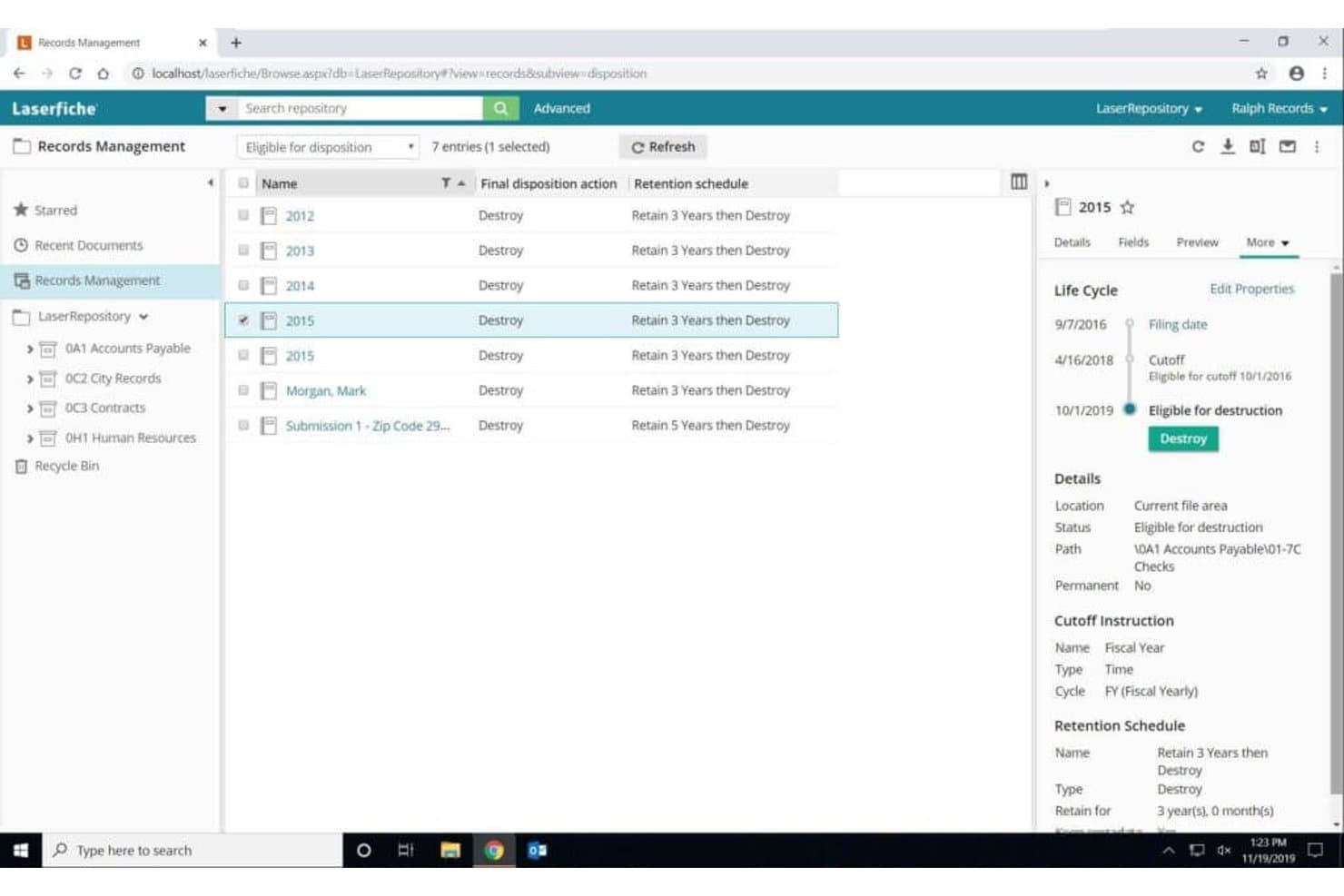
Laserfiche automates records retention schedules and destruction workflows. Laserfiche is a document management and process automation platform that combines AI-powered capture, no-code workflow automation, records retention, and role-based access controls to manage administrative and clinical documents across healthcare organizations.
Who Is Laserfiche Best For?
Laserfiche is a strong fit for mid-to-large healthcare organizations with dedicated IT resources that need compliance-grade document control and workflow automation across administrative operations.
Why I Picked Laserfiche
I picked Laserfiche as one of the best because its compliance infrastructure is genuinely hard to find in a general-purpose ECM platform: SOC 2 Type 2 Plus, ISO 27001:2022, HIPAA compliance across all paid tiers, and an immutable Advanced Audit Trail that logs every user and system action. I particularly like the automated retention schedules and legal hold capabilities, which let compliance officers set defensible destruction rules for PHI without manually tracking record ages. The no-code workflow designer handles complex, multi-step document routing, including credentialing renewals and billing workflows, with conditional logic and process versioning built in.
Laserfiche Key Features
- AI-powered Smart Fields: Uses natural language prompts to auto-classify and extract metadata from incoming documents, including lab results, insurance forms, and referral letters.
- No-code electronic forms: Drag-and-drop form builder supports digital patient intake, consent, and HR-related clinical paperwork with public submission and offline mobile capability.
- WORM storage via Vault add-on: Provides Write Once, Read Many storage for long-term, non-alterable record preservation supporting defensible PHI destruction policies.
- Solution Marketplace templates: Prebuilt healthcare workflow templates for use cases like patient intake, medical billing, and credentialing reduce configuration time for common administrative processes.
Laserfiche Integrations
Laserfiche offers native integrations with Salesforce, SAP, Workday, Oracle Cloud ERP, DocuSign, Adobe Sign, OneSpan, and Esri ArcGIS, plus native connectivity across the Microsoft ecosystem, including Microsoft 365 and Azure AD. A REST API is available for custom integrations, including EHR and practice management systems, since Laserfiche does not offer pre-built connectors for Epic, Cerner, or athenahealth.
Pros and Cons
Pros:
- Workflow designer handles multi-step healthcare processes
- AI auto-classifies and extracts clinical metadata
- Compliance infrastructure meets rigorous audit standards
Cons:
- No built-in secure eFax or Direct Messaging
- No certified EHR or patient chart integrations
Learn more about Laserfiche: Best for on-prem or cloud clinical records storage
- Free trial available
- Pricing upon request
Visit WebsiteCustomer Rating:4.7/5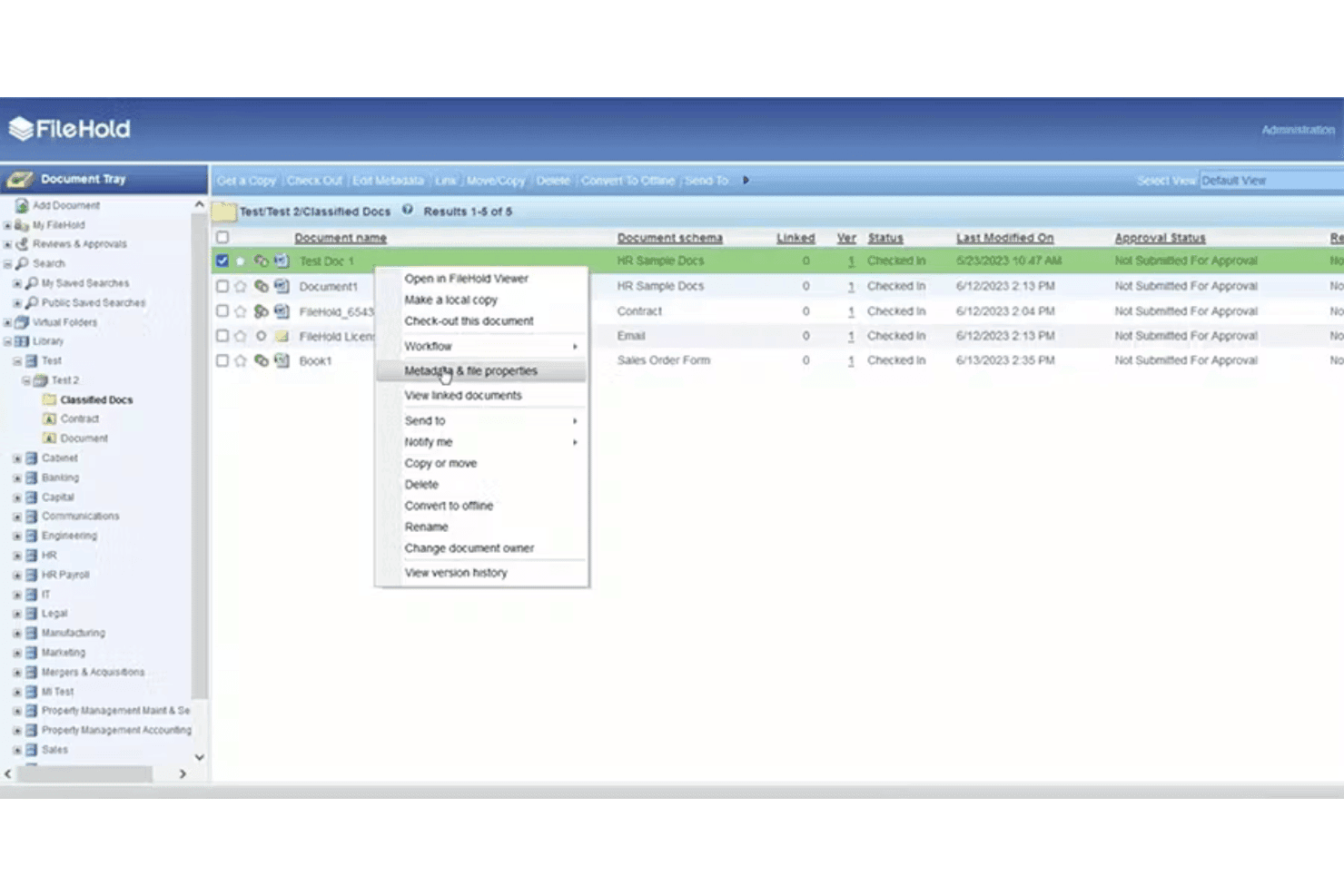
FileHold manages clinical records with secure storage, retention, access controls, and approval workflows. FileHold is a document management system that supports clinical records capture, storage, retention scheduling, role-based access control, and configurable approval workflows across cloud, on-premises, and hybrid deployments.
Who Is FileHold Best For?
FileHold suits healthcare organizations that need to choose between on-premises, cloud, or hybrid deployment for managing clinical records.
Why I Picked FileHold
I picked FileHold as one of the best because it's one of the few document management systems that lets clinical organizations choose between on-premises, cloud, or hybrid deployment for their records. FileHold's Cabinet/Drawer/Folder hierarchy with custom metadata schemas keeps patient records organized and searchable, while its records management module supports NARA-aligned retention schedules and legal hold flags. I also like that configurable approval workflows can automatically route new clinical documents the moment they're added.
FileHold Key Features
- Records retention scheduling: Configure retention and disposition policies by document schema, including archival timelines, destruction dates, and legal hold flags aligned with NARA standards.
- Zonal OCR: Extract metadata from specific zones in scanned forms automatically, reducing manual data entry for structured clinical and administrative documents.
- Secure external document sharing: Courier lets you send expiring, permission-controlled document links to external recipients without requiring a FileHold license.
- E-forms with automatic workflow triggers: InForm e-forms extract metadata on submission and instantly route documents through configured review or approval workflows.
FileHold Integrations
FileHold offers native integrations across the Microsoft ecosystem, including Microsoft 365, Microsoft Teams, Active Directory, Azure Active Directory, and SharePoint, along with DocuSign, Adobe Acrobat Sign, Duo Security, ABBYY, Kodak, and Kofax. A Web Services API is available at no extra cost for custom integrations, including EHR/PM systems like Allscripts.
Pros and Cons
Pros:
- Zonal OCR for structured form data extraction
- Granular records retention and legal hold features
- Supports cloud, on-premises, and hybrid deployments
Cons:
- Does not publicly offer a BAA
- No native integrations with major EHRs
Learn more about FileHold: Best for multi-site healthcare records workflows
- Free demo available
- Pricing upon request
Visit WebsiteCustomer Rating:4.5/5
DocuWare manages healthcare records with AI capture, secure storage, access controls, and workflows. DocuWare is a document management and workflow automation platform that combines AI-powered document capture, centralized records storage, role-based access controls, and configurable multi-step workflows across clinical and administrative functions.
Who Is DocuWare Best For?
DocuWare fits healthcare organizations managing documents and workflows across multiple locations, particularly those in administrative, billing, and compliance-heavy roles.
Why I Picked DocuWare
DocuWare earns its spot on my shortlist because of how well it handles document workflows across multiple healthcare sites. I've seen it deployed across dozens of locations simultaneously, like Armonea's 132 care facilities, where it coordinates invoice processing and records management from a single platform. Its Workflow Manager with conditional routing and included e-signatures keeps approval chains moving without manual handoffs between sites.
DocuWare Key Features
- AI-powered document capture: DocuWare's IDP suite uses OCR, handwritten text recognition, and GenAI zero-shot extraction to pull structured data from scanned forms, lab results, and clinical paperwork without manual indexing.
- Role-based access controls: Set granular permissions by user, group, or document type, with tamper-evident audit logs tracking every access, edit, and version change across locations.
- DocuWare Forms: Build mobile-optimized, no-code web forms for patient intake and administrative data collection that automatically trigger document workflows on submission.
- Flexible deployment options: Choose between DocuWare Cloud hosted on Microsoft Azure or an on-premises installation to meet your organization's infrastructure and data residency requirements.
DocuWare Integrations
DocuWare offers native integrations with SAP S/4HANA, Oracle NetSuite, Microsoft Dynamics, QuickBooks, Sage, and Unit4 ERP, plus HL7 support for connecting PACS, RIS, and lab systems. It connects to 1,000+ apps through iPaaS platforms like Make and Microsoft Power Automate, and provides a REST API for custom integrations.
Pros and Cons
Pros:
- Cloud and on-premises deployment options available
- Drag-and-drop workflow builder with e-signatures included
- AI-powered document capture handles handwritten forms
Cons:
- No dedicated patient self-service portal
- No certified integrations for major EHR systems
Learn more about DocuWare: Best for on-prem HIPAA file control and audit trails
- Free demo + 14-day free trial available
- From $14/user/month (billed annually)
Visit WebsiteCustomer Rating:4.5/5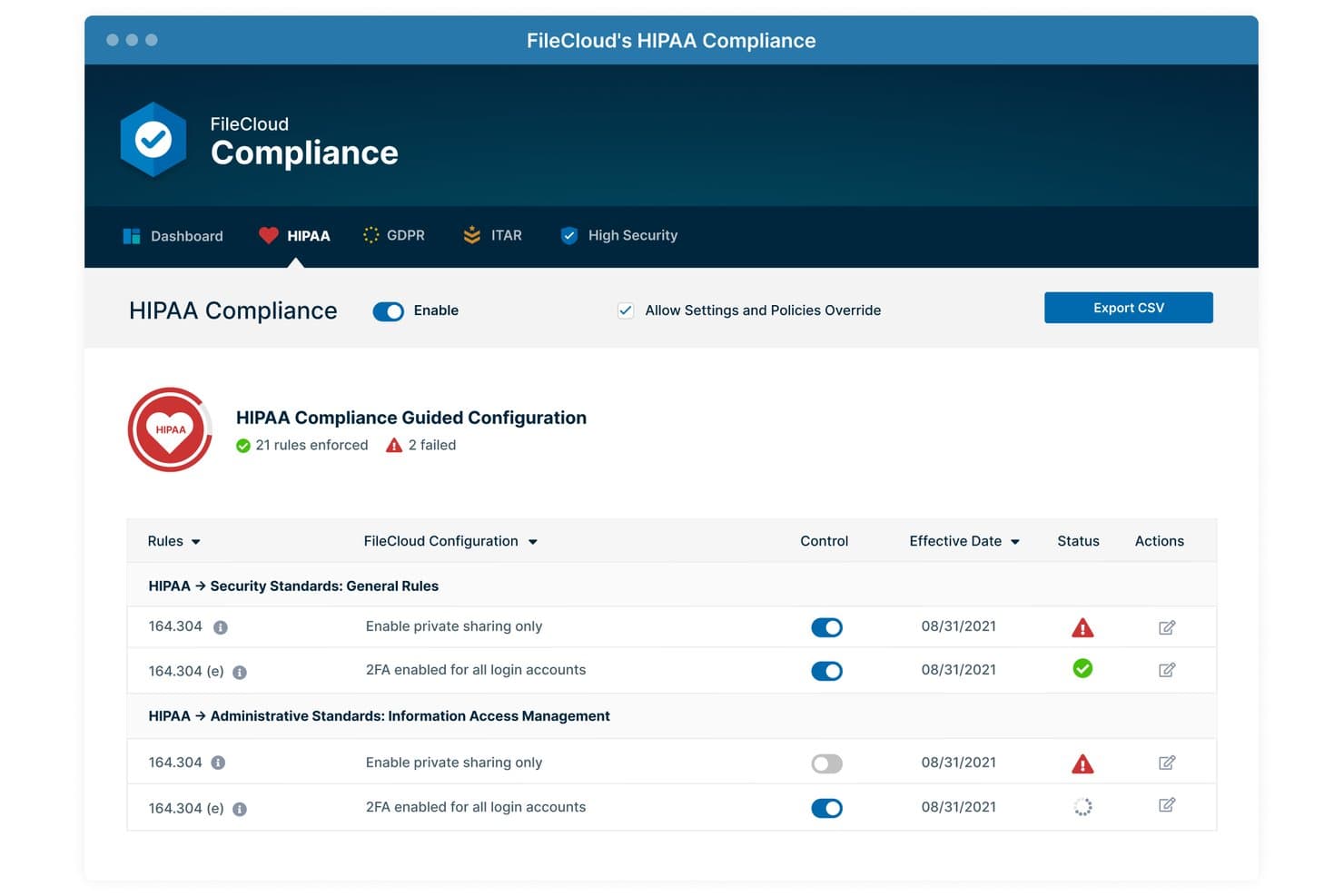
FileCloud enforces HIPAA compliance rules with real-time status tracking. FileCloud is an enterprise file management platform with HIPAA-focused security controls, offering on-premises and hybrid deployment, granular access management, tamper-proof audit trails, and native DICOM medical image preview.
Who Is FileCloud Best For?
FileCloud is a strong fit for healthcare IT and compliance teams that need self-hosted or hybrid PHI storage with granular access controls and tamper-proof audit trails.
Why I Picked FileCloud
I picked FileCloud as one of the best because it's the only tool on my list with a dedicated HIPAA Compliance Center dashboard that maps your organization's status directly to Privacy, Security, and Breach Notification rules. I also love that it pairs this with tamper-proof, immutable audit logs you can export or archive for compliance reviews. Its native DICOM preview, which lets you open X-rays and CT scans directly in the browser, is a genuine differentiator I haven't seen in comparable platforms.
FileCloud Key Features
- Smart DLP with PHI/PII discovery: Automatically scans stored and shared files to identify protected health information and personally identifiable information in real time.
- No-code workflow builder: A drag-and-drop editor lets you create multi-step document approval and notification workflows without writing any code.
- Unlimited file versioning: Every file change is tracked and stored indefinitely, with check-in/check-out controls to prevent conflicting edits across your team.
- Native DICOM image preview: Open X-rays, CT scans, MRIs, and ultrasounds directly in the browser without installing separate medical imaging software.
FileCloud Integrations
FileCloud offers native integrations across the Microsoft ecosystem, including Microsoft 365, Outlook, SharePoint, Active Directory, and ADFS, plus Google Workspace, OnlyOffice, Salesforce, Signority, and SIEM and antivirus tools like Symantec, OPSWAT, and Votiro via ICAP. It also connects to S3-compatible storage backends like AWS S3, Azure Blob, and Wasabi, and provides 140+ Admin and 127+ User REST APIs for custom EHR and system integrations.
Pros and Cons
Pros:
- Supports native DICOM medical image preview
- Allows on-premises or hybrid deployment choice
- Offers dedicated HIPAA compliance dashboard
Cons:
- No built-in patient self-service portal
- Lacks certified EHR and PM integrations
Learn more about FileCloud: Best for AI-driven capture and audit-ready PHI storage
- 14-day free trial + free demo available
- Pricing upon request
Visit WebsiteCustomer Rating:4.4/5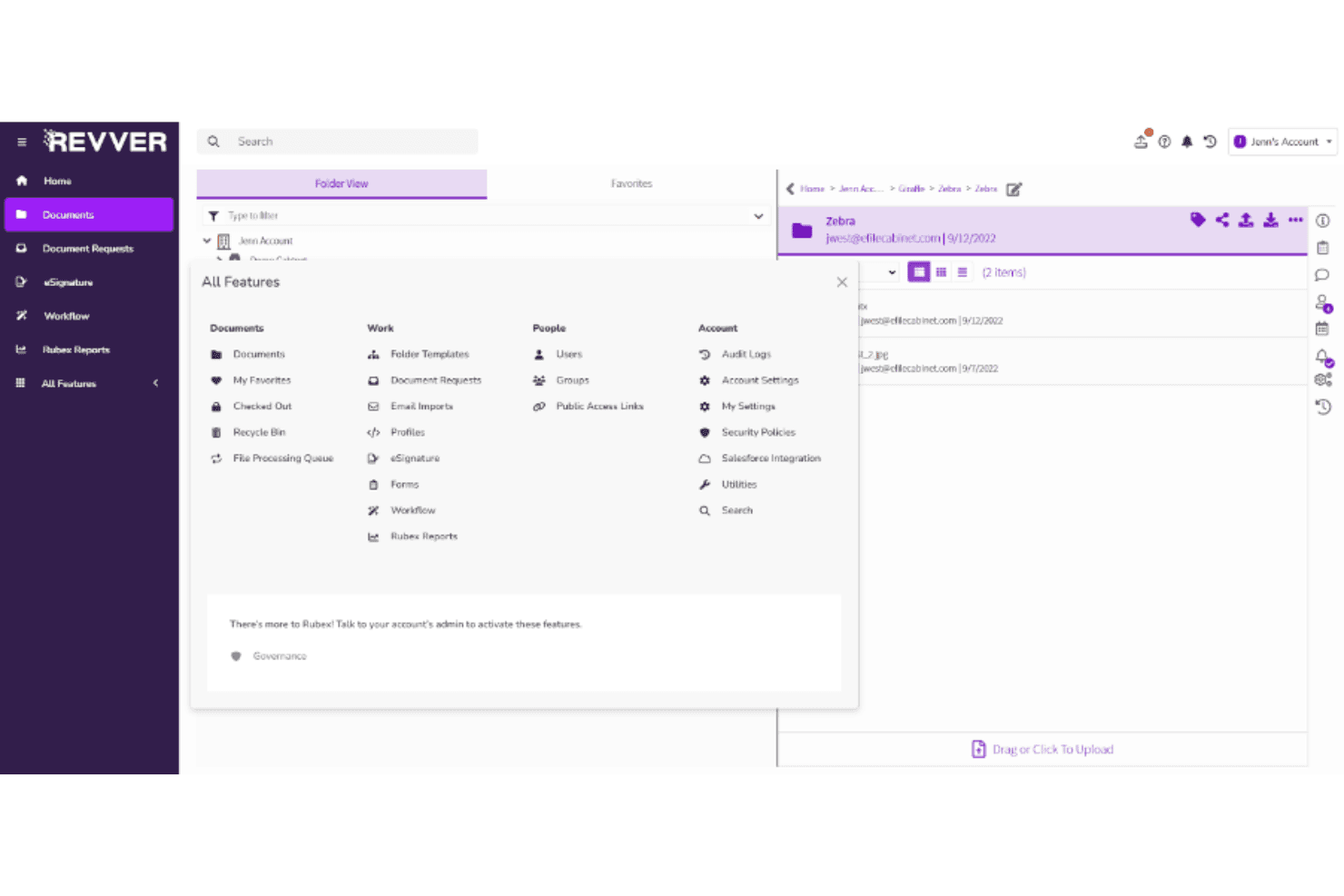
Revver organizes healthcare records with AI capture, OCR, workflows, and audit controls. Revver is a document management system for healthcare organizations that combines AI-powered capture, OCR, automated folder templates for patient records, no-code workflow automation, and HIPAA-aligned access controls with full audit logging.
Who Is Revver Best For?
Revver is a strong fit for practice administrators and health information management staff who need AI-powered document capture, audit-ready PHI storage, and no-code workflow automation without a hard dependency on EHR integration.
Why I Picked Revver
I picked Revver as one of the best because its Smart Extract AI is genuinely built for the messy reality of healthcare documentation: it reads handwritten notes, scanned intake forms, and mixed-format PDFs, then automatically pulls metadata to file documents into patient-level folder hierarchies. Pair that with comprehensive audit logs tracking every view, edit, and download against granular role-based permissions, and you get PHI storage that holds up under HIPAA scrutiny without manual overhead.
Revver Key Features
- No-code workflow builder: Build automated document routing, approvals, and notifications using a visual, code-free interface.
- Patient document collection portal: Patients can securely submit forms and documents from any device through a dedicated portal.
- Automated retention and governance controls: Lock files for defined periods and schedule governance actions to support regulated retention timelines.
- eSignature support: Collect legally binding signatures on consent forms and intake documents, compliant with the ESIGN Act and UETA.
Revver Integrations
Revver offers native integrations with Microsoft 365, Outlook, SharePoint, Salesforce, QuickBooks, and FreshBooks, and provides a REST API with roughly 50 functions for custom integrations. No EHR or practice management connectors (Epic, Cerner, athenahealth) are documented, so chart sync with clinical systems requires custom API work.
Pros and Cons
Pros:
- No-code workflows automate consent and intake routing
- Audit-ready PHI access logs support HIPAA compliance
- Smart Extract AI handles handwritten medical documents
Cons:
- Lacks healthcare-specific workflow templates
- No pre-built EHR or PM integrations
Learn more about Revver: Best for enterprise-scale clinical document capture
- Free demo available
- Pricing upon request
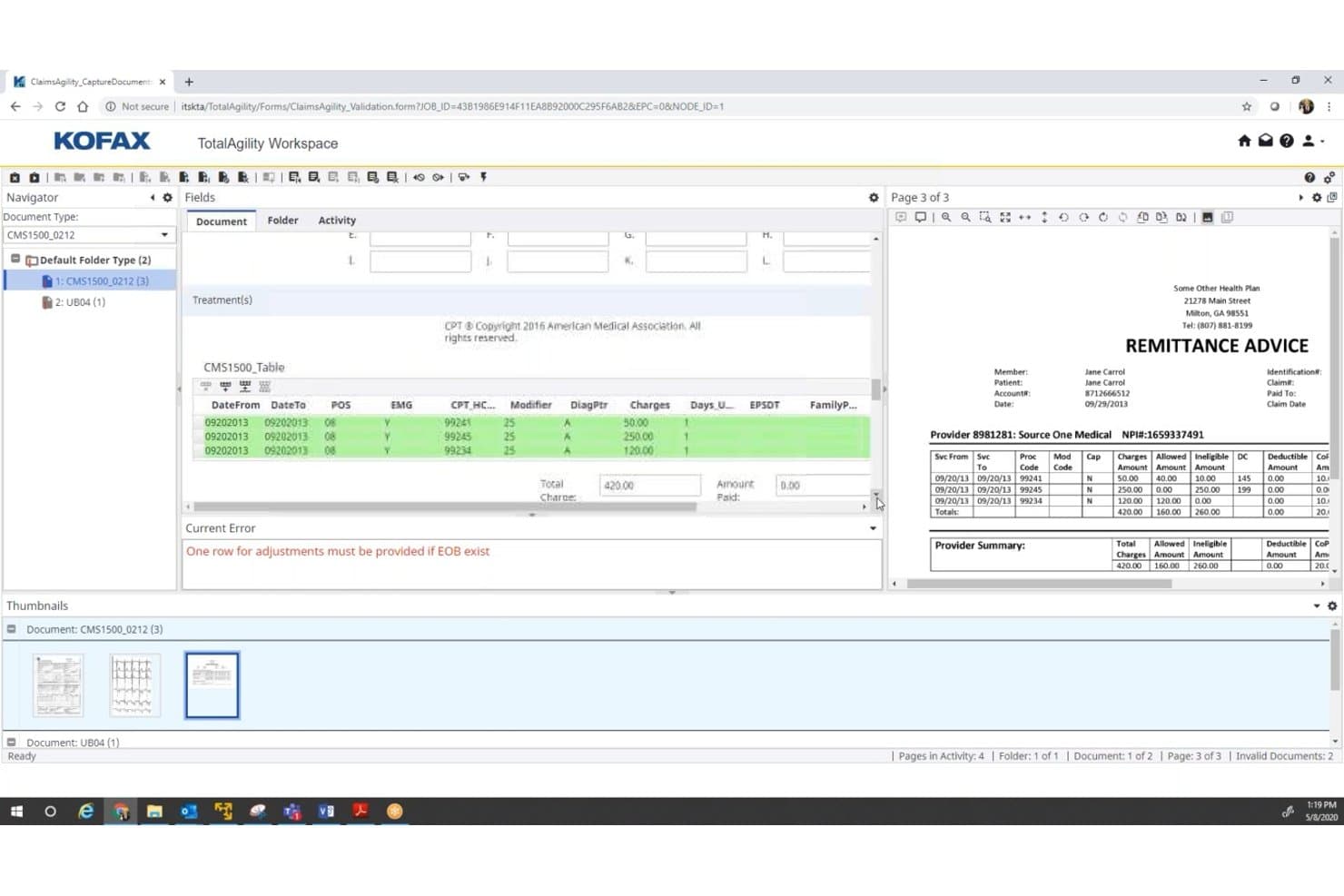
Tungsten Automation validates claims data and flags EOB adjustment errors. Tungsten Automation is an intelligent document processing and workflow automation platform built for enterprise health systems, combining AI-powered document capture, clinical form extraction, and process orchestration across multi-channel intake sources.
Who Is Tungsten Automation Best For?
Tungsten Automation is a strong fit for large hospitals and health systems that need to capture, classify, and route high volumes of clinical documents across multiple intake channels.
Why I Picked Tungsten Automation
Tungsten Automation earns its spot on my shortlist because no other platform I've tested matches its sheer scale of clinical document capture. I'm particularly impressed by Tungsten Capture's ability to ingest documents from 300+ MFP models across scanners, mobile devices, fax, and email simultaneously, all fed into Tungsten Transformation's AI classification engine. Pre-trained extraction models for UB-04 and CMS-1500 forms mean large health systems can process claims documents without building models from scratch.
Tungsten Automation Key Features
- RedactAI PHI scrubbing: A trainable redaction tool that removes protected health information from documents by page, keyword, fuzzy search, and hidden metadata.
- TotalAgility case management: Consolidates multiple documents, automated tasks, and process steps into a unified case view for managing complex clinical workflows.
- CLAIMSAutomate solution bundle: A pre-built TotalAgility app that handles multi-channel claims intake, data extraction, and direct integration with insurance systems.
- Flexible deployment options: TotalAgility runs on public cloud, private cloud, or on-premises infrastructure to accommodate varied healthcare IT governance requirements.
Tungsten Automation Integrations
Tungsten Automation offers a documented partnership integration with Oracle Health (Cerner), plus native integrations with Salesforce, Microsoft SharePoint, Microsoft Teams, iManage, and Citrix, and connects across the Microsoft ecosystem including Microsoft 365. Tungsten Capture provides 140+ connectors to ECM, ERP, and BPM systems, and a Tungsten Marketplace offers additional pre-built healthcare connectors, with scripting APIs available for custom integrations.
Pros and Cons
Pros:
- SOC 2, HIPAA, ISO 27001 certified
- Pre-trained medical form extraction models included
- Excels at enterprise-scale document ingestion
Cons:
- No HITRUST certification documented
- Lacks native patient portal functionality
Learn more about Tungsten Automation: Best for AI-driven PHI capture and audit trails
- Free trial + free demo available
- Pricing upon request
Ademero manages healthcare documents with AI capture, secure storage, and workflows. Ademero is a document management system for healthcare that combines AI-powered document capture, HIPAA-ready storage, role-based access controls, and no-code workflow automation for clinical and administrative document operations.
Who Is Ademero Best For?
Ademero suits small-to-mid-size practices and administrative teams that prioritize AI-powered PHI capture accuracy and HIPAA-ready audit trails over purpose-built clinical workflows.
Why I Picked Ademero
I picked Ademero as one of the best because its Paige AI tool genuinely sets it apart for PHI capture accuracy. Paige processes handwritten doctor's notes, prescriptions, and insurance claims at 99.9% accuracy using a hybrid AI and human verification model. Pair that with immutable audit logs that track every PHI access, edit, copy, and download, and you get a document management setup that holds up under a HIPAA audit.
Ademero Key Features
- No-code workflow builder: Configure event- and schedule-triggered approval routing, notifications, and document exports without writing any code.
- CapturePoint high-volume scanning: Process over one million pages per day across 50+ scanner models with 99.5% OCR accuracy and AI-based document classification.
- Natural language smart search: Use AI-powered search to locate patient records and clinical documents up to three times faster than standard keyword search.
- On-premises AI deployment (Cortexa): Run Ademero's AI infrastructure locally on a dedicated appliance for practices that require full data sovereignty and air-gapped PHI storage.
Ademero Integrations
Ademero offers 100+ integrations, including Epic, Cerner, MEDITECH, Allscripts, DocuSign, Salesforce, QuickBooks, Slack, Google Workspace, and native connections across the Microsoft ecosystem including Microsoft 365 and Active Directory. It connects with Zapier and provides a REST API with webhooks for custom integrations.
Pros and Cons
Pros:
- Full audit trails support HIPAA audit readiness
- No-code workflow builder for document automation
- AI-powered capture reads handwriting with 99.9% accuracy
Cons:
- Lacks HITRUST CSF security certification
- No patient self-service portal available
Learn more about Ademero: Best for enterprise-wide clinical records management
- Free demo available
- Pricing upon request
OnBase by Hyland centralizes healthcare records with AI capture, HIM workflows, and EHR access. OnBase is an enterprise healthcare document management platform that handles multichannel document capture, AI-driven record classification, HIM lifecycle workflows, and EHR-integrated content access across clinical and administrative functions.
Who Is OnBase Best For?
OnBase is built for large health systems and enterprise-scale HIM teams that manage high document volumes across multiple sites and EHR environments.
Why I Picked OnBase
OnBase earns its spot on my shortlist because no other platform I've evaluated covers the full HIM life cycle at enterprise scale the way it does. I'm particularly impressed by Intelligent MedRecords, which uses AI and LLMs to auto-classify incoming documents at speeds 88% faster than manual indexing, and the DeficiencyPop module, which lets physicians sign off on record deficiencies without ever leaving their existing workflow. For large health systems managing document volumes across dozens of sites and EHR environments, that depth of coverage is genuinely difficult to replicate.
OnBase Key Features
- Multichannel document capture: Accepts documents via scanning, fax, email, mobile, and web forms, routing each into indexed workflows automatically.
- Governance Rules as a Service (GRaas): Automates retention schedule enforcement end-to-end within OnBase through a partnership with Iron Mountain Policy Center.
- Enterprise Search: Cross-searches email, databases, and document repositories to support e-discovery, audit response, and ROI request fulfillment.
- WorkView application builder: Lets administrators build content-enabled workflow apps on top of OnBase using low-code, drag-and-drop tooling with minimal custom development.
OnBase Integrations
OnBase supports 500+ application integrations across the Hyland Content Innovation Cloud, with native healthcare-focused connections to Epic (30 certified modules plus 80+ clinical ancillary systems via SMART on FHIR), Cerner, Meditech, athenaIDX, ETHERFAX, TriZetto, Salesforce, Workday, and the Microsoft ecosystem including Microsoft 365 and Outlook. HL7, FHIR, and web service APIs are available for custom integrations, and RPA connectors extend connectivity to legacy clinical and administrative systems.
Pros and Cons
Pros:
- Automates legal hold and retention policies
- Epic integration covers 30 modules and workflows
- AI classifies and indexes clinical documents
Cons:
- Advanced dashboards need extra licensed modules
- Custom implementations require significant IT resources
Learn more about OnBase: Best for physical-to-digital health records at scale
- Not available
- Pricing upon request
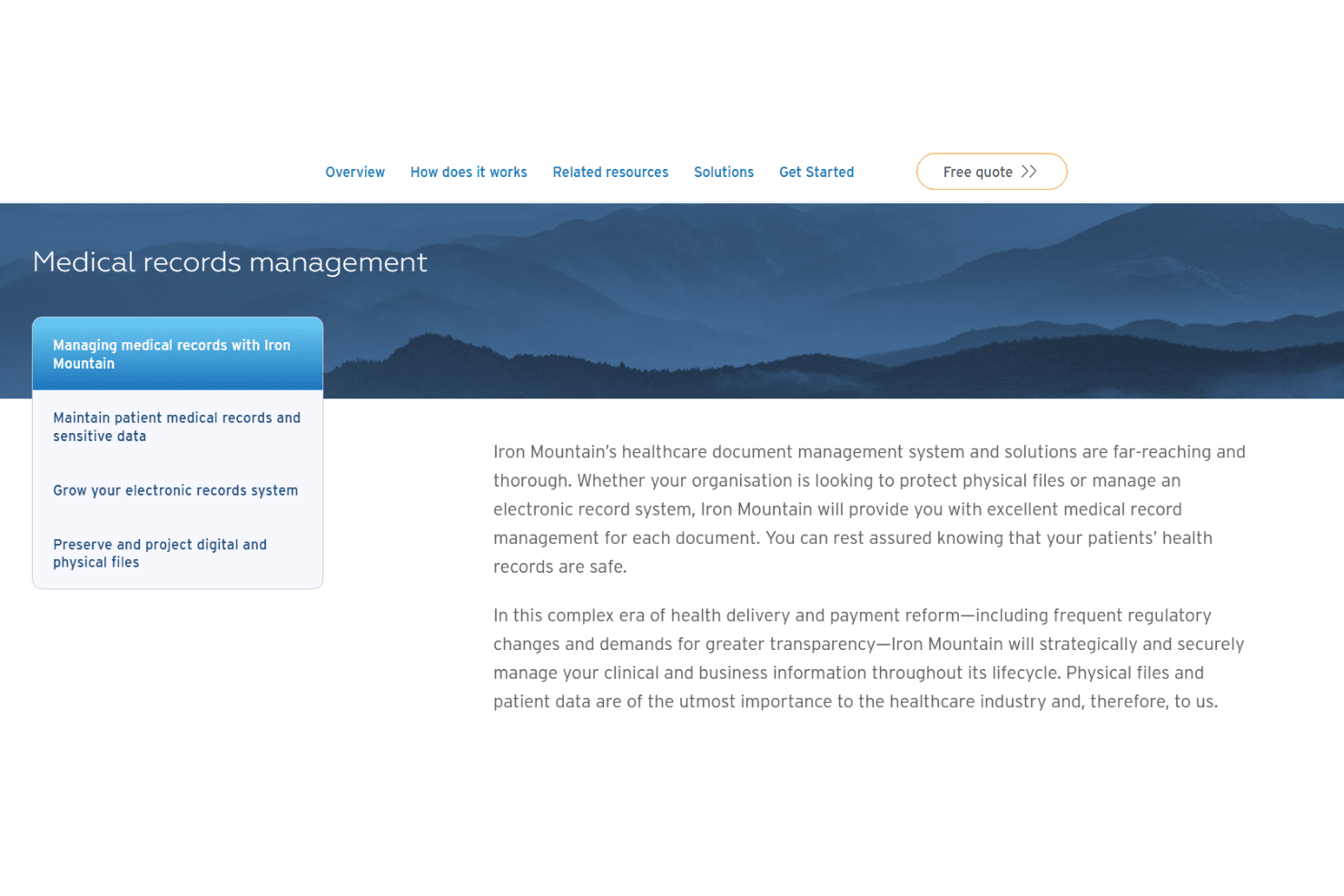
Iron Mountain InSight manages healthcare records through digitization, AI processing, and governed document storage. Iron Mountain InSight is an enterprise document management platform built around physical records storage, large-scale chart digitization, AI-powered document processing, and governed digital repositories for healthcare organizations.
Who Is Iron Mountain InSight Best For?
Iron Mountain InSight is the right fit for health information management teams at large hospital systems or multi-site health networks that need to convert high volumes of legacy paper records into a governed digital repository.
Why I Picked Iron Mountain InSight
Iron Mountain InSight earns its spot on my shortlist because no other platform I've seen matches its ability to move legacy paper records into a governed digital repository at true enterprise scale. With 135 global imaging sites and over 20 years of scanning experience, it handles the kind of backfile digitization workload that would overwhelm a general-purpose document platform. I'm also impressed by its MPI Cleanup tool, which actively detects and reconciles duplicate patient records across multiple sites, a real problem for large health networks managing decades of fragmented charts.
Iron Mountain InSight Key Features
- Intelligent Document Processing (IDP): AI-powered engine that extracts, classifies, and auto-indexes data from patient records, lab results, and prescriptions with a claimed ~99% extraction accuracy.
- Digital Mail for Healthcare: Converts incoming physical mail into digitized documents and routes them automatically through configurable approval and assignment workflows.
- AI-driven retention scheduling: Automatically applies retention policies and flags records for defensible deletion based on configurable governance rules.
- MuleSoft connector framework: Connects InSight DXP to enterprise systems like Salesforce, SAP, Oracle, and Workday through a pre-built library of API connectors.
Iron Mountain InSight Integrations
Iron Mountain InSight offers native integrations with MuleSoft, Salesforce, SAP, Oracle, Workday, Google Cloud (Document AI, Vertex AI, Cloud Storage), Amazon Web Services (Textract, S3), Microsoft Azure, and Iron Mountain Policy Center, with cloud marketplace availability across AWS, Google Cloud, and Azure. An API is available for custom integrations, and additional connectors can be built through Iron Mountain Professional Services, though native HL7/FHIR or EHR-specific connectors (Epic, Oracle Health, athenahealth) are not documented.
Pros and Cons
Pros:
- Strong compliance certifications for healthcare governance
- Advanced AI extraction and auto-indexing accuracy
- Industry leader in large-scale health record digitization
Cons:
- Patient portal and ROI workflows not included
- No native EHR or HL7 integration tools
Learn more about Iron Mountain InSight:
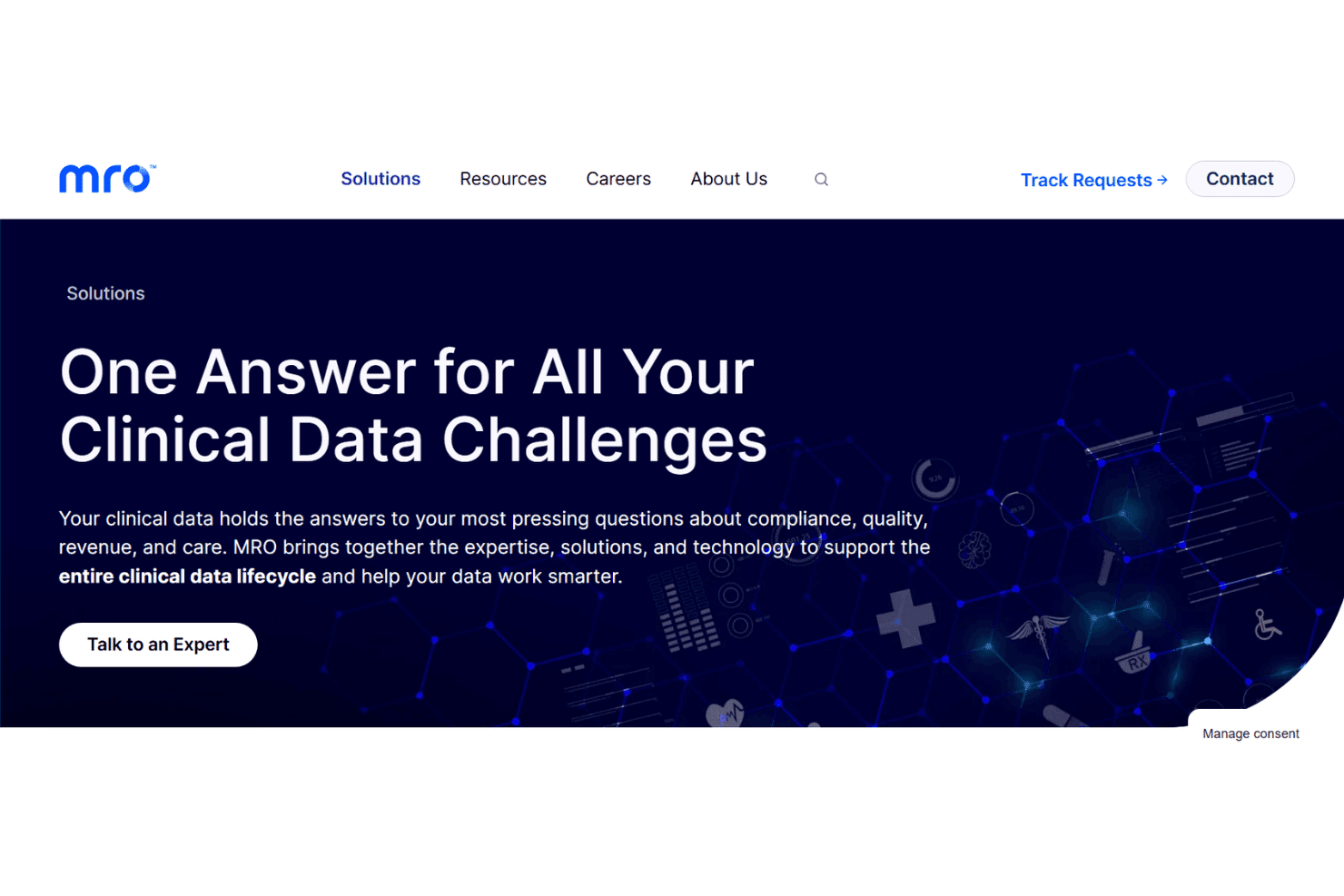
MRO manages healthcare record requests, disclosures, and audits across EHR systems. MRO is a managed release-of-information platform built for hospitals and health systems, handling inbound record request intake, authorization validation, document acquisition, disclosure management, and audit logging across 250+ EHR connections.
Who Is MRO Best For?
MRO is built for HIM directors and compliance officers at hospitals and health systems who need to manage high-volume, multi-requester medical record disclosure workflows.
Why I Picked MRO
I picked MRO as one of the best because no other platform comes close to its depth of hospital HIM release-of-information coverage. Its Exchange Manager handles the full ROI lifecycle, from authorization validation through disclosure logging, with AI-assisted processing and patented OCR that hits a 99.99% accuracy rate on record requests. I also rate its HITRUST CSF certification and multi-layered QA highly, since those aren't just checkboxes—they enforce PHI disclosure policies across every release, which matters enormously in high-volume HIM environments.
MRO Key Features
- Requester Central portal: A self-service portal where attorneys, payers, and insurers can submit record requests, check status, and pay invoices electronically.
- Audit Manager: A revenue integrity module that routes, tracks, and manages payer audits and denial appeals, with dashboards showing open audits and denial trends by payer, procedure, and department.
- FHIR-native data exchange: MRO's Clinical Data Exchange Platform uses FHIR-based APIs to retrieve patient records directly from connected EHRs, supporting 21st Century Cures Act compliance.
- FMLA form completion: A managed workflow for secure intake, review, and expert completion of FMLA forms on behalf of provider organizations.
MRO Integrations
MRO connects with 250+ EHR and health IT systems through its FHIR-native Clinical Data Exchange Platform, with documented connectivity to payer portals across 44 of the top 50 US payers, CMS eMDR/esMD for electronic medical documentation requests, HL7/HIE networks, and 835/837 claim data ingestion for its Audit Manager module. An API is available for custom integrations, and Zapier support is not documented.
Pros and Cons
Pros:
- Strong compliance posture with HITRUST and SOC 2
- 99.99% accuracy with patented OCR technology
- Built for high-volume release of information workflows
Cons:
- Implementation complexity for smaller organizations
- Not designed for general document storage
Learn more about MRO:
Outros sistemas de gestão documental na área da saúde
Eis algumas opções adicionais de sistemas de gestão documental na área da saúde que não chegaram à minha lista restrita, mas que ainda vale a pena conhecer:
- 11PhreesiaBest for digital intake and consent workflows
- 12ChartRequestBest for medical records release and ROI workflows
- 13BoxBest for enterprise PHI security and governance
- 14LogicalDOCBest for general-purpose DMS adapted to clinical use
- 15Square 9Best for admin-focused PHI capture and compliance
- 16AlfrescoBest for records governance and retention audits
- 17ShareFileBest for HIPAA-compliant PHI sharing and approvals
- 18UpdoxBest for fax-to-EHR document intake in small practices
- 19DocsvaultBest for general DMS with HIPAA-mapped controls
- 20DokmeeBest for flat-fee scanning and HIM retention
How I Evaluate Healthcare Document Management Systems
When evaluating these platforms, I split my assessment into two layers: baseline criteria every tool must meet—like HIPAA-compliant PHI storage and audit trails—and differentiators that separate the best from the rest.
Core Functionality (Table Stakes For This List)
When I'm selecting tools for my list, I rank each one on a scale from 0 (does not offer the functionality) to 5 (excels in this area) for each core functionality listed below. I then calculate the tool's total score into a percentage, using 65% as a benchmark to help assess its overall fit for the list.
- HIPAA-Compliant Security: I check for encryption at rest and in transit, signed BAAs, and MFA support—plus whether the vendor holds certifications like SOC 2 or HITRUST.
- Medical Document Capture: Multi-channel intake matters here, so I evaluate whether a platform can handle scanned charts, faxes, insurance cards, and lab results with healthcare-tuned OCR.
- Centralized Record Repository: I look for patient-indexed storage with fast full-text and metadata search, so staff can pull up a specific chart or encounter in seconds.
- Role-Based Access & Audit Trails: Granular permissions and exportable audit logs are what I evaluate—can you restrict a billing clerk's view to financials while giving clinicians full chart access?
- Clinical Workflow Automation: Configurable routing for tasks like consent approvals, referral sign-offs, and e-signature requests tied to patient records is what separates useful tools from basic file storage.
- EHR/PM Integration: I look at whether the system connects with major EHRs like Epic, Cerner, or athenahealth via HL7, FHIR, or direct APIs to keep documents synced with patient charts.
Once I have a list of tools that meet the criteria, I consider what sets each platform apart.
Differentiating Factors (What Sets Vendors Apart)
Here's how I compare and contrast different vendors:
Standout Features
I look for AI clinical data extraction that goes beyond basic OCR—can the system classify a referral vs. a lab result and pull discrete values like diagnoses or medications into structured EHR fields without manual entry? ROI automation is another separator. Platforms like ChartRequest and MRO offer purpose-built request tracking, PHI redaction, and secure delivery, which matters when your HIM team handles dozens of records requests daily. I also evaluate retention and legal hold management, since state-level record retention laws vary widely and defensible destruction workflows save real headaches during audits or subpoena responses.
Beyond Features
I evaluate each vendor's HIPAA compliance posture beyond just checking a box. A signed BAA is table stakes, but I look for independent attestations like SOC 2 Type II or HITRUST CSF certification, plus documented breach notification SLAs. EHR ecosystem fit matters just as much—I check whether a platform offers true bi-directional HL7/FHIR sync with your specific EHR, not just a one-way document push. I also consider total cost of ownership, since per-user pricing can balloon fast when you add eFax pages, e-signature volume, or integration fees across multiple locations.
Como escolher um sistema de gestão documental na área da saúde
Encontrar um sistema de gestão documental na área da saúde implica equilibrar a preparação para auditorias, a segurança dos dados dos doentes e as necessidades dos fluxos de trabalho clínicos, sem acrescentar mais trabalho administrativo.
| Se a sua prioridade é... | Procure... |
|---|---|
| Se a sua prioridade é...Conformidade com a HIPAA e preparação para auditorias | Procure...BAA assinado, registos de auditoria exportáveis, certificações HITRUST/SOC 2 |
| Se a sua prioridade é...Acesso rápido aos registos clínicos | Procure...Repositório indexado por doente, com pesquisa de texto integral e metadados |
| Se a sua prioridade é...Fluxos digitais de recolha de dados e consentimento | Procure...Formulários eletrónicos personalizáveis com anexação direta ao processo clínico |
| Se a sua prioridade é...Gestão de unidades de saúde em vários locais | Procure...Painéis centralizados, permissões associadas à localização |
| Se a sua prioridade é...Acompanhamento da divulgação de registos médicos | Procure...Painéis com o estado dos pedidos, ocultação de PHI, entrega segura |
Como avaliar a sua lista restrita
- Valide os comprovativos de conformidade: Solicite uma cópia do BAA assinado pelo fornecedor e das certificações de terceiros (SOC 2, HITRUST) antes de uma demonstração.
- Teste a velocidade de pesquisa e recuperação: Durante uma demonstração ao vivo, escolha o nome de um doente e peça ao fornecedor para encontrar um processo ou resultado específico no prazo de 60 segundos.
- Simule a receção de um documento: Envie um relatório laboratorial recebido por fax ou um cartão de seguro e confirme a precisão do OCR, a etiquetagem dos metadados e a atribuição correta no fluxo de trabalho de um médico.
- Solicite exemplos de auditoria/exportação: Peça uma exportação de exemplo dos registos de auditoria que mostre pelo menos duas funções a aceder ou modificar um registo protegido.
- Compromisso — na nuvem vs. no local: Decida se pretende atualizações de segurança sem intervenção da sua parte (nuvem) ou controlo direto sobre o armazenamento de PHI (no local), uma vez que a maioria das plataformas não oferece ambas as opções sem limitações.
O que são os sistemas de gestão documental na área da saúde?
Os sistemas de gestão documental na área da saúde são plataformas de software que organizam, protegem e acompanham os registos dos pacientes e os documentos clínicos dos consultórios médicos.
Estes sistemas ajudam a centralizar a documentação, proteger as informações de saúde protegidas e manter a conformidade com os regulamentos da área da saúde.
Ao digitalizar, indexar e controlar o acesso aos seus registos, estas ferramentas reduzem a carga administrativa e permitem uma recuperação rápida, facilitando a concentração das equipas clínicas e administrativas nos cuidados prestados aos pacientes.
Funcionalidades dos sistemas de gestão documental na área da saúde
Ao escolher um sistema de gestão documental na área da saúde, tenha em atenção as seguintes funcionalidades essenciais:
- Segurança em conformidade com a HIPAA: Proteja as informações de saúde dos pacientes com encriptação, controlos baseados em funções, BAAs assinados e certificações de conformidade. Isto reduz o risco de violações de dados e infrações regulamentares.
- Captura documental multicanal: Capture registos provenientes de faxes, digitalizadores, dispositivos móveis e e-mail num único sistema.
- Repositório centralizado de registos: Armazene todos os documentos clínicos e administrativos num arquivo pesquisável e indexado por paciente. As equipas podem recuperar rapidamente históricos clínicos, resultados de exames ou formulários de consentimento através de pesquisas de texto integral e de metadados.
- Controlos de acesso granulares e trilhos de auditoria: Defina as permissões dos utilizadores por departamento, localização ou função. Ative registos de auditoria que acompanhem quem acedeu ou alterou os registos, apoiando a conformidade e a investigação de incidentes.
- Automatização dos fluxos de trabalho clínicos: Automatize tarefas recorrentes, como encaminhar documentos para aprovação, acionar notificações ou gerir pedidos de assinatura eletrónica. Isto ajuda a garantir que nada fica por tratar nos processos clínicos e de faturação.
- Integrações com EHR e gestão de consultórios: Ligue-se diretamente aos principais EHR ou plataformas de gestão de consultórios através de HL7, FHIR ou APIs personalizadas. Mantenha os dados dos pacientes sincronizados e reduza as transferências manuais de ficheiros.
- Reconhecimento ótico de caracteres (OCR): Converta imagens digitalizadas ou PDFs em dados pesquisáveis e estruturados. O OCR permite a etiquetagem, indexação e categorização automáticas, facilitando a localização e gestão dos documentos.
- Retenção de registos e preservação legal: Aplique calendários de retenção documental e coloque os registos sob preservação legal quando necessário. Isto ajuda as organizações a cumprir a legislação relativa à conservação de registos médicos e os requisitos de auditoria.
- Gestão de pedidos e ocultação de PHI: Acompanhe os pedidos de divulgação de informações (ROI), aplique a ocultação automática de PHI e disponibilize os registos de forma segura aos requerentes autorizados. Esta funcionalidade simplifica os pedidos de informações dos pacientes que exigem um elevado nível de conformidade.
- Acesso móvel e assinaturas eletrónicas: Permita o acesso seguro aos documentos e as assinaturas eletrónicas a partir de dispositivos móveis. Isto apoia a prestação remota de cuidados, a admissão de pacientes e a recolha de consentimentos em vários contextos de cuidados de saúde.
Vantagens dos sistemas de gestão documental na área da saúde
A implementação de sistemas de gestão documental na área da saúde proporciona várias vantagens para a sua equipa e para a sua organização. Eis algumas das que pode esperar:
- Garantia de conformidade regulamentar: Cumpra os requisitos da HIPAA e de auditoria com armazenamento encriptado, BAAs assinados, controlos de acesso baseados em funções e trilhos de auditoria exportáveis.
- Recuperação mais rápida de documentos: Encontre rapidamente registos de pacientes e documentos clínicos utilizando pesquisas de texto integral e de metadados num repositório indexado por paciente.
- Admissão multicanal segura: Capture, digitalize e organize registos provenientes de digitalizadores, fax, e-mail e dispositivos móveis, centralizando toda a documentação num único local.
- Fluxos de trabalho automatizados: Encaminhe consentimentos, referenciações e aprovações para assinatura eletrónica diretamente nos fluxos de trabalho clínicos, reduzindo as etapas manuais e minimizando os erros.
- Gestão integrada de EHR e consultórios: Sincronize documentos com o seu EHR ou plataforma de gestão de consultórios através de HL7, FHIR ou APIs diretas para melhorar a coordenação dos cuidados.
- Extração e indexação precisas de dados: Utilize o reconhecimento ótico de caracteres e funcionalidades de IA para extrair automaticamente dados essenciais e categorizar corretamente os documentos, reduzindo a introdução manual de dados.
- Retenção defensável e divulgação de registos: Aplique preservações legais, gira calendários de retenção e acompanhe os pedidos de registos com ferramentas de ocultação de PHI para apoiar auditorias ou divulgações.
Custos e preços dos sistemas de gestão documental na área da saúde
A seleção de sistemas de gestão documental na área da saúde exige uma compreensão dos vários modelos de preços e planos disponíveis. Os custos variam consoante as funcionalidades, a dimensão da equipa, os complementos e outros fatores. A tabela abaixo resume os planos mais comuns, os respetivos preços médios e as funcionalidades normalmente incluídas nas soluções de sistemas de gestão documental na área da saúde:
Tabela de comparação de planos para sistemas de gestão documental na área da saúde
| Tipo de plano | Preço médio | Funcionalidades comuns |
|---|---|---|
| Tipo de planoPlano gratuito | Preço médio$0 | Funcionalidades comunsArmazenamento básico de documentos, acesso limitado dos utilizadores, pesquisa básica e controlos de segurança mínimos. |
| Tipo de planoPlano pessoal | Preço médio$10-$25/utilizador/mês | Funcionalidades comunsGestão individual de documentos, pesquisa melhorada, OCR básico, modelos preparados para a HIPAA e captura de documentos por e-mail. |
| Tipo de planoPlano empresarial | Preço médio$30-$60/utilizador/mês | Funcionalidades comunsColaboração em equipa, recolha multicanal, acesso baseado em funções, assinatura eletrónica, registos de auditoria avançados e integração com EHR. |
| Tipo de planoPlano empresarial de grande dimensão | Preço médio$70-$150/utilizador/mês | Funcionalidades comunsFluxos de trabalho personalizados, acesso total à API, extração de dados com IA, conformidade avançada, retenção de registos e suporte prioritário. |
Perguntas frequentes sobre sistemas de gestão de documentos de saúde
Eis algumas respostas a perguntas comuns sobre sistemas de gestão de documentos de saúde:
Como é que os sistemas de gestão de documentos de saúde garantem a conformidade com a HIPAA?
Os sistemas de gestão de documentos de saúde garantem a conformidade com a HIPAA através de funcionalidades como a encriptação em repouso e em trânsito, controlos de acesso baseados em funções, acordos de associado comercial (BAA) assinados, registos de auditoria detalhados e suporte para autenticação multifator (MFA).
Muitos fornecedores disponibilizam também atestações de conformidade de terceiros, como certificações SOC 2 ou HITRUST, que acrescentam uma camada adicional de responsabilização na proteção das informações de saúde dos doentes.
Estes sistemas podem integrar-se com o meu EHR ou software de gestão de consultórios?
Sim, muitos sistemas de gestão de documentos de saúde disponibilizam integrações diretas com as principais plataformas de EHR e de gestão de consultórios. Procure suporte para HL7, FHIR ou APIs personalizadas para garantir a sincronização contínua de documentos e informações dos doentes. Antes de escolher, confirme se o fornecedor suporta uma verdadeira integração bidirecional ou se apenas permite carregamentos unidirecionais de documentos para o seu EHR.
Que tipos de documentos posso capturar e armazenar nestes sistemas?
Pode capturar e armazenar processos clínicos, referências, resultados laboratoriais, faxes, cartões de seguro, formulários de consentimento e muito mais. A recolha multicanal — através de scanners, fax, e-mail e até dispositivos móveis — permite centralizar todos os documentos clínicos e administrativos para facilitar a pesquisa e a recuperação. Algumas plataformas também suportam OCR para digitalizar e indexar imagens digitalizadas e PDFs.
Como é que estes sistemas suportam a retenção de documentos e as retenções legais?
A maioria dos sistemas de gestão de documentos de saúde dispõe de ferramentas para automatizar os calendários de retenção e definir retenções legais para documentos ou registos específicos de doentes. Isto ajuda a garantir o cumprimento dos requisitos estatais e federais de conservação de registos e permite suspender a eliminação durante auditorias ou processos judiciais. Os registos de auditoria e os relatórios de conformidade também facilitam a demonstração do cumprimento das políticas de retenção.
O que devo testar durante uma demonstração antes de comprar um sistema de gestão de documentos?
Durante uma demonstração, peça ao fornecedor que lhe mostre a rapidez com que consegue localizar o registo de um doente específico, simule a entrada de documentos (como o processamento de um fax ou de um resultado laboratorial digitalizado) e solicite exemplos de registos de auditoria. Certifique-se de que esclarece como funcionam as integrações com o seu EHR ou sistema de gestão de consultórios atual e peça cópias das certificações de conformidade e dos documentos BAA.
Os consultórios pequenos podem beneficiar de sistemas de gestão de documentos de saúde?
Sim, os consultórios pequenos beneficiam da redução do armazenamento em papel, do acesso mais rápido aos registos e da minimização dos riscos de conformidade. Alguns fornecedores disponibilizam planos simplificados ou de preço fixo concebidos para equipas mais pequenas, com recolha de fax digital e funcionalidades de assinatura eletrónica para ajudar a reduzir a carga administrativa sem exigir grandes recursos informáticos.
Quais são os erros comuns a evitar ao escolher um novo sistema de gestão de documentos?
Não subestime a importância de integrações reais com o seu EHR, de uma pesquisa robusta e de uma recuperação rápida, nem de registos de auditoria exportáveis. Evite plataformas que não forneçam um BAA assinado ou preços claros para todas as funcionalidades que irá realmente utilizar (como assinaturas eletrónicas ou armazenamento adicional). Solicite sempre uma demonstração em direto utilizando os seus cenários reais de fluxo de trabalho antes de tomar uma decisão.