

Faktureringsprogramvare for rusmiddelbehandling automatiserer behandling av krav, betalingsoppfølging og samsvar for tilbydere av avhengighetsbehandling. Hvis du sammenligner alternativer, håndterer du sannsynligvis krevende forsikringsregler, skiftende dokumentasjonsbehov og presset med å få hvert eneste krav riktig. Den riktige plattformen hjelper teamet ditt med å håndtere faktureringskravene, redusere avviste krav og opprettholde tydelige registre. Denne listen hjelper deg raskt med å se hvilke verktøy som er utviklet for de unike utfordringene ved fakturering av rusmiddelbehandling, slik at du kan finne løsninger som passer arbeidsflyten og kravene til samsvar.
Why Trust Our Software Recommendations
6,700+
Reviews
20
Industry experts
16+
Evaluation factors
14
Years
Our team has been testing and reviewing software since 2012. As medical practice leaders ourselves, we know how difficult—and important—it is to choose the right software.
For this guide, we evaluated tools using hands-on testing and independent research, scoring tools using our selection criteria.
Our reviews reflect our human editorial judgment, not a sales pitch.
Sammenligningstabell for faktureringsprogramvare for rusmiddelbehandling
Tabellen nedenfor sammenligner prisdetaljer for mine beste utvalg av faktureringsprogramvare for rusmiddelbehandling.
| Tool | Best For | Trial Info | Price | ||
|---|---|---|---|---|---|
| 1 | Best for addiction EHR and CRM | Free demo available | From $59/user/month | Website | |
| 2 | Best for enterprise behavioral health | Free demo available | Pricing upon request | Website | |
| 3 | Best for substance use management | Free plan available | Pricing upon request | Website | |
| 4 | Best for behavioral health charting | 30-day free trial | From $55/month | Website | |
| 5 | Best for addiction care workflows | Free demo available | Pricing upon request | Website | |
| 6 | Best for addiction treatment workflows | Free demo available | Pricing upon request | Website | |
| 7 | Best for integrated treatment operations | Free demo available | Pricing upon request | Website | |
| 8 | Best for substance use documentation | Free demo available | Pricing upon request | Website | |
| 9 | Best for residential treatment programs | Free demo available | Pricing upon request | Website | |
| 10 | Best for addiction treatment CRM | Free demo available | Pricing upon request | Website |


Anmeldelser av den beste faktureringsprogramvaren for rusmiddelbehandling
\u003cspan style=\u0022font-weight: 400;\u0022\u003eNedenfor finner du mine detaljerte sammendrag av den beste faktureringsprogramvaren for rusmiddelbehandling som kom med på kortlisten. Anmeldelsene mine gir en detaljert gjennomgang av funksjonene, prisene og integrasjonene i hver programvare, slik at du kan finne den beste løsningen for deg.\u003c/span\u003e
 Best for addiction EHR and CRM
- Free demo available
- From $59/user/month
Visit WebsiteCustomer Rating:4.5/5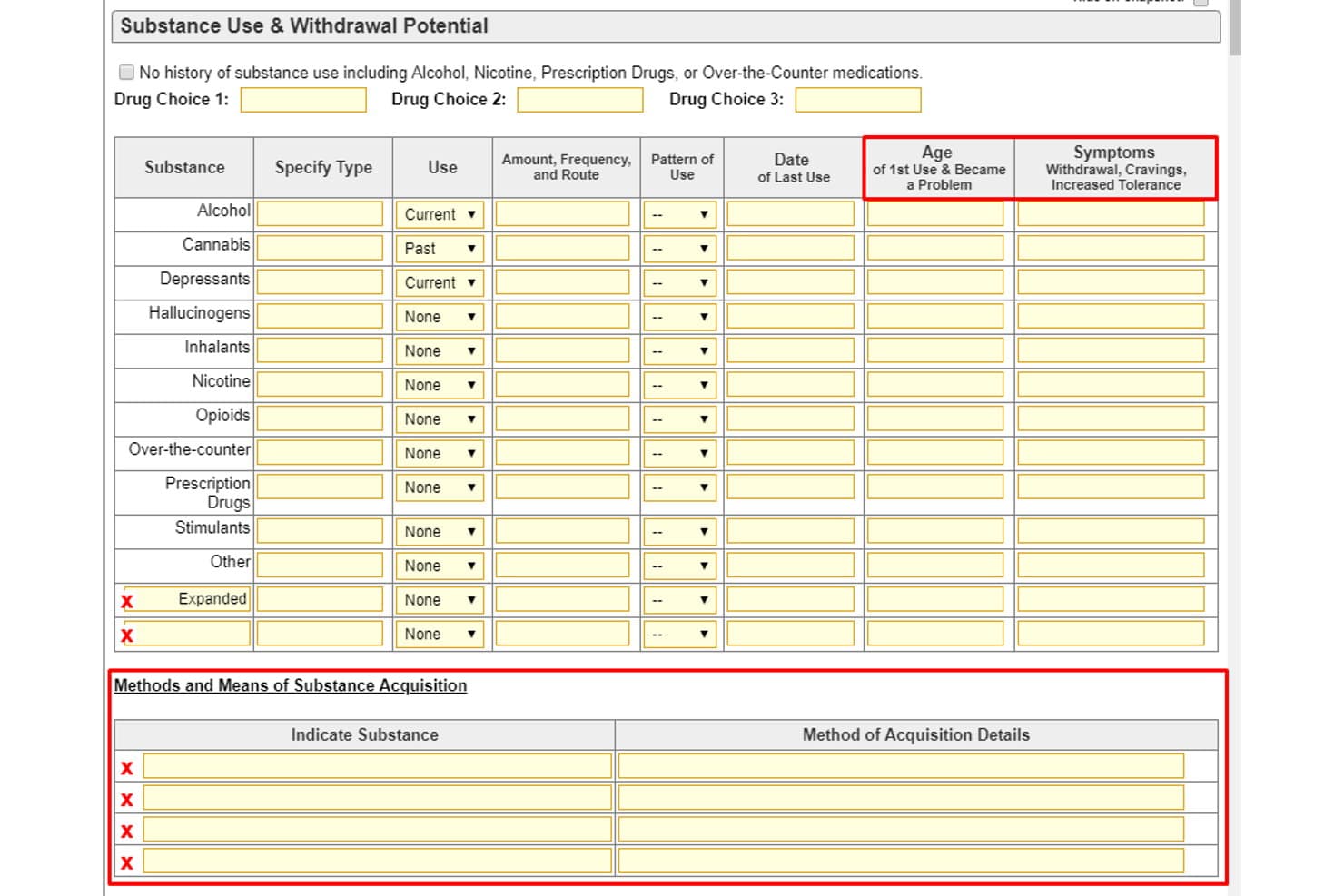
BestNotes offers a detailed Substance Use & Withdrawal Potential form for tracking patient drug history, usage patterns, and acquisition methods. BestNotes is a cloud-based EHR and CRM platform built specifically for behavioral health and addiction treatment providers, combining clinical documentation, admissions pipeline management, and RCM billing in a single system.
Who Is BestNotes Best For?
BestNotes is a strong fit for small to mid-sized addiction treatment centers that need SUD-specific documentation, admissions tracking, and billing in one platform.
Why I Picked BestNotes
BestNotes earns its spot on my shortlist because the native admissions CRM and addiction EHR mean billing teams aren't reconciling data across two separate systems. I particularly like the native ASAM Continuum integration, which embeds level-of-care assessments directly into clinical workflows before a claim is submitted. The built-in 42 CFR Part 2 consent management is a real differentiator, since SUD billing records carry confidentiality requirements that most EHRs bolt on as an afterthought.
BestNotes Key Features
- eMAR functionality: Document medication administration for each patient stay within an integrated electronic MAR.
- CollaborateMD billing integration: Submit electronic claims with 837I/837P formats using a built-in revenue cycle management engine.
- ASAM Criteria assessments: Launch standardized ASAM Level of Care assessments directly within the EHR workflow.
- Real-time patient eligibility checks: Verify insurance coverage and estimator status from the billing interface before claim submission.
BestNotes Integrations
BestNotes offers native integrations with ASAM Continuum, CO-Triage, CollaborateMD, DrFirst, and Videra Health. An API is available for custom integrations.
Pros and Cons
Pros:
- End-to-end admissions to billing in one system
- Native 42 CFR Part 2 consent workflows
- Built-in ASAM and SUD-specific assessment tools
Cons:
- Custom report templates require paid setup
- Out-of-network contract modeling is limited
Learn more about BestNotes: Best for enterprise behavioral health
- Free demo available
- Pricing upon request
Visit WebsiteCustomer Rating:4.4/5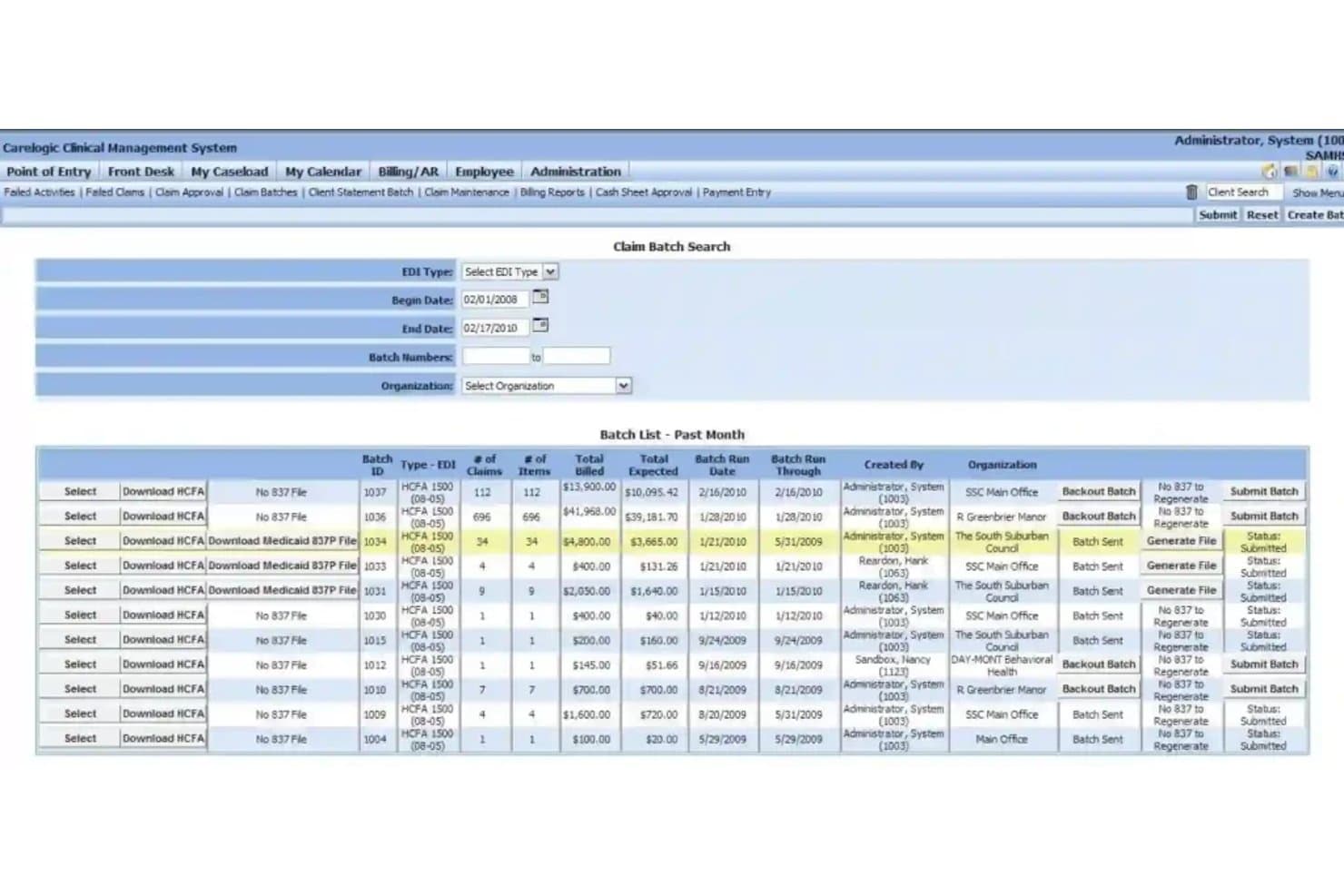
Qualifacts CareLogic offers a Claim Batch Search interface that allows billing staff to filter, review, and submit claim batches with detailed EDI type, date range, and organization controls. Qualifacts CareLogic is a behavioral health EHR with an integrated RCM and billing module built for substance use disorder treatment facilities, supporting SUD-specific claims processing, 42 CFR Part 2 compliance, and multi-payer billing workflows.
Who Is Qualifacts CareLogic Best For?
It's a strong fit for mid-size to enterprise SUD treatment facilities running multiple locations or programs, such as residential, IOP, PHP, and MAT.
Why I Picked Qualifacts CareLogic
I've included Qualifacts CareLogic in my top picks because no other platform on this list handles 42 CFR Part 2 compliance with the same depth. At the enterprise level, running billing across residential, IOP, and MAT programs simultaneously means consent management and redisclosure controls can't be an afterthought. CareLogic's ASAM Criteria Software add-on and MethodOne MAT/MOUD module make it one of the few EHRs I'd trust to handle level-of-care billing without heavy manual configuration.
Qualifacts CareLogic Key Features
- Integrated payer contract management: Lets you configure multiple payer contracts, including Medicaid and commercial, for program-specific billing rules.
- Automated claims validation: Runs claims through built-in validation checks before submission to minimize rejections.
- Role-based access controls: Sets detailed user permissions for sensitive SUD patient records and billing tasks.
- Business intelligence dashboards: Offers automated reporting by payer, level of care, or episode to support audits and payer negotiations.
Qualifacts CareLogic Integrations
Native integrations include OnCall Health for telehealth, Inovalon for eligibility workflows, lab information systems, and health information exchanges. An API is available for custom integrations.
Pros and Cons
Pros:
- Multi-location and program billing flexibility
- ASAM level-of-care and SUD code support
- Built-in 42 CFR Part 2 controls
Cons:
- Outpatient scheduling can feel outdated
- Custom reporting often requires SQL knowledge
Learn more about Qualifacts CareLogic: Best for substance use management
- Free plan available
- Pricing upon request
Visit WebsiteCustomer Rating:4.8/5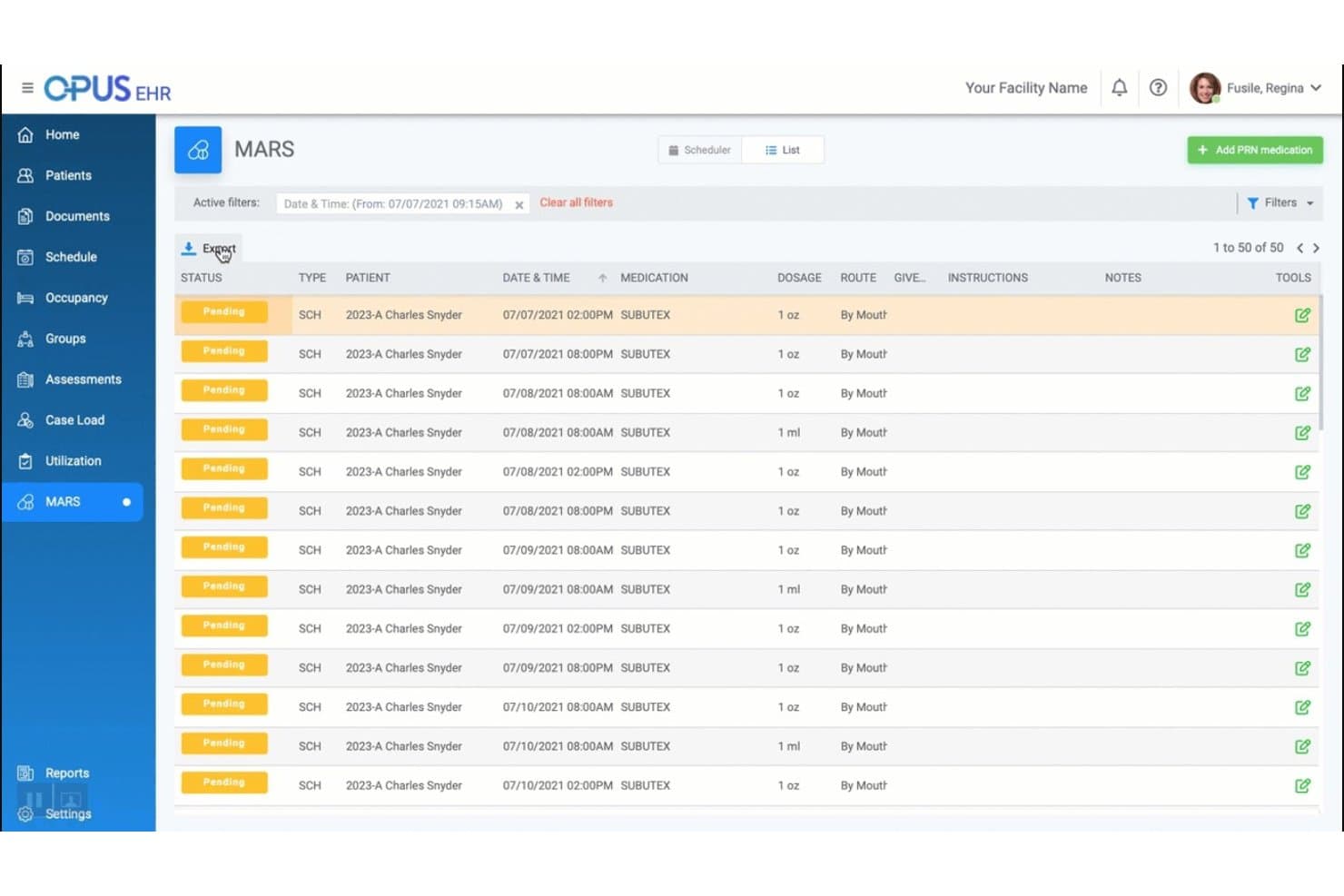
Opus EHR offers a MARS (Medication Administration Record System) list view displaying pending Subutex medication schedules for substance abuse patients. Opus EHR is a cloud-based EHR built specifically for addiction treatment and behavioral health facilities, combining clinical documentation, CRM-based admissions management, and a built-in revenue cycle management engine for SUD billing.
Who Is Opus EHR Best For?
Opus EHR is a strong fit for mid-sized addiction treatment centers running multiple levels of care, such as IOP, PHP, residential, and MAT programs, with 5 or more clinicians on staff.
Why I Picked Opus EHR
I picked Opus EHR because it's one of the few platforms built from the ground up for substance use disorder treatment, meaning its billing workflows are pre-configured for the realities of SUD care rather than adapted from general practice management. I especially like its utilization review module, which flags unpaid claims and over-billing situations in real time across ASAM levels of care. Its built-in RCM handles both UB-04 and CMS 1500 claims, so my team can bill residential and outpatient services from the same system without switching platforms.
Opus EHR Key Features
- E-prescribing for controlled substances: Securely send electronic prescriptions for SUD medications within the EHR.
- Custom analytics dashboard: Manage financial and operational metrics with drag-and-drop reporting widgets tailored for SUD programs.
- Flexible fee schedule management: Set up multiple billing schedules by payer, contract, or level of care for addiction treatment services.
- Embedded group telehealth: Run HIPAA-compliant group sessions and document attendance from within the platform.
Opus EHR Integrations
Opus EHR offers native integrations with Collect Rx, APT Financial, Healthcare Capital, and Curogram. The software also connects with various pharmacy, lab, and payer systems. An API is available for custom integrations.
Pros and Cons
Pros:
- Custom reporting for SUD financial metrics
- Integrated utilization review and claims scrubbing
- Pre-built billing for ASAM levels of care
Cons:
- Limited support for bundled SCA contract billing
- 42 CFR Part 2 consent not explicit
Learn more about Opus EHR: Best for behavioral health charting
- 30-day free trial
- From $55/month
Visit WebsiteCustomer Rating:4.1/5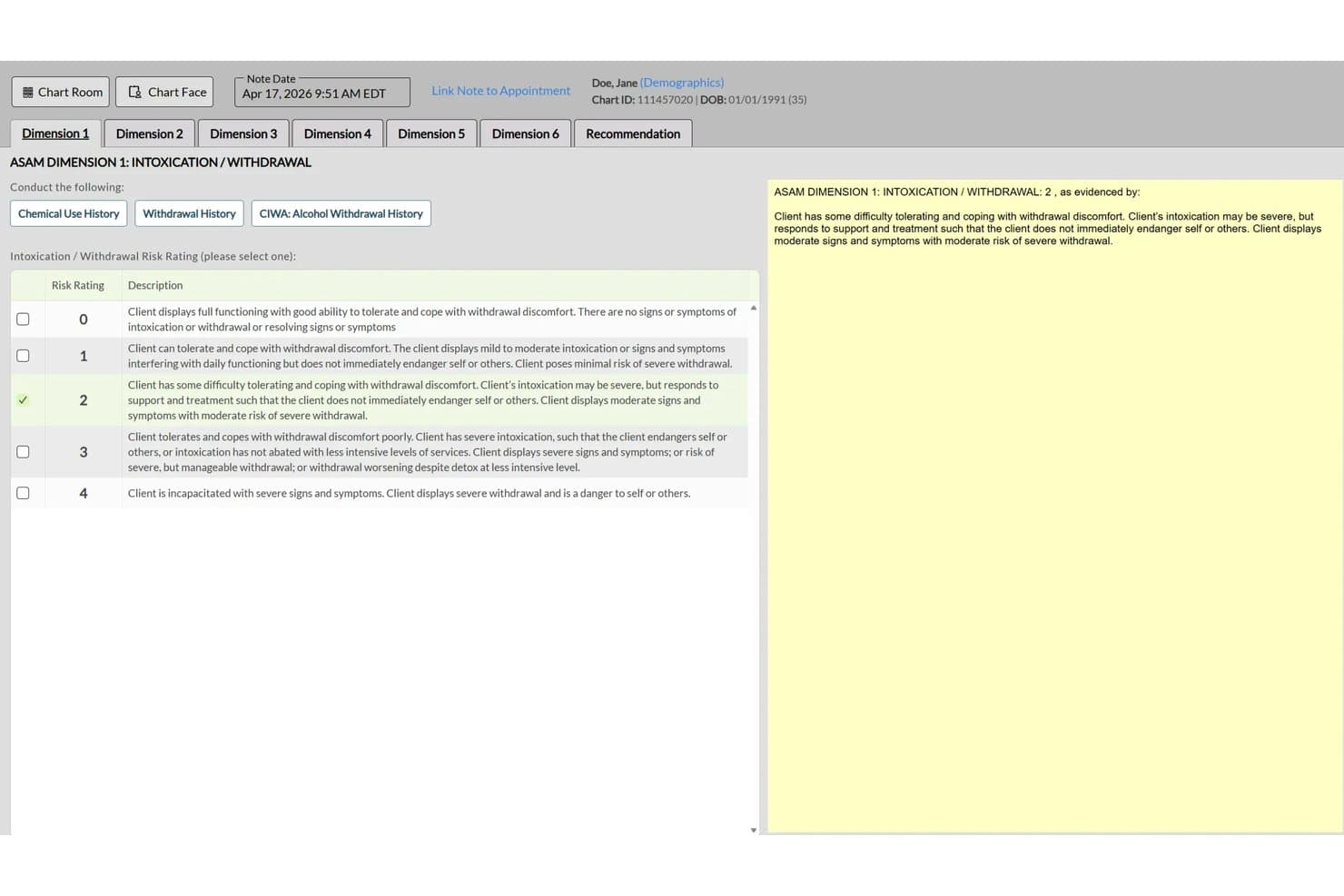
ICANotes offers structured ASAM Dimension 1 Intoxication/Withdrawal risk rating documentation within its addiction treatment EMR. ICANotes is a behavioral health EHR with integrated billing that combines SUD-specific clinical documentation, group therapy charting, and claims submission tools built for addiction treatment practices.
Who Is ICANotes Best For?
It's a strong fit for solo and small-to-mid-size outpatient SUD practices that need charting and billing in a single platform without managing separate systems.
Why I Picked ICANotes
ICANotes earns its spot on my shortlist because its SUD-specific charting directly supports billing accuracy. I like that the group therapy note templates generate individualized clinical notes for each client in a single workflow, which meets the documentation standards IOP and outpatient group programs need for payer compliance. The content engine, built on 75,000+ pre-written clinical phrases, produces audit-ready notes that map to medical necessity criteria and reduce the documentation gaps that commonly trigger claim denials.
ICANotes Key Features
- E-prescribing with EPCS: Prescribers can submit electronic prescriptions for controlled and non-controlled substances within the platform.
- Integrated clearinghouse claims submission: Prepare and batch-submit claims directly to connected clearinghouses from within ICANotes.
- Patient portal: Clients can access appointment schedules, secure messages, and select financial records online.
- Lab ordering and results integration: Order labs and receive results directly in the patient chart for coordinated care documentation.
ICANotes Integrations
ICANotes offers native integrations for e-prescribing, clearinghouse claims submission, and lab ordering and results. An API is available for custom integrations.
Pros and Cons
Pros:
- 42 CFR Part 2 compliance workflows included
- Batch claims sent to integrated clearinghouse
- SUD charting built for addiction counselors
Cons:
- Lacks support for ASAM level contract billing
- No real-time insurance verification or pre-auth
Learn more about ICANotes:
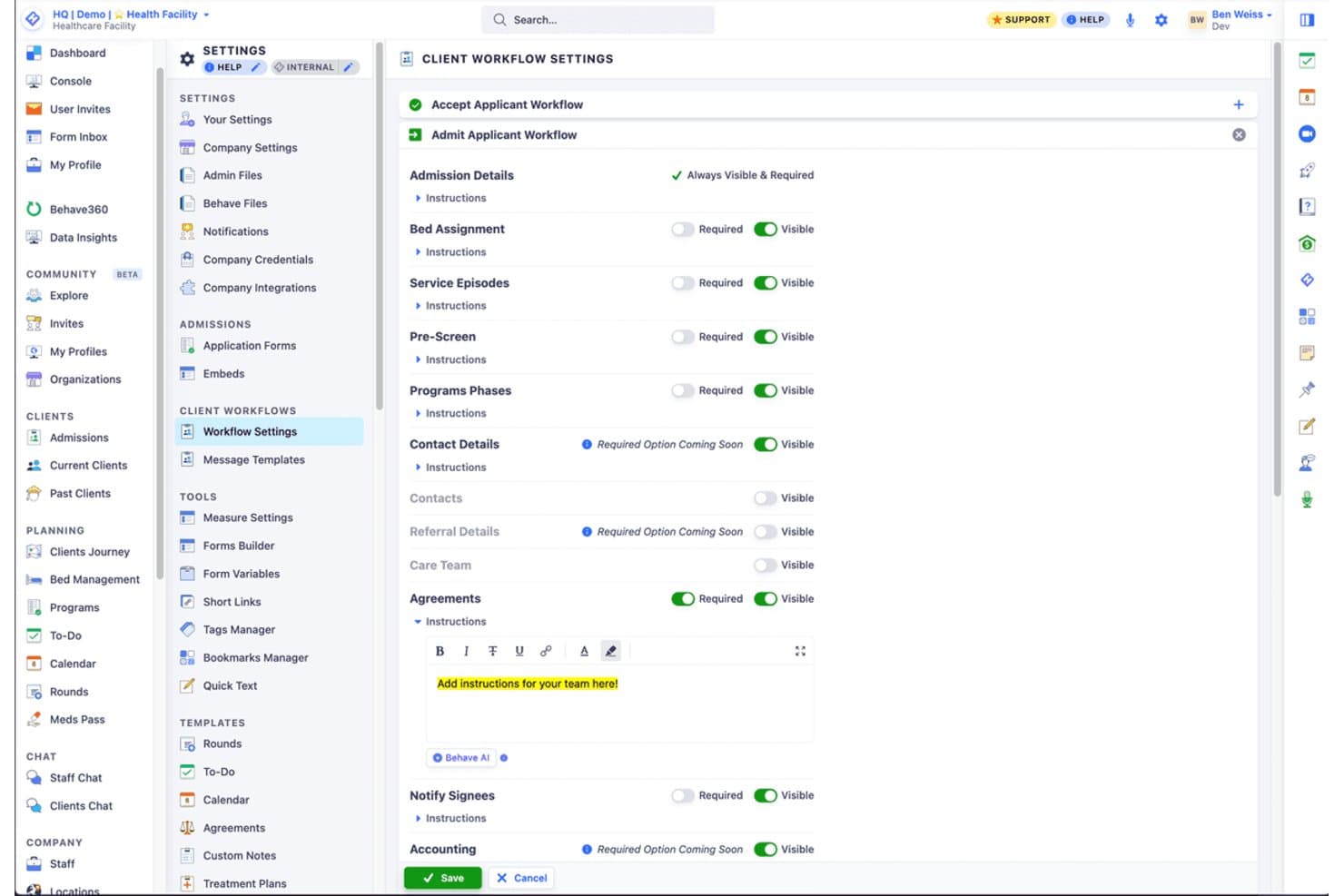
Behave Health offers customizable client workflow settings that allow staff to configure admission steps, agreements, and visibility requirements for each stage of the intake process. Behave Health is an all-in-one platform for addiction treatment and behavioral health facilities that bundles CRM, EHR, and RCM into a single system with built-in insurance verification, claims submission, utilization review, and denial management.
Who Is Behave Health Best For?
Behave Health is a strong fit for facility-based addiction treatment providers running detox, residential, PHP, or IOP programs who need clinical and billing workflows in one system.
Why I Picked Behave Health
I picked Behave Health because the clinical and billing workflows are built specifically around addiction treatment levels of care. When a client moves from detox into PHP, that level-of-care change flows directly into per-diem claim generation without manual re-entry. I also like the utilization review module, which keeps authorization tracking and concurrent review deadlines connected to the clinical chart rather than managed separately in a spreadsheet or a different system.
Behave Health Key Features
- Real-time insurance eligibility checks: Instantly verify behavioral health coverage, copays, deductibles, and reimbursement rates for each client.
- Integrated EHR and billing platform: Sync clinical charts, treatment plans, and billing events in one shared system to minimize data entry errors.
- Out-of-network and per-diem rate handling: Accommodate single-case agreements, variable daily rates, and bundled billing common in addiction treatment.
- Behavioral health financial and operational reporting: Generate reports segmented by payer, level of care, and episode across all programs and facilities.
Behave Health Integrations
Behave Health offers native integrations with Stripe for payments, Zoom and Google Meet for telehealth sessions, and supports e-prescribing integrations for EPCS and PDMP checks. An API is available for custom integrations.
Pros and Cons
Pros:
- Real-time denial tracking and reporting
- Automatic VOB with behavioral health parsing
- SUD billing logic built for ASAM levels
Cons:
- Reporting customization is not extensive
- Limited payer contract modeling tools
Learn more about Behave Health: 6Best for addiction treatment workflows
Kipu
- Free demo available
- Pricing upon request
Visit WebsiteCustomer Rating:4.7/5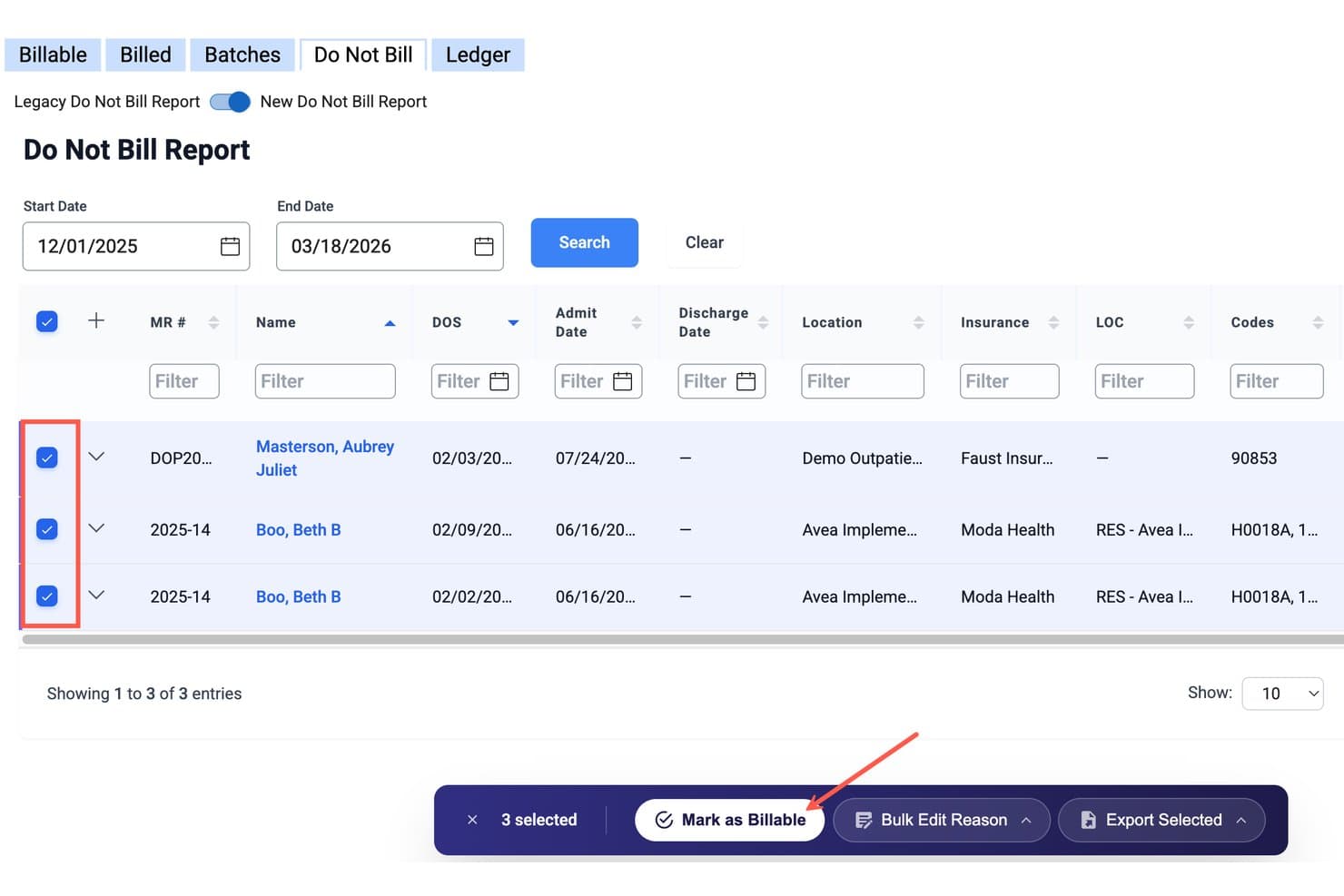
Kipu offers a Do Not Bill Report with bulk action tools, allowing users to select multiple claims and mark them as billable in one step. Kipu is a cloud-based EMR and revenue cycle management platform built for addiction treatment and behavioral health centers, combining clinical documentation, insurance verification, utilization review, and claims management in one system.
Who Is Kipu Best For?
Kipu is a strong fit for multi-site addiction treatment and residential behavioral health facilities that need billing and clinical documentation managed in a single platform.
Why I Picked Kipu
I picked Kipu as one of the best because its billing workflows are built specifically around addiction treatment level-of-care coding, not retrofitted from general medical billing. The attendance calendar directly feeds claim generation, so when a patient completes an IOP session, that attendance record becomes a billable claim without manual entry. I also like that the utilization review module tracks authorization status with color-coded alerts, keeping concurrent review on track across active cases.
Kipu Key Features
- Automated denial categorization: Tracks and categorizes payer denials by type to streamline appeals and root-cause analysis.
- Real-time VOB checks: Instantly verifies behavioral health benefits and displays details directly within the billing workflow.
- Integrated utilization review dashboard: Centralizes authorization monitoring with alerts for concurrent review and expiring approvals.
- Financial reporting by level of care: Generates reports segmented by ASAM level, payer, and treatment episode for actionable billing data.
Kipu Integrations
Kipu offers native integrations with ASAM CONTINUUM, Chess Health, Contexture, and DFM, and provides an API for custom integrations. Additional connections are available through its certified partner marketplace.
Pros and Cons
Pros:
- 42 CFR Part 2 compliance features included
- Automated denial categorization for behavioral claims
- ASAM level billing logic built in
Cons:
- Requires in-house staff for billing process
- Fragmented billing and RCM pricing structure
Learn more about Kipu: Best for integrated treatment operations
- Free demo available
- Pricing upon request
Visit WebsiteCustomer Rating:4.4/5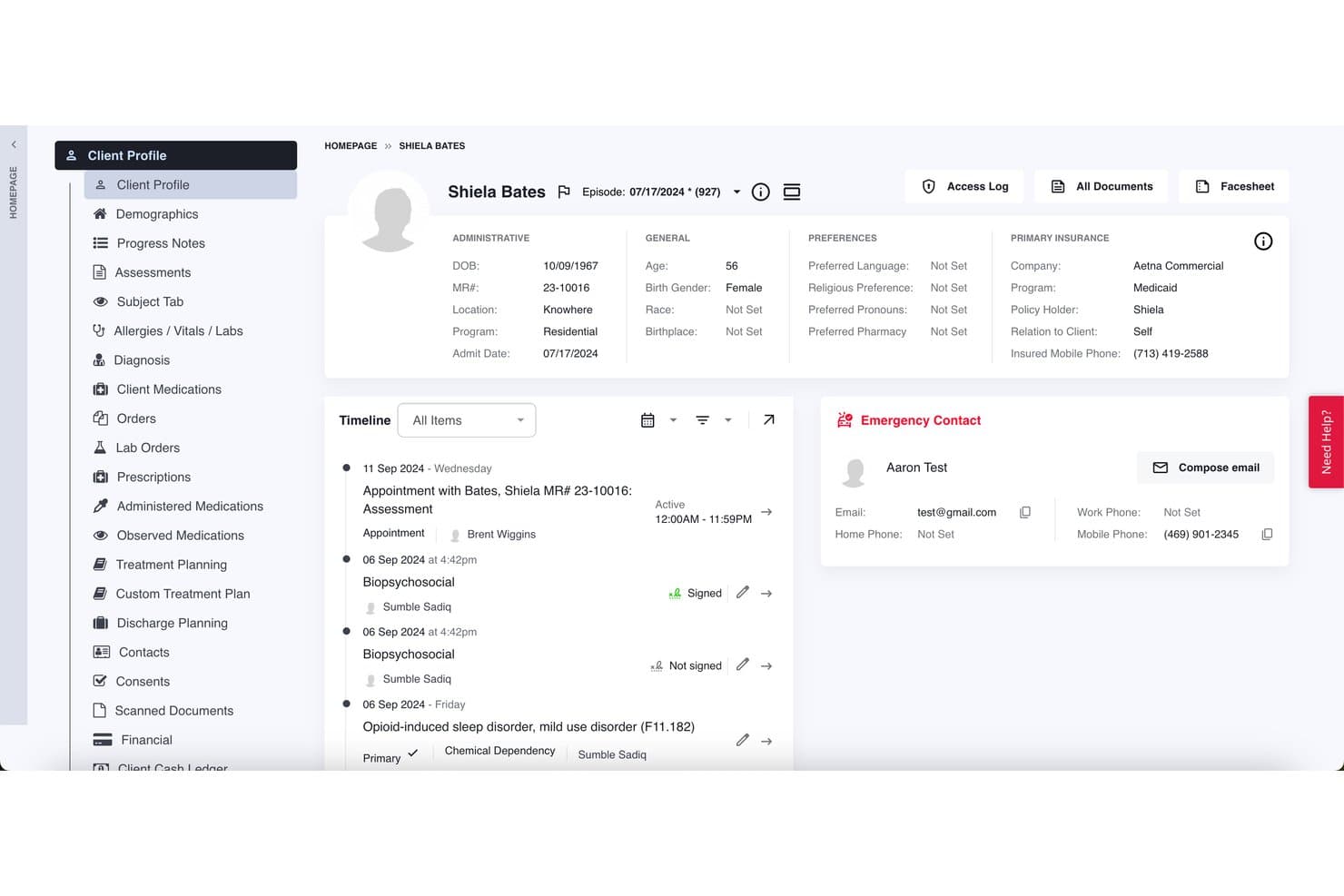
Lightning Step offers a detailed client profile view with insurance, billing, emergency contact, and timeline documentation for substance abuse treatment management. Lightning Step is a behavioral health platform built for substance abuse treatment centers that integrates CRM, EMR, and revenue cycle management with SUD-specific claims processing, insurance verification, and 42 CFR Part 2-compliant billing tools.
Who Is Lightning Step Best For?
Lightning Step is a strong fit for addiction treatment facilities that operate across multiple levels of care, from detox and residential to PHP and IOP programs.
Why I Picked Lightning Step
Lightning Step earns its spot on my shortlist because the CRM, EMR, and RCM all run on a single login, so billing teams aren't reconciling data across disconnected systems. I particularly like LIA, the AI assistant that learns payer-specific denial patterns and flags at-risk claims before submission. The automated 42 CFR Part 2 consent verification also runs in the background, which I think billing managers at SUD facilities will genuinely value.
Lightning Step Key Features
- Smart bulk claims actions: Submit multiple SUD-specific insurance claims and payments with a single click.
- Integrated clearinghouse connectivity: Direct connections to Waystar for real-time claim status, remits, and denials.
- Utilization review dashboards: Monitor and track UR documentation, reviews, and status by client and payer.
- Patient billing portal: Lets patients upload insurance cards, make credit card payments, and manage billing consents online.
Lightning Step Integrations
Lightning Step offers native integrations with Waystar, CTM, Millenium, Twilio, and Salesforce. An API is available for custom integrations.
Pros and Cons
Pros:
- Automated VOB and UR tracking for SUD
- AI flags at-risk SUD claims before submission
- Built-in 42 CFR Part 2 compliance workflows
Cons:
- Reporting customization is somewhat restricted
- Limited payer contract modeling features
Learn more about Lightning Step: Best for substance use documentation
- Free demo available
- Pricing upon request
Visit WebsiteCustomer Rating:3.9/5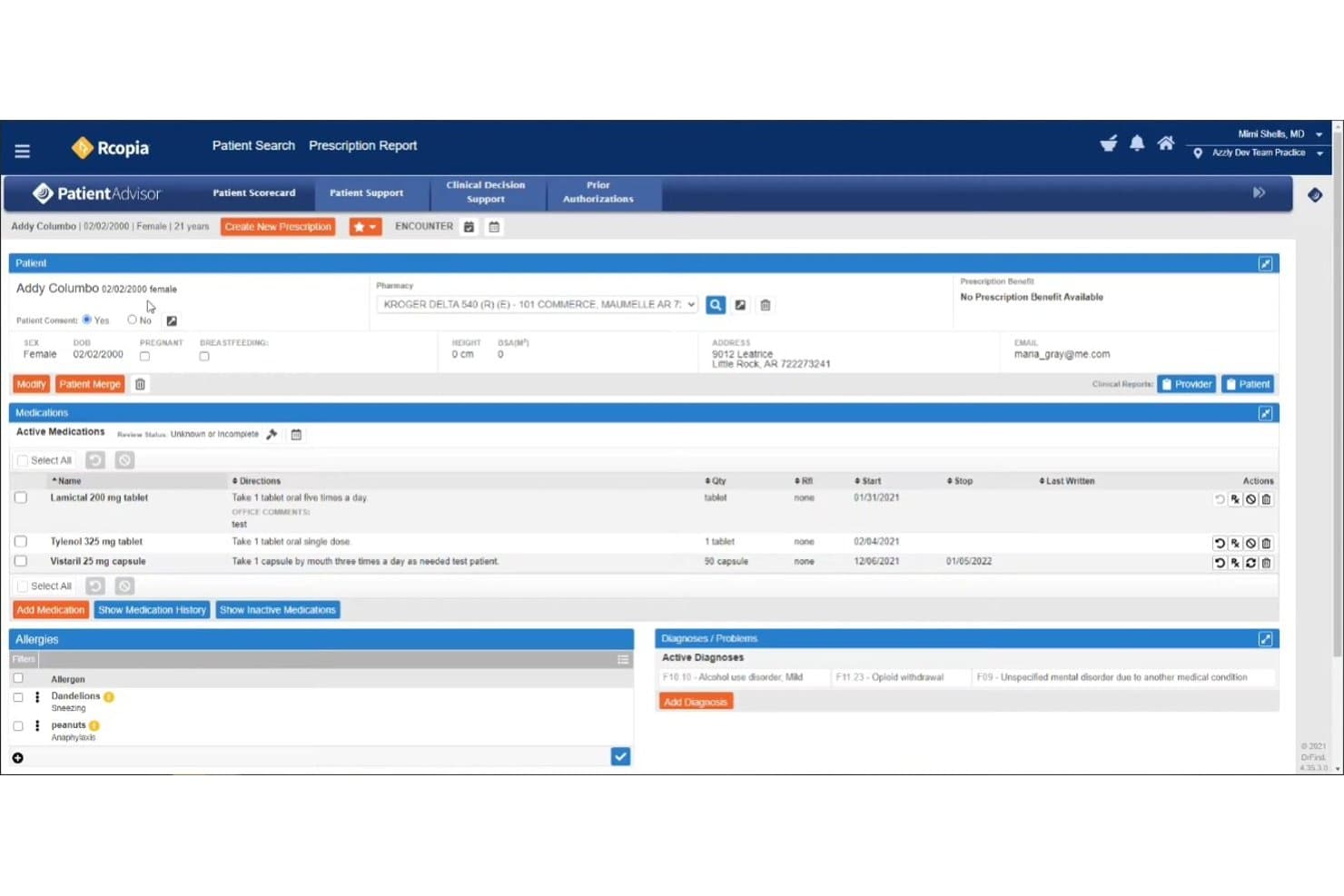
AZZLY Rize offers an integrated e-prescribing module with active medications, allergy tracking, and substance-related diagnoses such as opioid withdrawal and alcohol use disorder. AZZLY Rize is an all-in-one EHR and RCM platform built specifically for behavioral health and substance use disorder programs, combining clinical documentation, medical billing, claims submission, and revenue cycle management in a single system.
Who Is AZZLY Rize Best For?
It's a strong fit for small-to-mid-size substance use disorder treatment centers running MAT, OTP, IOP, PHP, or residential programs that need one platform for both clinical and billing workflows.
Why I Picked AZZLY Rize
I picked AZZLY Rize as one of the best because its clinical documentation is directly wired into the billing engine. ASAM level-of-care notes feed auto-claims generation by encounter type, and the system blocks incomplete notes from submitting, which cuts post-submission coding errors at the source. I find that particularly useful when managing IOP and residential billing simultaneously across multiple ASAM levels with different payer rules.
AZZLY Rize Key Features
- Prior-auth countdown tracking: Automated tools notify billing staff of upcoming authorization expirations for ongoing SUD treatment episodes.
- Auto charge master and fee schedule setup: Lets you configure payer-specific billing rules, rates, and modifiers to match addiction treatment program billing models.
- Integrated ERA posting: Automatically posts electronic remittance advice data directly to patient accounts to simplify AR and denial follow-up.
- Real-time bed and census management: Monitors inpatient occupancy and program census in sync with billing and clinical documentation.
AZZLY Rize Integrations
AZZLY Rize offers native integrations with Zoom for telehealth, Stripe for payment processing, EPCS and PDMP for e-prescribing, MethodOne and Methware for methadone dosing data, plus bi-directional lab integrations.
Pros and Cons
Pros:
- Built-in prior-auth expiration tracking
- Strong controls for 42 CFR Part 2 compliance
- ASAM-level billing directly linked to documentation
Cons:
- Custom reporting setup can be time-consuming
- Out-of-network billing model options are limited
Learn more about AZZLY Rize: Best for residential treatment programs
- Free demo available
- Pricing upon request
Visit WebsiteCustomer Rating:4.7/5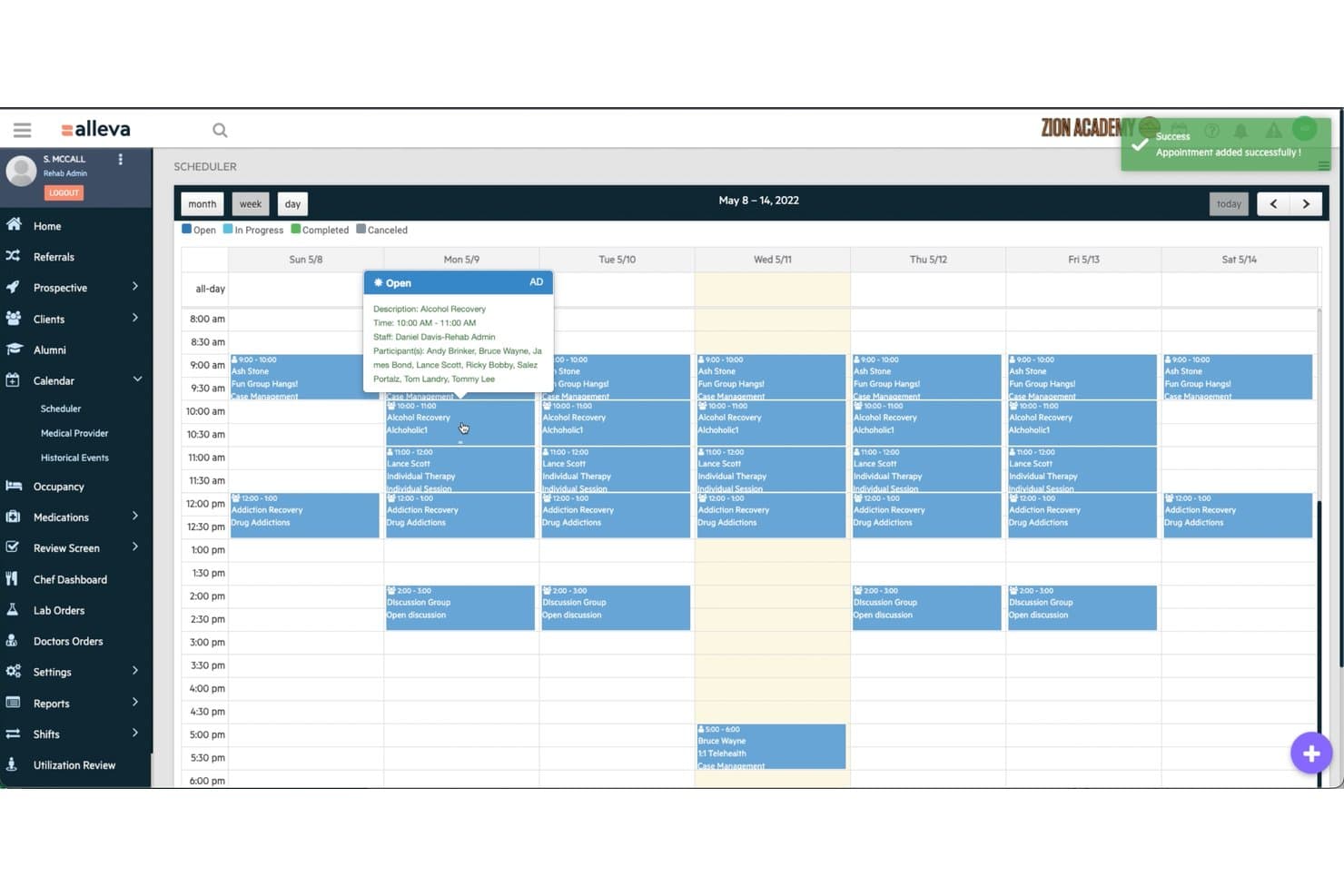
Alleva offers a weekly scheduler view that displays group therapy sessions, individual appointments, and staff assignments for substance abuse treatment programs. Alleva is a behavioral health EMR and RCM platform built exclusively for addiction treatment programs, covering clinical documentation, insurance verification, claims submission, and denial management across detox, IOP, PHP, and residential care settings.
Who Is Alleva Best For?
Alleva is a strong fit for addiction treatment centers operating across multiple levels of care, particularly those running residential programs alongside IOP, PHP, or detox services.
Why I Picked Alleva
I picked Alleva as one of the best because it's the only platform I've used that builds residential care workflows directly into the billing process. The Encounter Transmission Table (ETT) runs pre-submission claim audits with custom rules per payer and program, so claims go out clean. Echo, the ambient AI scribe, generates progress notes and UR documentation from clinical sessions, keeping 24/7 residential documentation current without adding manual work for shift staff.
Alleva Key Features
- Instant VOBs: Built-in verification of benefits powered by Waystar with real-time eligibility checks at the point of admission.
- Automated ERA posting: Integration with clearinghouse services for electronic remittance advice posting and reconciliation in the billing dashboard.
- Payer-specific validation rules: Encounter Transmission Table (ETT) applies custom auditing criteria to billing submissions for different payers and programs.
- Integrated client and family portal: Secure portal enabling clients, families, and referral sources to access information and telehealth sessions.
Alleva Integrations
Alleva offers native integrations with Waystar, Salesforce, CollaborateMD, CMD, NuIQ, and Owl, and provides an API for custom integrations.
Pros and Cons
Pros:
- Real-time VOB integrated at intake
- ETT pre-submission claim validation prevents denials
- Dedicated residential and detox billing workflows
Cons:
- Payer contract modeling features are limited
- 42 CFR Part 2 compliance not prominently shown
Learn more about Alleva: 10Best for addiction treatment CRM
Sunwave
- Free demo available
- Pricing upon request
Visit WebsiteCustomer Rating:5/5
Sunwave offers an Individual Treatment Plan screen with patient details, goals, objectives, and interventions for substance abuse care management. Sunwave is an all-in-one behavioral health platform built for substance use disorder treatment centers, combining CRM, EMR, and RCM into a single system with SUD-specific claims processing, insurance verification, and 42 CFR Part 2 compliance tools.
Who Is Sunwave Best For?
Sunwave is a strong fit for mid-sized to large SUD treatment facilities managing multiple levels of care across one or more locations.
Why I Picked Sunwave
I've included Sunwave in my top picks because its addiction treatment CRM feeds directly into the RCM module, removing the manual handoff between admissions and billing. When a patient moves from inquiry to admission, census data auto-populates insurance claims, so billing teams aren't re-entering what admissions already captured. I also like the real-time bed board, which keeps payer eligibility and available capacity visible in the same system where claims are generated.
Sunwave Key Features
- Automated SUD claims validation: Runs over 150 built-in rules to catch coding errors and ensure payer-specific requirements are met before submission.
- Real-time eligibility and VOB dashboard: Lets you instantly check behavioral health benefits and run verification of benefits with detailed breakdowns.
- Clinical documentation sync: Links clinical progress notes and utilization review data directly to billing for support with audits and medical necessity.
- Configurable SUD financial reporting: Generates reports segmented by payer, level of care, and treatment episode for compliance and operational analysis.
Sunwave Integrations
Sunwave offers native integrations with Salesforce, CHESS Health, Twilio, PaySimple, DoseSpot, TriZetto, CTM, Waystar, and Stripe. An API is available for custom integrations.
Pros and Cons
Pros:
- Real-time eligibility and VOB workflow tools
- CRM, EMR, and billing fully integrated
- SUD-specific claims validation rules built in
Cons:
- Implementation timelines can be lengthy
- Contract modeling for OON payers is limited
Learn more about Sunwave:
Annen faktureringsprogramvare for rusmiddelbehandling
\u003cspan style=\u0022font-weight: 400;\u0022\u003eHer er noen flere alternativer for faktureringsprogramvare for rusmiddelbehandling som ikke kom med på kortlisten min, men som likevel er verdt å undersøke:\u003c/span\u003e
- 11Ease HealthBest for addiction workflow automation
- 12RittenBest for behavioral health documentation
- 13ValantBest for behavioral practice management
- 14NetsmartBest for large behavioral organizations
- 15NextGen Behavioral Health SuiteBest for large behavioral practices
- 16ProcentiveBest for behavioral billing workflows
- 17MillinBest for substance use billing
- 18PIMSYBest for customizable behavioral EHR
How I Evaluate Substance Abuse Billing Software
I split my evaluation into must-have billing capabilities—like 42 CFR Part 2 compliance and ASAM-level claims—and the differentiators that separate a good fit from a great one.
Core Functionality (Table Stakes for This List)
When I'm selecting tools for my list, I rank each one on a scale from 0 (does not offer the functionality) to 5 (excels in this area) for each core functionality listed below. Then, I calculate the tool's total score into a percentage. Each tool needs to achieve a minimum total score of 55% to be considered for inclusion.
- SUD-Specific Claims Processing: I check whether claims can go out with ASAM levels, H-codes, and detox/IOP/PHP/residential revenue codes via both 837I and 837P formats.
- Insurance Verification & Authorization: Real-time eligibility checks matter, but I also look for built-in authorization tracking and concurrent review workflows tied to behavioral health payers.
- 42 CFR Part 2 Compliance: Beyond standard HIPAA, I evaluate how each tool manages consent tracking, redisclosure controls, and audit trails for substance use disorder records.
- Denial Management & AR Follow-up: Denied SUD claims often share common patterns. I look for denial categorization, appeal templates, and AR worklists built around behavioral health payer trends.
- Payer Contract & Rate Management: Addiction treatment billing regularly involves out-of-network claims, single case agreements, and per-diem or bundled rates. Each tool should handle that variety.
- Behavioral Health Reporting: I evaluate whether reports can break down revenue and AR by level of care, payer, and episode of treatment rather than just standard financial summaries.
Once I have a list of tools that meet the criteria, I consider what sets each platform apart.
Differentiating Factors (What Sets Vendors Apart)
Here's how I compare and contrast different vendors:
Standout Features
Authorization tracking matters most when a patient's pre-auth expires mid-stay and you lose days of reimbursement. I look for tools that send expiration alerts and flag coverage gaps before they hit your revenue. UR integration pairs well here—linking clinical documentation directly to each billed day helps defend medical necessity during payer reviews. I also evaluate level of care billing logic, since platforms that auto-adjust between per-diem and bundled rates as a patient steps down from residential to IOP save your team from constant manual reconfiguration.
Beyond Features
Payer mix expertise is a big one—I look at whether a vendor has depth with commercial, Medicaid, and single case agreement billing, since SUD facilities often juggle all three. EHR integration also matters. A platform that syncs with your clinical system lets billing staff pull documentation to support medical necessity without chasing down clinicians. I also consider how well a tool scales across facility types, especially if you run both outpatient and residential programs under one organization.
Slik velger du faktureringsprogramvare for rusmiddelbehandling
Det er lett å gå seg vill i lange funksjonslister og kompliserte prisstrukturer. For å hjelpe deg med å holde fokus mens du arbeider deg gjennom den unike prosessen med å velge programvare, får du her en sjekkliste over faktorer du bør ha i bakhodet:
| Faktor | Hva du bør vurdere |
| Skalerbarhet | Vil programvaren passe både små polikliniske programmer og heldøgnsbehandling ved flere institusjoner når organisasjonen din vokser? |
| Integrasjoner | Fungerer den med EPJ-systemet, oppgjørssentralen eller regnskapsverktøyene dine, slik at viktig faktureringsinformasjon ikke blir isolert eller krever dobbel dataregistrering? |
| Tilpasningsmuligheter | Hvor enkelt kan du tilpasse maler, skjemaer, faktureringsregler eller rapporter slik at de passer dine spesifikke kontraktsvilkår og rapporteringskrav? |
| Brukervennlighet | Kan nye medarbeidere innen fakturering raskt lære systemet, eller vil kontinuerlig opplæring være nødvendig? Test hvor intuitiv navigeringen er under demonstrasjoner. |
| Implementering og oppstart | Hvordan foregår migrering og opplæring i praksis, og får du støtte hvis du går over fra regneark eller eldre verktøy? |
| Kostnad | Vurder ikke bare månedlige avgifter, men også oppsett, brukeravgifter eller priser basert på en prosentandel av innbetalingene – les kontrakten for å avdekke skjulte kostnader. |
| Sikkerhetstiltak | Tilbyr leverandøren sterk datakryptering, tilgangslogger og revisjonsspor for å støtte HIPAA og konfidensialitet i henhold til 42 CFR Part 2? |
| Krav til samsvar | Håndterer plattformen din spesifikke kombinasjon av betalere, beredskap for revisjoner samt delstatsbaserte regler for konfidensialitet og fakturering av SUD? |
Hva er faktureringsprogramvare for rusmiddelbehandling?
Faktureringsprogramvare for rusmiddelbehandling er et spesialisert system som er utviklet for å håndtere krav, forsikringsbekreftelse, oppfølging av avslag og samsvar for behandlingstjenester ved avhengighet. Det støtter unike krav som ASAM-nivåkoding, samtykkehåndtering i henhold til 42 CFR Part 2 og arbeidsflyter for betalerkontrakter for avgiftning, IOP, PHP og heldøgnsbehandling. Denne programvaren hjelper institusjoner med å automatisere administrative oppgaver samtidig som regulatoriske standarder opprettholdes og refusjonen for behandling av rusmiddellidelser maksimeres.
Funksjoner
Ved valg av faktureringsprogramvare for rusmiddelmisbruk bør du se etter følgende nøkkelfunksjoner:
- Fordringsbehandling spesifikt for SUD: Håndterer fakturering ved hjelp av ASAM-nivåer, H-koder og riktige inntektskoder på tvers av avgiftning, IOP, PHP og behandling i døgninstitusjon.
- Forsikringsverifisering og godkjenning: Automatiserer sanntidskontroller av rettigheter og følger opp forhåndsgodkjenninger for å bidra til å forhindre avviste krav og avbrudd i behandlingen.
- Etterlevelse av 42 CFR Part 2: Håndhever avansert konfidensialitet, robust samtykkesporing og kontroller for videreutlevering av pasientjournaler ved rusmiddellidelser.
- Arbeidsflyter for håndtering av avviste krav: Sporer, kategoriserer og bidrar til å løse avviste krav med innebygde klager og analyser av grunnårsaker, tilpasset vanlige faktureringsutfordringer innen SUD.
- Håndtering av betalerkontrakter og satser: Håndterer komplekse refusjonsstrukturer, inkludert satser utenfor nettverket, samlede betalinger og avtaler for enkeltsaker.
- Rapportering for atferdshelse: Genererer økonomiske og operative rapporter segmentert etter betaler, omsorgsnivå, behandlingsforløp og andre relevante nøkkeltall for atferdshelse.
- Integrasjon med UR (utnyttelsesvurdering): Kobler klinisk dokumentasjon til fakturering og sikrer at hver fakturerte behandlingsdag har tilhørende notater om medisinsk nødvendighet og dokumentasjon for forhåndsgodkjenning.
- Tilpassbare faktureringsregler: Lar deg endre faktureringslogikken slik at den gjenspeiler betalerspesifikke krav, delstatsreguleringer eller endrede omsorgsnivåer.
- Revisjonsspor og samsvarslogger: Opprettholder en tydelig og tilgjengelig oversikt over alle faktureringshandlinger og endringer, klar for ekstern revisjon eller intern gjennomgang når som helst.
- Beregning av pasientens egenandel: Beregner egenandeler, egenbetaling og medforsikring på forhånd for å hjelpe pasientene med å planlegge kostnader de må betale selv.
Fordeler
Implementering av faktureringsprogramvare for rusmiddelmisbruk gir flere fordeler for teamet og virksomheten din. Her er noen av fordelene du kan se frem til:
- Raskere refusjon: Automatisert behandling av krav, betalerspesifikk faktureringslogikk og sanntidskontroll av rettigheter bidrar til raskere innkreving og færre manuelle feil.
- Færre avviste krav: Standardiserte arbeidsflyter for oppfølging av godkjenninger, vedlegg om medisinsk nødvendighet og håndtering av avvisninger reduserer risikoen for avviste krav betydelig.
- Bedre etterlevelse av regelverk: Innebygde samtykkekontroller og revisjonsspor for 42 CFR Part 2 bidrar til å sikre at faktureringen alltid oppfyller kravene til konfidensialitet og samsvar for SUD.
- Tydeligere økonomiske resultater: Avansert rapportering etter betaler, omsorgsnivå og behandlingsforløp gir mer presise prognoser og et bedre grunnlag for beslutninger.
- Redusert administrativ belastning: Integrert forsikringsverifisering, UR-dokumentasjon og beregning av pasientens egenandel reduserer mengden repetitivt manuelt arbeid for de ansatte.
- Bedre pasientopplevelse: Forhåndskontroll av ytelser og tydelige kostnadsanslag hjelper pasientene med å forstå sine økonomiske forpliktelser før behandlingen starter.
- Bedre forhold til betalere: Konsistente og nøyaktige krav med tilhørende dokumentasjon legger til rette for smidigere samhandling og raskere avklaringer med betalere innen atferdshelse.
Kostnader og priser
Valg av faktureringsprogramvare for rusmiddelmisbruk krever en forståelse av de ulike prismodellene og abonnementene som er tilgjengelige. Kostnadene varierer basert på funksjoner, teamstørrelse, tillegg og mer. Tabellen nedenfor oppsummerer vanlige abonnementer, gjennomsnittsprisene deres og typiske funksjoner som er inkludert i løsninger for faktureringsprogramvare for rusmiddelmisbruk:
Sammenligningstabell for abonnementer på faktureringsprogramvare for rusmiddelmisbruk
| Abonnementstype | Gjennomsnittspris | Vanlige funksjoner |
| Gratisabonnement | $0 | Grunnleggende registrering av krav, begrenset rapportering og manuell forsikringsverifisering. |
| Personlig abonnement | $30-$75/bruker/måned | Fakturering for individuelle behandlere, enkel oppfølging av avvisninger, tilpassbare maler og HIPAA-samsvar. |
| Bedriftsabonnement | $100-$250/bruker/måned | Tilgang for flere brukere, SUD-faktureringskoder, automatisert forsikringsverifisering, håndtering av betalerkontrakter og standardrapportering. |
| Storbedriftsabonnement | $300-$600+/bruker/måned | Avanserte arbeidsflyter for utestående fordringer, kontroller for 42 CFR Part 2, EHR-integrasjoner, automatisering av samlede krav, tilpassede analyser og dedikert kundestøtte. |
Vanlige spørsmål om faktureringsprogramvare for rusmiddelbehandling
Her er noen svar på vanlige spørsmål om faktureringsprogramvare for rusmiddelbehandling:
Hva skiller fakturering for rusmiddelbehandling fra vanlig medisinsk fakturering?
Fakturering for rusmiddelbehandling innebærer unike standarder som ASAM-behandlingsnivåer, krav til samtykke i henhold til 42 CFR Part 2 og autorisasjons- og medisinsk nødvendighetsprosesser som er spesifikke for psykisk helsevern, og som ikke finnes i generell medisinsk fakturering.
Kan faktureringsprogramvare for rusmiddelbehandling støtte både polikliniske og døgnbaserte programmer?
Ja, de fleste løsninger kan håndtere krav og faktureringslogikk for polikliniske tjenester, intensiv poliklinisk behandling, delvis innleggelse og døgnbaserte tjenester i samme plattform.
Hvordan bidrar programvaren til å redusere avviste krav?
Disse plattformene automatiserer forsikringsverifisering, sporer autorisasjoner og kobler klinisk dokumentasjon til faktureringen. Alt dette bidrar til å håndtere de vanligste årsakene til avvisning av krav innen fakturering for avhengighetsbehandling.
Er samsvar med 42 CFR Part 2 inkludert i all faktureringsprogramvare for rusmiddelbehandling?
Nei, ikke alle plattformer tilbyr full sporing av samtykker og kontroll over videreformidling i henhold til 42 CFR Part 2 – sørg for å kontrollere at løsningen oppfyller kravene til konfidensialitet.
Hvilke integrasjoner er viktige for faktureringsprogramvare for rusmiddelbehandling?
Se etter integrasjoner med elektroniske pasientjournalsystemer, oppgjørssentraler og regnskapsprogramvare for å minimere dobbeltregistrering, holde faktureringen synkronisert med kliniske data og effektivisere registreringen av innbetalinger.
Vil programvaren håndtere fakturering utenfor nettverket eller avtaler for enkeltsaker?
Mange spesialiserte plattformer støtter krav utenfor nettverket og kan håndtere avtaler for enkeltsaker, noe som er viktig for behandlingssentre for avhengighet som betjener et bredt spekter av betalere.