

Programvare for utgiftsstyring i helsesektoren hjelper organisasjonen med å spore, kontrollere og rapportere virksomhetens utgifter på tvers av kliniske, administrative og operative aktiviteter. Hvis du leter etter måter å redusere manuelle prosesser, forbedre etterlevelsen og få sanntidsinnsikt i utgiftene på, kan den rette plattformen utgjøre en målbar forskjell.
Med strenge regler, komplekse godkjenningskjeder og behovet for å fordele kostnader nøyaktig trenger helseteam brukervennlige programvareløsninger som reduserer den administrative belastningen og er utviklet for deres unike miljø. Denne listen hjelper deg med å sammenligne ledende verktøy for utgiftsstyring, slik at du kan velge programvare som passer arbeidsflytene dine, støtter behovene dine for etterlevelse og lar deg holde fokus på pasientbehandling.
Why Trust Our Software Recommendations
6,700+
Reviews
20
Industry experts
16+
Evaluation factors
14
Years
Our team has been testing and reviewing software since 2012. As medical practice leaders ourselves, we know how difficult—and important—it is to choose the right software.
For this guide, we evaluated tools using hands-on testing and independent research, scoring tools using our selection criteria.
Our reviews reflect our human editorial judgment, not a sales pitch.
Sammenligningstabell for programvare for utgiftsstyring i helsesektoren
Tabellen nedenfor sammenligner prisopplysningene for mine beste utvalg av programvare for utgiftsstyring i helsesektoren.
| Tool | Best For | Trial Info | Price | ||
|---|---|---|---|---|---|
| 1 | Best for multi-site provider spend controls | Free demo available | Pricing upon request | Website | |
| 2 | Best for corporate card expense feeds | Free demo available | From $11.99/user/month (billed annually) | Website | |
| 3 | Best for travel and expense management in clinics | Free plan available | Pricing upon request | Website | |
| 4 | Best for global supplier payment automation | Free demo available | From $99/month | Website | |
| 5 | Best for compliance tracking in clinical environments | Free demo available | Pricing upon request | Website | |
| 6 | Best for mobile receipt capture by healthcare staff | Free demo available | Pricing upon request | Website | |
| 7 | Best for grant and fund expense allocation | Free demo available | From $400/month | Website | |
| 8 | Best for AP automation in medical group practices | Free plan + free demo available | From $49/user/month | Website | |
| 9 | Best for real-time policy enforcement on claims | Free demo available | From $11.99/user/month (billed annually) | Website | |
| 10 | Best for multi-location healthcare purchasing control | Free demo available | From $499/month (billed annually) | Website |


Anmeldelser av programvare for utgiftsstyring i helsesektoren
Nedenfor finner du mine detaljerte sammendrag av programvare for utgiftsstyring i helsesektoren som kom med på kortlisten min. Anmeldelsene mine gir et detaljert innblikk i funksjonene, de beste bruksområdene og integrasjonene til hver plattform, slik at du kan finne den beste løsningen for deg.
 Best for multi-site provider spend controls
- Free demo available
- Pricing upon request
Visit WebsiteCustomer Rating:4.8/5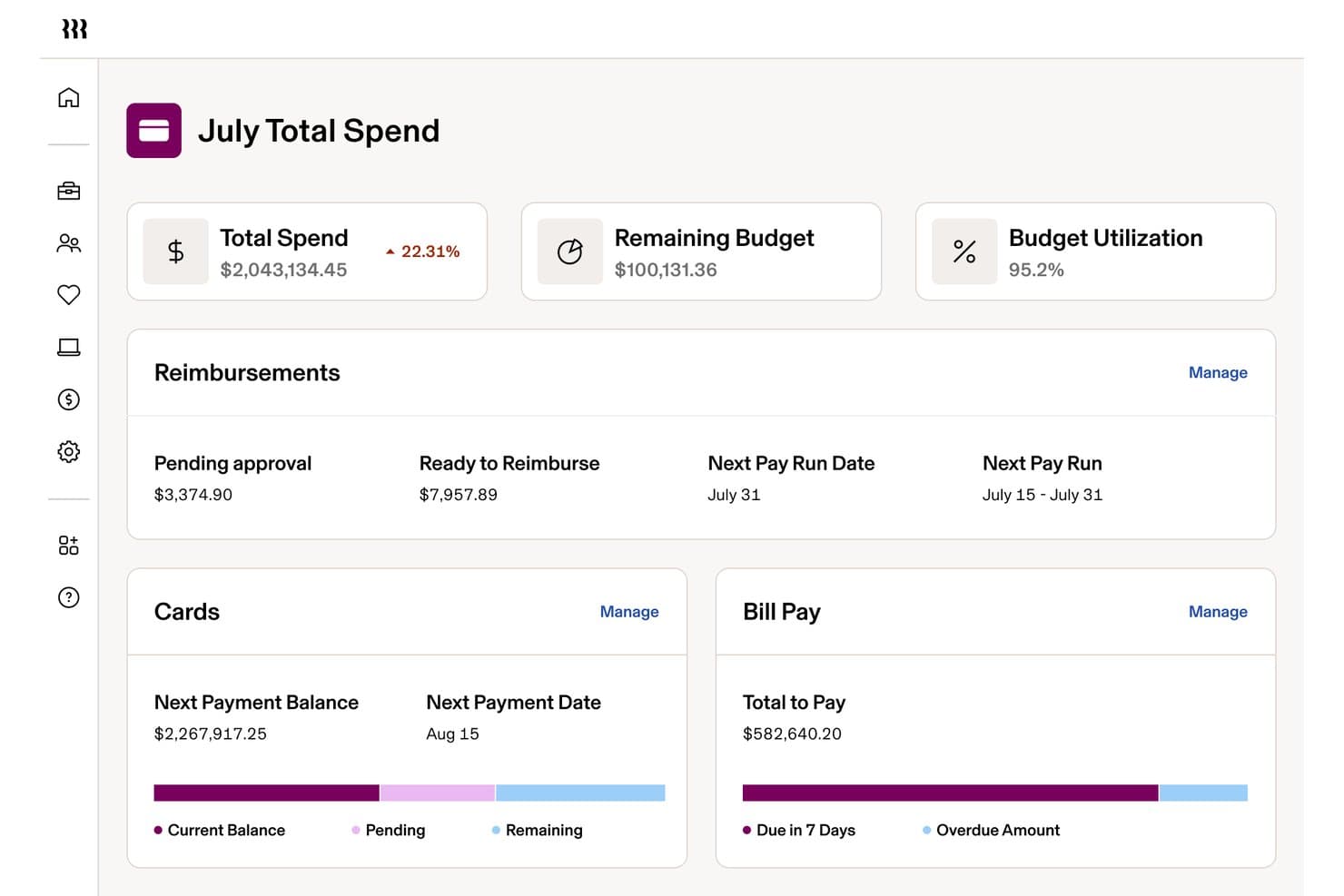
Rippling Spend tracks total spend, reimbursements, and bill pay in one dashboard. Rippling Spend is an expense management platform that unifies corporate cards, reimbursements, bill pay, and travel booking under a single policy engine driven by employee HR data across departments, roles, and locations.
Who Is Rippling Spend Best For?
Rippling Spend is a strong fit for multi-site medical groups and healthcare networks that need granular, HR-driven spend controls across providers, departments, and locations.
Why I Picked Rippling Spend
Rippling Spend earns its spot on my shortlist because of how its HR-driven policy engine handles spend controls across multiple provider locations. I love that you can auto-issue corporate cards with custom limits scoped to a provider's role, site, and department, then have those policies update automatically when staff change positions. For a medical group running several clinics, that kind of granular, location-level control is genuinely hard to replicate with a standalone expense tool.
Rippling Spend Key Features
- Global reimbursement processing: Rippling pays employees and contractors in 185+ countries and 100+ currencies directly through its payroll system, making it practical for organizations with traveling clinicians or locum tenens staff.
- AI-powered receipt capture: The mobile app uses OCR to extract line-item data from receipts, auto-convert currencies, and flag duplicate submissions before they're finalized.
- Role-based spend dashboards: Finance controllers and department heads each see spend data scoped to their level, with pivot tables, custom fields, and ERP-synced exports for month-end reporting.
- Integrated corporate travel booking: Rippling Travel connects flight, hotel, and car rental booking directly to the expense system, with dynamic price caps and 24/7 live travel agent support.
Rippling Spend Integrations
Rippling Spend offers native integrations with QuickBooks Online, Xero, NetSuite, and Sage Intacct, plus 70+ HRIS partner integrations, including Workday, BambooHR, and ADP. No native integrations are listed for Epic, Cerner, or major practice management platforms.
Pros and Cons
Pros:
- AI-powered receipt capture and duplicate detection
- Global reimbursement for traveling clinicians supported
- Granular spend controls for multi-site providers
Cons:
- No pre-built healthcare expense categories
- No HIPAA BAA for expense management data
Learn more about Rippling Spend: Best for corporate card expense feeds
- Free demo available
- From $11.99/user/month (billed annually)
Visit WebsiteCustomer Rating:4.6/5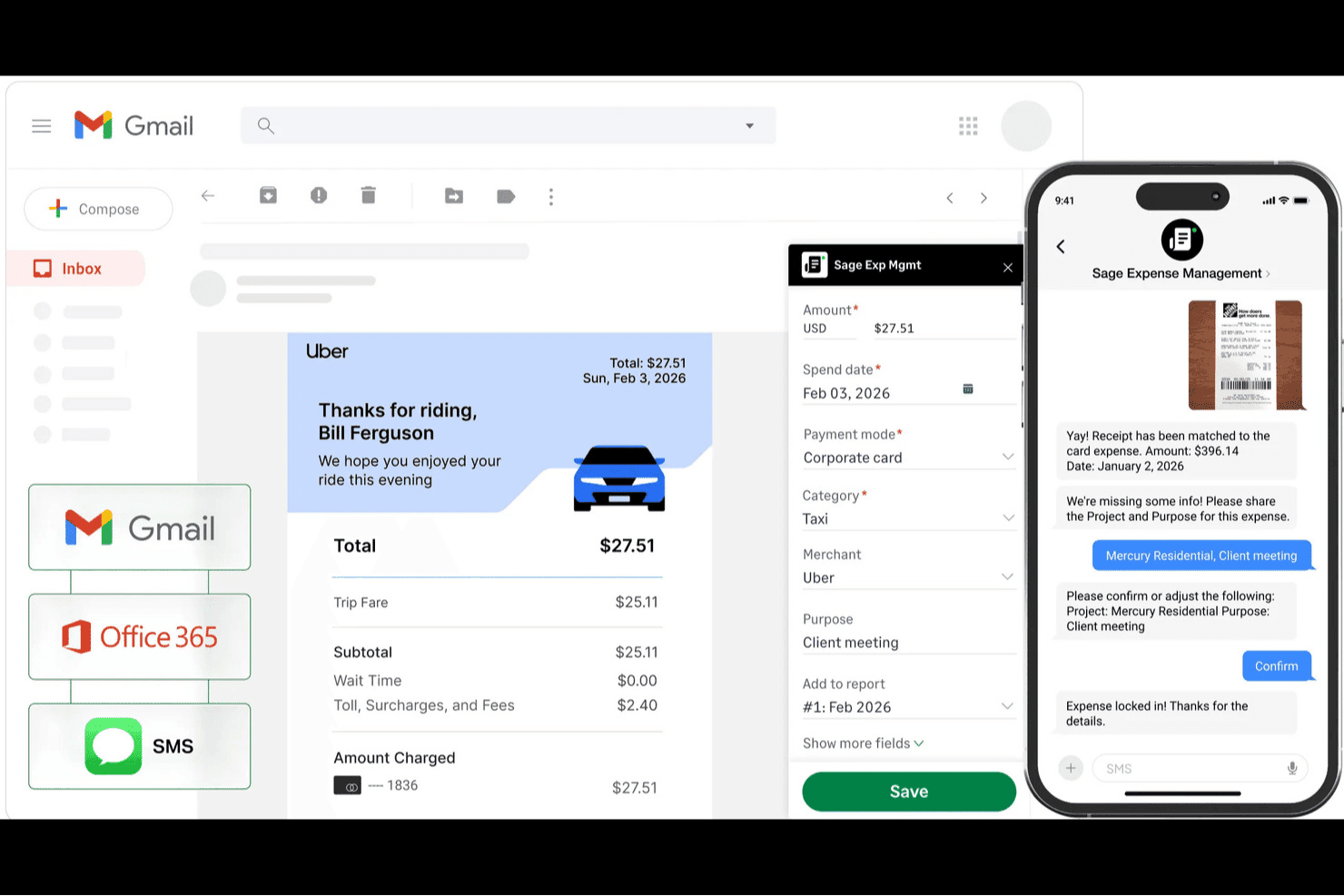
Sage Expense Management auto-captures receipts from Gmail and SMS into expense reports. Sage Expense Management is an SMB-focused expense management platform that automates receipt capture, corporate card reconciliation, approval workflows, and accounting sync across tools like QuickBooks, Xero, and Sage Intacct.
Who Is Sage Expense Management Best For?
Sage Expense Management is a strong fit for finance and accounts payable teams at small and mid-sized healthcare organizations that need to automate corporate card reconciliation and expense reimbursement without switching card providers.
Why I Picked Sage Expense Management
Sage Expense Management earns its spot on my shortlist because of how it handles corporate card expense feeds in real time. When a staff member uses a card, they get an instant text alert and can reply with a receipt photo, which the system then reads and matches to the transaction automatically. I particularly like this for healthcare teams, where card reconciliation across departments or facilities is a constant burden. The Bluegrass Health Partners case is a good example: a 13-group nursing home operator used custom cost-center fields to hit 99% expense tagging accuracy and cut month-end close from 15 days down to 5.
Sage Expense Management Key Features
- Multi-level approval routing: Rules-based approval workflows let you configure routing by amount, category, department, or project, with scheduling reminders for pending approvals.
- Real-time spend policy checks: The policy engine flags missing receipts, duplicate submissions, and budget overruns before an expense report reaches an approver.
- Custom cost center and field tagging: You can create custom dropdowns and fields—like a "Facility" selector—to tag every expense to a specific department, location, or entity.
- Offline mobile expense capture: The mobile app saves expenses, mileage, and reports locally and syncs them automatically once a connection is restored.
Sage Expense Management Integrations
Sage Expense Management offers native integrations with QuickBooks Online, Xero, Sage Intacct, Sage 50 (beta), and Sage 300 CRE. Business plans also include API integrations for custom connections with HR and payroll systems.
Pros and Cons
Pros:
- Offline capture helps traveling clinical staff
- Facility tags support multi-site expense coding
- Real-time card alerts prompt receipt capture
Cons:
- Receipt matching errors can require corrections
- No stated HIPAA or BAA assurance
Learn more about Sage Expense Management (formerly Fyle): Best for travel and expense management in clinics
- Free plan available
- Pricing upon request
Visit WebsiteCustomer Rating:4.7/5
Navan streamlines travel booking and expense management for healthcare teams. Navan offers an integrated platform for managing travel bookings and expenses, designed with healthcare clinics and organizations in mind. It appeals to administrators and finance teams who need to control travel costs and simplify reimbursement processes. The tool helps address challenges like policy compliance, real-time expense tracking, and centralized travel management for busy clinical environments.
Who Is Navan Best For?
Navan is a good fit for healthcare clinics and organizations that need to manage staff travel and related expenses in a centralized platform.
Why I Picked Navan
I picked Navan because it brings together travel booking and expense management in one platform, which is especially useful for clinics with staff who travel between locations or attend offsite training. Navan lets you set travel policies, automate approvals, and capture expenses directly from bookings, reducing manual entry and errors. I also appreciate that it provides real-time insights and visibility into travel spend, so finance teams can monitor budgets and ensure compliance. These features make Navan a practical choice for healthcare organizations that need to manage both travel logistics and related expenses efficiently.
Navan Key Features
In addition to its travel and expense management focus for clinics, I also found several other features worth noting:
- Real-time spend tracking: The platform provides up-to-date visibility into all travel and expense transactions as they occur.
- Integrated virtual cards: Navan issues virtual cards for specific purchases, helping control spending and reduce fraud risk.
- Mobile app for on-the-go management: Users can book travel, submit expenses, and approve requests directly from their mobile devices.
- Automated policy enforcement: The system flags out-of-policy bookings and expenses, supporting compliance with clinic guidelines.
Navan Integrations
Integrations include NetSuite, QuickBooks Online, Xero, Sage Intacct, and Workday.
Pros and Cons
Pros:
- Direct sync with major HRIS and ERP tools
- Automated IRS and tax audit compliance
- AI-powered OCR scans healthcare receipts
Cons:
- High cost compared to basic competitors
- Significant GPS battery drain on mobile
Learn more about Navan: Best for global supplier payment automation
- Free demo available
- From $99/month
Visit WebsiteCustomer Rating:4.5/5
Tipalti automates healthcare payments, supplier onboarding, and global compliance. Tipalti is a payment automation platform designed for healthcare organizations that manage complex supplier networks and international payments. It appeals to finance and procurement teams looking to reduce manual payment processing and improve compliance with global regulations. The platform helps address challenges like cross-border payments, supplier onboarding, and payment reconciliation in healthcare environments.
Who Is Tipalti Best For?
Tipalti is a strong choice for healthcare organizations with global supplier networks that need to automate and manage cross-border payments.
Why I Picked Tipalti
I picked Tipalti because it addresses the unique challenges healthcare organizations face when paying suppliers across multiple countries and currencies. The platform automates global payments, manages tax compliance, and supports a wide range of payment methods, which is essential for healthcare finance teams working with international vendors and contractors. I also like that Tipalti includes built-in supplier onboarding and validation tools, reducing the risk of payment errors and fraud. These features make it a practical solution for healthcare organizations that need to optimize and secure their global supplier payment processes.
Tipalti Key Features
Some other features that make Tipalti a strong choice for healthcare organizations include:
- Tax compliance management: The platform collects and validates tax forms, helping organizations meet IRS and global tax requirements.
- Supplier self-service portal: Suppliers can onboard themselves, update payment details, and track payment status without manual intervention from your team.
- Automated invoice processing: Tipalti uses OCR and AI to capture invoice data and match it to purchase orders, reducing manual entry.
- Payment reconciliation: The system automatically reconciles payments with bank records, simplifying month-end close and audit preparation.
Tipalti Integrations
Integrations include Oracle NetSuite, Sage Intacct, Microsoft Dynamics 365, Intuit QuickBooks, Everflow, and LinkTrust.
Pros and Cons
Pros:
- AI-driven 3-way PO matching for clinics
- Automates mass global healthcare payouts
- SOC 1 & 2 plus HIPAA data protection
Cons:
- Sync errors with some legacy EMR systems
- Mobile app lacks deep admin controls
Learn more about Tipalti: Best for compliance tracking in clinical environments
- Free demo available
- Pricing upon request

SAP Concur automates healthcare expense reporting with compliance and visibility tools. SAP Concur is a cloud-based expense management platform designed for healthcare organizations that need to manage complex spending and regulatory requirements. It appeals to clinical administrators and finance teams who want to automate expense reporting and gain visibility into spending patterns. The tool helps address challenges like policy enforcement, audit readiness, and integrating expense data with other healthcare systems.
Who Is SAP Concur Best For?
SAP Concur suits healthcare organizations and clinical administrators who need to closely track expenses and maintain regulatory compliance across multiple departments.
Why I Picked SAP Concur
What makes SAP Concur a strong choice for healthcare expense management is its focus on compliance tracking in clinical environments. I picked it because it offers automated policy enforcement, audit trails, and real-time alerts for out-of-policy expenses, which are essential for organizations facing strict regulatory scrutiny. The platform also supports detailed documentation and digital receipt capture, making it easier for healthcare teams to maintain accurate records for audits. These features help healthcare administrators reduce compliance risks and ensure spending aligns with both internal policies and external regulations.
SAP Concur Key Features
Some other features that make SAP Concur valuable for healthcare expense management include:
- Mobile expense capture: Users can submit receipts and expenses directly from their mobile devices for faster processing.
- Automated reimbursement workflows: The platform routes expense reports through customizable approval chains to match healthcare organization structures.
- Integration with travel booking tools: Connects business travel bookings with expense reporting to ensure all costs are tracked and categorized.
- Multi-currency and multi-language support: Supports global healthcare organizations with staff and operations in multiple countries.
SAP Concur Integrations
Integrations include SAP, ADP, NetSuite, QuickBooks, Xero, and Microsoft Dynamics 365.
Pros and Cons
Pros:
- Integrates with major ERP and HR systems
- Offers automated policy enforcement for expenses
- Supports digital receipt capture for mobile users
Cons:
- Setup complexity for multi-entity healthcare groups
- Occasional delays in expense reimbursement processing
Learn more about SAP Concur: Best for mobile receipt capture by healthcare staff
- Free demo available
- Pricing upon request

Emburse streamlines healthcare expense capture, approval, and reimbursement compliance. Emburse offers expense management solutions designed for healthcare organizations with distributed teams and mobile staff. It appeals to administrators and finance professionals who need to capture, approve, and reimburse expenses quickly while maintaining compliance. The platform helps address challenges like lost receipts, manual data entry, and policy enforcement in busy clinical environments.
Who Is Emburse Best For?
Emburse is a good fit for healthcare organizations with mobile staff who need to capture and manage expenses on the go.
Why I Picked Emburse
I chose Emburse because it offers mobile receipt capture that fits the fast-paced, on-the-go nature of healthcare work. Staff can snap photos of receipts from their phones and upload them instantly, which helps reduce lost paperwork and speeds up reimbursement. I also like that Emburse uses OCR technology to extract data from receipts, minimizing manual entry and errors. These features make it much easier for healthcare teams to manage expenses while moving between clinics, patient sites, or administrative offices.
Emburse Key Features
Some other features that make Emburse a strong fit for healthcare organizations include:
- Automated expense report creation: The platform generates expense reports automatically from uploaded receipts and card transactions.
- Custom approval workflows: Administrators can set up multi-level approval processes tailored to organizational policies.
- Integration with accounting systems: Emburse connects with popular accounting and ERP platforms to sync expense data.
- Mileage tracking: Users can log and calculate mileage expenses directly within the platform for reimbursement.
Emburse Integrations
Integrations include NetSuite, QuickBooks Online, Xero, Sage Intacct, and Amazon Business.
Pros and Cons
Pros:
- AI helps flag medical policy violations
- Automates audit trails for healthcare
- Integrates with CMS and NPI databases
Cons:
- High implementation fees for small labs
- Customer support can be slow to respond
Learn more about Emburse: Best for grant and fund expense allocation
- Free demo available
- From $400/month

DATABASICS is a cloud expense platform for healthcare finance and compliance tracking. DATABASICS is a cloud-based expense management platform designed for healthcare organizations with complex funding and reporting needs. It’s well-suited for finance teams and administrators who need to track expenses across multiple grants, funds, or cost centers. The platform helps address challenges like compliance, transparency, and detailed allocation of healthcare spending.
Who Is DATABASICS Best For?
DATABASICS is a strong fit for healthcare finance teams that need to allocate and track expenses across multiple grants, funds, or cost centers.
Why I Picked DATABASICS
I chose DATABASICS because it offers detailed tools for allocating expenses to specific grants and funds, which is a common challenge in healthcare finance. The platform lets you tag and split expenses across multiple funding sources, making it easier to stay compliant with grant requirements and internal policies. I also appreciate that DATABASICS provides built-in reporting for fund tracking and audit support, so finance teams can quickly generate documentation for oversight or reimbursement. These features make it a practical choice for healthcare organizations managing complex funding streams.
DATABASICS Key Features
In addition to its focus on grant and fund expense allocation, I also found several other features that support healthcare organizations:
- Mobile receipt capture: Users can upload receipts directly from their mobile devices, making it easier to document expenses on the go.
- Automated policy enforcement: The system flags out-of-policy expenses automatically, helping teams maintain compliance with internal and external regulations.
- Multi-currency support: DATABASICS allows users to submit and process expenses in multiple currencies, which is useful for organizations with international operations or funding.
- Custom approval workflows: Administrators can configure multi-level approval processes to match their organization’s specific expense review requirements.
DATABASICS Integrations
Integrations include Sage Intacct, NetSuite, Microsoft Dynamics 365, Paylocity, and Oracle Financial.
Pros and Cons
Pros:
- Combines time and expense in one app
- Highly responsive 24/7 customer support
- Automated work hour and audit rules
Cons:
- Custom report builder is not intuitive
- Higher entry cost for smaller clinics
Learn more about DATABASICS: 8Best for AP automation in medical group practices
BILL
- Free plan + free demo available
- From $49/user/month

BILL automates accounts payable for healthcare teams, streamlining payments and approvals. BILL offers accounts payable automation designed for medical group practices and healthcare organizations. It appeals to finance teams and administrators who need to manage vendor payments, approvals, and documentation in one place. The platform helps reduce manual data entry and supports compliance with healthcare financial processes.
Who Is BILL Best For?
BILL is a good fit for finance teams in mid-sized and large medical group practices for accounts payable automated workflows.
Why I Picked BILL
I picked BILL because it automates accounts payable tasks that are often time-consuming for medical group practices. The platform lets you digitize invoice capture, set up multi-level approval workflows, and schedule payments to vendors directly from the system. I also appreciate that BILL provides audit trails and document storage, which helps healthcare organizations stay organized and compliant. These features make it easier for finance teams to manage high volumes of invoices and payments without manual paperwork.
BILL Key Features
In addition to its AP automation capabilities for medical group practices, I also found several other features that support healthcare finance teams:
- Digital document storage: The platform stores invoices, receipts, and supporting documents in a secure, searchable digital archive.
- Custom payment approval workflows: Administrators can configure multi-step approval processes to match internal controls and compliance needs.
- Vendor management tools: BILL allows you to onboard, manage, and communicate with vendors directly within the platform.
- Automatic payment scheduling: Users can set up recurring or one-time payments to vendors, reducing manual intervention.
BILL Integrations
Integrations include NetSuite, QuickBooks Online, Xero, Sage Intacct, Tallie, and Intacct.
Pros and Cons
Pros:
- Real-time visibility into medical spend
- Direct sync with top healthcare ERPs
- Roles-based access protects patient data
Cons:
- Occasional sync lags with accounting
- Requires specific setup for HIPAA use
Learn more about BILL: Best for real-time policy enforcement on claims
- Free demo available
- From $11.99/user/month (billed annually)

Sage Expense Management automates healthcare expense claims while ensuring compliance and control. Sage Expense Management offers healthcare organizations a way to automate and control expense claims across departments. It’s designed for finance teams and administrators who need to manage spending while maintaining compliance with healthcare regulations. The platform helps address challenges like policy adherence, real-time visibility, and reducing manual errors in expense processing.
Who Is Sage Expense Management Best For?
Sage Expense Management is a strong choice for healthcare finance teams that need strict, automated policy controls on expense claims.
Why I Picked Sage Expense Management
I picked Sage Expense Management because it enforces expense policies in real time, which is especially important for healthcare organizations with strict compliance requirements. The platform automatically checks every claim against custom rules as expenses are submitted, flagging violations before they reach the approval stage. I also like that it provides instant feedback to users, helping prevent errors and reducing back-and-forth between staff and finance teams. This level of automation supports healthcare administrators who need to maintain tight control over spending and regulatory adherence and maintain operational efficiency.
Sage Expense Management Key Features
Some other features that make Sage Expense Management useful for healthcare expense workflows include:
- Automated receipt scanning: Users can upload receipts, and the system extracts and matches data to expense claims.
- Multi-level approval workflows: Administrators can set up custom approval chains to match organizational hierarchies.
- Real-time spend analytics: Finance teams can access dashboards that break down spending by department, category, or user.
- Mileage and per diem tracking: The platform supports healthcare staff who need to log travel expenses according to organization policies.
Sage Expense Management Integrations
Integrations include Sage Intacct, Sage 300 CRE, Sage 50, QuickBooks Online, and American Express.
Pros and Cons
Pros:
- Real-time visibility into clinic spend
- Built-in audit trails for compliance
- HIPAA-compliant data security
Cons:
- Mobile app lacks full web functionality
- Complex initial configuration required
Learn more about Sage Expense Management: 10Best for multi-location healthcare purchasing control
Precoro
- Free demo available
- From $499/month (billed annually)
Visit WebsiteCustomer Rating:4.8/5
Precoro helps healthcare teams manage purchasing, approvals, and budgets across locations. Precoro gives healthcare organizations a way to manage purchasing and business expenses across multiple locations from a single platform. It’s a strong fit for finance teams and administrators who need to coordinate procurement, approvals, and budget tracking in complex healthcare environments. The tool helps reduce manual paperwork and supports clear oversight of company and employee spending across departments or facilities.
Who Is Precoro Best For?
Precoro fits healthcare organizations with multiple locations that need centralized control over purchasing and expense approvals.
Why I Picked Precoro
What stands out about Precoro is how it addresses the challenges of managing purchasing and expenses across multiple healthcare locations. I picked it because it lets you set up location-specific approval workflows and budget controls, so each facility can follow its own rules while still reporting into a central system. The platform also tracks orders, deliveries, and invoices by site, which helps healthcare finance teams monitor spending and compliance at both the local and organizational level. This level of control is especially important for healthcare groups that need to balance autonomy with oversight.
Precoro Key Features
In addition to its multi-location purchasing controls, Precoro offers several other features relevant to healthcare expense management:
- Catalog management: Maintain a centralized catalog of approved suppliers and products for consistent purchasing across all locations.
- Three-way matching: Automatically match purchase orders, invoices, and delivery receipts to reduce errors and prevent duplicate payments.
- Custom reporting: Generate detailed reports on spending, supplier performance, and order history tailored to healthcare needs.
- Role-based access controls: Assign permissions based on job function to protect sensitive financial and procurement data.
Precoro Integrations
Integrations include NetSuite, QuickBooks Online, Xero, and Sage Intacct.
Pros and Cons
Pros:
- Customizable approval workflows for healthcare compliance
- Centralizes supplier and contract management
- Offers three-way matching for invoices
Cons:
- Catalog setup can be time-consuming for large systems
- Reporting customization can require technical support
Learn more about Precoro:
Annen programvare for utgiftsstyring i helsesektoren
Her er noen flere alternativer for programvare for utgiftsstyring i helsesektoren som ikke kom med på kortlisten min, men som likevel er verdt å se nærmere på:
How I Evaluate Expense Management Software for Healthcare
I evaluate these tools in two layers—baseline must-haves like HIPAA compliance and receipt automation, then the differentiators that matter most to practice administrators managing multi-site spend.
Core Functionality (Table Stakes For This List)
When I'm selecting tools for my list, I rank each one on a scale from 0 (does not offer the functionality) to 5 (excels in this area) for each core functionality listed below. Then, I calculate the tool's total score into a percentage. Each tool needs to achieve a minimum total score of 55% to be considered for inclusion.
- Healthcare Expense Categorization: I check whether a tool offers medical-specific categories like CME, malpractice insurance, and clinical supplies rather than forcing you to build them from scratch.
- HIPAA-Compliant Data Handling: Receipts and invoices tied to patient care can contain PHI, so I look for signed BAAs, role-based access controls, and audit logging.
- Automated Receipt & Reimbursement: I evaluate the full workflow from mobile receipt capture through OCR extraction to approval routing, especially for physician and traveling clinician reimbursements.
- Corporate Card & Spend Controls: Practice administrators need to set spend limits by department or provider, so I look at card issuance options and how granular the policy controls are.
- Multi-Location & Provider Tracking: Group practices and MSOs need expense allocation across clinics, departments, and individual providers. I evaluate how each tool handles cost center mapping and consolidated reporting.
- Healthcare Accounting Integrations: Connecting to platforms like QuickBooks, Sage Intacct, or NetSuite matters, but I also check for compatibility with practice management systems like Athenahealth or NextGen.
Once I have a list of tools that meet this criteria, I consider what sets each platform apart.
Differentiating Factors (What Sets Vendors Apart)
Here's how I compare and contrast different vendors:
Standout Features
Dedicated CME and credentialing tracking is a big differentiator. I look for tools that let you tag licensing fees and education spend by provider with renewal reminders built in. AI-powered policy enforcement also matters, especially for flagging duplicate submissions or out-of-policy charges before they reach an approver. For practices tied to research grants or value-based care contracts, I evaluate whether a tool can tag expenses to specific payers or funding sources for clean reconciliation at audit time.
Beyond Features
I consider how well a platform fits your practice size. A solo dermatology office has very different needs than a multi-specialty group adding locations through acquisition. Implementation support also carries weight—I look for vendors that offer pre-built chart of accounts templates and onboarding resources designed for clinical staff who aren't finance professionals. Security posture rounds things out; beyond HIPAA compliance, certifications like SOC 2 Type II and HITRUST signal that a vendor takes healthcare data governance seriously.
Slik velger du programvare for utgiftsstyring i helsesektoren
Det er lett å gå seg vill i lange funksjonslister og komplekse prisstrukturer. For å hjelpe deg med å holde fokus mens du arbeider deg gjennom den unike programvarevalgsprosessen din, har vi laget en sjekkliste over faktorer du bør ha i bakhodet:
| Faktor | Hva du bør vurdere |
| Skalerbarhet | Vil programvaren håndtere dagens og forventede mengder fakturaer og betalinger etter hvert som praksisen din vokser? |
| Integrasjoner | Kobler verktøyet seg direkte til EHR-, regnskaps- og lønnssystemene dine for å unngå manuell dataregistrering? |
| Tilpasningsmuligheter | Kan du tilpasse godkjenningsarbeidsflyter, brukerroller og rapportering slik at de samsvarer med organisasjonens struktur og retningslinjer? |
| Brukervennlighet | Vil klinisk og administrativt personale kunne bruke systemet med minimalt behov for opplæring eller avbrudd? |
| Implementering og oppstart | Hvor lang tid vil det ta å komme i gang, og hvilke ressurser eller hvilken støtte tilbyr leverandøren under oppsettet? |
| Kostnad | Er alle kostnader tydelige, inkludert gebyrer for oppsett, support og integrasjoner? Passer prisen budsjettet og bruksmønstrene dine? |
| Sikkerhetstiltak | Tilbyr programvaren HIPAA-kompatibel datahåndtering, revisjonsspor og tilgangskontroller for å beskytte sensitiv informasjon? |
| Krav til etterlevelse | Kan systemet støtte behovene dine for dokumentasjon, oppbevaring og revisjon knyttet til helsereguleringer og krav fra betalere? |
Hva er programvare for utgiftsstyring i helsevesenet?
Programvare for utgiftsstyring i helsevesenet er et digitalt verktøy som hjelper medisinske organisasjoner med å spore, godkjenne og dokumentere utgifter knyttet til drift, forsyninger og tjenester. Disse systemene automatiserer fakturabehandling, administrerer leverandørbetalinger og opprettholder samsvar med helseforskrifter. Ved å sentralisere utgiftsdata og arbeidsflyter støtter de nøyaktig rapportering, reduserer manuelle feil og hjelper helseteam med å opprettholde økonomisk kontroll på tvers av avdelinger og virksomheter.
Funksjoner i programvare for utgiftsstyring i helsevesenet
Når du velger programvare for utgiftsstyring i helsevesenet, bør du se etter følgende viktige funksjoner:
- Fakturainnhenting: Digitaliserer og importerer fakturaer fra e-post, skanninger eller opplastinger, noe som reduserer manuell registrering og hjelper team med å behandle store mengder leverandørfakturaer raskt.
- Godkjenningsarbeidsflyter: Sender utgifter gjennom tilpassbare godkjenningskjeder på flere nivåer for å sikre samsvar med interne retningslinjer og regulatoriske krav.
- Leverandørstyring: Sentraliserer leverandørers kontaktopplysninger, betalingsbetingelser og transaksjonshistorikk, slik at det blir enklere å følge opp relasjoner og løse betalingsproblemer.
- Betalingsplanlegging: Gjør det mulig for brukere å angi betalingsdatoer, automatisere regelmessige betalinger og styre kontantstrømmen ved å tilpasse utbetalinger til budsjettsykluser.
- Dokumentlagring: Lagrer kvitteringer, kontrakter og støttedokumenter på en sikker måte, og gir enkel tilgang ved revisjoner og samsvarskontroller.
- Utgiftsrapportering: Genererer detaljerte rapporter om utgifter etter avdeling, leverandør eller kategori, noe som støtter budsjettanalyse og økonomisk planlegging.
- Revisjonsspor: Sporer alle handlinger som utføres på en utgift eller faktura, og oppretter en transparent oversikt for samsvar og intern gjennomgang.
- Integrasjonsmuligheter: Kobler seg til regnskapsprogramvare, lønnssystemer og EHR-systemer for å synkronisere data og redusere dobbeltregistrering på tvers av plattformer.
- Brukertillatelser: Lar administratorer kontrollere tilgangen til sensitive økonomiske data ved å tildele roller og tillatelser basert på arbeidsfunksjon.
- Mobil tilgang: Gjør det mulig for ansatte å gjennomgå, godkjenne eller sende inn utgifter fra smarttelefoner eller nettbrett, og støtter arbeidsflyter på avstand og på farten.
Vanlige AI-funksjoner i programvare for utgiftsstyring i helsevesenet
I tillegg til standardfunksjonene i programvare for utgiftsstyring i helsevesenet som er nevnt ovenfor, tar mange av disse løsningene i bruk AI med funksjoner som:
- Automatisert datauttrekking: Bruker AI til å lese og trekke ut viktige detaljer fra fakturaer, kvitteringer og andre dokumenter, noe som reduserer manuell registrering og minimerer feil.
- Avviksdeteksjon: Analyserer kontinuerlig utgiftsmønstre for å flagge uvanlige transaksjoner eller mulig svindel, og hjelper helseorganisasjoner med å opprettholde samsvar og økonomisk integritet.
- Smart godkjenningsruting: Lærer av historiske godkjenningsbeslutninger for å foreslå eller automatisere rutingen av utgifter til riktige godkjennere, noe som gir kortere behandlingstid.
- Prediktiv kontantstrømanalyse: Bruker AI-modeller til å forutsi fremtidige utgifter og behov for kontantstrøm basert på historiske data, og støtter proaktiv økonomisk planlegging.
- Duplikatdeteksjon: Identifiserer mulige duplikatfakturaer eller utleggskrav ved å sammenligne dokumentdetaljer, og reduserer risikoen for dobbeltbetalinger.
Fordeler med programvare for utgiftsstyring i helsevesenet
Implementering av programvare for utgiftsstyring i helsevesenet gir flere fordeler for teamet og virksomheten din. Her er noen av fordelene du kan se frem til:
- Forbedret samsvar: Automatiserte godkjenningsarbeidsflyter og revisjonsspor hjelper organisasjonen med å oppfylle helseforskrifter og interne retningslinjer.
- Raskere fakturabehandling: Digital registrering og AI-drevet datauttrekking reduserer manuell registrering og fremskynder hele syklusen fra faktura til betaling.
- Større økonomisk oversikt: Rapportering og analyser i sanntid gir økonomiteamene et tydelig bilde av kostnadene på tvers av avdelinger og leverandører.
- Redusert risiko for feil: Automatisert oppdagelse av duplikater og varsler om avvik minimerer risikoen for dobbeltbetalinger eller falske transaksjoner.
- Forenklet dokumenthåndtering: Sentralisert lagring av fakturaer, kvitteringer og kontrakter gjør det enkelt å hente frem dokumenter til revisjoner eller gjennomganger.
- Forbedret integrasjon: Sømløse tilkoblinger til regnskaps-, lønns- og EHR-systemer eliminerer datasiloer og reduserer behovet for manuell avstemming.
- Skalerbare arbeidsflyter: Tilpassbare godkjenningskjeder og brukertillatelser støtter vekst og tilpasser seg endringer i organisasjonsstrukturen.
Kostnader og priser for programvare for utgiftsstyring i helsesektoren
Ved valg av programvare for utgiftsstyring i helsesektoren er det viktig å forstå de ulike prismodellene og abonnementene som er tilgjengelige. Kostnadene varierer basert på funksjoner, teamstørrelse, tillegg og mer. Tabellen nedenfor oppsummerer vanlige abonnementer, gjennomsnittsprisene deres og typiske funksjoner som er inkludert i løsninger for programvare for utgiftsstyring i helsesektoren:
Sammenligningstabell for abonnementer for programvare for utgiftsstyring i helsesektoren
| Abonnementstype | Gjennomsnittspris | Vanlige funksjoner |
| Gratisabonnement | $0 | Grunnleggende fakturaregistrering, begrenset dokumentlagring, tilgang for én bruker og enkel rapportering. |
| Personlig abonnement | $15-$49/bruker/måned | Støtte for flere brukere, grunnleggende godkjenningsarbeidsflyter, standardrapportering og begrensede integrasjoner. |
| Bedriftsabonnement | $100-$999/måned | Avanserte godkjenningskjeder, leverandørstyring, integrasjon med regnskapssystemer og revisjonsspor. |
| Storbedriftsabonnement | Tilpasset | Tilpassede arbeidsflyter, forbedret sikkerhet, samsvarsverktøy, dedikert brukerstøtte og avanserte analyser. |
Vanlige spørsmål om programvare for utgiftsstyring i helsesektoren
Her finner du svar på noen vanlige spørsmål om programvare for utgiftsstyring i helsesektoren:
Hvordan bidrar programvare for utgiftsstyring til samsvar i helsesektoren?
Programvare for utgiftsstyring bidrar til å opprettholde samsvar ved å håndheve godkjenningsarbeidsflyter, lagre revisjonsspor og støtte HIPAA-kompatibel dokumenthåndtering. Disse funksjonene gjør det enklere å oppfylle regulatoriske krav og forberede seg til revisjoner.
Kan programvare for utgiftsstyring integreres med elektroniske pasientjournalsystemer (EHR)?
Ja, mange løsninger for utgiftsstyring tilbyr integrasjoner med EHR-systemer. Dette muliggjør sømløs datadeling mellom økonomiske og kliniske systemer, reduserer manuell registrering og støtter nøyaktig kostnadssporing.
Hva bør helseorganisasjoner se etter når det gjelder sikkerheten i programvare for utgiftsstyring?
Se etter funksjoner som HIPAA-kompatibel datahåndtering, tilgangskontroller for brukere, kryptering og detaljerte revisjonslogger. Disse sikkerhetstiltakene beskytter sensitiv økonomisk informasjon og pasientrelatert informasjon mot uautorisert tilgang eller datainnbrudd.
Er mobiltilgang viktig for utgiftsstyring i helsesektoren?
Ja, mobiltilgang gjør det mulig for klinikere og ansatte å sende inn, gjennomgå eller godkjenne utgifter mens de er på farten. Denne fleksibiliteten er spesielt nyttig for team som arbeider på flere steder eller i hektiske kliniske miljøer.
Hvor lang tid tar det å implementere programvare for utgiftsstyring i helsesektoren?
Tidsrammen for implementering varierer, men de fleste skybaserte løsninger kan settes opp i løpet av noen uker. Faktorer som datamigrering, integrasjonsbehov og opplæring av ansatte kan påvirke den totale tidsrammen, så planlegg en trinnvis utrulling ved behov.