

Skybasert programvare for medisinsk fakturering gir teamet ditt sikker nettbasert tilgang til verktøy for fakturering, krav og inntektssyklusen fra hvor som helst. Hvis praksisen din har problemer med manuelle faktureringsprosesser, manglende betalinger eller økende krav til dokumentasjon, trenger du en digital løsning som er tilpasset moderne kliniske og administrative utfordringer. Denne listen hjelper deg med å sammenligne de beste skybaserte faktureringsverktøyene for 2026, slik at du kan finne en plattform som holder økonomien sunn og teamet ditt fokusert på pasientbehandling.
Why Trust Our Software Recommendations
6,700+
Reviews
20
Industry experts
16+
Evaluation factors
14
Years
Our team has been testing and reviewing software since 2012. As medical practice leaders ourselves, we know how difficult—and important—it is to choose the right software.
For this guide, we evaluated tools using hands-on testing and independent research, scoring tools using our selection criteria.
Our reviews reflect our human editorial judgment, not a sales pitch.
Sammenligningstabell for skybasert programvare for medisinsk fakturering
\u003cp data-pm-slice=\u00221 1 []\u0022\u003eBruk denne sammenligningstabellen til å gjennomgå de viktigste funksjonene, integrasjonene og bruksområdene for mine beste utvalgte skybaserte programmer for medisinsk fakturering.\u003c/p\u003e
| Tool | Best For | Trial Info | Price | ||
|---|---|---|---|---|---|
| 1 | Best all-in-one platform for small practices | Free plan available; 14-day free trial | From $31/user/month | Website | |
| 2 | Best for unlimited electronic claims submissions | Free demo available | Pricing upon request | Website | |
| 3 | Best compliant e-claim submissions | Free demo available | From $349/month; RCM services from 2.49% of monthly collections. | Website | |
| 4 | Best for customizable billing workflows | Not available | Pricing upon request | Website | |
| 5 | Best for hospital accounting workflows | Not available | Pricing upon request | Website | |
| 6 | Best interface for multi-location practices | Free plan available | From $25/month | Website | |
| 7 | Best open-source customization options | Free demo available | Pricing upon request | Website | |
| 8 | Best for integrated patient scheduling tools | Free plan available | Free | Website | |
| 9 | Best for open-source remittance processing | Free demo available | Free | Website | |
| 10 | Best for straightforward claim management workflow | Free plan available | Pricing upon request | Website |


 Best all-in-one platform for small practices
- Free plan available; 14-day free trial
- From $31/user/month
Visit WebsiteCustomer Rating:4.4/5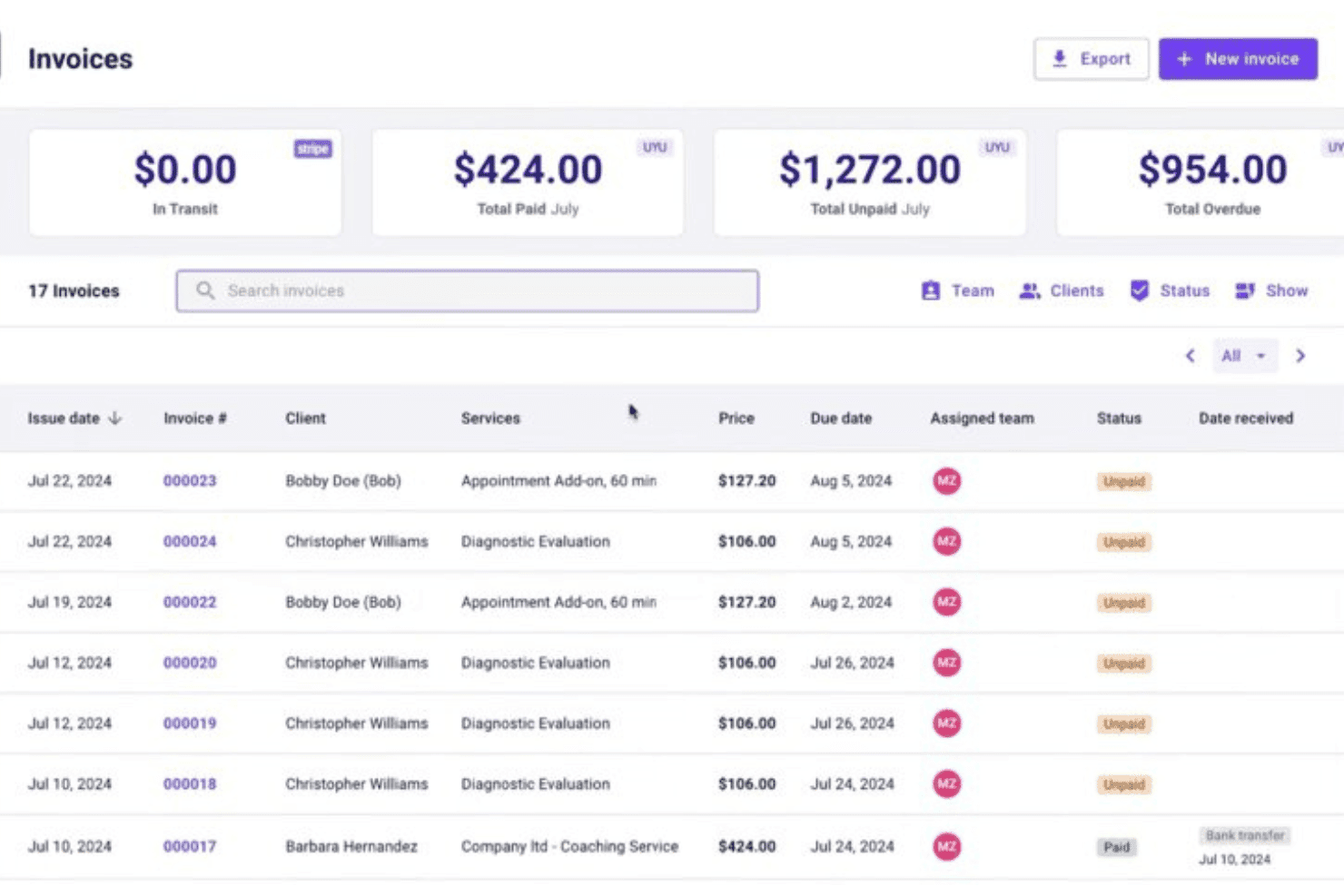
Carepatron combines billing, claims, scheduling, EHR, invoicing, and telehealth. Carepatron is a practice management platform that combines medical billing, invoicing, insurance claims (CMS-1500), payment posting, scheduling, EHR documentation, and telehealth in a single free-to-start system built for small healthcare practices.
Who Is Carepatron Best For?
Solo practitioners and small practice teams who want to manage scheduling, notes, and billing from one platform without paying for separate tools.
Why I Picked Carepatron
I picked Carepatron as one of the best because small practices rarely have the budget or bandwidth to run billing, scheduling, and clinical documentation in separate tools. I love that CMS-1500 forms auto-populate directly from appointment and client records, cutting manual entry before a claim is ever submitted. Superbills also pull CPT and ICD-10 codes automatically, keeping coding consistent across visits without a dedicated billing team.
Carepatron Key Features
- Integrated telehealth: Launch secure video calls with patients directly from appointment records.
- Payment processing via Stripe: Accept credit card and ACH payments with patient cards saved on file.
- Client portal: Patients can access bills, upload documents, and communicate securely with your practice.
- AI-powered medical scribe: Automatically generate visit notes and documentation using built-in AI tools.
Carepatron Integrations
Carepatron offers native integrations with Stripe, Zoom, Google Calendar, and Google Analytics. An API for custom integrations is listed as coming soon.
What's Free?
Carepatron's free plan is free forever and includes unlimited clients, telehealth, a client portal, automated online payments, and an AI medical scribe. Insurance claim submission (CMS-1500) and superbills are not included on the free plan and require a paid Plus subscription.
Pros and Cons
Pros:
- Client portal allows secure document sharing
- Unlimited patient records on the free plan
- Superbills generate with ICD-10 and CPT codes
Cons:
- No recurring billing for subscription services
- Insurance claim forms require a paid plan
Learn more about Carepatron: Best for unlimited electronic claims submissions
- Free demo available
- Pricing upon request
Visit WebsiteCustomer Rating:4.1/5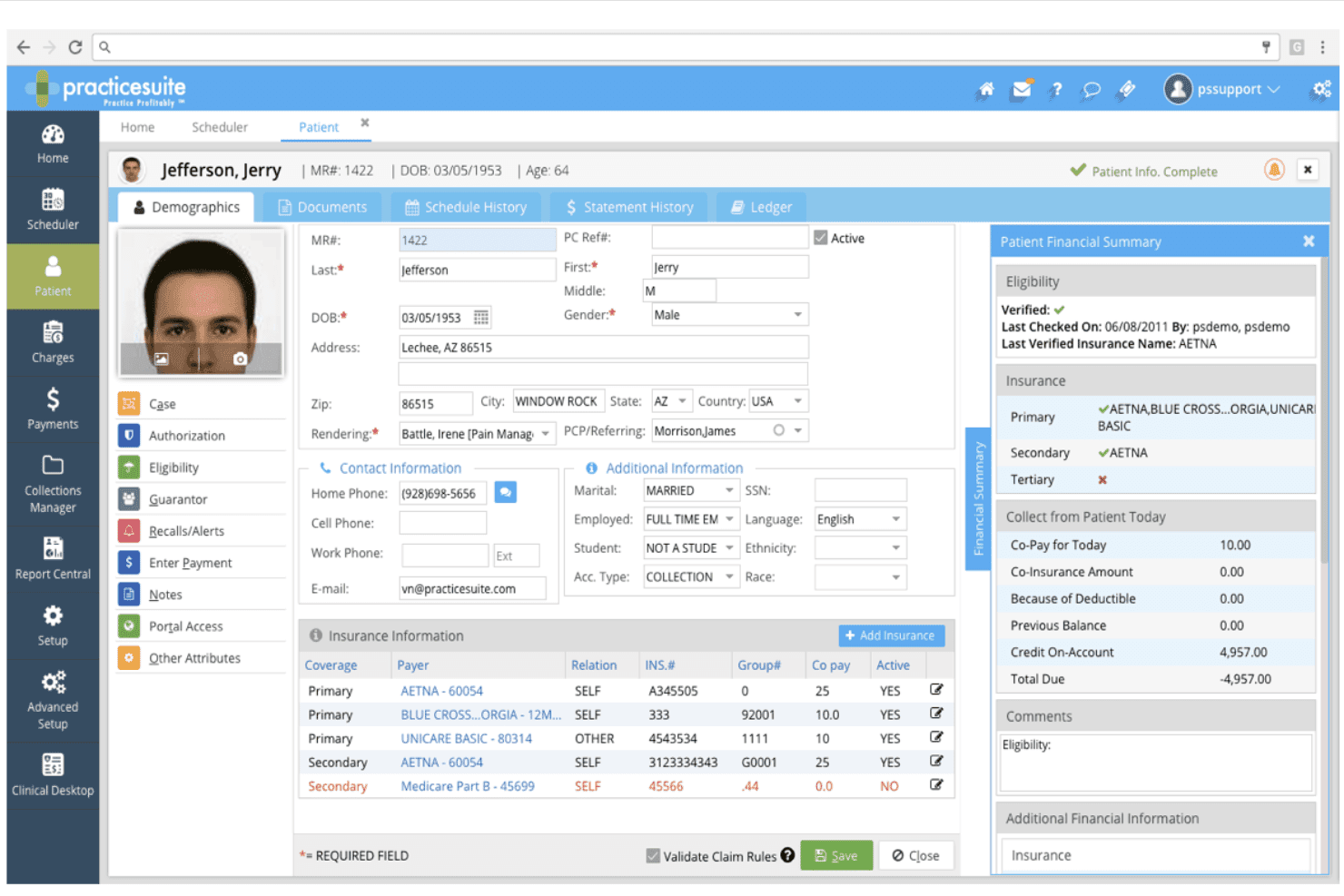
PracticeSuite supports claims, billing, payments, denials, eligibility, and ARs. PracticeSuite is a cloud-based medical billing platform that covers claims management, patient billing, payment posting, denial tracking, insurance eligibility verification, and AR reporting across 160+ billing specialties.
Who Is PracticeSuite Best For?
PracticeSuite is a solid fit for independent medical billing companies managing multiple provider accounts across a range of specialties.
Why I Picked PracticeSuite
PracticeSuite earns its spot on my shortlist because it doesn't cap the number of electronic claims your team can submit, which matters when you're running high-volume billing cycles. I particularly like its pre-submission denial intelligence, which flags problem claims before they reach a payer. The mass claim correction tool also lets my team fix and resubmit entire batches without touching each claim individually.
PracticeSuite Key Features
- Real-time eligibility verification: Check patient insurance coverage instantly before submitting claims.
- Integrated patient portal: Give patients direct access to view and download their billing statements online.
- Extensive coding libraries: Access ICD-10, CPT, and HCPCS code sets within the billing workflow.
- Multiple specialty support: Manage billing tasks for over 160 medical specialties in one unified system.
PracticeSuite Integrations
PracticeSuite offers native integrations with Elation and Practice Fusion EHR systems. An API is available for custom integrations.
What's Free?
PracticeSuite doesn't offer a free plan or free trial. You can request a free demo to see the platform before committing to a paid plan.
Pros and Cons
Pros:
- Supports over 160 medical billing specialties
- Advanced denial management and tracking tools
- Unlimited electronic claims submission with all plans
Cons:
- Feature set can be overwhelming for beginners
- Free plan not available for users
Learn more about PracticeSuite: Best compliant e-claim submissions
- Free demo available
- From $349/month; RCM services from 2.49% of monthly collections.
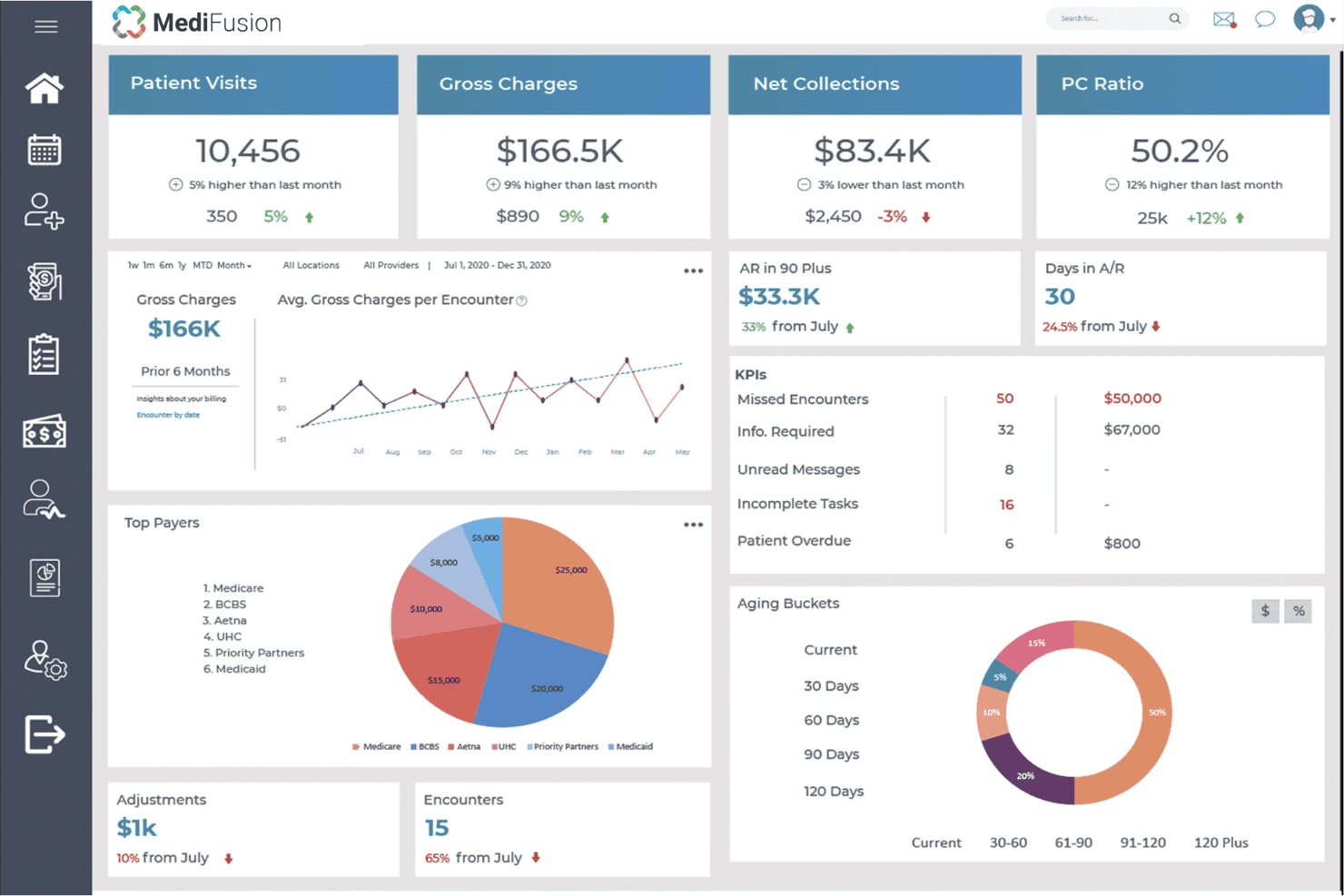
MediFusion handles claims, eligibility checks, payments, billing, and EHR tools. MediFusion is a free, cloud-based EHR and medical billing platform that covers electronic claim submission, insurance eligibility verification, payment posting, practice management, and patient billing for healthcare practices.
Who Is MediFusion Best For?
MediFusion is a good fit for US-based independent practices and small clinics that need a no-cost, all-in-one billing and EHR solution.
Why I Picked MediFusion
I picked MediFusion as one of the best because its FusionEDI clearinghouse handles e-claim submissions with a level of insurance optimization I rarely see in free tools. It automatically verifies secondary and tertiary insurance coverage and calculates the optimal billing order per each payer's rules before a claim goes out. That pre-submission logic directly cuts down on denials without requiring manual intervention from billing staff.
MediFusion Key Features
- PatientSense patient engagement tool: Lets you send appointment reminders, answer inquiries, and automate check-in communications.
- DocuHub document management: Securely stores, shares, and maintains patient EHR files for staff accessibility.
- Provider credentialing module: Verifies qualifications and licensure of healthcare providers within the system.
- Integrated patient portal: Allows patients to request appointments, send messages, and handle payments online.
MediFusion Integrations
Native integrations are not clearly documented. MediFusion includes internal modules for clearinghouse submissions, patient engagement, and document management. An API for custom integrations is not publicly mentioned.
What's Free?
MediFusion includes a free EHR and practice management system for practices using its revenue cycle management services.
Pros and Cons
Pros:
- Patient engagement tools for reminders
- Provider credentialing module included
- Compliant e-claim clearinghouse process
Cons:
- Practice support is only available by request
- Native integrations not clearly documented
Learn more about MediFusion: Best for customizable billing workflows
- Not available
- Pricing upon request
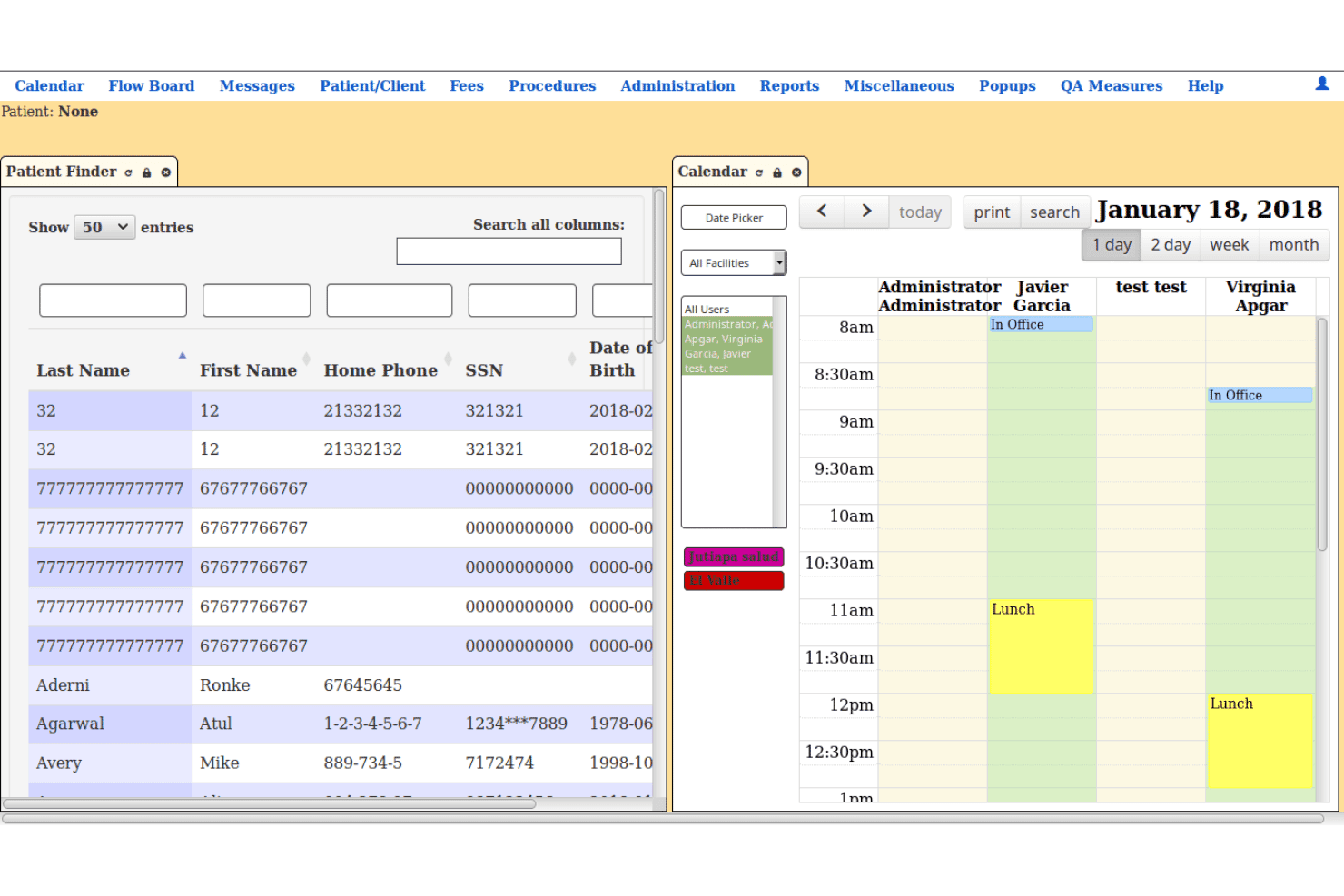
LibreHealth EHR brings records, scheduling, billing, payments, and reports. LibreHealth EHR is a free, open-source electronic health record and practice management system that covers clinical documentation, appointment scheduling, patient records, billing, insurance information, payment posting, statements, and reporting.
Who Is LibreHealth EHR Best For?
LibreHealth EHR is suitable for clinics, educational healthcare programs, developers, and technically experienced teams that need a customizable ambulatory EHR with billing and practice management functions.
Why I Picked LibreHealth EHR
I picked LibreHealth EHR for its configurable fee and billing workflows. The platform includes fee posting, patient statements, insurance information, billing reports, payment records, and paper insurance claim tracking.
Its open-source code allows organizations to adjust forms, workflows, reports, and database functions. However, teams should complete a detailed security and technical review before using it with real patient information.
LibreHealth EHR Key Features
- Fee posting: Records charges and payments associated with patient encounters.
- Patient statements: Produces statements for selected patients through the fees and posting area.
- Insurance claim records: Tracks claims and records when a claim is added to a file or printed on a paper insurance form.
- Billing reports: Displays billing activity using patient, provider, insurance, code, and service-date information.
- Customizable EHR: Supports clinical records, encounters, facilities, users, provider calendars, and configurable healthcare workflows.
LibreHealth EHR Integrations
LibreHealth does not publish a detailed list of ready-made third-party connections for its EHR. The wider LibreHealth project provides a separate Toolkit with a REST API and reusable web components, but the EHR’s direct connector coverage is not clearly documented.
What’s Free?
LibreHealth EHR’s source code can be downloaded and self-hosted without subscription or licensing fees. The free software includes its clinical, scheduling, practice management, fee posting, billing, statement, and reporting functions.
Pros and Cons
Pros:
- Supports detailed clinical and billing records
- No licensing fees or vendor lock-in
- Fully open-source and customizable platform
Cons:
- Requires technical expertise for implementation
- No built-in electronic claim submission
Learn more about LibreHealth EHR:
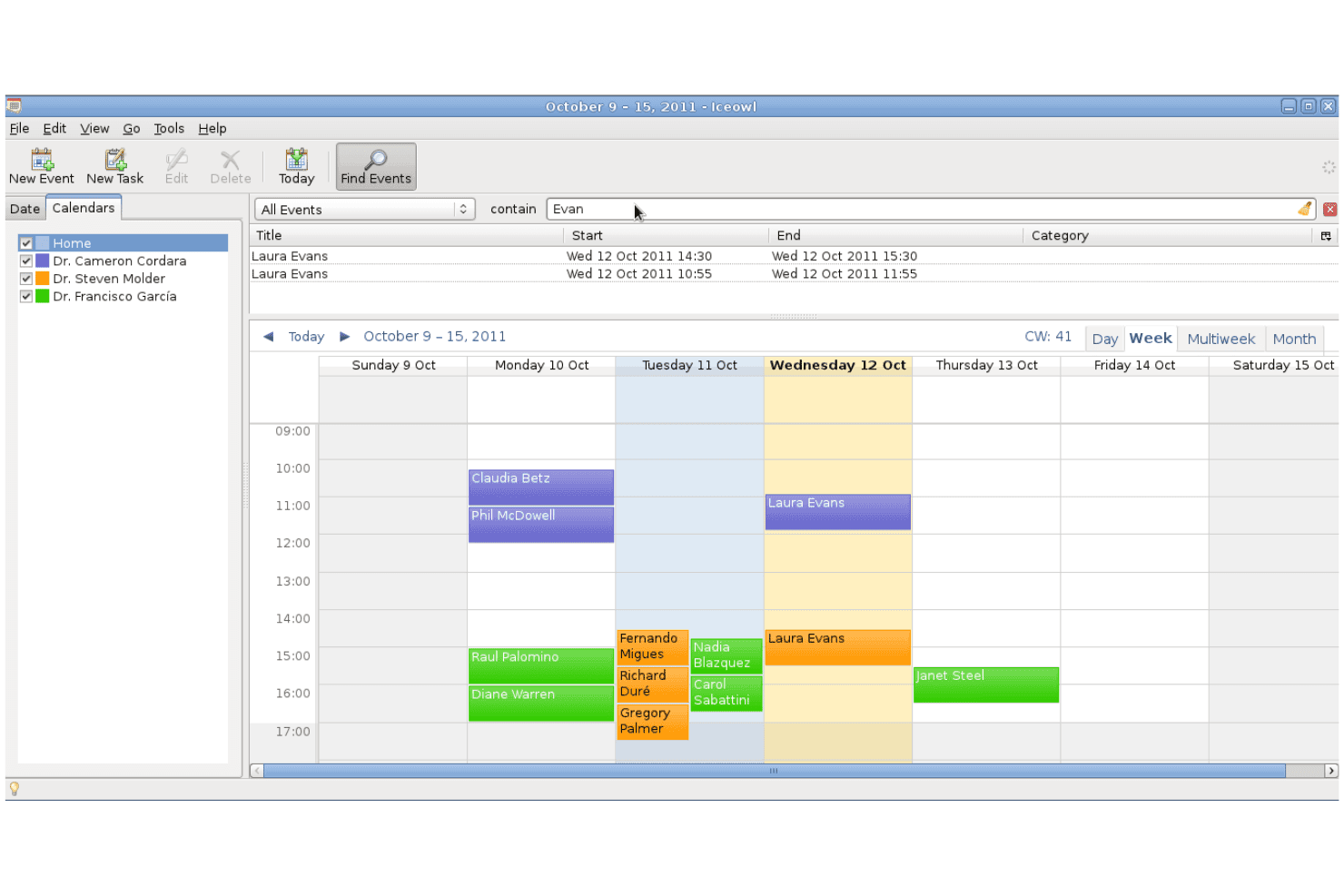
GNU Health centralizes records, billing, labs, pharmacy, accounting, and stock. GNU Health is a free, open-source hospital information system that combines patient records, health center administration, invoicing, financial accounting, laboratory management, pharmacy operations, and inventory tracking.
Who Is GNU Health Best For?
GNU Health is a good fit for hospitals, health centers, public health institutions, and nonprofit healthcare programs that need to connect clinical services with patient invoicing and accounting.
Why I Picked GNU Health
I picked GNU Health for its dedicated health accounting module. Unlike billing tools that focus mainly on insurance claims, GNU Health connects patient services with invoices, payment records, journals, a chart of accounts, and a general ledger.
Healthcare facilities can generate charges for hospitalizations, examinations, treatments, medications, supplies, laboratory tests, and imaging services. This makes it suitable for organizations that need to manage clinical billing and financial accounting within the same self-hosted environment.
GNU Health Key Features
- Patient service invoicing: Creates invoices for consultations, hospital stays, treatments, medications, supplies, laboratory tests, and other healthcare services.
- Financial accounting: Includes a chart of accounts, general ledger, journals, invoice management, and bookkeeping functions.
- Laboratory billing: Converts laboratory requests and completed tests into billable services and invoices.
- Pharmacy and inventory management: Tracks medications, vaccines, medical supplies, purchasing, and stock movements across healthcare facilities.
- Insurance plan records: Stores insurance plans as products that can be associated with patient and billing workflows.
GNU Health Integrations
GNU Health supports connections with Orthanc for medical imaging, CalDAV and WebDAV for calendars, and GNU Health Federation for distributed healthcare networks. Its modules are built on the Tryton application platform.
What’s Free?
GNU Health’s source code and core hospital information system are available without subscription or licensing fees. The free edition includes patient management, appointments, healthcare services, invoicing, accounting, pharmacy, laboratory, and inventory modules.
Pros and Cons
Pros:
- Supports hospital and laboratory billing
- Charges clinical services directly to invoices
- Full accounting and invoicing module
Cons:
- Requires self-hosting and technical administration
- Does not focus on US insurance claim submission
Learn more about GNU Health: Best interface for multi-location practices
- Free plan available
- From $25/month
Visit WebsiteCustomer Rating:4.2/5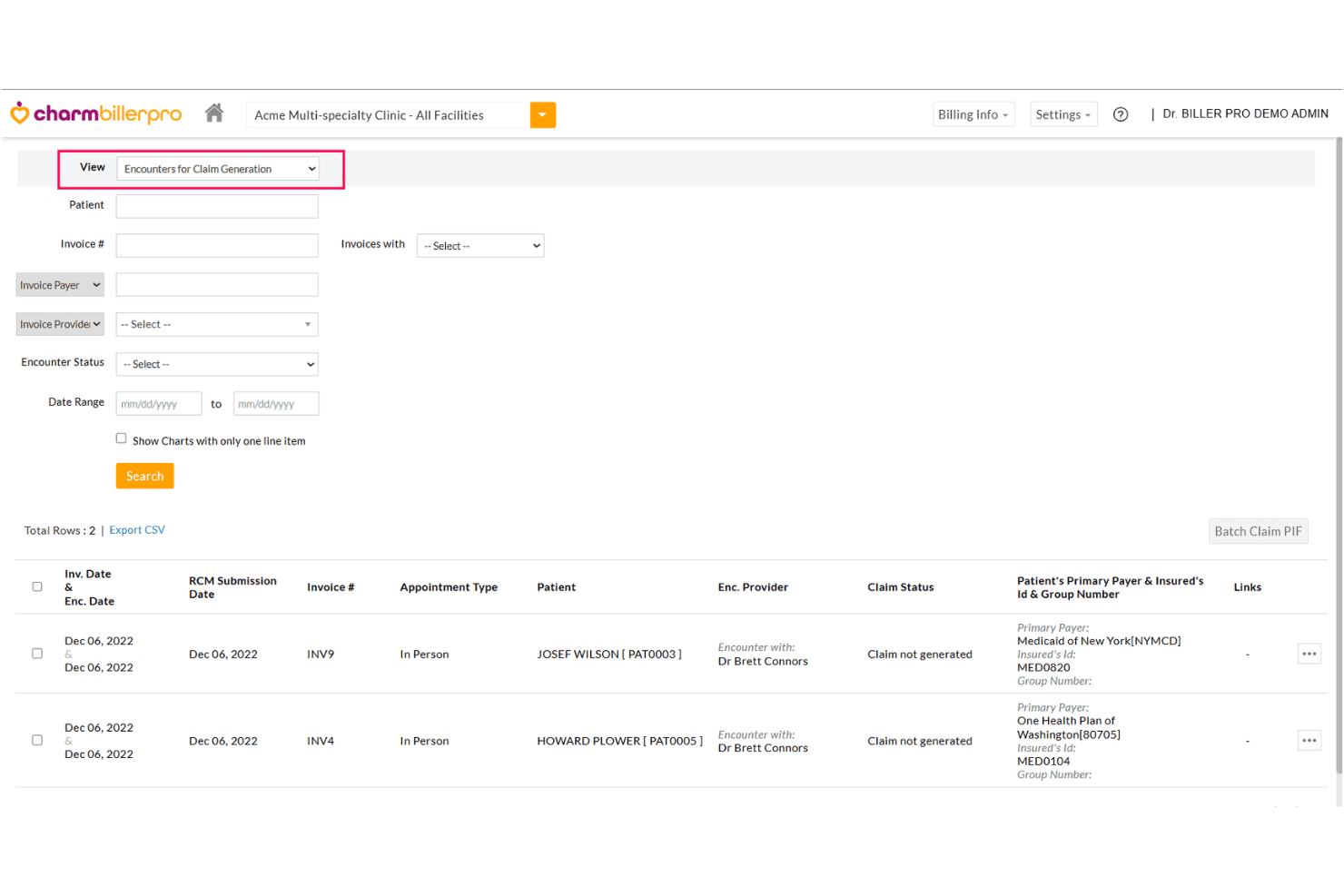
CharmHealth unifies EHR, claims, billing, coding, revenue cycle, and care tools. CharmHealth is a cloud-based EHR and medical billing platform that combines claims management, revenue cycle management, patient billing, coding support, and practice management tools in a single system.
Who Is CharmHealth Best For?
CharmHealth is a strong fit for independent physicians and small clinics that need a free, scalable billing solution without committing to per-provider subscription costs upfront.
Why I Picked CharmHealth
I picked CharmHealth as one of the best because its CharmBillerPro interface consolidates claims, payments, and performance reports across every practice location into a single dashboard, with no system hopping. I particularly like the custom rule engine, which flags claim errors before submission across all connected locations at once. ERA auto-posting means my team isn't manually reconciling payments site by site across multiple sites.
CharmHealth Key Features
- Integrated patient portal: Patients can access health records, view statements, and communicate securely.
- Automated encounter-based billing: Generate claims directly from clinical encounters with full support for ICD-10, CPT, and HCPCS codes.
- Revenue analytics dashboard: Monitor payment trends, outstanding AR, and claim status from a unified reporting center.
- Insurance eligibility verification: Check patient coverage and benefits before submitting claims to minimize denials.
CharmHealth Integrations
CharmHealth offers 10 native integrations, including Zoom Workplace, Fullscript, Twilio, QuickBooks Online Advanced, Zoho CRM, Sfax, Wellevate, DeepScribe, Change Healthcare, and Insight Health. An API is available for custom integrations.
What's Free?
CharmHealth's free plan is free forever, supporting 1 provider, up to 5 users, and 1,000 patient records, with 50 claims and 50 encounters per month. Paid add-ons are available to extend functionality while staying on the free tier.
Pros and Cons
Pros:
- Includes encounter-based billing and cloud EHR
- Interface supports multiple practice locations smoothly
- Handles complex insurance and payer rules
Cons:
- Claim and encounter limits on free tier
- Free plan limits patient record volume
Learn more about CharmHealth: Best open-source customization options
- Free demo available
- Pricing upon request
Visit WebsiteCustomer Rating:3.9/5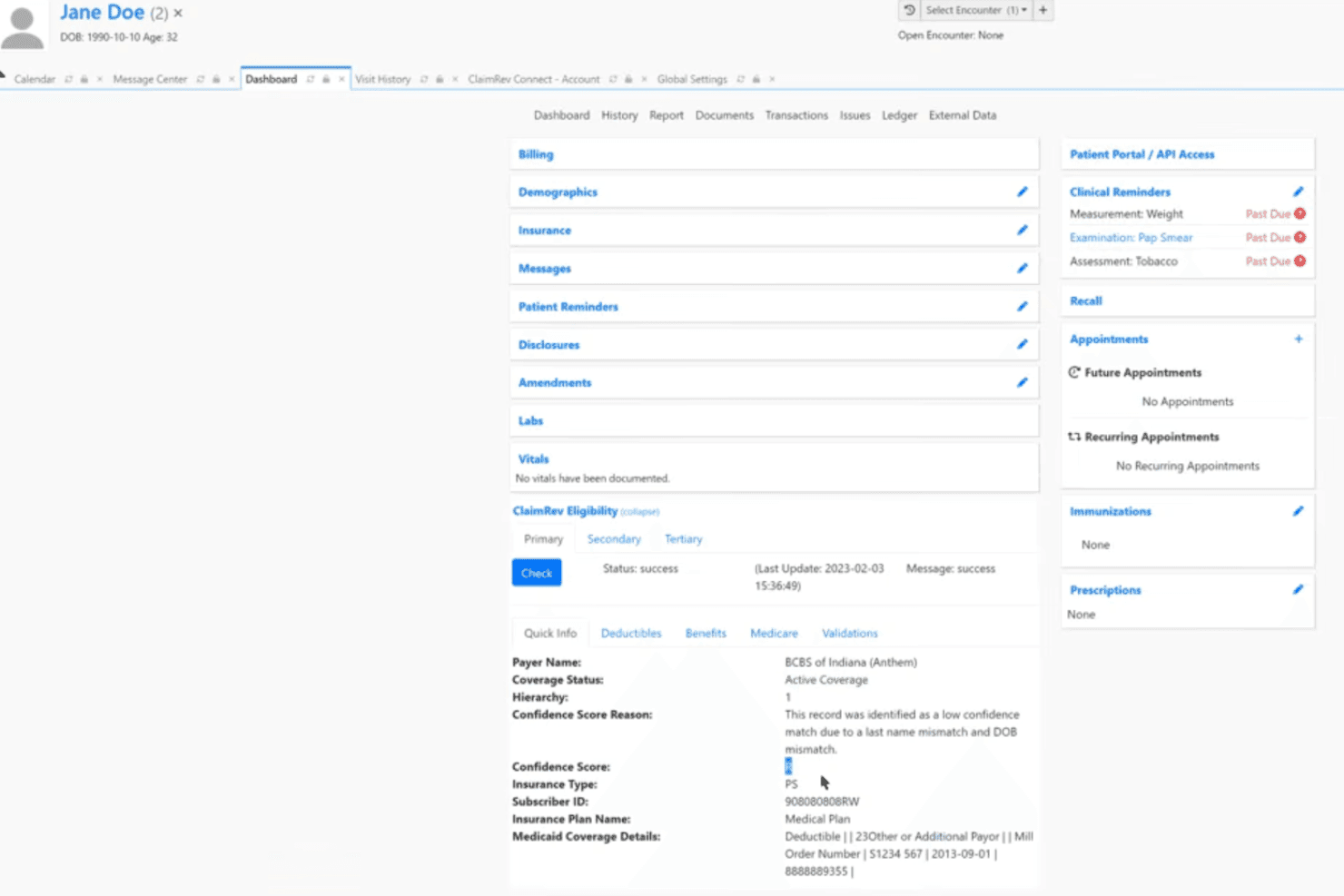
OpenEMR combines records, billing, claims, scheduling, e-prescribing and coding. OpenEMR is a free, open-source electronic health records and medical practice management system that includes integrated medical billing, insurance claim submission, patient scheduling, e-prescribing, and ICD-10/CPT/HCPCS coding support.
Who Is OpenEMR Best For?
OpenEMR is a strong fit for small clinics and independent practices with in-house IT support that need a fully free, customizable billing and practice management system.
Why I Picked OpenEMR
I've included OpenEMR in my top picks because its open-source architecture lets you modify the billing module at the code level to fit your practice's exact claim submission workflow. I like that practices can build entirely custom clinical forms and configure coding rules without any vendor approval or licensing cost. The modular design also supports multilingual configurations across 30+ languages, which makes it adaptable for clinics serving diverse patient populations.
OpenEMR Key Features
- Integrated e-prescribing: Send digital prescriptions directly to pharmacies from within the platform.
- HIPAA ASC X12 5010 claim support: Submit electronic insurance claims compliant with current regulatory standards.
- Lab integration: Manage lab orders and receive results automatically in patient charts.
- ERA/payment posting: Record and reconcile insurance payments using electronic remittance advice files.
OpenEMR Integrations
OpenEMR offers native integrations with ClaimRev, WENO Exchange, Comlink, Sphere Payment, and EMR Direct phiMail. An API is available for custom integrations.
What's Free?
OpenEMR is fully free and open-source with no licensing fees, no user limits, and no feature restrictions. You can self-host it at no cost, though third-party services like clearinghouse connections and professional support may carry separate fees.
Pros and Cons
Pros:
- Regular updates from an active community
- Unlimited users and patients supported
- Open-source code with full backend access
Cons:
- Lacks built-in clearinghouse service
- Requires self-hosting and technical setup
Learn more about OpenEMR: Best for integrated patient scheduling tools
- Free plan available
- Free
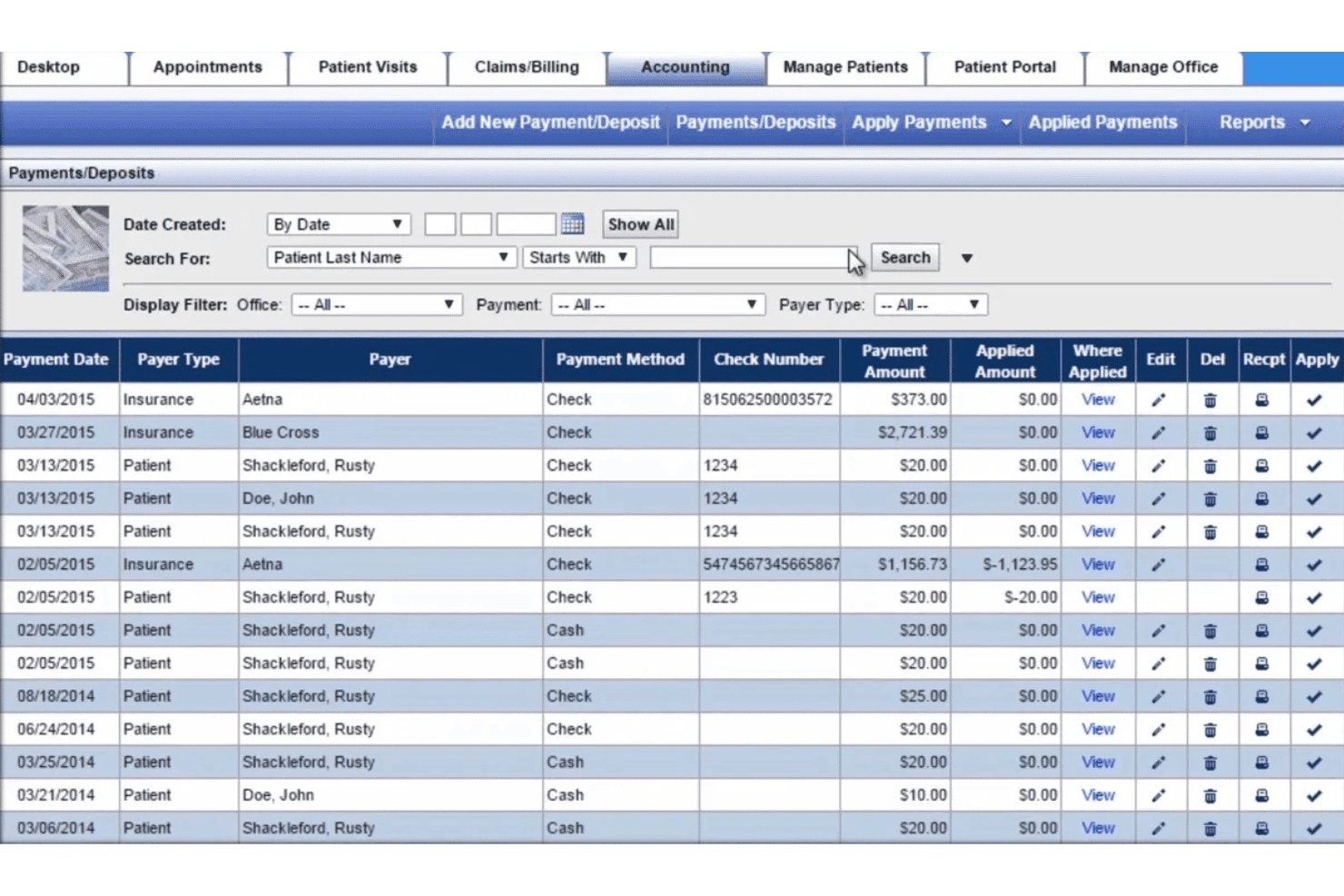
Practice Mate manages scheduling, claims, billing, eligibility, and receivables. Practice Mate by Office Ally is a free practice management and medical billing platform that handles appointment scheduling, claim submission via clearinghouse, patient billing, eligibility verification, and accounts receivable tracking.
Who Is Office Ally Practice Mate Best For?
Practice Mate is a strong fit for solo physicians and small clinic administrators who need a no-cost billing and scheduling solution without technical setup overhead.
Why I Picked Office Ally Practice Mate
Practice Mate earns its spot on my shortlist because the scheduling and billing workflows are genuinely connected, not just adjacent. When I book an appointment, I can run eligibility and benefits verification within that same scheduling flow, before the patient ever arrives. Reminder Mate then handles automated outreach across 16 languages, which keeps the appointment pipeline moving without manual follow-up from the front desk.
Office Ally Practice Mate Key Features
- Claim attachments: Upload supporting documents directly to electronic claims for payers that require additional records.
- Patient ledger: Track all patient charges, payments, and adjustments in an organized account history.
- Electronic remittance advice (ERA): Automatically receive payment details and reconciliation from insurance payers for posted claims.
- Configurable superbills: Create and customize digital superbills with ICD-10, CPT, and HCPCS codes to standardize billing documentation.
Office Ally Practice Mate Integrations
Native integrations include Office Ally EHR 24/7, Patient Ally, Stripe for payment processing, and Office Ally’s clearinghouse. An API is available for custom integrations.
What's Free?
Practice Mate's core plan is free forever, with no subscription or licensing fees, and includes appointment scheduling, patient billing, configurable superbills, patient ledger, and reporting. Some add-ons carry transactional fees, including eligibility verification (first 100 transactions at $10/month, then $0.10 each) and patient appointment reminders via Reminder Mate.
Pros and Cons
Pros:
- Claims clearinghouse is included with no licensing fees
- Supports patient ledger and accounts receivable tracking
- Includes appointment scheduling and billing at no cost
Cons:
- No built-in telehealth or e-prescribing
- Interface looks outdated compared to modern tools
Learn more about Office Ally Practice Mate:
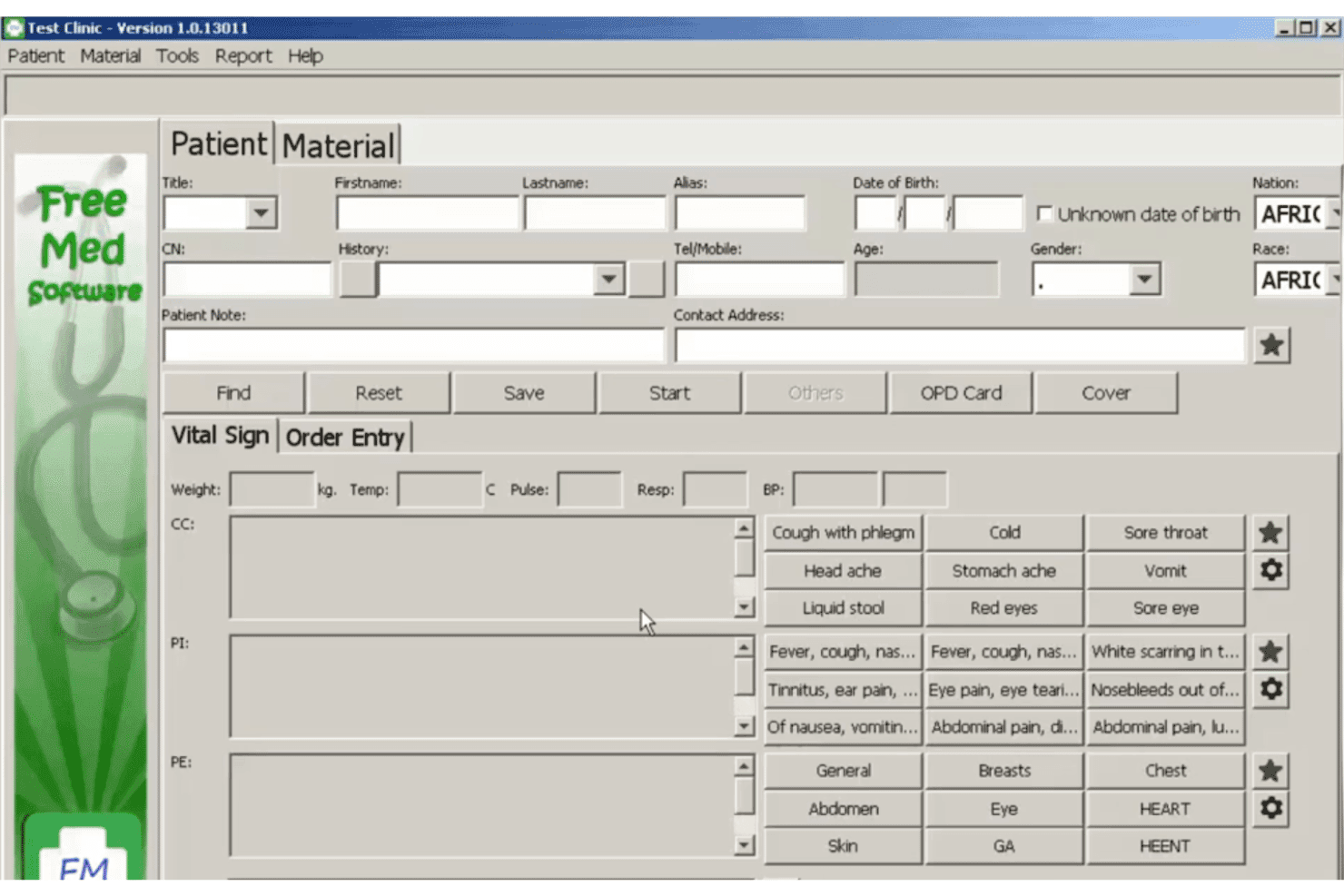
FreeMED connects clinical records, workflows, reporting, and medical billing. FreeMED is a free, open-source electronic medical record and practice management system that covers clinical records, administrative workflows, reporting, and medical billing connections for healthcare providers.
Who Is FreeMED Best For?
FreeMED is suited to independent practices, clinics, developers, and healthcare organizations with technical resources to install and maintain an open-source EMR and billing environment.
Why I Picked FreeMED
I picked FreeMED for its connection with REMITT, an open-source billing and remittance package developed by the FreeMED Software Foundation. REMITT translates medical billing documents between formats and transmits them for claim submission.
This approach gives technically experienced teams more control over how billing files are generated, converted, and sent. However, setup requires more configuration than a hosted billing platform with ready-made payer connections.
FreeMED Key Features
- Practice management: Manages administrative and clinical workflows through a browser-based system.
- Billing and remittance connection: Works with REMITT to translate and transmit medical billing and claim documents.
- Medical data exchange: Provides an XML-RPC backend and supports multiple import and export formats.
- Reporting tools: Generates administrative and clinical reports from data stored in the system.
- Open-source customization: Allows developers to modify the source code and configure the platform for specific workflows.
FreeMED Integrations
FreeMED connects with REMITT for billing and remittance processing. Its repository also contains an XML-RPC backend, a REMITT callback service, and documentation for a Quest Diagnostics HL7 interface. A current list of ready-made third-party connections is not published.
What’s Free?
FreeMED is distributed under the GNU General Public License and can be downloaded, modified, and self-hosted without subscription or licensing fees. Its official repository currently requires PHP 8.3 and uses Debian as the reference installation environment.
Pros and Cons
Pros:
- Can be modified for specific workflows
- Supports billing document translation
- Free and open-source codebase
Cons:
- Limited current user-facing documentation
- Requires technical installation and maintenance
Learn more about FreeMED:
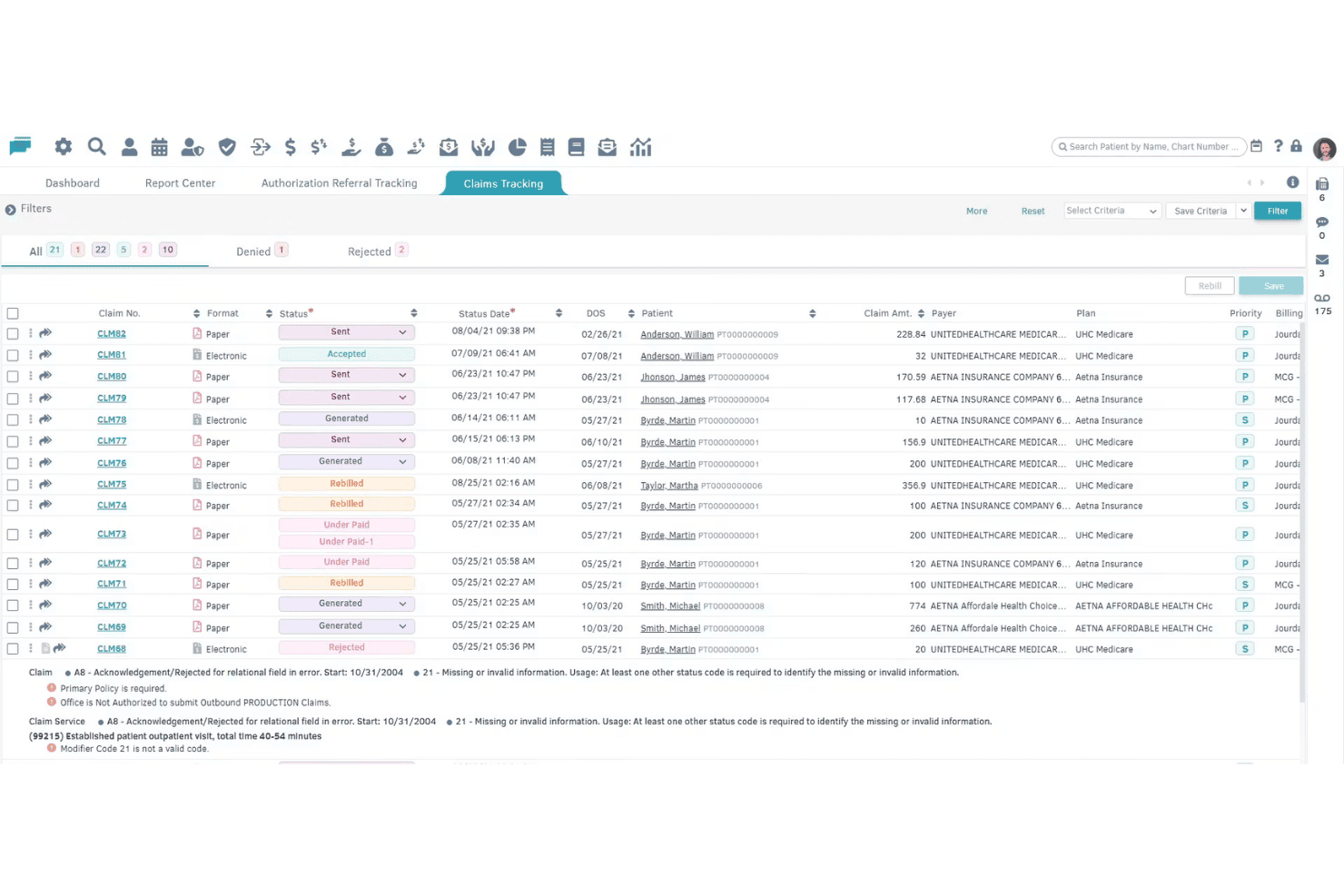
billrMD covers claims, payments, invoicing, eligibility checks, and AR tracking. billrMD is a cloud-based medical billing platform that covers electronic claims submission, payment posting, patient invoicing, insurance eligibility verification, and AR tracking—all within a single system that includes a permanently free entry-level plan.
Who Is billrMD Best For?
billrMD is a good fit for solo physicians, small practices, and independent medical billing companies that need a full-featured billing system without an upfront financial commitment.
Why I Picked billrMD
billrMD earns its spot on my shortlist because the claims workflow is genuinely end-to-end: electronic submission runs through an integrated clearinghouse, ERA auto-posting reconciles payer payments without manual entry, and real-time eligibility verification catches coverage gaps before a claim is ever submitted. I also like that CMS-1500 forms auto-fill from existing patient and billing data, which removes a meaningful amount of manual work from the claim creation step.
billrMD Key Features
- Built-in coding library: Access over 73,000 codes including ICD-10, CPT, and DSM5 for accurate claim preparation.
- Patient invoicing and balance statements: Generate branded statements and invoices for patient billing management.
- Appointment scheduling: Manage calendars and appointments with multiple views and drag-and-drop controls.
- User-based access controls: Set role-based permissions to maintain HIPAA compliance and control PHI access.
billrMD Integrations
billrMD offers native integrations with Dendi LIS, AltaPoint, HealthBiller, WebIMS, Availity, Global Pay, Professional Office Services, and Data Dimensions. An API is available for custom integrations.
What's Free?
billrMD's free plan is a permanent "Complimentary Introductory Plan," not a time-limited trial, and requires no credit card to sign up. Paid upgrades are available as your practice scales, but the free tier gives you access to core billing functionality from day one.
Pros and Cons
Pros:
- Real-time insurance eligibility verification
- Built-in coding and diagnosis library
- Claim creation auto-fills from existing records
Cons:
- No advanced reporting or analytics
- Support response times can be slow
Learn more about billrMD:
- 11Cortex EDI (Ebill Cloud)Best eligibility verification automation
- 12BahmniBest for resource-limited clinical environments
- 1375healthBest for cloud-based user access flexibility
- 14remedlyBest integrated appointment reminders
- 15Pro Health BillingBest for detailed patient billing histories
- 16Medica Billing SolutionsBest specialty-specific billing options
- 17AltuMED PracticeFitBest pre-authorization management features
- 18Service Center by Office AllyBest guided claims submission interface
- 19OpenPMBest robust patient statement management
- 20eMedicalPracticeBest workflow tools for solo providers
How I Evaluate Cloud Based Medical Billing Software
I split my evaluation into must-have billing fundamentals—like electronic claim submission and ERA posting—and the differentiators that separate a good platform from the right one for your practice.
Core Functionality (Table Stakes for This List)
When I'm selecting tools for my list, I rank each one on a scale from 0 (does not offer the functionality) to 5 (excels in this area) for each core functionality listed below. Then, I calculate the tool's total score into a percentage. Each tool needs to achieve a minimum total score of 65% to be considered for inclusion.
- Claims Management: I check whether the platform can generate CMS-1500 forms, submit them electronically through a clearinghouse, and track claim status without switching to a separate tool.
- Patient Billing & Invoicing: After insurance adjudication, your front desk still needs to collect patient balances. I look for automated statement generation and clear balance tracking.
- Payment Posting: Manually posting every ERA slows your team down. I evaluate how each tool handles insurance and patient payment reconciliation, including auto-posting capabilities.
- Eligibility Verification: A single missed coverage lapse can stall reimbursement for weeks. I look for real-time verification across multiple payers before claims go out the door.
- Medical Coding Support: Built-in ICD-10, CPT, and HCPCS code libraries with search and validation help reduce rejected claims. I evaluate how each platform supports accurate code selection.
- AR & Denial Tracking: Aging reports and denial reason codes tell you where revenue is stuck. I look for dashboards that categorize denials and support follow-up or resubmission workflows.
Once I have a list of tools that meet the criteria, I consider what sets each platform apart.
Differentiating Factors (What Sets Vendors Apart)
Here's how I compare and contrast different vendors:
Standout Features
A denial management dashboard is one of the first things I look for. When your billing team can see rejected claims organized by reason code with resubmission workflows built in, they recover revenue much faster than chasing denials through spreadsheets. I also evaluate patient portal access, since a self-service portal where patients view statements and pay balances online cuts down on phone calls and manual payment collection. Customizable superbill templates matter too—a mental health practice and a primary care clinic need very different charge capture forms, and the best platforms let you tailor those templates to your specialty.
Beyond Features
HIPAA compliance is where I start. I check whether the vendor provides a signed Business Associate Agreement on the free plan and confirm that encryption, role-based access, and audit logging are in place. Clearinghouse connectivity matters just as much—if the free tier doesn't include electronic claim submission to major payers, you're stuck printing and mailing CMS-1500 forms. I also evaluate EHR integrations, since a billing tool that doesn't connect to your clinical system means double data entry for every patient encounter.
Slik velger du skybasert programvare for medisinsk fakturering
Det er lett å gå seg vill i lange funksjonslister og kompliserte prisstrukturer. For å hjelpe deg med å holde fokus mens du arbeider deg gjennom den unike programvarevalgsprosessen din, får du her en sjekkliste over faktorer du bør ha i mente:
| Faktor | Hva du bør vurdere |
| Skalerbarhet | Vil programvaren vokse i takt med pasientvolumet og antallet behandlere, eller vil du vokse ut av gratisversjonen eller startnivået? Ta hensyn til nåværende og fremtidige behov. |
| Integrasjoner | Kobles den sømløst til det eksisterende journalsystemet, planleggingsverktøyet eller regnskapsverktøyet ditt? Mangler kan føre til dobbeltregistrering av data og utestående kostnader. |
| Tilpasningsmuligheter | Kan du tilpasse faktureringsregler, maler eller rapportering etter spesialiteten eller arbeidsflyten din? Stive systemer fører til mer arbeid og flere feil. |
| Brukervennlighet | Vil teamet ditt trenge omfattende opplæring, eller er systemet intuitivt nok til at ikke-teknisk personale raskt kan lære å bruke det? Vær oppmerksom på skjult kompleksitet under enkle grensesnitt. |
| Implementering og innføring | Hvor lang tid tar oppsettet, og hvilken hjelp til innføring er inkludert? Finnes det trinnvise veiledninger eller direkte gjennomganger – særlig for nye praksiser eller praksiser med for få ansatte? |
| Kostnad | Er alle virksomhetskritiske funksjoner inkludert i gratisversjonen, eller må du betale ekstra for tilgang til oppgjørssentral, journalsystemintegrasjon eller brukerstøtte? Vær oppmerksom på volumbaserte gebyrer i «gratis» abonnementer. |
| Sikkerhetstiltak | Opplyser leverandøren tydelig om hvordan pasientdata krypteres, sikkerhetskopieres og begrenses til autoriserte brukere? Bekreft at det tilbys en avtale om forretningsforbindelse før innføringen. |
| Tilgjengelig brukerstøtte | Hvilke kanaler (direktechat, supportsak, telefon) og responstider er tilgjengelige, også for gratisbrukere? Begrenset brukerstøtte kan føre til forsinkelser ved akutte fakturerings- eller likviditetsproblemer. |
Hva er skybasert programvare for medisinsk fakturering?
Skybasert programvare for medisinsk fakturering er nettbaserte plattformer som lar helseteam administrere krav, pasientfakturering, forsikringsverifisering, registrering av betalinger og innkreving fra hvor som helst. Disse systemene tilbyr sikker tilgang via en nettleser, støtter HIPAA-samsvar og samler oppgaver knyttet til pasientøkonomi i ett enkelt kontrollpanel. Bruk av skybasert faktureringsprogramvare reduserer papirarbeidet, gjør det enklere å sende inn og følge opp krav og hjelper praksiser med å holde oversikten når kravene fra betalere og myndigheter endres.
Funksjoner i skybasert programvare for medisinsk fakturering
Når du velger skybasert programvare for medisinsk fakturering, bør du se etter følgende viktige funksjoner:
- Skadehåndtering: Gjør det mulig å opprette, sende inn og følge opp forsikringskrav elektronisk, noe som reduserer feil og fremskynder refusjon fra betalere.
- Pasientfakturering: Automatiserer genereringen av fakturaer og kontoutskrifter, noe som gjør det enklere å fakturere pasienter etter forsikringsbehandling og følge opp utestående saldoer.
- Registrering av betalinger: Gjør det mulig å registrere forsikrings- og pasientbetalinger automatisk eller manuelt og knytte dem til riktige kontoer for nøyaktig økonomisk oppfølging.
- Kontroll av forsikringsberettigelse: Kontrollerer pasientenes forsikringsdekning i sanntid før tjenester leveres, noe som reduserer avviste krav som skyldes problemer med dekningen.
- Støtte for medisinsk koding: Tilbyr integrerte kodebiblioteker for ICD-10, CPT og HCPCS samt valideringsverktøy for å sikre at kravene er riktig kodet i samsvar med regelverket.
- Oppfølging av avviste krav og kundefordringer: Markerer avviste eller forkastede krav, følger opp alderen på utestående fordringer og tilbyr verktøy for å sende inn krav på nytt og følge opp ubetalte saldoer.
- Pasientportal: Gir pasienter sikker tilgang på nettet for å se regninger, oppdatere forsikringsinformasjon og betale saldoer, noe som forbedrer brukervennlighet og kommunikasjon.
- Rapportering og analyse: Gir handlingsrettet innsikt i faktureringsresultater, innbetalinger og inntektsutvikling, slik at teamet kan ta databaserte beslutninger.
- Integrasjon med andre systemer: Kobler seg til EHR-, praksisadministrasjons- eller regnskapsverktøy, noe som reduserer dobbeltregistrering og skaper en samlet arbeidsflyt.
- Tilgangskontroller for brukere: Begrenser datatilgang basert på brukerroller og beskytter sensitiv pasient- og økonomiinformasjon i samsvar med personvernregler.
Fordeler med skybasert programvare for medisinsk fakturering
Implementering av skybasert programvare for medisinsk fakturering gir flere fordeler for teamet og virksomheten. Her er noen av fordelene dere kan se frem til:
- Tilgang fra hvor som helst: Få sikker tilgang til faktureringsdata og arbeidsflyter gjennom en nettleser fra alle steder, noe som støtter fleksible arbeidsordninger.
- Raskere refusjon: Elektronisk innsending av krav og registrering av betalinger fremskynder innbetalingene og reduserer manuelle forsinkelser sammenlignet med papirbaserte prosesser.
- Færre avviste krav: Kontroller av forsikringsberettigelse i sanntid og integrert validering av koder reduserer risikoen for feil som kan føre til avviste krav.
- Bedre pasientopplevelse: En pasientportal lar enkeltpersoner se kontoutskrifter og betale på nettet, noe som gjør faktureringsinteraksjoner enklere og raskere for alle.
- Bedre samsvar og sikkerhet: HIPAA-kompatibel datalagring, tilgangskontroller for brukere og revisjonslogger bidrar til å beskytte sensitiv pasient- og økonomiinformasjon.
- Sømløs integrasjon: Tilkobling til EHR- og praksisadministrasjonssystemer reduserer overflødig datainnsamling og holder alle oppføringer oppdatert.
- Bedre oversikt over inntekter: Innebygde rapporterings- og verktøy for oppfølging av avviste krav hjelper teamet med å identifisere flaskehalser og holde oversikt over utestående saldoer.
Kostnader og priser for skybasert programvare for medisinsk fakturering
Ved valg av skybasert programvare for medisinsk fakturering er det nødvendig å forstå de ulike prismodellene og abonnementene som er tilgjengelige. Kostnadene varierer basert på funksjoner, teamstørrelse, tillegg og mer. Tabellen nedenfor oppsummerer vanlige abonnementer, gjennomsnittsprisene deres og typiske funksjoner som inngår i skybaserte løsninger for medisinsk fakturering:
Sammenligningstabell for skybasert programvare for medisinsk fakturering
| Abonnementstype | Gjennomsnittspris | Vanlige funksjoner |
| Gratisabonnement | $0 | Grunnleggende skadehåndtering, begrenset pasientfakturering, manuell registrering av betalinger, kontroll av berettigelse for utvalgte betalere og brukerstøtte via e-post. |
| Personlig abonnement | $10-$30/bruker/måned | Full innsending av krav, automatiserte kontoutskrifter for pasienter, registrering av betalinger, forsikringskontroll, tilgang til kodebibliotek og grunnleggende rapportering. |
| Bedriftsabonnement | $35-$75/bruker/måned | Samlet innsending av krav, automatisk ERA-registrering, oversikter for oppfølging av avviste krav, pasientportal, tilpassede superbilag, integrasjoner og brukerstøtte via chat. |
| Storbedriftsabonnement | $80-$150+/bruker/måned | Avansert automatisering av arbeidsflyter, analyse, tilpasset API-tilgang, støtte for flere lokasjoner, forbedret regelverksetterlevelse samt dedikert innføring og brukerstøtte. |
Vanlige spørsmål om skybasert programvare for medisinsk fakturering
Her er noen svar på vanlige spørsmål om skybasert programvare for medisinsk fakturering:
Hvor sikkert er skybasert programvare for medisinsk fakturering?
Skybasert programvare for medisinsk fakturering bruker kryptering, rollebasert tilgang og revisjonslogging for å beskytte pasientdata. Bekreft alltid at leverandøren tilbyr en avtale med forretningsforbindelse (BAA) for å sikre HIPAA-samsvar, og sjekk om infrastrukturen oppfyller anerkjente sikkerhetsstandarder for helsesektoren.
Kan jeg bruke skybasert programvare for medisinsk fakturering med mitt eksisterende EHR-system?
Ja, mange skybaserte faktureringsplattformer inkluderer innebygde integrasjoner eller alternativer for import og eksport for populære EHR-systemer. Sjekk at løsningen du velger, støtter verktøyene du bruker i dag, slik at du unngår manuell dataregistrering og sikrer en smidig arbeidsflyt.
Hva skjer hvis praksisen min vokser utover gratis- eller startpakken?
De fleste plattformer tilbyr oppgraderinger til mer omfattende abonnementer etter hvert som behovene dine utvikler seg. Sammenlign priser for oppgradering, inkluderte funksjoner og eventuelle begrensninger på krav, brukere eller pasientjournaler før du bestemmer deg, slik at du ikke blir overrasket når praksisen din vokser.
Støtter skybasert programvare for medisinsk fakturering praksiser med flere spesialiteter eller lokasjoner?
Noen løsninger er utviklet for generell bruk eller bruk innen bestemte spesialiteter, mens andre er laget for større grupper med flere lokasjoner. Kontroller om programvaren støtter flere behandlere, spesialiteter og rapportering per lokasjon etter hvert som organisasjonen vokser.
Er opplæring eller hjelp med innføring tilgjengelig for nye brukere?
Ja, de fleste leverandører tilbyr ressurser for innføring, for eksempel oppsettsveiledninger, hjelpesentre eller videoveiledninger. Direkte opplæring og prioritert brukerstøtte kan være begrenset til betalte abonnementer, så se gjennom hva som er tilgjengelig på hvert nivå for å få teamet ditt raskt i gang.