

Programvare for bemanningsstyring i helsetjenesten hjelper teamet ditt med å håndtere turnusplanlegging, tidsregistrering og bemanningssamsvar på én sikker plattform. Hvis du ser etter verktøy som holder omsorgsteamene samkjørte og organisasjonen i samsvar med kravene, vet du at hvert minutt og hvert skift teller. Når pasientbehandling og regulatoriske krav står på spill, kan den riktige løsningen være forskjellen mellom kaos og kontroll. I denne listen finner du topprangerte alternativer som er valgt ut fra reelle behov i helsetjenesten – slik at du kan sammenligne funksjoner, unngå vanlige fallgruver og ta et valg som passer arbeidsflytene og bemanningsmålene dine.
Why Trust Our Software Recommendations
6,700+
Reviews
20
Industry experts
16+
Evaluation factors
14
Years
Our team has been testing and reviewing software since 2012. As medical practice leaders ourselves, we know how difficult—and important—it is to choose the right software.
For this guide, we evaluated tools using hands-on testing and independent research, scoring tools using our selection criteria.
Our reviews reflect our human editorial judgment, not a sales pitch.
Sammenligningstabell for programvare for bemanningsstyring i helsetjenesten
Denne sammenligningstabellen oppsummerer prisdetaljene for mine beste utvalgte løsninger for programvare for bemanningsstyring i helsetjenesten.
| Tool | Best For | Trial Info | Price | ||
|---|---|---|---|---|---|
| 1 | Best with integrated biometric time tracking | 30-day free trial + free demo available | From $50/user/month | Website | |
| 2 | Best for float pool and agency spend control | Free demo available | Pricing upon request | Website | |
| 3 | Best AI-powered shift scheduling for compliance | 14-day free trial + free demo available | From $5/user/month | Website | |
| 4 | Best for centralized on-call physician visibility | Free demo available | Pricing upon request | Website | |
| 5 | Best for long-term care staffing stability | Free demo available | Pricing upon request | Website | |
| 6 | Best for multi-location team scheduling | Free trial + free plan available | From $1.70/user/month (billed annually) | Website | |
| 7 | Best mobile scheduling app built for nurses | 30-day free trial available | From $5/member/month | Website | |
| 8 | Best for real-time labour optimization | Free demo available | Pricing upon request | Website | |
| 9 | Best enterprise solution for physician call schedules | Not available | Pricing upon request | Website | |
| 10 | Best for automated staff scheduling | Free demo available | Pricing upon request | Website |


Anmeldelser av den beste programvaren for bemanningsstyring i helsetjenesten
Nedenfor finner du mine detaljerte sammendrag av den beste programvaren for bemanningsstyring i helsetjenesten som kom med på kortlisten. Anmeldelsene mine gir et detaljert innblikk i funksjonene, mulighetene og de beste bruksområdene for hver plattform, slik at du kan finne den som passer best for deg.
 Best with integrated biometric time tracking
- 30-day free trial + free demo available
- From $50/user/month
Visit WebsiteCustomer Rating:4.5/5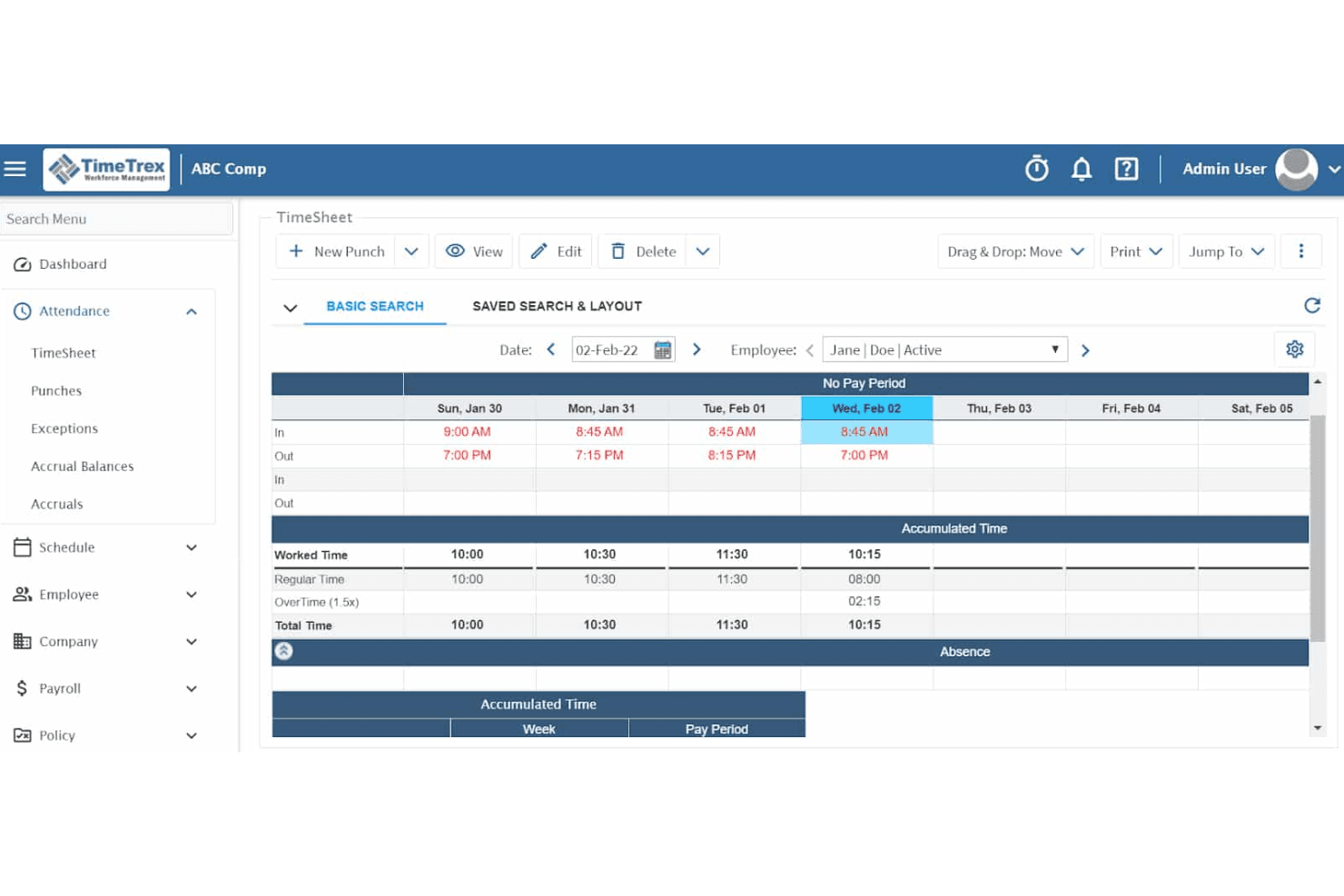
TimeTrex displays a weekly timesheet view with punch-in/out times, worked hours, regular time, and overtime tracking for an individual employee. TimeTrex is a workforce management platform that combines time and attendance tracking, employee scheduling, payroll processing, and HR management, with support for biometric time clocks across both cloud and open-source deployments.
Who Is TimeTrex Best For?
TimeTrex suits mid-to-large healthcare organizations that manage staff across multiple physical locations and need reliable, hardware-integrated time capture.
Why I Picked TimeTrex
TimeTrex earns its spot on my shortlist because its biometric facial recognition time clocks eliminate buddy punching, which is a persistent problem in shift-based clinical environments. I like that clock-in data feeds directly into payroll processing, so my team can reconcile worked hours without manual touchpoints. The geofencing layer adds another control, restricting punches to approved facility locations only.
TimeTrex Key Features
- Multi-location employee scheduling: Build and publish shift rosters for clinical staff across multiple sites with template support.
- Credential tracking module: Store healthcare staff certifications and manually track expiration dates within each employee profile.
- Payroll and tax engine: Automate wage calculations, deductions, and regional tax compliance for healthcare environments.
- Native mobile app: Enable staff to view schedules, submit PTO requests, and punch in or out from iOS and Android devices.
TimeTrex Integrations
TimeTrex offers native integrations with QuickBooks, ADP, Paychex, Ceridian, and Sage for payroll processing. An API is available for custom integrations.
Pros and Cons
Pros:
- Built-in payroll reduces third-party vendor dependency
- Self-hosted option gives IT teams full control
- Biometric time clocks eliminate buddy punching
Cons:
- Mobile self-scheduling tools are limited for clinicians
- Credential tracking lacks automated expiration alerts
Learn more about TimeTrex: Best for float pool and agency spend control
- Free demo available
- Pricing upon request
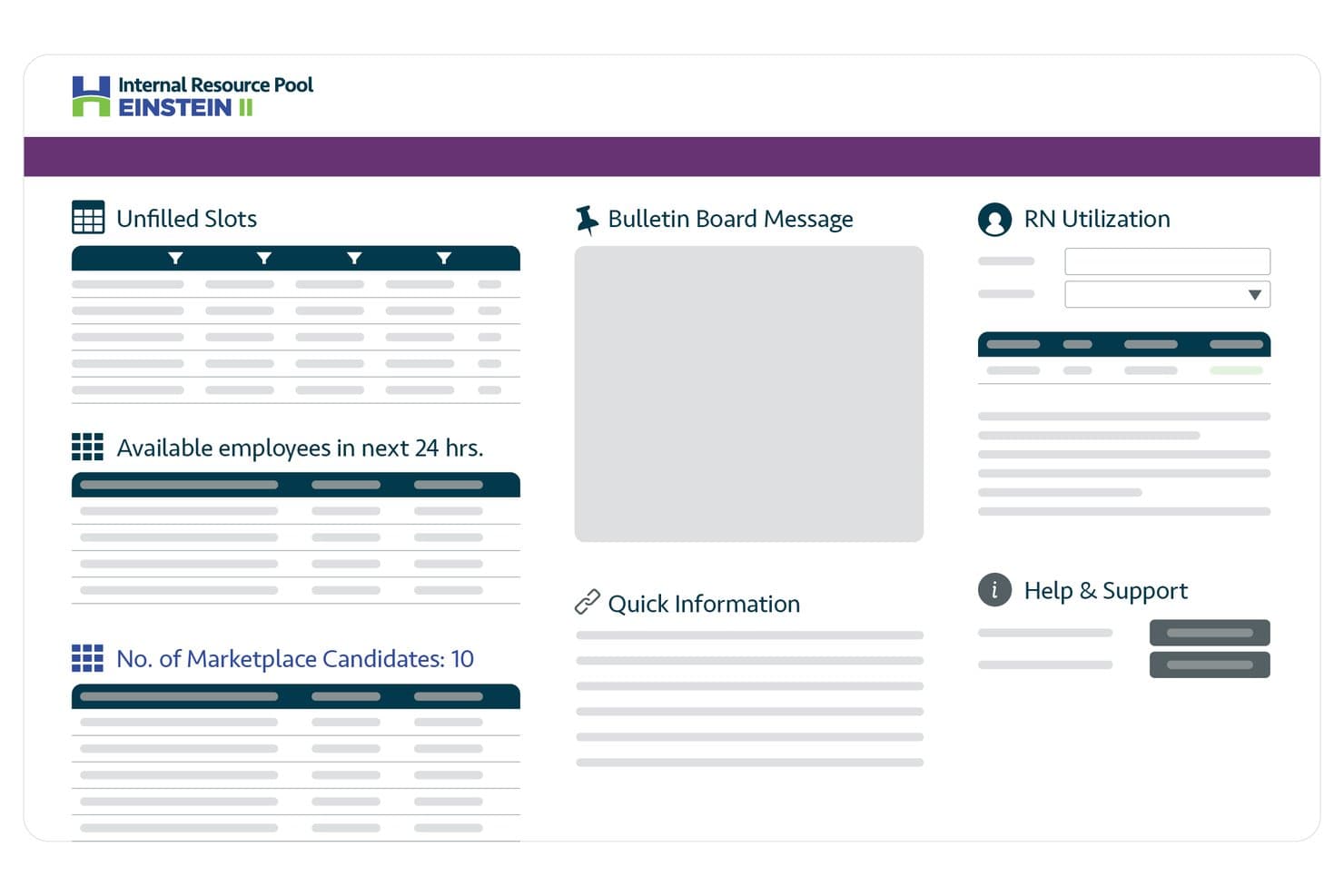
Hallmark Health Care Solutions centralizes staffing data on one dashboard. Hallmark Health Care Solutions is an enterprise healthcare workforce management platform that combines AI-driven clinician scheduling, float pool management, credential tracking, vendor management, and predictive staffing demand forecasting.
Who Is Hallmark Health Care Solutions Best For?
Hallmark is a strong fit for enterprise health systems that need to reduce agency spend by tightening control over float pool utilization and contingent labor.
Why I Picked Hallmark Health Care Solutions
I picked Hallmark Health Care Solutions because it's one of the few platforms built specifically to tighten the gap between float pool utilization and agency spend. Its AI eligibility engine automatically matches credentialed, available internal staff to open shifts before any external vendor is engaged, which directly cuts contingent labor costs. The vendor-neutral VMS layers on top, letting you run competitive bidding across 400+ staffing agencies when internal coverage falls short. I also like the rate management module, which centralizes bill rate data across units and regions so you can spot and eliminate overpayment in real time.
Hallmark Health Care Solutions Key Features
- Predictive staffing demand forecasting: AI models pull in real-time census, acuity, length of stay, and callout data to project staffing needs by unit and service line before gaps appear.
- Credential expiration monitoring: The credentialing module automatically tracks license and certification deadlines and flags exceptions in real time to keep your workforce audit-ready.
- Fatigue and overtime alerts: The platform flags consecutive shifts and hours-worked thresholds in real time so nurse leaders can intervene before overtime costs escalate.
- Executive workforce intelligence dashboards: Role-specific dashboards for CFOs, CHROs, and CNOs connect labor spend data directly to margin and patient outcome metrics.
Hallmark Health Care Solutions Integrations
Hallmark Health Care Solutions integrates with Epic, Oracle Health, UKG EZCall, Workday HCM, ADP, Oracle Payroll, and Microsoft Entra ID. It also supports API, webhooks, EDI, HL7, FHIR, and SFTP connectivity for custom integrations.
Pros and Cons
Pros:
- Purpose-built float pool and agency management
- Comprehensive credential and license tracking
- AI-driven demand forecasting for staffing needs
Cons:
- No free plan or trial available
- Lacks native time and attendance features
Learn more about Hallmark Health Care Solutions: Best AI-powered shift scheduling for compliance
- 14-day free trial + free demo available
- From $5/user/month
Visit WebsiteCustomer Rating:4.6/5
The Deputy scheduling dashboard shows employee shifts across locations. Deputy is a workforce management platform built for healthcare organizations, offering digital shift scheduling, time and attendance tracking, labour law compliance tools, and real-time staff communication.
Who Is Deputy Best For?
Nursing supervisors and operations leaders in healthcare facilities who need daily oversight of shift allocation and staffing rules will appreciate Deputy.
Why I Picked Deputy
I picked Deputy as one of the best because I use its AI scheduling engine to match staff to shifts while staying compliant with healthcare labour rules, and I can instantly flag overtime or credential conflicts as I build the rota.
Deputy Key Features
- Timesheet approvals: Managers can review and approve digital timesheets for each staff member.
- Mobile shift swapping: Staff can swap shifts and update availability directly from the mobile app.
- Task assignments: Assign and track non-clinical tasks alongside shift schedules.
- Payroll export: Export timesheet and pay data to popular payroll software.
Deputy Integrations
Integrations include Square, ADP, Gusto, BambooHR, QuickBooks, AirWatch, Clover, Dropbox, Epos Now, and HiBob.
Pros and Cons
Pros:
- AI matches staff to open shifts
- Flags overtime and credential conflicts
- Flags license and credential expirations
Cons:
- Advanced reporting requires higher-tier plans
- Limited bulk editing of published schedules
Learn more about Deputy: Best for centralized on-call physician visibility
- Free demo available
- Pricing upon request
Visit WebsiteCustomer Rating:4.5/5
QGenda on-call dashboard shows physician schedules and staff assignments. QGenda is a healthcare workforce management platform designed for medical organizations to handle complex physician scheduling, staff assignments, credentialing management, and time tracking in one place.
Who Is QGenda Best For?
Hospitals and large healthcare systems seeking unified, organization-wide physician scheduling and staff tracking will find QGenda especially relevant.
Why I Picked QGenda
I picked QGenda as one of the best because its centralized dashboard lets me instantly see who’s on call across all departments. I rely on the rule-based scheduling engine and transparent shift change tracking to avoid coverage gaps and miscommunications.
QGenda Key Features
- Mobile access: Secure app allows staff to view and manage their schedules on the go.
- Credential management: Stores and tracks provider credentials inside the same platform.
- Time and attendance tools: Records shifts, clock-ins, and work hours for payroll accuracy.
- Analytics and reporting: Generates workforce analytics for utilization and staffing trends.
QGenda Integrations
Integrations include Workday, Oracle, Voalte, Apple Calendar, Google Calendar, Outlook, Epic, MBMS, and MedHub.
Pros and Cons
Pros:
- Detailed audit trails for schedule changes
- Automated physician assignment
- Centralized physician and staff scheduling
Cons:
- Limited user interface customization
- Complex initial setup
Learn more about QGenda: Best for long-term care staffing stability
- Free demo available
- Pricing upon request

The OnShift mobile app shows employee schedules and open shift access. OnShift is a healthcare workforce management software platform designed for long-term and post-acute care that offers scheduling, call-off tracking, labour analytics, and employee engagement tools.
Who Is OnShift Best For?
OnShift fits staffing managers and HR teams in long-term care facilities and senior living organizations that need to improve workforce consistency and fill shifts quickly.
Why I Picked OnShift
I picked OnShift because I’ve managed staffing in long-term care where census forecasting and automated shift call-outs help keep teams stable. I like how OnShift alerts my team to overtime risk and lets us fill open shifts with just a few clicks.
OnShift Key Features
- Mobile scheduling app: Staff can swap shifts and check schedules from their phones.
- Employee rewards system: Managers can recognize team members with in-platform rewards and recognition features.
- Real-time attendance monitoring: Track clock-ins and absences as they happen.
- Credential tracking: Keep tabs on license and certification status for compliance.
OnShift Integrations
Integrations include isolved, Paylocity, Workday, ADP, UKG, Paycom, Viventium, MatrixCare, PointClickCare, and First Advantage.
Pros and Cons
Pros:
- Rewards staff to boost retention
- Real-time call-off and attendance alerts
- Identifies staffing needs using census
Cons:
- Onboarding process is time-intensive
- Limited customization for facility rules
Learn more about OnShift: Best for multi-location team scheduling
- Free trial + free plan available
- From $1.70/user/month (billed annually)

The Sling schedule dashboard shows shifts across teams and locations. Sling is a workforce management software designed for healthcare organizations that need to manage shift scheduling, time clocking, team messaging, and labour cost controls across multiple locations.
Who Is Sling Best For?
Sling is a strong match for healthcare administrators who coordinate staffing and schedules across several clinic or facility locations.
Why I Picked Sling
I’ve included Sling in my shortlist because I can create, publish, and manage schedules for different departments and locations in one place—plus, my team can handle shift swapping, open shifts, and location-specific availability simply.
Sling Key Features
- Time clock and attendance tools: Record worked hours, manage clock-ins and monitor tardiness digitally.
- labour cost tracking: Calculate and track labour costs in real time as you schedule.
- In-app chat: Communicate instantly with team members within the Sling platform.
- Employee task assignments: Assign specific tasks to staff members during each shift.
Sling Integrations
Integrations include Toast, Square, Gusto, Harbortouch, Restaurant Manager, POSiTouch, ADP, Shopify, and Google Calendar.
Pros and Cons
Pros:
- Built-in time clock with geofencing support
- Location-based shift notifications for employees
- Multisite scheduling from a single dashboard
Cons:
- Reporting export options are restricted
- Limited reporting for compliance tracking
Learn more about Sling: Best mobile scheduling app built for nurses
- 30-day free trial available
- From $5/member/month

The NurseGrid schedule overview shows nurse shifts across weekly calendars. NurseGrid is a mobile-first workforce management solution for healthcare organizations, offering nurse shift scheduling, real-time calendar syncing, internal messaging, and team coordination features.
Who Is NurseGrid Best For?
NurseGrid is a fit for frontline nurses and nurse managers in hospital departments or healthcare facilities needing app-based shift scheduling and team calendar management.
Why I Picked NurseGrid
I picked NurseGrid as one of the best because I can coordinate nursing teams directly from my phone—it’s the only app I use that lets my nurses sync schedules, swap shifts, and send instant scheduling updates on mobile.
NurseGrid Key Features
- Group messaging: Organize team discussions or urgent notifications inside the app.
- Shift reminders: Send automated push notifications before each scheduled shift.
- Availability tracking: Let staff indicate available or unavailable days in real time.
- Work history export: Export personal shift data for documentation and payroll needs.
NurseGrid Integrations
Integrates with enterprise scheduling systems, the NurseGrid mobile app, and personal digital calendars, such as Google Calendar and Apple Calendar.
Pros and Cons
Pros:
- Connects nursing teams across floors
- Real-time mobile team scheduling updates
- Built-in shift swapping for nurses
Cons:
- Lacks support for multi-location organizations
- No advanced analytics or reporting tools
Learn more about NurseGrid: Best for real-time labour optimization
- Free demo available
- Pricing upon request

SmartLinx's scheduling dashboard shows staffing ratios and labour tracking. SmartLinx is a healthcare workforce management platform focused on senior care that offers features for dynamic staff scheduling, time and attendance tracking, compliance monitoring, and real-time labour analytics.
Who Is SmartLinx Best For?
SmartLinx fits HR and operations leaders in senior care organizations who need detailed oversight of staffing, labour costs, and regulatory compliance.
Why I Picked SmartLinx
I picked SmartLinx as one of the best because I use its live scheduling dashboards to adjust staffing by census and see instant cost impacts. I rely on real-time reporting to control overtime and fill open shifts in our senior care facilities.
SmartLinx Key Features
- Credential compliance tracking: Monitors staff license and certification status for regulatory needs.
- Automated timeclock management: Captures punch-ins via biometric or mobile devices for time tracking accuracy.
- Payroll processing tools: Processes payroll within the platform and helps manage exceptions.
- Mobile employee self-service: Let staff request shifts, check schedules, and update availability on their phones.
SmartLinx Integrations
Integrations include DailyPay, Apex Global Solutions, PointClickCare, ADP Smart Compliance, FlexWage, and Rain.
Pros and Cons
Pros:
- Monitors staffing ratios in real time
- Calculates labour costs instantly
- Real-time shift adjustment for census changes
Cons:
- Limited non-senior care integrations
- Requires more dedicated system training
Learn more about Smartlinx : Best enterprise solution for physician call schedules
- Not available
- Pricing upon request

The AMiON mobile app shows physician schedules and on-call assignments. AMiON is a physician scheduling platform designed for hospitals and large healthcare groups, offering cloud-based management for call schedules, shift planning, rotation building, and automated notifications.
Who Is AMiON Best For?
AMiON is built for medical staff schedulers and department managers in enterprise hospitals and multi-specialty physician groups.
Why I Picked AMiON
I picked AMiON as one of the best because I use its on-call scheduling grids and rule-driven automation to manage complex physician rotations across departments, and real-time updates keep everyone synced around frequent last-minute changes.
AMiON Key Features
- Mobile app: Physicians and staff can view or update schedules on the go.
- Vacation and PTO tracking: Track vacation requests and manage approvals directly in the platform.
- HIPAA-compliant messaging: Securely communicates shift details and urgent updates within the app.
- Custom reporting: Build and export detailed reports on staffing, shifts, and call coverage.
AMiON Integrations
Integrations include Epic Systems, American Messaging, Spok, Verizon, LightningBolt, QGenda, Microsoft Azure, Okta, Imprivata Mobile Access Management, and Imprivata Enterprise Access Management.
Pros and Cons
Pros:
- Real-time sync of last-minute changes
- Supports HIPAA-compliant group messaging
- Handles complex physician shift rotations
Cons:
- Limited analytics beyond schedule reporting
- Requires more customization settings
Learn more about Amion: Best for automated staff scheduling
- Free demo available
- Pricing upon request

The Lightning Bolt schedule view shows automated staff assignments. Lightning Bolt is a healthcare staff scheduling software that automates provider shift scheduling, manages shift swaps and time-off requests, and supports complex rule-based assignments for hospital systems and clinics.
Who Is Lightning Bolt Best For?
Lightning Bolt is a strong fit for hospital scheduling administrators and medical group managers who need to automate and optimize complex provider shift schedules.
Why I Picked Lightning Bolt
I picked Lightning Bolt as one of the best because I can automatically generate complex staff schedules with just a few clicks—including preferences, rules, and compliance requirements—which saves my team time with every new schedule.
Lightning Bolt Key Features
- Mobile app access: Staff can view and manage schedules from their mobile devices.
- Real-time shift swap requests: Team members can request and accept shift swaps instantly.
- Integrated messaging: Facilitates direct communication between providers and schedulers within the platform.
- Reporting and analytics dashboard: Offers oversight into staffing patterns, trends, and schedule metrics.
Lightning Bolt Integrations
Integrations include Epic On Call Finder, Epic OpTime, New Innovations Duty Hours, Outlook, TigerConnect, and Workday.
Pros and Cons
Pros:
- Mobile app for real-time schedule access
- Advanced algorithms reduce coverage gaps
- Supports complex physician scheduling
Cons:
- Steep setup process for large organizations
- Lacks comprehensive time tracking
Learn more about Lightning Bolt:
Annen programvare for bemanningsstyring i helsetjenesten
Her er noen flere alternativer for programvare for bemanningsstyring i helsetjenesten som ikke kom med på kortlisten, men som likevel er verdt å se nærmere på:
- 11Humanity by TCPBest AI forecasting for staff coverage needs
- 12StaffReadyBest for integrated competency tracking
- 13HealthStreamBest for automated provider enrollment
- 14Infor Best for complex union rule adherence
- 15ConnecteamBest mobile-first employee communication tools
- 16ShiftboardBest dynamic scheduling for high-volume shift
- 17Paychex Best for multi-state tax filing
- 18UKGBest integration of HR and workforce analytics
- 19ReliasBest for clinical competency assessments
- 20When I WorkBest intuitive shift swapping for hourly staff
- 21PaycorBest payroll-centred staff management
- 22ShiftMedBest for on-demand clinician marketplace
How I Evaluate Healthcare Workforce Management Software
Healthcare workforce management software is what CNOs, nursing directors, and HR teams turn to when manual scheduling can no longer keep a night-shift ICU adequately staffed, credential expirations tracked, and premium labor costs in check. When I evaluate options in this category, I separate what every tool needs to handle well enough to make the list from what actually sets the better picks apart.
Core Functionality (Table Stakes for This List)
For healthcare workforce management software, the core functionality I test and evaluate is:
- Shift Scheduling: I check whether the tool handles 24/7 rule-based scheduling that accounts for unit-specific skills, nurse-to-patient ratios, and float pool assignments.
- Time & Attendance: Accurate capture of shift differentials, overtime, and on-call hours matters. I look for biometric or badge-based clock-in options and exception alerts.
- Credential Tracking: Expired BLS certs or lapsed RN licenses can't slip through. I evaluate how the tool flags expirations and blocks unqualified staff from scheduling.
- Compliance Automation: The tool should enforce rest-period rules, mandatory overtime limits, and union seniority requirements without manual workarounds from schedulers.
- Open Shift Management: I look at how open or unfilled shifts are broadcast to eligible staff, whether through mobile push notifications, shift bidding, or marketplace-style claiming.
- Mobile Self-Service: Nurses and aides aren't at desks. I evaluate the mobile experience for viewing schedules, swapping shifts, submitting PTO, and picking up extra hours.
- Staffing Analytics: Dashboards that surface labor costs, agency utilization, overtime trends, and census-based demand forecasts are what I look for here.
- Payroll & EHR Integration: Connections to systems like Epic, Oracle Health, ADP, and UKG are appreciated. I check the depth of these integrations, not just their existence.
A tool has to deliver most of these capabilities to earn a spot on the list. From there, I consider what sets each tool apart.
Standout Features (What Separates the Picks)
Automated demand forecasting and AI-driven clinical staffing suggestions can really set a tool apart for organizations that live and die by their census. I also look for advanced contingent workforce management, like integrated VMS modules for per-diem pools and agency partnerships, which larger systems rely on. Built-in compliance audit tools—such as instant reporting against state-specific ratios or credentialing documentation—add real value for providers facing regulatory scrutiny.
What I Weigh Beyond Features
Implementation support matters a lot in this space. Rolling out a WFM platform across a hospital system with union contracts is a different challenge than onboarding a single outpatient clinic. I evaluate whether vendors offer healthcare-specific implementation teams and dedicated success managers. HIPAA compliance and SOC 2 certification are non-negotiable for any tool handling employee health records. I also consider buyer fit—some platforms serve enterprise health systems well, while others are better suited to smaller practices or staffing agencies.
Slik velger du programvare for bemanningsstyring i helsetjenesten
Det er lett å gå seg vill i lange funksjonslister og komplekse prismodeller. For å hjelpe deg med å holde fokus mens du går gjennom den unike prosessen med å velge programvare, får du her en sjekkliste over faktorer du bør ha i bakhodet:
| Faktor | Hva du bør vurdere |
|---|---|
| FaktorSkalerbarhet | Hva du bør vurdereVil plattformen støtte organisasjonen din når den vokser, inkludert håndtering av flere ansatte og lokasjoner? |
| FaktorIntegrasjoner | Hva du bør vurdereKan den kobles direkte til HR-, lønns- eller EMR-systemene dine uten at du trenger spesialtilpassede løsninger? |
| FaktorTilpasningsmuligheter | Hva du bør vurdereLar systemet deg justere arbeidsflyter, tillatelser og visninger slik at de samsvarer med driften og retningslinjene dine? |
| FaktorBrukervennlighet | Hva du bør vurdereEr rutineoppgaver og rapportering enkelt for ansatte og ledere som kanskje ikke er teknisk kyndige? |
| FaktorImplementering og opplæring | Hva du bør vurdereHvor lang tid vil oppsett og brukeropplæring ta, og hvilke ressurser eller hvilken støtte trenger teamet ditt? |
| FaktorKostnad | Hva du bør vurdereEr alle kostnader (lisenser, support, oppgraderinger) tydelige på forhånd, og passer prismodellen budsjettet ditt? |
| FaktorSikkerhetstiltak | Hva du bør vurdereTilbyr plattformen HIPAA-kompatibel sikkerhet, revisjonsspor og begrenset tilgang til sensitive data? |
| FaktorSamsvarskrav | Hva du bør vurdereStøtter den tidsregistrering, dokumentasjon og rapportering for føderale og statlige krav samt akkrediteringskrav? |
Hva er programvare for bemanningsstyring i helsetjenesten?
Programvare for bemanningsstyring i helsetjenesten er en kategori digitale verktøy som er utviklet for å automatisere turnusplanlegging, tidsregistrering, overvåking av kvalifikasjoner og samsvar for medisinske organisasjoner. Disse plattformene hjelper ledere med å fordele ressurser, overvåke arbeidskostnader og sikre at regulatoriske krav oppfylles på tvers av klinikker, sykehus og omsorgsinstitusjoner, samtidig som de gir både ansatte og administratorer en smidigere opplevelse.
Funksjoner i programvare for bemanningsstyring i helsetjenesten
Ved valg av programvare for bemanningsstyring i helsetjenesten bør du se etter følgende viktige funksjoner:
- Skiftplanlegging: Gjør det mulig for ledere å opprette, publisere og justere arbeidsplaner basert på tilgjengelighet, autorisasjoner og behov innen pasientbehandling.
- Registrering av arbeidstid og oppmøte: Registrerer nøyaktig start- og sluttidspunkt for skift, fravær og overtid gjennom stemplingssystemer eller mobile enheter.
- Håndtering av kvalifikasjoner: Følger opp ansattes lisenser og sertifiseringer og varsler administratorer før de utløper, slik at kravene i regelverket oppfylles.
- Lønn integrasjon: Kobler arbeidsstyrkedata direkte til lønnssystemer for automatisert beregning og lønnsutbetaling, noe som reduserer feil og manuell registrering.
- Rapportering av regelverksetterlevelse: Genererer detaljerte rapporter som støtter revisjoner og dokumenterer overholdelse av arbeidsmiljølovgivning, helsestandarder og akkrediteringskrav.
- Analyse av arbeidskostnader: Analyserer bemanningsmønstre, overtid og kostnader, slik at ledere kan oppdage ineffektivitet eller trender som påvirker budsjettene.
- Mobil tilgjengelighet: Gjør det mulig for ansatte å se arbeidsplaner, be om skift og kommunisere med ledere fra alle steder ved hjelp av smarttelefoner eller nettbrett.
- Verktøy for oppgaver og kommunikasjon: Samler kunngjøringer, skiftrelaterte meldinger og oppgavetildelinger på én og samme arbeidsstyrkeplattform.
- Selvbetjeningsportaler: Gjør det mulig for ansatte å oppdatere tilgjengeligheten sin, bytte skift og se lønnsslipper uten innblanding fra ledere.
- Automatiserte varsler og meldinger: Sender påminnelser om manglende stemplinger, utløpende kvalifikasjoner, ledige skift eller endringer i arbeidsplanen i siste liten til relevante ansatte.
Fordeler med programvare for bemanningsstyring i helsetjenesten
Implementering av programvare for bemanningsstyring i helsetjenesten gir flere fordeler for teamet og virksomheten din. Her er noen av fordelene du kan se frem til:
- Bedre bemanningsdekning: Sørg for at riktig helsepersonell er satt opp til riktige tider. Dette bidrar til å optimalisere dekningen, redusere under- eller overbemanning og forbedre pasientbehandlingen.
- Bedre etterlevelse av regelverket: Følg opp kvalifikasjoner, arbeidsmiljølovgivning og akkrediteringsstandarder med automatisering, detaljert rapportering og sertifiseringsoppfølging.
- Mindre administrativ belastning: Automatiser planlegging, tidsregistrering og lønnsintegrasjon, slik at ledere bruker mindre tid på manuelle oppgaver.
- Bedre kostnadskontroll: Bruk prognoser til å analysere bemanningsmønstre og overtid. Dette gjør det lettere å oppdage ineffektivitet og håndtere arbeidskostnader for å oppnå betydelige kostnadsbesparelser.
- Økt engasjement blant ansatte: Forbedre ansattes opplevelse og lojalitet ved å la dem bytte skift og be om fri gjennom selvbetjeningsverktøy, noe som bidrar til å motvirke utbrenthet.
- Bedre oversikt og analyse: Bruk datadrevne oversikter for å få et tydelig bilde av driftseffektivitet, etterlevelse av regelverket og nøkkeltall på tvers av helseorganisasjoner.
- Færre planleggingsfeil: Samle bemanningsplanleggingen og send varsler i sanntid til helsepersonell for å minimere misforståelser og endringer i siste liten.
Kostnader og priser for programvare for bemanningsstyring i helsetjenesten
Ved valg av programvare for bemanningsstyring i helsetjenesten er det nødvendig å forstå de ulike prismodellene og abonnementene som er tilgjengelige. Kostnadene varierer basert på funksjoner, teamstørrelse, tillegg og mer. Tabellen nedenfor oppsummerer vanlige abonnementer, gjennomsnittsprisene deres og typiske funksjoner som inngår i programvareløsninger for bemanningsstyring i helsetjenesten:
Sammenligningstabell for abonnementer for programvare for bemanningsstyring i helsetjenesten
| Abonnementstype | Gjennomsnittspris | Vanlige funksjoner |
|---|---|---|
| AbonnementstypeGratisabonnement | Gjennomsnittspris$0 | Vanlige funksjonerGrunnleggende skiftplanlegging, begrenset rapportering, selvbetjeningsportaler og brukerstøtte fra fellesskapet. |
| AbonnementstypePersonlig abonnement | Gjennomsnittspris$5-$15/bruker/måned | Vanlige funksjonerIndividuell planlegging, oppmøteoppfølging, påminnelser om kvalifikasjoner og tilgang til mobilapper. |
| AbonnementstypeBedriftsabonnement | Gjennomsnittspris$15-$30/bruker/måned | Vanlige funksjonerAutomatisert planlegging, lønnsintegrasjoner, rapportering av regelverksetterlevelse, mobil tilgjengelighet og håndtering av fravær. |
| AbonnementstypeVirksomhetsabonnement | Gjennomsnittspris$30-$50/bruker/måned | Vanlige funksjonerAvansert analyse, tilpassede arbeidsflyter, API-tilgang, dedikert kundeansvarlig og førsteklasses kundestøtte. |
Vanlige spørsmål om programvare for arbeidsstyring i helsesektoren
Her er svar på vanlige spørsmål om programvare for arbeidsstyring i helsesektoren:
Hvordan bidrar programvare for arbeidsstyring i helsesektoren til å sikre samsvar med regelverket?
Den sporer sertifiseringer, lisenser og krav i arbeidsmiljølovgivningen automatisk. Dette betyr at helsepersonell får påminnelser før kvalifikasjoner utløper, og innebygde rapporter for samsvarsoppfølging støtter revisjoner ved å holde all dokumentasjon samlet på ett sted.
Kan programvare for arbeidsstyring i helsesektoren integreres med lønns- og HR-systemer?
Ja, de fleste alt-i-ett-løsninger tilbyr direkte integrasjoner med populære lønns- og HR-plattformer. Dette lar deg synkronisere arbeidsplaner, tidsregistrering og medarbeiderdata på tvers av systemene med mindre manuell registrering og færre feil.
Hvilke typer organisasjoner bruker programvare for arbeidsstyring i helsesektoren?
Klinikker, sykehus, langtidspleieinstitusjoner og spesialistpraksiser bruker alle disse verktøyene. Store helsesystemer og alle medisinske organisasjoner med flere medarbeidere eller komplekse bemanningsbehov kan dra nytte av automatiseringen og rapporteringen disse plattformene tilbyr.
Er mobiltilgang tilgjengelig i de fleste programvareløsninger for arbeidsstyring i helsesektoren?
Ja, mange verktøy inkluderer brukervennlige mobilapper eller nettbaserte portaler. Pleiepersonell og andre medarbeidere kan sjekke arbeidsplanene sine, be om endringer og kommunisere på farten, noe som reduserer uteblitte vakter og misforståelser.
Hvor lang tid tar implementeringen vanligvis?
Implementeringstiden varierer etter system og organisasjonens størrelse. Små team kan ofte komme i gang i løpet av en uke, mens store institusjoner eller institusjoner med flere lokasjoner kan trenge noen uker til oppsett, integrasjon og opplæring av medarbeidere. De fleste leverandører tilbyr støtte ved oppstart for å hjelpe deg gjennom prosessen.