

Det kan være overveldende å administrere sykepleierturnuser i en travel legepraksis. Du må håndtere vakter, fordele arbeidsbelastningen og sørge for at regelverket overholdes. Programvare for sykepleierturnus kan gjøre disse oppgavene enklere, spare tid og redusere feil.
Basert på min erfaring innebærer det å finne riktig programvare at du må forstå teamets unike behov. Jeg har testet og vurdert ulike alternativer uavhengig for å gi deg en objektiv og grundig undersøkt liste over de beste valgene.
Du finner informasjon om funksjonene, fordelene og ulempene ved hvert verktøy, slik at du kan ta en informert beslutning. Enten du ser etter noe brukervennlig eller funksjonsrikt, er målet med denne veiledningen å hjelpe deg med turnusplanleggingen.
Why Trust Our Software Recommendations
6,700+
Reviews
20
Industry experts
16+
Evaluation factors
14
Years
Our team has been testing and reviewing software since 2012. As medical practice leaders ourselves, we know how difficult—and important—it is to choose the right software.
For this guide, we evaluated tools using hands-on testing and independent research, scoring tools using our selection criteria.
Our reviews reflect our human editorial judgment, not a sales pitch.
Sammenligningstabell for programvare for sykepleierturnus
Denne sammenligningstabellen oppsummerer prisopplysningene for mine beste utvalgte programmer for sykepleierturnus:
| Tool | Best For | Trial Info | Price | ||
|---|---|---|---|---|---|
| 1 | Best for efficient scheduling and shift management | 14-day free trial | From $29/month (billed annually) | Website | |
| 2 | Best for mobile-first schedule access in Canada | Free 21-day trial + free demo available | From $2.93/user/month (billed annually) | Website | |
| 3 | Best for automated nurse scheduling | 30-day free trial + free demo available | From $50/user/month | Website | |
| 4 | Best for unified internal and agency nurse staffing | Free demo available | Pricing upon request | Website | |
| 5 | Best for enhancing team communication through a unified platform | 14-day free trial + free demo available | From $5/user/month | Website | |
| 6 | Best for facilitating mobile workforce management | Free demo available | Pricing upon request | Website | |
| 7 | Best for remote access to schedules across multiple devices | From $25/month (billed annually) | Website | ||
| 8 | Best for managing large, complex workforce schedules | Free demo available | Pricing upon request | Website | |
| 9 | Best for addressing staffing challenges and reducing labor costs | Free demo available | Pricing upon request | Website | |
| 10 | Best for simplified shift planning and time tracking | Free trial + free plan available | From $1.70/user/month (billed annually) | Website |


Anmeldelser av den beste programvaren for sykepleierturnus
Nedenfor finner du mine detaljerte oppsummeringer av den beste programvaren for sykepleierturnus som kom med på kortlisten. I anmeldelsene ser jeg nærmere på de viktigste funksjonene, fordelene & ulempene, integrasjonene og de ideelle bruksområdene for hvert verktøy, slik at du kan finne det som passer best for deg.
 Best for efficient scheduling and shift management
- 14-day free trial
- From $29/month (billed annually)
Visit WebsiteCustomer Rating:4.6/5
Connecteam helps employees stay in the loop with updated schedules via notifications. Connecteam is an all-in-one employee management app designed to manage deskless teams efficiently. It features tools for time tracking, scheduling, task management, and real-time communication.
Why I Picked Connecteam:
Connecteam significantly improves the scheduling process for healthcare facilities through its comprehensive and user-friendly features. Its intuitive interface allows for efficient shift management, enabling nurses to view, manage, and swap shifts with ease. Additionally, the software's automated scheduling tools reduce administrative burdens and minimize conflicts, ensuring efficient operations.
Along with these features, Connecteam also offers real-time notifications to help keep staff informed about schedule changes, promoting better communication and coordination among team members. Added functionalities like GPS tracking, task management, and customizable HR solutions further enhance operations and boost productivity.
Standout Features & Integrations:
Key features of Connecteam include operations management, streamlined communication, automated time tracking, employee availability management, and mobile access.
Integrations include Gusto, Xero, Zapier, Paychex, and QuickBooks.
Pros and Cons
Pros:
- Mobile access
- Strong communication tools
- Customizable templates
Cons:
- Limited offline capabilities
- Limited advanced features
Learn more about Connecteam: Best for mobile-first schedule access in Canada
- Free 21-day trial + free demo available
- From $2.93/user/month (billed annually)
Visit WebsiteCustomer Rating:4.8/5
Agendrix displays a color-coded weekly schedule with shift details, open slots, and time-off visibility, helping managers assign roles and avoid conflicts. Agendrix is a Canadian scheduling solution designed for shift-based teams. Its mobile-first design and healthcare-friendly features make it a reliable option for clinics, long-term care facilities, and small hospitals looking to streamline nursing schedules.
Why I Picked Agendrix:
I chose Agendrix for its mobile-first design, which is a big win for healthcare teams constantly on the move. Nurses can view schedules, clock in, and receive shift updates all from their phones—making it easier to stay connected without returning to a central desk. Managers can fill open shifts, approve time off, and send real-time updates to the team using built-in communication tools. It also handles attendance, availability, and multi-location scheduling, which is especially helpful for busy clinical settings.
Standout Features & Integrations
Features include mobile scheduling, GPS-enabled time tracking, automatic timesheets, employee availability management, and built-in messaging. The platform also supports clock-ins via kiosk, mobile, landline, or biometric options.
Integrations include EmployerD, Nethris, Sage 50, Acomba, QuickBooks, Ceridian Powerpay, ADP Workforce Now, Payworks, Lightspeed, Azur, Easypay, BeLocum, Hopem, and Folks HR.
Pros and Cons
Pros:
- Built-in chat and shift notifications help teams stay informed
- Time tracking and clock-in options support different workplace setups
- Nurses can view and manage schedules from their phones
Cons:
- Reports could offer more customization options
- Setup may take time if switching from manual tools
Learn more about Agendrix: Best for automated nurse scheduling
- 30-day free trial + free demo available
- From $50/user/month
Visit WebsiteCustomer Rating:4.5/5
TimeTrex provides a centralized dashboard where managers can review schedules, time punches, exceptions, and authorizations in one place. TimeTrex gives healthcare facilities, staffing agencies, and nursing teams a practical way to centralize scheduling, time-tracking, and payroll — all tied together in one platform. If you’re managing complex nurse rosters, rotating shifts, or multiple facility sites, TimeTrex can help you replace spreadsheets and manual punch-clocks with a system that lets you manage schedules, track attendance, and automate payroll — potentially freeing you to focus more on patient care and less on administration.
Why I Picked TimeTrex
I picked TimeTrex because it offers scheduling tools that account for staff availability, skills, and demand — an essential match for nursing environments where shifts, certifications, and coverage needs vary. The automated scheduling and shift-management capabilities help ensure proper coverage and reduce conflicts, which means less nurse overwork and fewer gaps in care. Combined with integrated time-tracking and payroll, TimeTrex makes it easier for you to manage complex shift patterns and ensure accurate pay based on real hours worked.
TimeTrex Key Features
In addition to its scheduling engine, you get a broader set of features that support full workforce management:
- Biometric & Attendance Solutions: Provides advanced attendance tracking with facial recognition and GPS, enhancing accuracy and reducing fraud.
- Employee Self-Service Portal: staff can clock in/out, view their schedules, request time off or shift swaps, and review pay stubs — all from a browser or mobile device.
- Human Resources Management: Includes consolidated HR tools for managing employee profiles, benefits, compliance, and document management.
- Analytics & Reporting: Delivers insights into workforce performance and trends for data-driven decision-making.
TimeTrex Integrations
TimeTrex provides custom API integration for enhanced functionality, allowing seamless connectivity with existing systems.
Pros and Cons
Pros:
- Time and attendance plus payroll in one package
- Supports mobile and biometric clock-in, handy for distributed workforces
- Allows employee self-service for time off, schedules, timesheets
Cons:
- Free plan lacks customer support and mobile app access
- Limited number of native integrations compared with leading HR platforms
Learn more about TimeTrex: Best for unified internal and agency nurse staffing
- Free demo available
- Pricing upon request
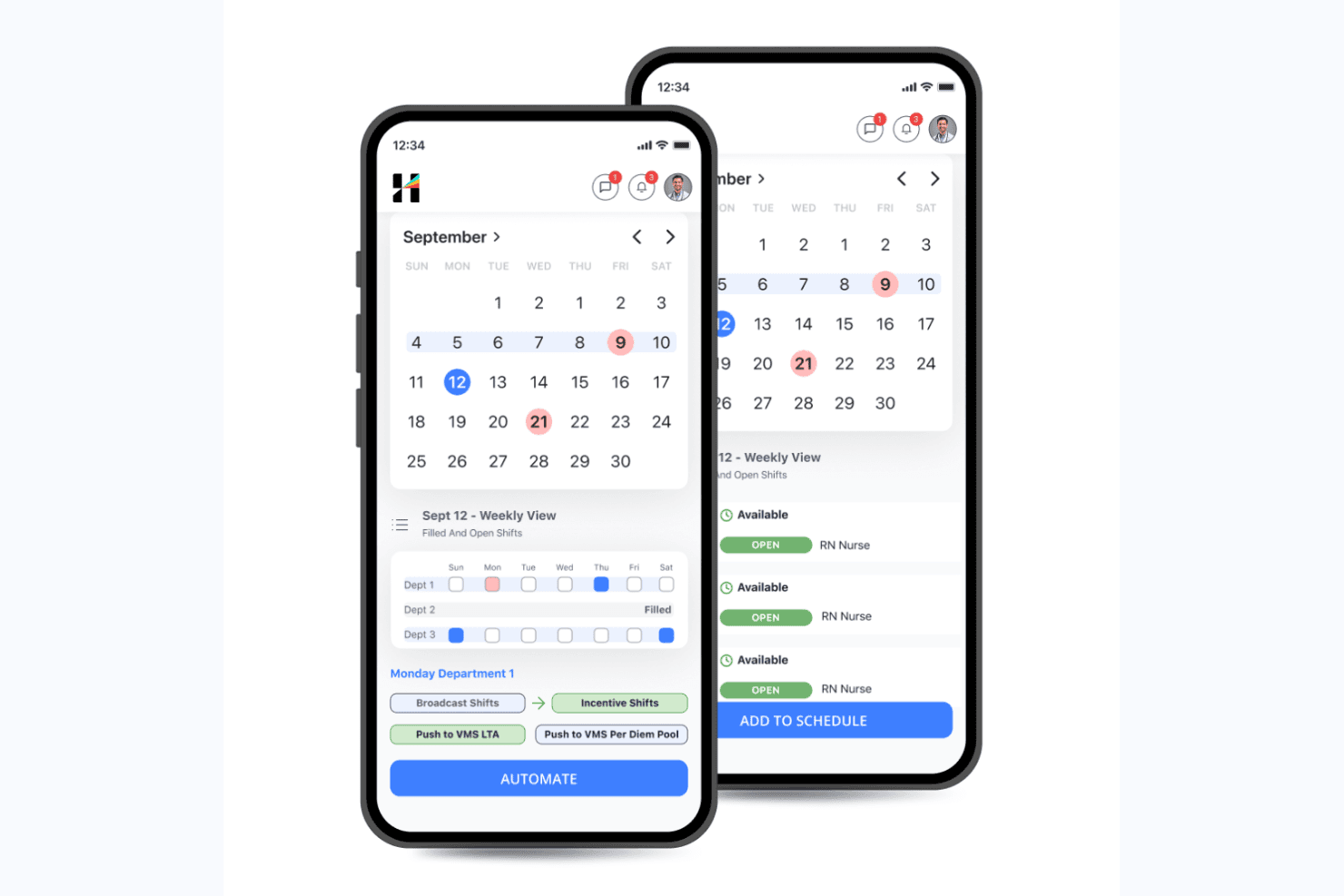
Hallmark Health Care Solutions lets managers schedule and automate open nursing shifts. Hallmark Health Care Solutions is an enterprise nurse scheduling and workforce management platform that combines AI-driven shift scheduling, internal float pool management, vendor management for external agencies, credential tracking, and predictive demand forecasting.
Who Is Hallmark Health Care Solutions Best For?
Hallmark is a strong fit for large hospitals and multi-hospital health systems that need to manage employed nurses, float pool staff, and external agency workers from a single platform.
Why I Picked Hallmark Health Care Solutions
Hallmark earns its spot on my shortlist because it's the only nurse scheduling platform I've found that manages employed nurses, internal float pools, and 750+ external staffing agencies from a single system. I particularly like the AI-Enabled Resourcing module, which compares internal versus agency labor in real time using acuity, HPPD, and census data, so your team isn't guessing which option is faster or cheaper to fill a shift. The Vendor Management System handles competitive bidding and fulfillment tracking across agencies without requiring separate tools.
Hallmark Health Care Solutions Key Features
- Demand forecasting: An AI model uses census data, callout patterns, seasonal trends, and length-of-stay metrics to project staffing needs at the unit and service line level weeks or months out.
- Talent intelligence: Captures individual nurse preferences for shift, location, and assignment type, then factors those preferences into AI-driven scheduling decisions alongside availability and skills.
- Credential expiration monitoring: Automatically tracks credential and licensure deadlines for current, active, and past workers, with proactive alerts and exception management built in.
- Executive workforce analytics: Dashboards consolidate overtime spend, agency utilization, compensation alignment, and patient outcomes into a single view designed for senior nursing and finance leadership.
Hallmark Health Care Solutions Integrations
Hallmark lists integrations with Epic, Cerner, Workday, UKG, QGenda, Okta, ADP, Paycom, Oracle, and SAP Concur. It supports API, Webhooks, EDI, HL7, FHIR, and SFTP connections for custom data exchanges.
Pros and Cons
Pros:
- Executive dashboards consolidate labor and patient data
- Unified internal float pool and agency management
- AI-driven staffing meets HPPD and acuity rules
Cons:
- Very few published peer user reviews
- No public pricing or free trial offered
Learn more about Hallmark Health Care Solutions: Best for enhancing team communication through a unified platform
- 14-day free trial + free demo available
- From $5/user/month
Visit WebsiteCustomer Rating:4.6/5
Deputy's scheduling feature screenshot. Deputy, as a comprehensive nurse scheduling software, is designed to simplify workforce management and enhance team communication. It facilitates communication within a unified platform, making it the go-to solution for healthcare settings that prioritize smooth and effective interaction among staff.
Why I Picked Deputy:
Deputy caught my eye as an impressive scheduling tool that goes beyond just slotting shifts. Its commitment to fostering communication in healthcare teams through its platform made it stand out. Given the often frantic and high-stakes environment in healthcare, facilitating seamless communication between team members can significantly boost efficiency and morale.
This is precisely why I chose Deputy - it recognizes and addresses this often overlooked aspect of nurse scheduling.
Standout Features and Integrations:
With Deputy, not only can you create and share schedules easily, but you can also manage leave requests, track time and attendance, and even share instant updates with your team. The real-time communication feature makes it an ideal tool for nursing teams that need to stay connected and informed.
Key integrations include payroll systems like ADP and Gusto, HR platforms like BambooHR, and point-of-sale systems like Square and Vend.
Pros and Cons
Pros:
- Broad range of integrations with popular payroll and HR systems
- Easy-to-use interface that simplifies scheduling tasks
- Robust communication tools to ensure effective team coordination
Cons:
- Customer support can sometimes be slow to respond
- Limited customizability in comparison to some other tools on this list
- Advanced features are only available at a higher price tier
Learn more about Deputy: Best for facilitating mobile workforce management
- Free demo available
- Pricing upon request
Visit WebsiteCustomer Rating:4.2/5
Skedulo analytics dashboard Skedulo is a scheduling software designed to streamline mobile workforce management. It provides businesses with comprehensive tools to schedule, track, and manage their on-the-go employees, making it well-suited for industries reliant on field operations.
Why I Picked Skedulo:
In reviewing various scheduling tools, I picked Skedulo for its robust focus on mobile workforce management. Compared to other options, it provides specific features that cater to field operations, such as location-based scheduling and mobile job tracking.
I determined Skedulo to be best for facilitating mobile workforce management due to its comprehensive approach to mobile work coordination.
Standout Features and Integrations:
Key features of Skedulo include location-based scheduling, real-time visibility into job status, and robust analytics for performance assessment. These features are vital for businesses with significant field operations.
Skedulo integrates well with various CRM, HRM, and payroll systems. This includes prominent platforms such as Salesforce, providing businesses with the flexibility to incorporate Skedulo into their existing workflows.
Pros and Cons
Pros:
- Provides real-time visibility into job status for better management
- Integrates with popular CRM, HRM, and payroll systems, allowing for smooth workflow management
- Robust focus on mobile workforce management, ideal for businesses with significant field operations
Cons:
- Features may be overkill for businesses without a significant mobile workforce
- The platform may have a learning curve for those unfamiliar with such systems
- The starting price might be steep for small businesses or startups
Learn more about Skedulo: Best for remote access to schedules across multiple devices
- From $25/month (billed annually)
Visit WebsiteCustomer Rating:4.5/5
A screenshot in ScheduleAnywhere where employees' schedule can be seen. ScheduleAnywhere is a scheduling solution that provides accessible and easy-to-use features for scheduling staff across various industries. Its capacity to offer remote access to schedules across multiple devices underpins its capability to cater to modern, agile workplaces where mobility and flexibility are vital.
Why I Picked ScheduleAnywhere:
I picked ScheduleAnywhere for its robust mobile compatibility. This tool stands out because it allows employees and managers to access schedules on the go, which I found extremely important in today's dynamic work environments. In my judgment, ScheduleAnywhere is the best for enabling remote access to schedules across multiple devices.
Standout Features and Integrations:
ScheduleAnywhere offers vital features such as shift rotations, schedule copying, and multi-view options for different locations and departments. Additionally, mobile compatibility is an essential feature that facilitates remote access to schedules.
The tool provides essential integrations with payroll systems, which greatly simplifies the process of accounting for employee hours and overtime.
Pros and Cons
Pros:
- Features like schedule copying and shift rotations add convenience
- Integration with payroll systems aids in accounting for employee hours
- Mobile compatibility enables access to schedules on the go
Cons:
- The user interface might seem outdated compared to other modern scheduling tools
- Lack of a free version could deter potential users
- Higher price point may not be ideal for smaller organizations
Learn more about ScheduleAnywhere: Best for managing large, complex workforce schedules
- Free demo available
- Pricing upon request

Here's an overview of Shiftboard's all-device screenshot showing the published schedule dashboard. Shiftboard is a robust nurse scheduling software designed to handle the complexities of large workforce schedules. It expertly accommodates intricate rotations, variable shifts, and diverse skill sets, making it an optimal choice for larger healthcare institutions or settings with complex staffing needs.
Why I Picked Shiftboard:
When selecting this tool, I appreciated Shiftboard's exceptional handling of large, intricate workforce schedules. Compared to other options, it effectively stands out for its ability to seamlessly manage and navigate complexity.
I firmly believe that Shiftboard is "Best for managing large, complex workforce schedules" due to its comprehensive scheduling capabilities, robust features, and adaptability to diverse staffing requirements.
Standout Features and Integrations:
Shiftboard shines with its dynamic scheduling capabilities, including its ability to auto-generate schedules, manage overtime, and facilitate quick shift trades. Its demand-based scheduling is a major boon for large teams with variable staffing needs.
As for integrations, Shiftboard offers excellent compatibility with a wide range of systems. Key integrations include HR and payroll systems like ADP and Quickbooks, enhancing the end-to-end management of your workforce.
Pros and Cons
Pros:
- Advanced scheduling features enhance efficiency
- Integrates smoothly with HR and payroll systems
- Exceptional at managing complex staffing needs
Cons:
- The user interface may require some learning for optimal utilization
- Some features may be excessive for smaller healthcare settings
- Higher starting price compared to some alternatives
Learn more about Shiftboard: Best for addressing staffing challenges and reducing labor costs
- Free demo available
- Pricing upon request

OnShift's scheduling dashboard view OnShift is a human capital management software designed specifically for the healthcare industry, offering an array of features that address common staffing challenges and help reduce labor costs. It caters to organizations that deal with high employee turnover rates and those looking to maintain staffing levels while managing expenses.
Why I Picked OnShift:
I chose OnShift for its industry-specific approach to staffing challenges. It stands out for its attention to factors that particularly impact the healthcare industry, such as high turnover and fluctuating demand. Based on my analysis and comparisons, I determined that OnShift is best for addressing staffing challenges and reducing labor costs, thanks to its predictive and proactive management features.
Standout Features and Integrations:
OnShift provides notable features like predictive scheduling, employee engagement tools, and a recruitment platform to ensure staffing needs are met efficiently. It also offers proactive overtime control to manage labor costs effectively.
OnShift integrates with a range of payroll and HR systems, making it a versatile solution that can adapt to various administrative structures.
Pros and Cons
Pros:
- Offers integrations with multiple payroll and HR systems
- Employee engagement tools for improved morale and reduced turnover
- Predictive scheduling and proactive overtime control for cost-effectiveness
Cons:
- The user interface might require a learning curve for those unfamiliar with such systems
- The industry-specific approach might limit its applicability to non-healthcare industries
- Lack of transparent pricing information may deter potential users
Learn more about OnShift: 10Best for simplified shift planning and time tracking
Sling
- Free trial + free plan available
- From $1.70/user/month (billed annually)

Take a look at Sling's scheduling feature. Sling is a workforce management software that centralizes scheduling, time tracking, and employee coordination. Designed with ease of use in mind, it simplifies shift planning and time tracking, making it an excellent tool for businesses wanting to manage these tasks efficiently.
Why I Picked Sling:
Sling captured my attention with its focus on simplicity and ease of use in shift planning and time tracking. Its clean, intuitive interface sets it apart from other scheduling tools that can often seem overwhelming. I selected Sling as the best tool for simplified shift planning and time tracking due to its user-friendly design and focus on these core features.
Standout Features and Integrations:
Sling offers a robust set of features, including a built-in time clock, employee availability settings, and an efficient shift planning module. The time tracking component is particularly useful, allowing managers to monitor work hours and overtime accurately.
When it comes to integrations, Sling can be paired with multiple payroll software platforms to ensure a smooth transition from scheduling and time tracking to payroll processing.
Pros and Cons
Pros:
- Effective integration with payroll software
- Built-in time clock with overtime monitoring
- User-friendly interface makes shift planning and time tracking simple
Cons:
- The free plan is fairly limited, necessitating an upgrade for more comprehensive needs
- Lacks some of the advanced customization options found in competitors
- The annual billing cycle may not be preferable for all businesses
Learn more about Sling:
Annen programvare for sykepleierturnus
Her er noen flere alternativer for programvare for sykepleierturnus som ikke kom med på kortlisten, men som likevel er verdt å se nærmere på:
- 11TCP SoftwareBest for integrating with existing HR systems seamlessly
- 12Schedule360Best for advanced configurability and scalability options
- 13NurseGridBest for fostering nurse engagement and work-life balance
- 14ShiftWizardBest for reducing overtime with efficient labor management
- 15eScheduleBest for streamlining operations with custom automation features
- 16Deel HRBest for creating schedule policies
- 17RotageekBest for optimizing staffing with AI-powered scheduling
- 18Buddy PunchBest for drag-and-drop shift scheduling
- 19StaffScheduleCareGood for extensive staff scheduling in care environments
How I Evaluate Nurse Scheduling Software
I split my evaluation into two layers: the baseline capabilities a tool must have—like shift rotation and credential tracking—and the differentiators that set the best options apart.
Core Functionality (Table Stakes For This List)
When I'm selecting tools for my list, I rank each one on a scale from 0 (does not offer the functionality) to 5 (excels in this area) for each core functionality listed below. Then, I calculate the tool's total score into a percentage. Each tool needs to achieve a minimum total score of 65% to be considered for inclusion.
- Shift Scheduling & Rotations: I look for tools that handle complex rotating patterns, night shifts, and multi-unit coverage without requiring managers to rebuild schedules each period.
- Self-Service Shift Management: Staff should be able to request PTO, pick up open shifts, and initiate swaps from a mobile app rather than calling the charge nurse.
- Credential & Compliance Tracking: Each tool should store nursing licenses and certifications with expiration tracking so unqualified staff aren't accidentally scheduled.
- Staffing Ratio & Coverage Rules: I check whether the platform enforces nurse-to-patient ratios and skill-mix rules per unit rather than leaving coverage gaps to manual oversight.
- Time, Attendance & Payroll Integration: The tool should capture clock-in/out data and connect to payroll systems to reconcile overtime, shift differentials, and worked hours.
- Automated Notifications & Alerts: I evaluate how the platform pushes open-shift alerts, schedule changes, and coverage gap warnings through SMS, email, or push notifications.
Once I have a list of tools that meet this criteria, I consider what sets each platform apart.
Differentiating Factors (What Sets Vendors Apart)
Here's how I compare and contrast different vendors:
Standout Features
Acuity-based staffing is a big differentiator—I look for tools that adjust assignments based on real-time patient severity, not just headcount. Fatigue management matters too, especially for units running 12-hour shifts; the best platforms flag unsafe consecutive stretches before they happen. I also evaluate predictive demand forecasting. Tools that use historical census data to project staffing needs weeks ahead help managers avoid last-minute scrambles.
Beyond Features
Healthcare ecosystem integrations are one of the first things I check. A scheduling tool that connects to your EHR for real-time census data and syncs with payroll platforms like UKG or ADP saves hours of manual reconciliation each pay period. Compliance also carries real weight—I evaluate whether a platform meets HIPAA standards and supports role-based access for PHI. Finally, deployment fit matters. A five-location clinic network and a solo practice have very different needs, so I look at how pricing and scalability flex across practice sizes.
Slik velger du programvare for sykepleierturnus
Det er lett å gå seg vill i lange funksjonslister og kompliserte prisstrukturer. For å hjelpe deg med å holde fokus mens du går gjennom den unike prosessen med å velge programvare, får du her en sjekkliste over faktorer du bør ha i tankene:
| Faktor | Hva du bør vurdere |
|---|---|
| FaktorSkalerbarhet | Hva du bør vurdereKan programvaren håndtere vekst i antall ansatte? Kontroller om den støtter flere lokasjoner eller avdelinger, og om prisen justeres når teamet utvides. |
| FaktorIntegrasjoner | Hva du bør vurdereKan den integreres med eksisterende systemer, for eksempel lønns- og HR-programvare? Sørg for at den støtter verktøyene du allerede bruker, slik at du unngår manuell dataregistrering. |
| FaktorTilpasningsmuligheter | Hva du bør vurdereKan du tilpasse programvaren til turnusreglene og retningslinjene dine? Se etter muligheter for å justere maler eller opprette tilpassede arbeidsflyter. |
| FaktorBrukervennlighet | Hva du bør vurdereEr grensesnittet intuitivt for alle brukere? Vurder om de ansatte trenger omfattende opplæring, eller om de raskt kan ta det i bruk med minimal veiledning. |
| FaktorImplementering og oppstart | Hva du bør vurdereHvor lang tid tar det å komme i gang? Kontroller om det finnes ressurser som opplæringsvideoer eller guidede omvisninger, slik at teamet kommer smidig i gang. |
| FaktorKostnad | Hva du bør vurdereHva er de totale eierkostnadene? Se utover listeprisen. Ta hensyn til skjulte gebyrer for ekstra funksjoner eller brukerstøtte, og sammenlign årlige og månedlige abonnementer. |
| FaktorSikkerhetstiltak | Hva du bør vurdereEr programvaren i samsvar med regelverket for databeskyttelse? Sørg for at den har kryptering, tilgangskontroller og regelmessige sikkerhetsoppdateringer for å beskytte sensitive personopplysninger om ansatte. |
Hva er programvare for sykepleierturnus?
Programvare for vaktplanlegging av sykepleiere er et verktøy utviklet for å administrere og organisere sykepleiervakter og arbeidsplaner. Administratorer i helsetjenesten og sykepleieledere bruker vanligvis disse verktøyene til å fordele personalet effektivt og sikre overholdelse av arbeidslovgivningen. Automatisert planlegging, bytte av vakter og varsler i sanntid bidrar til å redusere den administrative arbeidsmengden og forbedre vaktdekningen. Alt i alt forbedrer disse verktøyene den operative effektiviteten og sikrer bedre pasientbehandling gjennom optimal personalstyring.
Funksjoner
Når du velger programvare for vaktplanlegging av sykepleiere, bør du se etter følgende viktige funksjoner:
- Automatisert planlegging: Generer automatisk vaktplaner basert på personalets tilgjengelighet og preferanser, slik at man reduserer manuelle feil og sparer tid.
- Bytte av vakter: La sykepleiere enkelt bytte vakter, slik at dekningen opprettholdes samtidig som personlige behov ivaretas.
- Varsler i sanntid: Send umiddelbare varsler til personalet om endringer i arbeidsplanen eller kommende vakter, slik at alle holdes informert.
- Oppfølging av etterlevelse: Følg med på overholdelsen av arbeidslovgivning og interne retningslinjer for å unngå juridiske problemer og sikre rettferdig planlegging.
- Mobiltilgang: Gjør det mulig for personalet å se og administrere arbeidsplanene sine underveis via mobile enheter for større fleksibilitet.
- Administrasjon av tilgjengelighet: Hold oversikt over når personalet er tilgjengelig for arbeid, slik at det blir enklere å fylle vakter og håndtere forespørsler om fri.
- Tilpassbare maler: Bruk maler til raskt å opprette arbeidsplaner som passer bestemte avdelingsbehov eller vaktmønstre.
- Integrasjonsmuligheter: Koble til eksisterende systemer som lønns- og HR-programvare for å effektivisere dataflyten og redusere administrative oppgaver.
- Rapporteringsverktøy: Generer rapporter om planleggingsmålinger for å analysere bemanningseffektiviteten og ta informerte beslutninger.
- Brukertillatelser: Kontroller tilgangen til planleggingsdata og verktøy basert på personalets roller for å opprettholde sikkerhet og dataintegritet.
Fordeler
Implementering av programvare for vaktplanlegging av sykepleiere gir flere fordeler for teamet og virksomheten din. Her er noen av fordelene du kan se frem til:
- Bedre effektivitet: Automatisert planlegging reduserer tiden som brukes på manuelle oppgaver, slik at personalet kan konsentrere seg om pasientbehandling.
- Forbedret kommunikasjon: Varsler i sanntid holder alle oppdatert om endringer i arbeidsplanen og reduserer misforståelser.
- Bedre etterlevelse: Oppfølgingsverktøy sikrer at arbeidsplanene følger arbeidslovgivning og interne retningslinjer, og minimerer juridisk risiko.
- Økt fleksibilitet: Bytte av vakter og mobiltilgang gjør det mulig for personalet å administrere arbeidsplanene sine på en praktisk måte, noe som forbedrer balansen mellom arbeid og fritid.
- Datadrevne beslutninger: Rapporteringsverktøy gir innsikt i bemanningsmønstre og hjelper deg med å gjøre informerte justeringer for å forbedre driften.
- Kostnadsbesparelser: Effektiv planlegging og integrasjon med lønnssystemer bidrar til å kontrollere arbeidskraftkostnadene og redusere administrasjonskostnadene.
Kostnader & priser
Valg av programvare for vaktplanlegging av sykepleiere krever en forståelse av de ulike prismodellene og abonnementene som er tilgjengelige. Kostnadene varierer basert på funksjoner, teamstørrelse, tillegg og mer. Tabellen nedenfor oppsummerer vanlige abonnementer, gjennomsnittsprisene deres og typiske funksjoner som er inkludert i programvareløsninger for vaktplanlegging av sykepleiere:
Sammenligningstabell for programvare for vaktplanlegging av sykepleiere
| Abonnementstype | Gjennomsnittspris | Vanlige funksjoner |
|---|---|---|
| AbonnementstypeGratisabonnement | Gjennomsnittspris$0 | Vanlige funksjonerGrunnleggende planlegging, begrenset brukertilgang og grunnleggende rapportering. |
| AbonnementstypePersonlig abonnement | Gjennomsnittspris$5-$25/bruker/måned | Vanlige funksjonerAutomatisert planlegging, bytte av vakter og mobiltilgang. |
| AbonnementstypeBedriftsabonnement | Gjennomsnittspris$30-$60/bruker/måned | Vanlige funksjonerVarsler i sanntid, oppfølging av etterlevelse og tilpassbare maler. |
| AbonnementstypeVirksomhetsabonnement | Gjennomsnittspris$70-$100/bruker/måned | Vanlige funksjonerAvansert rapportering, integrasjonsmuligheter og dedikert brukerstøtte. |
Vanlige spørsmål om programvare for sykepleierturnus
Her er noen svar på vanlige spørsmål om programvare for sykepleierturnus:
Kan programvare for sykepleierturnus håndtere roterende skiftmønstre?
Ja, de fleste programmer for sykepleierturnus kan håndtere roterende skift, for eksempel syklusene dag–kveld–natt. Du kan sette opp mønstre som gjentas over dager eller uker. Systemet lar deg vanligvis tilordne ansatte til disse mønstrene eller justere dem manuelt ved behov. Det hjelper deg med å holde oversikt over bemanningen uten å måtte starte fra begynnelsen hver uke.
Hvordan påvirker endringer i regler for etterlevelse turnusplanen?
Hvis reglene endres, må du oppdatere innstillingene i turnusplanleggingssystemet. Programvaren bruker deretter de oppdaterte reglene til å markere konflikter eller forhindre ugyldige tildelinger. Hvis for eksempel pauseregler eller hvileperioder endres, bør systemet gjenspeile dette i fremtidige turnusplaner. Det er best å gjennomgå innstillingene hver gang en regel eller et retningslinje endres.
Kan man begrense hvor mange nattevakter en sykepleier får tildelt?
Ja, du kan vanligvis sette grenser for antall nattevakter per person i løpet av en bestemt periode. Programvaren kontrollerer disse reglene når turnusplanen genereres eller vakter tildeles manuelt. På den måten ender ingen opp med for mange uønskede vakter på rad. Det hjelper deg også med å følge regler i tariffavtaler eller andre arbeidsavtaler.
Kreves det opplæring for å bruke programvare for sykepleierturnus?
Det meste av programvaren for sykepleierturnus er utviklet for å være brukervennlig, men noe opplæring kan være nyttig, spesielt for team som er nye innen digital turnusplanlegging. Mange leverandører tilbyr opplæringsressurser som videoer, webinarer og produktvisninger. Ved å benytte deg av disse ressursene kan du forkorte læringskurven og sørge for at teamet bruker programvaren effektivt.
Hvordan kan programvare for sykepleierturnus forbedre etterlevelsen av regler?
Programvare for sykepleierturnus kan bidra til bedre etterlevelse ved å automatisere oppfølgingen av turnusplanen og varsle om mulige brudd på arbeidsrettslige regler eller interne retningslinjer. Den kan generere rapporter som hjelper deg med å overvåke etterlevelsen og gjøre nødvendige justeringer raskt. Denne funksjonen er spesielt nyttig for større organisasjoner med komplekse turnusbehov.