

HIPAA-kompatibel transkripsjonsprogramvare er en type medisinsk dokumentasjonsverktøy som er utviklet for å konvertere tale eller lyd til tekst på en sikker måte, samtidig som alle HIPAA-krav til personvern og sikkerhet oppfylles. Hvis du leter etter måter å beskytte pasientdata, redusere dokumentasjonsfeil og overholde strenge helsereguleringer på, er det avgjørende å velge riktig transkripsjonsprogramvare. Denne listen hjelper deg med å sammenligne ledende HIPAA-kompatible alternativer for 2026, slik at du kan finne en løsning som dekker dine kliniske, administrative og regulatoriske behov.
Why Trust Our Software Recommendations
6,700+
Reviews
20
Industry experts
16+
Evaluation factors
14
Years
Our team has been testing and reviewing software since 2012. As medical practice leaders ourselves, we know how difficult—and important—it is to choose the right software.
For this guide, we evaluated tools using hands-on testing and independent research, scoring tools using our selection criteria.
Our reviews reflect our human editorial judgment, not a sales pitch.
Sammenligningstabell for HIPAA-kompatibel transkripsjonsprogramvare
Denne sammenligningstabellen oppsummerer prisdetaljene for mine beste utvalgte HIPAA-kompatible transkripsjonsprogrammer:
| Tool | Best For | Trial Info | Price | ||
|---|---|---|---|---|---|
| 1 | Best for automated waitlist and cancellation fills | 14-day free trial | From $19/month | Website | |
| 2 | Best for centralized practice operations | Free demo available | From $100/user/month (billed annually) | Website | |
| 3 | Best for therapist-friendly documentation | 14-day free trial | From $19.99/month | Website | |
| 4 | Best for hands-free clinical dictation | 7-day free trial | From $39/month | Website | |
| 5 | Best for scalable voice-to-text integration | Free plan available | Pricing upon request | Website | |
| 6 | Best for meeting documentation automation | Free plan + free demo available | From $10/user/month (billed annually) | Website | |
| 7 | Best for real-time collaboration with teams | 7-day free trial + free demo available | From $19.99/month (billed annually) | Website | |
| 8 | Best for automated conversation analytics | 30-day free trial available | From $1/session | Website | |
| 9 | Best for human-verified medical accuracy | Not available | From $0.07/min | Website | |
| 10 | Best for specialty medical fields | Free trial available | Pricing upon request | Website |


Anmeldelser av den beste HIPAA-kompatible transkripsjonsprogramvaren
Nedenfor finner du mine detaljerte oppsummeringer av den beste HIPAA-kompatible transkripsjonsprogramvaren som kom med på kortlisten min. Anmeldelsene mine gir en detaljert oversikt over funksjonene, integrasjonene og de beste bruksområdene for hver plattform, slik at du kan finne den som passer best for deg.
 Best for automated waitlist and cancellation fills
- 14-day free trial
- From $19/month
Visit WebsiteCustomer Rating:4.7/5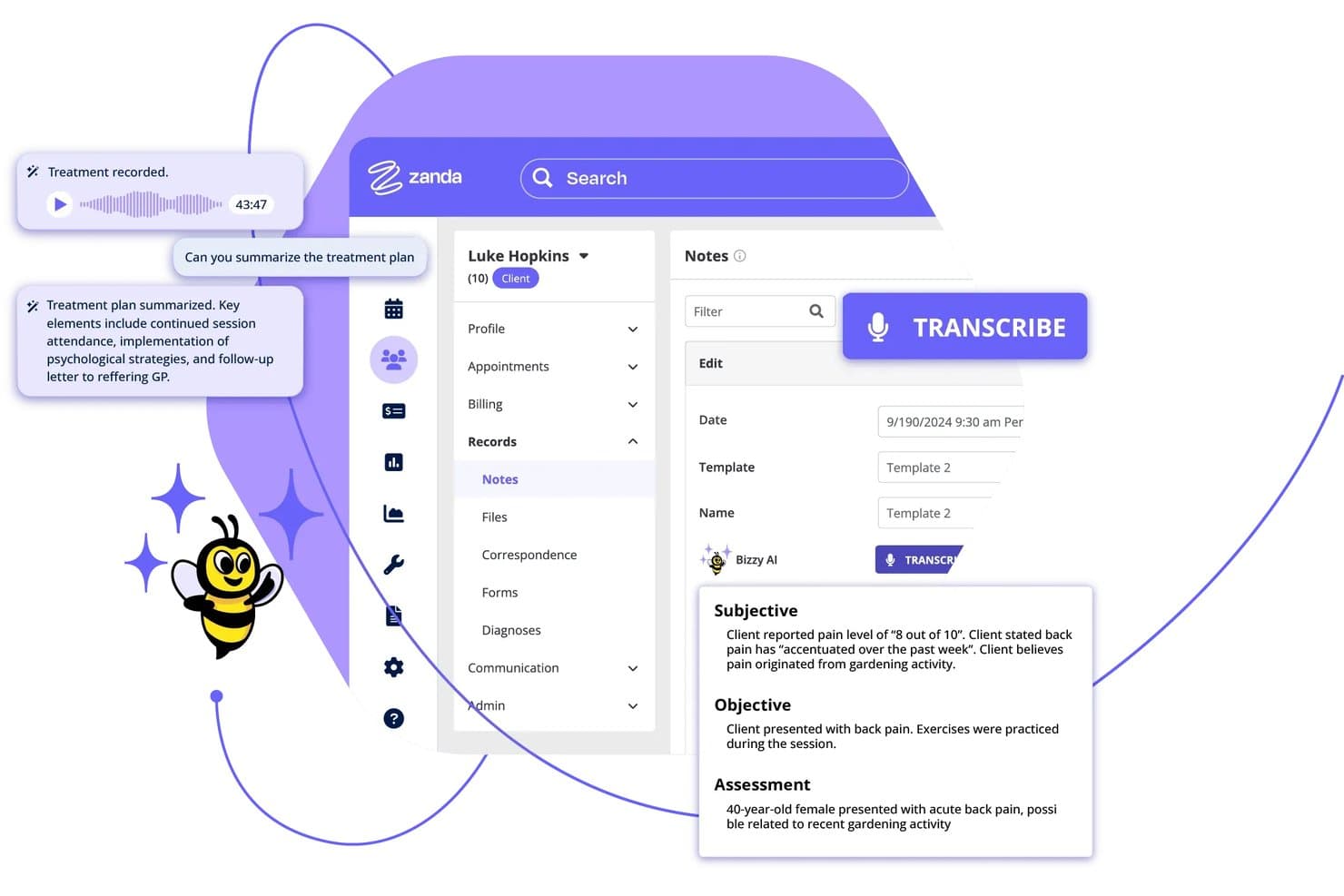
Zanda offers an AI-powered transcription feature called Bizzy AI that automatically converts session recordings into structured clinical notes with Subjective, Objective, and Assessment sections. Zanda is a HIPAA-compliant practice management platform for allied health practitioners that combines AI session transcription, appointment scheduling, clinical notes, billing, and client communication in one system.
Who Is Zanda Best For?
Zanda is a strong fit for solo and small-group allied health practitioners—such as therapists, psychologists, and physiotherapists—who want scheduling and AI transcription in a single platform.
Why I Picked Zanda
I picked Zanda as one of the best because of how it handles late cancellations. When a slot opens, it automatically prompts you to SMS the next waitlisted client and fill it before the gap costs you a session. I also like that BizzyAI: Scribe, Zanda's HIPAA-compliant transcription tool, sits inside the same platform, so every recovered appointment flows into AI-drafted clinical notes. Client audio is never used to train AI models, which matters under HIPAA.
Zanda Key Features
- Integrated AI transcription: Accurately transcribes client sessions directly within your calendar and notes workflow.
- Client portal: Enables clients to manage appointments, complete intake forms, and access communications securely.
- Role-based access controls: Lets you define user permissions to maintain strict HIPAA compliance for sensitive records.
- Paperless intake forms: Collects client demographic and assessment data electronically before sessions.
Zanda Integrations
Zanda offers native integrations with Stripe, Zoom, Xero, Mailchimp, Physitrack, Outlook, Google Calendar, and more.
Pros and Cons
Pros:
- Session notes organized alongside appointment records
- Instant waitlist notifications for canceled appointments
- Automated AI-powered clinical session transcription
Cons:
- Limited advanced voice editing controls
- No offline transcription mode available
Learn more about Zanda: Best for centralized practice operations
- Free demo available
- From $100/user/month (billed annually)
Visit WebsiteCustomer Rating:5/5
DocVilla centralizes patient records, SOAP notes, and clinical workflows. DocVilla is a HIPAA-compliant, cloud-based EHR platform with built-in AI medical dictation, speech-to-text transcription, clinical documentation, practice management, medical billing, and telehealth—all within a single system.
Who Is DocVilla Best For?
DocVilla is a good fit for independent and small-to-mid-size medical practices that want EHR, billing, scheduling, and dictation in one platform.
Why I Picked DocVilla
I picked DocVilla as one of the best because I love how it's genuinely built around the idea that a practice shouldn't need five different tools to run. The dictation feature ties directly into customizable SOAP note templates, so you can dictate an encounter and have it populate the right fields in real time, rather than transcribing into a blank text box and reformatting later. What makes that especially useful in a busy clinic is the role-based access control and audit trail built into the same system, so every dictated note is HIPAA-compliant without any extra steps. I also think the cross-device dictation (desktop, tablet, smartphone) is genuinely practical, not a marketing checkbox, especially for providers moving between exam rooms or managing notes after telehealth visits.
DocVilla Key Features
- Speech-to-text dictation: Built-in HIPAA compliant speech-to-text converts spoken notes directly into the EHR without a third-party app.
- HL7 FHIR integration: Supports health information exchange so dictated records move across systems without manual data re-entry.
- Role-based access controls: Admins can assign permissions by provider role, limiting who can view or edit transcribed patient records.
- Lab result documentation: Lab orders and results tie directly into the patient record alongside dictated notes, keeping the full clinical picture in one place.
DocVilla Integrations
DocVilla offers native integrations with Fullscript, MedlinePlus, AccuReference Medical Lab, Quest Diagnostics, and Vibrant. It supports webhooks, OAuth, and an HL7 FHIR API for custom practice management workflows.
Pros and Cons
Pros:
- Voice command navigation for hands-free use
- Multi-specialty templates for clinical notes
- Direct dictation into patient charts
Cons:
- Heavy local processor demand requirements
- No mobile dictation app available
Learn more about DocVilla: Best for therapist-friendly documentation
- 14-day free trial
- From $19.99/month
Visit WebsiteCustomer Rating:4.5/5
Mentalyc creates AI-powered, compliant therapy notes quickly. Mentalyc is a HIPAA compliant AI documentation platform for mental health professionals that generates clinical notes, treatment plans, and cross-session progress tracking directly from session recordings.
Who Is Mentalyc Best For?
Mentalyc is a strong fit for individual therapists and small mental health practices that want to reduce documentation time without changing how they conduct sessions.
Why I Picked Mentalyc
I picked Mentalyc as one of the best because of how intentionally it's designed around clinical documentation workflows. I particularly like Alliance Genie, which derives therapeutic alliance scores from session content without sending questionnaires to clients. Its cross-session progress tracking also automatically extracts symptoms, goals, and behaviors across sessions and trends them over time. These aren't features you find in standard AI note tools, and they're built directly into the documentation workflow.
Mentalyc Key Features
- Multiple note format support: Generate notes in SOAP, DAP, BIRP, EMDR, and other formats based on your treatment approach.
- Group session notes: Document group therapy sessions with individual client summaries generated from a single recording.
- Supervision note generation: Create supervision notes for student clinicians and supervisors directly within the platform.
- Multi-language transcription: Transcribe and generate notes from sessions conducted in languages other than English.
Mentalyc Integrations
Mentalyc offers direct integrations with six mental health-specific EHRs, including TherapyNotes, ICANotes, TheraNest, Valant, SimplePractice, and TheraBill, plus a Chrome Extension that one-click autofills generated notes into SimplePractice, Jane App, and any other web-based EHR.
Pros and Cons
Pros:
- Audio upload for post-session transcription
- Supports multiple note formats, including DAP
- AI generates behavioural health-specific progress notes
Cons:
- Limited to behavioural health documentation workflows
- No real-time transcription during live sessions
Learn more about Mentalyc: Best for hands-free clinical dictation
- 7-day free trial
- From $39/month
Visit WebsiteCustomer Rating:5/5
Freed AI automates medical charting and transcription for clinicians. Freed AI is an AI-powered medical scribe and clinical dictation platform that converts patient conversations into specialty-specific clinical notes, with built-in coding assistance and EHR push capabilities.
Who Is Freed AI Best For?
Freed AI is built specifically for independent and community-based clinics where clinicians carry both the patient care and documentation load themselves.
Why I Picked Freed AI
I've included Freed AI in my top picks because its ambient listening feature genuinely removes documentation from the clinical encounter. I like that it runs passively in the background on a mobile device during a visit, then generates a specialty-formatted SOAP note the moment the conversation ends. Its custom note style feature lets you train the AI to match your exact documentation preferences, so output doesn't need heavy editing before it hits your EHR.
Freed AI Key Features
- Visit prep summary: Freed auto-generates a summary of the patient's prior visit, last note, and outstanding follow-up items before each appointment.
- Post-visit letter generation: Freed creates referral letters, return-to-work certifications, sick notes, and caregiver letters from the visit context, with 14+ letter types available.
- ICD-10, CPT, and E/M code suggestions: Billing codes appear directly in your Freed note the moment the visit note is complete, with specialty-aware recommendations.
- Patient instructions: Freed converts clinical note content into plain-language patient instructions that are ready to send immediately after the visit.
Freed AI Integrations
Freed AI works with any browser-based EHR through its Chrome extension, with optimized EHR push support for athenahealth, Practice Fusion, eClinicalWorks, Tebra/Kareo, Elation, SimplePractice, Kipu, Optimantra, ModMed, and DrChrono.
Pros and Cons
Pros:
- Patient consent workflow built into the app
- Multi-specialty templates for tailored documentation
- Hands-free SOAP note generation during visits
Cons:
- Limited support for non-English languages
- No offline transcription capability available
Learn more about Freed AI: Best for scalable voice-to-text integration
- Free plan available
- Pricing upon request
Visit WebsiteCustomer Rating:4.6/5
Amazon Transcribe Medical converts clinical speech into searchable text. Amazon Transcribe Medical is an AWS-native automatic speech recognition service built specifically for medical terminology, offering both real-time streaming and batch transcription through a developer API.
Who Is Amazon Transcribe Medical Best For?
Amazon Transcribe Medical is a strong fit for development teams at health systems or digital health companies building voice-enabled clinical applications directly within AWS infrastructure.
Why I Picked Amazon Transcribe Medical
I picked Amazon Transcribe Medical as one of the best because it's built to scale without any infrastructure management on my end. The API handles both real-time streaming and batch transcription, so I can process a single dictation or thousands of patient encounters simultaneously. It's also trained on medical-specific vocabularies across specialties like cardiology and neurology, which cuts down on post-processing corrections that slow clinical documentation down.
Amazon Transcribe Medical Key Features
- HIPAA eligibility under AWS BAA: Amazon Transcribe Medical is covered under the AWS Business Associate Agreement, making it eligible for use with protected health information.
- Speaker diarization: Automatically labels and separates multiple speakers in a recording, useful for capturing multi-provider conversations or patient-clinician interactions.
- Custom vocabulary: Add facility-specific terms, drug names, or rare medical phrases to improve transcription accuracy beyond the default medical model.
- PHI identification: Detects and flags protected health information within transcripts, supporting downstream redaction or compliance workflows.
Amazon Transcribe Medical Integrations
Amazon Transcribe Medical operates as an API-first service connecting natively with AWS ecosystem tools like Amazon Comprehend Medical, Amazon S3, and AWS HealthScribe. An API is available for custom EHR integrations.
Pros and Cons
Pros:
- Automatic redaction of sensitive patient information
- Medical vocabulary tuned for healthcare terminology
- Real-time transcription for live clinical conversations
Cons:
- Limited native integrations with EHR systems
- No built-in human review for accuracy
Learn more about Amazon Transcribe Medical: Best for meeting documentation automation
- Free plan + free demo available
- From $10/user/month (billed annually)

Fireflies offers automated meeting capture and recap controls. Fireflies is an AI meeting assistant for healthcare that transcribes, summarizes, and analyzes clinical conversations with built-in HIPAA compliance, BAAs, private storage, and GPT-4-powered note generation.
Who Is Fireflies Best For?
Fireflies is a strong fit for healthcare teams that conduct a high volume of virtual or in-person consultations and need automated, HIPAA compliant meeting documentation.
Why I Picked Fireflies
I've included Fireflies in my top picks because its approach to meeting documentation automation is genuinely built around clinical workflow, not retrofitted for it. I use the AI Soundbites and AskFred features to pull specific moments from patient consultations without replaying full recordings, which cuts documentation time significantly. Fireflies' zero-day data retention policy is also worth noting: vendors are contractually prohibited from using ePHI for AI model training, which is a meaningful compliance distinction.
Fireflies Key Features
- Real-time transcription: Fireflies generates live transcripts during consultations as the conversation happens, not after.
- Admin access controls: Workspace admins can manage user permissions, control meeting visibility, and restrict access to sensitive recordings.
- Private storage: Consultation data is stored in dedicated, organization-specific cloud storage, separate from shared infrastructure.
- Rules engine: Set automated rules to control how Fireflies joins, routes, or shares specific meeting types across your team.
Fireflies Integrations
Fireflies offers 100+ native integrations, including Zoom, Google Meet, Microsoft Teams, Slack, Salesforce, HubSpot, Notion, Google Docs, Confluence, and RingCentral. It's also available on Zapier and has a GraphQL API for custom integrations.
Pros and Cons
Pros:
- Zero-day ePHI data retention policy
- Speaker identification across multi-person calls
- Automated AI summaries after every consultation
Cons:
- No built-in video recording on lower plans
- Struggles with overlapping speakers or accents
Learn more about Fireflies: Best for real-time collaboration with teams
- 7-day free trial + free demo available
- From $19.99/month (billed annually)

Supanote offers a shared workspace for collaborative clinical documentation. Supanote is a HIPAA compliant AI scribe platform built specifically for mental health professionals, offering session recording, automated clinical note generation across SOAP, DAP, and intake formats, and EHR-compatible exports.
Who Is Supanote Best For?
Supanote is a strong fit for mental health clinicians and therapy practices that need secure, AI-assisted note generation without adding administrative overhead.
Why I Picked Supanote
I've included Supanote in my top picks because it's one of the few HIPAA compliant transcription tools built specifically around team-based mental health practice. Its group practice mode lets multiple clinicians work within a shared workspace, which means supervisors can review and sign off on notes generated by associate therapists. I also like that each clinician can set individual tone and format preferences, so a shared account doesn't mean uniform output. The automatic PII scrubbing from transcripts adds another layer of security when notes pass between team members.
Supanote Key Features
- Multi-format note templates: Generate clinical notes in SOAP, DAP, BIRP, and intake formats depending on session type.
- Live session transcription: Transcribe patient sessions in real time directly through the platform during appointments.
- EHR-compatible export: Export completed notes in formats ready for upload into major electronic health record systems.
- Custom template builder: Create and save note templates tailored to your specific documentation style or specialty requirements.
Supanote Integrations
Supanote offers native integrations with scheduling and billing systems, along with an integrated calendar and document upload portal. An API is available for custom electronic health record (EHR) workflows.
Pros and Cons
Pros:
- HIPAA-compliant cloud storage for all notes
- Accurate multi-speaker transcription in medical settings
- Automated SOAP note generation for clinicians
Cons:
- Occasional transcription errors with strong accents
- Limited EHR integrations compared to competitors
Learn more about Supanote: Best for automated conversation analytics
- 30-day free trial available
- From $1/session

Upheal offers automated conversation analytics and progress notes. Upheal is an AI-native EHR for mental health therapists that combines HIPAA-compliant session transcription, AI-generated clinical notes, conversation analytics, built-in telehealth, and practice management tools in one platform.
Who Is Upheal Best For?
Upheal is a good fit for therapists who want session analytics alongside note generation, particularly those running telehealth practices who want client progress data built into their clinical workflow.
Why I Picked Upheal
I picked Upheal as one of the best because its session analytics go well beyond what other HIPAA-compliant transcription tools offer. Upheal measures talking ratios and client sentiment scores directly from transcribed sessions, giving you quantitative data on session dynamics without any extra steps. Its compliance checker also automatically audits notes against payer standards before you sign, which is a genuinely useful layer of protection I haven't seen built this tightly into a note tool elsewhere.
Upheal Key Features
- AI treatment plan generation: Build SMART treatment plans automatically from past session data, with goal tracking that carries forward across appointments.
- Client portal: Give clients a self-serve space to book sessions, complete intake forms, sign consent documents, and message you securely.
- AI assistant: Use a conversational AI tool to handle practice tasks like scheduling changes, drafting client messages, and pulling up client history.
- Automated superbill generation: Pull diagnostic and procedure codes directly from signed notes to generate and send superbills without manual data entry.
Upheal Integrations
Upheal offers a native Zoom app available through the Zoom App Marketplace, a two-way sync with Google Calendar, and calendar connections with other platforms like Alma and Headway via iCal. Its Chrome extension and Smart Paste feature let you copy AI-generated notes directly into any web-based EHR.
Pros and Cons
Pros:
- Supports both audio and video session recording
- Visualizes session trends and client progress
- AI highlights therapeutic interventions in transcripts
Cons:
- Limited offline access for session documentation
- High local system storage usage
Learn more about Upheal:

TranscribeMe provides a workspace for human-reviewed transcription. TranscribeMe is a HIPAA-compliant transcription service that combines AI-powered speech recognition with human-verified editing to produce medical transcripts across specialties including radiology, pathology, surgery, and psychiatry.
Who Is TranscribeMe Best For?
TranscribeMe is a strong fit for healthcare organizations that handle high-stakes clinical documentation across multiple specialties and need guaranteed accuracy from human reviewers.
Why I Picked TranscribeMe
I picked TranscribeMe as one of the best because the human-verified accuracy layer is genuinely hard to replicate with AI alone. Every transcript goes through multiple levels of review by transcriptionists who pass HIPAA compliance exams and sign BAAs, which matters when a single misheard term in a radiology or surgical note can have clinical consequences. TranscribeMe also handles PHI and PII redaction as part of the workflow, with automatic deletion schedules you can set at 30, 60, or 90 days.
TranscribeMe Key Features
- SFTP secure file transfer: Submit and receive HIPAA-compliant transcripts through a dedicated SFTP account, keeping protected health information out of standard web portals.
- Timestamp and speaker ID tagging: Add timestamps and speaker identification markers to transcripts, available as add-ons at checkout for structured clinical recordings.
- Geofencing for transcriptionist teams: Restrict which transcriptionists work on your files by geographic location or certification level to meet specific compliance requirements.
- Mobile dictation app: Record and upload dictations directly from iOS or Android, with audio files routing automatically to your customer portal for processing.
TranscribeMe Integrations
TranscribeMe doesn't offer native integrations with third-party software. It provides a REST API for custom integrations, letting you upload recordings, create transcription orders, and retrieve output programmatically.
Pros and Cons
Pros:
- Offers strict HIPAA-compliant data handling
- Supports complex medical terminology and jargon
- Human transcriptionists review all medical transcripts
Cons:
- Turnaround times can be slower than AI tools
- Manual file management overhead required
Learn more about TranscribeMe: Best for specialty medical fields
- Free trial available
- Pricing upon request

360 Transcription delivers fast HIPAA-compliant radiology transcription. 360 Transcription is a human-delivered, HIPAA-compliant medical transcription service covering specialty areas like radiology, orthopedics, cardiology, oncology, and surgical notes, with direct EMR and EHR integration.
Who Is 360 Transcription Best For?
360 Transcription is a strong fit for small to mid-size medical practices that need human-verified transcription across high-complexity specialties like radiology, orthopedics, oncology, and cardiology.
Why I Picked 360 Transcription
I've included 360 Transcription in my top picks because its specialty coverage goes deeper than most transcription services I've come across. It has dedicated transcriptionists trained specifically in radiology, orthopedics, oncology, cardiology, and surgical notes, which matters when terminology accuracy directly affects patient records. I also like its IME and QME transcription support, where transcriptionists actively compile multiple dictations and investigative reports into one final document. That level of specialty-specific human oversight is hard to find at this price point.
360 Transcription Key Features
- Speech recognition editing: Transcriptionists review and correct speech-to-text output to reach a documented 99.5% accuracy rate before documents are delivered.
- Stat dictation support: Rush dictations are flagged and returned same-day or next-day, prioritized within the standard workflow.
- WebChartMD platform access: As an official WebChartMD licensee, 360 Transcription gives you access to a dedicated transcription management app for tracking and retrieving documents.
- Medico-legal transcription: Handles workers' compensation reports, malpractice documentation, and other cases that require both medical and legal terminology accuracy.
360 Transcription Integrations
360 Transcription works directly inside your EMR or EHR system, with documented support for Epic, Cerner, eClinicalWorks, NextGen, athenahealth, Centricity, McKesson Paragon, GreenWay PrimeSuite, AdvancedMD, Meditech, PrognoCIS, HealthFusion MediTouch, WebPT, CPSI Evident, and Sage.
Pros and Cons
Pros:
- Direct EMR/EHR delivery of completed files
- Multi-level quality assurance for each transcript
- U.S.-based transcriptionists with specialty expertise
Cons:
- Requires dedicated documentation staff resources
- No AI-powered speech recognition option
Learn more about 360 Transcription:
Annen HIPAA-kompatibel transkripsjonsprogramvare
Her er noen flere alternativer for HIPAA-kompatibel transkripsjonsprogramvare som ikke kom med på kortlisten min, men som likevel er verdt å undersøke:
- 11HealthOrbitBest for EHR-ready data transfer
- 12Ditto TranscriptsBest for rapid turnaround times
- 13HeidiBest for dynamic clinical security monitoring
- 14DeepgramBest for real-time speech engine APIs
- 15BastionGPTBest for privacy-first conversational AI
- 16YUNG SidekickBest for personalized voice assistant tools
- 17Rev AIBest for customizable developer APIs
- 18Blueprint AIBest for structured behavioral health notes
- 19Quill TherapyBest for psychiatric documentation templates
- 20KlarifyBest for Canadian data residency needs
- 21SignalWireBest for secure telehealth integrations
- 22Vero ScribeBest for evidence-cited note generation
How I Evaluate HIPAA Compliant Transcription Software
I split my evaluation into two layers: what a tool must do to safely handle ePHI from patient consultations, and the differentiators that set certain tools apart for clinical documentation.
Core Functionality (Table Stakes For This List)
When I'm selecting tools for my list, I rank each one on a scale from 0 (does not offer the functionality) to 5 (excels in this area) for each core functionality listed below. Then, I calculate the tool's total score into a percentage. Each tool needs to achieve a minimum total score of 70% to be considered for inclusion.
- HIPAA compliance infrastructure: I check whether the vendor offers a signed BAA and maintains safeguards like encryption at rest and in transit, which are foundational for handling ePHI from patient encounters.
- Transcription accuracy: Clinical conversations include drug names, diagnostic codes, and anatomical terms, so I evaluate how well each tool handles medical vocabulary without heavy manual correction.
- Speaker identification: Multi-party consultations require clear attribution, so the tool should distinguish between clinicians, patients, and other participants in the transcript.
- Access and permission controls: I look for role-based permissions that let admins restrict who can view, share, or download recordings and transcripts containing sensitive patient information.
- Automated meeting summaries: After a consultation wraps, the tool should generate structured notes or summaries that capture key discussion points, action items, and follow-ups.
- Audit logging: Tracking who accessed a transcript and when matters for compliance reviews, so I evaluate whether the platform maintains detailed activity logs.
- Data storage and retention policies: I look at where recordings and transcripts are stored, whether the vendor offers region-specific or private storage, and how deletion policies align with organizational data governance requirements.
Once I have a list of tools that meet this criteria, I consider what sets each platform apart.
Differentiating Factors (What Sets Vendors Apart)
Here's how I compare and contrast different vendors:
Standout Features
Custom medical vocabulary training matters because it lets the tool learn specialty-specific terminology your clinicians actually use, rather than relying on a generic dictionary. I also evaluate whether a platform offers direct EHR integration, since pushing structured notes into systems like Epic or Cerner removes a manual step from the documentation workflow. Smart search across past transcripts is another differentiator, letting clinicians locate specific patient discussions by keyword or topic without scrolling through full recordings.
Beyond Features
Vendor compliance history is something I evaluate closely, including whether a vendor has maintained its BAA terms consistently and how transparent they are about incident response procedures. Customer support responsiveness also carries weight, especially for clinical teams that can't afford delays when a recording fails mid-consultation. I look at onboarding resources too, because a platform that offers guided setup for admin controls and permission structures saves your IT team from building those workflows from scratch.
Slik velger du HIPAA-kompatibel transkripsjonsprogramvare
Det er lett å gå seg vill i lange funksjonslister og kompliserte prismodeller. For å hjelpe deg med å holde fokus mens du går gjennom den unike prosessen med å velge programvare, får du her en sjekkliste over faktorer du bør ha i bakhodet:
| Faktor | Hva du bør vurdere |
|---|---|
| FaktorSkalerbarhet | Hva du bør vurdereKan verktøyet håndtere konsultasjonsmengden etter hvert som praksisen vokser, på tvers av flere behandlere eller lokasjoner? |
| FaktorIntegrasjoner | Hva du bør vurdereKan plattformen kobles til dine eksisterende systemer for elektroniske pasientjournaler, telehelse eller timeplanlegging uten tungvinte omveier? |
| FaktorTilpasningsmuligheter | Hva du bør vurdereKan du tilpasse dokumentasjonsmaler eller arbeidsflyter slik at de gjenspeiler dine kliniske spesialiteter og behov? |
| FaktorBrukervennlighet | Hva du bør vurdereHvor raskt kan klinikere lære seg systemet under travle klinikkdager? Test det med en ikke-teknisk bruker før du bestemmer deg. |
| FaktorImplementering og innføring | Hva du bør vurdereHvilken opplæring og støtte ved oppsett tilbyr leverandøren, og hvor lang tid tar det før programvaren er klar til daglig bruk? |
| FaktorKostnad | Hva du bør vurdereEr alle HIPAA-pålagte funksjoner inkludert i prisnivået ditt, eller er BAA-dekning og administratorkontroller betalte tillegg? |
| FaktorSikkerhetstiltak | Hva du bør vurdereTilbyr leverandøren dokumentasjon om kryptering, tilgangskontroller og regelmessige sikkerhetsrevisjoner? |
| FaktorEtterlevelseskrav | Hva du bør vurdereKan leverandøren levere en signert BAA og dokumentasjon på regelmessige HIPAA-gjennomganger til revisjonssporet ditt? |
Hva er HIPAA-kompatibel transkripsjonsprogramvare?
HIPAA-kompatibel transkripsjonsprogramvare er et digitalt verktøy som er utviklet for å konvertere kliniske samtaler til skriftlige transkripsjoner, samtidig som strenge personvern- og sikkerhetsstandarder fastsatt av HIPAA oppfylles. Disse plattformene beskytter sensitiv helseinformasjon med sikkerhetstiltak som kryptering, tilgangskontroller og revisjonslogger, og hjelper helseteam med å dokumentere nøyaktig uten å gå på bekostning av pasientenes konfidensialitet.
Funksjoner i HIPAA-kompatibel transkripsjonsprogramvare
Når du velger HIPAA-kompatibel transkripsjonsprogramvare, bør du se etter følgende nøkkelfunksjoner:
- Automatisert transkripsjon: Gjør talte kliniske samtaler om til nøyaktig tekst, reduserer behovet for manuell dataregistrering og støtter rask og pålitelig dokumentasjon.
- Identifikasjon av talere: Skiller mellom flere stemmer under gruppe- eller pasient-behandlersamtaler og tilskriver tydelig dialogen i transkripsjonen.
- Støtte for tilpasset vokabular: Gjør det mulig å laste opp medisinsk terminologi, spesialterminologi eller organisasjonsspesifikke uttrykk for å forbedre transkripsjonsnøyaktigheten i komplekse kliniske samtaler.
- Rollebaserte tilgangskontroller: Lar administratorer bestemme hvem som kan vise, redigere eller eksportere transkripsjoner, slik at riktig sikkerhet og konfidensialitet opprettholdes i behandlingsteamene.
- Total kryptering: Sikrer lydopptak og transkripsjoner både under overføring og ved lagring, og opprettholder samsvar med personvernstandarder for pasienters helsedata.
- Revisjonsspor: Registrerer hver tilgangs-, redigerings- eller eksporthendelse og gir full oversikt ved samsvarsgjennomganger og undersøkelser av hendelser.
- Integrasjon med EHR-systemer: Kobler seg direkte til elektroniske pasientjournalsystemer, slik at klinikere kan knytte transkriberte notater til pasientjournaler med minimalt behov for ekstra trinn.
- Administrasjon av datalagring: Gir kontroll over hvor lenge transkripsjoner oppbevares og når de slettes, og hjelper organisasjoner med å oppfylle lovpålagte eller interne retningslinjer.
- Automatiserte sammendrag: Genererer strukturerte notater fra transkripsjoner og gir klinikere raske oversikter og konkrete neste trinn etter konsultasjoner.
- Støtte for flere språk: Tilbyr transkripsjon og oversettelse på ulike språk, og imøtekommer mangfoldige pasientgrupper og flerspråklige behandlingsteam.
Fordeler med HIPAA-kompatibel transkripsjonsprogramvare
Implementering av HIPAA-kompatibel transkripsjonsprogramvare gir flere fordeler for teamet og virksomheten din. Her er noen av fordelene du kan se frem til:
- Beskyttede pasientdata: Sterk kryptering og tilgangskontroller bidrar til å beskytte sensitive helseopplysninger i alle opptak og transkripsjoner.
- Nøyaktige kliniske journaler: Automatisert transkripsjon og tilpassede vokabularer reduserer feil og fører til pålitelig og omfattende dokumentasjon.
- Effektiviserte dokumentasjonsprosesser: Integrasjon med EHR-systemer og automatiserte sammendrag hjelper klinikere med å bruke mindre tid på papirarbeid og mer tid med pasientene.
- Samsvar som er klart for revisjon: Revisjonsspor og kontrollert datalagring gjør det enklere å dokumentere HIPAA-samsvar under rutinemessige gjennomganger eller undersøkelser.
- Rask innføring for team: Brukervennlig utforming og veiledede oppsettsalternativer gjør at team kan komme i gang med minimale forstyrrelser i den daglige driften.
- Effektivt tverrfaglig samarbeid: Funksjoner for sikker deling gjør det mulig for flere medlemmer av behandlingsteamet å gjennomgå, kommentere eller handle på dokumentasjon raskt.
- Flerspråklig støtte: Innebygd oversettelse og alternativer for flere språk sikrer tydelig kommunikasjon på tvers av ulike pasientgrupper og kliniske team.
Kostnader og priser for HIPAA-kompatibel transkripsjonsprogramvare
Valg av HIPAA-kompatibel transkripsjonsprogramvare krever en forståelse av de ulike prismodellene og abonnementene som er tilgjengelige. Kostnadene varierer basert på funksjoner, teamstørrelse, tillegg og mer. Tabellen nedenfor oppsummerer vanlige abonnementer, gjennomsnittsprisene deres og typiske funksjoner som er inkludert i HIPAA-kompatible transkripsjonsløsninger:
Sammenligningstabell for HIPAA-kompatibel transkripsjonsprogramvare
| Abonnementstype | Gjennomsnittspris | Vanlige funksjoner |
|---|---|---|
| AbonnementstypeGratisabonnement | Gjennomsnittspris$0 | Vanlige funksjonerGrunnleggende automatisert transkripsjon, begrenset lagring, standardstøtte og bruksbegrensninger. |
| AbonnementstypePersonlig abonnement | Gjennomsnittspris$10-$30/bruker/måned | Vanlige funksjonerUbegrensede transkripsjoner, tilgang for én bruker, tilpasset vokabular, mobilapper og støtte via e-post. |
| AbonnementstypeBedriftsabonnement | Gjennomsnittspris$25-$60/bruker/måned | Vanlige funksjonerStøtte for flere brukere, rollebaserte tilgangskontroller, integrasjon med EHR-systemer, alternativer for datalagring og prioritert støtte. |
| AbonnementstypeVirksomhetsabonnement | Gjennomsnittspris$60-$120/bruker/måned | Vanlige funksjonerTilpassede arbeidsflyter, dedikert kontoadministrasjon, hjelp med innføring, revisjonslogger, avansert sikkerhet og BAA. |
Vanlige spørsmål om HIPAA-kompatibel transkripsjonsprogramvare
Her er noen svar på vanlige spørsmål om HIPAA-kompatibel transkripsjonsprogramvare:
Hvordan kan jeg bekrefte at en transkripsjonsprogramvare faktisk er HIPAA-kompatibel?
Be leverandøren om en signert Business Associate-avtale (BAA), og gå gjennom sikkerhetsdokumentasjonen deres for å bekrefte sikkerhetstiltakene, for eksempel sertifisering for SOC 2-samsvar. Se etter informasjon om kryptering, tilgangskontroller og revisjonslogger. Bekreft at prosessene deres er i samsvar med HIPAA-kravene for beskyttelse av beskyttede helseopplysninger (PHI).
Kan HIPAA-kompatibel transkripsjonsprogramvare integreres med mitt eksisterende EHR-system?
Ja, mange HIPAA-kompatible transkripsjonsverktøy tilbyr EHR-integrasjon. Kontroller om programvaren støtter den aktuelle EHR-plattformen din, og spør om oppsettprosessen, støttede dataformater og eventuelle ekstra integrasjonsgebyrer.
Hva skjer hvis det oppstår et datainnbrudd i transkripsjonsprogramvaren min?
Leverandørene må varsle deg så snart som mulig hvis det oppstår et datainnbrudd, og oppgi detaljer om omfanget og konsekvensene. De bør også ha tydelige rutiner for håndtering, begrensning og rapportering av datainnbrudd, i samsvar med HIPAA-forskriftene.
Finnes det HIPAA-kompatible transkripsjonsløsninger for små praksiser?
Ja, flere leverandører tilbyr HIPAA-kompatible transkripsjonstjenester som er tilpasset små praksiser. Disse løsningene kombinerer ofte automatisert behandling av naturlig språk (NLP) med mulighet for nøyaktig menneskelig transkripsjon. Se etter fleksible priser, enkel oppstart og støtte for grunnleggende transkripsjons- og sikkerhetsbehov uten krav om forpliktelser på bedriftsnivå.
Må jeg lære opp personalet mitt i bruk av HIPAA-kompatibel transkripsjonsprogramvare?
opplæringsressurser, opplæringsvideoer og støtte som hjelper teamet ditt med å forstå sikkerhetsprotokoller og beste praksis for arbeidsflyt.