

HIPAA-kompatibel prosjektstyringsprogramvare hjelper helseteam med å planlegge, spore og samarbeide om prosjekter samtidig som de overholder regelverket for personvern og sikkerhet i helsesektoren. Hvis du trenger å administrere pasientrelaterte oppgaver, dele sensitiv informasjon eller dokumentere kliniske arbeidsflyter, er det viktig å bruke riktig verktøy for å sikre samsvar og trygghet.
Med strenge krav og begrensede alternativer kan det være vanskelig å vite hvilken programvare du kan stole på. Denne listen hjelper deg med å sammenligne de beste HIPAA-kompatible prosjektstyringsplattformene raskt, slik at du kan velge en løsning som holder teamet ditt samkjørt – og dataene dine sikre.
Why Trust Our Software Recommendations
6,700+
Reviews
20
Industry experts
16+
Evaluation factors
14
Years
Our team has been testing and reviewing software since 2012. As medical practice leaders ourselves, we know how difficult—and important—it is to choose the right software.
For this guide, we evaluated tools using hands-on testing and independent research, scoring tools using our selection criteria.
Our reviews reflect our human editorial judgment, not a sales pitch.
Sammenligningstabell for HIPAA-kompatibel prosjektstyringsprogramvare
Tabellen nedenfor sammenligner prisopplysninger for mine beste utvalgte HIPAA-kompatible prosjektstyringsprogrammer.
| Tool | Best For | Trial Info | Price | ||
|---|---|---|---|---|---|
| 1 | Best for building custom ePHI workflows | Free plan available; 14-day free trial | From $20/user/month (billed annually) | Website | |
| 2 | Best for coordinating PHI-linked patient workflows | Free plan available | From $12/user/month | Website | |
| 3 | Best for secure multi-site practice dashboards | 2-week free trial; free demo available | From $8/user/month (billed annually) | Website | |
| 4 | Best for compliant healthcare policy collaboration | Free plan available | From $5.78/user/month | Website | |
| 5 | Best for structured healthcare issue tracking | Free plan available | From $7.91/user/month | Website | |
| 6 | Best for tailored healthcare initiative tracking | 30-day free trial | From $12/user/month | Website | |
| 7 | Best for advanced access controls and security | 14-day free trial | From $10/user/month (billed annually) | Website | |
| 8 | Best for secure patient communication tools | 14-day free trial | From $97/month | Website | |
| 9 | Best for managing cross-team compliance projects | Free plan + free demo available | From $10.99/user/month (billed annually) | Website | |
| 10 | Best for medical workflow automation in clinics | Free demo available | Pricing upon request | Website |


Anmeldelser av den beste HIPAA-kompatible prosjektstyringsprogramvaren
Nedenfor finner du mine detaljerte sammendrag av den beste HIPAA-kompatible prosjektstyringsprogramvaren som kom med på kortlisten min. Anmeldelsene mine gir en detaljert gjennomgang av funksjonene, samsvarsmulighetene og de beste bruksområdene for hver plattform, slik at du kan finne den som passer best for deg.
 Best for building custom ePHI workflows
- Free plan available; 14-day free trial
- From $20/user/month (billed annually)
Visit WebsiteCustomer Rating:4.6/5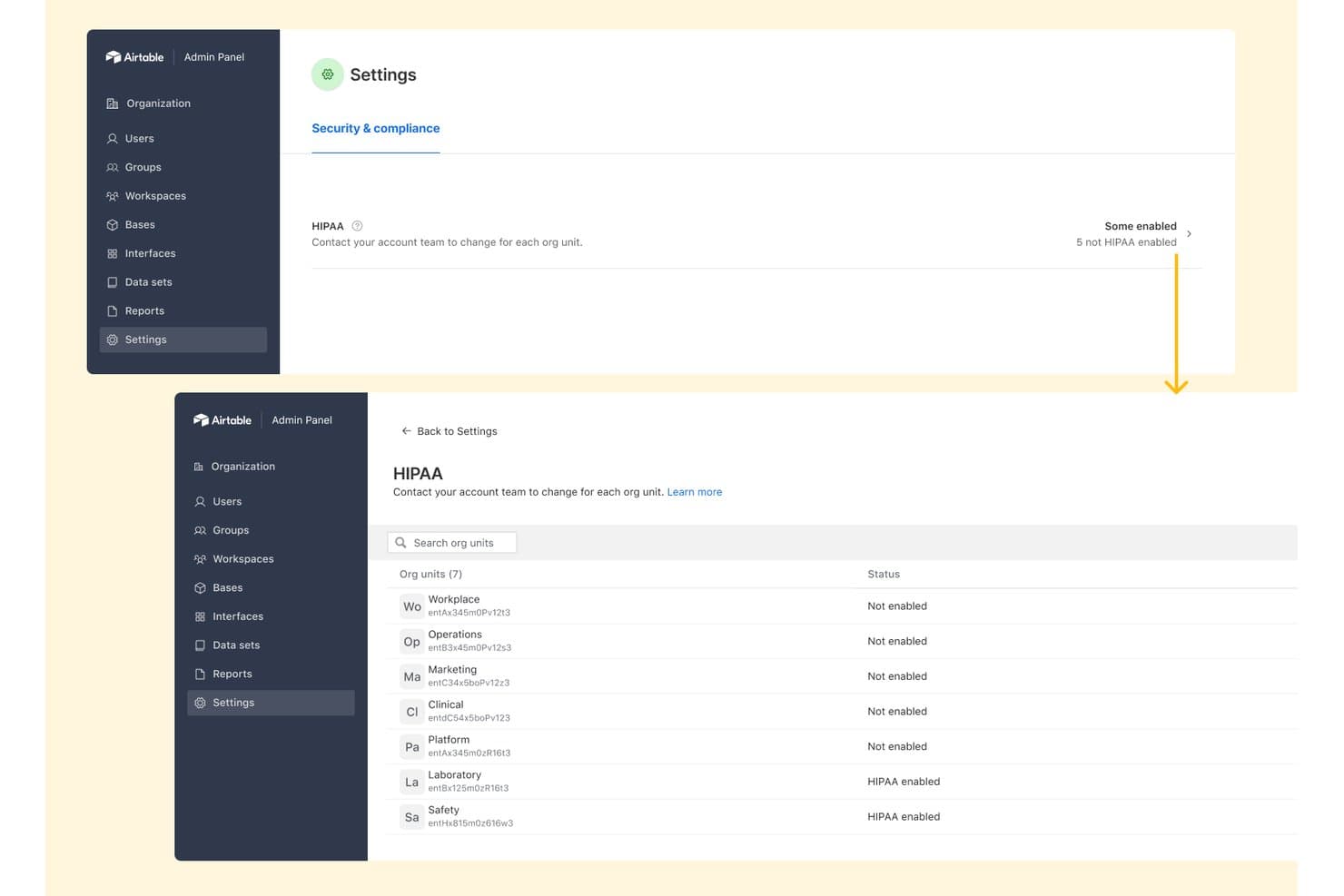
Airtable offers granular HIPAA compliance settings at the org unit level, allowing admins to view and manage HIPAA enablement status across multiple organizational units. Airtable is a no-code database and workflow platform that lets healthcare teams build custom applications, automations, and structured data views to manage ePHI-related processes under HIPAA-compliant controls.
Who Is Airtable Best For?
Airtable suits mid-to-large healthcare organizations whose clinical operations or IT teams need to build and manage custom ePHI workflows without relying on developer resources.
Why I Picked Airtable
I've included Airtable in my top picks because no other tool on this list lets you build healthcare workflows from scratch with this level of control. I use Airtable's relational bases and custom Interfaces to design ePHI workflows that match exactly how my care team operates, rather than bending the team to fit a rigid template. The Enterprise Key Management feature lets me encrypt those bases with my own keys, which matters directly when PHI is involved.
Airtable Key Features
- Enterprise audit logs: Track user actions and PHI access with exportable, tamper-evident logs.
- Role-based access control: Assign granular permissions at the workspace, base, or view level for secure data segregation.
- DLP API integration: Connect to data loss prevention tools to monitor and control PHI leaving the platform.
- Automated workflow triggers: Set conditions to automate updates, reminders, and task assignments based on activity or status changes.
Airtable Integrations
Airtable offers native integrations with Slack, Google Drive, Dropbox, Box, and Jira, and it connects with Zapier. An API is available for custom integrations.
Pros and Cons
Pros:
- Granular view-level permissions restrict PHI access
- Customer-managed encryption keys available
- Fully customizable ePHI workflow structures
Cons:
- No native healthcare-specific project templates
- BAA restricted to Enterprise tier only
Learn more about Airtable: Best for coordinating PHI-linked patient workflows
- Free plan available
- From $12/user/month
Visit WebsiteCustomer Rating:4.7/5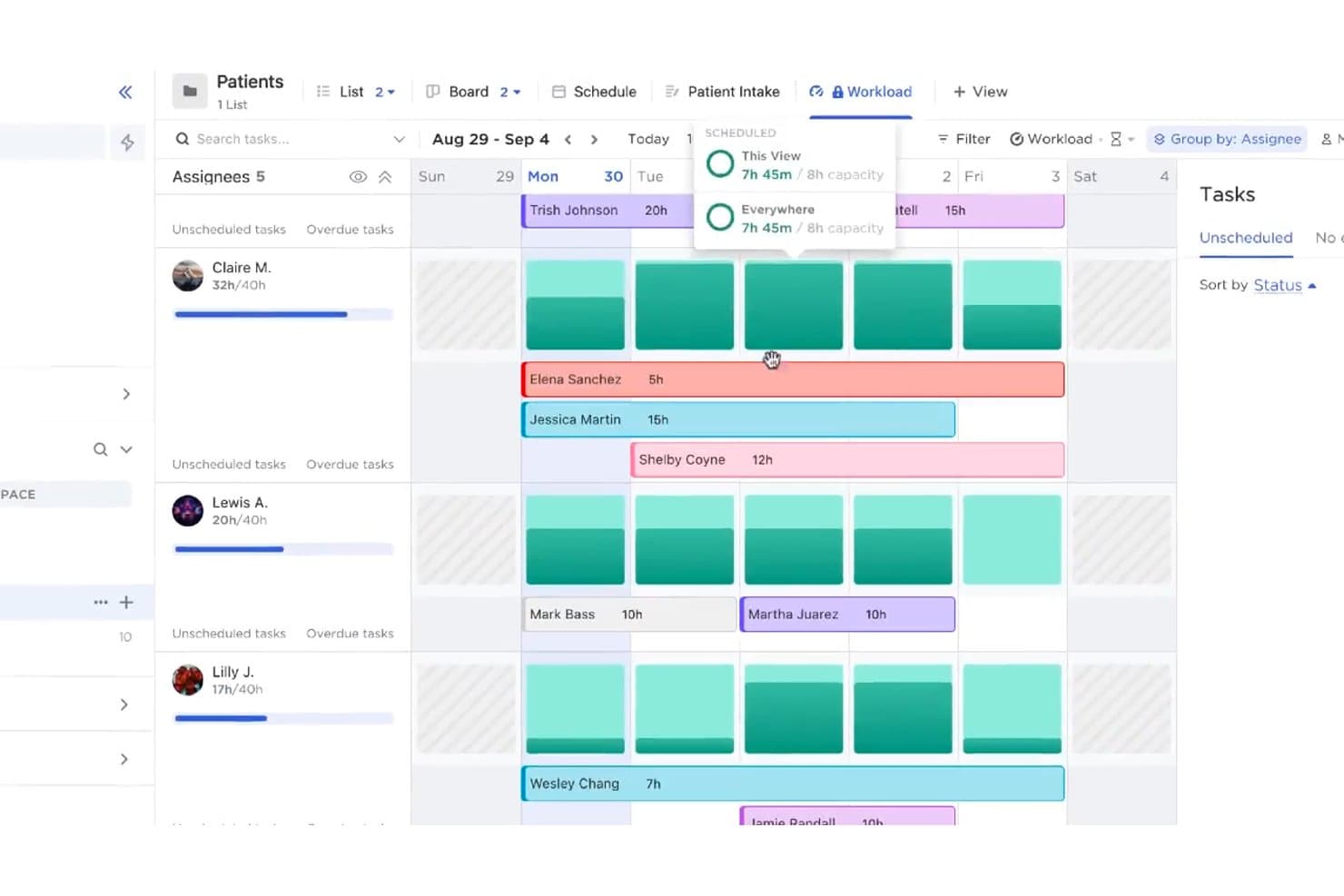
ClickUp offers a Workload view that helps healthcare teams manage patient-related tasks across assignees with scheduled hours and capacity tracking. ClickUp is a HIPAA-compliant project management platform that combines task tracking, workflow automation, document management, role-based access controls, and care coordination tools in a single workspace built for healthcare teams.
Who Is ClickUp Best For?
ClickUp is a strong fit for mid-to-large healthcare organizations and multi-location practices that need enterprise-grade security controls alongside deeply customizable project workflows.
Why I Picked ClickUp
ClickUp earns its spot on my shortlist because of how it handles PHI-linked task coordination. I like that Custom Fields let you tag tasks with patient-specific data, and you can link related Docs directly to those tasks, keeping intake forms and care plans in the same thread as the underlying work. Restricted Spaces and Custom Roles on the Enterprise plan let me lock PHI-sensitive workflows to authorized staff only, which is exactly the kind of structural control that makes HIPAA compliance manageable day to day.
ClickUp Key Features
- Audit logging: Tracks all user actions and document changes for compliance review.
- Role-based access controls: Lets admins set granular permissions on workspaces, tasks, and files.
- Secure file management: Encrypts files and supports controlled sharing of attachments and documents.
- Automated workflow templates: Provides prebuilt, customizable templates for common healthcare project types.
ClickUp Integrations
ClickUp offers over 1,000 native integrations, including tools like Slack, Google Drive, Microsoft 365, Dropbox, Zoom, GitHub, Jira, HubSpot, Salesforce, and Zendesk. It also supports Zapier and provides an API for custom integrations.
Pros and Cons
Pros:
- Audit logs track all PHI-related activity
- Granular permissions at workspace and task level
- BAA available on Business+ plans
Cons:
- Mobile app lacks granular security controls
- Admin configuration for HIPAA compliance is complex
Learn more about ClickUp: Best for secure multi-site practice dashboards
- 2-week free trial; free demo available
- From $8/user/month (billed annually)
Visit WebsiteCustomer Rating:4.7/5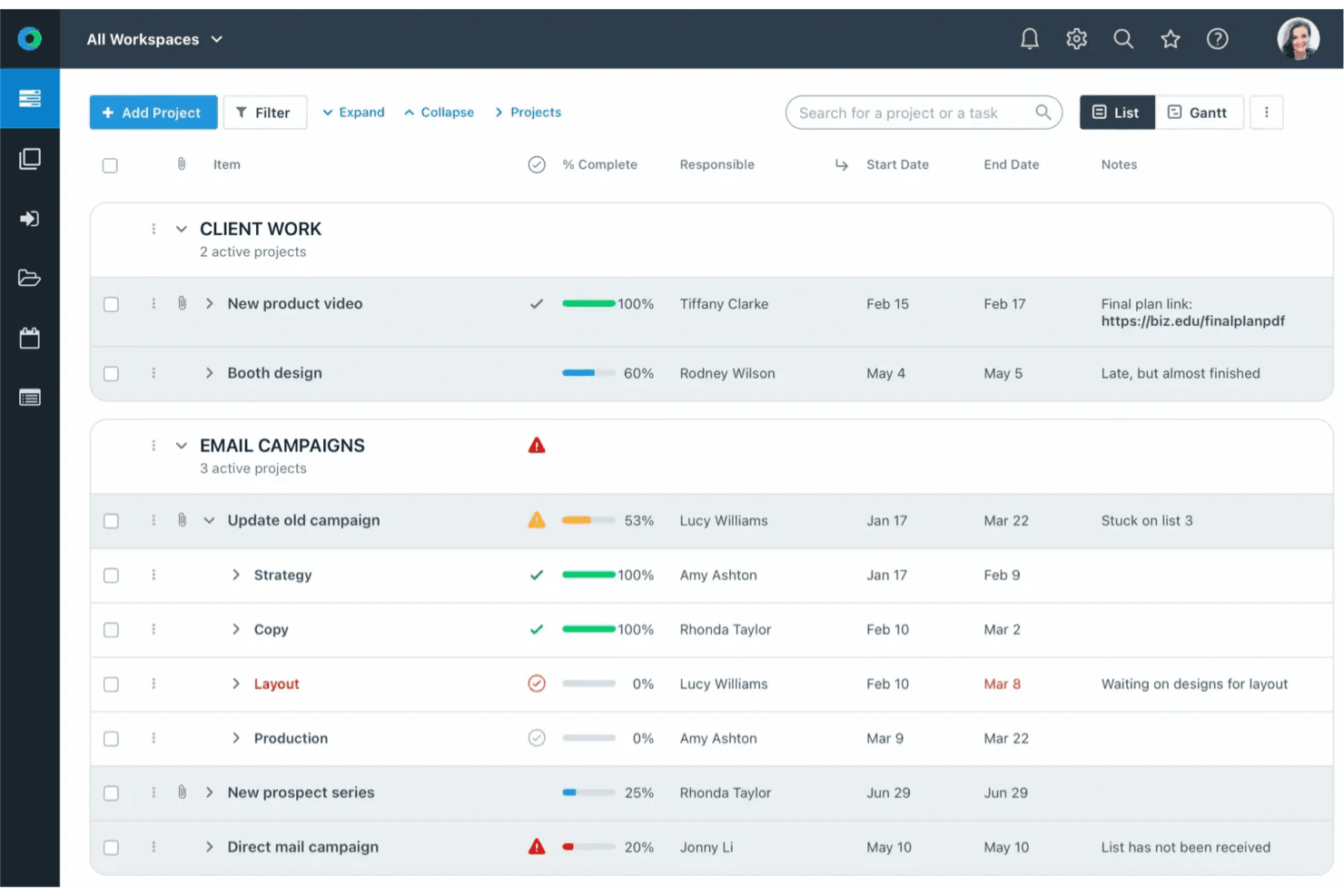
Workzone project list with progress tracking, tasks, and team assignments. Workzone is a HIPAA-compliant project management platform built for healthcare organizations, offering portfolio dashboards, task management, intake forms, document proofing, and role-based access controls across multiple sites and teams.
Who Is Workzone Best For?
Workzone is a strong fit for mid-sized healthcare organizations managing projects across multiple care sites, departments, or service lines.
Why I Picked Workzone
I've included Workzone in my top picks because its portfolio dashboards give healthcare admin teams a single view across multiple care sites, drilling down from executive summary to individual task status. I particularly like how each site runs its own department-specific workspace under one HIPAA-compliant umbrella, with SSO and MFA controlling exactly who sees what. The External Approval feature also lets you loop in outside vendors without giving them full platform access.
Workzone Key Features
- HIPAA business associate agreement support: The Enterprise plan includes a signed BAA to formally cover PHI protection.
- Detailed activity and approval logs: Every project activity and document approval is tracked with exportable logs for compliance audit needs.
- Customizable intake forms: Teams can build and manage intake workflows to standardize project and request collection.
- Secure proofing and file markup: Users can annotate, review, and approve files while keeping documents encrypted and access-controlled.
Workzone Integrations
Workzone offers native integrations with Slack, Microsoft Teams, Google Drive, Microsoft OneDrive, Microsoft SharePoint, and Power BI. It connects with Zapier and provides an API for custom integrations.
Pros and Cons
Pros:
- Portfolio views connect project and workload data
- Healthcare templates cover operational projects
- Built-in proofing supports regulated approval workflows
Cons:
- Healthcare functionality favors operational project teams
- Mobile access relies on a browser interface
Learn more about Workzone: Best for compliant healthcare policy collaboration
- Free plan available
- From $5.78/user/month
Visit WebsiteCustomer Rating:4.1/5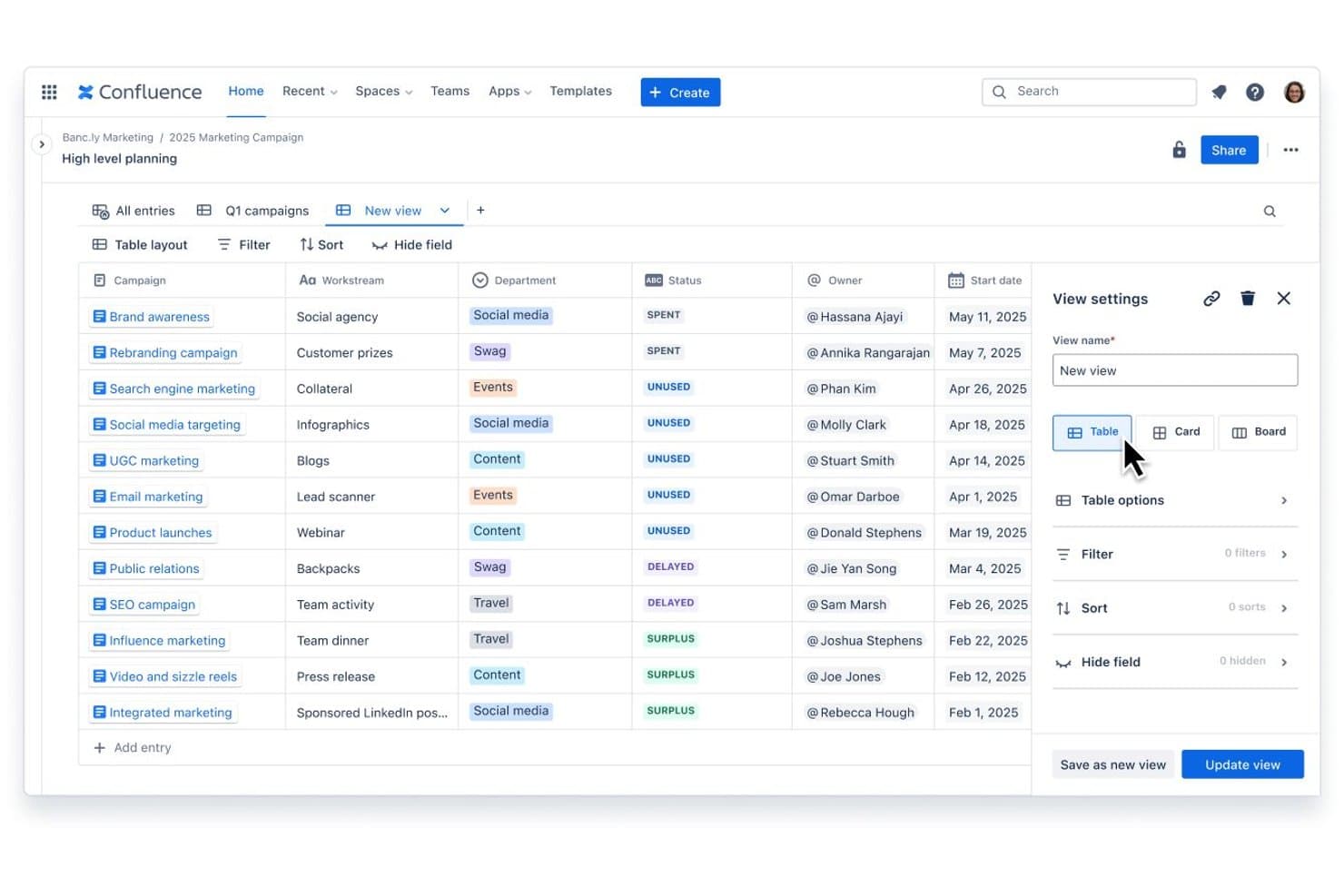
Confluence offers a structured database view with customizable table layouts, filters, and view settings for organizing marketing campaign entries. Confluence is a collaborative documentation and knowledge management platform from Atlassian that combines structured page hierarchies, real-time co-editing, and enterprise-grade access controls for team policy and workflow documentation.
Who Is Confluence Best For?
Confluence is a strong fit for healthcare compliance officers and practice IT directors who need a centralized, permission-controlled space for policy documentation and audit preparation.
Why I Picked Confluence
I've included Confluence in my top picks because its page-level permissions and space hierarchy let compliance teams structure PHI-adjacent documentation with tight access controls. You can execute a BAA with Atlassian on Premium and Enterprise plans, making it one of the few documentation tools where policy collaboration is formally HIPAA-eligible. The built-in audit trail captures every edit and access event, which matters most when preparing for an external HIPAA audit.
Confluence Key Features
- Page history and version control: Keeps a detailed record of all changes to pages and attachments for audit readiness.
- Enterprise-grade SSO and SCIM provisioning: Supports integration with identity providers for automated user management and secure access.
- Marketplace app ecosystem: Allows teams to add project templates, workflow modules, and compliance-focused integrations from a vetted library.
- Data residency controls: Lets organizations select data storage regions to align with regulatory requirements.
Confluence Integrations
Confluence offers native integrations with Jira Software, Trello, Loom, Google Drive, Slack, Microsoft Teams, and Figma. An API and marketplace are available for custom and third-party integrations.
Pros and Cons
Pros:
- Structured spaces organize compliance policies centrally
- Exportable audit logs support HIPAA review
- Granular space and page-level permissions available
Cons:
- No native task or project execution tools
- BAA only on Premium and Enterprise plans
Learn more about Confluence: 5Best for structured healthcare issue tracking
Jira
- Free plan available
- From $7.91/user/month
Visit WebsiteCustomer Rating:4.3/5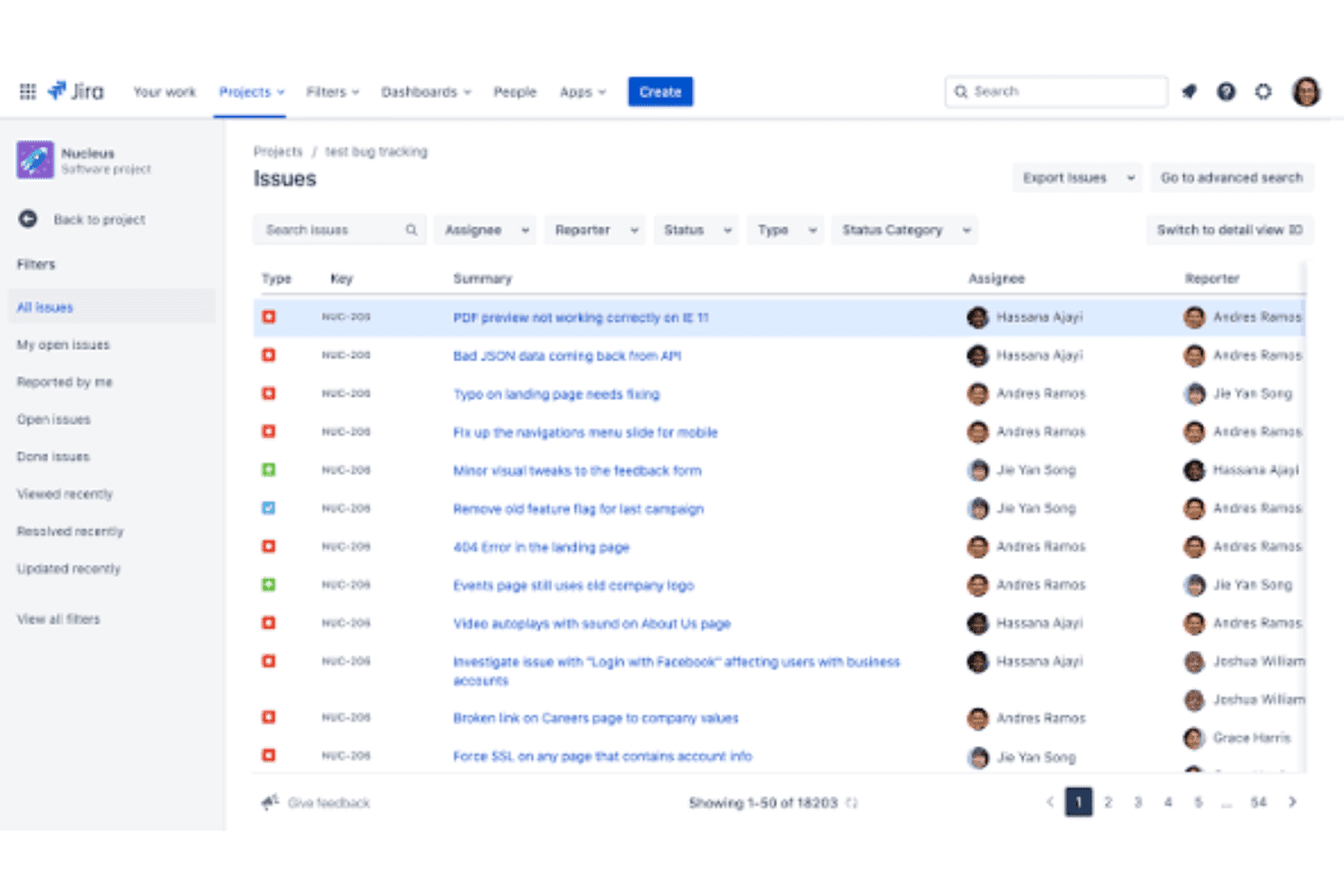
Atlassian Jira secures healthcare workflows, audits, access, and HIPAA plans. Jira is an agile project management and issue-tracking platform that combines structured task management, customizable workflows, sprint planning, and detailed audit logging for regulated industries including healthcare.
Who Is Jira Best For?
Jira is a strong fit for healthcare IT teams and compliance officers managing structured, audit-driven workflows across mid-size to enterprise-level organizations.
Why I Picked Jira
I picked Jira as one of the best because its structured issue tracking capabilities are genuinely unmatched for healthcare IT and compliance teams. JQL (Jira Query Language) lets me filter and surface any ticket instantly, which is invaluable when a compliance officer needs to pull every issue touching a specific PHI workflow before an audit. I also rely on Jira's release management and audit log to track exactly what changed, who approved it, and when, creating a reviewable paper trail that holds up to regulatory scrutiny.
Jira Key Features
- Role-based access control: Assigns granular permissions for users, teams, and projects to restrict PHI access.
- Tamper-evident audit logs: Automatically tracks and exports all user activity, comment edits, and file interactions for compliance.
- Custom workflow automation: Lets teams build conditional approvals, task routing, and escalations tailored to healthcare policies.
- Data residency and retention settings: Enables selection of hosting region and automated configuration of data archival or deletion schedules.
Jira Integrations
Jira offers native integrations with Confluence, Bitbucket, Slack, GitHub, Microsoft Teams, Google Workspace, Salesforce, Zendesk, Okta, and Zoom, and provides an API for custom integrations.
Pros and Cons
Pros:
- Custom workflows suit highly structured processes
- Work-item security adds another access layer
- BAAs are available below the Enterprise tier
Cons:
- Jira's audit log is not a complete activity record
- HIPAA configuration requires several administrative steps
Learn more about Jira: Best for tailored healthcare initiative tracking
- 30-day free trial
- From $12/user/month
Visit WebsiteCustomer Rating:4.5/5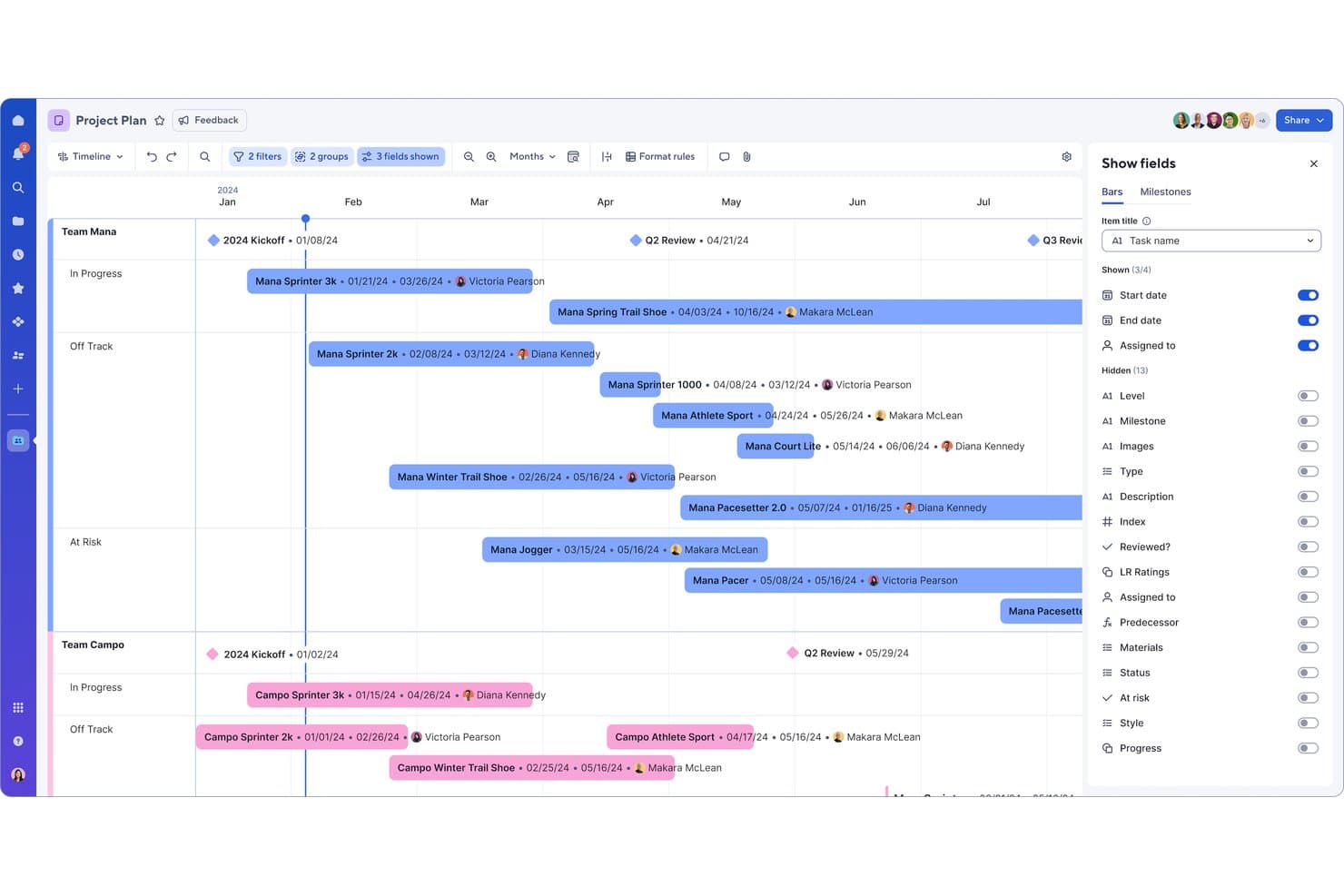
Smartsheet offers a timeline view with customizable field visibility controls, enabling project managers to track multi-team task schedules and assignments across months. Smartsheet is a HIPAA-eligible work management platform that combines Gantt-based project tracking, portfolio management, workflow automation, scheduling and enterprise-grade access controls in a spreadsheet-style interface.
Who Is Smartsheet Best For?
It's a strong fit for enterprise healthcare organizations managing multi-department initiatives, clinical operations, or compliance programs across large or multi-location teams.
Why I Picked Smartsheet
I picked Smartsheet as one of the best because Control Center lets healthcare PMOs build standardized project templates and roll them out across departments from a single hub. I love that it pairs this with Gantt charts supporting critical path and baseline comparison, so tracking a clinical trial against its original plan stays transparent. The HIPAA Implementation Guide also removes guesswork from configuring the platform for PHI environments.
Smartsheet Key Features
- Role-based access controls: Admins can restrict or allow access to sensitive projects, specific sheets, and shared files for each user or group.
- Exportable audit logs: Every interaction with PHI in tasks, files, or comments is tracked and can be exported for compliance review.
- Encrypted file storage: Files and attachments are encrypted at rest and in transit, with permissions managed down to the item level.
- Multiple project views: Users can switch between Gantt, grid, board, calendar, and timeline views to organize complex healthcare projects.
Smartsheet Integrations
Smartsheet offers 100+ native integrations, including Salesforce, Jira, Microsoft 365 and Teams, Google Workspace, DocuSign, Slack, Tableau, Power BI, and Adobe Creative Cloud. An API is available for custom integrations.
Pros and Cons
Pros:
- Multiple planning views support complex healthcare initiatives
- Portfolio rollups expose program-level risks
- Control Center pushes governance changes across projects
Cons:
- Advanced portfolio capabilities can require separate products
- File Library is excluded from HIPAA-eligible services
Learn more about Smartsheet: Best for advanced access controls and security
- 14-day free trial
- From $10/user/month (billed annually)
Visit WebsiteCustomer Rating:4.3/5
Wrike coordinates healthcare tasks, workflows, timelines, resources, and audits. Wrike is an enterprise work management platform with HIPAA-configurable environments, offering task tracking, workflow automation, Gantt charts, resource planning, and audit logging across clinical and administrative teams.
Who Is Wrike Best For?
Wrike is a strong fit for mid-to-large healthcare organizations that need enterprise-level compliance controls alongside cross-departmental project coordination.
Why I Picked Wrike
Wrike earns its spot on my shortlist because of how far its access controls go beyond basic role permissions. I particularly like Wrike Lock, which lets my team hold encryption keys entirely outside Wrike's infrastructure, so PHI stays under our control. Pair that with SCIM provisioning and granular user-type configurations, and I can tightly scope exactly who sees patient-related tasks and project data.
Wrike Key Features
- Tamper-evident audit logs: Tracks and exports every action on PHI-containing projects for compliance and security reviews.
- Custom workflow automations: Allows teams to build conditional processes for approvals, task routing, and notifications based on compliance needs.
- Data residency and retention controls: Lets admins choose regional data hosting and configure retention and deletion policies for healthcare governance.
- Secure client and external collaborator portals: Creates encrypted portals so staff, patients, and outside partners can exchange files and tasks without email.
Wrike Integrations
Wrike offers hundreds of native integrations through its built-in and marketplace connectors, including Google Workspace, Microsoft 365, Salesforce, Jira, Slack, GitHub, Box, OneDrive, Dropbox, and Zoom. It also provides an API for custom integrations.
Pros and Cons
Pros:
- Exportable audit logs support HIPAA compliance reviews
- Granular RBAC extends to individual task level
- Wrike Lock enables customer-managed encryption keys
Cons:
- Setup complexity high for compliance configurations
- BAA only available on Enterprise-tier plans
Learn more about Wrike:
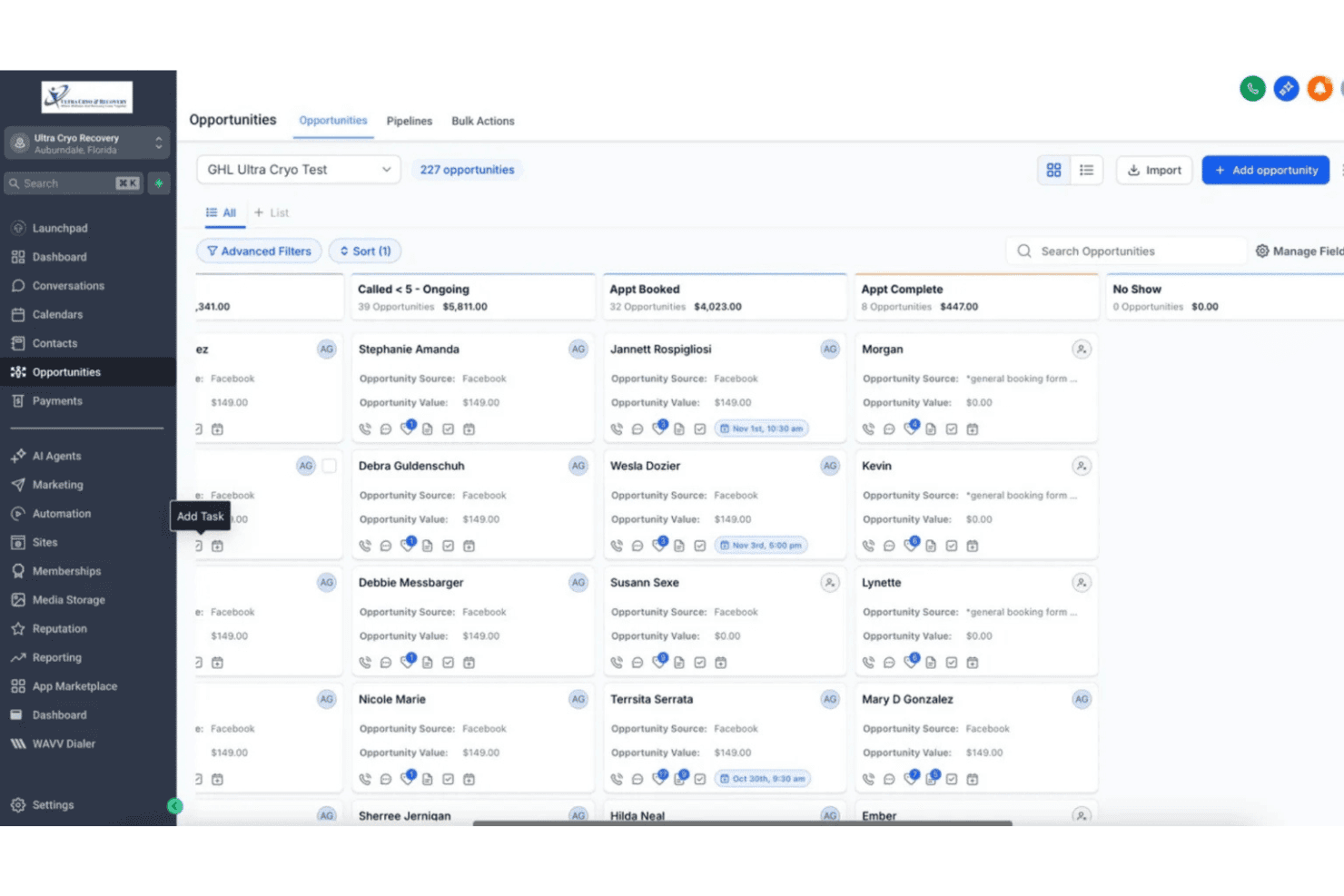
GoHighLevel combines secure messaging, scheduling, pipelines, and workflows. GoHighLevel is a CRM and marketing automation platform with a HIPAA compliance add-on that combines secure patient messaging, appointment scheduling, pipeline management, and workflow automation for healthcare-focused agencies and practices.
Who Is GoHighLevel Best For?
GoHighLevel is a strong fit for healthcare-focused marketing agencies that manage patient communication and lead workflows on behalf of medical practices.
Why I Picked GoHighLevel
I've included GoHighLevel in my top picks because its HIPAA module consolidates patient messaging across SMS, email, WhatsApp, and social DMs into a single encrypted conversation stream. I like that the BAA is signed directly inside the app, and AES-256 encryption with role-based access controls activates automatically once the module is enabled. In practice, that means my team can manage compliant patient outreach without routing sensitive messages through unsecured channels.
GoHighLevel Key Features
- Unified CRM and pipeline management: Track patient details, lead status, and communication history in a single dashboard.
- Appointment scheduling with reminders: Automate scheduling, confirmations, and SMS/email reminders for patient appointments.
- Integrated invoicing and payment collection: Generate invoices and accept online payments from patients through major payment processors.
- Automated workflow builder: Set up custom automated workflows for onboarding, follow-up, or communication tasks.
GoHighLevel Integrations
GoHighLevel offers native integrations with Stripe, PayPal, NMI, Authorize.net, Square, Adyen, Razorpay, Google, Facebook, Instagram, WhatsApp Business API, Shopify, and QuickBooks, and connects with Zapier. An API is available for custom integrations.
Pros and Cons
Pros:
- Round-robin scheduling distributes appointments across staff
- Tasks can connect across multiple operational records
- Appointment events can trigger follow-up workflows
Cons:
- HIPAA activation creates a permanent account-wide cost
- Project tracking remains CRM-centric
Learn more about HighLevel: Best for managing cross-team compliance projects
- Free plan + free demo available
- From $10.99/user/month (billed annually)
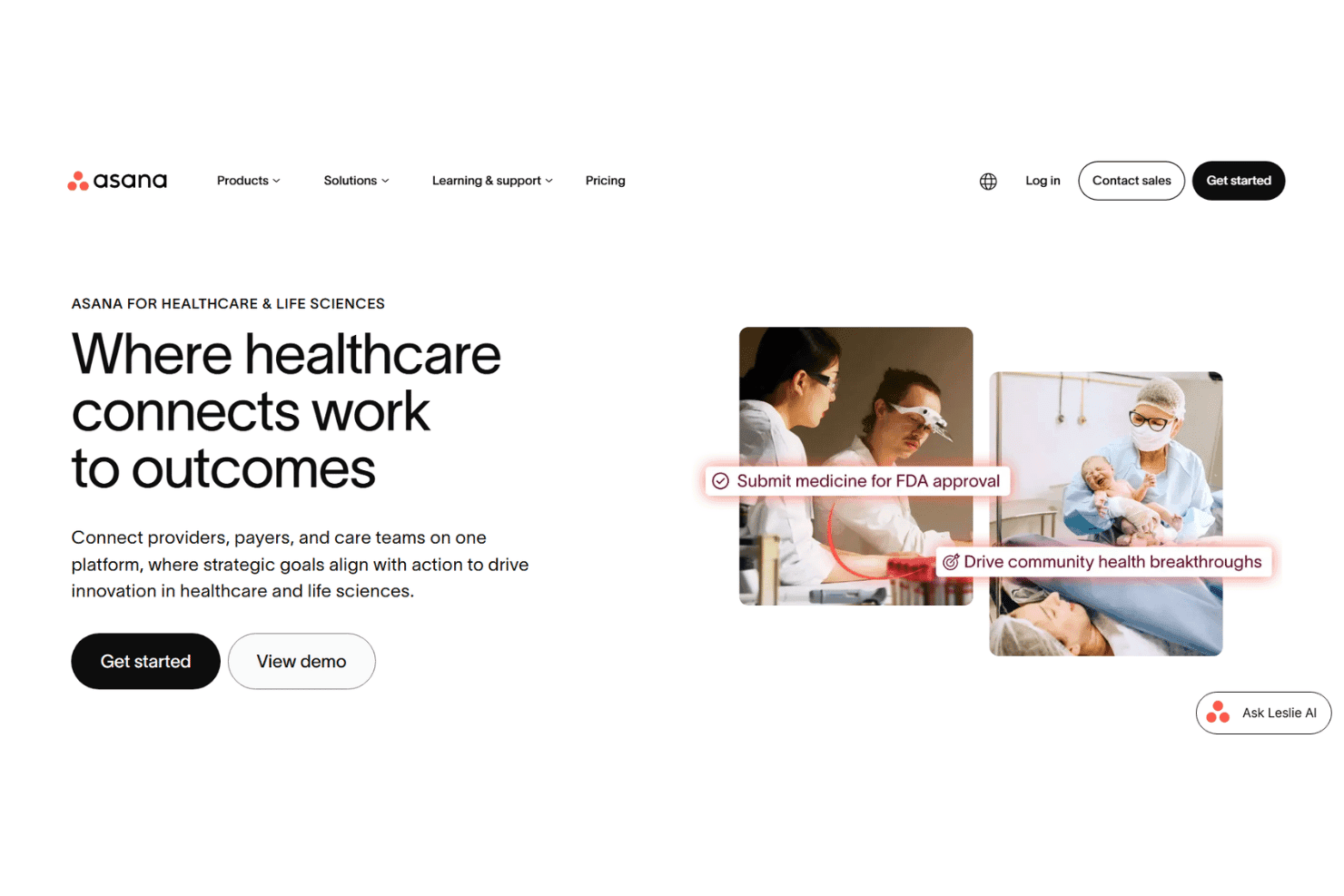
Asana organizes tasks, workflows, portfolios, compliance, and secure teamwork. Asana is a work management platform built for cross-functional teams that combines task tracking, workflow automation, portfolio management, and compliance-oriented project coordination with enterprise-grade security controls.
Who Is Asana Best For?
Asana is a strong fit for mid-to-large healthcare organizations with dedicated compliance, operations, and IT teams coordinating work across multiple departments or locations.
Why I Picked Asana
I've included Asana in my top picks because its portfolio view lets compliance officers track regulatory initiatives across multiple teams in a single dashboard. I also like that workflow bundles let you standardize compliance processes, like audit prep or policy rollouts, so every team follows the same steps. On Enterprise+, the Audit Log API connects directly to Splunk for a tamper-resistant record of every project action.
Asana Key Features
- Granular role-based permissions: Set access controls on projects, tasks, and files at the user, team, or department level.
- SAML SSO and SCIM provisioning: Integrate with enterprise identity providers for centralized user provisioning and authentication.
- Immutable audit log API: Record and export all user actions and PHI-related events for compliance and incident review.
- Encrypted file storage with DLP integration: Store attachments with AES-256 encryption plus data loss prevention for extra control over sensitive content.
Asana Integrations
Asana offers 300+ native integrations, including Slack, Microsoft Teams, Zoom, Google Drive, Gmail, Microsoft Outlook, Microsoft 365, Salesforce, Jira Cloud, Tableau, and Power BI. An API is available for custom integrations.
Pros and Cons
Pros:
- Audit Log API connects with SIEM tools
- Bundles standardize processes across many projects
- Portfolios connect healthcare projects to broader initiatives
Cons:
- Sensitive healthcare data has placement restrictions
- HIPAA mode restricts integrations by default
Learn more about Asana: Best for medical workflow automation in clinics
- Free demo available
- Pricing upon request
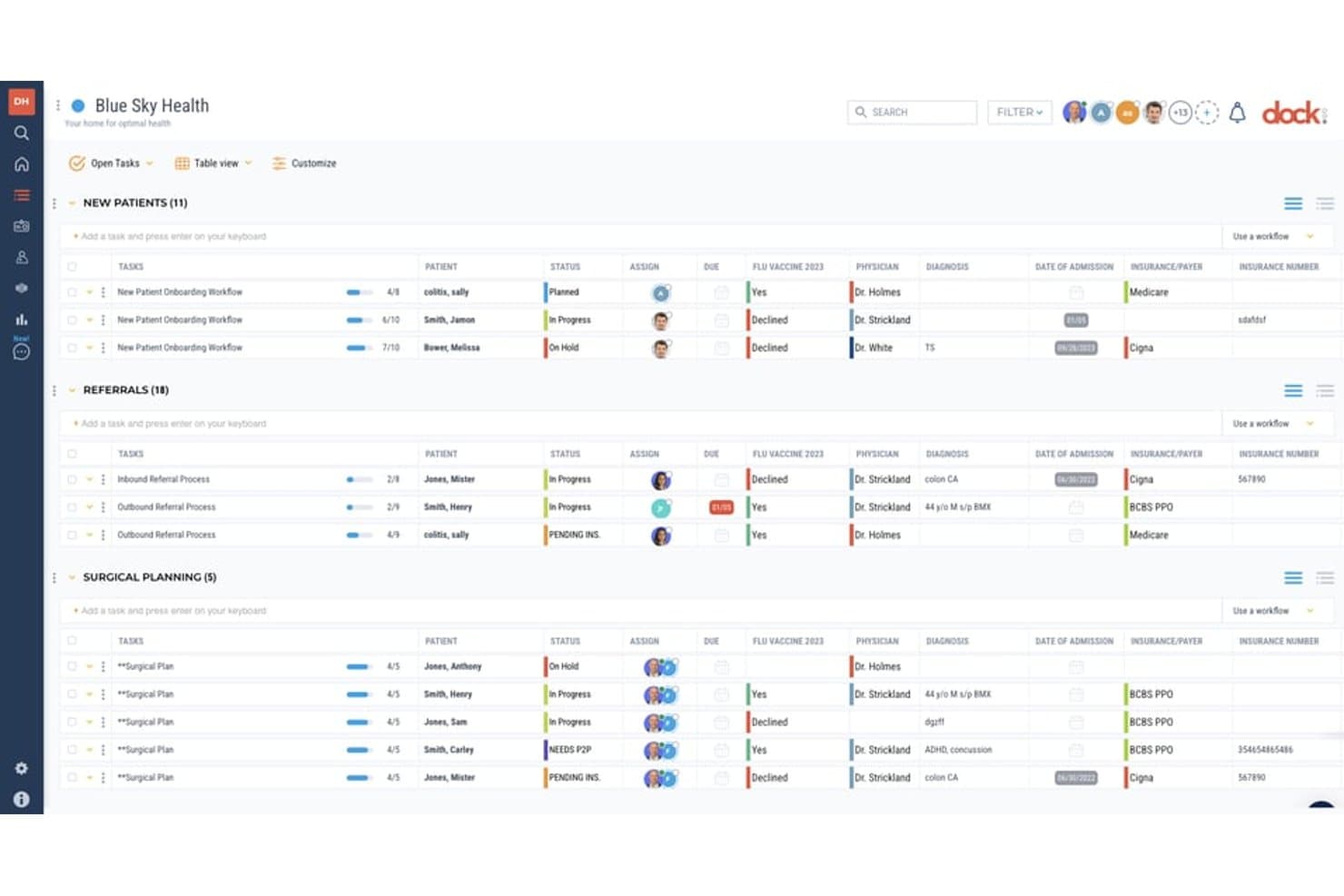
Dock Health offers a HIPAA-compliant project management interface with patient task lists, statuses, physician assignments, diagnosis tracking, and insurance details organized in a table view. Dock Health is a HIPAA-compliant, HITRUST-certified task management and workflow automation platform built exclusively for healthcare teams, combining patient-linked task tracking, triggered SmartFlow automations, and EHR integrations.
Who Is Dock Health Best For?
Dock Health is a good fit for clinic administrators and care coordinators managing patient-linked workflows across single or multi-specialty practices.
Why I Picked Dock Health
I picked Dock Health as one of the best because its SmartFlow builder lets clinic teams trigger automated task sequences directly from EHR events, like an incoming referral order. In practice, my team can replace manual follow-up chains with automatically assigned tasks that track each step from order to scheduling. What I appreciate most is that HITRUST certification applies at every plan level, so PHI within those automated workflows stays protected from the start.
Dock Health Key Features
- Role-based access controls: Set user permissions to restrict PHI access for specific tasks, files, or projects.
- HIPAA-compliant file storage: Store documents and attachments with AES-256 encryption and granular team sharing controls.
- Audit logging dashboard: Track user activity and PHI event trails in tamper-resistant, reviewable audit logs.
- EHR integration options: Connect to supported EHR platforms or import patient profile data for context-driven workflow management.
Dock Health Integrations
Dock Health offers native integrations with athenahealth and Elation Health EHR systems, Google Drive, and provides an API for custom integrations.
Pros and Cons
Pros:
- Limited-access collaboration suits outside care partners
- Patient context stays attached to operational tasks
- SmartFlows handle branching healthcare workflows
Cons:
- Operational analytics are restricted by plan
- EHR connections may require professional services
Learn more about Dock Health:
Annen HIPAA-kompatibel prosjektstyringsprogramvare
Her er noen flere alternativer for HIPAA-kompatibel prosjektstyringsprogramvare som ikke kom med på kortlisten min, men som likevel er verdt å undersøke:
- 11QuickbaseBest for fast HIPAA-aligned workflow design
- 12monday.comBest for healthcare-specific template library
- 13Adobe WorkfrontBest for enterprise workflow visibility
- 14RedboothBest for healthcare project accountability
- 15MocDocBest for connected clinic and hospital workflows
- 16OneDeskBest for flexible AWS or on-premise deployment
- 17CaspioBest for custom HIPAA-compliant healthcare apps
- 18OpenProjectBest for on-premise healthcare project control
- 19Birdview PSABest for healthcare resource planning
- 20ClearPoint StrategyBest for aligning hospital strategy and KPIs
How I Evaluate HIPAA Compliant Project Management Software
I split my evaluation into core acceptance criteria—things like BAA availability, PHI encryption, and audit logging—and differentiating factors that separate the best options from the rest.
Core Functionality (Table Stakes for This List)
When I'm selecting tools for my list, I rank each one on a scale from 0 (does not offer the functionality) to 5 (excels in this area) for each core functionality listed below. Then, I calculate the tool's total score into a percentage. Each tool needs to achieve a minimum total score of 65% to be considered for inclusion.
- BAA Availability: I check whether the vendor offers a Business Associate Agreement on the plan tier you'd actually buy, not just behind an enterprise paywall.
- PHI Data Encryption: Both in-transit (TLS) and at-rest (AES-256) encryption should cover tasks, files, and comments where PHI like patient names or case details may appear.
- Access Controls: I look for role-based permissions, MFA, and SSO so admins can limit PHI visibility to the right people across clinical, billing, and compliance teams.
- Audit Logging: Detailed activity logs that track who viewed, edited, or shared PHI-related records help your compliance officer prepare for audits without scrambling.
- Project Management Core: The platform should offer task assignments, due dates, workflows, and collaboration features suited to projects like EHR migrations or policy rollouts.
- Secure File Handling: I evaluate how the tool handles sensitive attachments, looking for encrypted storage, granular sharing permissions, and configurable retention policies.
Once I have a list of tools that meet the criteria, I consider what sets each platform apart.
Differentiating Factors (What Sets Vendors Apart)
Here's how I compare and contrast different vendors:
Standout Features
Secure client or patient portals are a big differentiator. I look for encrypted spaces where clinicians and outside partners can exchange PHI-related files without falling back on email. Custom workflow automations also matter, especially for recurring processes like credentialing or audit prep where task routing and approvals need to follow PHI handling rules. I also evaluate data residency and retention controls, since admins need the ability to set where data is hosted and when it's archived or deleted.
Beyond Features
I pay close attention to how a vendor structures its BAA, specifically whether it covers sub-processors and integrations, not just the core platform. Security certifications like SOC 2 Type II or HITRUST CSF carry real weight because they go beyond self-attested HIPAA compliance. Integration fit matters too. I check whether the tool connects to your EHR/EMR and supports SSO via providers like Okta or Azure AD so your IT team can manage access from one place.
Slik velger du HIPAA-kompatibel prosjektstyringsprogramvare
Det er lett å gå seg vill i lange funksjonslister og kompliserte prismodeller. For å hjelpe deg med å holde fokus mens du går gjennom din unike prosess for valg av programvare, får du her en sjekkliste over faktorer du bør ha i bakhodet:
| Faktor | Hva du bør vurdere |
|---|---|
| FaktorSkalerbarhet | Hva du bør vurdereVil denne plattformen fortsatt dekke behovene dine for håndtering og rapportering av PHI når praksisen din vokser eller krymper? Se etter fleksibel prising og ulike nivåer for antall brukere. |
| FaktorIntegrasjoner | Hva du bør vurdereKan verktøyet kobles til EHR/EMR, sikre meldingsplattformer og eksisterende identitetsleverandører? Mangler kan øke den manuelle arbeidsmengden eller sikkerhetsrisikoen. |
| FaktorTilpasningsmuligheter | Hva du bør vurdereKan du justere arbeidsflyter, tillatelser og datafelt for din unike samsvarsdokumentasjon eller dine kliniske prosjektbehov uten omfattende involvering fra IT-avdelingen? |
| FaktorBrukervennlighet | Hva du bør vurdereVil det kliniske personalet og administrasjonsmedarbeiderne dine ta i bruk systemet uten langvarig opplæring? Prøv å vurdere den praktiske læringskurven under produktdemonstrasjoner eller prøveperioder. |
| FaktorImplementering og oppstart | Hva du bør vurdereHvilke ressurser trenger du til konfigurering, opplæring og oppsett for samsvar med kravene til PHI? Se etter tydelig veiledning og oppstartsprogrammer tilpasset helsesektoren. |
| FaktorKostnad | Hva du bør vurdereEr BAA-er, samsvarsmoduler eller avanserte tilgangskontroller inkludert i den oppgitte prisen, eller regnes de som premiumtillegg? Be om en detaljert prisoversikt. |
| FaktorSikkerhetstiltak | Hva du bør vurdereHvilke sikkerhetssertifiseringer, detaljer om kryptering og rutiner ved datainnbrudd tilbyr leverandøren utover det grunnleggende i HIPAA? Be om dokumentasjon og bevis. |
| FaktorTilgjengelig kundestøtte | Hva du bør vurdereHvor raskt kan du få hjelp hvis det oppstår et spørsmål om samsvar, en utestenging eller et annet akutt problem? Bekreft åpningstidene for kundestøtte og om du får en navngitt kontaktperson. |
Hva er HIPAA-kompatibel prosjektstyringsprogramvare?
HIPAA-kompatibel prosjektstyringsprogramvare er en plattform som er utviklet for å hjelpe helseteam med å administrere oppgaver, filer og arbeidsflyter samtidig som kravene til personvern og sikkerhet i HIPAA oppfylles. Disse verktøyene krypterer beskyttede helseopplysninger, tilbyr revisjonsspor, krever signerte BAA-er og gir rollebaserte tilgangskontroller, slik at praksiser kan koordinere prosjekter uten å risikere brudd på regelverket eller eksponering av pasientdata.
Funksjoner i HIPAA-kompatibel prosjektstyringsprogramvare
Når du velger HIPAA-kompatibel prosjektstyringsprogramvare, bør du se etter følgende viktige funksjoner:
- Avtale med forretningsforbindelse: En signert BAA sikrer at leverandøren formelt påtar seg HIPAA-ansvar for alle beskyttede helseopplysninger som lagres eller behandles i plattformen.
- Datakryptering: Kryptering sikrer all PHI både under overføring og når den er lagret, og beskytter sensitive pasientopplysninger mot uautorisert tilgang eller datainnbrudd.
- Rollebaserte tilgangskontroller: Denne funksjonen begrenser tilgangen til PHI basert på arbeidsfunksjon, slik at administratorer kan gi riktig nivå av systemtillatelser til hver bruker eller hvert team.
- Revisjonslogging: Detaljerte, manipulasjonssikre aktivitetslogger sporer alle brukerhandlinger som involverer PHI, støtter samsvarsgjennomganger og gir tydelige oppføringer for revisjoner.
- Sikker fillagring: Filer og vedlegg lagres med sterk kryptering og detaljerte delingsalternativer for å beskytte sensitive dokumenter gjennom hele livssyklusen.
- Automatisering av arbeidsflyt: Automatiseringer hjelper team med å videresende oppgaver, angi godkjenninger og redusere manuelle samsvarstrinn i gjentakende prosjektprosesser i helsetjenesten.
- Flerfaktorautentisering: Ved å legge til ekstra trinn for identitetsbekreftelse begrenses uautorisert tilgang, noe som reduserer risikoen for eksponering av PHI på grunn av tapte eller kompromitterte påloggingsopplysninger.
- Tilpassbare maler: Formålstilpassede maler for kliniske, administrative eller samsvarsrelaterte arbeidsflyter bidrar til å opprettholde konsistens og standardisere gjennomføringen av prosjekter.
- PHI-bevisste varsler: Systemet varsler brukere når de arbeider med PHI eller gjør endringer som kan påvirke pasientvernet, og reduserer dermed risikoen for utilsiktet eksponering.
- Retningslinjer for lagring og sletting: Konfigurerbare retningslinjer lar organisasjoner styre hvor lenge PHI lagres og når den slettes, slik at praksis for datahåndtering er i tråd med HIPAA.
Fordeler med HIPAA-kompatibel prosjektstyringsprogramvare
Implementering av HIPAA-kompatibel prosjektstyringsprogramvare gir flere fordeler for teamet og virksomheten din. Her er noen av fordelene du kan se frem til:
- Redusert risiko for brudd på regelverket: Innebygde revisjonslogger, tilgangskontroller og signerte BAA-er hjelper deg med å unngå kostbare HIPAA-brudd og regulatoriske sanksjoner.
- Sikkert samarbeid: Krypterte portaler, sikker fildeling og PHI-bevisste varsler gjør det mulig for behandlere og ansatte å samarbeide trygt uten å risikere pasientvernet.
- Effektive arbeidsflyter i helsetjenesten: Tilpassbare maler, automatisering av arbeidsflyter og oppgavehåndtering gjør det mulig for team å standardisere prosesser som revisjoner, akkreditering og utrulling av prosjekter.
- Sentralisert dokumentasjon: Når oppgaver, filer og kommunikasjon lagres på ett sted, får du en revisjonsklar oversikt, og det blir mye enklere å håndtere samsvarsinitiativer.
- Fleksibel datakontroll: Funksjoner som retningslinjer for lagring og detaljerte tillatelser lar deg tilpasse systemet til virksomhetens spesifikke krav til datahåndtering og personvern.
- Forenklet opplæring og innføring: Brukervennlige grensesnitt og konfigurerbare roller forkorter læringskurven for de ansatte og fremmer innføring og beste praksis for samsvar.
- Forbedret koordinering på tvers av lokasjoner: Skybasert tilgang og rollebaserte kontroller støtter prosjekter og standardiserte operasjoner på tvers av flere praksiser eller forretningsenheter.
Kostnader og priser for HIPAA-kompatibel prosjektstyringsprogramvare
Valg av HIPAA-kompatibel prosjektstyringsprogramvare krever en forståelse av de ulike prismodellene og abonnementene som er tilgjengelige. Kostnadene varierer basert på funksjoner, teamstørrelse, tillegg og mer. Tabellen nedenfor oppsummerer vanlige abonnementer, gjennomsnittsprisene deres og typiske funksjoner som inngår i HIPAA-kompatible prosjektstyringsløsninger:
Sammenligningstabell for abonnementer for HIPAA-kompatibel prosjektstyringsprogramvare
| Plantype | Gjennomsnittspris | Vanlige funksjoner |
|---|---|---|
| PlantypeGratisabonnement | Gjennomsnittspris$0 | Vanlige funksjonerBegrenset oppgavehåndtering, grunnleggende fildeling og få brukerkontroller. |
| PlantypePersonlig abonnement | Gjennomsnittspris$5–$15/bruker/måned | Vanlige funksjonerIndividuelle prosjektstyrer, enkle tillatelser og begrenset antall integrasjoner. |
| PlantypeBedriftsabonnement | Gjennomsnittspris$20–$40/bruker/måned | Vanlige funksjonerRollebaserte tilgangskontroller, kryptert lagring, automatiserte arbeidsflyter og mulighet for signert BAA. |
| PlantypeStorbedriftsabonnement | Gjennomsnittspris$40–$90/bruker/måned | Vanlige funksjonerAvansert sikkerhet, revisjonslogging for PHI, SSO/MFA, retningslinjer for datalagring, tilpasset introduksjon og prioritert brukerstøtte. |
Vanlige spørsmål om HIPAA-kompatibel prosjektstyringsprogramvare
Her er svar på vanlige spørsmål om HIPAA-kompatibel prosjektstyringsprogramvare:
Støtter alle prosjektstyringsplattformer HIPAA-samsvar?
Nei, bare programvare som tilbyr en signert BAA, sterke tilgangskontroller og funksjoner som ivaretar PHI, kan brukes på en trygg måte i forbindelse med HIPAA. Bekreft alltid påstander om samsvar før du deler beskyttede helseopplysninger.
Hva bør jeg spørre en leverandør om når det gjelder HIPAA-samsvar?
Spør om det er mulig å få en signert BAA, hvilke funksjoner og integrasjoner som omfattes, og om leverandøren har sikkerhetssertifiseringer fra tredjeparter, for eksempel SOC 2 Type II eller HITRUST.
Kan jeg lagre og dele pasientfiler i disse verktøyene?
Ja, så lenge fillagringen er kryptert, tilgangen er begrenset og leverandørens BAA dekker alle relevante funksjoner. Se etter revisjonslogger og alternativer for styring av lagringsperioder.
Er integrasjoner med EHR- eller EMR-systemer mulig?
Mange HIPAA-kompatible plattformer støtter integrasjoner med EHR-/EMR-systemer, men du bør kontrollere om disse forbindelsene er inkludert i BAA-en og støtter sikker dataoverføring.
Hvor vanskelig er det å bytte til et HIPAA-kompatibelt prosjektstyringsverktøy?
Implementeringen varierer mellom leverandører og avhenger av de interne ressursene dine. De fleste leverandører tilbyr introduksjonsstøtte, men du bør beregne tid til å konfigurere tillatelser, lære opp ansatte og migrere oppgaver og filer.