

Faktureringsprogramvare for kravformidlere fungerer som et digitalt mellomledd som behandler, kontrollerer og sender helserefusjonskrav mellom praksisen din og betalerne. Hvis du ser etter det beste alternativet, prøver du sannsynligvis å redusere avviste krav, begrense manuelt arbeid og holde inntektssyklusen solid – selv med begrenset bemanning eller endrede regler fra betalerne.
Denne veiledningen skjærer gjennom markedsføringen og går rett til det som faktisk er nyttig: de beste alternativene innen faktureringsprogramvare for kravformidlere, hva som gjør hvert alternativ unikt, og hvordan de passer inn i den daglige arbeidsflyten din.
Why Trust Our Software Recommendations
6,700+
Reviews
20
Industry experts
16+
Evaluation factors
14
Years
Our team has been testing and reviewing software since 2012. As medical practice leaders ourselves, we know how difficult—and important—it is to choose the right software.
For this guide, we evaluated tools using hands-on testing and independent research, scoring tools using our selection criteria.
Our reviews reflect our human editorial judgment, not a sales pitch.
Sammenligningstabell for faktureringsprogramvare for kravformidlere
Denne sammenligningstabellen oppsummerer prisdetaljene for faktureringsprogramvaren min for kravformidlere:
| Tool | Best For | Trial Info | Price | ||
|---|---|---|---|---|---|
| 1 | Best for all-payer claims access | Free plan available | Free | Website | |
| 2 | Best for advanced analytics dashboard | Free demo available | Pricing upon request | Website | |
| 3 | Best for integrated EHR workflows | Free demo available | Pricing upon request | Website | |
| 4 | Best for rural healthcare integration | Free demo available | Pricing upon request | Website | |
| 5 | Best for streamlined claim tracking | Free demo available | From $30/month | Website | |
| 6 | Best for automated denial management | Free demo available | Pricing upon request | Website | |
| 7 | Best for real-time eligibility checks | Not available | Pricing upon request | Website | |
| 8 | Best for extensive payer connectivity | Free demo available | Pricing upon request | Website | |
| 9 | Best for integrated payment solutions | Free demo available | Pricing upon request | Website | |
| 10 | Best for claims scrubbing accuracy | Free demo available | Pricing upon request | Website |


Anmeldelser av den beste faktureringsprogramvaren for kravformidlere
Nedenfor finner du mine detaljerte sammendrag av den beste faktureringsprogramvaren for kravformidlere som kom med på kortlisten min. Anmeldelsene mine gir en grundig gjennomgang av funksjonene, prisene og integrasjonene i hver programvare, slik at du kan finne det beste alternativet for deg.

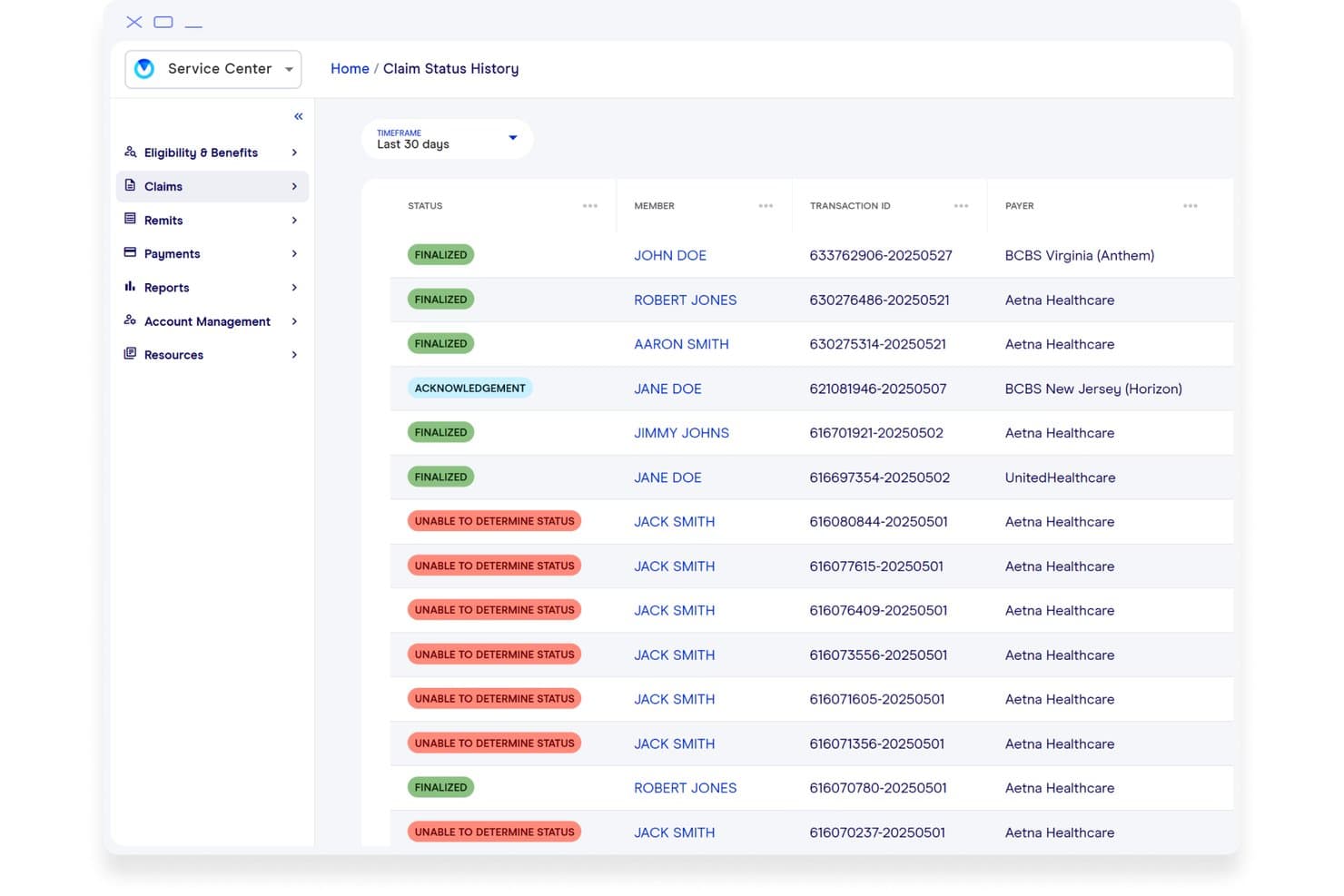
Office Ally (Service Center) offers a Claim Status History dashboard displaying member claims with statuses such as Finalized, Acknowledgement, and Unable to Determine Status across multiple payers. Office Ally's Service Center is a medical billing clearinghouse that handles electronic claims submission across Professional, Institutional, and Dental claim types, eligibility verification, and ERA retrieval for healthcare providers and billing services.
Who Is Office Ally (Service Center) Best For?
Service Center is a strong fit for independent medical billing services and small-to-midsize practices that need multi-payer claim submission without high per-claim fees.
Why I Picked Office Ally (Service Center)
Service Center earns its spot on my shortlist because of its all-payer reach. I like that it supports Professional (837P), Institutional (837I), and Dental (837D) claims alongside Encounters and Workers Comp, all through a single clearinghouse connection to 5,000+ payers. What I find genuinely useful is the ability to submit via direct entry, file upload, or SFTP, so my team isn't locked into one submission method regardless of which practice management system we're running.
Office Ally (Service Center) Key Features
- Eligibility and benefits verification: Instantly check patient insurance status before claims submission.
- Electronic remittance advice (ERA): Receive and view 835 remittance files from payers directly in the portal.
- Claim attachments support: Upload and send supporting documents electronically with billing claims.
- Secure SFTP transmissions: Submit files via secure file transfer protocol for automated, high-volume claim workflows.
Office Ally (Service Center) Integrations
Office Ally (Service Center) offers native integrations with Practice Mate and EHR 24/7, accepts claim files from billing platforms like EPIC and Allscripts, and provides an API for custom integrations.
Pros and Cons
Pros:
- Accepts batch and manual claim submissions
- Built-in eligibility and benefits verification
- Handles multiple claim types including dental
Cons:
- Occasional delays in payer response updates
- Claim scrubbing not highly customizable
Learn more about Office Ally (Service Center): Best for advanced analytics dashboard
- Free demo available
- Pricing upon request
Visit WebsiteCustomer Rating:4.3/5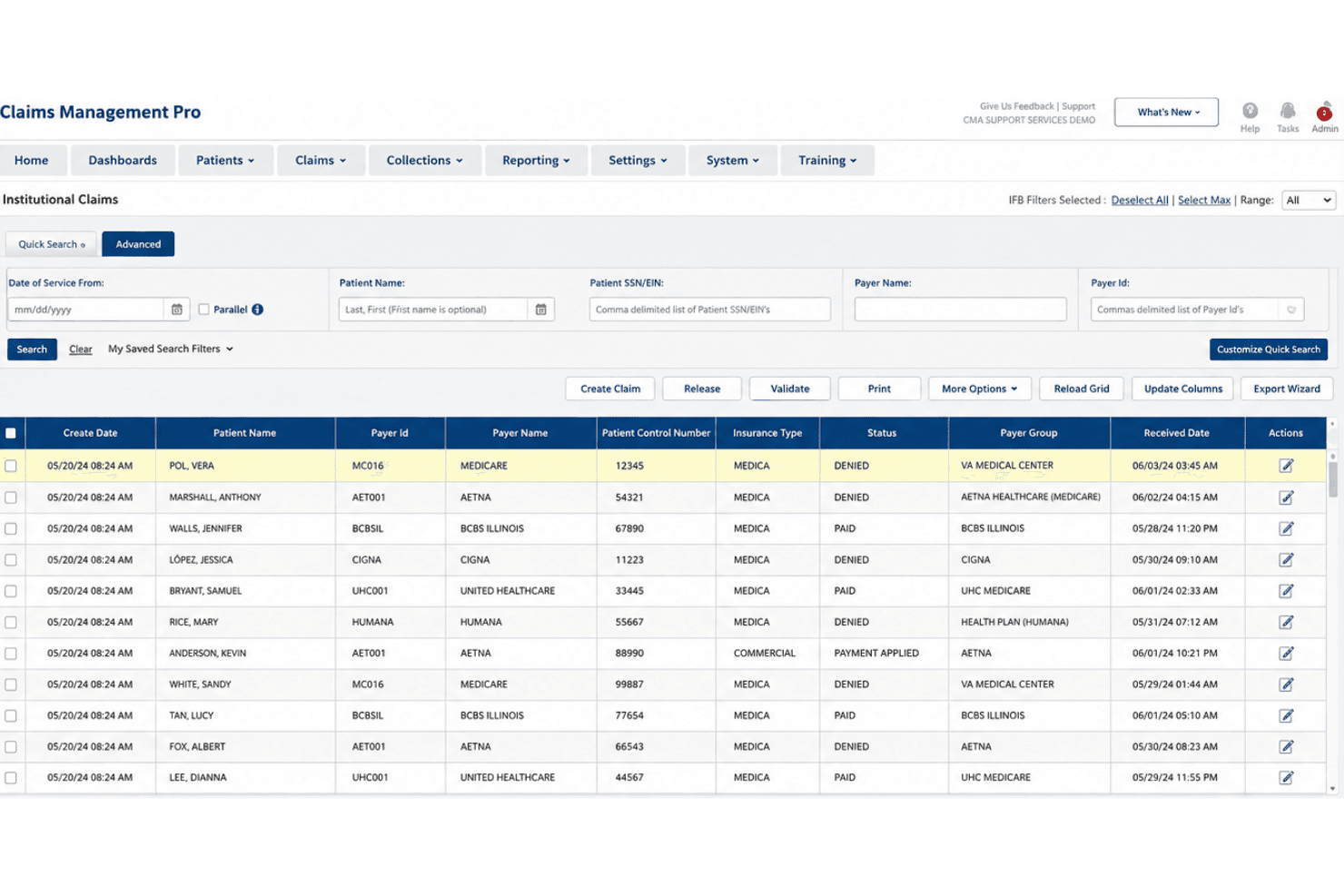
Inovalon Claims Management Pro covers claims, eligibility, ERA, audits, and appeals. Inovalon Claims Management Pro is a clearinghouse billing platform built for healthcare providers, covering all-payer electronic claims submission, real-time eligibility verification, automated claim scrubbing, ERA posting, and audit and appeals workflow management.
Who Is Inovalon Claims Management Pro Best For?
It's a strong fit for revenue cycle teams at mid-to-large provider organizations that need centralized control over multi-payer claim workflows and denial management.
Why I Picked Inovalon Claims Management Pro
I picked Inovalon Claims Management Pro as one of the best because its analytics dashboard gives billing teams real visibility into claim aging and denial patterns, not just submission status. The customizable workspace lets each user configure their own view of eligibility, claim status, and remittance data. I also like how the Pro tier layers automated work criteria on top of that visibility, so my team can act on what the dashboard flags without manually chasing each claim.
Inovalon Claims Management Pro Key Features
- Automated claims scrubbing: Claims are checked against up-to-date payer and CMS rules before submission.
- Real-time and batch eligibility checks: Instantly verify patient coverage across all major payers with both options.
- Medicare DDE integration: Submit and track Medicare claims directly through the Direct Data Entry workflow.
- Audit and appeals workflow: Manage audits and appeals tasks within a centralized, trackable interface.
Inovalon Claims Management Pro Integrations
Native integrations include PointClickCare, MEDITECH, and HelloNote. An API is available for custom integrations.
Pros and Cons
Pros:
- Direct Medicare DDE claim management
- Automated eligibility and secondary billing workflows
- Advanced claim and denial analytics features
Cons:
- Contracts may have strict renewal terms
- Limited self-service reporting customization
Learn more about Inovalon Claims Management Pro: Best for integrated EHR workflows
- Free demo available
- Pricing upon request
Visit WebsiteCustomer Rating:4.1/5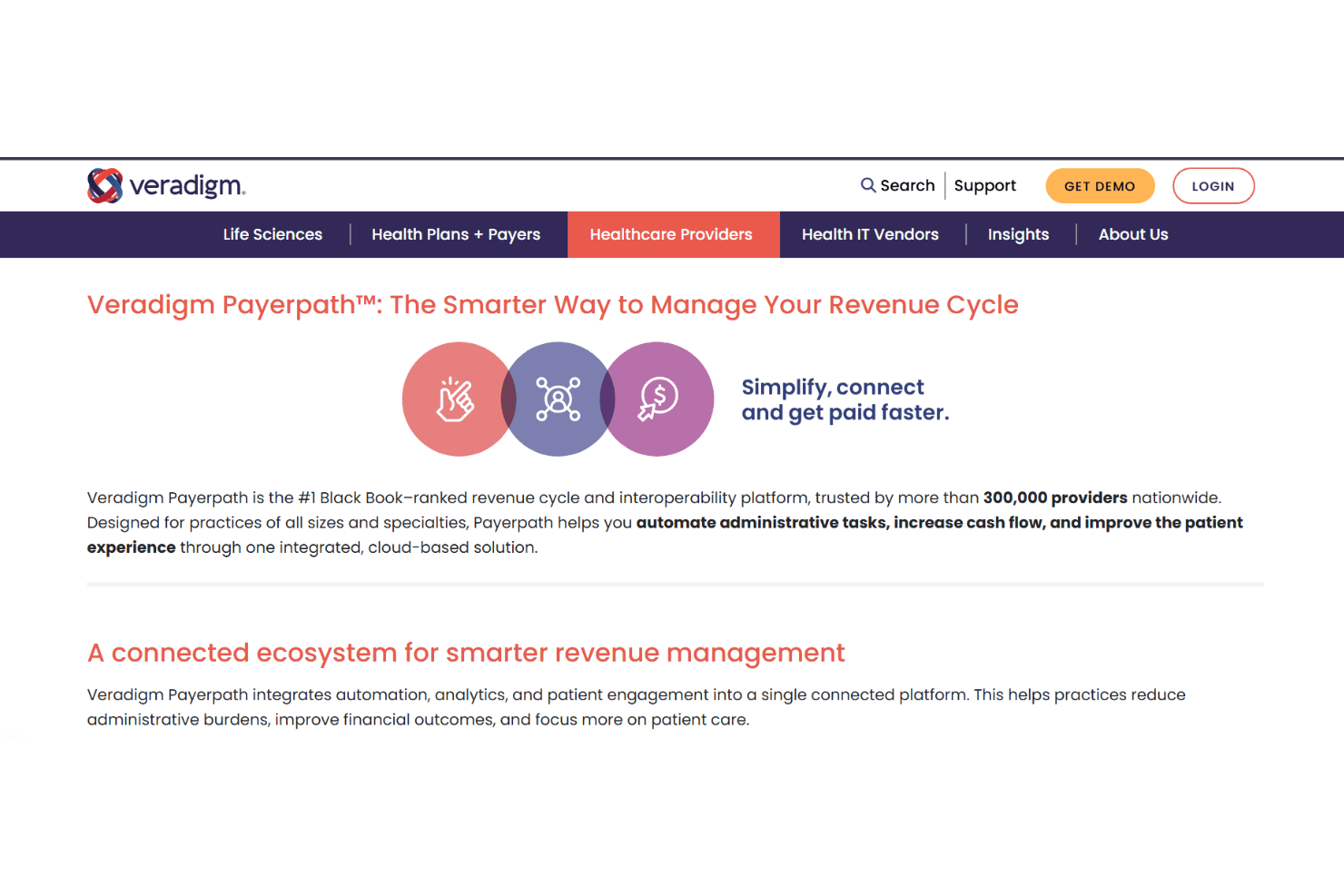
Veradigm Payerpath manages claims, payer-specific claim scrubbing, eligibility, and ERA transactions. Veradigm Payerpath is a clearinghouse billing platform that handles end-to-end revenue cycle management, including 837 claim submission, payer-specific claim scrubbing, 270/271 eligibility verification, and 835 remittance processing within the Veradigm EHR ecosystem.
Who Is Veradigm Payerpath Best For?
It's a strong fit for medical billing managers and revenue cycle teams at ambulatory practices already running on Veradigm or Allscripts EHR and practice management systems.
Why I Picked Veradigm Payerpath
I've included Veradigm Payerpath in my top picks because of how tightly it connects with the Veradigm EHR and practice management stack. When a patient's encounter is documented, claim data flows directly into Payerpath's scrubbing engine, which applies payer-specific edits before submission rather than generic CMS rules alone. I also like the Remittance Manager, which pulls 835 ERA files back into the same environment where claims originated, keeping the full claim lifecycle within one connected system.
Veradigm Payerpath Key Features
- Practice performance analytics: Visualize financial, operational, and claims trends with built-in analytics tools.
- Eligibility benefits inquiry: Confirm patient coverage and benefits in real time using 270/271 transactions.
- Patient payment lockbox: Centralize patient payment collection and reconciliation through a dedicated payment processing workflow.
- Medical claim attachments: Submit required documentation electronically to reduce payer delays and exceptions.
Veradigm Payerpath Integrations
Veradigm Payerpath has native integrations with Veradigm EHR and Veradigm Practice Management (formerly Allscripts), supports direct EDI connections to payers, and offers an API for custom integrations.
Pros and Cons
Pros:
- Built-in analytics for claims and revenue
- Payer-specific claim scrub rules available
- Direct claim flow from Veradigm EHR
Cons:
- Limited transparency in payer rule updates
- Not suitable for non-Veradigm EHR users
Learn more about Veradigm Payerpath: Best for rural healthcare integration
- Free demo available
- Pricing upon request
Visit WebsiteCustomer Rating:2.6/5
TruBridge supports claims, scrubbing, eligibility, ERA, and status tracking. TruBridge is a medical claims clearinghouse and RCM platform built for rural and community hospitals, supporting electronic claims submission, claims scrubbing, eligibility verification, ERA processing, and real-time claim status tracking.
Who Is TruBridge Best For?
TruBridge is a strong fit for revenue cycle teams at critical access hospitals, rural health clinics, and community hospitals that need an integrated clearinghouse within a broader RCM stack.
Why I Picked TruBridge
TruBridge earns its spot on my shortlist because it's one of the few clearinghouses built specifically around the constraints of rural and critical access hospitals. I like how the clearinghouse sits inside a broader RCM and EHR stack, so claims scrubbing and eligibility verification pull from the same patient data my clinical team is already working with. That single-vendor setup removes the disconnect you get when routing claims through a standalone clearinghouse that has no visibility into the source system.
TruBridge Key Features
- Automated transaction processing: Handles electronic claims, remittance advice, eligibility checks, and claim status updates in one platform.
- Data validation and editing: Flags non-compliant or incomplete fields before submission to reduce payer rejections.
- Claims status dashboard: Lets your team see claim movement and responses in real time from within the platform.
- Fast implementation timeline: Gets your clearinghouse live and connected to payers in two to three weeks.
TruBridge Integrations
Native integrations are not clearly documented. The tool offers integration with TruBridge Medical Coding Services and TruBridge Encoder and provides an API for custom integrations.
Pros and Cons
Pros:
- Real-time claim status tracking included
- Supports both institutional and professional claims
- Built for rural and community hospitals
Cons:
- Outdated interface and slow platform performance
- Payer network size not publicly disclosed
Learn more about TruBridge:
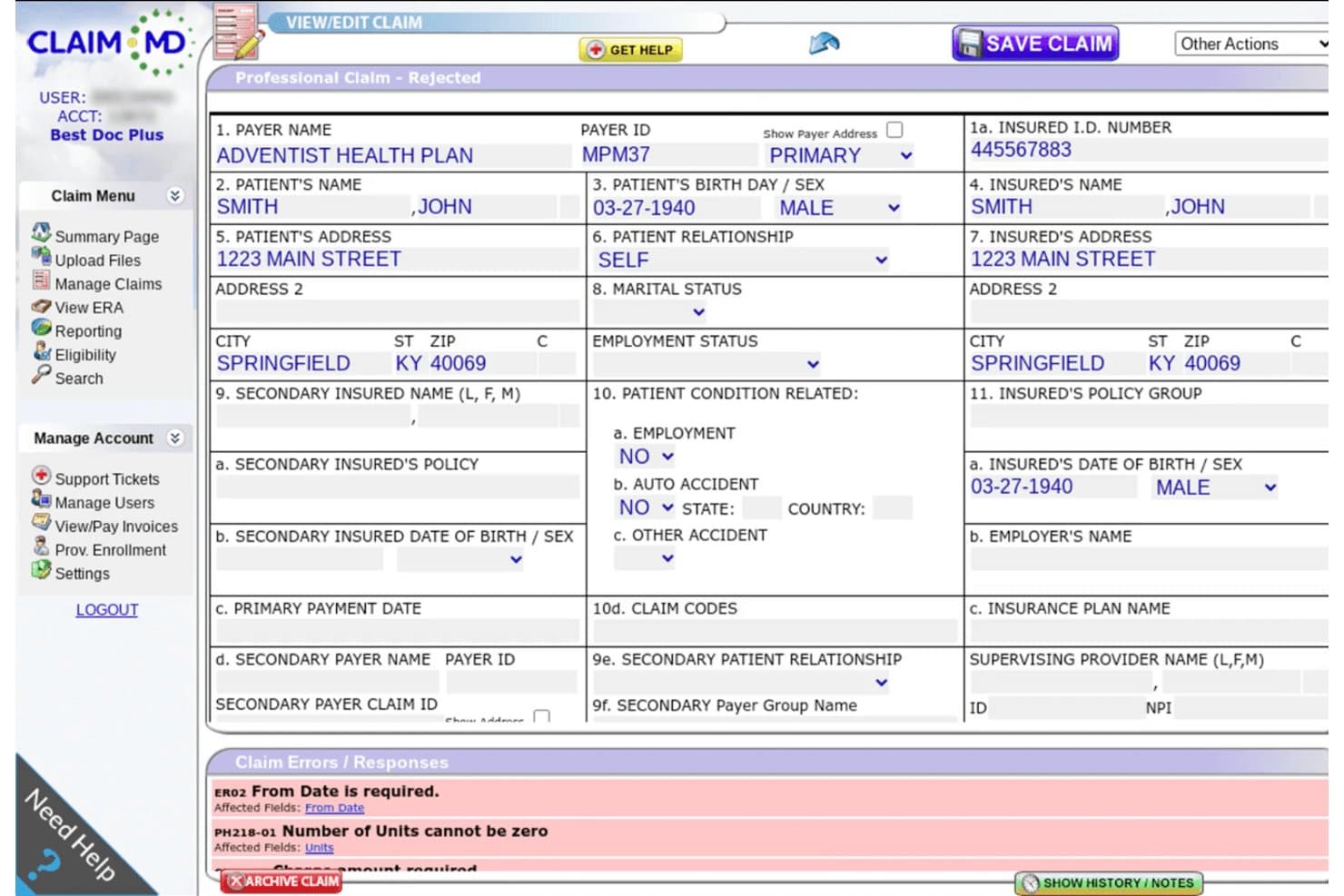
Claim.MD displays a rejected professional claim form with visible errors including missing From Date, zero units, and a required charge amount. Claim.MD is a web-based EDI clearinghouse that handles electronic claims submission, real-time eligibility verification, ERA processing, and automated rejection monitoring across a broad network of commercial and government payers.
Who Is Claim.MD Best For?
Claim.MD is a strong fit for independent billing services and small-to-mid-sized practices that need predictable, per-claim pricing without long-term contracts.
Why I Picked Claim.MD
Claim.MD earns its spot on my shortlist because of how it handles claim lifecycle visibility. I love that the automated response monitoring continuously reconciles every submitted claim against expected payer responses, flagging anything unresolved directly on the Manage Claims list. When a rejection comes in, I can edit the claim on an interactive HCFA-1500 form with errors highlighted inline, then resubmit without leaving the platform.
Claim.MD Key Features
- Real-time eligibility checks: Quickly verify patient benefits through both web portal and API.
- Broad file format compatibility: Submit claims using 837P, 837I, 5010, 4010, CSV, XLS, XML, NSF, or print image files.
- ERA download in multiple formats: Access electronic remittance advice as 835, spreadsheet, XML, or PDF documents.
- Integrated support ticketing: Open a GetHelp ticket directly from any claim, ERA, or eligibility transaction.
Claim.MD Integrations
Claim.MD offers native integrations with Elation Health and Jane App. It supports most practice management and EHR systems via SFTP and API for custom integrations.
Pros and Cons
Pros:
- Interactive claim editing on rejection
- Real-time eligibility verification via portal and API
- Claim status tracking flags unresolved claims
Cons:
- Appeals workflow less robust than competitors
- No AI-driven denial prediction tools
Learn more about Claim.MD: Best for automated denial management
- Free demo available
- Pricing upon request
Visit WebsiteCustomer Rating:4.4/5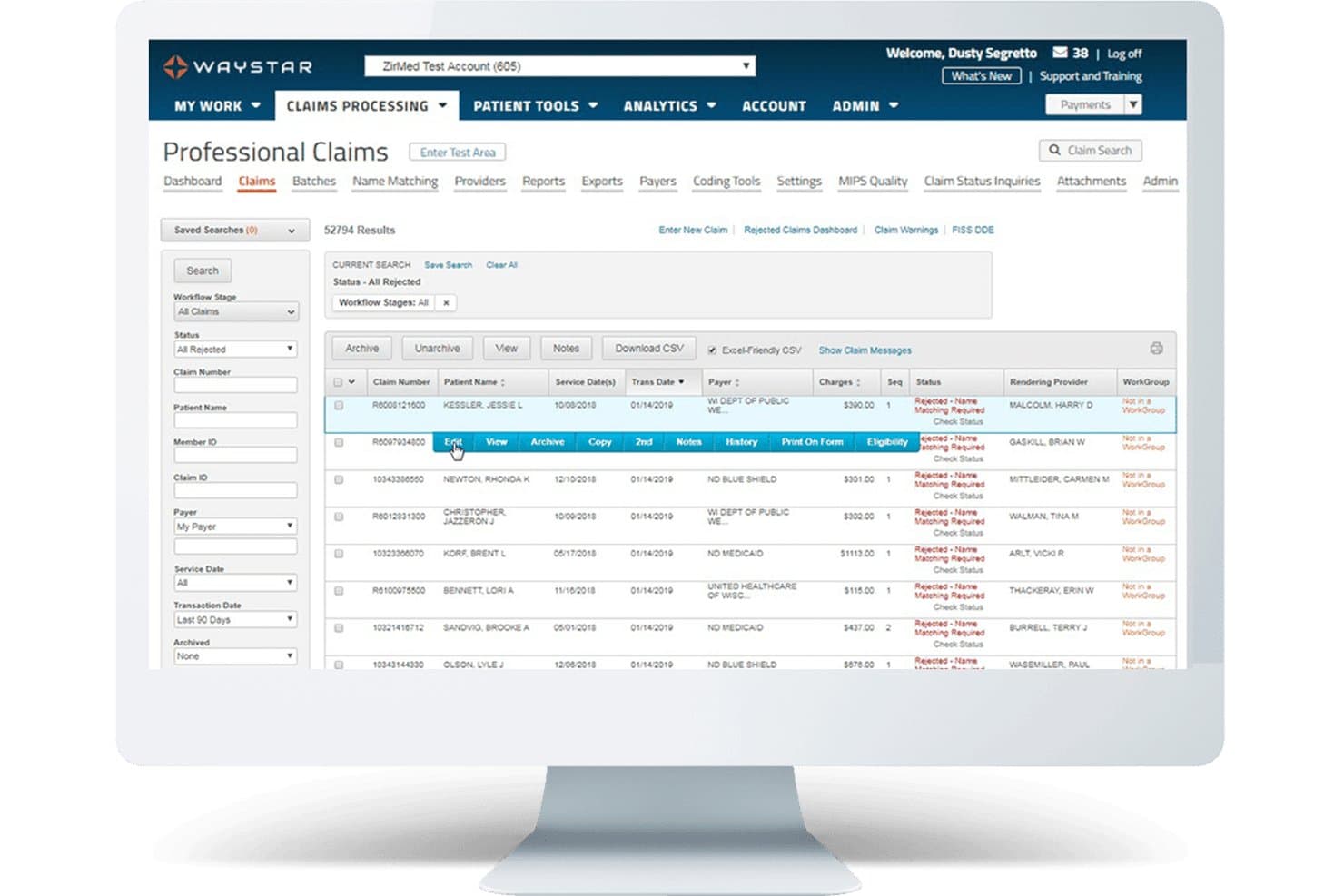
Waystar offers a Professional Claims dashboard that displays rejected claims with filtering options, claim details, and inline action buttons for efficient billing management. Waystar is a cloud-native healthcare clearinghouse platform that combines electronic claims submission, AI-powered claim scrubbing, eligibility verification, ERA reconciliation, and denial and appeal management in a single system.
Who Is Waystar Best For?
Waystar is a strong fit for revenue cycle teams at mid-size to enterprise health systems and hospitals managing high claim volumes across multiple payers.
Why I Picked Waystar
Waystar earns its spot on my shortlist because of how far ahead its denial automation is compared to other clearinghouses. I particularly like AltitudeAI™, which prioritizes denials by likelihood of payment and autonomously generates appeal letters using generative AI. The Appeals Wizard pairs with 1,100+ pre-populated payer templates, and I can batch up to 100 similar appeals to the same payer at once.
Waystar Key Features
- Financial clearance module: Verify eligibility, coverage, authorizations, and medical necessity directly within your clearinghouse workflow.
- Remit Manager: Automate ERA retrieval, posting, and reconciliation from more than 2,000 connected payers.
- Claim lifecycle dashboards: Track claim status, adjudication, and submission details in real time across all payers.
- Customizable workgroups: Assign, route, and prioritize claims and remittance tasks by staff role or business rules.
Waystar Integrations
Waystar offers native integrations with Epic, Cerner, Meditech, and connects to more than 2,000 payer endpoints. An API is available for custom integrations.
Pros and Cons
Pros:
- Automated remittance posting and reconciliation
- Extensive payer connectivity and real-time tracking
- Advanced AI-driven denial triage and appeals
Cons:
- Multi-year contract commitment required
- Not suitable for small independent practices
Learn more about Waystar: Best for real-time eligibility checks
- Not available
- Pricing upon request
Visit WebsiteCustomer Rating:3.7/5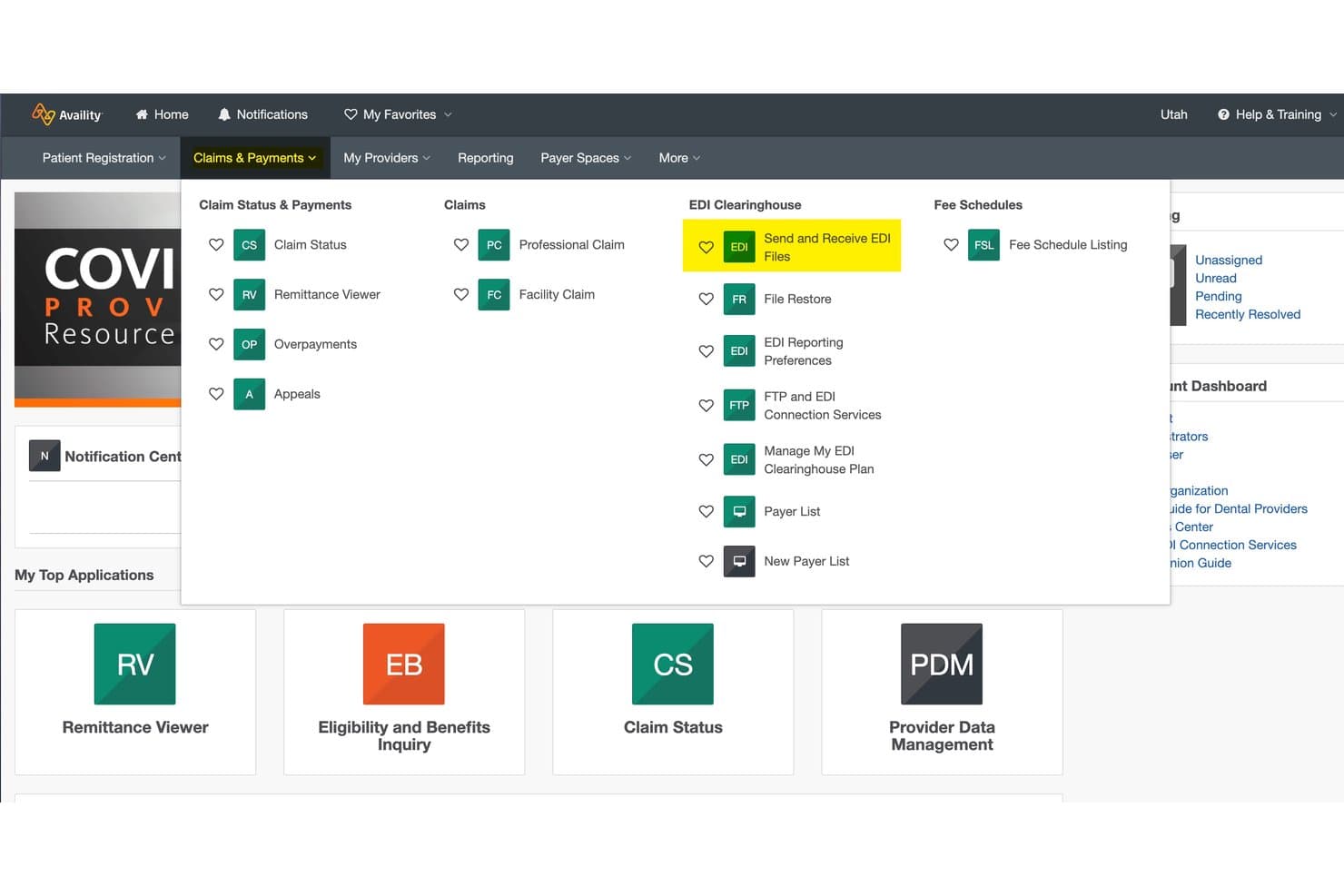
Availity offers an EDI Clearinghouse section within its Claims & Payments menu, featuring tools like Send and Receive EDI Files, File Restore, and FTP and EDI Connection Services. Availity is a health information network and EDI clearinghouse that handles electronic claims submission, real-time eligibility verification, prior authorization, claim status tracking, and ERA remittance across a national payer network.
Who Is Availity Best For?
Availity fits medical billing services and revenue cycle teams that manage high-volume, multi-payer claim workflows and need a single platform to handle transactions across commercial and government payers.
Why I Picked Availity
Availity earns its spot on my shortlist because of how it handles eligibility at the point of care. I like that it runs real-time 270/271 transactions, surfaces member ID cards, and returns patient cost estimates before a visit starts. In Essentials Pro, those checks feed directly into the patient financial clearance workflow, so my team can flag coverage gaps before services are delivered, not after a denial comes back.
Availity Key Features
- Claim submission for all claim types: Submit professional, institutional, and dental claims directly to thousands of payers from a single platform.
- Automated remittance management: Receive and process ERA transactions for reconciliation and payment posting workflows.
- Claim status tracking dashboard: Monitor acceptance, rejection, and payer responses in real-time with detailed status updates.
- Prior authorization management: Submit and track medical prior authorization requests, including supporting documentation and attachments.
Availity Integrations
Availity offers native integrations with Epic, AbbaDox, AZZLY, Cohere Unify, ElderSuite, EZBIS, Juris, Nexis Dossier, VerifyRX, and Visualfiles. An API is available for custom integrations.
Pros and Cons
Pros:
- Robust denial management with predictive edits
- Real-time eligibility checks and responses
- Largest payer network among clearinghouses
Cons:
- Interface navigation can require extra steps
- Occasional delays with some payer transactions
Learn more about Availity: Best for extensive payer connectivity
- Free demo available
- Pricing upon request
Visit WebsiteCustomer Rating:3.9/5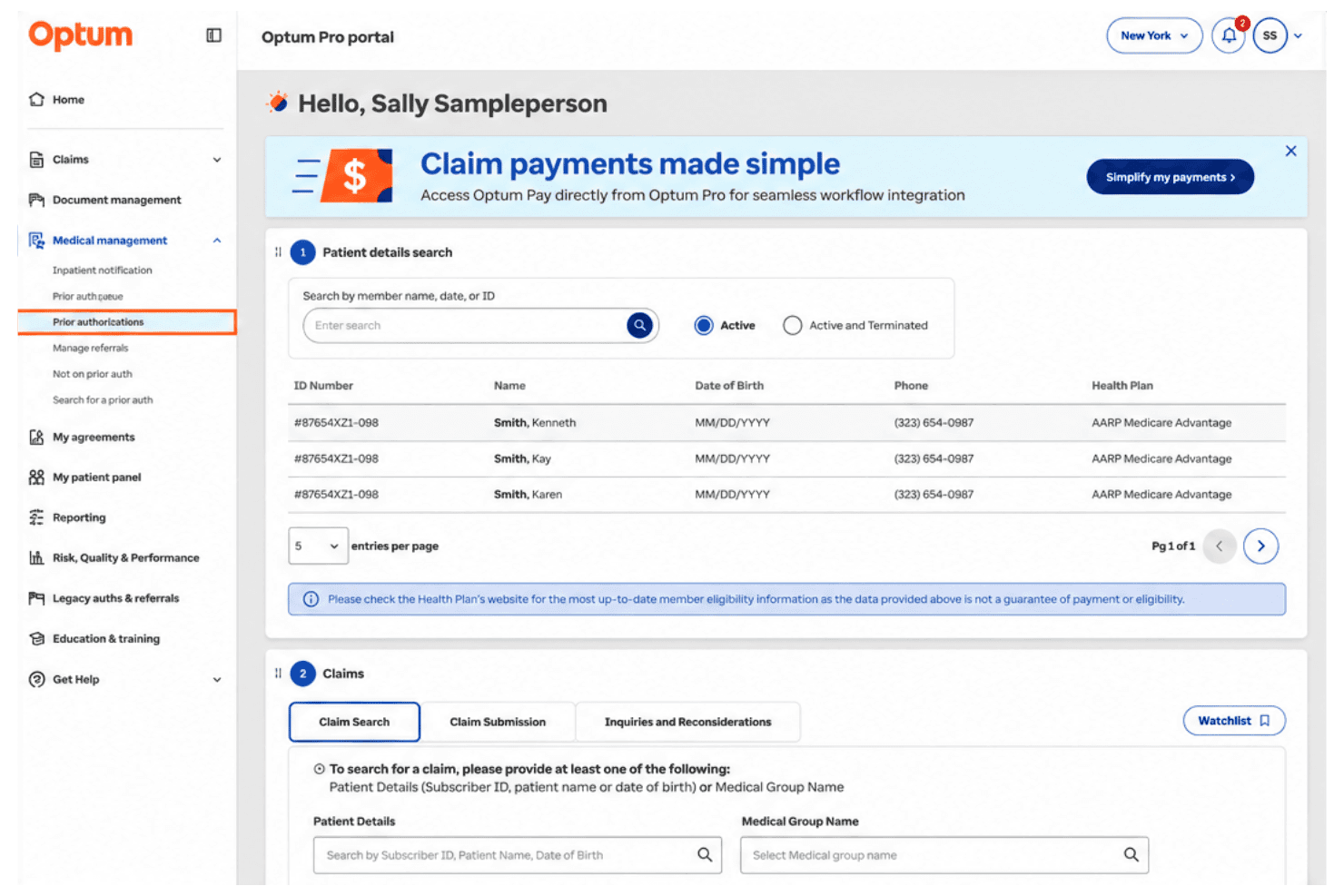
Optum (Change Healthcare) offers a Pro portal dashboard with prior authorization search, patient details lookup, and claims management tools for billing workflows. Optum (Change Healthcare) is a large-scale healthcare EDI clearinghouse that handles 837 claims submission, 835 remittance processing, real-time 270/271 eligibility verification, and claim status tracking across commercial and government payers.
Who Is Optum (Change Healthcare) Best For?
Optum (Change Healthcare) is a strong fit for hospitals, health systems, and large billing organizations that route high claim volumes across a wide range of payers.
Why I Picked Optum (Change Healthcare)
I've included Optum (Change Healthcare) in my top picks because its ENHAC-certified clearinghouse connects to approximately 2,400 payers, covering commercial, Medicare, Medicaid, and workers' comp through a single network. I particularly like the advanced claim routing, which automatically identifies the most direct path to the final claim adjudicator. The PayerList API also lets my team query a real-time list of active payer connections and supported transactions before submitting a single claim.
Optum (Change Healthcare) Key Features
- Claim attachments submission: Send electronic claim attachments and required documentation directly through the clearinghouse portal.
- 835 ERA workflow support: Retrieve, view, and reconcile electronic remittance advice files for automated payment posting.
- Custom claim edits setup: Configure payer-specific validation and data transformations to meet unique filing requirements.
- Real-time eligibility checks: Submit 270/271 eligibility inquiries for instant patient coverage confirmation before service delivery.
Optum (Change Healthcare) Integrations
Optum (Change Healthcare) connects natively with over 2,400 commercial and government payers for direct EDI claim exchange and supports custom integrations through its API.
Pros and Cons
Pros:
- Customizable claim scrubbing and edits engine
- Advanced real-time claim status tracking
- Extensive direct commercial and government payer access
Cons:
- Incident-driven disruptions affect business continuity
- No clear support for small practices
Learn more about Optum (Change Healthcare): Best for integrated payment solutions
- Free demo available
- Pricing upon request
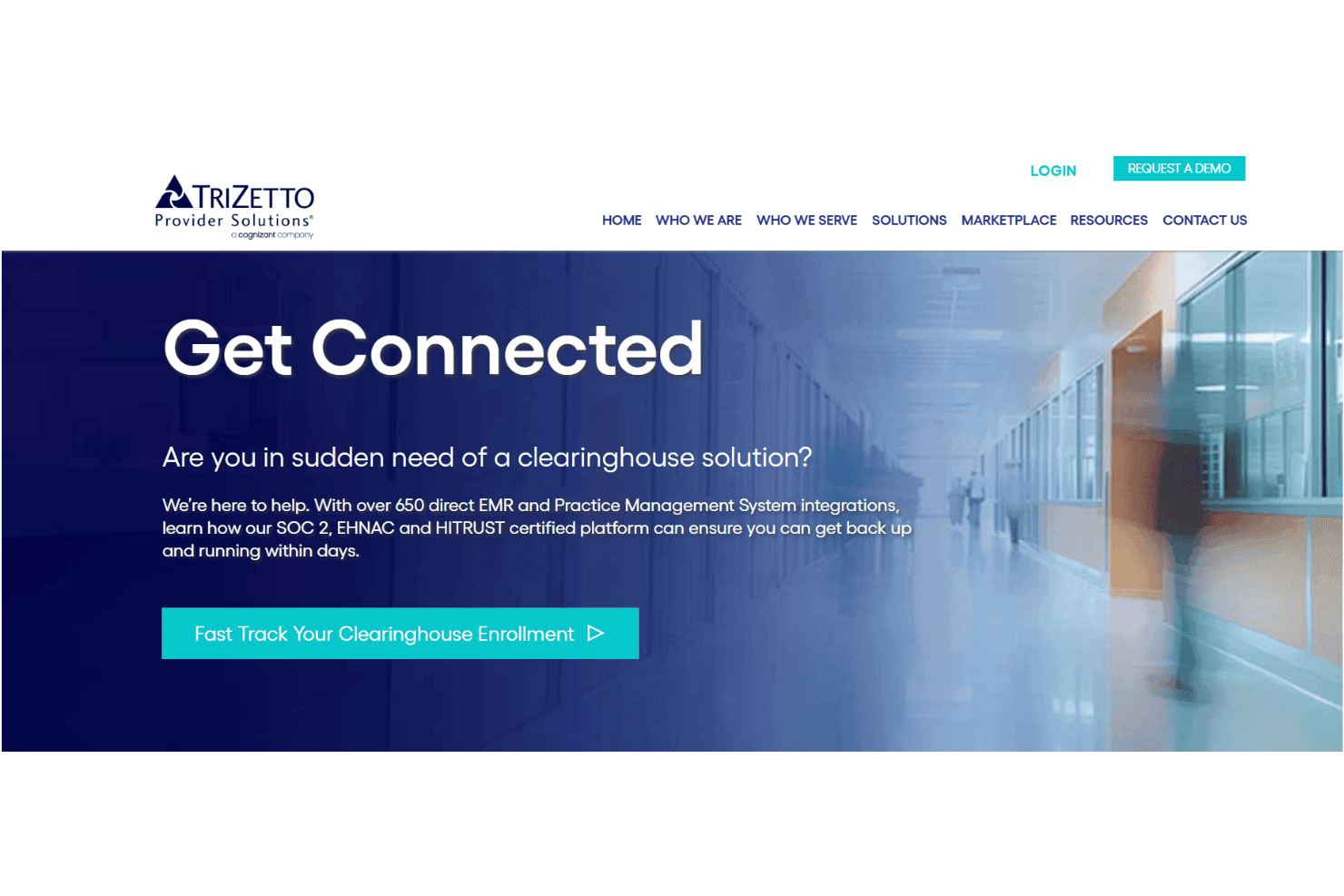
Cognizant TriZetto links claims, AI scrubbing, ERA, eligibility, and denials. Cognizant TriZetto Provider Solutions is an enterprise clearinghouse and RCM platform covering electronic claims submission, AI-powered claim scrubbing, ERA/EOB processing, eligibility verification, and denial management across a network of 11,000+ payer connections.
Who Is Cognizant TriZetto Provider Solutions Best For?
It's a strong fit for mid-to-large physician groups, health systems, and third-party billing services that need enterprise-grade RCM infrastructure.
Why I Picked Cognizant TriZetto Provider Solutions
I picked TriZetto Provider Solutions because of how tightly its payment tools connect across the revenue cycle. The Claim Remittance module converts EOBs directly to EDI 835 files and routes them into auto-posting workflows, so payments and adjustments land without manual intervention. I also like that patient payment collection sits within the same platform, covering responsibility estimation and payment tools alongside ERA processing.
Cognizant TriZetto Provider Solutions Key Features
- Advanced claim editing: Built-in AI tools scan claims for payer-specific errors before submission.
- Real-time claim tracking: Track claim status and payer responses within a centralized dashboard.
- Eligibility verification: Run instant eligibility checks for patient coverage using 270/271 transactions.
- Denials management workflows: Route claim denials into follow-up worklists and track recovery actions.
Cognizant TriZetto Provider Solutions Integrations
TriZetto Provider Solutions offers native integrations with over 650 electronic health record and practice management systems and connects with more than 11,000 payers. An API is available for custom integrations.
Pros and Cons
Pros:
- Extensive payer and provider connectivity
- Supports large-scale batch claim processing
- AI-powered claim scrubbing reduces denial rates
Cons:
- Reporting dashboards lack advanced customization
- Occasional delays in customer service response
Learn more about Cognizant TriZetto Provider Solutions: Best for claims scrubbing accuracy
- Free demo available
- Pricing upon request
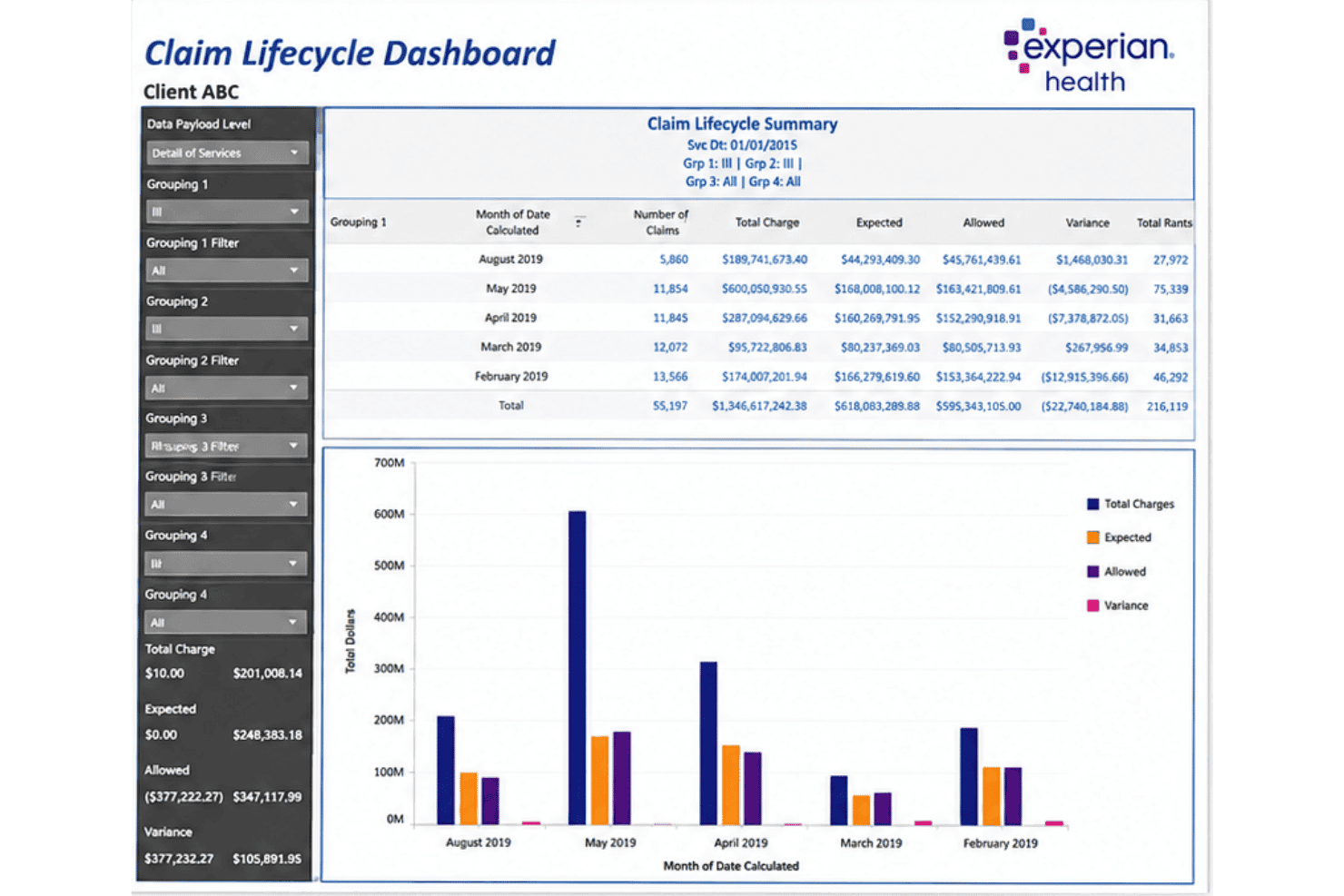
Experian Health ClaimSource handles claims, edits, tracking, denials, and ERA. Experian Health ClaimSource is a claims management platform that handles electronic claims submission, pre-submission editing, real-time claim status tracking, denial workflow management, and electronic remittance processing across commercial and government payers.
Who Is Experian Health ClaimSource Best For?
ClaimSource is a strong fit for revenue cycle teams at mid-to-large health systems and hospital-affiliated billing departments processing high claim volumes.
Why I Picked Experian Health ClaimSource
I picked ClaimSource as one of the best because its claims scrubbing goes far deeper than basic format checks. It runs claims through an expansive library of national payer-specific edits and supports custom provider-level edits on top of those. The AI Advantage Predictive Denials module then flags claims likely to be denied before submission, using your own historical claims data to continuously adapt to changing payer rules.
Experian Health ClaimSource Key Features
- Real-time claim status tracking: View up-to-date acceptance, rejection, and adjudication status for all submitted claims in one dashboard.
- Work queue customization: Set up custom work queues to prioritize claims by payer, dollar amount, or denial reason.
- Electronic remittance integration: Receive and process 835 ERA files with payment and adjustment details directly in the platform.
- Eligibility verification integration: Check patient coverage in real time or batch through direct connections with commercial and government payers.
Experian Health ClaimSource Integrations
ClaimSource offers native integrations with EMR and EHR systems, and connects directly to other Experian Health revenue cycle solutions like eCare NEXT, Coverage Discovery, Enhanced Claim Status, Denial Workflow Manager, and Contract Manager. An API is available for custom integrations.
Pros and Cons
Pros:
- Handles institutional, professional, and dental claims
- Customizable work queues for claims follow-up
- Powerful denial prediction using payer-specific AI
Cons:
- May be complex for smaller practices
- Onboarding process can be lengthy
Learn more about Experian Health ClaimSource:
Annen faktureringsprogramvare for kravformidlere
Her er noen flere alternativer innen faktureringsprogramvare for kravformidlere som ikke kom med på kortlisten min, men som likevel er verdt å se nærmere på:
- 11QuadaxBest for specialty claims support
- 12SSI GroupBest for customizable claim routing
- 13RXNTBest for paperless claim workflows
- 14CollaborateMDBest for rapid batch claim submission
- 15athenahealthBest for payer rules automation
- 16AdvancedMDBest for practice management integration
- 17NextGen HealthcareBest for large group scalability
- 18Kareo (Tebra)Best for billing transparency tools
- 19Apex EDI (Ensora Clearinghouse)Best for direct payer relationships
- 20FinThriveBest for preemptive denial defense
How I Evaluate Clearinghouse Billing Software
I split my evaluation into baseline EDI functions—like 837 submission and claim scrubbing—and the differentiators, like payer network depth, that determine long-term fit.
Core Functionality (Table Stakes for This List)
When I'm selecting tools for my list, I rank each one on a scale from 0 (does not offer the functionality) to 5 (excels in this area) for each core functionality listed below. Then, I calculate the tool's total score into a percentage. Each tool needs to achieve a minimum total score of 65% to be considered for inclusion.
- Electronic Claims Submission: I check for 837P, 837I, and 837D support with batch processing, since multi-specialty groups need all claim types flowing through one connection.
- Claim Scrubbing & Validation: Payer-specific edit libraries catch issues generic CMS rule checks miss, like modifier requirements that vary between commercial plans.
- Real-Time Claim Status: I evaluate whether the tool offers 277CA tracking with drill-down and alerts, not just a basic accepted/rejected dashboard view.
- ERA & Payment Posting: I look at whether 835 files auto-post to patient accounts or require manual reconciliation, which bogs down billing teams fast.
- Eligibility Verification: Real-time 270/271 inquiries at check-in prevent surprise coverage gaps, so I look for both real-time and batch lookup options.
- Payer Network Connectivity: The breadth of connected commercial, Medicare, Medicaid, and workers' comp payers matters, especially direct connections over secondary routing.
Once I have a list of tools that meet the criteria, I consider what sets each platform apart.
Differentiating Factors (What Sets Vendors Apart)
Here's how I compare and contrast different vendors:
Standout Features
AI-powered claim scrubbing goes beyond standard edit checks by catching coding errors and missing modifiers that payer-specific rules would reject. I look for platforms where denial management isn't just a flag—it categorizes rejection reasons and routes claims into corrective workflows with suggested fixes. Multi-payer analytics dashboards also matter. Being able to compare clean claim rates and reimbursement timelines across payers helps billing teams spot which ones consistently underpay or delay.
Beyond Features
Payer network breadth is one of the first things I check. Direct connections to commercial, Medicare, Medicaid, and workers' comp payers mean fewer claims get rerouted through secondary clearinghouses, which adds delays. Pricing structure matters too, since per-claim fees can quietly eat into margins for high-volume billing services while flat subscriptions favor them. I also evaluate EHR and practice management integrations, looking for native connections and API access that let your existing system push and pull claim data without manual file transfers.
Slik velger du faktureringsprogramvare for kravformidlere
Det er lett å gå seg vill i lange funksjonslister og komplekse prisstrukturer. For å holde fokus mens du arbeider deg gjennom den unike prosessen med å velge programvare, får du her en sjekkliste over faktorer du bør ha i bakhodet:
| Faktor | Dette bør du vurdere |
|---|---|
| FaktorSkalerbarhet | Dette bør du vurdereVil programvaren holde tritt når kravvolumet eller sammensetningen av betalere øker? Se etter begrensninger eller ekstrakostnader når virksomheten vokser. |
| FaktorIntegrasjoner | Dette bør du vurdereKan den kobles direkte til EHR-, PM- eller regnskapssystemet ditt? Vurder kompatibilitet med eksisterende systemer og nødvendige filformater eller API-er. |
| FaktorTilpasningsmuligheter | Dette bør du vurdereLar den deg konfigurere brukerroller, betalerspesifikke redigeringer eller tilpassede rapporter? Tenk over hvordan den kan tilpasses arbeidsflytene i teamet ditt. |
| FaktorBrukervennlighet | Dette bør du vurdereEr grensesnittet tydelig og raskt for daglige faktureringsoppgaver? Se etter unødvendige trinn eller bratte læringskurver som kan gjøre arbeidet tregere for de ansatte. |
| FaktorImplementering og oppstart | Dette bør du vurdereHvilken opplæring og støtte er inkludert? Spør hvordan registrering hos betalere, oppsett av brukere og datamigrering håndteres fra starten av. |
| FaktorKostnad | Dette bør du vurdereBetales gebyrene per krav, per leverandør eller samlet? Se etter skjulte kostnader for avviste krav, kvalifikasjonskontroller eller EDI-transaksjoner. |
| FaktorSikkerhetstiltak | Dette bør du vurdereTilbyr leverandøren HIPAA-kompatibel infrastruktur, revisjonslogger og katastrofegjenoppretting? Vurder sikkerhetsstandardene for PHI i alle faser. |
| FaktorTilgjengelig kundestøtte | Dette bør du vurdereKan du nå leverandøren i arbeidstiden din og via de foretrukne kanalene dine? Se etter forsinkelser eller begrenset tilgang til kundestøtte. |
Hva er faktureringsprogramvare for kravformidlere?
Faktureringsprogramvare for kravformidlere er en plattform som elektronisk behandler, kontrollerer og sender medisinske krav mellom helsepersonell og forsikringsbetalere. Den reduserer manuelt arbeid ved å validere at kravene er korrekte, rute informasjonen til riktig betaler og spore kravstatus i sanntid fra innsending til betaling.
Denne programvaren hjelper faktureringsteam med å redusere avvisninger, fremskynde refusjoner og opprettholde samsvar i et komplekst betalerlandskap.
Funksjoner i faktureringsprogramvare for kravformidlere
Når du velger faktureringsprogramvare for oppgjørssentraler, bør du se etter følgende viktige funksjoner:
- Elektronisk innsending av krav: Sender ANSI X12 837-krav direkte til kommersielle og offentlige betalere, med støtte for masseopplasting for flere pasienter samtidig.
- Kontroll og validering av krav: Kontrollerer automatisk krav for kodefeil, manglende data og brudd på betalernes spesifikke regler før innsending, slik at avvisninger reduseres.
- Sporing av kravstatus i sanntid: Lar brukerne se det aktuelle stadiet for hvert krav, fra godkjenning til betaling, med varsler om avvisninger og nødvendige tiltak.
- Automatisk bokføring av ERA/EOB: Importerer og bokfører automatisk detaljer fra elektroniske betalingsråd og forklaringer av ytelser på pasientkontoer, noe som sparer manuelt arbeid.
- Kontroll av rettigheter: Bekrefter umiddelbart pasientens aktive forsikringsdekning, egenandeler og fradrag før tjenester ytes, slik at ubetalte krav kan unngås.
- Motor for tilpassede regler per betaler: Gjør det mulig å opprette, redigere eller automatisere betalerspesifikke endringer og regler, slik at unike krav fra ulike forsikringsselskaper kan håndteres.
- Omfattende nettverk av betalere: Kobler direkte til tusenvis av kommersielle betalere, Medicare-, Medicaid- og spesialiserte betalere for bredere kravdekning.
- Arbeidsflyter for avvisningshåndtering: Merker avvisninger, sporer årsakene til avvisningene og sender krav inn i korrigerende arbeidsflyter for rask og veiledet ny innsending.
- Revisjonsspor og samsvarslogging: Oppbevarer sikre registre over systemaktivitet og dataendringer for å støtte HIPAA-samsvar og risikostyring.
- Analysedashbord for flere betalere: Tilbyr visuelle verktøy for å analysere tidslinjer for refusjon, trender i avvisninger, betalernes resultater og andelen feilfrie krav på tvers av alle betalere.
Fordeler med faktureringsprogramvare for oppgjørssentraler
Implementering av faktureringsprogramvare for oppgjørssentraler gir flere fordeler for teamet og virksomheten din. Her er noen av fordelene du kan se frem til:
- Færre avviste krav: Innebygd kontroll og validering forhindrer feil og manglende data, og reduserer avvisningsfrekvensen hos betalerne.
- Raskere refusjon: Sporing av kravstatus i sanntid og automatisk bokføring av ERA fremskynder innkrevingssyklusen.
- Større rekkevidde blant betalere: Direkte forbindelser til tusenvis av betalere gjør det mulig å håndtere ulike forsikringstyper og spesialiserte krav i ett system.
- Mer nøyaktig kontantstrøm: Automatisk bokføring av betalinger og kontroll av rettigheter avdekker problemer på forhånd, noe som gir bedre prognoser og færre overraskelser knyttet til dekning.
- Bedre samsvar: Revisjonslogger og HIPAA-kompatibel utforming bidrar til å sikre datasikkerheten og redusere regulatorisk risiko.
- Mindre administrativ belastning: Automatisering erstatter manuell dataregistrering, sparer tid for de ansatte og reduserer behovet for korrigeringer og nye innsendinger.
- Handlingsrettet innsikt i inntekter: Analysedashbord avdekker betaleres resultater og trender i avvisninger, slik at du kan forbedre prosessene for bedre resultater.
Kostnader og priser for faktureringsprogramvare for oppgjørssentraler
Valg av faktureringsprogramvare for oppgjørssentraler krever en forståelse av de ulike prismodellene og abonnementene som er tilgjengelige. Kostnadene varierer basert på funksjoner, teamstørrelse, tillegg og mer. Tabellen nedenfor oppsummerer vanlige abonnementer, gjennomsnittsprisene deres og typiske funksjoner som er inkludert i løsninger for faktureringsprogramvare for oppgjørssentraler:
Sammenligningstabell for abonnementer for faktureringsprogramvare for oppgjørssentraler
| Abonnementstype | Gjennomsnittspris | Vanlige funksjoner |
|---|---|---|
| AbonnementstypeGratisabonnement | Gjennomsnittspris$0 | Vanlige funksjonerGrunnleggende innsending av krav, begrenset tilgang til betalere, standard brukerstøtte og minimal rapportering. |
| AbonnementstypePersonlig abonnement | Gjennomsnittspris$50–$150/måned | Vanlige funksjonerElektroniske krav, grunnleggende kontroll av krav, kontroll av rettigheter, tilgang for én bruker og standard brukerstøtte. |
| AbonnementstypeBedriftsabonnement | Gjennomsnittspris$200–$600/måned | Vanlige funksjonerBehandling av krav i grupper, betalerspesifikk kontroll, automatisk bokføring av ERA, analysedashbord og støtte for flere brukere. |
| AbonnementstypeStorbedriftsabonnement | Gjennomsnittspris$1,000+/måned | Vanlige funksjonerAvanserte integrasjoner, tilpassede regler per betaler, dedikert oppstart, samsvarsverktøy og førsteklasses kontostøtte. |
Vanlige spørsmål om faktureringsprogramvare for oppgjørssentraler
Her er noen svar på vanlige spørsmål om faktureringsprogramvare for oppgjørssentraler:
Hvordan håndterer faktureringsprogramvare for oppgjørssentraler avviste krav?
Faktureringsprogramvare for oppgjørssentraler flagger avviste krav, kategoriserer årsakene til avvisningen, og noen løsninger oppretter korrigerende arbeidsflyter slik at teamet kan løse problemer og sende inn kravene på nytt raskt. Dette bidrar til å redusere behandlingstiden for betaling og begrense forstyrrelser i kontantstrømmen.
Er faktureringsprogramvare for oppgjørssentraler kompatibel med EHR- eller praksisadministrasjonssystemet mitt?
De fleste moderne faktureringsverktøy for oppgjørssentraler tilbyr integrasjoner med ledende EHR- og PM-systemer eller støtter filformater som ANSI X12 837/835 og HL7. Bekreft alltid kompatibilitet eller tilgjengelige API-er med det eksisterende systemet før du tar en beslutning.
Hvilke sikkerhetsfunksjoner bør jeg se etter i faktureringsprogramvare for oppgjørssentraler?
Se etter HIPAA-kompatibel infrastruktur, kryptering av data i hvile og under overføring, revisjonslogging og signerte avtaler med forretningsforbindelser (BAA-er). Disse sikkerhetstiltakene bidrar til å beskytte sensitive pasientopplysninger og sikre overholdelse av regelverket.
Gir bruk av en oppgjørssentral raskere refusjon?
Ja, faktureringsprogramvare for oppgjørssentraler kan fremskynde betalingene ved å redusere feil ved dataregistrering, sikre renere krav fra starten av og gi sporing av krav i sanntid, slik at problemer løses raskt.
Kan faktureringsprogramvare for oppgjørssentraler brukes av spesialistpraksiser?
Ja, mange plattformer for oppgjørssentraler kobler seg til et bredt nettverk av kommersielle betalere, Medicare, Medicaid og spesialiserte betalere som tannhelse eller psykisk helse, noe som gjør dem egnet for praksiser med flere spesialområder eller nisjepraksiser.
Hvilke alternativer finnes for opplæring og kundestøtte?
Leverandører kan tilby hjelp med implementering, bistand ved registrering hos betalere, dedikerte kundeansvarlige og brukeropplæring. Spør om åpningstider for kundestøtte og hvordan den er tilgjengelig – spesielt hvis faktureringsteamet arbeider utenfor vanlige arbeidstider.