

EMR-sykehusprogramvare lar deg registrere, lagre og administrere pasienthelseinformasjon digitalt på tvers av sykehusets avdelinger. Hvis du prøver å finne den beste EMR-sykehusprogramvaren, vet du hvor mye som avhenger av å ta dette valget riktig – pasientsikkerhet, kontinuitet i behandlingen og smidig drift fra dag til dag avhenger av det.
Med alternativer som spenner fra etablerte bedriftsplattformer til fleksible nettbaserte løsninger, er det ikke enkelt å avgjøre hvilket system som faktisk passer til dine kliniske og administrative behov. Denne veiledningen gir deg en tydelig sammenligning av de beste alternativene, slik at du kan vurdere funksjoner og styrker opp mot hverandre og finne løsningen som passer best for teamet ditt.
Why Trust Our Software Recommendations
6,700+
Reviews
20
Industry experts
16+
Evaluation factors
14
Years
Our team has been testing and reviewing software since 2012. As medical practice leaders ourselves, we know how difficult—and important—it is to choose the right software.
For this guide, we evaluated tools using hands-on testing and independent research, scoring tools using our selection criteria.
Our reviews reflect our human editorial judgment, not a sales pitch.
Sammenligningstabell for EMR-sykehusprogramvare
Denne sammenligningstabellen viser priser for mine beste alternativer innen EMR-sykehusprogramvare:
| Tool | Best For | Trial Info | Price | ||
|---|---|---|---|---|---|
| 1 | Best for focused clinical management workflows | Free demo available | Pricing upon request | Website | |
| 2 | Best for cloud-based patient engagement workflows | Free demo available | Pricing upon request | Website | |
| 3 | Best for inpatient and ambulatory care records | Free demo available | Pricing upon request | Website | |
| 4 | Best for post-acute care management | Free demo available | Pricing upon request | Website | |
| 5 | Best for supporting rural and community healthcare | Free demo available | Pricing upon request | Website | |
| 6 | Best for configurable acute care workflows | Free demo available | Pricing upon request | Website | |
| 7 | Best for clinical and financial hospital data | Not available | Pricing upon request | Website | |
| 8 | Best for connecting clinical data with analytics | Free demo available | Pricing upon request | Website | |
| 9 | Best for web-based EHR workflows | Not available | Pricing upon request | Website | |
| 10 | Best for enterprise-wide clinical workflows | Not available | Pricing upon request | Website |


Anmeldelser av den beste EMR-sykehusprogramvaren
\u003cspan style=\u0022font-weight: 400;\u0022\u003eNedenfor finner du mine detaljerte sammendrag av den beste EMR-sykehusprogramvaren som kom med på kortlisten min. Anmeldelsene mine gir et detaljert innblikk i funksjonene, de beste bruksområdene og integrasjonene til hver programvare, slik at du kan finne den som passer best for deg.\u003c/span\u003e
 Best for focused clinical management workflows
- Free demo available
- Pricing upon request
Visit WebsiteCustomer Rating:3.7/5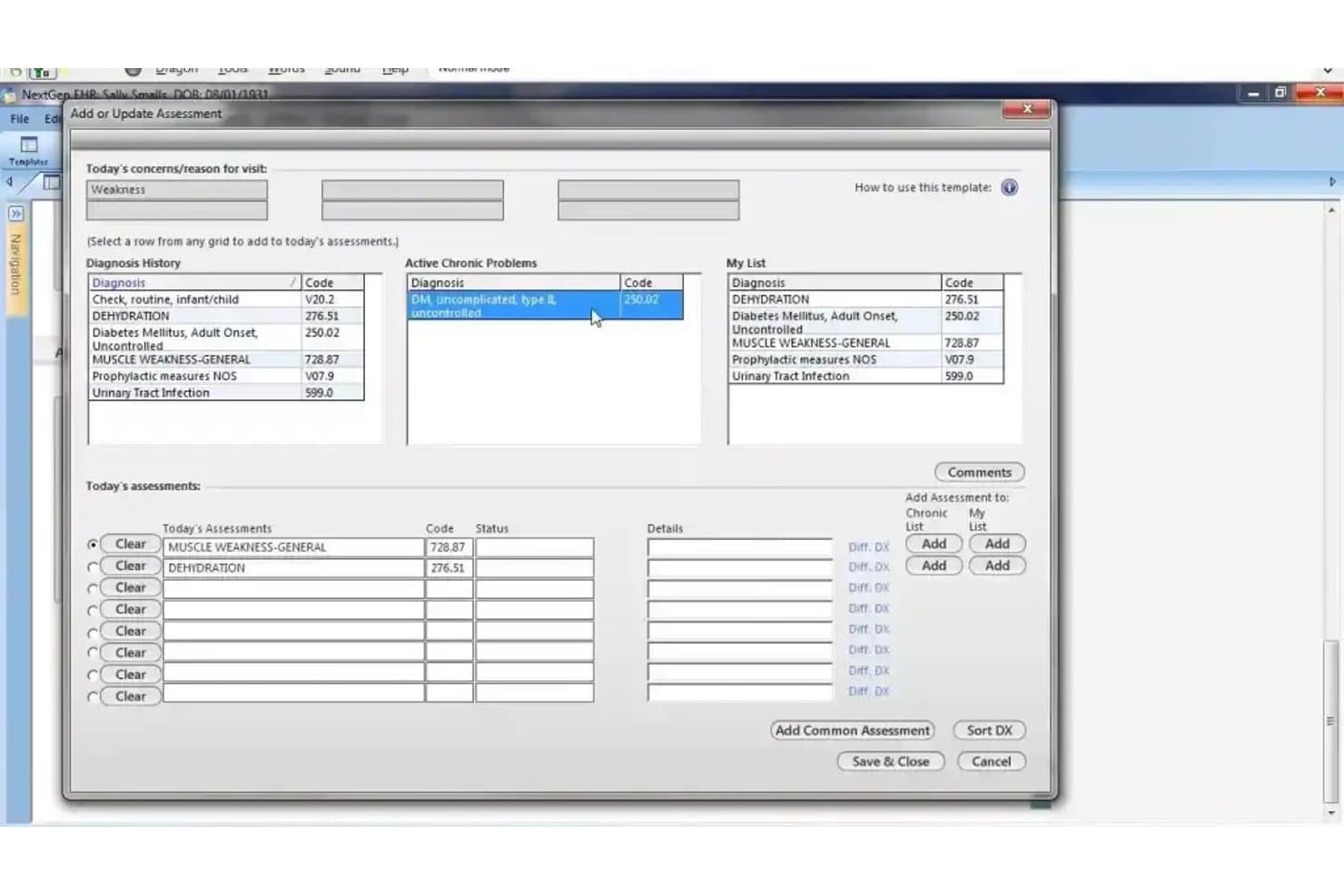
NextGen Healthcare offers an 'Add or Update Assessment' dialog that allows clinicians to manage diagnoses, chronic problems, and today's assessments with ICD codes. NextGen Healthcare is an ambulatory-focused EHR platform that combines clinical documentation, practice management, revenue cycle management, and care coordination tools across 40+ medical specialties.
Who Is NextGen Healthcare Best For?
NextGen Healthcare fits multi-specialty ambulatory practices and physician groups that need a unified EHR and practice management system across clinical and administrative teams.
Why I Picked NextGen Healthcare
I picked NextGen Healthcare as one of the best because of how tightly it structures specialty-specific clinical workflows. The 2,000+ built-in clinical templates across 40+ specialties mean my team documents within pre-built, specialty-appropriate frameworks rather than adapting generic forms. I also like the ambient AI, which converts patient conversations directly into structured SOAP notes, cutting after-hours documentation by up to 57%.
NextGen Healthcare Key Features
- Integrated practice management: Schedule appointments, track patient flow, and manage billing in a unified dashboard.
- FHIR and HL7 interoperability: Exchange clinical data with labs, imaging centers, and HIEs using standard APIs.
- Patient portal: Allow patients to message providers, request refills, view lab results, and manage appointments online.
- Population health analytics: Monitor quality measures and identify gaps in care with real-time reporting across multiple specialties.
NextGen Healthcare Integrations
NextGen Healthcare offers native integrations with Doctible, Solutionreach, Clearwave, InstaMed, and the Mirth Connect Integration Engine for health data exchange. An API is available for custom integrations.
Pros and Cons
Pros:
- Strong interoperability with labs and HIEs
- Ambient AI documentation for encounters
- Specialty-specific ambulatory clinical templates included
Cons:
- Lacks institutional hospital billing workflows
- No inpatient charting or bed management
Learn more about NextGen Healthcare: Best for cloud-based patient engagement workflows
- Free demo available
- Pricing upon request
Visit WebsiteCustomer Rating:3.4/5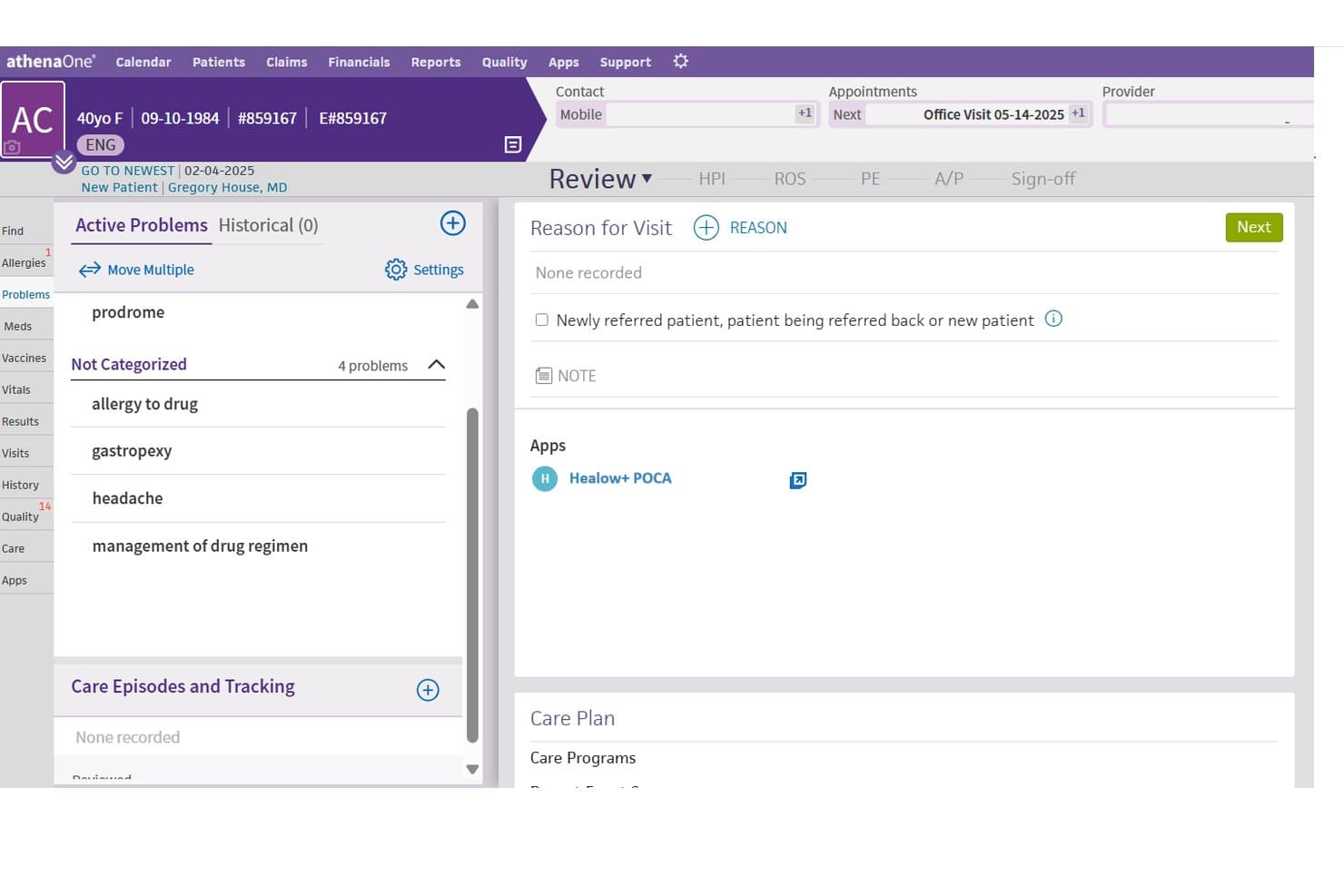
athenahealth offers an integrated patient chart view with active problems, reason for visit, and the Healow+ POCA app embedded directly within the EHR workflow. athenahealth is a cloud-native ambulatory EHR platform that combines clinical documentation, revenue cycle management, practice management, and patient engagement tools into a single connected system.
Who Is athenahealth Best For?
athenahealth is a strong fit for physician groups and hospital-owned ambulatory practices with 1 to 75 providers.
Why I Picked athenahealth
athenahealth earns its spot on my shortlist because of how completely athenaCommunicator handles patient engagement without bolting on separate software. I particularly like that self-scheduling, digital intake, appointment reminders, and online bill pay all live in one cloud-native workflow. Because athenahealth has been cloud-native since its founding, every update rolls out automatically, so patient-facing tools stay current without any IT intervention on my end.
athenahealth Key Features
- AI-powered clinical documentation: Uses natural language processing to automate charting and highlight relevant patient data in real time.
- Integrated revenue cycle management: Supports medical billing, coding, claims denial, and remittance workflows in one platform.
- FHIR-based interoperability: Enables data exchange with EHRs, HIEs, labs, and imaging vendors using FHIR and HL7 standards.
- ONC-certified compliance tools: Delivers built-in tools for HIPAA compliance, MIPS reporting, and meaningful use attestation.
athenahealth Integrations
athenahealth offers native integrations with Dragon Medical One, BirdEye, and Epocrates, and provides access to hundreds of partner apps through the athenahealth Marketplace. FHIR and HL7 APIs are available for custom integrations with EHRs, labs, and imaging systems.
Pros and Cons
Pros:
- Detailed ambulatory clinical documentation tools
- Automatic regulatory updates for all users
- Robust cloud-based patient engagement suite
Cons:
- Medication administration lacks BCMA support
- Lacks inpatient charting and hospital billing
Learn more about athenahealth: Best for inpatient and ambulatory care records
- Free demo available
- Pricing upon request
Visit WebsiteCustomer Rating:3.4/5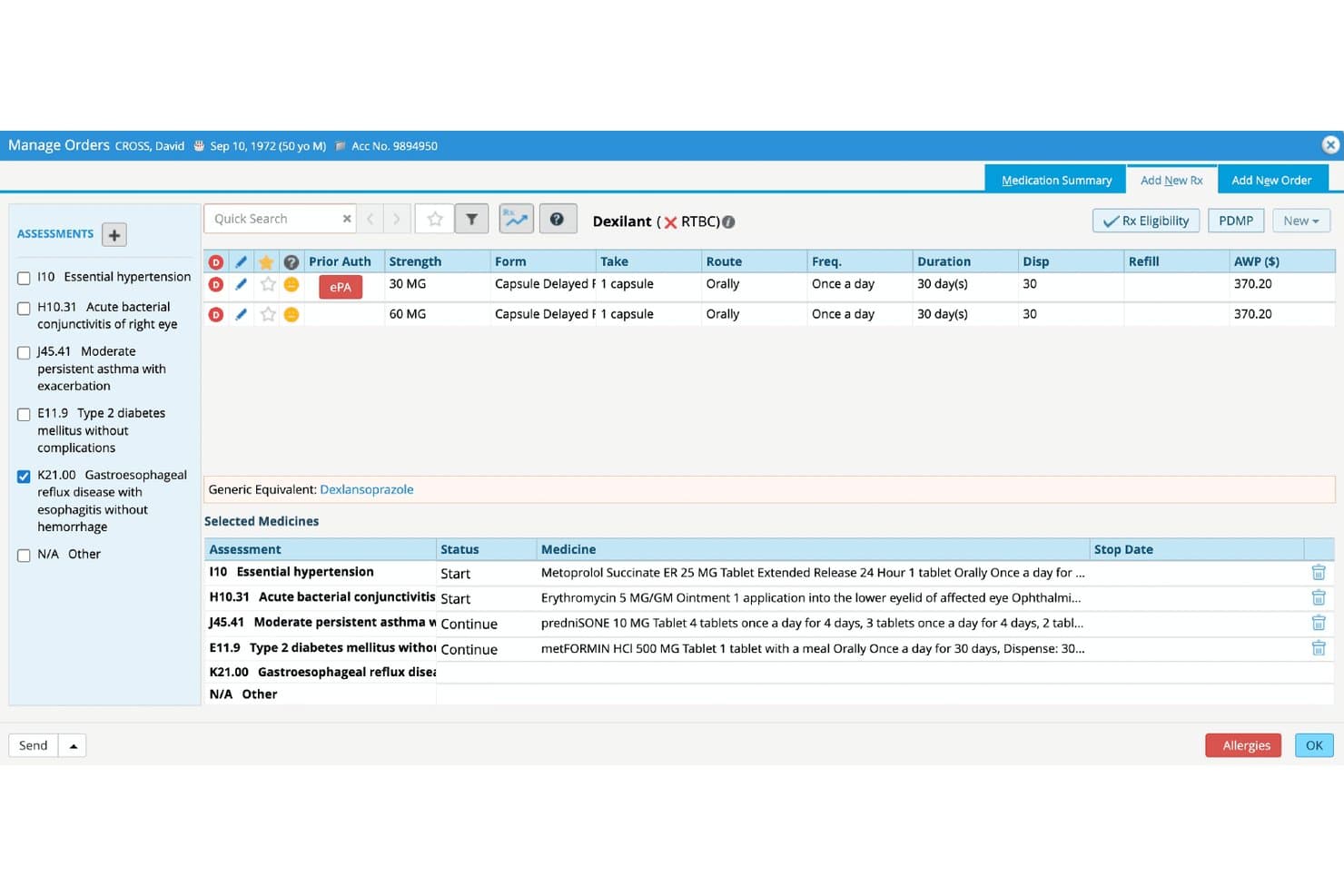
eClinicalWorks offers a Manage Orders screen with electronic prior authorization, medication selection, and multi-diagnosis prescription management for hospital EMR workflows. eClinicalWorks is an AI-powered EHR platform built for hospitals and ambulatory practices, combining inpatient documentation, CPOE, ePrescribing, revenue cycle management, and population health tools in a single unified system.
Who Is eClinicalWorks Best For?
It's a strong fit for community hospitals, integrated delivery networks, and multi-site health systems managing both inpatient and outpatient care on a single platform.
Why I Picked eClinicalWorks
eClinicalWorks earns its spot on my shortlist because it genuinely bridges inpatient and ambulatory records without requiring a separate system for each. I particularly like PRISMA, its built-in health information search engine, which pulls fragmented records across care settings into a single, queryable view. The ADT notification support also stands out, letting my team track admit, discharge, and transfer events in real time and connect them directly to outpatient follow-up workflows.
eClinicalWorks Key Features
- Bed management dashboard: Shows real-time availability and status of inpatient beds across hospital units.
- Embedded charge capture: Lets clinical staff document and submit charges within the same workflow as clinical documentation.
- HL7 and FHIR data exchange: Supports bidirectional data sharing with radiology, labs, pharmacies, and external health systems.
- ONC-certified quality reporting tools: Delivers dashboards and registry reporting for CMS programs like MIPS and HEDIS.
eClinicalWorks Integrations
eClinicalWorks offers native integrations with Meditech, Cerner, Epic, McKesson, Siemens, and supports HL7, FHIR, and CCDA data exchange. An API is available for custom integrations.
Pros and Cons
Pros:
- Customizable clinical content for multiple specialties
- Real-time bed management dashboard is included
- Ambulatory and inpatient records managed in one system
Cons:
- CPOE and nursing workflows can be complex
- Inpatient billing workflows less robust than competitors
Learn more about eClinicalWorks:
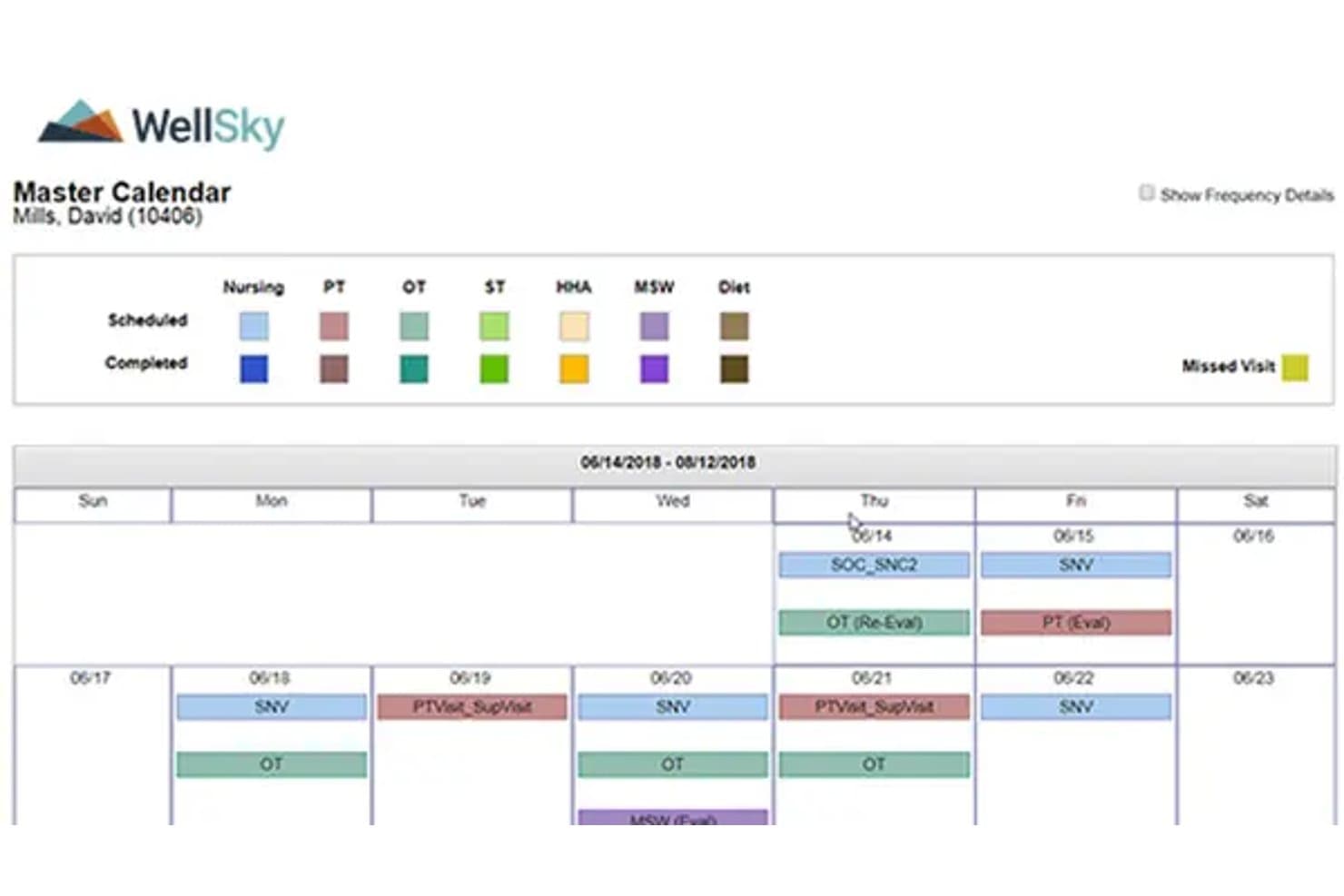
WellSky offers a Master Calendar view that displays scheduled and completed visits across nursing, PT, OT, ST, HHA, MSW, and Diet disciplines in a color-coded weekly format. WellSky Personal Care is a home care management platform built for post-acute and non-medical care agencies, combining scheduling, caregiver coordination, AI-powered shift documentation, and billing tools.
Who Is WellSky Best For?
WellSky Personal Care is a strong fit for private-duty and non-medical home care agencies managing caregiver scheduling, EVV compliance, and client billing at scale.
Why I Picked WellSky
I picked WellSky as one of the best because CareInsights flags clients at elevated hospitalization risk, giving post-acute teams a concrete tool to act before a readmission occurs. I also like how SkySense AI converts verbal caregiver conversations into structured shift notes automatically. In practice, that means care staff spend less time on documentation and more time tracking the clinical changes that matter most post-discharge.
WellSky Key Features
- Applicant tracking module: Lets you manage caregiver hiring and onboarding processes in a centralized dashboard.
- Family Room portal: Provides clients and families with secure online access to care calendars, shift notes, and billing.
- Custom report builder: Enables agencies to create and schedule detailed operational and compliance reports.
- EVV integration: Supports electronic visit verification requirements for Medicaid and government-funded programs.
WellSky Integrations
WellSky Personal Care offers native integrations with QuickBooks, Paychex, ADP, Sandata, AxisCare, MatrixCare, Alora, Rosemark, Axxess, and CareAcademy. An API is available for custom integrations.
Pros and Cons
Pros:
- Family portal for real-time care updates
- AI-powered caregiver documentation automation
- Specialized tools for non-medical care agencies
Cons:
- Lacks ONC certification and hospital billing
- No support for inpatient clinical charting
Learn more about WellSky: Best for supporting rural and community healthcare
- Free demo available
- Pricing upon request
Visit WebsiteCustomer Rating:2.6/5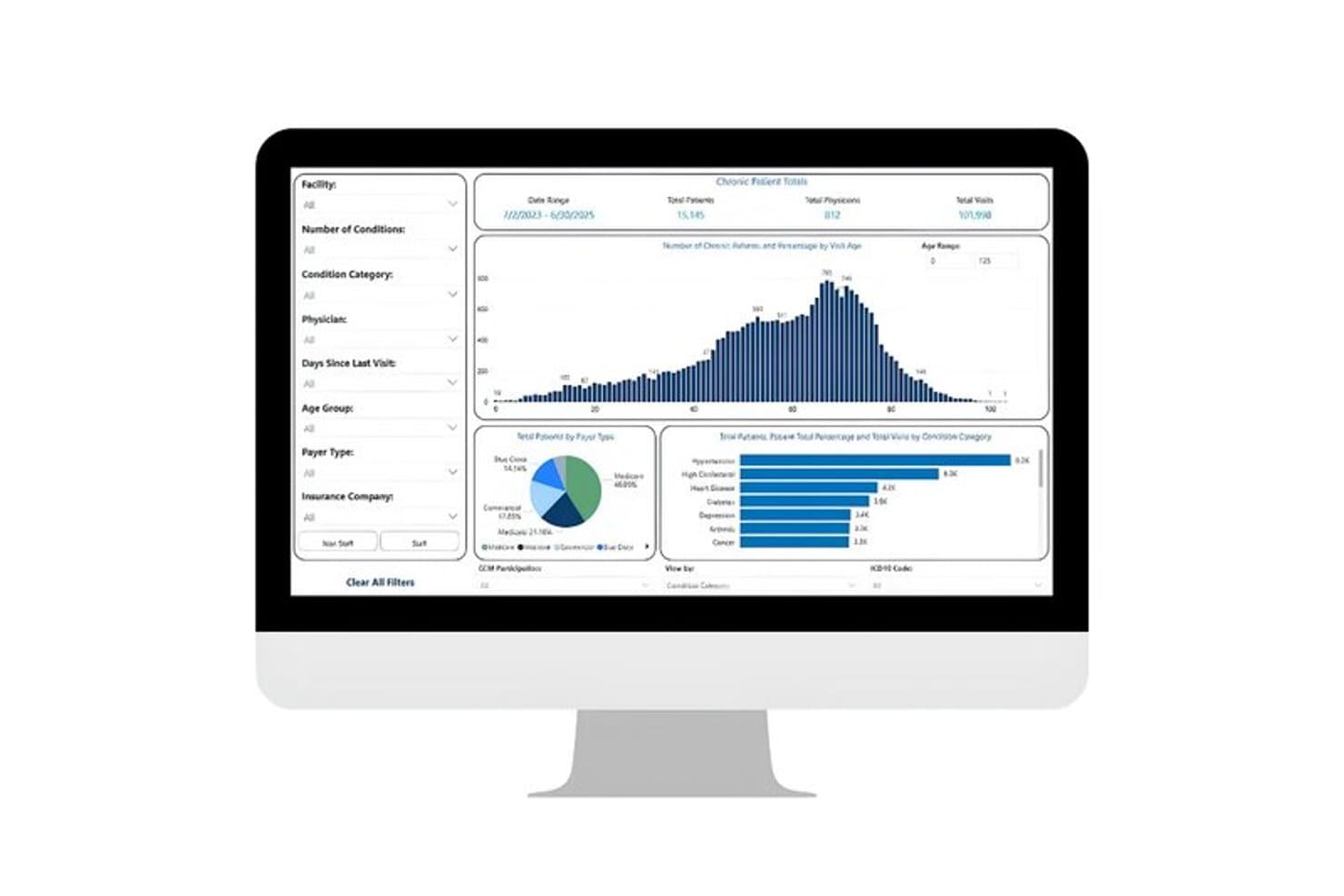
TruBridge offers a chronic patient reports dashboard displaying total patients, physicians, visits, age distribution charts, payer type breakdowns, and condition category analytics. TruBridge is a hospital EHR platform built for rural and community hospitals that combines inpatient clinical documentation, CPOE, medical coding services, and an integrated revenue cycle management suite.
Who Is TruBridge Best For?
TruBridge is a strong fit for CIOs and revenue cycle managers at rural, critical access, and community hospitals that need a tightly integrated EHR and RCM stack.
Why I Picked TruBridge
I've included TruBridge in my top picks because no other hospital EHR is as specifically designed around the resource constraints of critical access and community hospitals. I particularly like its single-path coding workflow, which handles facility and professional coding in one place using AHIMA and AAPC credentialed coders targeting 95%+ accuracy. Its RCM suite has held HFMA Peer Reviewed designation for seven consecutive years, covering denial management, clearinghouse, and encoder technology built to the scale of smaller hospital billing teams.
TruBridge Key Features
- Ambient listening integration: Dragon Copilot transcribes and structures clinical notes during patient encounters within the EHR.
- Bed and census management: Tracks real-time patient flow and bed availability across departments.
- Interactive reports and dashboards: Presents financial and clinical performance data for hospital leadership and compliance reporting.
- HL7 and FHIR support: Enables data exchange between departments, labs, imaging, and external systems.
TruBridge Integrations
TruBridge offers native integrations with Microsoft Dragon Copilot for ambient clinical documentation and RevSpring for patient payment solutions. It supports HL7 and FHIR standards for interoperability and provides API access for custom integrations.
Pros and Cons
Pros:
- Focused support for rural and critical access hospitals
- Ambient listening captures clinical documentation automatically
- Streamlined hospital billing and coding workflows
Cons:
- Pharmacy and BCMA feature details not clear
- Limited specialty modules for large hospitals
Learn more about TruBridge: Best for configurable acute care workflows
- Free demo available
- Pricing upon request
Visit WebsiteCustomer Rating:4.1/5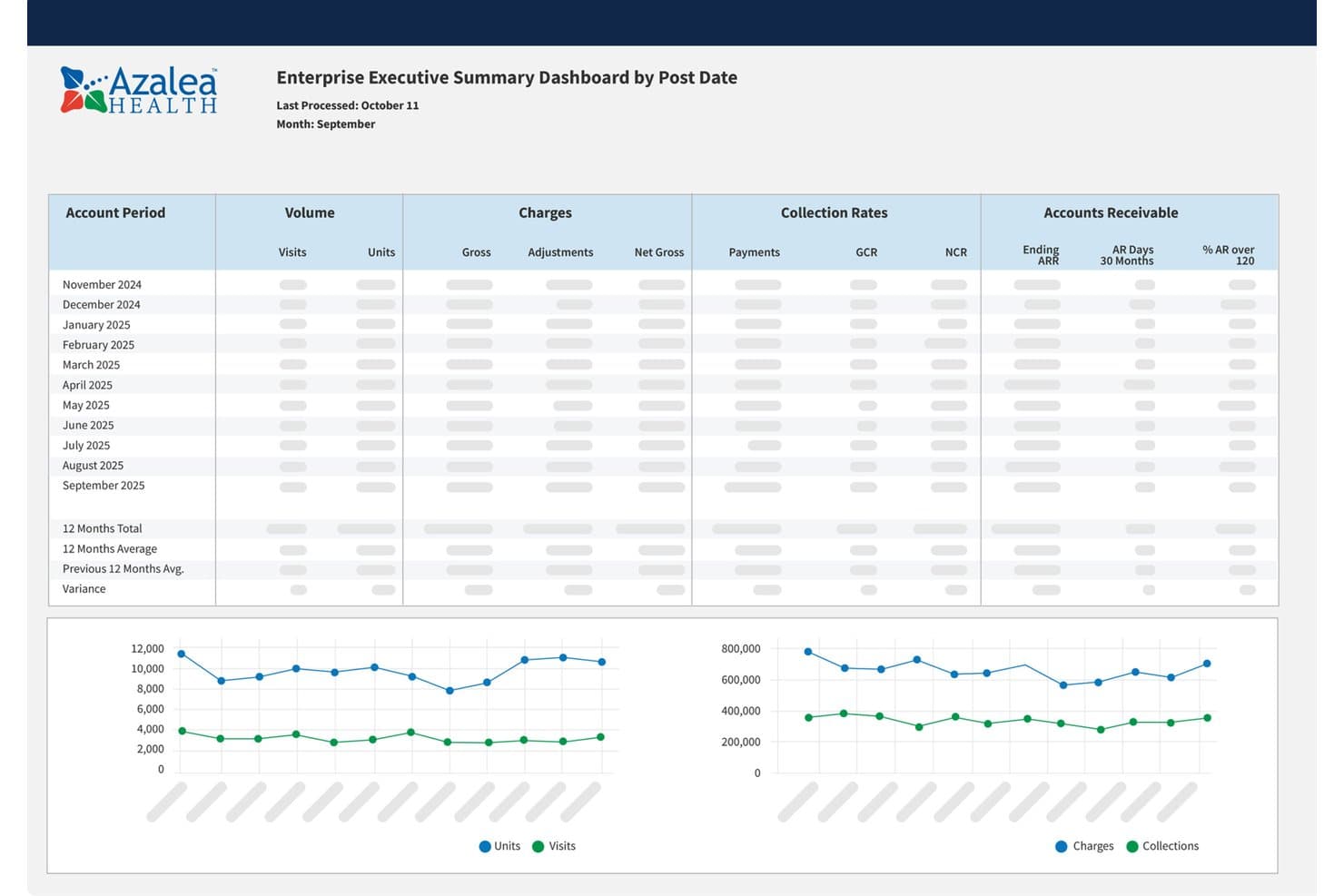
Azalea Health executive dashboard showing visits, charges, collections, and accounts receivable trends Azalea Health is a cloud-based EHR platform for rural and community hospitals that combines inpatient charting, CPOE, integrated RCM, telehealth, and patient engagement in a single system.
Who Is Azalea Health Best For?
Azalea Health is a strong fit for rural and critical access hospitals that need a unified clinical and billing platform without the cost or complexity of enterprise EHR systems.
Why I Picked Azalea Health
I picked Azalea Health as one of the best because its one-screen charting environment lets clinical teams configure templates for ED, inpatient, and nursing workflows without jumping between modules. I especially like the Nurse Board view, which surfaces real-time patient status and handoff visibility across units. The AI Clinical Assistant also handles ambient voice-based note capture, so documentation keeps pace with the demands of a fast-moving acute care floor.
Azalea Health Key Features
- Integrated revenue cycle management: Automates charge capture, coding suggestions, and claims processing within the EHR.
- HL7 and FHIR interoperability: Connects hospital departments, labs, and imaging through industry-standard protocols and smart APIs.
- ONC 21st Century Cures Act certification: Supports regulatory compliance and Meaningful Use/Promoting Interoperability attestation.
- Embedded patient engagement tools: Includes online bill pay, secure messaging, and self-scheduling through a single patient portal.
Azalea Health Integrations
Azalea Health offers native integrations with DrFirst, RevSpring, Updox, Signal Health, Health iPASS, and Surescripts Interconnect, and supports interoperability via HL7, FHIR, CCD/CCDA, TEFCA, and Carequality. An API is available for custom integrations.
Pros and Cons
Pros:
- Built-in AI assistant for clinical documentation
- Real-time nurse board for patient status tracking
- Configurable templates for multiple acute care settings
Cons:
- Reporting for MIPS and quality is limited
- Barcode medication administration is not included
Learn more about Azalea Health: Best for clinical and financial hospital data
- Not available
- Pricing upon request
Visit WebsiteCustomer Rating:4/5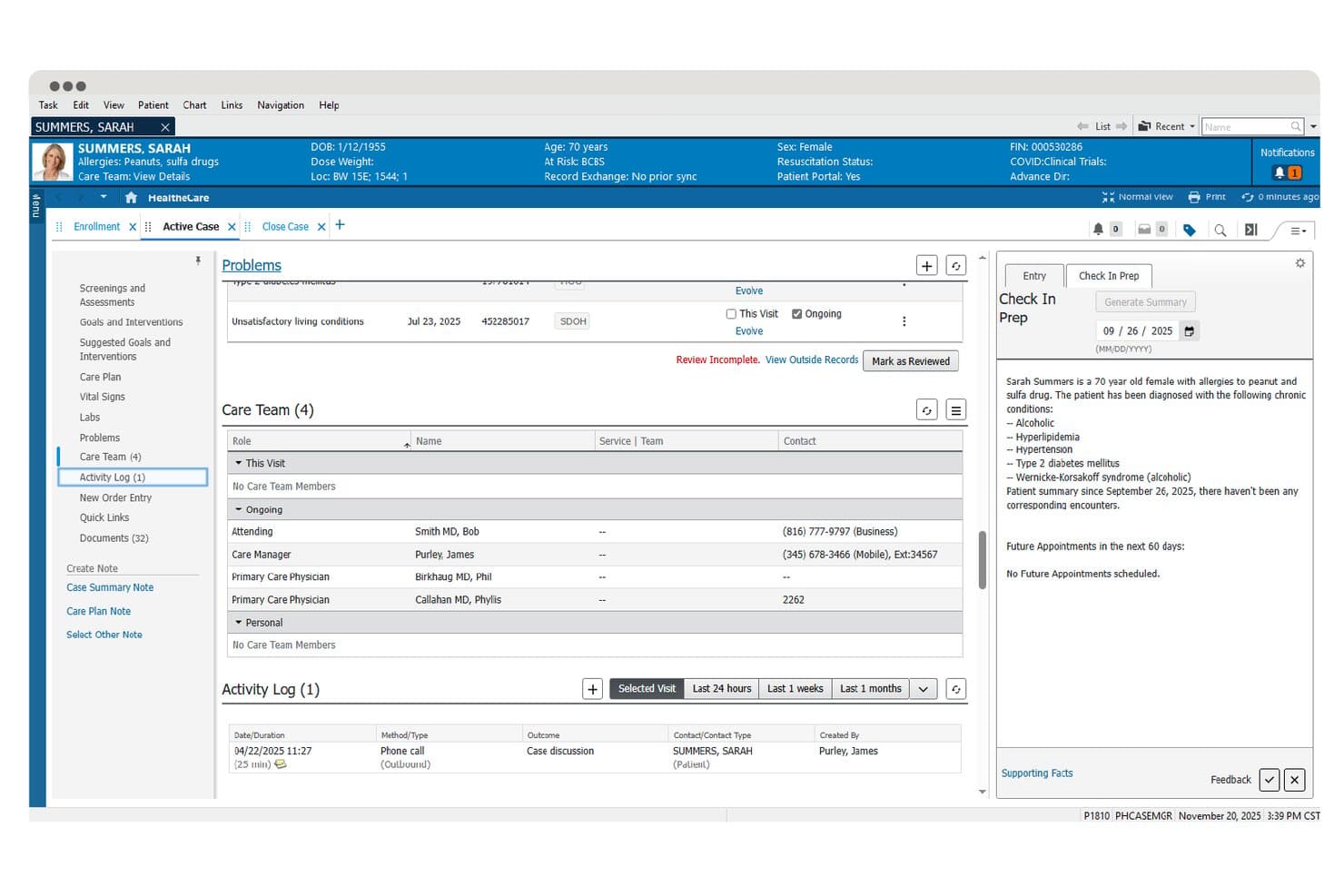
Oracle Health offers a care coordination dashboard displaying patient problems, care team assignments, activity logs, and an AI-generated check-in prep summary for clinical staff. Oracle Health is an enterprise hospital EHR platform built on Oracle Cloud that combines inpatient clinical documentation, CPOE, revenue cycle management, and AI-powered charting tools across acute-care and health system environments.
Who Is Oracle Health Best For?
Oracle Health is a strong fit for large hospitals and multi-facility health systems that need a unified platform spanning inpatient clinical workflows, institutional billing, and enterprise financial operations.
Why I Picked Oracle Health
Oracle Health earns its spot on my shortlist because it's one of the few hospital EHR platforms where clinical documentation and institutional billing data live in the same system. I like how the Revenue Cycle suite handles DRG grouping, charge capture, and claims management alongside inpatient charting, with no manual reconciliation between what clinicians document and what gets billed. The Clinical AI Agent uses voice-enabled documentation to keep clinical records accurate at the point of care.
Oracle Health Key Features
- Bed and census management: Track bed status, patient flow, and real-time census across hospital units.
- Laboratory device integration: Connect lab instruments directly to the EHR for seamless order processing and results reporting.
- Public health reporting: Automate case reporting, immunization registry uploads, and syndromic surveillance for regulatory compliance.
- Health information exchange (HIE) connectivity: Enable data exchange with external organizations and regional HIEs using HL7, FHIR, and CCDA standards.
Oracle Health Integrations
Oracle Health offers native integrations with Oracle Cloud Infrastructure, Oracle ERP, NetSuite, and supports device integration for lab instruments, infusion pumps, and bedside monitors. It also provides FHIR-based APIs and HL7/CCDA connectivity for custom integrations with HIEs, pharmacy systems, and external healthcare platforms.
Pros and Cons
Pros:
- Broad inpatient specialty workflow coverage
- Cloud-based architecture for large enterprise scale
- Advanced revenue cycle management tools
Cons:
- User interface feels outdated to many clinicians
- Support response times reported as slow
Learn more about Oracle Health: Best for connecting clinical data with analytics
- Free demo available
- Pricing upon request
Visit WebsiteCustomer Rating:3.4/5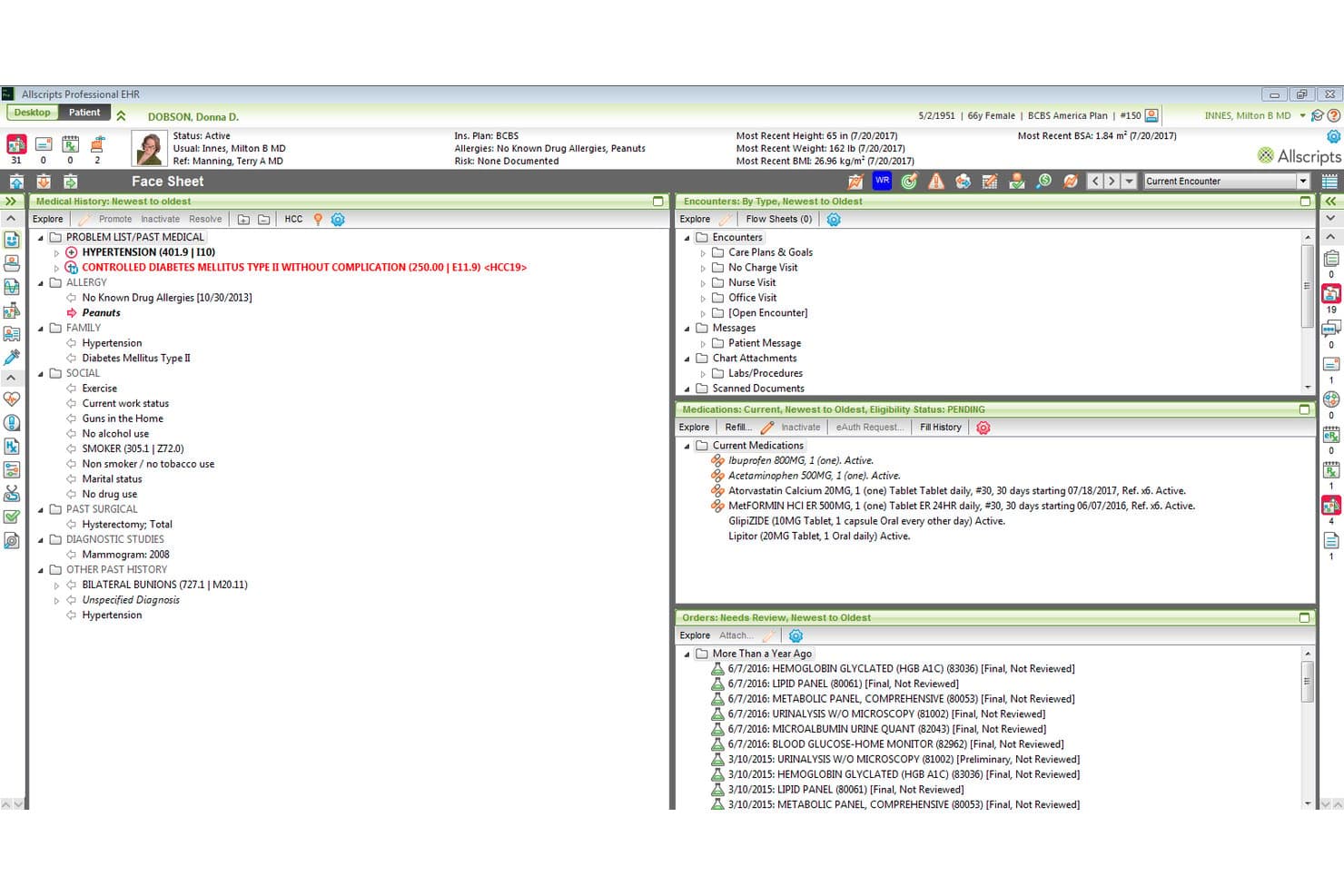
Veradigm offers a comprehensive patient face sheet view displaying medical history, medications, encounters, and lab orders within its EHR software. Veradigm is an ambulatory EHR platform that combines electronic health records, practice management, ePrescribing, and clinical decision support with a health data network that links provider records to payer and life-science analytics.
Who Is Veradigm Best For?
Veradigm fits multi-specialty ambulatory practices and independent physician groups that need an EHR connected to a broader clinical data and analytics network.
Why I Picked Veradigm
I've included Veradigm in my top picks because its HCC alerting and RAF risk scoring surface actionable clinical insights directly inside the EHR workflow. The Veradigm Network then pushes that same patient-level data out to payers and life-science registries in real time. I particularly like the gap closure alerting, which flags care gaps during encounters rather than after the fact.
Veradigm Key Features
- Veradigm Connect open API integration: Lets you link external health tech solutions and devices directly into the EHR workflow.
- Automated compliance reporting: Generates regulatory reports for programs like PQRS, PCMH, and FQHC from within the platform.
- Integrated telehealth visits: Allows clinicians to conduct video appointments and document directly in the patient chart.
- Mobile EHR access: Provides secure, HIPAA-compliant access to charts and schedules on any device.
Veradigm Integrations
Veradigm provides native integrations through its Veradigm Connect API platform, supporting certified connections with external health tech solutions, lab and radiology centers, ePrescribe, and PDMP registries. An API is available for custom integrations.
Pros and Cons
Pros:
- Real-time clinical insights for physicians
- Automated regulatory and quality reporting tools
- Robust outpatient data analytics capabilities
Cons:
- Lacks institutional billing and DRG support
- No native inpatient hospital workflows
Learn more about Veradigm:
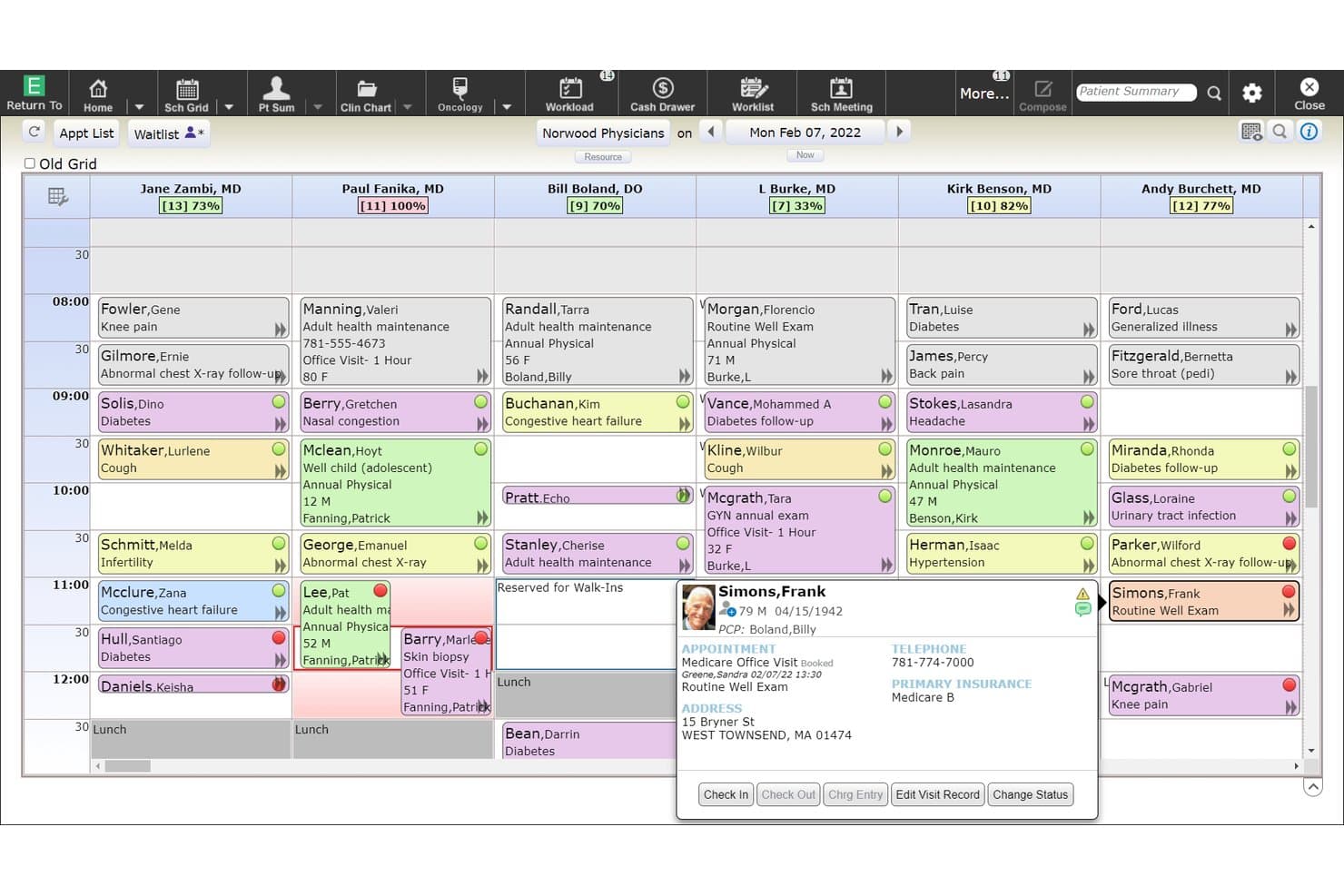
MEDITECH Expanse offers a multi-provider ambulatory scheduling grid displaying daily appointments, patient details, and status indicators across six physicians. MEDITECH Expanse is a cloud-hosted, hospital-grade EHR built for inpatient and ambulatory care, covering CPOE, nursing documentation, medication management, revenue cycle, and interoperability across departments, labs, pharmacies, and HIEs.
Who Is MEDITECH Expanse Best For?
MEDITECH Expanse is a strong fit for community, regional, and multi-site health systems looking for a cost-effective, web-based hospital EHR.
Why I Picked MEDITECH Expanse
I picked MEDITECH Expanse as one of the best because its fully web-based architecture lets clinicians access charts, enter orders, and document care from any browser without client software. I particularly like Expanse Now, the physician mobile app with voice command support, and Expanse Point of Care for bedside nursing documentation. The ambient listening feature, which auto-generates visit notes, keeps documentation moving without pulling clinicians away from patients.
MEDITECH Expanse Key Features
- Integrated revenue cycle management: Combines hospital billing, claims management, coding, and denials workflows within the EHR.
- Clinical analytics and population health: Delivers dashboards and tools for quality reporting, risk stratification, and population management.
- Bed and census management: Monitors real-time bed availability, patient flow, and unit capacity across all hospital departments.
- Interoperability via FHIR and HL7: Supports bidirectional data exchange with HIEs, labs, and imaging systems through modern APIs and legacy feeds.
MEDITECH Expanse Integrations
MEDITECH Expanse offers native integrations with DrFirst, First Databank, Forward Advantage, Intelligent Medical Objects, Interlace Health, MedPower, Micromedex, SSI Healthcare Revenue Cycle Solutions, Stedman's Online, and Zynx Health. An API and Greenfield app development environment are available for custom integrations.
Pros and Cons
Pros:
- Web-based access from any modern browser
- Strong hospital billing and revenue cycle support
- Flexible inpatient and specialty care modules
Cons:
- Reporting setup can be difficult for teams
- Interface often feels slow and outdated
Learn more about MEDITECH Expanse: Best for enterprise-wide clinical workflows
- Not available
- Pricing upon request
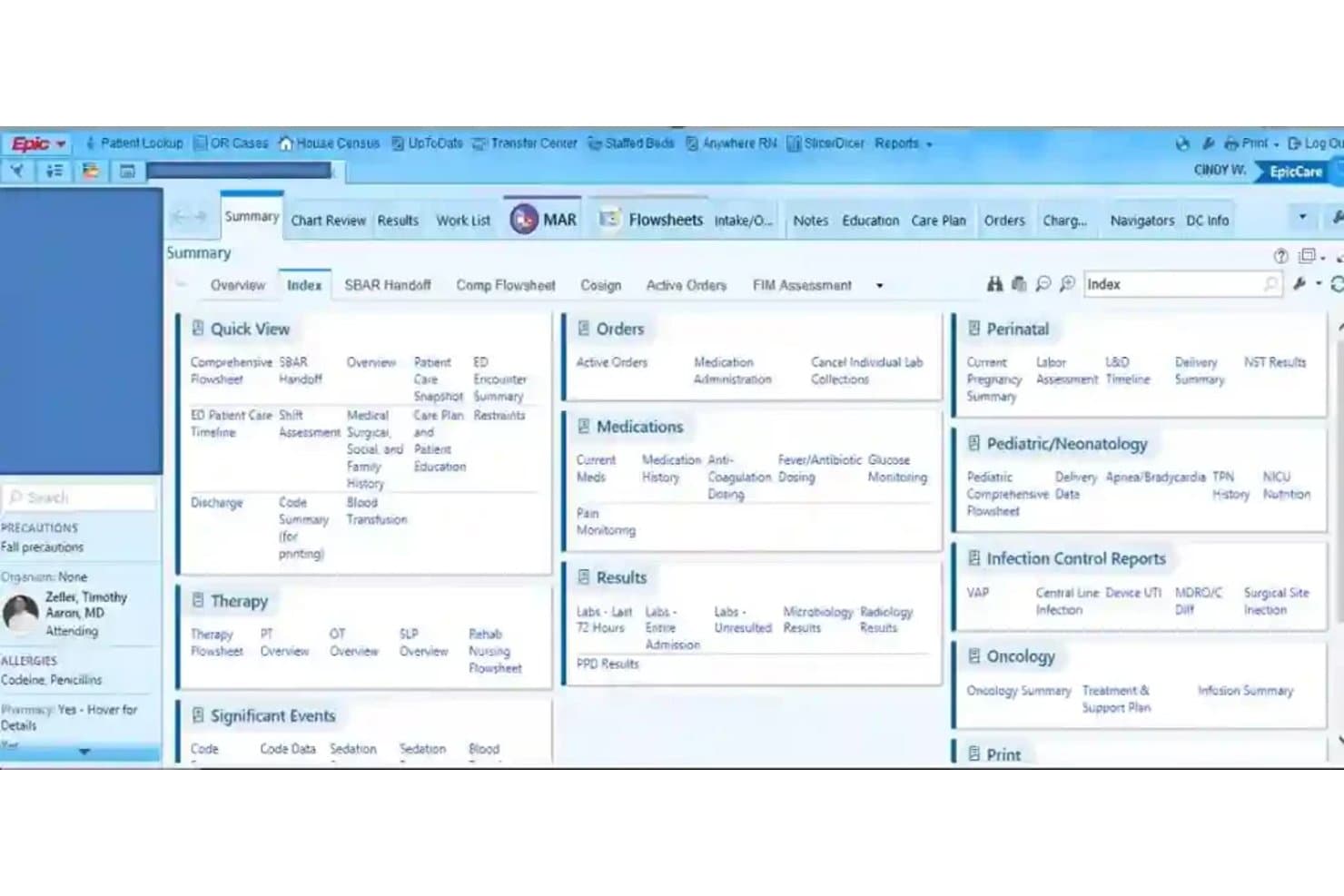
Epic Systems offers a comprehensive patient summary index view with quick access to orders, medications, results, therapy, and clinical reports within its EMR platform. Epic Systems is a hospital EMR platform built for large health systems, covering inpatient charting, CPOE, pharmacy management, revenue cycle, clinical decision support, and population health across acute and ambulatory care settings.
Who Is Epic Systems Best For?
Epic is built for large hospitals and multi-site health systems where CIOs and clinical informatics teams need a single, deeply integrated platform across every department.
Why I Picked Epic Systems
Epic Systems earns its spot on my shortlist because its "one patient, one record" architecture connects every care setting, from critical care to outpatient clinics, without data silos. I particularly like the Acute and Inpatient Care suite, which puts Willow Inpatient pharmacy, CPOE, and nursing workflows all in one place. The Art AI assistant also reduces documentation time by generating clinical notes directly within the charting workflow, which I've seen demonstrated at health systems like UNC Health and WakeMed.
Epic Systems Key Features
- Bed management dashboard: Tracks real-time bed status, patient flow, and unit census for hospitals managing high patient volumes.
- Integrated RCM tools: Provides a built-in billing engine with charge capture, claims scrubbing, coding, and denial management.
- HL7 and FHIR interface engine: Facilitates secure bidirectional data exchange with labs, imaging, and health information exchanges.
- Regulatory compliance reporting: Offers automated CMS quality measure reporting, ONC-certification support, and audit-ready compliance dashboards.
Epic Systems Integrations
Epic Systems offers native integrations with Tempus for precision oncology, Vitals Gateway for device data transfer, and numerous vendors via open.epic.com and showroom.epic.com, supporting HL7, FHIR, and CCDA standards for hospital interoperability. An API is available for custom integrations.
Pros and Cons
Pros:
- Advanced clinical decision support with AI
- Supports extensive specialty modules for departments
- Integrates inpatient and outpatient records seamlessly
Cons:
- Optimizing workflows requires significant IT resources
- Complex system configuration for new implementations
Learn more about Epic Systems:
Annen EMR-sykehusprogramvare
\u003cspan style=\u0022font-weight: 400;\u0022\u003eHer er noen flere alternativer innen EMR-sykehusprogramvare som ikke kom med på kortlisten min, men som likevel er verdt å se nærmere på:\u003c/span\u003e
- 11MEDHOSTBest for hospital EHR and emergency department
- 12InterSystemsBest for unified patient records
- 13NetsmartBest for behavioral health services organizations
- 14MeditabBest for customizable EMR workflows
- 15Napier HealthcareBest for modular hospital management
- 16ChipSoft HiXBest for integrated hospital management
- 17IMS MAXIMSBest for flexible electronic patient records
How I Evaluate EMR Hospital Software
I split my evaluation into baseline requirements—like CPOE, hospital billing, and FHIR interoperability—and the differentiators that separate truly capable platforms from the rest.
Core Functionality (Table Stakes For This List)
When I'm selecting tools for my list, I rank each one on a scale from 0 (does not offer the functionality) to 5 (excels in this area) for each core functionality listed below. Then, I calculate the tool's total score into a percentage. Each tool needs to achieve a minimum total score of 65% to be considered for inclusion.
- Inpatient Charting & CPOE: I look for full clinical documentation with CPOE that covers medication, lab, and imaging orders across nursing units and specialty departments.
- Hospital-Wide Interoperability: Support for HL7, FHIR, and CCDA matters here—especially the ability to exchange data with HIEs, labs, and imaging centers.
- Revenue Cycle & Billing: I check whether the platform handles UB-04/837I claims, charge capture, ICD-10/DRG coding, and denials management in one workflow.
- ePrescribing & Medication Management: Each tool should offer eRx with EPCS, medication reconciliation, pharmacy integration, and ideally BCMA for closed-loop administration.
- Clinical Decision Support: I evaluate whether alerts go beyond basic drug checks to include evidence-based order sets tailored to inpatient care scenarios.
- Regulatory Compliance & Reporting: ONC certification and HIPAA compliance are the baseline. I also look for built-in CMS quality reporting for programs like MIPS and PI.
Once I have a list of tools that meet the criteria, I consider what sets each platform apart.
Differentiating Factors (What Sets Vendors Apart)
Here's how I compare and contrast different vendors:
Standout Features
Bed and census management is a major differentiator. I look for real-time visibility into bed availability and patient flow across units, which directly affects ED boarding times and discharge planning. Clinical analytics also set vendors apart—platforms with embedded dashboards for quality measure reporting and readmission risk stratification give your team actionable data without relying on a third-party BI tool. Integrated revenue cycle management rounds things out, especially when charge capture and claims scrubbing live inside the clinical workflow.
Beyond Features
Hospital size and care setting fit matters a lot. A platform that works for a 25-bed critical access hospital won't necessarily scale to a multi-hospital IDN with specialty departments like oncology and L&D. Deployment model is another key factor—I check whether a vendor offers cloud-hosted, on-premise, or hybrid options, along with uptime SLAs that support 24/7 operations. Vendor training and support resources also shape the long-term experience, especially for nursing and revenue cycle staff during go-live.
Hvordan velge EMR-sykehusprogramvare
Det er lett å gå seg vill i lange funksjonslister og komplekse prismodeller. For å holde fokus mens du jobber deg gjennom den unike programvarevalgsprosessen din, finner du her en sjekkliste over faktorer du bør ha i mente:
| Faktor | Hva bør vurderes |
| Skalerbarhet | Vil programvaren håndtere veksten i virksomheten din – med flere senger, spesialavdelinger eller nye klinikksteder over tid? Vurder begrensninger for brukere og arbeidsflyter. |
| Integrasjoner | Kan den kobles til eksisterende systemer for laboratorier, bildediagnostikk, apotek og fakturering? Spør om støtte for HL7/FHIR og utfordringer knyttet til samhandling med tredjepartssystemer. |
| Tilpasningsmuligheter | Hvor enkelt er det å tilpasse kliniske behandlingsforløp, bestillingssett og rapporter? Vurder om du vil trenge leverandørtjenester for endringer i arbeidsflyten. |
| Brukervennlighet | Vil klinikere, sykepleiere og administrativt personale raskt kunne navigere i den daglige arbeidsflyten? Se etter oversiktlige skjermer og intuitiv navigering, spesielt i situasjoner med høy alvorlighetsgrad. |
| Implementering og opplæring | Hva er den realistiske tidsplanen for innføringen basert på sykehusets størrelse og de ansattes ferdighetsnivå? Spør om nedetid, trinnvis produksjonssetting og planer for opplæring på stedet. |
| Kostnad | Vurder de totale eierkostnadene – lisensiering, infrastruktur, integrasjon, oppgraderinger og løpende støtte. Be om en oversikt over både innledende og langsiktige kostnader. |
| Sikkerhetstiltak | Oppfyller leverandøren kravene i HIPAA, HITECH og lokale standarder for personvern og datasikkerhet? Gå gjennom revisjonslogger, tilgangskontroller og prosesser for å oppdage datainnbrudd. |
| Tilgjengelig støtte | Kan du få tilgang til eksperthjelp døgnet rundt for både kliniske og tekniske spørsmål? Spør om støtte ved katastrofegjenoppretting og eskaleringstider for kritiske hendelser. |
Hva er EMR-sykehusprogramvare?
EMR-sykehusprogramvare viser til digitale systemer som er utviklet for å sentralisere klinisk dokumentasjon for innlagte pasienter, sykehusfakturering og utveksling av helsedata på tvers av avdelinger og behandlingsteam. Disse plattformene støtter behandlere med journalføring, klinisk beslutningsstøtte og funksjoner for interoperabilitet, noe som gjør det enklere å koordinere behandling, oppfylle regulatoriske krav og administrere pasientinformasjon på en sikker måte i sykehusmiljøer.
Funksjoner i EMR-sykehusprogramvare
Når du velger EMR-sykehusprogramvare, bør du se etter følgende viktige funksjoner:
- Journalføring for innlagte pasienter: Gjør det mulig for klinikere å dokumentere innleggelser, fremdriftsnotater og vitale tegn, og støtter grundig journalføring på tvers av sykehusavdelinger.
- Elektronisk registrering av behandlerordrer: Gjør det mulig for behandlere å registrere legemiddel-, laboratorie- og bildediagnostikkordrer elektronisk, noe som reduserer feil og gjør behandlingen raskere.
- Klinisk beslutningsstøtte: Gir varsler, påminnelser og evidensbaserte ordresett på behandlingsstedet for å forbedre beslutningstaking og pasientsikkerhet.
- Legemiddelhåndtering: Tilbyr verktøy for elektronisk forskrivning, legemiddelsamstemming og integrasjon med apotek for å sikre trygg og nøyaktig administrering av legemidler.
- Sykehusfakturering og koding: Integrerer registrering av fakturerbare tjenester, ICD-10/DRG-koding og arbeidsflyter for UB-04/837I-krav, og støtter nøyaktig og tidsriktig refusjon.
- Interoperabilitet: Muliggjør sømløs datautveksling med laboratorier, bildediagnostiske sentre, HIE-er og andre helsesystemer ved hjelp av HL7-, FHIR- og CCDA-standarder.
- Håndtering av senger og pasientbelegg: Følger tilgjengelige senger og pasientbelegg i sanntid, slik at behandlingsteam kan forbedre pasientflyten og kapasitetsplanleggingen.
- Regulatorisk rapportering: Støtter automatisert datainnsamling og rapportering for programmer som CMS Promoting Interoperability, MIPS og kvalitetsmålinger.
- Rollebaserte sikkerhetskontroller: Tildeler tilgang basert på arbeidsfunksjon for å beskytte sensitiv pasientinformasjon og støtte overholdelse av personvernregler.
- Revisjonslogging: Overvåker og registrerer systemtilgang og endringer, slik at team kan opprettholde dataintegritet og oppfylle revisjonskrav.
Vanlige AI-funksjoner i EMR-sykehusprogramvare
I tillegg til standardfunksjonene i EMR-sykehusprogramvare som er nevnt ovenfor, tar mange av disse løsningene i bruk AI med funksjoner som:
- Prediktiv analyse: Bruker AI til å identifisere pasienter med risiko for reinnleggelse, forverring eller komplikasjoner ved å analysere kliniske data og demografiske data i sanntid.
- Automatisert klinisk dokumentasjon: Bruker naturlig språkbehandling til å transkribere og oppsummere samtaler mellom behandlere og pasienter, noe som reduserer tiden som brukes på manuell journalføring.
- AI-drevet kodingsstøtte: Foreslår nøyaktige faktureringskoder basert på kliniske notater og dokumentasjon, noe som bidrar til å redusere avviste krav og fremskynde refusjonen.
- Intelligent automatisering av arbeidsflyt: Optimaliserer oppgavefordeling, prioriterer varsler og effektiviserer behandlingskoordinering ved å lære av historiske arbeidsflytmønstre.
- Klinisk bildeanalyse: Bruker maskinlæring på radiologiske bilder og patologibilder, og markerer mulige avvik for gjennomgang av behandlere og støtte til raskere diagnostisering.
Fordeler med EMR-sykehusprogramvare
Implementering av EMR-sykehusprogramvare gir flere fordeler for teamet og virksomheten din. Her er noen av fordelene du kan se frem til:
- Bedre behandlingskoordinering: Sentralisert journalføring for innlagte pasienter og interoperabilitet gjør det enklere for behandlingsteam å få tilgang til oppdatert pasientinformasjon.
- Økt pasientsikkerhet: Klinisk beslutningsstøtte og legemiddelhåndtering bidrar til å flagge legemiddelinteraksjoner og redusere risikoen for feil på behandlingsstedet.
- Raskere fakturering og refusjoner: Integrert registrering av fakturerbare tjenester, koding og arbeidsflyter for krav effektiviserer inntektssyklusen og bidrar til å redusere forsinkelser i faktureringen.
- Datadrevet kvalitetsforbedring: Innebygde analyse- og rapporteringsverktøy gjør det mulig for organisasjonen å følge resultater, overvåke etterlevelse og nå regulatoriske mål.
- Større operasjonell effektivitet: Automatisert sengehåndtering, oppgavefordeling og tilpasning av arbeidsflyt hjelper team med å håndtere ressurser og pasientflyt mer effektivt.
- Bedre datasikkerhet: Rollebaserte tilgangskontroller, revisjonslogger og HIPAA-kompatible sikkerhetstiltak beskytter sensitiv informasjon og støtter krav til etterlevelse.
- Redusert belastning for klinikere: Automatisert klinisk dokumentasjon og intuitiv navigering reduserer manuelt arbeid, bidrar til å forebygge utbrenthet og effektiviserer de daglige rutinene.
Kostnader og priser for EMR-sykehusprogramvare
Å velge EMR-sykehusprogramvare krever en forståelse av de ulike prismodellene og planene som er tilgjengelige. Kostnadene varierer basert på funksjoner, teamstørrelse, tillegg og mer. Tabellen nedenfor oppsummerer vanlige planer, gjennomsnittsprisene deres og typiske funksjoner som er inkludert i EMR-sykehusprogramvareløsninger:
Sammenligningstabell for planer for EMR-sykehusprogramvare
| Plantype | Gjennomsnittlig pris | Vanlige funksjoner |
| Gratisplan | $0 | Begrenset journalføring for innlagte pasienter, grunnleggende dokumentasjon av vitale tegn og begrenset tilgang til brukerstøtte. |
| Personlig plan | $50–$100/måned | Standardverktøy for journalføring, registrering av ordinasjoner, grunnleggende rapportering i henhold til regelverk og nødvendig interoperabilitet med laboratorier og bildediagnostikk. |
| Forretningsplan | $300–$700/måned | Komplette arbeidsflyter for innlagte pasienter, elektronisk forskrivning, avansert fakturering, revisjonslogger, egendefinerte maler og forbedret klinisk analyse. |
| Virksomhetsplan | $1,500–$5,000/måned | Administrasjon av flere lokasjoner, prioritert brukerstøtte, dedikert oppstart, omfattende tilpasning, komplette integrasjoner og SLA-er for oppetid. |
Vanlige spørsmål om EMR-sykehusprogramvare
\u003cspan style=\u0022font-weight: 400;\u0022\u003eHer er noen svar på vanlige spørsmål om EMR-sykehusprogramvare:\u003c/span\u003e
Hvor lang tid tar det å implementere EMR-sykehusprogramvare?
\u003cspan style=\u0022font-weight: 400;\u0022\u003eImplementeringen tar vanligvis 12 til 24 måneder, avhengig av sykehusets størrelse, bemanning og eksisterende IT-systemer. Det er ofte nødvendig med planlegging, opplæring av ansatte og trinnvis produksjonssetting for å minimere forstyrrelser.\u003c/span\u003e
Kan EMR-sykehusprogramvare integreres med eksisterende laboratorie- og bildediagnostikksystemer?
\u003cspan style=\u0022font-weight: 400;\u0022\u003eJa, de fleste løsninger støtter integrasjon med laboratorie- og bildediagnostikksystemer ved hjelp av HL7- eller FHIR-standarder. Dette muliggjør automatisk levering av resultater, sporing av ordinasjoner og mer koordinert behandling.\u003c/span\u003e
Hvilken støtte er tilgjengelig for ansatte under og etter produksjonssetting?
\u003cspan style=\u0022font-weight: 400;\u0022\u003eMange leverandører tilbyr opplæring på stedet, brukerstøttelinjer døgnet rundt, klinikere som bygger og tilpasser løsningen, samt ressursbiblioteker for kontinuerlig opplæring av ansatte og feilsøking etter produksjonssetting.\u003c/span\u003e
Hvilke sikkerhetstiltak er standard i EMR-sykehusprogramvare?
\u003cspan style=\u0022font-weight: 400;\u0022\u003eDu kan forvente tilgangskontroller i samsvar med HIPAA, revisjonslogger, datakryptering og verktøy for oppdagelse av datainnbrudd som bidrar til å sikre pasientvern og overholdelse av regelverket.\u003c/span\u003e
Hvordan struktureres kostnadene vanligvis for EMR-sykehusprogramvare?
\u003cspan style=\u0022font-weight: 400;\u0022\u003eDe fleste leverandører fakturerer per antall senger, brukerbaserte lisenser eller en virksomhetsavtale. Kostnadene dekker lisensiering, opplæring, vedlikehold, integrasjon og noen ganger ekstra moduler eller tilpasninger.\u003c/span\u003e