

Il software CDI—software per l'integrità della documentazione clinica—ti aiuta a migliorare l'accuratezza, la chiarezza e la completezza della documentazione clinica. Se stai cercando modi migliori per supportare cartelle conformi e di alta qualità, ridurre gli errori amministrativi o stare al passo con le linee guida di codifica in continua evoluzione, non sei il solo.
Trovare lo strumento CDI giusto può aiutarti a garantire che il tuo team produca una documentazione del paziente chiara, completa e utilizzabile. In questo elenco potrai confrontare fianco a fianco le opzioni più apprezzate, che possono aiutarti ad affrontare le difficoltà nella gestione delle cartelle, migliorare i flussi di lavoro e sentirti più sicuro dell'integrità della tua documentazione.
Perché fidarsi dei nostri consigli sui software
6,700+
Reviews
20
Industry experts
16+
Evaluation factors
14
Years
Il nostro team testa e recensisce software dal 2012. In quanto leader di studi medici noi stessi, sappiamo quanto sia difficile — e importante — scegliere il software giusto.
Per questa guida, abbiamo valutato gli strumenti attraverso test pratici e ricerche indipendenti, assegnando un punteggio agli strumenti in base ai nostri criteri di selezione.
Le nostre recensioni riflettono il nostro giudizio editoriale umano, non un discorso di vendita.
Tabella di confronto dei software CDI
Questa tabella di confronto mostra i prezzi dei principali software CDI:
| Tool | Best For | Trial Info | Price | ||
|---|---|---|---|---|---|
| 1 | Ideale per la documentazione clinica aziendale | Demo gratuita disponibile | Prezzo su richiesta | Website | |
| 2 | Ideale per documentazione integrata nell'EHR | Demo gratuita disponibile | Da $25/utente/mese | Website | |
| 3 | Ideale per analisi e insight CDI | Demo gratuita disponibile | Prezzo su richiesta | Website | |
| 4 | Ideale per CDI e codifica in outsourcing | Demo gratuita disponibile | Prezzo su richiesta | Website | |
| 5 | Ideale per codifica e CDI integrati | Non disponibile | Prezzo su richiesta | Website | |
| 6 | Ideale per l'integrità documentale guidata dall'AI | Demo gratuita disponibile | Prezzo su richiesta | Website | |
| 7 | Ideale per revisione automatizzata delle cartelle | Non disponibile | Prezzo su richiesta | Website | |
| 8 | Ideale per indicazioni sulla documentazione presso il punto di assistenza | Dimostrazione gratuita disponibile | Prezzi su richiesta | Website | |
| 9 | Ideale per la gestione delle richieste ai clinici | Non disponibile | Prezzo su richiesta | Website | |
| 10 | Ideale per garantire l'integrità dei ricavi tramite IA | Demo gratuita disponibile | Prezzo su richiesta | Website |


Recensioni dei migliori software CDI
Di seguito sono riportati i riepiloghi dettagliati dei migliori software CDI inclusi nella mia selezione. Le mie recensioni offrono un’analisi dettagliata delle funzionalità, delle integrazioni e dei casi d’uso più adatti di ciascuna piattaforma, per aiutarti a trovare quella migliore per te.
 Ideale per la documentazione clinica aziendale
- Demo gratuita disponibile
- Prezzo su richiesta
Visit WebsiteCustomer Rating:4/5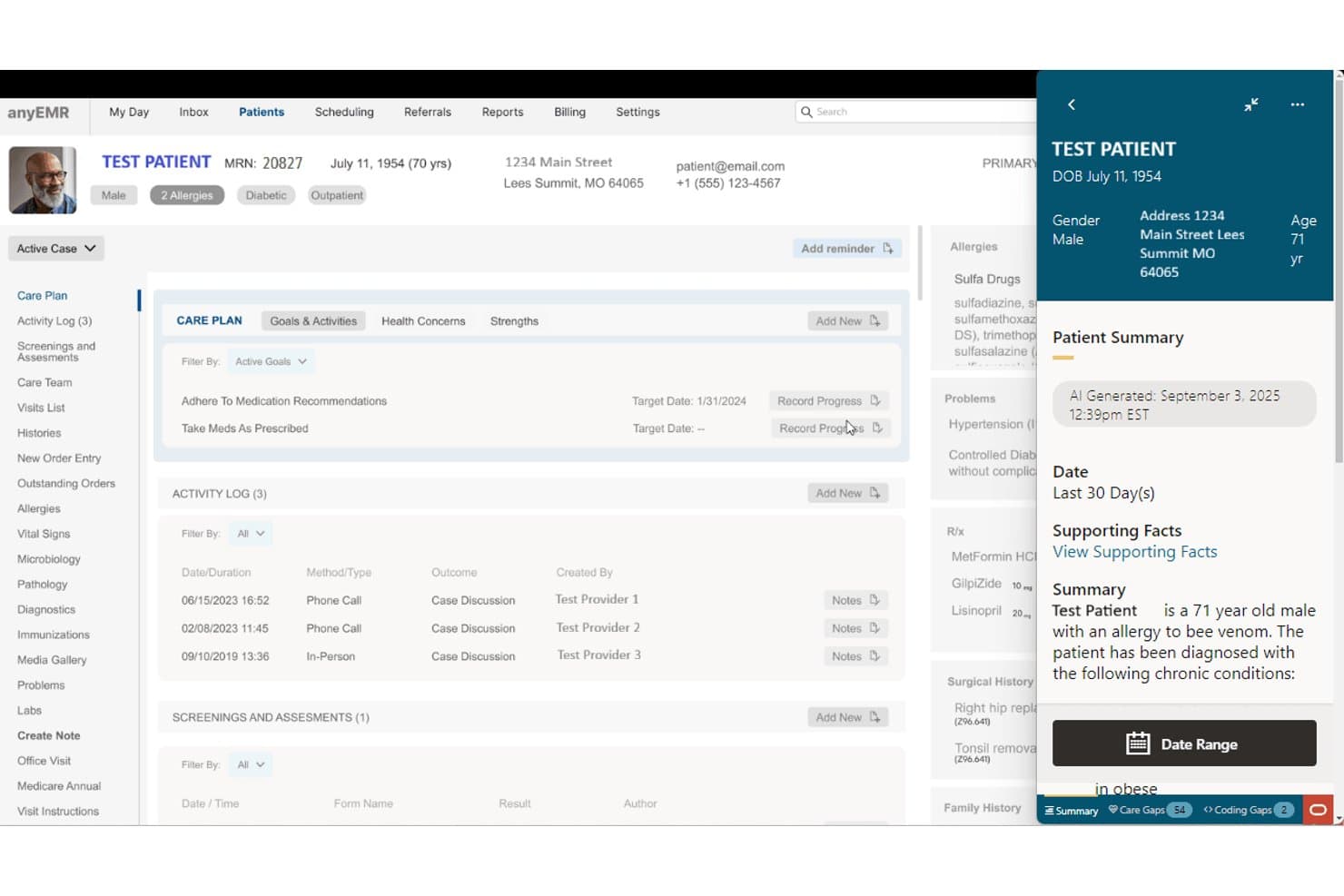
Oracle Health offre un pannello di riepilogo paziente generato da IA che mostra lacune nelle cure, condizioni croniche e fatti clinici di supporto all’interno della cartella del paziente. Oracle Health è una piattaforma EHR aziendale con strumenti di documentazione AI integrati, tra cui un Agente Clinico AI che gestisce la stesura delle note, il riepilogo delle cartelle cliniche e fornisce raccomandazioni di codifica basate sul contesto all'interno dei flussi di lavoro clinici.
Per chi è ideale Oracle Health?
Oracle Health è particolarmente adatto per grandi sistemi sanitari e ospedali aziendali che già utilizzano l’ecosistema EHR di Oracle Health (precedentemente Cerner).
Perché ho scelto Oracle Health
Ho incluso Oracle Health tra le mie migliori scelte perché il suo Agente Clinico AI gestisce la documentazione direttamente al punto di cura, utilizzando la registrazione vocale per generare riepiloghi delle cartelle, bozzetti di note e suggerimenti di codifica estratti direttamente dalle conversazioni cliniche. Apprezzo che i suggerimenti sulla codifica riflettano il reale contesto della cura, anziché regole statiche. Questa distinzione fa la differenza quando un sistema sanitario processa migliaia di ricoveri e necessita che la documentazione regga nelle verifiche DRG.
Funzionalità principali di Oracle Health
- Acquisizione avanzata con OCR: Automatizza la scansione e l'indicizzazione dei documenti direttamente nelle cartelle dei pazienti utilizzando la tecnologia di riconoscimento ottico dei caratteri e codici a barre.
- Connettività dispositivi: Collega dispositivi medici a letto per l’inserimento automatico dei dati nell’EHR, riducendo la documentazione manuale.
- Reportistica di intelligenza clinica: Offre strumenti di analisi per valutare dati su utilizzo, conformità e qualità della documentazione.
- Integrazione nativa EHR: Integra strumenti di documentazione e codifica direttamente nell’ambiente EHR di Oracle Health, supportando il flusso di lavoro contestuale.
Integrazioni di Oracle Health
Oracle Health offre integrazione nativa con la propria piattaforma EHR, supporta lo scambio di dati tramite HL7 e FHIR API e può connettersi a reti di interoperabilità come CommonWell. È disponibile un’API per integrazioni personalizzate.
Pros and Cons
Pros:
- Registrazione vocale potenziata da IA per la stesura delle note
- Ampio supporto alla documentazione clinica nativo EHR
- Si adatta a grandi sistemi ospedalieri multi-struttura
Cons:
- Implementazione complessa al di fuori degli ambienti EHR Oracle
- Gli strumenti di richiesta specifici per CDI sono meno sviluppati
Learn more about Oracle Health: Ideale per documentazione integrata nell'EHR
- Demo gratuita disponibile
- Da $25/utente/mese
Visit WebsiteCustomer Rating:3.1/5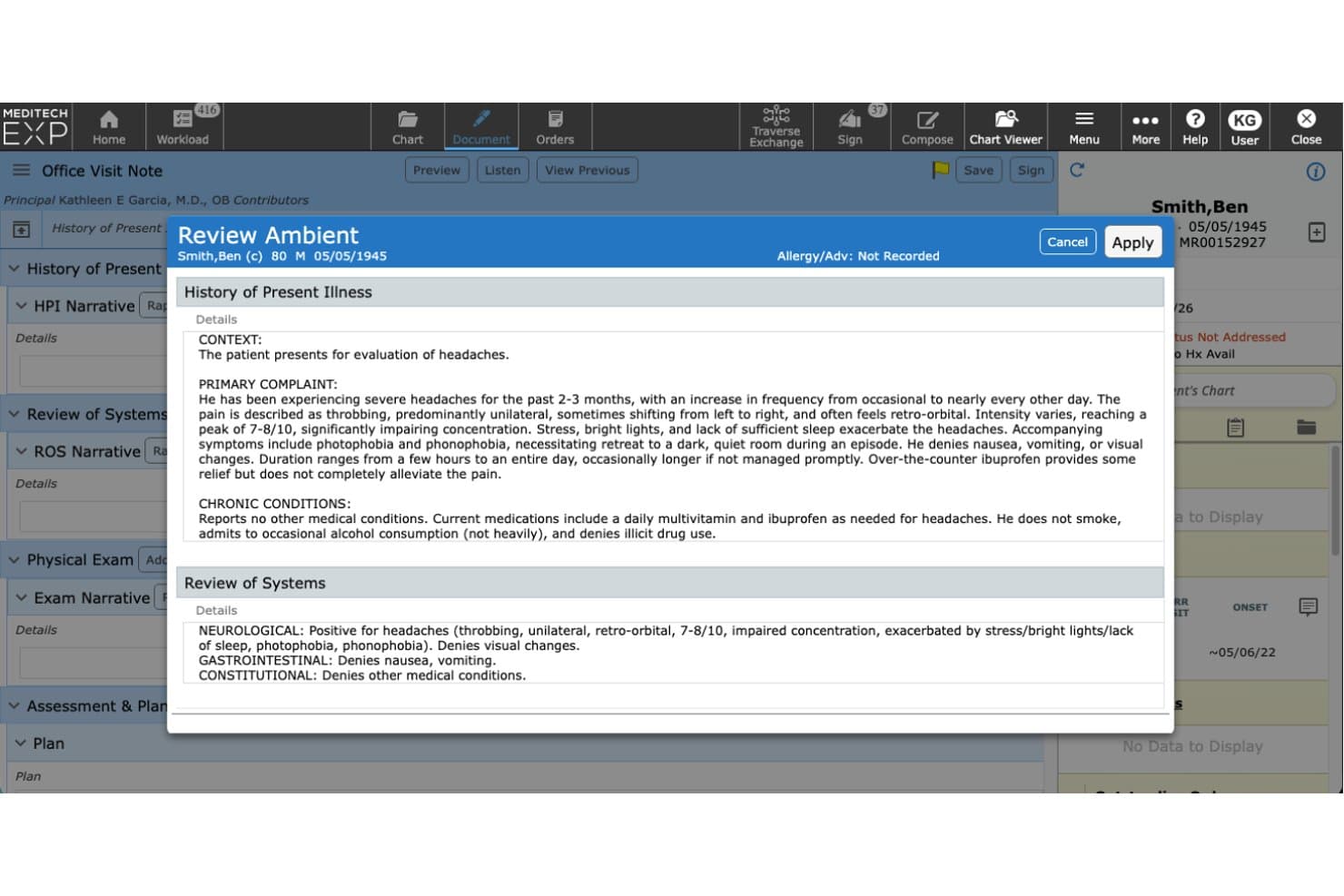
MEDITECH offre uno strumento di documentazione ambientale alimentato da AI che genera automaticamente note cliniche strutturate, inclusi HPI e Review of Systems, per la revisione del medico prima dell'inserimento nella cartella del paziente. MEDITECH Expanse è una piattaforma EHR basata su cloud con strumenti nativi di documentazione clinica, generazione di note assistita da AI, ascolto ambientale e supporto alle decisioni cliniche integrati direttamente nei flussi di lavoro di ospedali e sistemi sanitari.
Per chi è ideale MEDITECH?
MEDITECH Expanse è particolarmente indicato per ospedali e grandi sistemi sanitari che desiderano funzionalità di documentazione clinica integrate direttamente nel loro EHR di riferimento.
Perché ho scelto MEDITECH
Ho scelto MEDITECH perché gli strumenti rilevanti per CDI sono incorporati direttamente in Expanse, non sovrapposti ad esso. Expanse Navigator mostra sia dati strutturati che note cliniche non strutturate in una vista unificata, rendendo più facile individuare lacune nella documentazione durante i ricoveri attivi. La funzione di ascolto ambientale, disponibile tramite Suki o Nuance DAX, trascrive in tempo reale gli incontri e genera automaticamente le narrazioni di dimissione utilizzando i modelli AI di Google Cloud.
Caratteristiche principali di MEDITECH
- Supporto alle decisioni cliniche: Presenta le migliori pratiche e suggerimenti basati su linee guida all'interno dei flussi di lavoro di documentazione.
- Modelli di documentazione specialistica: Oltre 800 modelli per documentazione clinica in diversi contesti di cura e specialità.
- Revisione dei casi di sorveglianza: Segnala in tempo reale dati anomali dei pazienti così che i team possano identificare le cartelle che richiedono ulteriore attenzione.
- Integrazione bidirezionale con EHR: Supporta lo scambio dati basato su FHIR e l'interoperabilità con sistemi esterni e applicazioni partner.
Integrazioni MEDITECH
MEDITECH offre integrazioni native con Nuance DAX, Suki, Google Cloud Vertex AI e supporta lo scambio dati basato su FHIR con sistemi esterni. È disponibile un'API per integrazioni personalizzate.
Pros and Cons
Pros:
- Documentazione nativamente integrata nel flusso di lavoro EHR
- L'ascolto ambientale con AI cattura le note dell'incontro in tempo reale
- Piattaforma unica per EHR e revisione della documentazione
Cons:
- Le analisi specifiche per CDI sono meno sviluppate rispetto agli strumenti standalone
- Gli strumenti di query per medici richiedono componenti aggiuntivi di terze parti
Learn more about MEDITECH: Ideale per analisi e insight CDI
- Demo gratuita disponibile
- Prezzo su richiesta
Visit WebsiteCustomer Rating:5/5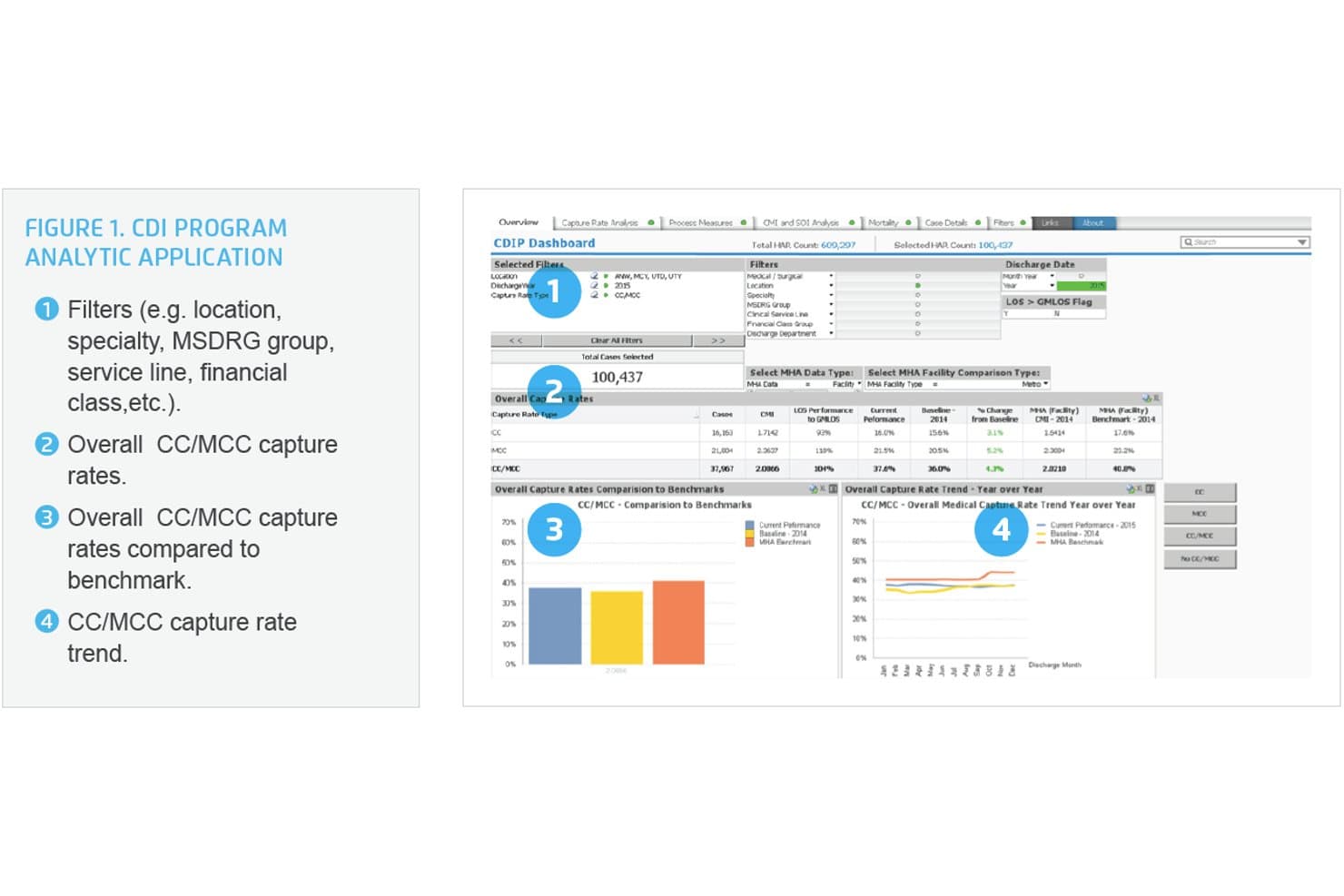
Health Catalyst offre una dashboard di Applicazione Analitica del Programma CDI con monitoraggio dei tassi di acquisizione CC/MCC, confronti di benchmark e analisi delle tendenze anno su anno. Health Catalyst è una piattaforma di dati e analisi sanitarie con una soluzione CDI integrata che combina revisione cartacea concorrente, suggerimenti AI per la documentazione medica, flussi di lavoro di query automatizzati e strumenti di calcolo DRG e di aggiustamento del rischio.
Per chi è Health Catalyst?
Health Catalyst è particolarmente adatto a grandi sistemi sanitari e ospedali di cura acuta con team dedicati CDI e HIM che desiderano collegare il miglioramento della documentazione ad analisi dati più ampie.
Perché ho scelto Health Catalyst
Ho scelto Health Catalyst tra i migliori perché la profondità analitica nel CDI lo distingue davvero. La piattaforma visualizza i tassi di acquisizione CC/MCC, l'indice case mix, dati SOI e mortalità insieme a confronti di benchmark in un'unica vista. Apprezzo anche il CAPD alimentato da AI, che invia suggerimenti ai medici direttamente al punto di cura, con il 73% dei suggerimenti risolti completati entro due giorni dall'ammissione.
Caratteristiche principali di Health Catalyst
- Liste di lavoro prioritarie: Gli specialisti CDI ricevono una priorizzazione intelligente e automatizzata delle cartelle in base all'impatto finanziario o qualitativo.
- Calcolatori DRG e di aggiustamento del rischio: Strumenti integrati di punteggio DRG, SOI/ROM e HCC favoriscono una revisione CDI accurata e la codifica.
- Strumenti di revisione concorrente e retrospettiva: La piattaforma supporta sia la revisione in tempo reale del paziente ricoverato che i flussi di lavoro di audit post-dimissione.
- Compatibilità con encoder ed EHR: Si integra con encoder come 3M e con i principali EHR per una migliore condivisione dei dati e processi di codifica più fluidi.
Integrazioni di Health Catalyst
Health Catalyst offre integrazioni native con Epic, Cerner, Meditech e 3M 360 Encompass. È disponibile un’API per integrazioni personalizzate.
Pros and Cons
Pros:
- Analisi approfondita e benchmarking specifici CDI
- Suggerimenti ai medici guidati da AI al punto di cura
- Supporta flussi di lavoro di revisione concorrente e retrospettiva
Cons:
- L’implementazione può essere lunga nei sistemi di grandi dimensioni
- Può essere eccessivo per team CDI più piccoli
Learn more about HealthCatalyst: Ideale per CDI e codifica in outsourcing
- Demo gratuita disponibile
- Prezzo su richiesta
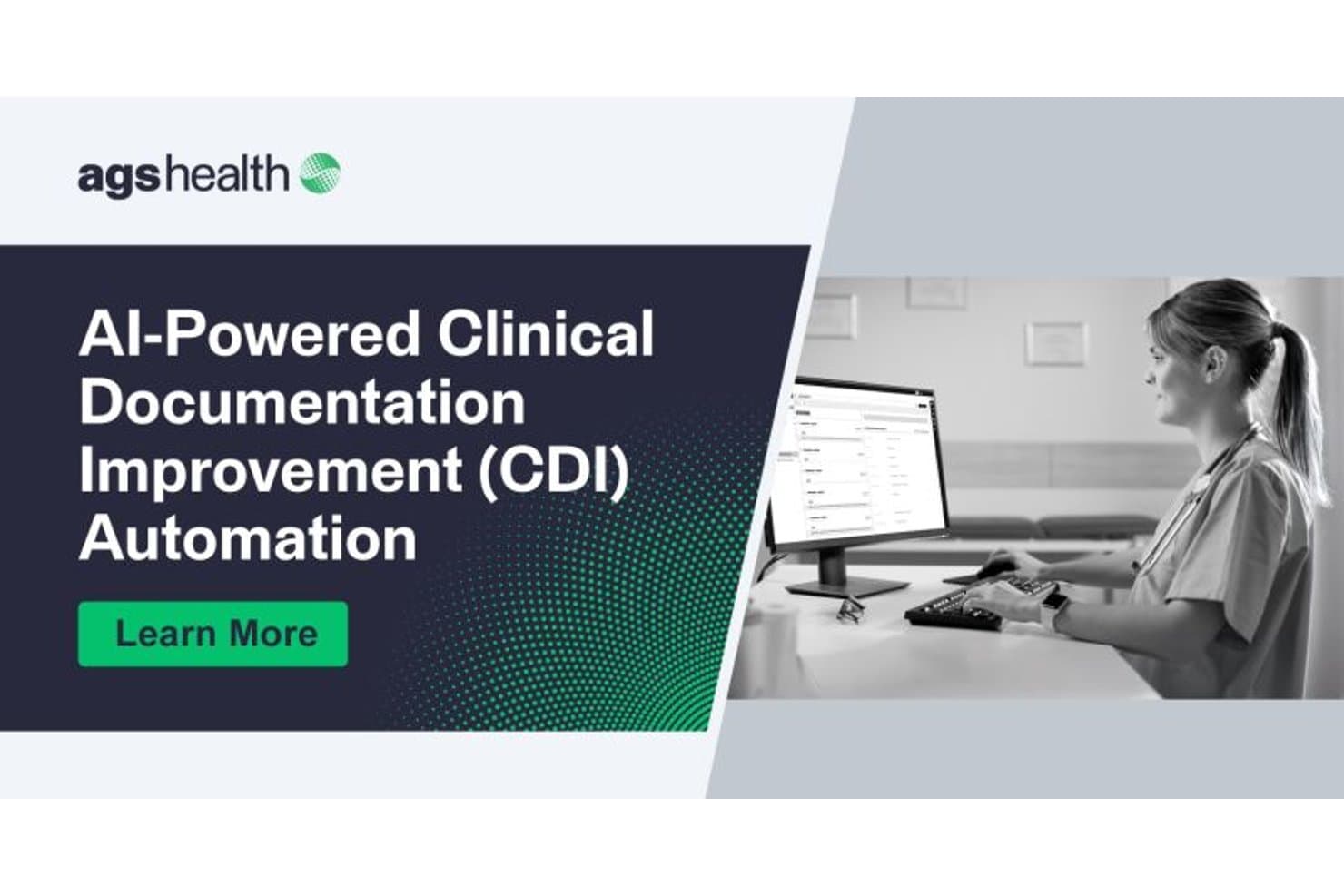
AGS Health offre automazione CDI (Miglioramento della Documentazione Clinica) potenziata dall'IA, mostrata con un professionista sanitario che utilizza un'interfaccia desktop. AGS Health è una piattaforma CDI e di gestione del ciclo dei ricavi abilitata dalla tecnologia che combina l'analisi delle cartelle cliniche tramite intelligenza artificiale, flussi di lavoro automatizzati per le richieste ai medici, revisione concorrente delle cartelle e strumenti di codifica integrati.
Per chi è ideale AGS Health?
AGS Health è particolarmente indicata per grandi sistemi sanitari e gruppi ospedalieri che desiderano combinare il software CDI con l’accesso a un team esternalizzato di specialisti in codifica e professionisti CDI.
Perché ho scelto AGS Health
AGS Health guadagna il suo posto nella mia shortlist perché nessun'altra piattaforma CDI abbina l'analisi delle cartelle cliniche guidata dall’IA a una forza lavoro di oltre 4.900 specialisti in codifica e professionisti CDI. Apprezzo in particolare le Intelligent CDI Worklists, che danno priorità alle cartelle in base alle opportunità di richiesta previste e trattengono i casi in attesa di risposta del medico, così da non perdere nulla. La funzionalità integrata di raggruppamento MS-DRG e le allerte in tempo reale su HAC, riammissioni e PSI consentono al mio team di agire sulle lacune nella documentazione prima che le cartelle vengano chiuse.
Caratteristiche principali di AGS Health
- Sincronizzazione in tempo reale dei dati EHR: Recupera automaticamente le cartelle dei pazienti e aggiorna l’analisi della documentazione man mano che sono disponibili nuove note cliniche e allegati.
- Dashboard di reportistica personalizzabile: Permette di monitorare i principali indicatori di performance CDI, i tassi di richiesta e le metriche finanziarie in visualizzazioni facilmente configurabili.
- Encoder integrato con riferimenti normativi: Fornisce informazioni sulle linee guida, coding clinics e calcoli DRG direttamente nel flusso di revisione della documentazione.
- Archiviazione dati su più sedi: Supporta la ridondanza dei dati e l’operatività tramite archiviazione cloud distribuita su più strutture sicure.
Integrazioni di AGS Health
AGS Health offre integrazioni nativamente con Epic, Cerner, MEDITECH, Allscripts, athenahealth, eClinicalWorks, Harris Healthcare ed Evident. È inoltre disponibile un'API per integrazioni personalizzate.
Pros and Cons
Pros:
- Team di codifica esternalizzato incluso nella piattaforma
- L'IA identifica opportunità di richiesta durante le revisioni concorrenti
- Monitora contemporaneamente PSI, HAC e HCC
Cons:
- La personalizzazione dei report richiede il supporto del fornitore per la configurazione
- Il processo di onboarding può richiedere più tempo del previsto
Learn more about AGS Health: Ideale per codifica e CDI integrati
- Non disponibile
- Prezzo su richiesta

Dolbey Fusion CAC riconosciuto per l'eccellenza nella codifica sanitaria assistita da computer Dolbey Fusion CDI è una piattaforma per il miglioramento della documentazione clinica che combina revisione delle cartelle cliniche guidata dall'IA, identificazione automatica delle lacune, gestione delle richieste ai medici e analisi CDI all'interno di un unico ambiente di lavoro integrato CAC e CDI.
Per chi è indicato Dolbey Fusion CDI?
È particolarmente adatto a direttori HIM e responsabili dei programmi CDI negli ospedali per acuti che necessitano che i team di codifica e CDI lavorino su una singola piattaforma condivisa.
Perché ho scelto Dolbey Fusion CDI
Dolbey Fusion CDI merita un posto nella mia lista grazie alla stretta integrazione tra i flussi di lavoro CDI e di codifica. Apprezzo in particolare CDI Alerts™, che segnala le lacune nella documentazione prima che uno specialista apra la cartella, evitando così che il team debba cercare manualmente i problemi. Trovo particolarmente interessante che i team di CDI, codifica e revisione possano lavorare contemporaneamente sullo stesso episodio in un ambiente di lavoro condiviso, riducendo il rimbalzo che normalmente rallenta la revisione simultanea.
Funzionalità principali di Dolbey Fusion CDI
- Dashboard in tempo reale: Monitora gli indicatori di performance dei programmi CDI, la produttività e i tassi di risposta alle richieste tramite dashboard personalizzabili.
- Calcolatori DRG e HCC: Accedi a strumenti integrati per il monitoraggio di MS-DRG, SOI/ROM e dell'aggiustamento del rischio HCC.
- Integrazione bidirezionale con EHR: Collegamento diretto con Epic, Cerner, MEDITECH e altri EHR per uno scambio efficiente di dati e richieste.
- Flussi di lavoro flessibili: Supporta processi CDI simultanei, pre-fatturazione, post-dimissione e revisioni retrospettive.
Integrazioni di Dolbey Fusion CDI
Dolbey Fusion CDI offre integrazioni native con Epic, Cerner, MEDITECH, Allscripts, Siemens e CPSI. È disponibile un'API per integrazioni personalizzate.
Pros and Cons
Pros:
- Valutato Best in KLAS per CAC nove anni consecutivi
- Unica piattaforma per CAC, CDI e revisione
- AutoClose codifica autonomamente i casi ambulatoriali semplici
Cons:
- La risoluzione dei problemi può richiedere più tempo del previsto
- Le funzionalità di reportistica e codifica automatica necessitano di ulteriore sviluppo
Learn more about Dolbey Fusion CDI: Ideale per l'integrità documentale guidata dall'AI
- Demo gratuita disponibile
- Prezzo su richiesta
Visit WebsiteCustomer Rating:4.4/5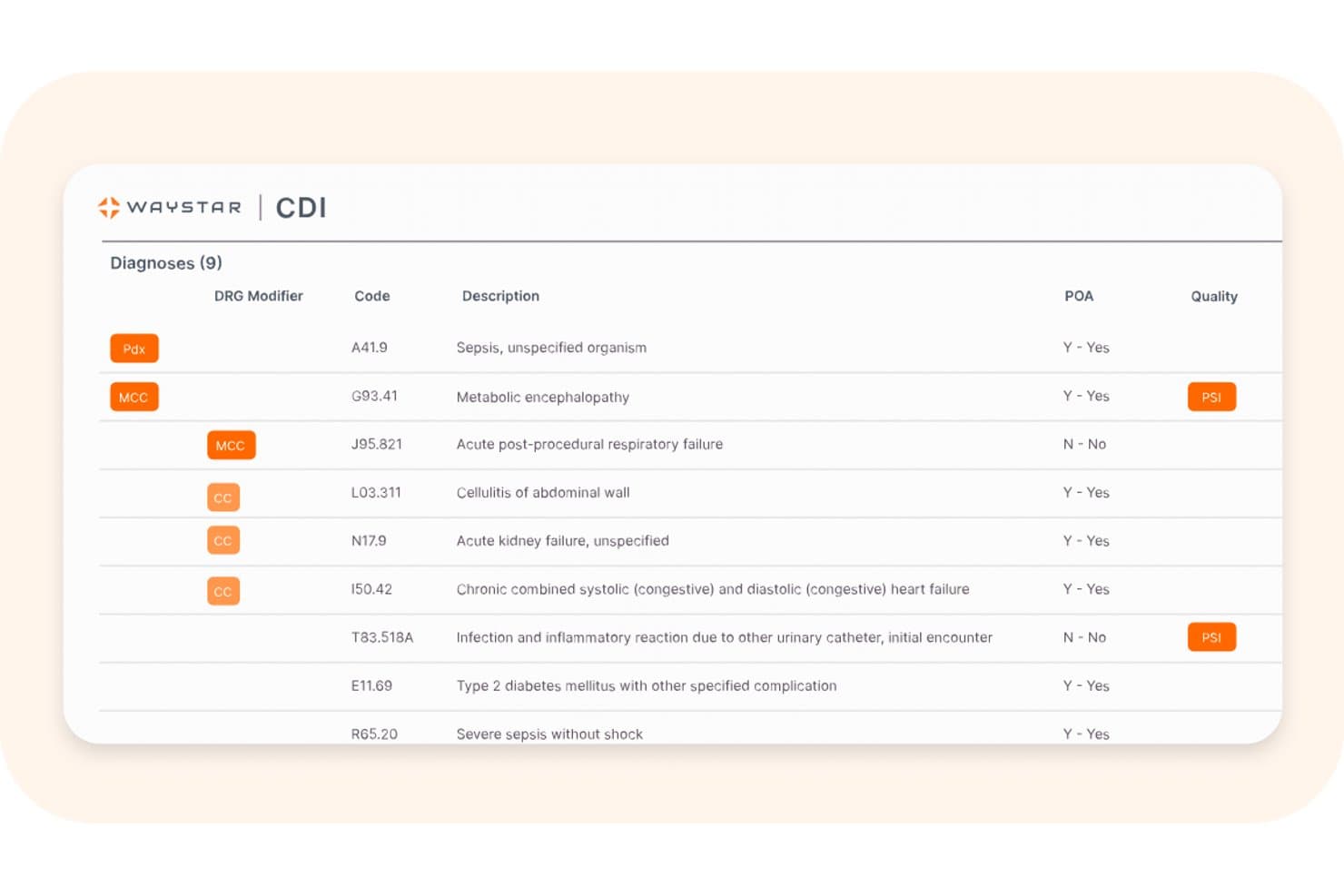
Waystar offre un'interfaccia CDI che mostra un elenco strutturato di 9 diagnosi con modificatori DRG, codici ICD, descrizioni, stato POA e indicatori di qualità come PSI. La soluzione CDI di Waystar è una piattaforma nativa AI per l'integrità della documentazione clinica progettata per contesti di ricovero, che combina revisione autonoma della cartella clinica, gestione delle richieste ai medici e analisi DRG alimentata dal motore AltitudeAI™.
Per chi è ideale Waystar?
La soluzione CDI di Waystar è particolarmente indicata per grandi sistemi sanitari e ospedali con elevato volume di pazienti ricoverati che desiderano modernizzare o espandere un programma CDI già esistente.
Perché ho scelto Waystar
Waystar si è guadagnata un posto nella mia lista ristretta per il suo approccio AI-first alla revisione delle cartelle cliniche, veramente differente rispetto agli strumenti CDI guidati esclusivamente dalle richieste. AltitudeAI™ è addestrato su oltre un terzo di tutte le dimissioni ospedaliere negli Stati Uniti, il che significa che individua lacune nella documentazione che modelli più limitati tendono a trascurare. Apprezzo anche la funzione QueryAgent, che utilizza AI generativa per redigere richieste post-dimissione direttamente nei flussi di lavoro dei medici, mantenendo alto il tasso di risposta senza sovraccaricare gli specialisti CDI.
Caratteristiche principali di Waystar
- Liste di lavoro prioritarie: La piattaforma presenta agli specialisti CDI elenchi di lavoro classificati dall'AI in base all’impatto finanziario e all’urgenza della documentazione.
- Calcolatori DRG integrati: Strumenti incorporati calcolano e visualizzano i raggruppamenti DRG attuali e potenziali, SOI e ROM per ciascun incontro.
- Dashboard di coinvolgimento dei medici: Monitora, in un'unica vista, i tempi di risposta dei medici alle richieste, richieste pendenti e tendenze della documentazione.
- Integrazione bidirezionale con EHR: Si collega direttamente con Epic, Oracle Health e Meditech per sincronizzare i dati dei pazienti e incorporare le richieste nei flussi di lavoro dei clinici.
Integrazioni Waystar
Waystar offre integrazioni native con i sistemi EHR Epic, Oracle Health (Cerner) e Meditech. È disponibile anche un'API per integrazioni personalizzate.
Pros and Cons
Pros:
- AltitudeAI addestrata su dati ospedalieri statunitensi
- Revisione autonoma della cartella clinica senza richiesta dello specialista
- Redazione richieste post-dimissione tramite AI generativa
Cons:
- Progettato principalmente per i contesti di ricovero soltanto
- I tempi di implementazione possono superare i 90 giorni
Learn more about Waystar: Ideale per revisione automatizzata delle cartelle
- Non disponibile
- Prezzo su richiesta
Solventum offre insight in tempo reale basati su AI per medici e team CDI al fine di favorire l'integrità clinica e dei ricavi. Solventum 360 Encompass CDI è una piattaforma per l'integrità della documentazione clinica che combina la revisione delle cartelle basata su NLP, flussi di lavoro automatizzati per le query ai medici, strumenti per DRG e risk adjustment, e analisi delle performance CDI nei servizi ospedalieri, ambulatoriali e professionali.
Per chi è ideale Solventum?
È particolarmente adatto a grandi sistemi sanitari e centri medici universitari che gestiscono programmi CDI dedicati su più strutture e linee di servizio.
Perché ho scelto Solventum
Ho scelto Solventum 360 Encompass CDI tra i migliori perché il suo algoritmo di prioritizzazione basato su NLP gestisce la revisione automatica delle cartelle su larga scala. Analizza le note cliniche non strutturate per individuare i casi ad alta priorità, inclusi quelli privi di acquisizione CC/MCC o dove la durata del ricovero non corrisponde alla gravità documentata. Quello che apprezzo particolarmente è il livello di machine learning, che affina continuamente la priorità delle worklist man mano che arrivano nuove documentazioni, così il mio team non deve occuparsi manualmente della triage delle cartelle.
Caratteristiche principali di Solventum
- Integrazione bidirezionale con EHR: Si collega con Epic, Cerner e Meditech per lo scambio dei dati e per integrare le query nei flussi di lavoro del medico.
- Moduli dedicati agli indicatori di qualità: Monitora PSI, HAC, SOI/ROM, HCC e altri indicatori di qualità e metriche di risk adjustment da un’unica piattaforma.
- Report CDI personalizzabili: Consente agli utenti di progettare ed eseguire analisi self-service sui KPI CDI, sulla produttività dei revisori e sull'impatto finanziario.
- Sequenziamento automatico dei codici: Ordina i codici di diagnosi per una migliore assegnazione dei DRG e la produzione di report sulle misure di qualità.
Integrazioni di Solventum
Solventum 360 Encompass CDI offre integrazioni native con Epic, Cerner e Meditech. È disponibile anche un'API per integrazioni personalizzate.
Pros and Cons
Pros:
- Prioritizzazione automatizzata delle cartelle tramite NLP
- Copertura DRG e HCC solida in tutti i contesti
- Supporto completo sia in revisione concorrente che retrospettiva
Cons:
- L'implementazione può richiedere oltre 90 giorni
- La personalizzazione dei report richiede il supporto del fornitore
Learn more about Solventum: Ideale per indicazioni sulla documentazione presso il punto di assistenza
- Dimostrazione gratuita disponibile
- Prezzi su richiesta
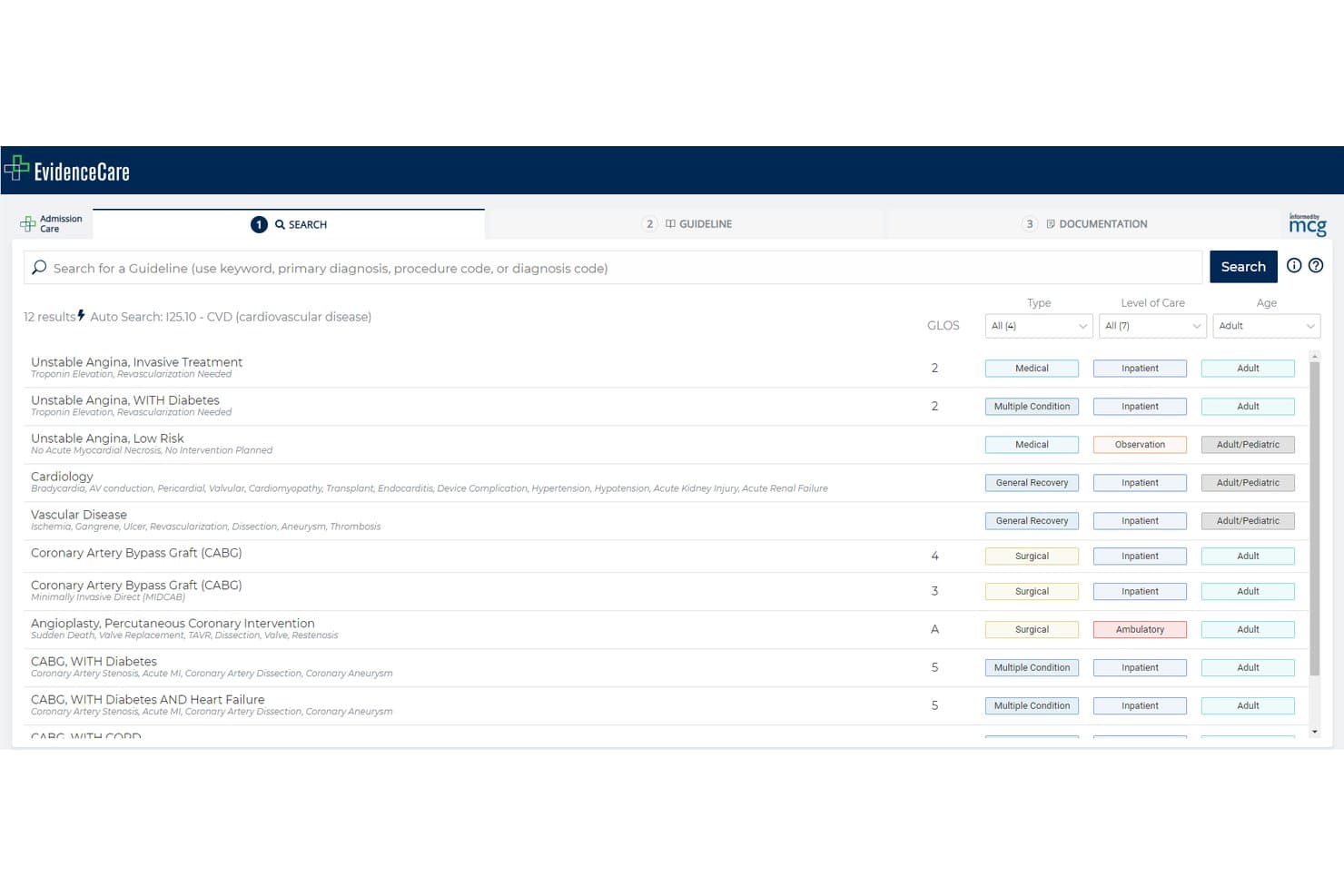
EvidenceCare offre una funzione di ricerca automatica che mostra le linee guida cliniche pertinenti in base al codice della diagnosi, come ICD-10 I25.10 per le patologie cardiovascolari, supportando i flussi di lavoro CDI. EvidenceCare è una piattaforma di documentazione clinica presso il punto di assistenza che integra criteri di necessità medica, indicazioni sullo stato del letto e monitoraggio del DRG provvisorio direttamente nei flussi di lavoro EHR per le squadre di assistenza ospedaliera.
A chi è più adatta EvidenceCare?
EvidenceCare è particolarmente adatta ai sistemi sanitari aziendali in cui i consulenti medici e i gruppi del ciclo dei ricavi devono ridurre i dinieghi relativi alla necessità medica dei pazienti ospedalizzati al momento del ricovero.
Perché ho scelto EvidenceCare
EvidenceCare rientra nella mia rosa ristretta per il modo in cui gestisce le indicazioni sulla documentazione direttamente all'interno dell'EHR, prima che si verifichi un diniego. Apprezzo il fatto che AdmissionCare presenti i criteri del pagatore relativi allo stato del letto al momento del ricovero, fornendo ai medici le indicazioni precise sulla documentazione di cui hanno bisogno in circa 42 secondi. L'integrazione InterQual AutoReview fa un ulteriore passo avanti, estraendo automaticamente i dati clinici dalla cartella e applicando criteri basati sull'evidenza senza l'estrazione manuale dei dati dalla cartella.
Caratteristiche principali di EvidenceCare
- Indicazione del DRG provvisorio in CareGauge: Invita i professionisti sanitari ad aggiornare le note di decorso e le diagnosi quando il DRG provvisorio non corrisponde all'utilizzo previsto.
- Attivatori delle revisioni concomitanti: Notifica automaticamente ai medici di effettuare revisioni successive per i pazienti in osservazione al raggiungimento di specifiche soglie di LOS.
- Integrazione EHR bidirezionale: Integrata in Epic, Oracle Cerner e MEDITECH per sincronizzare la documentazione e i criteri direttamente nei flussi di lavoro dei medici.
- Piattaforma cloud sicura e conforme: Le certificazioni HITRUST r2 e SOC 2 Type 2 garantiscono standard elevati per la sicurezza dei dati e la conformità normativa.
Integrazioni di EvidenceCare
EvidenceCare offre integrazioni native con i sistemi di cartella clinica elettronica Epic, Oracle Cerner e MEDITECH. È inoltre disponibile un'API per integrazioni personalizzate.
Pros and Cons
Pros:
- Si integra direttamente nei flussi di lavoro EHR esistenti
- Revisioni dei ricoveri completate in meno di 60 secondi
- Piattaforma cloud certificata HITRUST r2 per la protezione delle PHI
Cons:
- Ambito più ristretto rispetto alle piattaforme CDI complete
- Supporto limitato per i flussi di lavoro CDI ambulatoriali e per i servizi ambulatoriali
Learn more about EvidenceCare: Ideale per la gestione delle richieste ai clinici
- Non disponibile
- Prezzo su richiesta
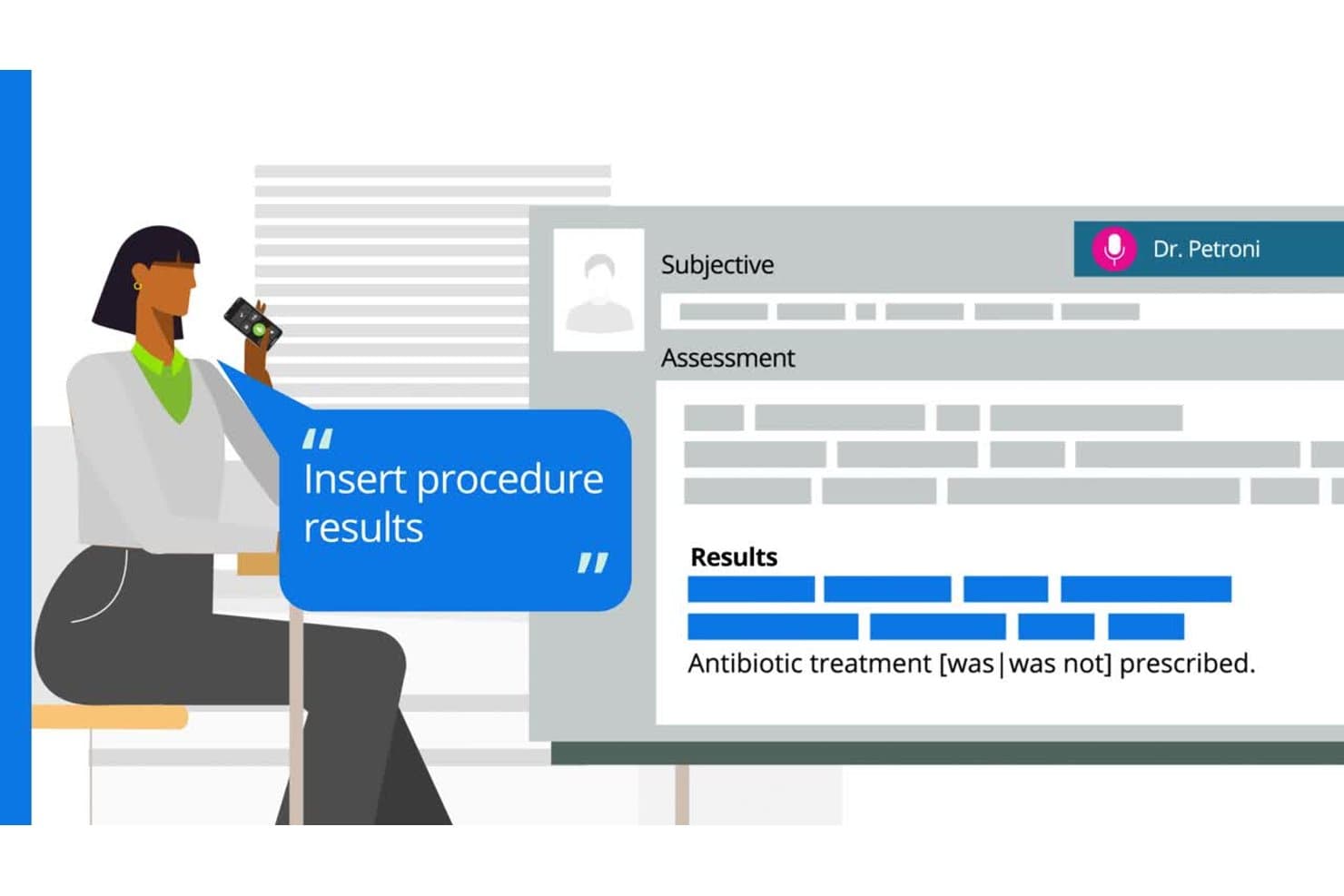
Microsoft CDE One offre documentazione vocale con inserimento in tempo reale dei risultati delle procedure e delle note di trattamento nei record clinici strutturati. Microsoft CDE One è una piattaforma per l'integrità della documentazione clinica basata sull'IA che combina la revisione concorrente delle cartelle cliniche, la gestione delle richieste ai medici, l'analisi della documentazione tramite NLP, calcolatori DRG e analisi delle prestazioni CDI.
Per chi è più adatto Microsoft CDE One?
CDE One è particolarmente indicato per grandi sistemi sanitari e ospedali multisede che gestiscono programmi CDI su scala aziendale e necessitano di flussi di lavoro standardizzati tra reparti e sedi diverse.
Perché ho scelto Microsoft CDE One
Ho scelto Microsoft CDE One tra i migliori grazie al modo in cui il suo flusso delle richieste funziona concretamente. Gli specialisti CDI inviano chiarimenti elettronici direttamente da CDE One, mentre i clinici ricevono e rispondono attraverso una casella di posta centralizzata integrata nel loro EHR. Le risposte vengono restituite automaticamente a CDE One e la lista di lavoro alimentata dall'IA utilizza prove cliniche e punteggi di opportunità di documentazione per dare priorità alle cartelle che richiedono attenzione per prime.
Funzionalità principali di Microsoft CDE One
- Analisi della documentazione con IA/NLP: Utilizza l'elaborazione del linguaggio naturale avanzata per identificare lacune e mancanza di specificità nelle note cliniche.
- Liste di lavoro prioritarie: Classifica automaticamente i casi in base alle opportunità di documentazione, all'impatto finanziario o alle misure di qualità per revisioni CDI più mirate.
- Calcolatori DRG e SOI/ROM: Include calcolatori DRG MS/APR di lavoro e strumenti di valutazione della gravità per supportare flussi di lavoro di rimborso accurati.
- Dashboard di analisi aziendali: Offre dashboard personalizzabili per monitorare KPI CDI, risultati finanziari e produttività dei revisori in più strutture.
Integrazioni di Microsoft CDE One
Microsoft CDE One offre integrazioni native con Epic, Cerner e Meditech EHR e presenta anche integrazioni native nell'ecosistema Microsoft, tra cui Microsoft 365 e Azure. È disponibile una API per integrazioni personalizzate.
Pros and Cons
Pros:
- Libreria di criteri clinici basata su evidenze con oltre 750 strategie
- Conformità rigorosa a HITRUST, SOC 2 e HIPAA
- Aggiornamenti continui del prodotto guidati dal feedback dei clienti
Cons:
- Dopo l'acquisizione, il supporto clienti personalizzato è diminuito
- Non adatto a programmi CDI di ospedali piccoli o medi
Learn more about Microsoft CDE One: Ideale per garantire l'integrità dei ricavi tramite IA
- Demo gratuita disponibile
- Prezzo su richiesta
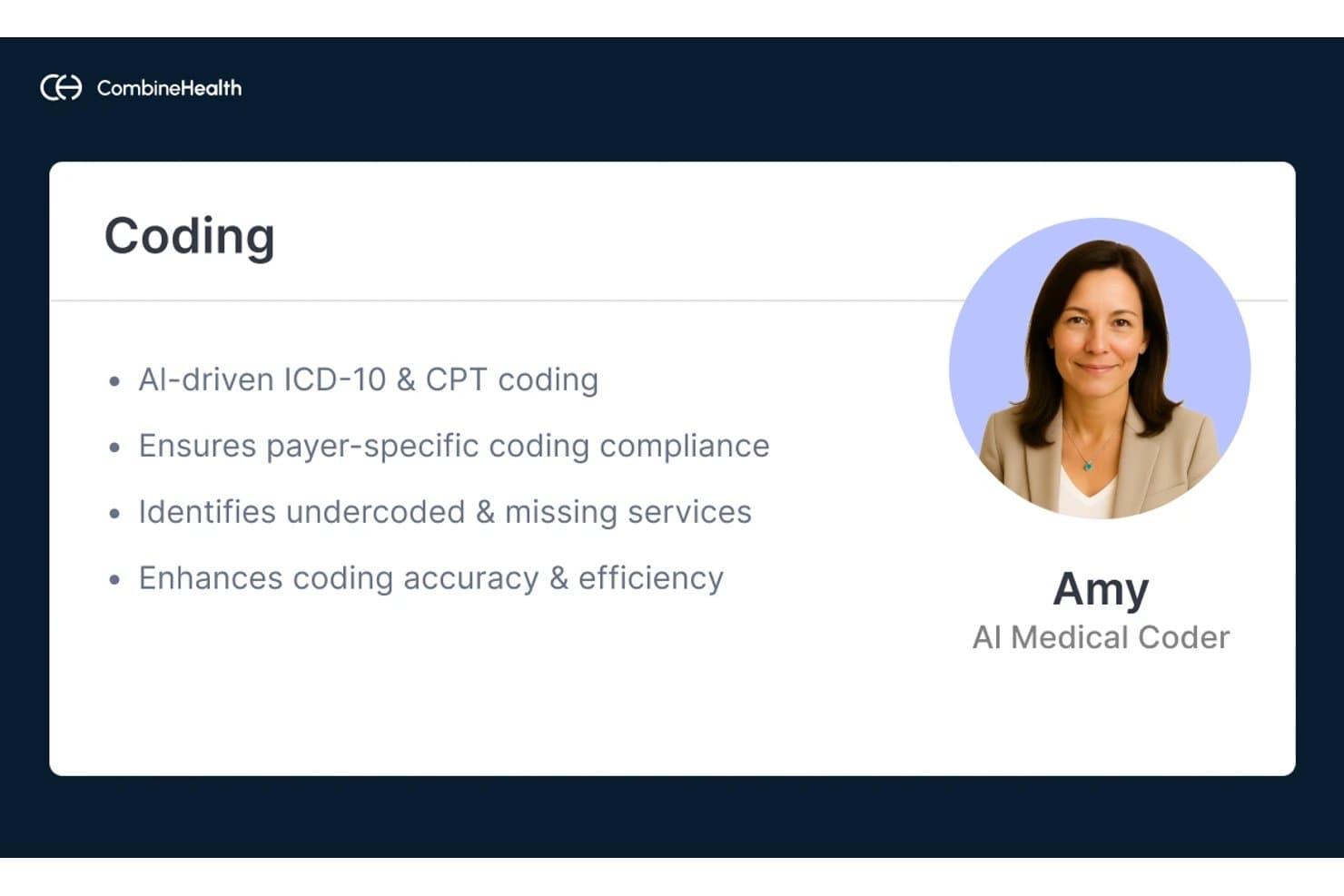
Combine Health offre un Codificatore Medico AI chiamato Amy che esegue la codifica ICD-10 e CPT assistita da IA per migliorare l'accuratezza e la conformità della codifica. Optum Enterprise CAC e CDI 3D è una piattaforma CDI e di codifica assistita da computer a livello ospedaliero che unisce l’analisi della documentazione basata su NLP, la revisione contemporanea delle cartelle, flussi di lavoro automatizzati per le richieste ai medici e strumenti per la codifica e il rimborso in un unico sistema integrato.
Per chi è ideale Combine Health?
È particolarmente consigliato per direttori HIM e responsabili dei programmi CDI presso grandi ospedali e sistemi sanitari che gestiscono operazioni di codifica per ricoverati ad alto volume.
Perché ho scelto Combine Health
Ho scelto Combine Health perché il motore NLP Clinical Language Intelligence elabora oltre 3 milioni di documenti clinici al giorno, leggendo ogni parola e mappando le diagnosi ai codici in meno di un secondo. CDI 3D individua le lacune nella documentazione mentre le note vengono inserite nell’EHR e l’Audit and Compliance Manager segnala i casi per la revisione pre-fatturazione prima che si verifichino rifiuti. In un caso documentato, questo flusso di lavoro ha portato a una riduzione del 37% dei rifiuti per necessità medica nel primo mese.
Caratteristiche principali di Combine Health
- Revisione contemporanea delle cartelle con prioritizzazione tramite IA: la piattaforma esamina tutta la documentazione dei pazienti ricoverati in tempo reale e classifica automaticamente i casi che richiedono l’attenzione degli specialisti CDI.
- Strumenti completi per DRG e aggiustamento del rischio: i calcolatori integrati supportano l’assegnazione di MS-DRG e SOI/ROM, oltre alla segnalazione degli HCC/aggiustamento rischio.
- Dashboard di analisi CDI personalizzabile: le dashboard di Power BI visualizzano KPI CDI, metriche di produttività, indici di audit e il monitoraggio dell’impatto finanziario per i responsabili del programma.
- App mobile per risposta alle richieste mediche: un’app mobile sicura consente ai medici di ricevere, rispondere e gestire le richieste direttamente dal proprio dispositivo.
Integrazioni di Combine Health
Combine Health offre integrazioni native con i sistemi EHR Epic, Cerner e Meditech. È disponibile un’API per integrazioni personalizzate.
Pros and Cons
Pros:
- Accuratezza NLP su ampi volumi di cartelle di ricovero
- Supporta la revisione CDI sia in tempo reale sia retrospettiva
- App mobile per la risposta alle richieste da parte dei medici
Cons:
- Più adatto a contesti ospedalieri di grandi dimensioni
- L'implementazione richiede un coinvolgimento significativo dell'IT ospedaliero
Learn more about Combine Health:
Altri software CDI
Ecco alcune ulteriori opzioni di software CDI che non sono state incluse nella mia selezione, ma che vale comunque la pena prendere in considerazione:
- 11Enjoin CDIIdeale per servizi CDI guidati da medici
- 12RapidClaimsIdeale per flussi di lavoro di codifica automatizzata
- 13Cotiviti CDIOttimo per la revisione della documentazione incentrata sul pagatore
- 14XsolisIdeale per l'utilizzo guidato dall'IA e CDI
How I Evaluate CDI Software
I evaluate CDI software in two layers: the core workflows every tool must handle—concurrent chart review, query management, DRG analysis—and the differentiators that separate the best options.
Core Functionality (Table Stakes For This List)
When I'm selecting tools for my list, I rank each one on a scale from 0 (does not offer the functionality) to 5 (excels in this area) for each core functionality listed below. Then, I calculate the tool's total score into a percentage. Each tool needs to achieve a minimum total score of 65% to be considered for inclusion.
- Concurrent Chart Review: I check whether CDI specialists can review inpatient charts in real time—not just retrospectively—with prioritized worklists that flag high-impact cases.
- Automated Query Workflow: I look for compliant, templated queries with routing, tracking, escalation paths, and audit trails that align with AHIMA/ACDIS practice briefs.
- AI/NLP Documentation Analysis: The tool should use NLP to surface missing diagnoses or specificity gaps in clinical notes, not just basic keyword matching or rules-based alerts.
- DRG & Risk Adjustment Tools: I evaluate whether the platform includes a working DRG calculator, SOI/ROM scoring, and HCC/risk adjustment prompts in one view.
- CDI Performance Analytics: Dashboards should cover core KPIs like query response rates, CMI impact, and reviewer productivity—with the ability to drill down by service line.
- EHR Integration: I look for bidirectional integration with major EHRs like Epic, Oracle Health, and MEDITECH so queries reach physicians inside their existing workflow.
Once I have a list of tools that meet the criteria, I consider what sets each platform apart.
Differentiating Factors (What Sets Vendors Apart)
Here's how I compare and contrast different vendors:
Standout Features
AI-powered query suggestions are a key differentiator—I look for platforms where NLP surfaces documentation gaps with clinically linked evidence, not just generic prompts. Prioritized worklists also matter because they let CDI specialists focus on cases with the highest DRG shift potential or risk adjustment opportunity first. Beyond reimbursement, I evaluate quality and risk adjustment tracking modules for PSI, HAC, and HCC capture that connect CDI work directly to value-based care outcomes.
Beyond Features
EHR and encoder integration is one of the first things I check—bidirectional connections with major EHRs and compatibility with encoders via HL7 or FHIR make a real difference in coding handoff speed. Regulatory compliance matters too, especially ACDIS/AHIMA-aligned query practices and timely ICD-10-CM/PCS and MS-DRG rule updates that keep your program audit-ready. I also evaluate scalability for multi-hospital systems, looking at whether licensing stays manageable as you expand across inpatient, outpatient, and ambulatory settings.
Come scegliere il software CDI
È facile perdersi in lunghi elenchi di funzionalità e strutture di prezzo complesse. Per aiutarti a rimanere concentrato mentre affronti il tuo processo di selezione del software, unico per le tue esigenze, ecco un elenco di fattori da tenere a mente:
| Fattore | Cosa considerare |
| Scalabilità | La piattaforma sarà in grado di gestire la crescita tra ospedali, strutture ambulatoriali e sedi assistenziali senza nuovi contratti o licenze? |
| Integrazioni | Supporta una vera integrazione bidirezionale con il tuo sistema EHR e i sistemi di codifica, oppure è ancora necessario inserire manualmente i dati nei flussi di lavoro principali? |
| Personalizzazione | Puoi adattare i modelli di richiesta, i cruscotti e i flussi di lavoro agli standard di documentazione e alle aree di interesse clinico del tuo programma? |
| Semplicità d'uso | Quanto è intuitiva l'interfaccia per gli specialisti CDI, i codificatori e gli operatori sanitari? Saranno necessari una formazione significativa o modifiche ai flussi di lavoro? |
| Implementazione e avvio | Quanto sono chiari i passaggi di implementazione, le tempistiche del progetto e l'accesso a esperti del settore o formatori clinici durante la configurazione del sistema? |
| Costo | Il fornitore offre modelli flessibili, come prezzi per utente, per episodio o per posto letto? Fai attenzione ai costi nascosti di assistenza o integrazione. |
| Misure di sicurezza | Il sistema è certificato per HIPAA, HITRUST e SOC 2? I dati sono crittografati durante il trasferimento e quando sono inattivi? Chiedi in che modo gli aggiornamenti influiscono sulla conformità. |
| Requisiti di conformità | Il software è sempre aggiornato rispetto agli standard ACDIS/AHIMA e si aggiorna automaticamente per le nuove revisioni delle regole ICD-10 e DRG? |
Che cos'è il software CDI?
Il software CDI è una piattaforma specializzata che aiuta le organizzazioni sanitarie a migliorare l'accuratezza, la chiarezza e la completezza della documentazione clinica. Questi sistemi supportano la revisione concorrente delle cartelle, i flussi di lavoro automatizzati per le richieste, la conformità della codifica e l'analisi delle prestazioni, per ridurre i dinieghi, ottimizzare il mix dei casi e garantire rimborsi adeguati. Il software CDI viene utilizzato dagli specialisti CDI, dai team HIM, dai consulenti medici e dai responsabili del ciclo delle entrate che desiderano standard di documentazione coerenti e conformi.
Funzionalità del software CDI
Quando scegli il software CDI, presta attenzione alle seguenti funzionalità principali:
- Revisione simultanea delle cartelle cliniche: consente agli specialisti di esaminare in tempo reale le cartelle dei pazienti mentre vengono assistiti, contribuendo a identificare le lacune nella documentazione prima della dimissione.
- Flusso di lavoro automatizzato per le richieste di chiarimento: semplifica la creazione, l'inoltro e il monitoraggio delle richieste ai medici per chiarire o integrare le informazioni cliniche nella cartella medica.
- Strumenti per DRG e adeguamento del rischio: fornisce calcolatori per l'assegnazione dei DRG, il calcolo dei punteggi SOI/ROM e i suggerimenti HCC, a supporto di una corretta determinazione della composizione dei casi e del rimborso.
- Strumenti per il coinvolgimento dei medici: include portali mobili, dashboard per le risposte alle richieste e report sulle tendenze per mantenere i medici informati e coinvolti nel miglioramento della documentazione.
- Analisi delle prestazioni: offre dashboard e report su KPI come il tasso di richieste, l'influenza sul CMI, le tendenze dei dinieghi e la produttività dei revisori, a supporto di una gestione basata sui dati.
- Integrazione con la cartella clinica elettronica: facilita la connettività bidirezionale con le piattaforme di cartella clinica elettronica, in modo che i dati clinici e le richieste siano sincronizzati direttamente nel flusso di lavoro del fornitore.
- Modelli personalizzabili: offre modelli predefiniti e modificabili per richieste, note e report, adattabili ai requisiti locali di documentazione, codifica e conformità.
- Tracciati di audit: monitora tutte le modifiche alla documentazione, le comunicazioni relative alle richieste e le azioni degli utenti, per mantenere la conformità normativa e supportare le revisioni retrospettive.
- Supporto ai flussi di lavoro in contesti diversi: supporta la revisione CDI in regime di ricovero, ambulatoriale, prima della fatturazione e dopo la dimissione, offrendo ai team flessibilità in tutti gli ambienti assistenziali.
Funzionalità AI comuni dei software CDI
Oltre alle funzionalità standard dei software CDI elencate sopra, molte di queste soluzioni stanno integrando l'AI con funzionalità come:
- Suggerimenti per le richieste basati sull'AI: genera automaticamente richieste clinicamente pertinenti analizzando il contesto della cartella e identificando le lacune nella documentazione che richiedono chiarimenti.
- Assegnazione prioritaria predittiva dei casi: utilizza l'apprendimento automatico per classificare le cartelle dei pazienti in base al potenziale impatto finanziario, alle opportunità di adeguamento del rischio o alla probabilità di diniego, aiutando i team CDI a concentrarsi sui casi di maggior valore.
- Analisi della documentazione tramite elaborazione del linguaggio naturale (NLP): analizza le note cliniche non strutturate per individuare diagnosi, livelli di specificità o indicatori clinici mancanti che potrebbero essere trascurati durante una revisione manuale.
- Collegamento automatizzato delle evidenze: collega le richieste suggerite o le lacune nella documentazione alle evidenze cliniche di supporto presenti nella cartella del paziente, facilitando ai fornitori una risposta consapevole.
- Monitoraggio della conformità in tempo reale: verifica continuamente la documentazione e le richieste rispetto agli standard normativi, segnalando potenziali rischi di non conformità o elementi che possono attivare un audit quando le cartelle vengono aggiornate.
Vantaggi dei software CDI
L'implementazione di un software CDI offre diversi vantaggi al team e all'azienda. Ecco alcuni dei benefici che ci si può aspettare:
- Maggiore accuratezza della documentazione: la revisione delle cartelle in tempo reale e le richieste automatizzate aiutano a colmare le lacune e garantiscono che le cartelle cliniche siano complete e conformi.
- Rimborso ottimizzato: gli strumenti per DRG e adeguamento del rischio facilitano la corretta determinazione della composizione dei casi, supportando ricavi adeguati e una riduzione dei dinieghi.
- Maggiore efficienza operativa: i flussi di lavoro automatizzati, i modelli integrati e le analisi riducono le attività manuali, consentendo agli specialisti CDI e ai medici di concentrarsi sull'assistenza.
- Migliore conformità e preparazione agli audit: i tracciati di audit integrati, il monitoraggio normativo e i set di codici aggiornati mantengono le pratiche di documentazione difendibili e aggiornate.
- Informazioni utili sulle prestazioni: le dashboard di reporting monitorano la produttività, l'impatto finanziario e le tendenze, aiutando i responsabili a dare priorità alle risorse e a misurare il ROI.
- Maggiore coinvolgimento dei fornitori: i portali mobili e il monitoraggio chiaro delle richieste facilitano la risposta dei medici alle richieste CDI e il miglioramento delle pratiche di documentazione.
Costi e prezzi dei software CDI
La scelta di un software CDI richiede la comprensione dei vari modelli e piani tariffari disponibili. I costi variano in base alle funzionalità, alle dimensioni del team, ai componenti aggiuntivi e ad altri fattori. La tabella seguente riassume i piani più comuni, i relativi prezzi medi e le funzionalità tipicamente incluse nelle soluzioni software CDI:
Tabella di confronto dei piani per i software CDI
| Tipo di piano | Prezzo medio | Caratteristiche comuni |
| Piano gratuito | $0 | Revisioni limitate delle cartelle cliniche, creazione di query di base, analisi limitate e accesso per un singolo utente. |
| Piano personale | $40–$100/utente/mese | Revisione simultanea delle cartelle cliniche, flusso di lavoro automatizzato per le query, reportistica limitata e integrazione con EHR. |
| Piano aziendale | $120–$250/utente/mese | Revisione in più contesti, analisi avanzate, modelli personalizzati, integrazione con EHR e sistemi di codifica e registri di audit. |
| Piano per grandi aziende | $300+/utente/mese | Scalabilità a livello di sistema, strumenti completi per la conformità, funzionalità di IA in tempo reale, onboarding personalizzato e assistenza dedicata. |
Domande frequenti sul software CDI
Ecco alcune risposte alle domande frequenti sul software CDI:
In che modo il software CDI si integra con i sistemi EHR esistenti?
La maggior parte dei software CDI offre integrazioni native o basate su API con le principali piattaforme EHR. Ciò consente ai dati clinici, alle query e alle risposte di fluire direttamente nelle cartelle dei pazienti, riducendo al minimo il doppio inserimento e il rischio di documentazione mancante.
Il software CDI può contribuire a ridurre i rifiuti delle richieste di rimborso?
Sì, il software CDI contribuisce a ridurre i rifiuti delle richieste di rimborso identificando le lacune nella documentazione, suggerendo query precise e garantendo una codifica accurata, il che favorisce richieste più corrette e aiuta a evitare i motivi più comuni dei rifiuti da parte dei pagatori.
Quali ruoli utilizzano generalmente il software CDI in un'organizzazione sanitaria?
Gli specialisti CDI, i professionisti HIM, i consulenti medici, i team di codifica e i responsabili del ciclo dei ricavi utilizzano tutti il software CDI per le revisioni simultanee, i flussi di lavoro delle query, le analisi e il monitoraggio della qualità.
Il software CDI è adatto agli ospedali o alle cliniche di dimensioni ridotte?
Sì, molte piattaforme CDI offrono piani scalabili e interfacce intuitive pensate per le strutture più piccole, rendendole accessibili a ospedali e cliniche di qualsiasi dimensione.
Quale assistenza continuativa dovrei aspettarmi da un fornitore di software CDI?
Dovresti aspettarti formazione per i nuovi utenti, accesso alle risorse del servizio di assistenza o della base di conoscenza, aggiornamenti periodici sulla conformità e un responsabile dell’account o un referente dell’assistenza dedicato per la risoluzione dei problemi e l’ottimizzazione.