

Gestionar los horarios de los enfermeros en una consulta médica con mucha actividad puede resultar abrumador. Hay que organizar turnos, equilibrar las cargas de trabajo y garantizar el cumplimiento de la normativa. El software de programación de enfermería puede ayudar a aliviar estas cargas, ahorrar tiempo y reducir los errores.
Según mi experiencia, encontrar el software adecuado implica comprender las necesidades específicas de tu equipo. He probado y analizado de forma independiente varias opciones para ofrecerte una lista imparcial y bien documentada de las mejores alternativas.
Encontrarás información sobre las funciones, ventajas y desventajas de cada herramienta, lo que te ayudará a tomar una decisión fundamentada. Tanto si buscas algo fácil de usar como una solución con muchas funciones, esta guía pretende ayudarte a gestionar tus horarios.
Por qué confiar en nuestras recomendaciones de software
6,700+
Reviews
20
Industry experts
16+
Evaluation factors
14
Years
Nuestro equipo lleva probando y evaluando software desde 2012. Como líderes de centros médicos, sabemos lo difícil —y lo importante— que es elegir el software adecuado.
Para esta guía, evaluamos las herramientas mediante pruebas prácticas e investigación independiente, puntuando las herramientas según nuestros criterios de selección.
Nuestras reseñas reflejan nuestro criterio editorial humano, no un discurso de ventas.
Resumen del mejor software de programación de enfermería
Esta tabla comparativa resume los detalles de precios de mi selección del mejor software de programación de enfermería para ayudarte a encontrar la opción más adecuada para tu presupuesto y las necesidades de tu negocio.
| Tool | Best For | Trial Info | Price | ||
|---|---|---|---|---|---|
| 1 | Mejor para una programación eficiente y gestión de turnos | Prueba gratis de 14 días + demo gratuita disponible | Desde $29/mes (facturado anualmente) | Website | |
| 2 | Ideal para acceso móvil a horarios en Canadá | Prueba gratuita de 21 días + demo gratuita disponible | Desde $2.93/usuario/mes (facturación anual) | Website | |
| 3 | Mejor para programación automatizada de turnos de enfermería | Prueba gratuita de 30 días + demo gratuita disponible | Desde $50/mes | Website | |
| 4 | La mejor opción para unificar la asignación de personal de enfermería interno y de agencias | Demostración gratuita disponible | Precios disponibles previa solicitud | Website | |
| 5 | Ideal para mejorar la comunicación del equipo mediante una plataforma unificada | Prueba gratuita + demo gratuita disponible | $2.50/usuario/mes | Website | |
| 6 | Ideal para facilitar la gestión de la fuerza laboral móvil | Demostración gratuita disponible | $59/user/month | Website | |
| 7 | Mejor para acceso remoto a horarios en múltiples dispositivos | $25/month | Website | ||
| 8 | La mejor opción para gestionar grandes y complejas planillas de personal | Demo gratuita disponible | $45/usuario/mes | Website | |
| 9 | El mejor para abordar retos de dotación de personal y reducir costos laborales | Demo gratuita disponible | Precio bajo solicitud | Website | |
| 10 | Ideal para planificar turnos y controlar el tiempo de forma simplificada | Prueba gratuita + plan gratuito disponible | $2/usuario/mes | Website |


Análisis del mejor software de programación de enfermería
A continuación se incluyen mis resúmenes detallados del mejor software de programación de enfermería que ha entrado en mi lista de selección. Mis análisis ofrecen una visión detallada de las funciones principales, ventajas y desventajas, integraciones y casos de uso ideales de cada herramienta para ayudarte a encontrar la opción más adecuada para ti.
 Mejor para una programación eficiente y gestión de turnos
- Prueba gratis de 14 días + demo gratuita disponible
- Desde $29/mes (facturado anualmente)
Visit WebsiteCustomer Rating:4.6/5
Connecteam ayuda a los empleados a mantenerse informados con horarios actualizados mediante notificaciones. Connecteam es una aplicación integral de gestión de empleados diseñada para administrar equipos sin escritorio de manera eficiente. Ofrece herramientas para el control de horarios, programación, gestión de tareas y comunicación en tiempo real.
Por qué elegí Connecteam:
Connecteam mejora significativamente el proceso de programación en centros de salud gracias a sus funciones completas y fáciles de usar. Su interfaz intuitiva permite una gestión eficaz de turnos, permitiendo a los enfermeros visualizar, gestionar e intercambiar turnos fácilmente. Además, las herramientas automáticas de programación del software reducen las cargas administrativas y minimizan los conflictos, asegurando operaciones eficientes.
Junto con estas características, Connecteam también ofrece notificaciones en tiempo real para mantener informado al personal sobre cambios en los horarios, fomentando una mejor comunicación y coordinación entre los miembros del equipo. Funcionalidades adicionales como seguimiento por GPS, gestión de tareas y soluciones de recursos humanos personalizables mejoran aún más las operaciones y aumentan la productividad.
Funciones destacadas e integraciones:
Las características clave de Connecteam incluyen gestión de operaciones, comunicación simplificada, control de horario automatizado, administración de disponibilidad del empleado y acceso móvil.
Las integraciones incluyen Gusto, Xero, Zapier, Paychex y QuickBooks.
Pros and Cons
Pros:
- Plantillas personalizables
- Potentes herramientas de comunicación
- Acceso móvil
Cons:
- Funciones avanzadas limitadas
- Capacidades offline limitadas
Learn more about Connecteam: Ideal para acceso móvil a horarios en Canadá
- Prueba gratuita de 21 días + demo gratuita disponible
- Desde $2.93/usuario/mes (facturación anual)
Visit WebsiteCustomer Rating:4.8/5
Agendrix muestra un horario semanal codificado por colores con detalles de turnos, espacios libres y visualización de ausencias, ayudando a los administradores a asignar roles y evitar conflictos. Agendrix es una solución de programación canadiense diseñada para equipos que trabajan por turnos. Su diseño enfocado en dispositivos móviles y características pensadas para el sector salud la convierten en una opción confiable para clínicas, centros de cuidados prolongados y pequeños hospitales que buscan optimizar la programación de horarios de enfermería.
Por qué elegí Agendrix:
Elegí Agendrix por su diseño móvil en primer plano, lo cual es una gran ventaja para los equipos de salud que siempre están en movimiento. Las enfermeras pueden ver los horarios, registrar su llegada y recibir actualizaciones de turnos directamente en sus teléfonos, facilitando la comunicación sin necesidad de regresar a una oficina central. Los administradores pueden cubrir turnos vacantes, aprobar solicitudes de tiempo libre y enviar actualizaciones en tiempo real al equipo usando herramientas de comunicación integradas. También gestiona la asistencia, la disponibilidad y la programación en múltiples ubicaciones, lo cual es especialmente útil en entornos clínicos concurridos.
Características destacadas e integraciones
Incluye programación desde el móvil, seguimiento de tiempo con GPS, hojas de asistencia automáticas, gestión de disponibilidad de empleados y mensajería integrada. La plataforma también permite registrar ingresos mediante quiosco, móvil, línea fija o biometría.
Las integraciones incluyen EmployerD, Nethris, Sage 50, Acomba, QuickBooks, Ceridian Powerpay, ADP Workforce Now, Payworks, Lightspeed, Azur, Easypay, BeLocum, Hopem y Folks HR.
Pros and Cons
Pros:
- Las enfermeras pueden consultar y gestionar horarios desde sus teléfonos
- Las opciones de seguimiento de tiempo y registro de llegadas respaldan distintos entornos laborales
- El chat integrado y las notificaciones de turnos ayudan a mantener informado al equipo
Cons:
- La configuración puede llevar tiempo si se migra desde herramientas manuales
- Los informes podrían ofrecer más opciones de personalización
Learn more about Agendrix: Mejor para programación automatizada de turnos de enfermería
- Prueba gratuita de 30 días + demo gratuita disponible
- Desde $50/mes
Visit WebsiteCustomer Rating:4.5/5
TimeTrex ofrece un panel centralizado donde los gestores pueden revisar horarios, registros de entrada, excepciones y autorizaciones en un solo lugar. TimeTrex ofrece a las instalaciones de atención médica, agencias de personal y equipos de enfermería una forma práctica de centralizar la programación, el seguimiento del tiempo y la nómina, todo en una sola plataforma. Si gestionas turnos de enfermería complejos, turnos rotativos o múltiples sedes, TimeTrex puede ayudarte a reemplazar hojas de cálculo y relojes manuales por un sistema que te permite gestionar horarios, controlar la asistencia y automatizar la nómina, lo que posiblemente te libere para que puedas enfocarte más en el cuidado de los pacientes y menos en la administración.
Por qué elegí TimeTrex
Elegí TimeTrex porque ofrece herramientas de programación que tienen en cuenta la disponibilidad del personal, habilidades y demanda, lo cual es fundamental en entornos de enfermería donde los turnos, certificaciones y necesidades de cobertura varían. Las capacidades automatizadas de programación y gestión de turnos ayudan a asegurar una cobertura adecuada y a reducir los conflictos, lo que significa menos sobrecarga de trabajo para las enfermeras y menos vacíos de atención. Combinado con el registro de asistencia y la nómina integrados, TimeTrex facilita la gestión de patrones de turnos complejos y garantiza un pago preciso según las horas reales trabajadas.
Características clave de TimeTrex
Además de su motor de programación, obtienes un conjunto más amplio de funciones que apoyan la gestión completa de tu personal:
- Soluciones biométricas y de asistencia: Ofrece un seguimiento avanzado de asistencia con reconocimiento facial y GPS, mejorando la precisión y reduciendo el fraude.
- Portal de autoservicio para empleados: El personal puede registrar entrada/salida, ver sus horarios, solicitar permisos o intercambios de turnos y revisar recibos de pago, todo desde un navegador o dispositivo móvil.
- Gestión de recursos humanos: Incluye herramientas consolidadas de RRHH para gestionar perfiles de empleados, beneficios, cumplimiento y administración de documentos.
- Analítica e informes: Ofrece información sobre el desempeño del personal y tendencias para la toma de decisiones basada en datos.
Integraciones de TimeTrex
TimeTrex proporciona integración personalizada mediante API para una funcionalidad mejorada, lo que permite una conectividad fluida con sistemas existentes.
Pros and Cons
Pros:
- Permite autoservicio del empleado para permisos, horarios y hojas de tiempo
- Admite registro de entrada móvil y biométrico, útil para equipos distribuidos
- Gestión de tiempo, asistencia y nómina en un solo paquete
Cons:
- Número limitado de integraciones nativas comparado con otras plataformas líderes de RRHH
- El plan gratuito no incluye soporte al cliente ni acceso a la app móvil
Learn more about TimeTrex: La mejor opción para unificar la asignación de personal de enfermería interno y de agencias
- Demostración gratuita disponible
- Precios disponibles previa solicitud
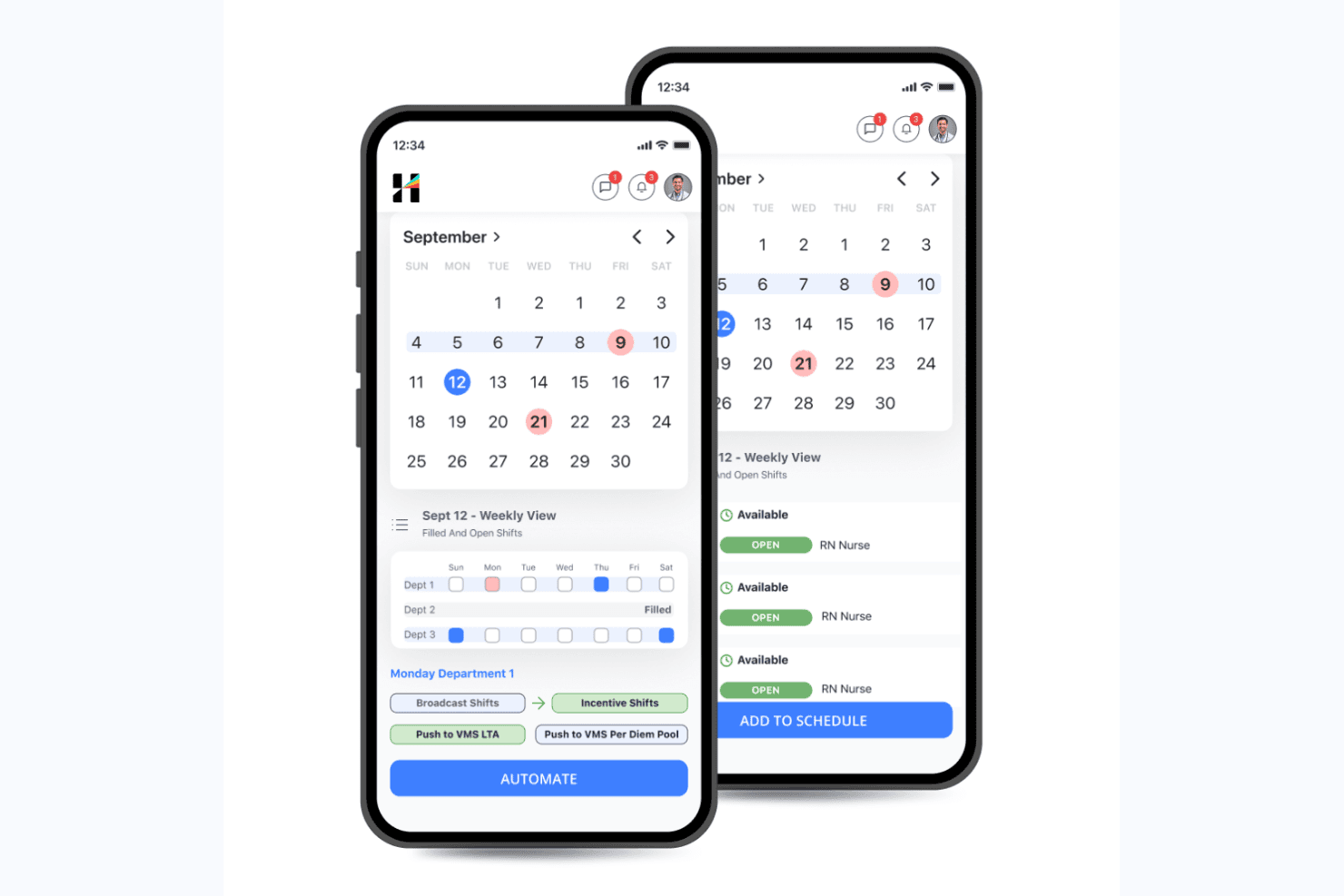
Hallmark Health Care Solutions permite a los responsables programar y automatizar los turnos de enfermería disponibles. Hallmark Health Care Solutions es una plataforma empresarial de programación de enfermería y gestión de personal que combina la programación de turnos impulsada por IA, la gestión interna de la bolsa de personal flotante, la gestión de proveedores para agencias externas, el seguimiento de credenciales y la previsión predictiva de la demanda.
¿Para quién es más adecuada Hallmark Health Care Solutions?
Hallmark es una opción excelente para grandes hospitales y sistemas sanitarios con varios hospitales que necesitan gestionar a enfermeros contratados, personal de la bolsa flotante y trabajadores de agencias externas desde una única plataforma.
Por qué elegí Hallmark Health Care Solutions
Hallmark ocupa un lugar en mi lista de opciones principales porque es la única plataforma de programación de enfermería que he encontrado que gestiona a enfermeros contratados, bolsas flotantes internas y más de 750 agencias externas de personal desde un único sistema. Me gusta especialmente el módulo de Asignación de recursos habilitada por IA, que compara en tiempo real la mano de obra interna con la de las agencias utilizando datos de nivel de gravedad, HPPD y censo, para que tu equipo no tenga que adivinar qué opción es más rápida o económica para cubrir un turno. El sistema de gestión de proveedores se encarga de las licitaciones competitivas y del seguimiento del cumplimiento entre agencias sin necesidad de utilizar herramientas independientes.
Funciones principales de Hallmark Health Care Solutions
- Previsión de la demanda: Un modelo de IA utiliza datos de censo, patrones de ausencias, tendencias estacionales y métricas de duración de la estancia para proyectar las necesidades de personal a nivel de unidad y línea de servicio con semanas o meses de antelación.
- Inteligencia del talento: Registra las preferencias individuales de cada enfermero en cuanto a turno, ubicación y tipo de asignación, y después incorpora esas preferencias a las decisiones de programación impulsadas por IA junto con la disponibilidad y las competencias.
- Supervisión del vencimiento de credenciales: Realiza un seguimiento automático de los plazos de credenciales y licencias de los trabajadores actuales, activos y anteriores, con alertas proactivas y gestión de excepciones integradas.
- Análisis ejecutivo de la fuerza laboral: Los paneles consolidan el gasto en horas extra, el uso de agencias, la alineación de las compensaciones y los resultados de los pacientes en una única vista diseñada para los responsables sénior de enfermería y finanzas.
Integraciones de Hallmark Health Care Solutions
Hallmark incluye integraciones con Epic, Cerner, Workday, UKG, QGenda, Okta, ADP, Paycom, Oracle y SAP Concur. Admite conexiones mediante API, Webhooks, EDI, HL7, FHIR y SFTP para intercambios de datos personalizados.
Pros and Cons
Pros:
- La asignación de personal impulsada por IA cumple las reglas de HPPD y nivel de gravedad
- Gestión unificada de la bolsa flotante interna y de las agencias
- Los paneles ejecutivos consolidan los datos laborales y de los pacientes
Cons:
- No ofrece precios públicos ni prueba gratuita
- Muy pocas reseñas de usuarios publicadas por sus pares
Learn more about Hallmark Health Care Solutions: Ideal para mejorar la comunicación del equipo mediante una plataforma unificada
- Prueba gratuita + demo gratuita disponible
- $2.50/usuario/mes
Visit WebsiteCustomer Rating:4.6/5
Captura de pantalla de la función de programación de Deputy. Deputy, como un software integral para la programación de enfermería, está diseñado para simplificar la gestión de personal y mejorar la comunicación del equipo. Facilita la comunicación dentro de una plataforma unificada, lo que lo convierte en la solución preferida para entornos de atención sanitaria que priorizan una interacción fluida y efectiva entre el personal.
Por qué elegí Deputy:
Deputy llamó mi atención como una impresionante herramienta de programación que va más allá de solo asignar turnos. Su compromiso de fomentar la comunicación en los equipos de atención médica a través de su plataforma lo hizo destacar. Dado el entorno a menudo frenético y de alta presión de la atención sanitaria, facilitar la comunicación fluida entre los miembros del equipo puede aumentar significativamente la eficiencia y la moral.
Precisamente por eso elegí Deputy: reconoce y aborda este aspecto a menudo pasado por alto en la programación de enfermeros.
Funciones e integraciones destacadas:
Con Deputy, no solo puedes crear y compartir horarios fácilmente, sino que también puedes gestionar solicitudes de permiso, hacer seguimiento del tiempo y la asistencia, e incluso compartir actualizaciones instantáneas con tu equipo. La función de comunicación en tiempo real lo convierte en una herramienta ideal para equipos de enfermería que necesitan mantenerse conectados e informados.
Las integraciones clave incluyen sistemas de nómina como ADP y Gusto, plataformas de recursos humanos como BambooHR y sistemas de punto de venta como Square y Vend.
Pros and Cons
Pros:
- Herramientas de comunicación robustas para asegurar la coordinación efectiva del equipo
- Interfaz fácil de usar que simplifica las tareas de programación
- Amplia gama de integraciones con sistemas populares de nómina y recursos humanos
Cons:
- Las funciones avanzadas solo están disponibles en un nivel de precio superior
- Limitada capacidad de personalización en comparación con otras herramientas de esta lista
- El soporte al cliente puede ser lento a veces
Learn more about Deputy: Ideal para facilitar la gestión de la fuerza laboral móvil
- Demostración gratuita disponible
- $59/user/month
Visit WebsiteCustomer Rating:4.2/5
Panel de análisis de Skedulo Skedulo es un software de programación diseñado para optimizar la gestión de la fuerza laboral móvil. Ofrece a las empresas herramientas integrales para programar, rastrear y gestionar a sus empleados en movimiento, lo que lo hace ideal para industrias que dependen de operaciones en campo.
Por qué elegí Skedulo:
Al revisar varias herramientas de programación, elegí Skedulo por su sólido enfoque en la gestión de la fuerza laboral móvil. En comparación con otras opciones, proporciona funciones específicas para las operaciones de campo, como la programación basada en la ubicación y el seguimiento de trabajos desde dispositivos móviles.
Determiné que Skedulo es el mejor para facilitar la gestión de la fuerza laboral móvil debido a su enfoque integral en la coordinación del trabajo móvil.
Características destacadas e integraciones:
Las características clave de Skedulo incluyen la programación basada en la ubicación, visibilidad en tiempo real del estado de los trabajos y análisis sólidos para la evaluación del rendimiento. Estas funciones son esenciales para empresas con una importante operación en campo.
Skedulo se integra bien con diversos sistemas de CRM, HRM y nómina. Esto incluye plataformas destacadas como Salesforce, proporcionando a las empresas la flexibilidad de incorporar Skedulo en sus flujos de trabajo existentes.
Pros and Cons
Pros:
- Enfoque sólido en la gestión de la fuerza laboral móvil, ideal para empresas con operaciones significativas en campo
- Se integra con los sistemas populares de CRM, HRM y nómina, permitiendo una gestión fluida del flujo de trabajo
- Ofrece visibilidad en tiempo real del estado de los trabajos para una mejor gestión
Cons:
- El precio inicial puede ser alto para pequeñas empresas o startups
- La plataforma puede tener una curva de aprendizaje para quienes no están familiarizados con este tipo de sistemas
- Las funciones pueden ser excesivas para empresas que no cuentan con una fuerza laboral móvil considerable
Learn more about Skedulo: Mejor para acceso remoto a horarios en múltiples dispositivos
- $25/month
Visit WebsiteCustomer Rating:4.5/5
Una captura de pantalla en ScheduleAnywhere donde puede verse el horario de los empleados. ScheduleAnywhere es una solución de programación que ofrece funciones accesibles y fáciles de usar para la programación de personal en diversas industrias. Su capacidad de ofrecer acceso remoto a los horarios en múltiples dispositivos respalda su habilidad para adaptarse a lugares de trabajo modernos y ágiles, donde la movilidad y la flexibilidad son vitales.
Por qué elegí ScheduleAnywhere:
Elegí ScheduleAnywhere por su sólida compatibilidad móvil. Esta herramienta destaca porque permite que empleados y gerentes accedan a los horarios mientras están fuera de la oficina, lo cual me pareció extremadamente importante en los entornos laborales dinámicos de hoy en día. En mi opinión, ScheduleAnywhere es el mejor para habilitar el acceso remoto a los horarios en múltiples dispositivos.
Características y integraciones destacadas:
ScheduleAnywhere ofrece funciones esenciales como rotaciones de turnos, copiado de horarios y opciones de vista múltiple para diferentes ubicaciones y departamentos. Además, la compatibilidad móvil es una característica fundamental que facilita el acceso remoto a los horarios.
La herramienta proporciona integraciones esenciales con sistemas de nómina, lo que simplifica enormemente el proceso de contabilizar las horas y horas extra de los empleados.
Pros and Cons
Pros:
- La compatibilidad móvil permite acceder a los horarios en cualquier lugar
- La integración con sistemas de nómina ayuda a contabilizar las horas de los empleados
- Funciones como copiado de horarios y rotaciones de turnos aportan conveniencia
Cons:
- El precio elevado puede no ser ideal para organizaciones pequeñas
- La ausencia de una versión gratuita podría disuadir a posibles usuarios
- La interfaz de usuario puede parecer anticuada en comparación con otras herramientas de programación modernas
Learn more about ScheduleAnywhere: La mejor opción para gestionar grandes y complejas planillas de personal
- Demo gratuita disponible
- $45/usuario/mes

Aquí tienes una vista general de la captura de pantalla de Shiftboard en todos los dispositivos mostrando el panel de horarios publicados. Shiftboard es un software robusto de programación de enfermería diseñado para manejar la complejidad de los horarios de grandes plantillas. Se adapta de manera experta a rotaciones intrincadas, turnos variables y conjuntos de habilidades diversas, lo que lo convierte en una opción óptima para instituciones de salud de mayor tamaño o entornos con necesidades de personal complejas.
Por qué elegí Shiftboard:
Al seleccionar esta herramienta, aprecié la capacidad excepcional de Shiftboard para gestionar grandes y complejos horarios de trabajo. En comparación con otras opciones, destaca por su habilidad para manejar y navegar la complejidad sin problemas.
Creo firmemente que Shiftboard es “La mejor opción para gestionar grandes y complejas planillas de personal” debido a sus completas capacidades de programación, funciones robustas y adaptabilidad a diversos requisitos de personal.
Características destacadas e integraciones:
Shiftboard brilla por sus capacidades dinámicas de programación, incluyendo la posibilidad de autogenerar horarios, gestionar horas extra y facilitar cambios de turnos rápidos. Su programación basada en la demanda es una gran ventaja para equipos grandes con necesidades variables de personal.
En cuanto a integraciones, Shiftboard ofrece excelente compatibilidad con una amplia gama de sistemas. Las principales integraciones incluyen sistemas de recursos humanos y nómina como ADP y Quickbooks, mejorando la gestión integral de tu plantilla.
Pros and Cons
Pros:
- Excepcional para gestionar necesidades complejas de personal
- Se integra fácilmente con sistemas de RR. HH. y nómina
- Las funciones avanzadas de programación mejoran la eficiencia
Cons:
- El precio inicial es más alto comparado con algunas alternativas
- Algunas funciones pueden ser excesivas para entornos de atención médica más pequeños
- La interfaz de usuario puede requerir cierto aprendizaje para su uso óptimo
Learn more about Shiftboard: El mejor para abordar retos de dotación de personal y reducir costos laborales
- Demo gratuita disponible
- Precio bajo solicitud

Vista del panel de programación de OnShift OnShift es un software de gestión de capital humano diseñado específicamente para la industria de la salud, que ofrece una variedad de funciones pensadas para abordar los desafíos comunes de dotación de personal y ayudar a reducir los costos laborales. Está dirigido a organizaciones que enfrentan altas tasas de rotación de empleados y a aquellas que buscan mantener niveles de personal adecuados mientras gestionan los gastos.
Por qué elegí OnShift:
Elegí OnShift por su enfoque específico en la industria para los desafíos de dotación de personal. Se destaca por su atención a factores que afectan particularmente al sector salud, como la alta rotación y la demanda fluctuante. Basándome en mi análisis y comparaciones, determiné que OnShift es el mejor para abordar retos de dotación de personal y reducir costos laborales, gracias a sus funciones de gestión predictiva y proactiva.
Características destacadas e integraciones:
OnShift ofrece funciones notables como programación predictiva, herramientas de compromiso de empleados y una plataforma de reclutamiento para asegurar que se cumplan las necesidades de personal de forma eficiente. También ofrece control proactivo de horas extra para gestionar los costos laborales de manera efectiva.
OnShift se integra con una variedad de sistemas de nómina y recursos humanos, convirtiéndose en una solución versátil que puede adaptarse a diversas estructuras administrativas.
Pros and Cons
Pros:
- Programación predictiva y control proactivo de horas extra para mayor rentabilidad
- Herramientas de compromiso de empleados para mejorar el ánimo laboral y reducir la rotación
- Ofrece integraciones con múltiples sistemas de nómina y recursos humanos
Cons:
- La falta de información transparente sobre los precios puede disuadir a usuarios potenciales
- El enfoque específico en la industria puede limitar su aplicación en sectores fuera de la salud
- La interfaz de usuario puede requerir una curva de aprendizaje para quienes no están familiarizados con este tipo de sistemas
Learn more about OnShift: 10Ideal para planificar turnos y controlar el tiempo de forma simplificada
Sling
- Prueba gratuita + plan gratuito disponible
- $2/usuario/mes

Echa un vistazo a la función de programación de Sling. Sling es un software de gestión de personal que centraliza la programación, el seguimiento de horas y la coordinación de empleados. Diseñado pensando en la facilidad de uso, simplifica la planificación de turnos y el control del tiempo, convirtiéndose en una excelente herramienta para las empresas que desean gestionar estas tareas de manera eficiente.
Por qué elegí Sling:
Sling captó mi atención por su enfoque en la simplicidad y la facilidad de uso en la planificación de turnos y el seguimiento de horas. Su interfaz limpia e intuitiva lo distingue de otras herramientas de programación que a menudo pueden parecer abrumadoras. Seleccioné Sling como la mejor herramienta para la planificación de turnos y el control horario simplificados debido a su diseño amigable y su enfoque en estas funciones principales.
Características destacadas e integraciones:
Sling ofrece un conjunto sólido de características, como un reloj registrador integrado, configuraciones de disponibilidad de empleados y un módulo eficiente de planificación de turnos. El componente de seguimiento del tiempo es especialmente útil, ya que permite a los gerentes supervisar con precisión las horas trabajadas y las horas extras.
En cuanto a integraciones, Sling puede conectarse con múltiples plataformas de software de nómina para garantizar una transición fluida de la programación y el control horario al procesamiento de nómina.
Pros and Cons
Pros:
- La interfaz amigable hace que la planificación de turnos y el control de tiempo sean sencillos
- Reloj registrador integrado con monitoreo de horas extras
- Integración efectiva con software de nómina
Cons:
- El ciclo de facturación anual puede no ser preferido por todas las empresas
- Carece de algunas opciones avanzadas de personalización que ofrecen los competidores
- El plan gratuito es bastante limitado, por lo que es necesario actualizar para necesidades más completas
Learn more about Sling:
Otros programas de programación de enfermería
Estas son algunas opciones adicionales de software de programación de enfermería que no han entrado en mi lista de selección, pero que aun así merece la pena consultar:
- 11TCP SoftwareIdeal para integrarse perfectamente con sistemas de RR.HH. existentes
- 12Schedule360Mejor para opciones avanzadas de configurabilidad y escalabilidad
- 13NurseGridMejor para fomentar el compromiso y el equilibrio entre la vida personal y laboral de las enfermeras
- 14ShiftWizardIdeal para reducir horas extra con una gestión eficiente del personal
- 15eScheduleMejor para optimizar operaciones con funciones de automatización personalizadas
- 16Deel HRIdeal para crear políticas de horarios
- 17RotageekIdeal para optimizar la dotación de personal con programación impulsada por IA
Cómo evalúo el software de programación de turnos para enfermería
Divido mi evaluación en dos capas: las capacidades básicas que una herramienta debe tener—como la rotación de turnos y el seguimiento de credenciales—y los diferenciadores que hacen destacar a las mejores opciones.
Funcionalidad principal (Requisitos esenciales para esta lista)
Cuando selecciono herramientas para mi lista, califico cada una en una escala de 0 (no ofrece la funcionalidad) a 5 (sobresale en esta área) para cada funcionalidad principal que aparece a continuación. Luego, calculo la puntuación total de la herramienta como un porcentaje. Cada herramienta debe lograr una puntuación total mínima del 65% para ser considerada para su inclusión.
- Programación y rotación de turnos: Busco herramientas que gestionen patrones rotativos complejos, turnos nocturnos y cobertura en varias unidades sin que los responsables deban rehacer los horarios cada periodo.
- Gestión de turnos de autoservicio: El personal debe poder solicitar permiso, tomar turnos abiertos e iniciar intercambios desde una aplicación móvil en lugar de llamar a la enfermera a cargo.
- Seguimiento de credenciales y cumplimiento: Cada herramienta debe almacenar licencias y certificaciones de enfermería con seguimiento de vencimiento para evitar que se programe accidentalmente a personal no calificado.
- Reglas de cobertura y relación de personal: Reviso si la plataforma garantiza las proporciones enfermera-paciente y las reglas de mezcla de habilidades por unidad, en vez de dejar los huecos de cobertura a la supervisión manual.
- Integración de tiempo, asistencia y nómina: La herramienta debe registrar datos de entrada/salida y conectarse con los sistemas de nómina para conciliar horas extras, diferenciales de turnos y horas trabajadas.
- Notificaciones y alertas automáticas: Evalúo cómo la plataforma envía alertas de turnos abiertos, cambios en los horarios y avisos de huecos de cobertura a través de SMS, correo electrónico o notificaciones push.
Una vez tengo una lista de herramientas que cumplen con este criterio, considero qué distingue a cada plataforma.
Factores diferenciadores (Qué distingue a los proveedores)
Así es como comparo y contrasto los diferentes proveedores:
Funciones destacadas
La programación basada en la agudeza del paciente es un gran diferenciador—busco herramientas que ajusten las asignaciones según la gravedad del paciente en tiempo real, no solo por el recuento de personal. La gestión de la fatiga también es importante, especialmente en unidades con turnos de 12 horas; las mejores plataformas señalan anticipadamente secuencias peligrosas de turnos consecutivos. Además, evalúo la previsión de demanda basada en datos. Las herramientas que utilizan historiales de censos para proyectar necesidades de personal con semanas de antelación ayudan a los responsables a evitar prisas de último momento.
Más allá de las funciones
Las integraciones con el ecosistema sanitario son de las primeras cosas que reviso. Una herramienta de programación que se conecta con tu historia clínica electrónica para obtener datos de censo en tiempo real y se sincroniza con plataformas de nómina como UKG o ADP ahorra horas de conciliación manual en cada periodo de pago. El cumplimiento también es fundamental—evalúo si una plataforma cumple con los estándares HIPAA y si soporta el acceso basado en roles para la información protegida de salud. Finalmente, la adaptación según el despliegue importa. Una red de clínicas con cinco sedes y una consulta individual tienen necesidades muy distintas, así que analizo cómo se adaptan el precio y la escalabilidad al tamaño de la práctica.
Cómo elegir un software de programación de enfermería
Es fácil perderse entre largas listas de funciones y estructuras de precios complejas. Para ayudarte a mantener la atención mientras avanzas en tu proceso específico de selección de software, esta es una lista de factores que debes tener en cuenta:
| Factor | Qué debes tener en cuenta |
|---|---|
| FactorEscalabilidad | Qué debes tener en cuenta¿Puede el software adaptarse al crecimiento del número de empleados? Comprueba si admite varias ubicaciones o departamentos y si el precio se ajusta a medida que tu equipo crece. |
| FactorIntegraciones | Qué debes tener en cuenta¿Se integra con tus sistemas actuales, como el software de nóminas y de recursos humanos? Asegúrate de que es compatible con las herramientas que ya utilizas para evitar introducir los datos manualmente. |
| FactorPersonalización | Qué debes tener en cuenta¿Puedes adaptar el software a tus normas y políticas de programación? Busca opciones para ajustar plantillas o crear flujos de trabajo personalizados. |
| FactorFacilidad de uso | Qué debes tener en cuenta¿La interfaz es intuitiva para todos los usuarios? Ten en cuenta si el personal necesitará una formación exhaustiva o si podrá aprender a utilizarla rápidamente con una orientación mínima. |
| FactorImplementación e incorporación | Qué debes tener en cuenta¿Cuánto tiempo se tarda en ponerlo en marcha? Comprueba si existen recursos como vídeos de formación o visitas guiadas para ayudar a tu equipo a empezar sin problemas. |
| FactorCoste | Qué debes tener en cuenta¿Cuál es el coste total de propiedad? No te fijes solo en el precio indicado. Ten en cuenta las tarifas ocultas por funciones o asistencia adicionales, y compara los planes anuales con los mensuales. |
| FactorMedidas de seguridad | Qué debes tener en cuenta¿Cumple la normativa de protección de datos? Asegúrate de que cuenta con cifrado, controles de acceso y actualizaciones de seguridad periódicas para proteger los datos confidenciales del personal. |
¿Qué es el software de programación de enfermería?
El software de programación de enfermeras es una herramienta diseñada para gestionar y organizar los turnos y horarios de las enfermeras. Los administradores sanitarios y los responsables de enfermería suelen utilizar estas herramientas para asignar al personal de forma eficiente y garantizar el cumplimiento de la legislación laboral. La programación automatizada, los cambios de turno y las notificaciones en tiempo real ayudan a reducir la carga administrativa y mejorar la cobertura de los turnos. En general, estas herramientas mejoran la eficiencia operativa y garantizan una atención al paciente de mayor calidad mediante una gestión óptima del personal.
Características
Al seleccionar un software de programación de enfermeras, presta atención a las siguientes características clave:
- Programación automatizada: Genera automáticamente los horarios de los turnos en función de la disponibilidad y las preferencias del personal, reduciendo los errores manuales y ahorrando tiempo.
- Cambio de turnos: Permite a las enfermeras cambiar de turno fácilmente, garantizando la cobertura y adaptándose a las necesidades personales.
- Notificaciones en tiempo real: Envía alertas instantáneas al personal sobre cambios en los horarios o próximos turnos para mantener a todo el mundo informado.
- Seguimiento del cumplimiento: Supervisa el cumplimiento de la legislación laboral y las políticas internas para evitar problemas legales y garantizar una programación justa.
- Acceso móvil: Permite al personal consultar y gestionar sus horarios en cualquier momento desde dispositivos móviles para disfrutar de una mayor flexibilidad.
- Gestión de la disponibilidad: Realiza un seguimiento de cuándo está disponible el personal para trabajar, facilitando la cobertura de los turnos y la gestión de las solicitudes de días libres.
- Plantillas personalizables: Utiliza plantillas para crear rápidamente horarios que se adapten a las necesidades específicas de cada departamento o a determinados patrones de turnos.
- Capacidades de integración: Conéctate con sistemas existentes, como los de nóminas y recursos humanos, para agilizar el flujo de datos y reducir las tareas administrativas.
- Herramientas de generación de informes: Genera informes sobre las métricas de programación para analizar la eficiencia de la dotación de personal y tomar decisiones fundamentadas.
- Permisos de usuario: Controla el acceso a los datos y las herramientas de programación según las funciones del personal para mantener la seguridad y la integridad de los datos.
Beneficios
La implementación de un software de programación de enfermeras proporciona varios beneficios para tu equipo y tu empresa. Estos son algunos de los que puedes esperar:
- Mayor eficiencia: La programación automatizada reduce el tiempo dedicado a las tareas manuales, lo que permite al personal centrarse en la atención al paciente.
- Comunicación mejorada: Las notificaciones en tiempo real mantienen a todo el mundo informado sobre los cambios en los horarios y reducen los malentendidos.
- Mejor cumplimiento: Las herramientas de seguimiento garantizan que los horarios cumplan la legislación laboral y las políticas internas, minimizando los riesgos legales.
- Mayor flexibilidad: El cambio de turnos y el acceso móvil permiten al personal gestionar sus horarios cómodamente, mejorando el equilibrio entre la vida laboral y personal.
- Decisiones basadas en datos: Las herramientas de generación de informes proporcionan información sobre los patrones de dotación de personal y te ayudan a realizar ajustes fundamentados para mejorar las operaciones.
- Ahorro de costes: Una programación eficiente y la integración con los sistemas de nóminas ayudan a controlar los costes laborales y reducir los gastos administrativos generales.
Costes y precios
Seleccionar un software de programación de enfermeras requiere comprender los distintos modelos de precios y planes disponibles. Los costes varían según las características, el tamaño del equipo, los complementos y otros factores. La tabla siguiente resume los planes habituales, sus precios medios y las funciones que suelen incluir las soluciones de software de programación de enfermeras:
Tabla comparativa de planes de software de programación de enfermeras
| Tipo de plan | Precio medio | Características habituales |
|---|---|---|
| Tipo de planPlan gratuito | Precio medio$0 | Características habitualesProgramación básica, acceso limitado de usuarios e informes básicos. |
| Tipo de planPlan personal | Precio medio$5-$25/usuario/mes | Características habitualesProgramación automatizada, cambio de turnos y acceso móvil. |
| Tipo de planPlan empresarial | Precio medio$30-$60/usuario/mes | Características habitualesNotificaciones en tiempo real, seguimiento del cumplimiento y plantillas personalizables. |
| Tipo de planPlan para empresas | Precio medio$70-$100/usuario/mes | Características habitualesInformes avanzados, capacidades de integración y asistencia específica. |
Preguntas frecuentes sobre el software de programación de turnos de enfermería
Estas son algunas respuestas a preguntas frecuentes sobre el software de programación de turnos de enfermería:
¿Puede el software de programación de turnos de enfermería gestionar patrones de turnos rotativos?
Sí, la mayoría de los programas de programación de turnos de enfermería pueden gestionar turnos rotativos, como ciclos de día-tarde-noche. Puedes configurar patrones que se repitan durante días o semanas. El sistema normalmente permite asignar al personal a esos patrones o ajustarlos manualmente si es necesario. Te ayuda a mantener el control de la cobertura sin tener que empezar desde cero cada semana.
¿Cómo afectan las actualizaciones de las normas de cumplimiento al horario?
Si cambian las normas, tendrás que actualizar la configuración de tu sistema de programación. Después, el software utiliza esas normas actualizadas para señalar conflictos o impedir asignaciones no válidas. Por ejemplo, si cambian los periodos de descanso o los intervalos de reposo, el sistema debería reflejarlo en los futuros horarios. Lo mejor es revisar la configuración cada vez que cambie una política.
¿Se puede limitar cuántos turnos nocturnos se asignan a un enfermero?
Sí, normalmente puedes establecer límites para los turnos nocturnos de cada persona durante un periodo determinado. El software comprueba esas normas al generar el horario o asignar turnos manualmente. De ese modo, nadie termina teniendo demasiados turnos poco deseables seguidos. También te ayuda a cumplir las normas sindicales o de los convenios laborales.
¿Se necesita formación para utilizar el software de programación de turnos de enfermería?
La mayoría de los programas de programación de turnos de enfermería están diseñados para ser fáciles de usar, pero puede ser útil recibir cierta formación, especialmente para los equipos que no tienen experiencia con la programación digital. Muchos proveedores ofrecen recursos formativos como vídeos, seminarios web y demostraciones del producto. Aprovechar estos recursos puede acortar la curva de aprendizaje y garantizar que tu equipo utilice el software de forma eficaz.
¿Cómo puede el software de programación de turnos de enfermería mejorar el cumplimiento?
El software de programación de turnos de enfermería puede ayudar a mejorar el cumplimiento al automatizar el seguimiento de los horarios y proporcionar alertas sobre posibles infracciones de la legislación laboral o de las políticas de la organización. Puede generar informes que te ayuden a supervisar el cumplimiento y realizar rápidamente los ajustes necesarios. Esta función es especialmente útil para organizaciones grandes con necesidades de programación complejas.
Qué viene ahora:
Si estás investigando software de programación de turnos de enfermería, ponte en contacto con un asesor de SoftwareSelect para obtener recomendaciones gratuitas.
Rellenas un formulario y mantienes una breve conversación en la que se profundiza en los detalles de tus necesidades. Después recibirás una selección de programas para revisar. Incluso te acompañarán durante todo el proceso de compra, incluidas las negociaciones de precios.